Ultimate Guide To Event Conflict Resolution
March 9, 2026


Conflicts in event management can disrupt schedules, strain team dynamics, and waste resources. Addressing these issues effectively ensures smoother operations and reduces long-term costs like employee turnover. Here’s a quick summary of what you need to know:
Event management often faces three primary conflict categories, each presenting unique challenges. Recognizing these early can prevent minor issues from escalating into bigger problems. By categorizing conflicts, you can better focus on resolving and preventing them, as will be discussed in later sections.
One of the most common scheduling issues is double-booking, where the same person is assigned to multiple tasks or events simultaneously. This often stems from fragmented systems, like using separate calendars or manual scheduling, which don't sync properly. The result? Staff shortages and missed responsibilities.
Overlapping commitments are another headache, especially when there's no allowance for travel time, setup, or delays. Combine this with poor visibility of staff availability, such as booking someone already on PTO due to outdated information, and you’re left scrambling for last-minute fixes.
"Scheduling conflicts drain time and trust." - Patrick Hussey, Koalendar
For remote or global teams, time zone confusion can wreak havoc. Miscalculating start times can lead to no-shows or delayed events. Additionally, last-minute changes communicated through unofficial channels like WhatsApp or DMs often fail to make it to the official schedule. Considering that managers reportedly spend 23 hours per week in meetings, such inefficiencies can significantly impact productivity.
But scheduling isn’t the only area where conflicts arise - team dynamics also play a big role.
Communication breakdowns are a frequent issue in event management. When details are scattered across emails, texts, and calls, important information gets lost, leaving team members without a clear understanding of their responsibilities. This directly leads to lack of coordination, with tasks falling through the cracks due to unclear assignments.
Keeping track of team availability is another challenge. Unlike traditional 9-to-5 jobs, event roles are often irregular, making it difficult to establish a predictable workflow. Each event brings new uncertainties, which can strain communication and teamwork. Research even links unstable or conflicting schedules to poorer sleep, higher stress, and lower happiness for service workers.
While interpersonal challenges can disrupt team dynamics, operational issues like resource allocation add another layer of complexity.
Shared resource clashes occur when multiple teams need the same equipment, room, or vehicle, but no centralized schedule exists to manage these demands. These conflicts often surface too late to resolve smoothly. Similarly, resource overload happens when one person or team is assigned too many tasks without considering their actual capacity.
Budgeting is frequently cited as the most challenging aspect of event planning. This fuels prioritization disputes, where urgent tasks push aside previously scheduled ones. Only 34% of projects are completed on time and within budget, and poor resource allocation is a major contributor to this statistic.
| Quick Conflict Summary | Root Issue | Key Consequence |
|---|---|---|
| Double-Booking | Fragmented calendars | Coverage gaps |
| Resource Clash | No shared visibility | Unavailable assets |
| Appointment Clash | Hidden PTO status | Emergency replacements |
| Time Zone Error | Manual calculations | Delayed starts |
| Schedule Overlap | Missing buffers | Compromised quality |
These conflicts highlight the importance of clear communication, centralized tools, and proactive planning in event management. Addressing these challenges head-on ensures smoother operations and better outcomes.
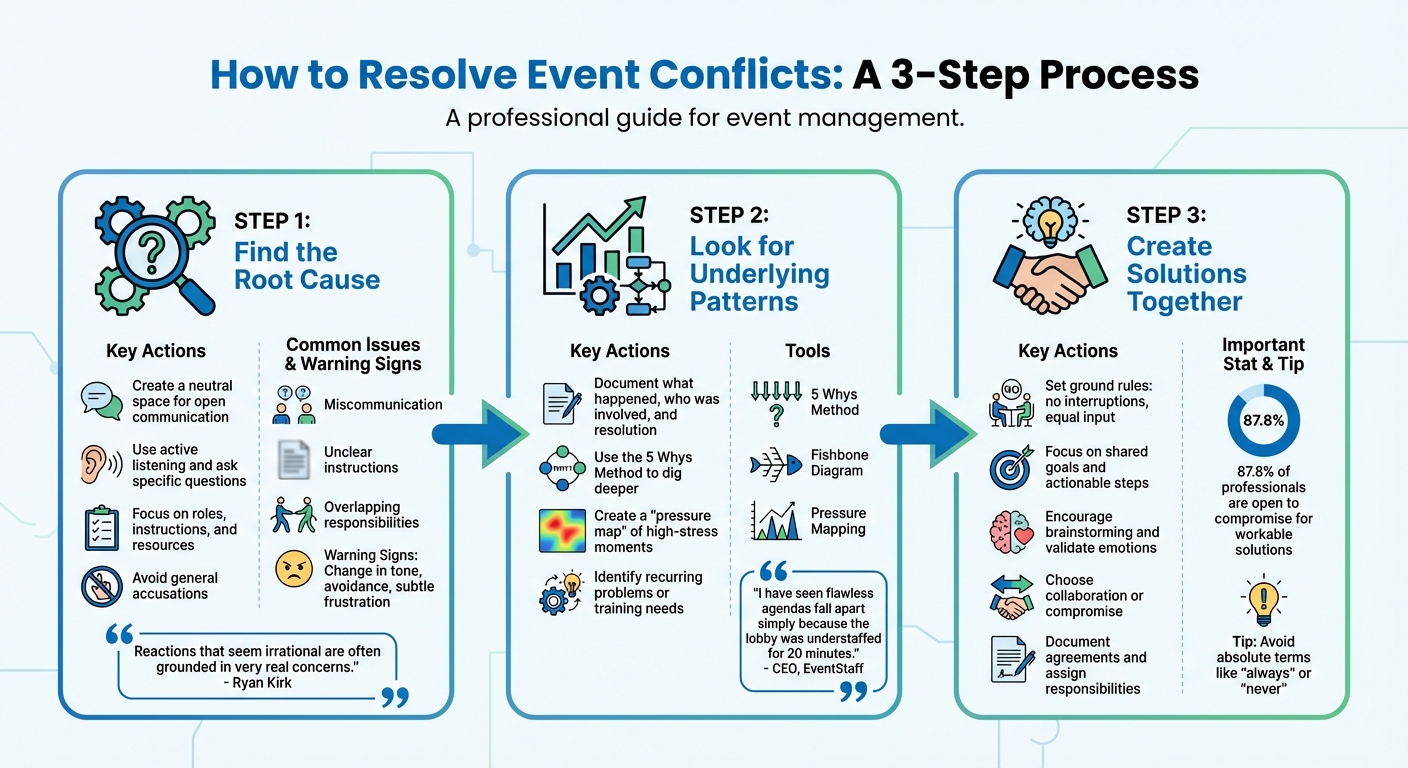
3-Step Event Conflict Resolution Process
In the fast-moving world of event management, resolving conflicts quickly and effectively can make or break an event. A structured approach helps prevent small issues from escalating into full-blown crises. Here’s a simple three-step process to tackle event conflicts head-on.
Start by creating a neutral space for everyone involved. This helps reduce tension and encourages open communication. Active listening is key - ask clear, specific questions to uncover the real source of the problem. Avoid making general accusations; instead, focus on understanding roles, instructions, and the resources provided.
"Reactions that seem irrational are often grounded in very real concerns. Concerns you might not yet be aware of." - Ryan Kirk, event manager
Many conflicts stem from miscommunication, unclear instructions, or overlapping responsibilities. What looks like a personality clash could actually be a scheduling mix-up or missing details. High-pressure moments, like a spike in registrations or a rushed session transition, can expose these underlying issues. Watch for early signs of trouble, such as a sudden change in tone, avoidance, or subtle frustration.
Once the immediate issue is addressed, step back and assess whether the conflict is a one-time incident or part of a larger trend. Document what happened, who was involved, and how it was resolved. Over time, these records can highlight recurring problems or training needs.
The 5 Whys Method is a great tool for digging deeper. For example, if the final guest count was unclear, keep asking why. Maybe the registration system wasn’t updated, or no one was assigned to track it. Digging deeper might reveal something like a missing pre-event checklist.
Another helpful strategy is creating a "pressure map" of your event. Identify high-stress moments - like check-in lines, equipment handoffs, or breaks - that frequently lead to conflicts.
"I have seen flawless agendas fall apart simply because the lobby was understaffed for 20 minutes." - CEO, EventStaff
If patterns emerge, adjust staffing or procedures to better manage these high-risk moments. For more complex problems, a Fishbone Diagram can help visualize all the contributing factors and ensure you’re addressing the real issue, not just the symptoms.
Once you’ve pinpointed the issues, bring everyone back together to focus on solutions. Set ground rules: no interruptions, equal input, and a focus on actionable steps. Remind the group of your shared goal - whether it’s a seamless conference, a perfect wedding, or a memorable guest experience. This helps shift the focus from blame to progress. For example, asking, “What can we do to prevent this from happening again today?” encourages a forward-thinking approach.
Encourage brainstorming and validate emotions with phrases like, “I understand why that would be frustrating”. If things get heated, take a short break to reset the conversation.
Decide whether collaboration or compromise is the best path forward. Collaboration works well when there’s time to explore creative solutions, while compromise is better for quick resolutions when both sides are willing to make concessions. Interestingly, 87.8% of professionals are open to compromise if it helps resolve a conflict and leads to a workable solution.
When discussing solutions, avoid absolute terms like "always" or "never", as these can make people defensive. Instead, focus on specific behaviors and actionable next steps. Wrap up by documenting what was agreed upon, assigning responsibilities, and setting follow-up times to ensure accountability.
The best way to handle scheduling conflicts is to stop them before they happen. Many issues - like double-bookings, understaffing, or unclear responsibilities - stem from relying on outdated methods such as scattered spreadsheets or endless text threads. Modern event staff scheduling software eliminates these problems by offering real-time updates and built-in safeguards. This proactive approach works hand-in-hand with conflict resolution strategies to create a smooth event management process.
Here’s how features like availability tracking, centralized calendars, and role-based scheduling can work together to avoid common scheduling headaches.
Availability tracking is your first defense against scheduling mishaps. When staff members block off dates they’re unavailable, managers can instantly see who’s free before assigning shifts. For example, Quickstaff ensures only available team members appear when creating schedules, avoiding accidental double-bookings and last-minute chaos.
Picture this: a catering manager preparing for a wedding notices the system flagging a bartender who’s already booked elsewhere. Thanks to the alert, they quickly pull someone from the waitlist instead of scrambling just hours before the event begins.
Additionally, staff can sync their work schedules with personal calendars, helping them keep track of shifts alongside their other commitments. This extra layer of visibility minimizes potential conflicts.
While tracking availability helps avoid individual errors, a centralized calendar ensures the entire team stays on the same page. Forget sticky notes, endless email chains, or juggling multiple spreadsheets - a shared calendar gives everyone access to a real-time schedule on their phone or computer.
This setup offers instant clarity on staffing needs. Managers can sort schedules by date, role, or event type, spotting gaps well before they turn into emergencies. The calendar also updates automatically when someone accepts or declines a shift. Event-specific details, like dress codes or venue addresses, can be attached directly to entries, saving time spent hunting through old messages.
"The calendar makes it really easy for me to see what my week looks like. The sorting function helps me isolate events to more easily see events." - Jennifer Manley, Staffing Coordinator
Role-based scheduling ensures the right people are assigned to the right tasks, reducing confusion and disputes. Instead of sending out generic "staff needed" requests, managers can invite specific roles - like bartenders for bar service, certified servers for plated meals, or setup crews for equipment handling.
For instance, this system prevents assigning someone without bartending experience to manage a full bar. Quickstaff organizes staff by roles, making it easy to find team members with the right skills for each job.
Targeted communication is another benefit. Managers can send updates to specific groups - like notifying just the setup crew about an earlier load-in time - without spamming everyone else’s inbox.
"My time spent scheduling has shrunk majorly, leaving me more time to focus on recruiting, onboarding, and training." - Jennifer Manley, Staffing Coordinator
For events with uncertain headcounts, placeholders like "Server 1" or "Server 2" can help visualize staffing needs early. This gives managers time to adjust or recruit before crunch time, making last-minute changes much less stressful.
Building on earlier steps for identifying and addressing conflicts, the Thomas-Kilmann model provides a structured way to refine your conflict resolution approach. In event planning, where tensions can run high, this framework helps tailor strategies to specific situations. The Thomas-Kilmann Conflict Mode Instrument (TKI), introduced in the 1970s by Dr. Kenneth Thomas and Dr. Ralph Kilmann, categorizes conflict management styles based on two key dimensions: assertiveness (pushing for your own needs) and cooperativeness (considering others' needs). These dimensions give rise to five modes: Competing, Collaborating, Compromising, Avoiding, and Accommodating. Each mode has its purpose - there’s no one-size-fits-all solution.
For event managers, understanding these modes can lead to quicker and more effective decisions, especially under pressure. For instance, a 2007 TKI report revealed that 57% of men tend to favor the Competing mode compared to 44% of women. Meanwhile, 58% of women lean toward Compromising, compared to 41% of men, with both genders showing equal tendencies (49%) toward Avoiding. Recognizing your natural conflict style - and its limitations - is the first step toward better conflict management and retaining the best event staff.
Conflict in the workplace can take a toll. Research shows that 42% of workers who encounter workplace conflict report feeling exhausted frequently or constantly.
"Reducing conflict should be part of an employer's overall strategy to improve work quality. Training can help improve line manager skills to foster more positive relationships and reduce the likelihood of conflict occurring."
- Jake Young, Senior Policy and Practice Adviser at CIPD
This model equips event managers with the tools to adapt strategies to various challenges, ensuring smoother operations.
Each of the five TKI modes plays a specific role in event management:
| Strategy | Advantages | Disadvantages | Event Planning Applications |
|---|---|---|---|
| Avoiding | Reduces immediate tension; allows reflection | Issues may escalate; concerns might be ignored | Minor conflicts; cooling-off periods |
| Competing | Enables quick decisions; enforces standards | Can cause resentment; may harm team morale | Emergencies; enforcing critical policies |
| Accommodating | Builds goodwill; preserves relationships | Overuse may lead to being seen as a pushover | Admitting mistakes; minor disputes |
| Compromising | Offers quick, fair solutions | May lead to suboptimal outcomes | Temporary fixes; resolving deadlocks |
| Collaborating | Creates win-win solutions; builds trust | Time-intensive; requires commitment | Complex issues; strengthening partnerships |
The key is to align your strategy with the demands of the situation.
"The goal isn't to pick the 'best' style; it's to know yours, spot when it's hurting more than helping, and flex to what the situation actually demands."
- Kaptain Kush, Editor-in-Chief at TheCityCeleb
Armed with this understanding, event managers can incorporate conflict strategies into their broader planning efforts, using tools like Quickstaff to streamline solutions.

After resolving immediate scheduling conflicts, adopting shift assignment software like Quickstaff can help keep these issues from resurfacing. Building on earlier strategies, Quickstaff offers a scheduling platform that automates communication, centralizes information, and provides remote access. Since 2013, this platform has helped event vendors manage staffing for over 20,000 events. By eliminating the chaos of endless phone calls and email threads, Quickstaff equips teams to maintain a smooth and conflict-free scheduling process.
Quickstaff simplifies communication with automated reminders and team messaging. Staff receive email invitations that include all relevant event details - like the event name, location, date, call time, role, and any attached files. With a single click, they can accept or decline assignments, cutting down on back-and-forth exchanges that often lead to confusion. Events can also sync seamlessly with popular calendar apps like Google Calendar, iCal, Outlook, and Yahoo, keeping personal and work schedules in harmony.
Managers can send role-specific updates or messages to the entire team, ensuring the right information reaches the right people without unnecessary clutter. Quickstaff’s Automagic Waitlist feature takes it a step further by automatically filling open slots, inviting extra staff when needed.
"I used to be on the phone all the time to schedule staff. Now, within a few minutes, I can schedule all the staffing I need for my events."
- Steven Townsend, Event Manager
The platform’s event duplication feature allows managers to reuse templates and make quick adjustments, enabling them to schedule multiple events in minutes. This consistency minimizes disputes over resource allocation, especially for recurring events. The mobile-friendly design ensures managers have full access to calendars, staff availability, and updates from anywhere. Staff can also block their unavailable dates directly from their phones, reducing scheduling errors. During events, managers can make real-time adjustments to keep everything on track.
"Prior to Quickstaff, I was using Excel spreadsheets to track my employees and their shift availability. My life changed the day I started using Quickstaff!"
- Jaime S, VP, Lisa's Catering
Quickstaff’s pricing plans cater to businesses of all sizes, supporting long-term operational stability.
All plans include unlimited events, assisted onboarding, and robust customer support. Plus, businesses can try Quickstaff with a 14-day free trial - no credit card required.
Resolving conflicts effectively starts with identifying their root causes, recognizing recurring patterns, and working together to find solutions. Whether it's scheduling challenges, strained team dynamics, or disputes over resources, the strategies in this guide - from the Thomas-Kilmann model to proactive measures - offer a reliable way to tackle issues before they spiral out of control.
The key isn’t just solving conflicts as they happen - it’s about heading them off entirely. As CEO Event Staff put it, "I don't build staffing plans for the easy hours. I build them for the 15 minutes where check-in backs up, the client's asking questions, and everyone's looking at us to fix it." Using an event staffing needs analyzer helps ensure you have the right headcount for these critical moments. Planning for those high-pressure moments safeguards the guest experience, keeps staff focused, and reassures clients.
Technology plays a big role in making this kind of planning easier. Tools like Quickstaff streamline scheduling, send automated reminders, and provide real-time visibility into staff assignments. With everyone on the same page - whether it’s about zone coverage or backup plans - there’s less room for miscommunication and more flexibility to adapt to surprises.
The financial impact of unresolved conflicts is hard to ignore. Losing a team member is expensive, and understaffing often leads to burnout for those left behind. By prioritizing conflict prevention through open communication, cross-training, and budget-friendly scheduling tools, you’re not just ensuring smoother events - you’re creating a sustainable operation that keeps your team engaged and delivers reliable results.
Starting with a centralized scheduling system and clear communication processes can turn a chaotic event into one that runs seamlessly. Small changes in planning and communication can make a big difference.
When conflicts pop up during an event, it’s important to tackle them right away to keep things running smoothly. Start by finding a quiet spot where everyone involved can share their side of the story openly. Clear communication is key - explain the steps your team should take and encourage them to work together toward a solution. Once the event wraps up, take some time to review what happened. This reflection can help you fine-tune your approach to handling similar situations in the future.
To tell the difference between a root cause and a "people problem", you need to dig into what’s really driving the issue. "People problems" typically show up as interpersonal conflicts or miscommunication, but these are usually just surface-level symptoms. True root causes are more systemic - things like vague job responsibilities or broken processes. If fixing the interpersonal side doesn’t solve the problem, it’s time to look deeper into organizational issues. Setting clear roles and expectations can go a long way in preventing the same conflicts from popping up again.
The Thomas-Kilmann style most effective for making quick decisions in fast-moving situations is Competing. This method emphasizes high assertiveness and low cooperativeness, making it perfect for scenarios that demand swift, decisive action.





