Checklist for Choosing Shift Assignment Software
December 13, 2025

Shift assignment software simplifies scheduling for event managers, especially those handling temporary and hourly staff across various roles, locations, and events. This type of software helps save time, reduce errors, and ensure compliance with U.S. labor laws like overtime and break regulations. Here's a quick guide to finding the right tool:
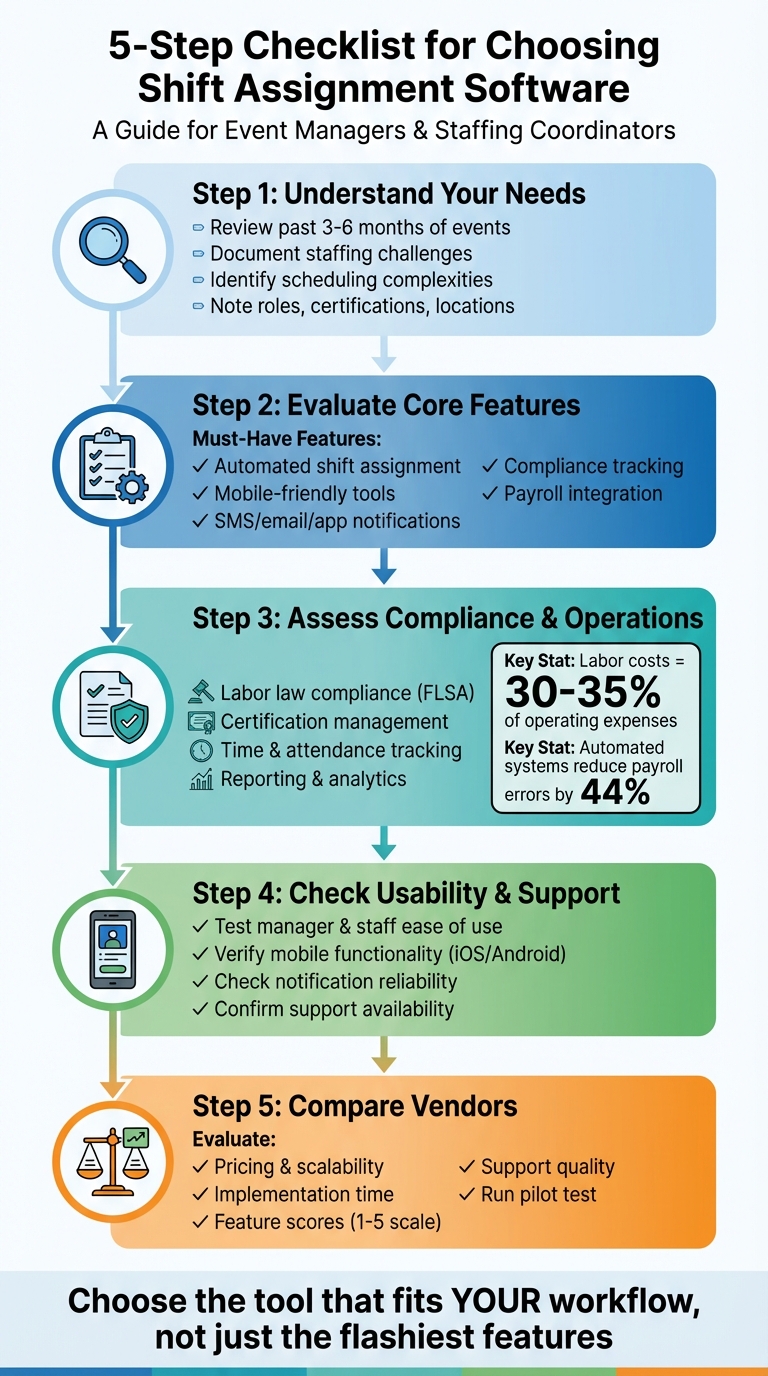
5-Step Checklist for Choosing Shift Assignment Software
Before diving into software demos or comparing pricing plans, take a moment to evaluate your scheduling needs. Start by documenting your current processes to pinpoint the features that will genuinely address your challenges versus those that just sound appealing. A good first step is reviewing the last three to six months of events. Look at the number and types of events you’ve managed - whether weddings, corporate conferences, festivals, or trade shows - and consider the staff involved and how often last-minute shift changes occurred. This review gives you a clear picture of whether you need a straightforward tool for occasional events or a more advanced platform capable of managing frequent and complex scheduling changes. These insights provide a strong foundation for understanding your staffing requirements in detail.
Take stock of the types, sizes, and frequency of your events to better understand your staffing needs. For example, a wedding and a large festival require very different staffing plans and shift structures. Make a list of all the roles you typically schedule - such as servers, bartenders, captains, registration staff, AV techs, security personnel, and setup/teardown crews - and note any positions that require specific certifications, like alcohol permits, food safety cards, or security licenses. Also, identify your usual staffing ratios, such as the number of servers per guest or security personnel per entrance. This allows your scheduling software to apply these templates automatically to future events, saving you from recalculating each time.
If your staff operates across multiple venues or cities, you’ll need tools that support location-based assignments to avoid issues like double-booking. Software like Quickstaff is designed with this in mind, connecting roles, call times, and locations directly to each event. This makes it easy to check if all critical positions are filled without any guesswork.
Labor laws in the U.S., such as the Fair Labor Standards Act (FLSA), require compliance with rules around overtime, mandatory meal and rest breaks, and youth employment restrictions. Your scheduling software should be able to flag potential compliance issues, whether it’s exceeding overtime limits, missing breaks, or scheduling younger employees for restricted tasks or hours. Beyond legal requirements, venues and clients may also have specific demands, like limits on shift lengths, required turnaround times between events, or security staffing ratios for late-night or alcohol-service events. By capturing these rules upfront, you can configure your software to automatically detect and alert you to potential violations, helping you stay compliant and avoid risks.
Distinguish between the features you absolutely need and those that would simply be nice additions. Start by identifying recurring problems like cancellations, double-booking, overtime surprises, or communication delays. Features that address these issues - such as availability-based auto-assignment, conflict detection, or real-time mobile notifications - should be non-negotiable. If you employ hourly staff or need to follow strict labor laws, prioritize tools that provide accurate time tracking, payroll integration, and timely overtime alerts.
For teams relying on part-time, temporary, or gig workers, mobile self-service options for shift availability, confirmations, and notifications are essential. On the other hand, advanced features like AI-driven demand forecasting, custom dashboards, or in-depth analytics can be considered optional if your immediate priority is ensuring basic coverage and smooth communication. To stay focused during vendor demos, create a simple scoring system that weighs critical features - those that help you avoid legal, financial, or operational risks - more heavily than optional extras. This keeps your priorities clear and ensures you choose the right solution for your needs.
Once you've identified your staffing needs, the next step is to evaluate the software's core features. A good shift assignment tool should not only handle day-to-day scheduling but also support the collaborative workflows that modern event operations demand.
Some scheduling tools rely on fully automated, rule-based systems to assign shifts based on qualifications, availability, and predefined rules. Quickstaff, however, takes a slightly different approach. It assigns role-based shifts only after staff confirm their availability. This method reduces scheduling conflicts and minimizes the need for manual follow-ups. By requiring explicit confirmation, Quickstaff ensures that shifts are assigned to team members who are truly available, creating a smoother, more reliable scheduling process.
A strong scheduling platform gives your team the tools to manage their own schedules with ease. Quickstaff's mobile-friendly self-service features allow staff to update their availability, volunteer for shifts, confirm assignments, and request changes - all from their smartphones. Notifications via app, SMS, or email prompt timely responses from team members, reducing the need for constant back-and-forth communication. For managers, this means real-time visibility into confirmed, pending, and unfilled shifts, streamlining the entire scheduling process.
For teams managing multiple events or venues, having a clear, centralized view of all schedules is crucial. Quickstaff’s event calendar and sorting tools provide a dashboard where managers can see every event and its staffing status at a glance. This makes it easy to identify fully staffed events and pinpoint those that still need attention. Managers can also attach notes, documents, and checklists to specific events or shifts, ensuring on-site teams have all the information they need. Additionally, for recurring events, Quickstaff's duplication features make it simple to replicate successful staffing setups, saving time and keeping operations efficient.
Managing operational details and ensuring compliance are just as important as scheduling when it comes to building a reliable shift assignment system. This involves features like payroll integration, adherence to labor laws, and insightful reporting to improve staffing efficiency and control costs.
A top-notch system should either integrate directly with your payroll software - such as ADP, Gusto, or QuickBooks - or allow for seamless timesheet exports. Direct integration eliminates the need for manual data entry, significantly reducing errors and saving time. In fact, automated systems can cut payroll processing time by up to 80% and reduce errors by as much as 44%.
For businesses with staff working across multiple locations, GPS-based or geofenced time tracking is a must. This feature ensures accurate location verification and prevents time theft, particularly with mobile punch-in capabilities. Additionally, the system should support multiple pay rates to accommodate roles with varying wages - for example, a server earning $20/hour versus a lead earning $25/hour. It should also handle overtime, shift differentials, and weekend premiums. To streamline labor cost analysis, time data should be easily segmented by event, client, or location. These features not only simplify payroll but also strengthen compliance efforts.
Given the varying labor laws across U.S. states, your scheduling software should include a rules engine to enforce critical regulations. This includes tracking overtime, ensuring proper rest breaks, and capping daily or weekly hours. The system should flag or block schedules that violate labor laws, such as assigning a 10-hour shift without a meal break or scheduling seven consecutive workdays.
Certification management is another vital feature. The platform should allow you to store important documents - like ServSafe cards, TIPS alcohol training certificates, security licenses, or CPR certifications - within each employee’s profile. By setting expiration dates and automated reminders, you can ensure that only qualified staff are assigned to roles requiring specific credentials. Additionally, maintaining an audit trail of schedule changes, approvals, and time edits can safeguard your business during wage-and-hour reviews.
Accurate time tracking and compliance data become even more valuable when paired with strong reporting tools. Detailed reports and visual dashboards can help you monitor key metrics like total hours worked, labor costs, overtime, and attendance trends by event, date range, or location.
With labor costs typically accounting for 30–35% of operating expenses in the hospitality and service industries, tracking and forecasting are crucial for profitability. Look for systems that allow easy export of reports in formats like CSV or PDF, with filtering options by role, event type, or client. Advanced forecasting tools that analyze historical data can also help you predict staffing needs and optimize labor spending for events of various sizes, ensuring your budget stays on track.
Once you've covered the essentials like core functionality and compliance, it's time to focus on usability, support, and pricing - key factors that shape the overall experience. Even the most feature-packed scheduling software won't be effective if your team finds it confusing, support isn't there when you need it, or unexpected costs blow your budget. This step is all about ensuring the software fits seamlessly into your day-to-day operations, provides reliable help when required, and aligns with your budget and usage patterns.
A user-friendly platform should make it effortless for managers to create events, build schedules, and assign staff - even without prior training. Features like drag-and-drop tools, clear calendar views (daily, weekly, or monthly), and filters for roles, events, or statuses can make spotting gaps in coverage a breeze. During a trial or demo, test how quickly you can handle common tasks like duplicating schedules, managing last-minute changes, or updating assignments. If these tasks feel clunky or take more steps than expected, that friction could slow you down over time.
Mobile functionality is equally critical. Staff should be able to log in, view their shifts, confirm or decline assignments, and request changes with just a few taps on their phones. To ensure the software works well for everyone, test it with a small group of staff on both iOS and Android devices, including older models, and in areas with spotty connectivity. Pay attention to how often staff struggle to find their schedules or whether coordinators have to rely on manual calls or texts to fill gaps. Platforms like Quickstaff are built with event-driven businesses in mind, focusing on event-specific workflows, mobile ease, and tracking staff availability.
Once you've confirmed the platform is easy to use, robust communication tools can help keep everything running smoothly.
Effective communication features are crucial for avoiding no-shows and handling last-minute changes. Look for software that offers built-in messaging and automated notifications, ensuring timely updates via in-app alerts, SMS, and email. Customizable reminders - like notifications 24 hours or 2 hours before a shift - can help keep everyone on track. Features like shift confirmation tracking, where staff actively accept or decline assignments, are particularly useful for identifying and addressing potential gaps early.
During a trial, test these features by scheduling dummy shifts to see if notifications arrive on time and are clear. Confirm that messages are delivered reliably across major U.S. carriers and time zones. For teams managing evening or weekend events, dependable notifications can make a huge difference in preventing missed shifts and ensuring smooth coordination on-site.
Pricing should be flexible enough to accommodate fluctuating staffing needs, especially during peak seasons. Common pricing models include per-user fees (per staff or manager per month), per-event pricing, or tiered monthly subscriptions based on active staff numbers. To get a clear picture of the total cost, annualize all fees in U.S. dollars, including onboarding, training, premium support, integrations, and any SMS charges. If your staffing levels vary seasonally, check whether temporary or occasional workers are billed the same as full-time users, or if there's a more affordable "flex" option available.
It's also important to understand limits on active staff, events, locations, and messages, as well as overage costs. For businesses with advanced needs - like API access, payroll integration, or detailed permissions - verify that higher-tier plans can handle these without requiring a platform switch as you grow.
For instance, Quickstaff offers three straightforward plans in USD: Boutique at $49/month (up to 35 staff), Growing at $99/month (up to 70 staff), and Large at $249/month (up to 175 staff). All plans include unlimited events, every feature, and assisted onboarding, making it easier to predict costs and avoid hidden fees. This means you can manage scenarios like 150 temporary staff across 20 events a month without surprises.
Finally, assess the quality of customer support. Confirm that assistance is available during U.S. business hours and, ideally, during evenings and weekends for live events. Multi-channel support options - like live chat, phone, email, and a detailed knowledge base - are essential. Check for service-level agreements (SLAs) that guarantee quick response times for critical issues, such as a login problem before a major event. Vendors specializing in event staffing often provide highly responsive support and onboarding help for complex setups, which you can verify through customer reviews or references.
When it’s time to choose the right tool, a vendor comparison checklist can help you make a clear, informed decision. Instead of relying on gut feelings or scattered notes from demos, a standardized checklist allows you to evaluate each vendor against the same set of criteria. This approach is especially useful when multiple teams - like operations, finance, and frontline staff - need to weigh in. By using a shared scorecard, everyone can easily see how each tool performs and where trade-offs might exist. This method adds structure to your decision-making process, ensuring that critical features - such as automated shift assignment or mobile usability - are assessed objectively.
Start by creating a comparison table with vendors listed as columns and evaluation criteria as rows. Organize the rows into key categories such as:
Use a numeric scale (e.g., 1–5) to rate each vendor on these criteria. To refine the evaluation, add a weight column for each criterion. Assign higher weights to must-have features like automated shift assignment or mobile functionality, and lower weights to less critical ones like advanced analytics. Multiply each score by its weight and calculate a total vendor score. You can also break down subtotals for categories like "Shift Assignment Strength" or "Usability", helping decision-makers pinpoint which platform excels in specific areas.
Dedicate rows in your table to assess each vendor’s automation and scheduling capabilities. Key features to evaluate include:
For event-specific needs, include rows for event-centric scheduling, coverage visualization by event area, staff self-sign-up and waitlists, and real-time schedule updates. These features highlight platforms that go beyond basic digitization to truly reduce manual effort.
Mobile functionality is equally important. Add rows to evaluate:
Since many event staff are part-time and frequently on the move, mobile usability is critical. Platforms like Quickstaff, which prioritize mobile-first design and instant updates, should be tested during trials to ensure they meet real-world needs.
Once core and mobile features are evaluated, consider how quickly and smoothly each vendor can be implemented. Include rows in your table for:
Also, evaluate how easy it is to test the platform with a small pilot event before committing to a full rollout. For example, a vendor that offers quick setup and assisted onboarding should score higher than one requiring weeks of custom configuration.
Finally, assess the quality of customer support. Add rows for support channels (email, in-app chat, phone), support hours (business hours vs. 24/7), and response times if available. Take note of any potential friction points during testing and prioritize tools that align with your workflow, even if they don’t have every feature on your wishlist. Remember to test automated assignment and conflict detection with real data to ensure the platform delivers on its promises. While cost is a factor, don’t let it overshadow usability or ease of training.
When selecting scheduling software, it’s essential to align its features with your specific event and staffing needs. Start by evaluating your event profile, how often events occur, the size of your team, the complexity of roles, and the type of staff you manage. Pinpoint your biggest scheduling challenges - whether it’s handling last-minute cancellations, avoiding double-bookings, or tracking certifications - and use these as non-negotiable criteria during software demos. This focused approach will help you make informed decisions when evaluating vendors.
Look for features like rules-based scheduling, conflict detection, and availability-based self-service options to minimize errors and save time. The ability for staff to manage their own schedules - checking availability, signing up for shifts, or swapping assignments - can significantly streamline operations. As Jennifer Manley, a Staffing Coordinator, shared:
"My time spent scheduling has shrunk majorly, leaving me more time to focus on recruiting, on-boarding and training."
Additionally, ensure the software meets compliance requirements for U.S. overtime laws, meal breaks, and integrates smoothly with payroll exports and time tracking. Compare vendors using objective criteria, rating them on aspects like automation, mobile usability, communication tools, support, and cost. If your operations are event-focused, tools like Quickstaff cater specifically to event scheduling, temporary staff management, and availability tracking - making them a strong choice for caterers, wedding planners, and staffing agencies.
Before committing, run a small pilot with one or two events to evaluate setup times, scheduling accuracy, staff satisfaction, and no-show rates. Choose the software that performs best against your weighted criteria and pilot results. Remember, the best tool isn’t necessarily the flashiest - it’s the one that your team finds intuitive and reliable day-to-day. By following these steps, you’ll ensure your event staffing process is both efficient and compliant.
When picking shift assignment software, focus on features that make scheduling easier and more efficient. For instance, real-time availability tracking lets you quickly see who’s free, while tools for scheduling and rescheduling streamline adjustments when plans change. A centralized event management system keeps all the details in one place, helping you stay organized.
Look for communication tools to keep your team updated without hassle, along with automatic reminders to cut down on missed shifts. A calendar view offers a clear snapshot of schedules, and sorting or filtering options, paired with a user-friendly interface, ensure managing shifts feels simple and stress-free.
Shift assignment software plays a crucial role in helping businesses navigate U.S. labor laws. By streamlining the management of work hours, overtime, and required rest periods, it minimizes the chances of compliance issues. The software ensures that schedules are crafted in line with legal standards, reducing the risk of violations.
Another key benefit is its ability to maintain detailed records of employee schedules and hours worked. These records simplify audits and support wage and hour reporting, making it easier for businesses to stay on top of regulatory requirements. This way, companies can focus on their operations without worrying about falling out of compliance.
When you're choosing shift assignment software, ease of use should be at the top of your list. A user-friendly tool with an intuitive interface can make all the difference. Look for software with simple navigation and clearly defined workflows that make creating and managing schedules a breeze. It should also function well on any device, offering a responsive design that works just as smoothly on mobile as it does on a desktop.
Pay close attention to how visually clear the platform is. Features like readable fonts and well-organized layouts can save you from unnecessary headaches. Tasks like data entry and editing should feel effortless and efficient. By focusing on these elements, you'll end up with a tool that not only saves you time but also takes the stress out of scheduling.


