10 Features to Look for in Staff Scheduling Software
December 9, 2025

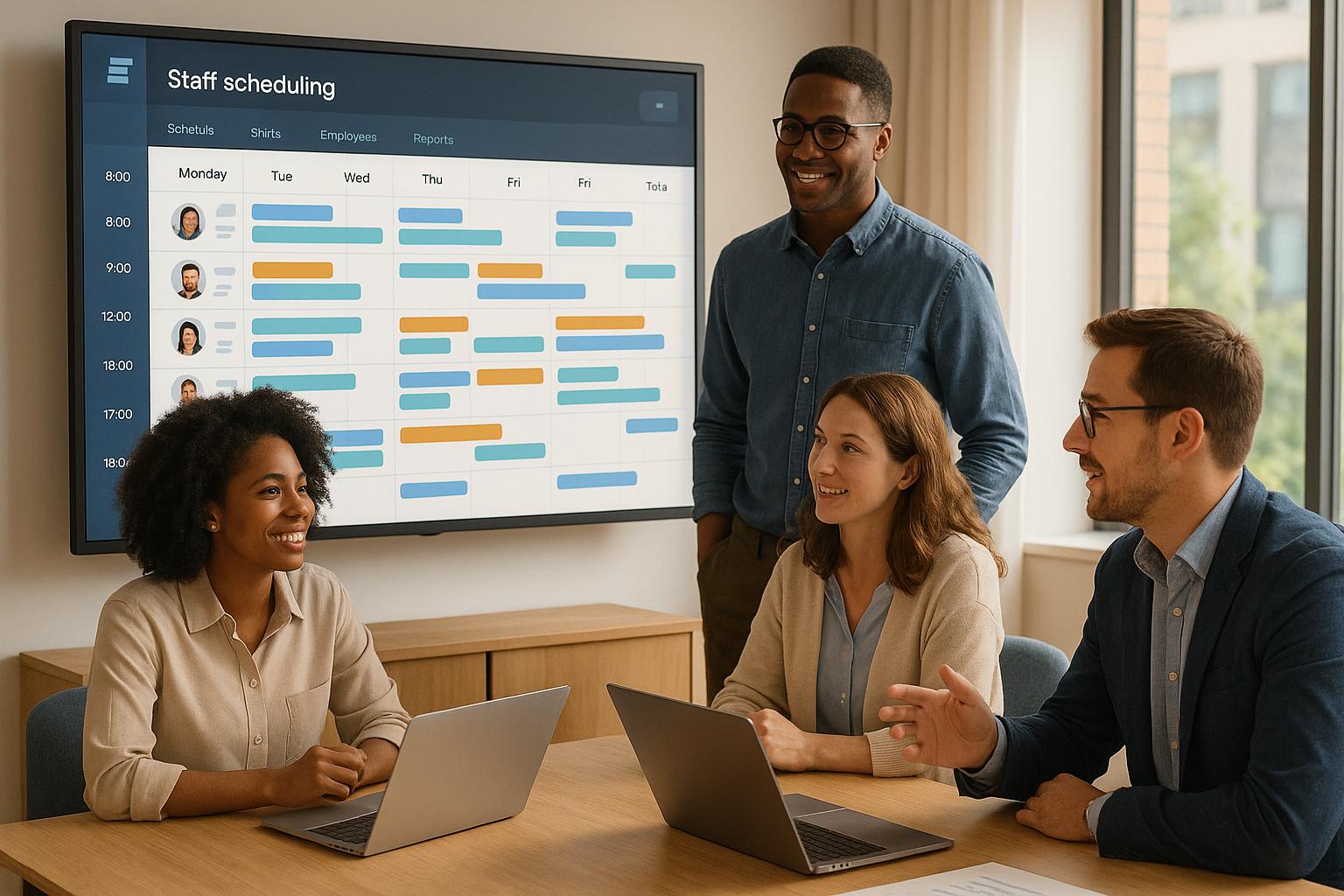
Staff scheduling software can save time, reduce errors, and improve coordination for businesses managing temporary or event-based staff. To choose the right platform, focus on these 10 essential features:
The right software reduces manual work, improves shift coverage, and ensures compliance with labor rules. Platforms like Quickstaff cater specifically to event-driven workflows, offering tools to handle complex scheduling needs efficiently. Test potential solutions using real-world scenarios to find the best fit for your business.
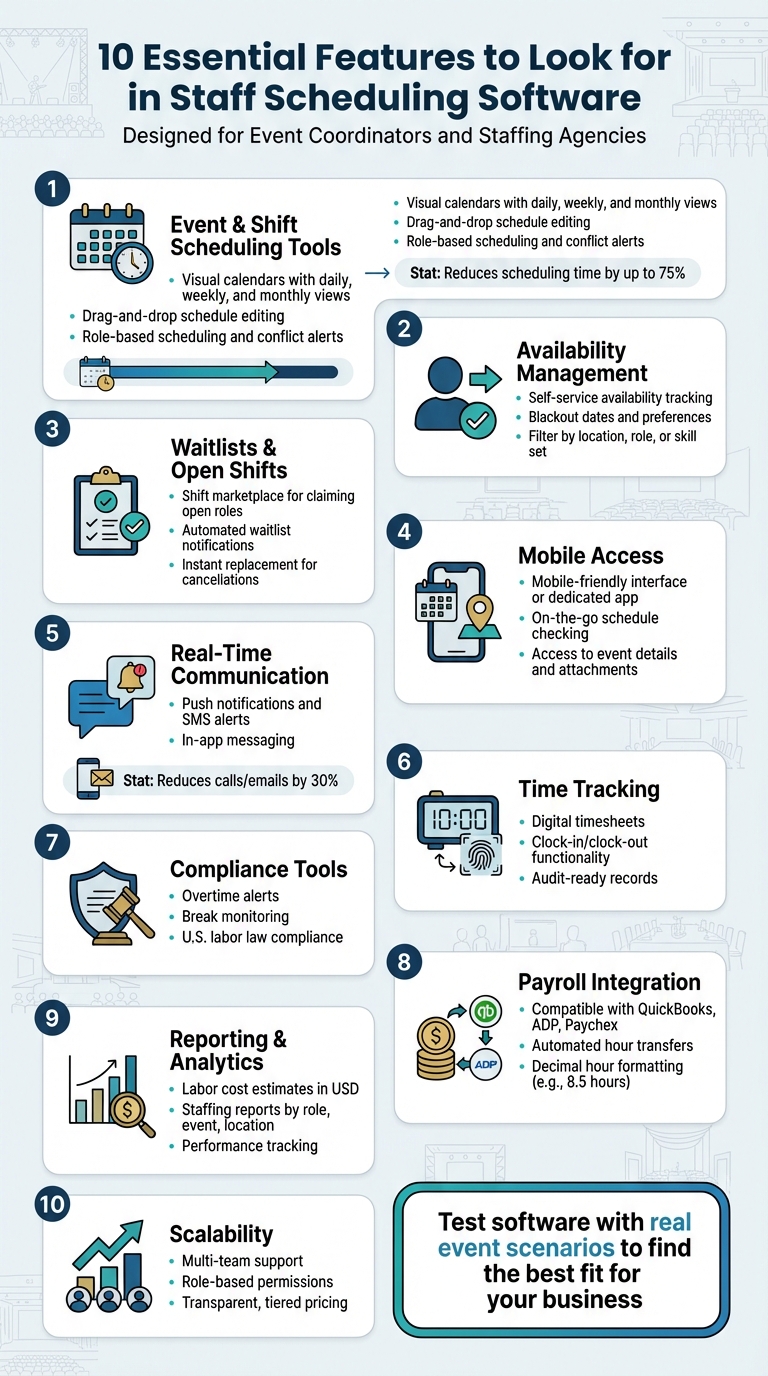
10 Essential Features of Staff Scheduling Software for Event Teams
When it comes to event staffing, precise scheduling is everything. Juggling multiple events requires tools that provide a clear overview, allow quick changes, and help avoid mistakes.
Scheduling software simplifies this process by centralizing all event details - roles, staff, and timelines - into one platform. It eliminates the need for clunky spreadsheets, endless text chains, or last-minute phone calls. With automated scheduling, organizations can reduce the time spent creating schedules by up to 75% compared to manual methods. These tools streamline operations, ensuring smoother, error-free management with features like the ones outlined below.
A well-designed visual calendar gives you a snapshot of your staffing needs. By organizing events by date, time, location, and role, it’s easy to spot gaps in coverage or overlapping events. For example, you can quickly see if you need more servers, bartenders, or setup crew for a specific event. Look for a calendar that offers daily, weekly, and monthly views so you can plan for busy periods and shift perspectives as needed.
Color-coded labels for roles and statuses (such as confirmed, pending, or open) make it simple to identify unfilled positions. A mobile-friendly version of the calendar is especially useful for temporary staff, allowing them to check schedules and access special instructions on the go - an essential feature for workers who are constantly on the move.
Adjusting schedules should be as simple as dragging and dropping. This feature lets you quickly reassign staff or tweak shift times directly on the calendar. Another time-saver is event duplication: if you frequently host similar events, like weddings or conferences, you can clone an existing schedule - complete with roles and staffing levels - and just update the date, time, or location. Real-time updates ensure that any changes are instantly visible to both managers and team members, reducing confusion and errors.
Role-based scheduling ensures that the right people are assigned to the right tasks. By defining event-specific roles and matching them with qualified staff, you can guarantee that every event has the skills and manpower needed for success.
Conflict alerts are another critical feature. They flag issues like overlapping shifts, double bookings, or staff exceeding their maximum hours. Catching these conflicts early allows you to resolve them before they lead to no-shows, overtime costs, or compliance issues. This proactive approach keeps operations running smoothly and ensures your team is always in the right place at the right time.
Managing temporary staff often feels like piecing together a constantly shifting puzzle. Schedules change, availability fluctuates, and keeping track of everything can drain hours from a manager’s day. Self-service tools can simplify this process, allowing staff to manage their own schedules, blackout dates, and preferences directly in an app. This reduces the need for endless back-and-forth communication. Let’s break down how availability tracking, waitlists, and status updates can make scheduling smoother.
Good scheduling software puts the power in the hands of the staff. Workers can set their regular availability (e.g., “available Fridays after 4:00 PM”) and block off specific dates for vacations or other commitments. The system automatically flags conflicts, so managers can’t accidentally assign shifts when someone isn’t available.
Want to narrow down options? Filter availability by location, role, or skill set. For instance, you can easily find bartenders in Chicago who are free on Saturday nights.
An open shift board or shift marketplace is a game-changer. Managers can post unfilled roles, and qualified staff can claim them instantly. The system ensures these shifts are only visible to workers who meet the requirements - like specific skills, availability, or location.
Waitlists add an extra layer of security for critical roles. For high-pressure events like weddings or corporate galas, staff can join a waitlist. If someone cancels last minute, the system immediately notifies the next person in line, ensuring you’re never left scrambling for replacements.
Clear status labels - such as invited, confirmed, declined, or waitlisted - keep everyone in the loop. Both managers and staff receive real-time updates, complete with visual indicators and time-stamped records. This transparency not only simplifies payroll but also helps resolve disputes by providing a clear history of who was invited, who accepted, and when.
Quickstaff combines these tools into a centralized platform, making it easier for event coordinators to handle self-service availability, dynamic waitlists, and real-time status tracking - all from one place.
Temporary staff aren’t tied to desks - they’re always on the move, juggling shifts, and navigating between venues. For them, a mobile-friendly platform isn’t optional; it’s a must. Whether checking schedules, confirming shifts, or reviewing event details, your team needs seamless access from their phones. Without it, you’re stuck with endless calls, missed updates, and a lot of unnecessary confusion.
Your scheduling software needs to shine on smartphones. Staff should be able to check shifts, event times, locations, and confirm assignments with just a tap. Whether the platform is a responsive website or a dedicated app, it should empower your team to manage their schedules on the go. For event-driven roles - like catering a wedding or staffing a corporate event - having quick access to client notes, dress codes, or contact details is crucial, especially when they’re en route.
Self-service tools are a game-changer. When employees can update availability, request time off, and review past shifts or earnings directly from their phones, you cut down on endless back-and-forth communication. Mobile-first platforms streamline all these tasks, ensuring workers can handle their schedules and access event-specific details easily. Platforms like Quickstaff, for example, prioritize mobile functionality, offering a centralized dashboard where staff can see all their upcoming jobs and event details. Plus, timely notifications make it even easier to stay in the loop.
Push notifications and SMS alerts keep your team updated in real-time. Automated reminders - sent 48 hours, 24 hours, and one hour before a shift - can significantly reduce no-shows. One staffing agency even reported cutting shift-related phone calls and emails by 30% after adopting self-service scheduling and in-app updates.
In-app messaging is another powerful tool. Managers can send event updates directly to staff, while workers can ask role-specific questions without delay. For instance, a message might say: "Ceremony start time moved to 5:30 PM - please arrive by 3:45 PM." Role-based channels, like "Bartenders – Wedding 12/14", ensure messages reach the right people. Beyond instant updates, staff also gain quick access to essential event documents, reducing confusion.
Having all event documents - like schedules, floor plans, and client preferences - attached to shifts is a game-changer. Staff can view and download these files directly from the event listing, giving them clear instructions on timelines, station setups, and dietary requirements.
When managers update these files, the system should notify staff immediately, with timestamps to ensure the latest information is always accessible. This kind of precision helps temporary workers arrive ready to go, minimizing last-minute questions and confusion.
"I used to be on the phone all the time to schedule staff. Now, within a few minutes, I can schedule all the staffing I need for my events."
Thanks to mobile access and detailed event attachments, this level of efficiency is within reach.
Keeping precise time records isn’t just about smooth payroll - it’s also critical for meeting U.S. labor law requirements. Relying on manual methods like paper sign-ins or handwritten timesheets can lead to mistakes, disagreements, and even compliance issues. That’s where modern scheduling software steps in, offering digital time tracking that simplifies payroll management.
Accuracy is just the beginning. Advanced features in scheduling software help maintain compliance while boosting efficiency. For example, U.S. labor laws require close monitoring of working hours, and good software can alert managers when employees are nearing overtime limits. This is especially helpful in states like California, where break rules are stricter. Automated alerts make it easier to adjust schedules in real time, helping to avoid unnecessary overtime costs.
Digital timesheets take it a step further by reducing errors and creating records that are ready for audits. Plus, seamless integration with payroll systems such as QuickBooks, ADP, and Paychex ensures that work hours are transferred correctly. These systems use standard formats - like dollar signs for currency, MM/DD/YYYY for dates, and decimal hours (e.g., 8.5 hours) - to keep everything consistent. When employees review their timesheets before payroll processing, it cuts down on disputes and speeds up the entire process.
As your event business or staffing agency grows, having software that adapts to your needs becomes crucial. Tools with strong reporting features and flexible pricing can make a big difference in managing labor costs, streamlining team oversight, and supporting expansion without major disruptions. Let’s break down the key features that can help you maintain control and grow efficiently.
Quick access to staffing data can be the difference between staying on budget and overspending. Your software should provide easy-to-generate reports that detail confirmed headcount, scheduled hours by role, and estimated labor costs in USD. These insights ensure your event labor costs align with your budget and help you make necessary adjustments to meet profit goals.
On a daily basis, managers can use these reports to track labor as a percentage of revenue and catch potential overruns before they escalate. For platforms like Quickstaff, event-specific reports allow you to compare estimated versus actual labor costs for each event. This helps fine-tune pricing strategies for future bookings and keeps your financial planning on point.
As your operations grow, the ability to analyze segmented data becomes increasingly important. Tools that let you filter reports by staff type, client, event type, or location can provide deeper insights. For instance, you might want to see how much you spent on bartenders for weddings in a particular city this quarter or identify which staff category has the highest no-show rate. These details can improve pricing accuracy, enhance quotes, and guide hiring decisions as you branch into new markets.
Multi-team support is another game-changer. It allows you to organize staff and events into groups - whether by city, venue, or client-specific teams - so managers only see schedules relevant to their responsibilities. Role-based permissions also keep sensitive financial data secure while still giving local managers the reporting tools they need. As your business expands, this structure helps prevent data overload and ensures that owners and executives get consolidated reports when needed.
Transparent pricing is essential for maintaining trust and ensuring smooth operations. Look for software providers that clearly outline monthly or annual costs in USD, specify what each pricing tier includes (such as limits on staff, events, or administrators), and clarify which features are standard versus add-ons. For U.S.-based event businesses with tight budgets and seasonal changes, knowing the software cost per active worker makes it easier to factor these expenses into client quotes and long-term financial plans.
Evaluate how your current needs align with the software’s pricing structure to ensure it can grow with you. Questions to consider include: How many staff members can you add before needing to upgrade? Are advanced features or additional locations locked behind higher pricing tiers? Ideally, the software should let you scale at a predictable cost. For instance, Quickstaff offers tiered plans starting at $49/month for up to 35 staff, $99/month for up to 70 staff, and $249/month for up to 175 staff. All plans include unlimited events and full feature access, making it easier to expand without unexpected fees or limitations.
Once you've identified the 10 must-have features, it’s time to put them to the test in real-world situations. Start by using demos and free trials to evaluate how well the software fits your temporary staffing workflow. This includes everything from creating events and filling shifts to tracking time and generating accurate cost data in U.S. dollars. When engaging with vendors, focus your questions on three key outcomes: Does this reduce manual work? Does it improve shift coverage and communication? Does it ensure compliance with U.S. labor rules and time formats? A practical scorecard will help you measure these factors during real event scenarios.
Develop a scorecard that outlines the 10 feature areas as individual line items, such as event and shift scheduling, availability and waitlists, mobile access and communication, time tracking and compliance, and reporting and scalability. For each feature, define 3–5 specific criteria that reflect the essential functionality discussed earlier. Use a simple 1–5 rating scale (1 = not supported, 3 = partially supported, 5 = fully supported) and include a notes section to document observations from demos, including any limitations. Collaborate with your team to fill out the scorecard, and consider using a weighted scoring model to prioritize critical needs like compliance, time tracking, and communication over less essential features.
Put your scorecard to work by testing the software in a real event scenario. Choose an upcoming event - whether it’s a Saturday wedding, a corporate gala, or a multi-day trade show - and build it from start to finish in the platform. This means defining roles, scheduling shifts, assigning staff, sending out invitations, tracking confirmations, and managing any last-minute adjustments. Use the software to send mobile notifications, attach key details like run sheets and maps, and simulate or record actual clock-ins and clock-outs on event day. Afterward, generate reports showing total hours, overtime, and estimated labor costs in U.S. dollars, and test exporting the time data to your payroll system.
To evaluate the software’s flexibility, simulate common scheduling challenges, such as last-minute client changes, same-day staff call-outs, or weather-related adjustments for outdoor events. Check how quickly you can post an open shift, move a worker from a waitlist into a role, or update event details in real time. The ability to send targeted notifications to only the affected team members and to centralize updates so everyone sees the latest version is key. Platforms like Quickstaff, designed specifically for event management and temporary staffing, are particularly effective for this kind of scenario-based testing.
For organizations operating in the U.S., it’s critical to confirm that the software aligns with U.S. standards for time, dates, and currency. Test whether the system handles multiple U.S. time zones for events spanning different regions and ensures automatic adjustments for daylight saving time so staff schedules remain accurate. Verify that the business hours, overtime thresholds, and workweek definitions (e.g., Sunday–Saturday) comply with your company’s policy and state regulations.
Additionally, check that all monetary values - such as hourly pay rates, event labor costs, and payroll summaries - are displayed in U.S. dollars (USD, $). The platform should allow for different pay rates based on roles, workers, or events. Run a test event with realistic wages (e.g., $18/hour for servers and $25/hour for captains) to confirm that labor costs, overtime premiums, and any surcharges are calculated correctly. Finally, ensure the software can export payroll data in formats compatible with your system - such as CSV files or integrations with popular U.S. payroll providers - and that it accurately separates regular hours, overtime, and pay codes to meet compliance requirements.
Selecting the right staff scheduling software for temporary and event-based teams isn’t about picking the platform with the flashiest feature list - it’s about ensuring the software delivers on the key capabilities that matter most. The ideal solution combines essential tools like event and shift scheduling, availability and waitlist management, mobile access and communication, time tracking and compliance, as well as reporting and scalability. These features directly address the challenges faced by U.S.-based event coordinators, caterers, wedding planners, and staffing agencies who operate in fast-paced, high-pressure environments.
To make an informed decision, consider turning the checklist of must-have features into a structured scorecard. Use this to compare platforms and identify which ones meet your needs versus those that are simply nice to have. Then, put your top contenders to the test in real-world scenarios - like managing a packed weekend with overlapping events or handling last-minute staffing changes. This hands-on approach will reveal which tool truly reduces manual effort, improves shift coverage, and ensures compliance with U.S. labor regulations. As Steven Townsend, an Event Manager, shared:
"I used to be on the phone all the time to schedule staff. Now, within a few minutes, I can schedule all the staffing I need for my events."
Generic scheduling tools often fall short when it comes to handling event-specific workflows. Platforms like Quickstaff are specifically designed for this niche, offering features tailored to event management. These include event creation, role-based scheduling, availability tracking, waitlists, mobile confirmations, and centralized management - all in one place. Quickstaff highlights their unique approach:
"Most staff scheduling software assumes that your staff are employees. Quickstaff ASKS your staff if they are available to work."
When evaluating options, it’s crucial to confirm that the software meets U.S.-specific requirements. Look for features like precise overtime tracking, accurate labor cost estimates in USD, and payroll export compatibility. Tools like real-time notifications and self-service availability tracking can significantly reduce no-shows and minimize time spent on phone calls. Additionally, robust reporting capabilities provide transparency into labor costs per event and staff reliability, helping you make data-driven decisions.
Finally, pilot-test the software during a busy event cycle. This trial run will help you measure its impact on administrative time savings, no-show rates, and labor cost visibility. Choosing a platform that aligns with the operational demands of U.S. event teams not only reduces long-term headaches but also ensures seamless experiences for both staff and clients.
Staff scheduling software plays a crucial role in helping businesses adhere to labor laws by automating and tracking essential requirements. It can keep an eye on employee hours to avoid overtime violations, ensure breaks are scheduled appropriately, and manage shift limits for minors or other workers with restrictions.
Many platforms also store detailed records of schedules and any changes made. These records can act as valuable documentation during audits or to resolve disputes. By centralizing these tasks, businesses can minimize mistakes and handle compliance requirements more effectively.
Mobile access plays a key role in keeping staff and managers connected. It allows them to schedule, update, and check assignments from anywhere, at any time. This kind of flexibility ensures everyone is on the same page and can respond to changes quickly, even while on the move.
It also streamlines communication by providing instant updates and notifications, cutting down the chances of missed shifts or confusion. With mobile access, team members can confirm their availability, get reminders, and stay up-to-date with event details - all right from their smartphones.
Role-based scheduling plays a key role in event management by matching tasks with the right team members. Assigning staff to specific roles - like servers, bartenders, or setup crew - ensures everyone knows their responsibilities, making coordination more seamless and reducing potential confusion.
This method boosts efficiency by eliminating redundant efforts and ensuring all critical tasks are handled. It also simplifies tracking staff availability and resource allocation, making the entire event run more smoothly.


