Common Role-Based Scheduling Problems and Fixes
December 17, 2025

Role-based scheduling ensures the right people with the right skills are assigned to specific roles, improving efficiency and service quality. However, event managers often encounter challenges like unclear roles, uneven workloads, availability conflicts, and manual scheduling errors. These issues can lead to skill mismatches, staff frustration, and operational disruptions.
Key solutions include:
Tools like Quickstaff simplify these processes, offering features like role-based templates, real-time availability tracking, and automated reminders. By addressing these challenges, businesses can improve staff morale, reduce costs, and enhance event outcomes.
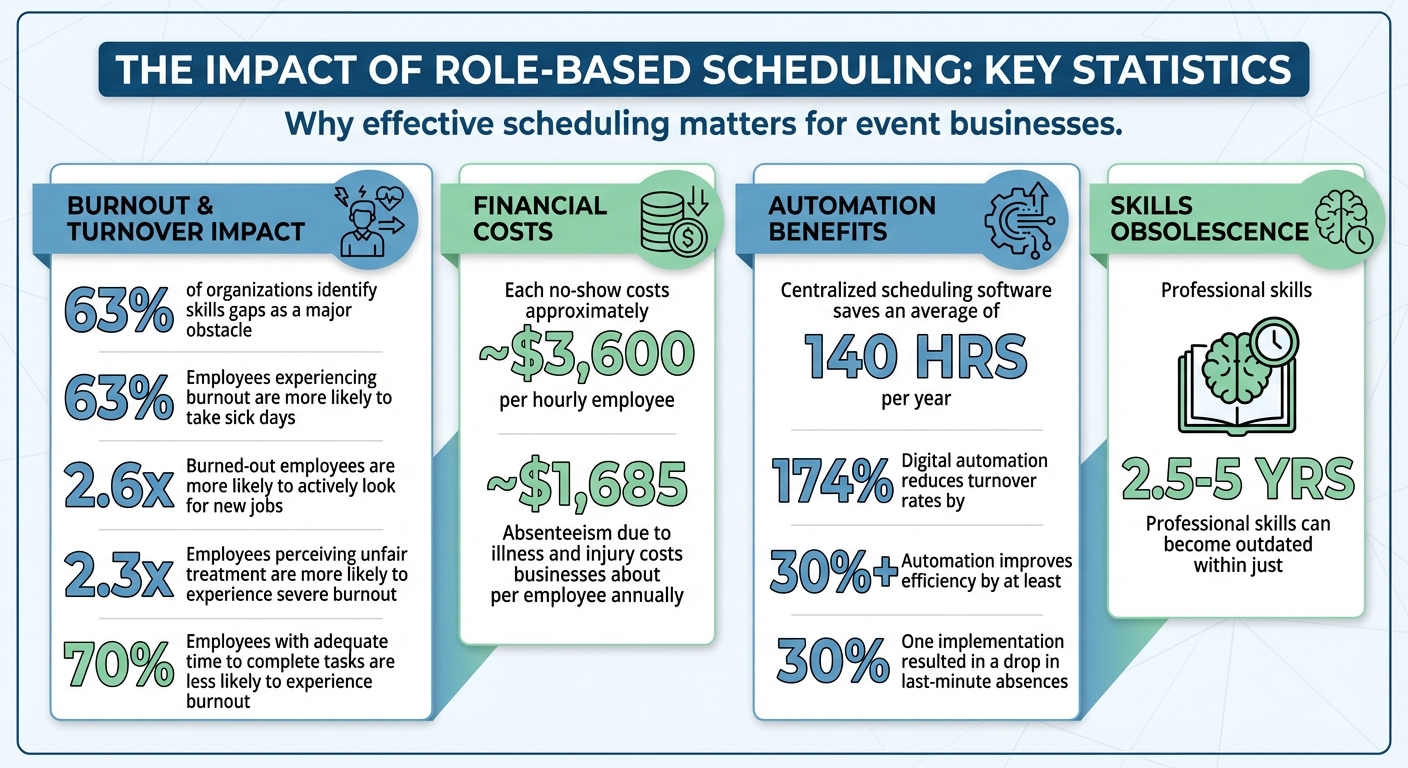
Role-Based Scheduling: Key Statistics on Burnout, Costs, and Efficiency Gains
Clearly defined roles are essential for smooth event execution. When roles are ambiguous, confusion takes over, costing both time and efficiency. Team members may find themselves waiting for instructions, duplicating efforts, or misusing their skills. This not only slows down operations but also increases the likelihood of employee burnout.
A common issue arises when formal job descriptions don't align with the actual tasks at hand. Imagine a bartender showing up to serve drinks but being asked to handle setup and breakdown duties instead. Or a server, unfamiliar with plated dinners, being assigned to one. These types of mismatches can disrupt operations, lower service quality, and even create tension among staff. Without clearly defined role requirements, critical skills gaps are inevitable.
Focus on documenting the real duties and skills required for each role, rather than relying solely on generic job descriptions. Traditional job descriptions often fail to capture the dynamic nature of event work. Instead, base your role definitions on actual event experiences, detailing the tasks, skills, and outcomes needed for success.
A skills matrix can help bridge the gap between the skills your team has and the ones your events demand. This is especially important as 63% of organizations identify the skills gap as a major obstacle. The matrix can guide training efforts, improve hiring decisions, and even uncover hidden talents within your team. Tools like Quickstaff allow you to store and reuse these role templates, ensuring consistent staffing and enabling you to match employees to roles based on their actual abilities.
By applying these refined role definitions to every event, you’ll create a more reliable and efficient staffing process.
Start by reviewing recent events to identify each role's tasks, peak activity times, and any skill mismatches. Use this information to set realistic staffing ratios based on the specific demands of your events.
After each event, hold a quick debrief with team leads to refine role definitions. Discuss what worked, what didn’t, and whether staff had the necessary skills for their assignments. This kind of ongoing review is vital, especially since professional skills can become outdated quickly - some within just 2.5 to 5 years. By continuously updating your role catalog and skills matrix with these insights, you’ll build a system that consistently places the right people in the right positions, ensuring smoother operations and better outcomes.
Creating fair schedules is just as important as defining roles and skills within a team. When certain employees consistently get stuck with the toughest shifts while others have it easier, frustration and resentment can quickly build. Often, this imbalance isn't intentional - it stems from subtle patterns or unconscious biases. For example, managers might repeatedly assign unpopular shifts to the same employees simply because they're more available, a phenomenon known as availability bias. Similarly, seniority bias can result in long-serving staff getting the more desirable shifts, leaving newer team members feeling overlooked and undervalued.
The impact of these practices can be significant. Employees experiencing burnout are 63% more likely to take sick days and are 2.6 times more likely to actively look for new jobs. Additionally, those who perceive unfair treatment are 2.3 times more likely to experience severe burnout. When the same people are repeatedly tasked with challenging shifts, such as nights or weekends, team morale inevitably suffers. To address this, structured rotation systems and transparent scheduling policies are essential.
Well-planned scheduling systems that evenly distribute shifts can prevent burnout and improve overall job satisfaction. Start by dividing both desirable shifts (e.g., those with higher tips) and less popular ones evenly among all team members. Use forward-rotating schedules - where shifts progress from day to evening to night - to align with natural body rhythms. Additionally, set schedules at least four weeks in advance and ensure no one works more than five consecutive days to reduce stress and fatigue. Research shows that employees with adequate time to complete their tasks are 70% less likely to experience burnout.
Tools like Quickstaff can simplify this process by tracking role assignments and shift histories. This transparency helps managers identify patterns and confirm that rotation policies are being followed consistently, rather than just existing on paper. By implementing clear rotation guidelines and leveraging tracking tools, teams can ensure fairer workloads for everyone.
Fairness in scheduling requires consistent monitoring, not just good intentions. Regularly reviewing scheduling data - weekly or monthly - can help identify employees who are either overburdened or underutilized. For instance, Lauren O'Halloran, Director of Production at Toaster, a creative agency with over 100 team members, uses Float to review workloads every Monday. She identifies team members who are either overloaded or light on tasks and adjusts assignments or brings in extra help as needed.
Incorporating capacity metrics with feedback from regular team check-ins adds another layer of accountability [14]. Creating an open environment where employees feel comfortable discussing workload concerns can lead to meaningful changes. This combination of data-driven insights and open communication helps prevent small issues from escalating into larger problems like burnout or turnover.
After tackling unclear roles and workload imbalances, another major challenge emerges - scheduling conflicts. No-shows and last-minute cancellations can throw even the best-laid plans into disarray. These disruptions often stem from personal commitments employees didn’t communicate in advance. Without centralized tracking, double bookings become a common issue, especially when shifts overlap with planned leave.
Emergencies and illnesses are inevitable, but the real trouble often comes from unapproved shift swaps. The financial impact is significant - each no-show can cost approximately $3,600 annually per hourly employee. For event-driven businesses, where precise timing is everything, even a single no-show in a critical role can lead to reduced service quality and unhappy clients. To tackle this, centralizing availability data is essential, complementing efforts to clarify roles and ensure balanced workloads.
To avoid availability conflicts, start by gathering employee availability and role preferences before schedules are created. This centralized approach ensures shifts aren’t assigned to individuals who simply can’t work. For instance, in March 2023, a restaurant introduced scheduling software that allowed employees to input their availability and manage shift swaps via an app. The result? A 30% drop in last-minute absences and a noticeable boost in staff morale.
Incorporate tiered confirmations by sending schedule notifications followed by timely reminders. Tools like Quickstaff make this seamless, offering automated waitlists and unlimited messaging to quickly alert backup staff when cancellations occur. Its mobile-friendly platform allows team members to confirm availability or flag conflicts from anywhere, cutting down on lengthy back-and-forth communications. Pairing these tools with clear shift swap policies can further strengthen scheduling efficiency.
Formal shift swap policies give employees the flexibility to arrange coverage while keeping management in the loop. For example, requiring all shift swaps to be submitted at least 48 hours before an event - and approved by a manager - can reduce last-minute chaos while still accommodating staff needs.
It’s also important to review swap patterns regularly. If certain roles consistently see higher swap requests, it might point to deeper scheduling issues that need adjustment. In the U.S., absenteeism due to illness and injury costs businesses about $1,685 per employee annually. By addressing preventable absences through better policies, companies can directly improve their financial performance. Plus, tracking swap trends helps identify dependable backup staff for key roles, ensuring smoother operations when the unexpected happens.
Once roles are clearly defined and schedules are fair, the next hurdle is figuring out how many people to assign to each role for a specific event. Getting staffing numbers right can be tricky. Too many employees drive up labor costs, while too few leave your team overwhelmed and your clients unimpressed. The main culprit? Poor demand forecasting. Instead of relying on data, managers often make decisions based on gut feelings. For instance, a hotel manager might staff based on overall room bookings, ignoring that a corporate conference requires more service staff than leisure travelers. Similarly, a catering company might use the same staffing plan for a small cocktail party and a large seated dinner, which can result in either wasted wages or chaotic service.
Without analyzing past trends or considering the particular needs of each event, businesses risk mismatched staffing. The financial fallout adds up fast - overtime pay, costly last-minute hires, or service delays that damage client trust. To avoid these pitfalls, it’s crucial to match staffing levels and skill sets to the specific demands of each event.
The key to effective staffing is data. By analyzing historical records - like peak hours, guest counts, and previous staffing patterns - you can tailor schedules to the unique demands of each event. This approach eliminates guesswork and ensures your team size is just right.
Quickstaff takes this a step further by letting you replicate successful staffing plans for similar events. For example, if you’ve perfected a staffing setup for a wedding, you can copy that plan and tweak it for your next event. This saves time and ensures you’re starting with a proven framework. Quickstaff also centralizes event management, making it easy to track which staffing levels worked best for different event types and sizes.
Before assigning shifts, define each role and its specific requirements. This "role-based rostering" ensures you’re addressing actual needs instead of simply filling slots. It also helps balance workloads and reduce scheduling conflicts. Don’t forget to consider skill levels - assign your most seasoned bartenders to high-pressure times when speed and precision are critical.
Real-time labor cost tracking can help you stay within budget and avoid surprises. Modern scheduling tools flag potential overtime and compliance issues before they become problems. These platforms also generate detailed labor reports, comparing planned hours with actual hours worked, giving you the data you need to improve future staffing decisions.
Keep an eye on metrics like productivity and absenteeism for each role. For example, if your setup crew consistently finishes ahead of schedule while the kitchen staff runs late, you can adjust staffing ratios to better allocate resources. Integrated time-tracking features prevent early clock-ins and enforce punch-in/punch-out rules, helping control labor costs. Post-event reviews using these metrics can uncover patterns and provide insights for better forecasting, turning every event into a learning opportunity.
Matching staffing levels to event demands is already challenging, but manual scheduling makes it even harder to stay efficient.
At first, spreadsheets and email chains might seem like a straightforward way to manage schedules. However, as your event business grows, these methods quickly spiral into chaos. Event staff managers often spend hours each week checking availability, assigning shifts, and handling last-minute changes across multiple Excel files. This juggling act frequently results in mistakes - incorrect staffing assignments, missed shifts, and confusion among team members.
Communication is another major headache. Mass emails often lead to chaotic "reply all" chains that overwhelm inboxes and bury important responses. One of Quickstaff's co-founders shared a vivid example: a manager emailed 80 staff members to check availability, creating a flood of replies that became impossible to manage. Without real-time updates on staff availability, managers are left guessing when staffing short-notice events, often crossing their fingers and hoping for the best. Missed messages can lead to staff no-shows, which not only disrupt operations but also damage client trust and hurt your reputation.
Manual systems also create roadblocks for tracking time-off requests, fairly distributing shifts, and filling last-minute gaps. All of this eats into time that managers could spend on more impactful work, like training staff or growing the business. If you're still relying on spreadsheets, you're leaving room for costly mistakes that waste both time and money.
It's clear that these manual processes need a better, tech-driven solution.
Centralized scheduling software takes the guesswork and frustration out of managing schedules. Tools like Quickstaff are designed specifically for event staffing, allowing team members to accept or decline shifts based on their availability - something traditional methods struggle to handle. The software also includes role-based templates, enabling managers to plan shift requirements before assigning staff. This ensures that the right skills are matched to the right tasks during busy periods.
With features like drag-and-drop scheduling and real-time availability tracking, the process becomes faster and far more accurate. Team members can block off dates they’re unavailable or submit time-off requests directly through the platform, giving managers instant updates on availability. Automated tools send out shift reminders and updates, eliminating the endless back-and-forth of email chains. Plus, payroll integration tracks hours and calculates wages automatically, reducing errors and ensuring compliance with pay rates.
This centralized system transforms scheduling from a stressful, time-consuming task into a seamless workflow that can be completed in minutes instead of hours.
Your scheduling software doesn’t just help with planning - it can also help you improve over time. After each event, use the data to evaluate what worked and what didn’t. Review role templates to see if they aligned well with event needs, and ask staff for feedback on scheduling issues, workload balance, or communication gaps. Adjust role definitions and scheduling parameters based on this feedback to fine-tune your processes for future events.
The solutions discussed earlier illustrate how role-based scheduling can revolutionize event staffing. By tackling common challenges - such as unclear roles, uneven workloads, availability conflicts, staffing mismatches, and manual errors - teams can achieve better performance and enhance client satisfaction.
For instance, centralized scheduling software significantly reduces manual errors, saving an average of 140 hours per year and cutting turnover rates by 174%. Additionally, digital automation improves efficiency by at least 30%. These numbers highlight that automation isn't just a convenience - it's a necessity for staying competitive in today’s fast-paced industry.
Tools like Quickstaff are tailored for event professionals managing temporary staff. With features like availability tracking, waitlist management, flexible call times for different roles, and a staff portal for blocking off unavailable dates, it simplifies even the most complex scheduling tasks.
Adopting these scheduling strategies ensures the right people, with the right skills, are in place at the right time. This approach minimizes last-minute chaos, boosts team morale, and strengthens overall event execution.
Role-based scheduling ensures that employees are matched with tasks that align with their skills, certifications, and availability. This approach helps maintain a balanced workload, avoids over- or under-staffing, and ensures that every shift has the right combination of talent. By eliminating scheduling conflicts and aligning staffing levels with actual demand, businesses can cut down on unnecessary labor expenses and overtime.
When shifts are distributed fairly, employees feel appreciated and perceive less favoritism, which boosts job satisfaction and lowers turnover rates. Offering flexible scheduling options also promotes a healthier work-life balance, reducing burnout and absenteeism. Tools like Quickstaff make this process easier by automating task assignments, tracking availability, and providing real-time updates. This not only saves time but also enhances team engagement while keeping costs under control.
A skills matrix is a visual tool that maps out employee qualifications, certifications, and experience against specific roles or tasks. It helps managers efficiently assign the right person to the right shift, boosting productivity, minimizing skill gaps, and aligning labor costs with actual needs. It’s also a valuable resource for forecasting staffing needs, planning capacity, and pinpointing training opportunities.
Quickstaff takes this concept further with its built-in skills matrix. Event planners can easily filter staff based on certifications like food safety or bartending, as well as experience levels. This ensures every event is staffed with qualified professionals, cutting down on last-minute scheduling headaches and saving both time and money for businesses such as caterers and wedding planners. With its mobile-friendly platform, Quickstaff streamlines the scheduling process and promotes clear communication across teams.
Centralized scheduling software simplifies the process of managing team schedules by gathering everyone's availability in a single, easy-to-access platform. With real-time automation, it identifies and prevents scheduling conflicts, flagging potential double-bookings before they occur.
With an accurate and up-to-date view of staff schedules, managers can work more efficiently, minimize mistakes, and keep operations running smoothly. This system is particularly useful for businesses that depend on temporary or event-based staff, where last-minute adjustments are often unavoidable.