How to Run Crisis Communication Simulations for Events
February 12, 2026

When something goes wrong during an event - like a keynote speaker canceling last minute or a sudden weather emergency - being prepared can make all the difference. Crisis communication simulations are practice drills that test your team’s ability to handle these unexpected situations effectively. These simulations range from simple discussions to complex, real-time exercises that mimic high-pressure scenarios.
These exercises help teams find weaknesses in their plans and improve coordination, saving time and money during real crises. By practicing regularly, you can turn potential chaos into a well-managed response.
5 Key Steps to Run Effective Crisis Communication Simulations for Events
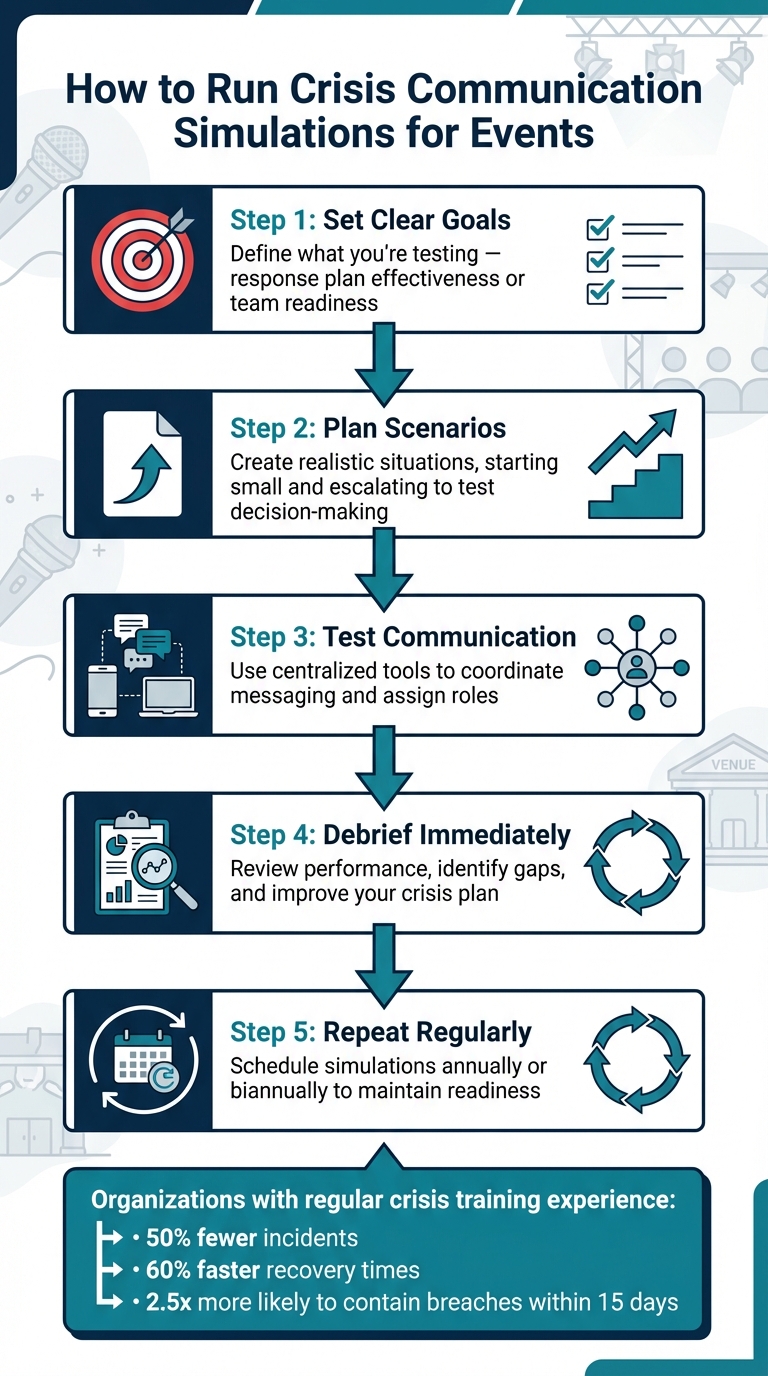
Before diving into planning, it’s essential to pin down your objectives. Are you testing the effectiveness of your crisis response plan, helping your team build confidence under pressure, or onboarding new staff to emergency protocols using event staff scheduling software? Each goal requires a tailored approach.
"Exercises are an essential part of skills development and... the only way to build these skills outside of an actual event"
- Andrew Sheves
Your objectives should shape every aspect of the simulation, from the complexity of the scenario to how success is measured. For example, event teams might focus on risks like vendors not showing up, sudden weather changes affecting outdoor plans, or a social media controversy erupting during a live event.
The intensity of the simulation should match your team's experience. Newer teams may benefit from low-pressure tabletop exercises where plans are reviewed step-by-step. In contrast, seasoned teams need high-stakes, surprise drills that test their ability to act quickly and effectively. The goal is to challenge the team enough to uncover weaknesses but not so much that it damages morale.
With objectives in place, the next step is to build a planning team. This group should include representatives from key areas like communications, logistics, legal, and senior management. Each perspective helps identify potential challenges and ensures a well-rounded response strategy.
Assign specific roles within the simulation team: facilitators to guide the exercise, evaluators to monitor actions and decisions, and planners to design scenarios and introduce escalating challenges.
"The leader of the CMT should not be chosen based on seniority or politics but on ability"
- Richard Long, MHA Consulting
Select team members based on their ability to perform under pressure, not just their rank or title. Bringing in an external consultant can also be valuable. Outside experts provide unbiased feedback and can point out blind spots. Research shows that organizations practicing regular crisis simulations are 2.5 times more likely to contain a breach within 15 days compared to those that don’t.
A crisis plan that only exists on paper won’t hold up when the pressure is on.
"If the best plans exist only on paper, they are worthless"
- Moh Heng Goh, Crisis Communication Certified Expert
Your communication plan should be a practical, ready-to-use document that the team can rely on in real-time. Include decision trees, pre-approved communication templates, and clear mobilization procedures to streamline decision-making. Prepare holding statements and templates for social media posts, press releases, and Q&A responses to ensure consistent messaging.
Be specific about mobilization procedures - who gets contacted first, how they’re reached, and what information they need to act immediately. Also, clarify your priorities. Is customer safety the main focus, or is it safeguarding revenue and reputation?
"It's far better to discover these issues in a closed, private environment, than in the middle of a live crisis"
- Kate Hartley, co-founder of Polpeo
Simulations help uncover gaps in your plan and highlight areas for improvement, laying the groundwork for creating realistic and effective scenarios.
To design crisis simulations that feel authentic, start with a manageable issue and allow it to escalate naturally into a high-stakes situation. Begin with a smaller challenge, then build toward a crisis peak where critical decisions must be made. Add layers of complications to test how swiftly the team can adapt.
Focus on likely risks tied to your event type. For example, catering companies might face a refrigeration breakdown during a wedding reception, while conference organizers could encounter a venue double-booking or a sudden social media controversy during a live session. The first 72 hours of a major incident are often chaotic, marked by misinformation, speculation, and heightened stress. Your simulation should reflect this intensity to prepare teams for real-world pressures.
It’s essential to strike a balance between challenging your team and maintaining morale. Scenarios should expose vulnerabilities without overwhelming participants. John P. Pironti, President of IP Architects LLC, highlights this balance:
"Tabletop exercises provide realistic scenarios and testing conditions that can be used to assess (and ultimately improve) an organization's crisis management and incident response capabilities".
Once your scenario is mapped out, introduce dynamic elements to keep participants engaged and responsive.
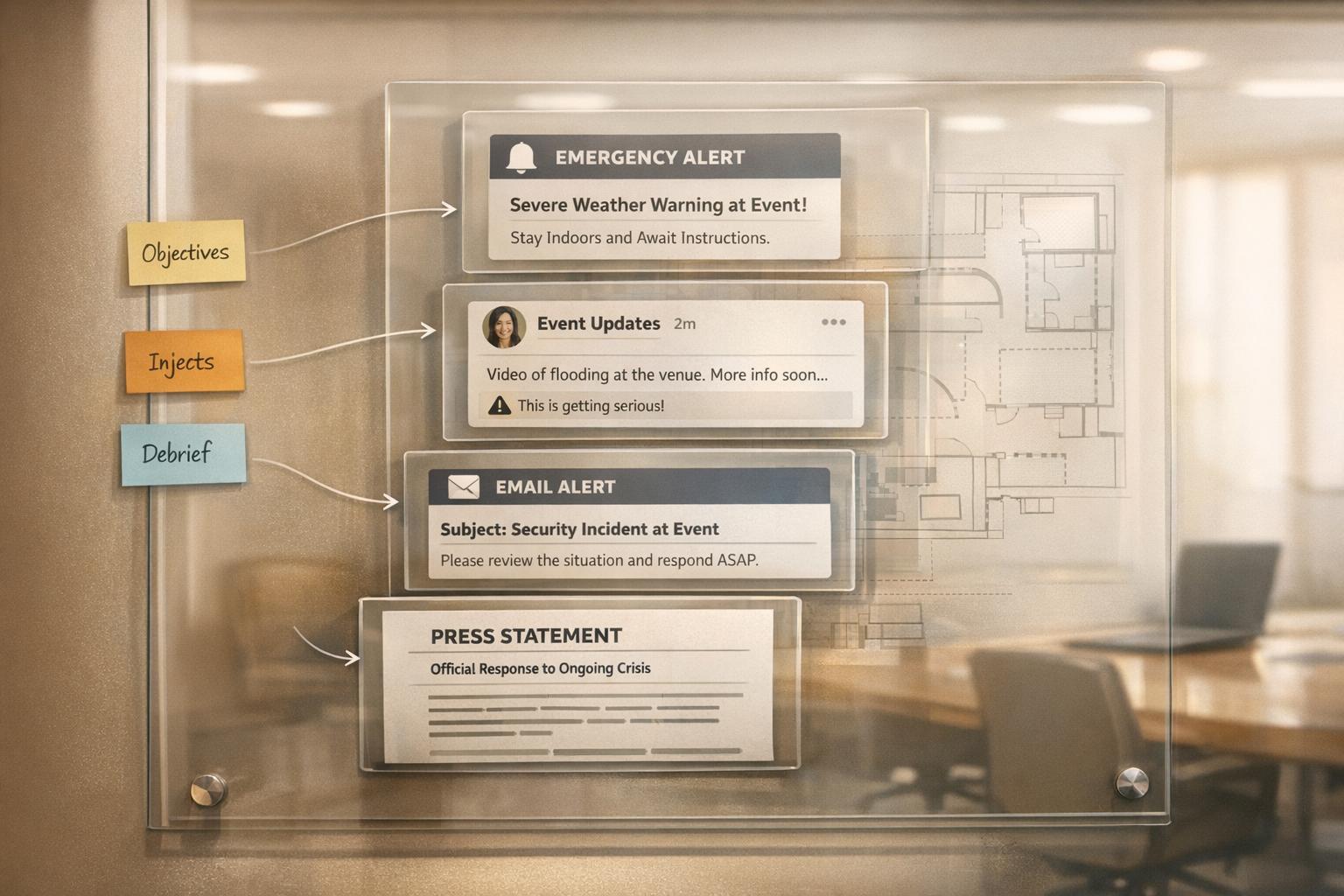
Once you’ve outlined a realistic scenario, enhance it by adding triggers and injects - unexpected developments that drive the simulation forward. For a half-day exercise, aim for about 10 to 15 injects to keep the team engaged. These might include mock media alerts, fake social media posts highlighting guest complaints, or a staged call from a health inspector.
Release injects gradually to mirror the natural progression of a crisis. For instance, begin with a minor alert, like a delay, and escalate it into larger problems such as viral complaints or facility failures. This rolling approach keeps participants immersed while testing their adaptability. If the team resolves the initial issue too quickly, introduce a secondary challenge - what experts call an "aftershock." Deb Hileman, President and CEO of the Institute for Crisis Management, explains:
"Crises don't happen in a vacuum and there are always 'aftershocks.' These kind of escalations make the exercise more realistic and more challenging for the team".
Facilitators should remain flexible, adjusting the sequence of injects based on how participants respond to the unfolding scenario.

Strong communication is the backbone of effective crisis management. A centralized system like Quickstaff can simplify coordination during escalating scenarios. With its unlimited messaging feature, Quickstaff allows your entire team to stay updated, respond to developments, and track availability in real time - all through a single platform.
This tool is particularly valuable for simulations that test backup plans. You can quickly identify substitutes and manage event staffing needs through its mobile-friendly interface. By streamlining communication, Quickstaff helps pinpoint bottlenecks and ensures smoother operations during both simulations and actual events.
Mark the simulation date on your event calendar using Quickstaff to ensure everyone is on the same page. However, don’t reveal the exact start time - this adds an element of surprise, testing your team’s ability to react to unexpected situations. Gerard Braud, CSP, Fellow IEC at Braud Communications, sums it up perfectly:
"Your goal is to mess up in private so that you never mess up in public".
When it’s time to start, keep the initial briefing short - no more than 5 minutes. Use role cards to assign specific responsibilities, such as Event Coordinator, Communication Officer, or Logistics Manager, so everyone knows their part. Make it clear that decisions made during the simulation carry real-world consequences. Emphasize that this is a safe environment to uncover and fix weaknesses before they become public issues . Include representatives from all key departments - legal, HR, tech, customer service, and leadership - to ensure smooth cross-functional collaboration. This structured kickoff sets the tone for the unpredictable challenges ahead.
After the briefing, reveal details gradually. This step-by-step approach mirrors the chaotic and evolving nature of real crises, moving from initial confusion to overwhelming information. Add surprise elements like mock email alerts, fake social media posts, or staged calls from journalists to keep participants alert. If your team successfully resolves one issue, introduce another twist to maintain pressure.
Shrink decision-making windows to replicate the stress of real crises. Bringing in an external party to design and run the simulation can add an extra layer of realism, as your team will face an unknown scenario in real time. Studies show that organizations with robust crisis training experience 50% fewer incidents and recover 60% faster when faced with actual crises. These unexpected hurdles naturally lead into testing your communication systems.
Once the simulation introduces unexpected events, it’s time to test your communication channels. Use the same tools you’d rely on in a real crisis - whether that’s internal chat platforms, dedicated hotlines, mobile apps, or email. Quickstaff’s unlimited messaging feature can serve as a central hub for tracking responses, monitoring availability, and pinpointing bottlenecks. Test alerts and mobile notifications to ensure remote staff receive updates instantly.
Throw in curveballs like a simulated email outage, forcing the team to pivot to alternative channels like radio or text messaging . Assign facilitators to act as journalists, government officials, or frustrated attendees, challenging your team to manage dynamic interactions across platforms. Track metrics such as response times, message accuracy, and acknowledgment rates . With 53% of people expecting a brand to respond to a crisis within an hour, speed and precision are critical.
After running a simulation, debriefing is where the real learning happens. It’s your chance to turn the experience into actionable improvements. Conduct the debrief immediately while observations are still fresh. Use dedicated observers to evaluate key areas like response times, adherence to protocols, clarity of communication, and team coordination . Compare the actual responses during the simulation with the behaviors outlined in your response plan. As John P. Pironti, President of IP Architects LLC, puts it:
"The goal of the tabletop exercise should not be to win, but instead to test the crisis management and incident response capabilities that have been developed and identify areas for improvement".
Encourage honest feedback from participants to assess whether roles were clear and resources were accessible. Pay close attention to decision-making under pressure, especially when participants face unexpected challenges like missing team members or tech issues. These findings are crucial for identifying what worked and what needs improvement.
Create a detailed report summarizing the exercise's strengths, weaknesses, and recommended action items. Deb Hileman, President and CEO of the Institute for Crisis Management, advises:
"Summarize findings in a report to leadership that highlights strengths, weaknesses, and actionable recommendations. Include a timeline to address deficiencies and schedule the next drill".
Assign someone specific to oversee the implementation of these recommendations . During the debrief, encourage participants to propose actionable steps that can be integrated into your crisis communication plan. If the simulation highlights significant shortcomings - like issues with media interactions - schedule focused training sessions to address them. Kate Hartley, Co-founder of Polpeo, highlights the importance of this:
"It's far better to discover these issues in a closed, private environment, than in the middle of a live crisis".
Set a follow-up date to review progress on the action items. This documentation not only guides immediate improvements but also serves as a roadmap for planning future simulations.
Consistency is key to staying prepared. Schedule crisis simulations annually, or even biannually for higher levels of readiness, to reflect changes in leadership, team structures, and communication strategies . Alternate between low-intensity tabletop exercises for newer teams and more challenging, high-intensity scenarios for experienced responders . Build on each exercise, gradually increasing complexity over time. Throw in the occasional unannounced drill to test how your team responds under real-world conditions. Moh Heng Goh, President of BCM Institute, emphasizes:
"The debriefing process whereby improvements are documented and put into an annual plan should be thoroughly discussed".
Use tools like Quickstaff’s event calendar to manage simulation schedules and track team participation. This ensures feedback from each drill is effectively used to fine-tune communication protocols. Regularly scheduled simulations keep your crisis communication plan aligned with your organization’s growth and ensure your team is always ready for the unexpected.
Effective crisis communication simulations hinge on four essential phases: preparation, design, execution, and debriefing. Start by setting clear goals and assembling a planning team that spans multiple departments. Create scenarios that feel real, complete with escalating challenges - often referred to as "injects" - to test how your team performs under mounting pressure. During the simulation, introduce details gradually to replicate the confusion of an actual crisis and use the same communication tools your team would depend on in a real event. Wrap up with a detailed debrief right after the exercise to capture immediate feedback, document lessons, and turn them into actionable steps for improvement. Running these simulations once or twice a year ensures your team stays sharp and ready to handle emergencies. This framework pairs seamlessly with tools like Quickstaff to enhance the process.
Quickstaff offers a centralized platform that makes managing crisis simulations easier for event teams. Its event calendar allows you to plan and monitor participation for simulations effortlessly. During the exercise, the unlimited messaging feature enables real-time, multi-channel communication testing, helping your team practice coordinating under pressure. Quickstaff's role assignment tools let you clearly define responsibilities - like Event Coordinator, Communication Officer, or Logistics Manager - ensuring everyone knows their part during a crisis. With mobile-friendly access, your team can practice responding to emergencies from any location, just as they would in real life. By combining these strategies with modern tools, your team can build confidence in handling actual crises.
A crisis plan is only as good as its execution, and that execution improves with practice. Regular simulations turn hesitant reactions into confident, coordinated responses. By working through the preparation, design, execution, and debriefing stages, each exercise brings your crisis plan closer to being foolproof. If you're just starting, try simpler tabletop exercises and gradually add complexity as your team gains experience. The goal isn't perfection - it's progress. Each simulation highlights areas for improvement, and addressing those gaps could be the key to managing a crisis successfully instead of letting it spiral out of control.
The participants should consist of the designated response team, including communication officers, management, and operational staff. It's a good idea to bring in stakeholders like department heads or subject matter experts to create more realistic scenarios. Think about the team's experience level - newer teams might gain more from guided exercises, while seasoned teams are better suited for full-scale simulations. The main objective is to equip those directly involved in crisis response to handle real emergencies effectively.
Start by clearly outlining the scope of your exercise based on your team’s expertise, objectives, and any limitations. Select scenarios that align with your team’s skill level - low-intensity scenarios are great for building familiarity, while high-intensity scenarios are better suited for testing advanced response capabilities. Prioritize risks that are most relevant to your event, such as natural disasters, technical failures, or security breaches. A well-defined scope ensures that the scenarios are practical, manageable, and directly tied to the goals of your event.
During a crisis communication simulation, it's crucial to monitor specific metrics to gauge performance and pinpoint areas that need work. Pay close attention to the timeliness and accuracy of shared information, response times, and how clear and effective your communication channels are. Additionally, assess stakeholder engagement, the efficiency of decision-making, and how well the team works together under pressure.
After the drill, collect feedback on the roles participants played, the effectiveness of the communication tools used, and how realistic the scenario felt. This input is essential for fine-tuning your crisis response approach and strengthening your overall readiness.