Safety Training Tracking for Temp Staff
August 19, 2026

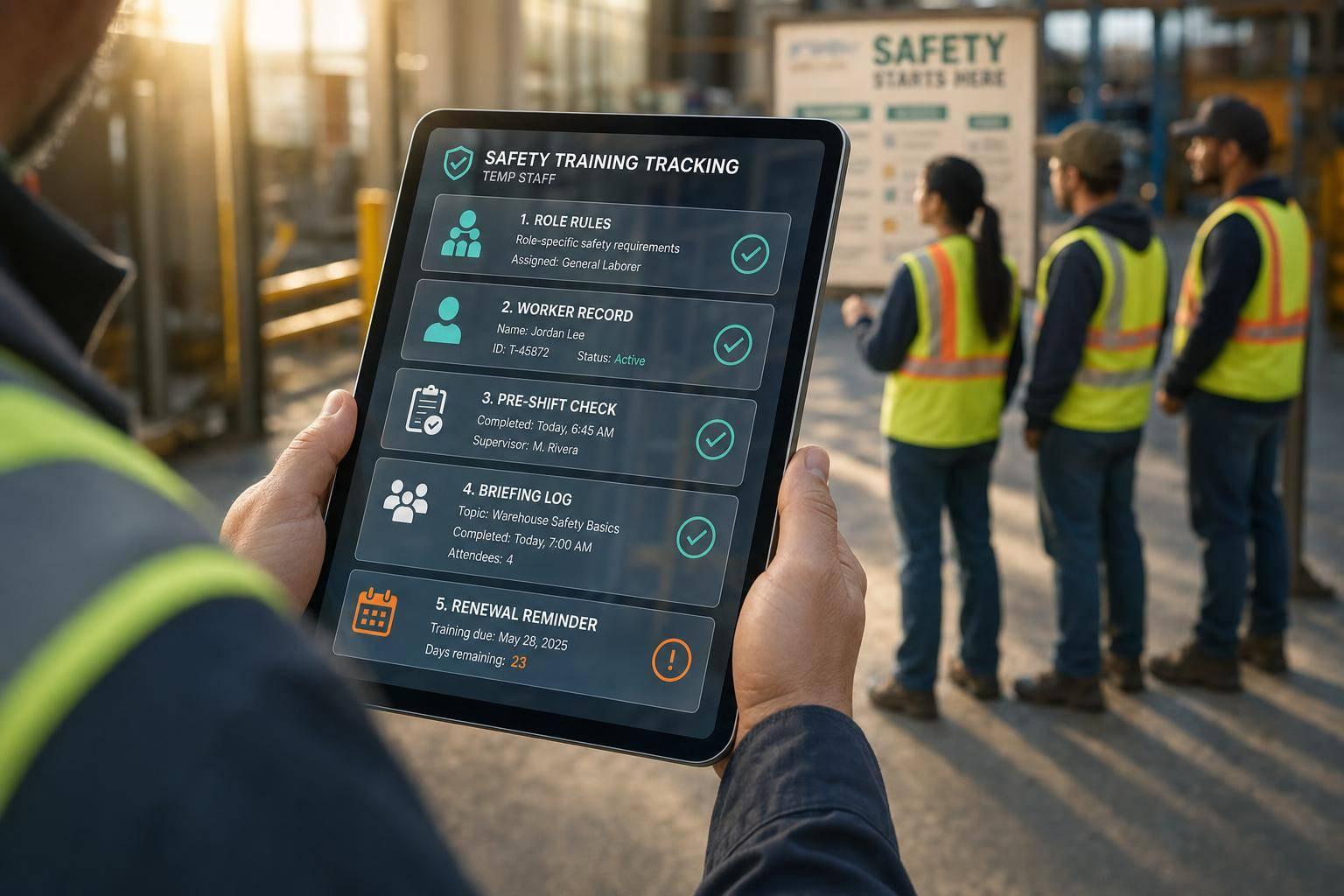
If you can’t confirm training before a shift starts, you have a safety gap.
I’d boil this article down to five steps: set role rules, keep one record per worker, check status before each shift, log every briefing, and track expiration dates before they lapse. That matters even more with temp crews, because training is often split between the staffing agency and the host site.
Here’s the short version:
A few facts stand out: OSHA says temp worker training is a shared duty between the agency and the host employer. And for forklift operators, re-evaluation is due at least every 3 years. Those two points alone show why text messages and paper sheets are not enough.
I see the main takeaway like this: if you run events with temp staff, your training process should include compliance checks to save time and show who is cleared, who is missing training, and who is close to expiration in a few seconds. That’s what keeps check-in smooth and cuts last-minute confusion on event day.
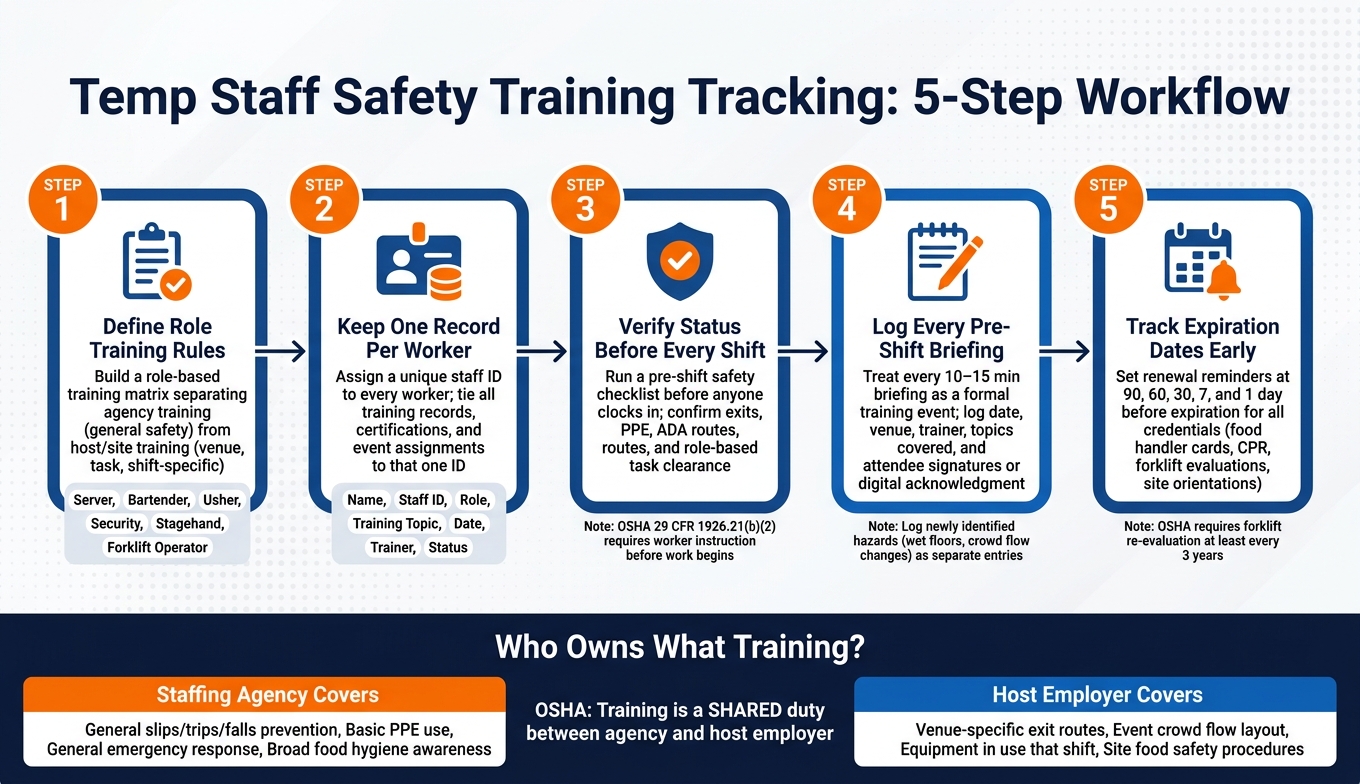
Temp Staff Safety Training Tracking: 5-Step Workflow
Start by spelling out the training and certification each role needs. A role-based matrix helps you keep those rules the same across every event.
Under OSHA's temporary worker guidance, staffing agencies and host employers share responsibility for safety training. Agency training covers general safety. Host training covers the venue, task, and event-specific risks.
In plain English, the agency handles the broad basics. The host handles what staff need to know for this event, in this venue, on this shift.
Agency-level training often includes slips, trips, and falls prevention; basic PPE use like gloves and safety shoes; general emergency response; and broad food hygiene awareness. Site-specific training should cover venue risks such as where the emergency exits are at that venue, how crowd flow works for that night's layout, which equipment is in use, and what the food safety procedures are for that menu.
Put those differences into a simple matrix so staff can be checked fast.
Use a matrix that lists each role, the required training, and who delivers it. Here’s a starting point for common event roles:
| Role | Agency Training | Host Training | Certifications |
|---|---|---|---|
| Server / Banquet Staff | Slips, trips, and falls; safe lifting and carrying; basic food hygiene | Venue layout; exits; menu-specific food handling; equipment locations | Food handler certification, where required |
| Bartender | General alcohol service responsibility, including ID checks; glassware handling | Bar layout; venue cut-off rules; emergency procedures | Alcohol service credential, where required |
| Usher / Crowd Staff | Crowd flow awareness; slip/fall prevention; basic emergency response | Seating plan; exit routes; ADA accommodations; event-specific crowd risks | Crowd manager training, where required by code |
| Security | Conflict de-escalation; use-of-force policies; basic legal considerations | Venue post orders; radio/camera systems; emergency action plan | Required security credential and any crowd control training |
| Stagehand / Rigger | Manual handling; general hazard awareness | Staging plan; fall protection systems; specific equipment | Agency-facilitated OSHA 10/30-hour course |
| Forklift Operator | Powered industrial truck safety fundamentals | Site-specific truck type; load types; travel paths | Powered industrial truck training and evaluation under OSHA |
For large events, add crowd-manager requirements where local code calls for them.
Once training happens, you need a record that proves it. Every completed training entry - whether it is a 10-minute site briefing or a formal certification - should capture the same core fields.
Each record should show who was trained, on what, and by whom. If one event logs that data one way and the next event logs it another way, checks get messy fast. A standard format keeps things clean.
Once the rules are defined, put them in one tracking system.
Once your role-based training rules are set, every record should live in one place. If the data sits in different spreadsheets, inboxes, or apps, things get messy fast. A central log keeps the whole picture together and makes event-day checks much faster.
Use one approved term for each role and each training item. Small wording changes can cause big problems.
If one coordinator logs waitstaff and another logs server for the same job, the system reads them as two separate roles with two separate training needs. That’s how gaps show up. Publish one approved term list and have every coordinator use it when they build rosters, assign shifts, and log completions.
Names alone don’t work well as identifiers. People share names, misspellings happen, and records drift apart over time. A unique staff ID - whether it’s an agency number, an internal contractor ID, or a system-generated identifier - keeps one person’s training history tied together across events, seasons, and role changes.
Every training record and every event assignment should point back to that ID. When a returning worker comes back for a new event, their earlier training, expiration dates, and pending refreshers are already there. Use one system that groups staff by role, event, and schedule so coordinators can match training status to shifts fast.
With one ID attached to each worker, pre-shift clearance takes seconds.
Use one simple template that shows clearance at a glance. The table below covers the fields that support tracking beyond what Section 1 already defined:
| Field | Why it matters |
|---|---|
| Unique staff ID | Ties all records to one person across events |
| Expiration date | Flags when a credential or refresher is due |
| Completion status | Shows current, pending, or expired at a glance |
| Event or location | Ties site-specific training to the right venue |
| Notes | Captures exceptions, missing docs, or conditions |
| Change log | Records updates with timestamps for audit history |
Log updates instead of overwriting earlier entries. If a certification is renewed or a record is corrected, add a timestamp so there’s a clear history of what was on file at the time of each assignment. That matters during audits, but it also helps when someone asks, “What did we know before this shift started?”
Once the template is in place, coordinators can update it from the field without rebuilding the record. That record becomes the source of truth for pre-shift clearance.
Safety checks should be part of the arrival workflow. Put them into badge pickup, shift handoff, or the pre-shift huddle. When records live in one system, supervisors can verify them on-site during handoff. That turns training records into same-day clearance.
Temp staff often know the job category, but not the venue itself. That’s why a site-specific checklist matters more than a generic one.
Before anyone clocks in, confirm the day’s access route, exits, and assembly point. Show the team who to contact if a safety issue comes up. For outdoor events, spell out hydration and heat steps: where water stations are, when rest breaks happen, where shaded areas are, and how to spot and report signs of heat exhaustion or heat stroke. Make sure PPE is on hand and assigned for any role with physical or site exposure. If staff will serve guests or manage walkways, confirm ADA-accessible routes and emergency egress too.
Role-based limits should be covered here as well. If a worker hasn’t been cleared for ladder use, equipment handling, lifting, food service cleanup, or crowd control in a restricted area, confirm that before the shift begins, not in the middle of the event.
A 10- to 15-minute pre-shift briefing is a training event. Treat it that way. Under OSHA's general instruction requirement (29 CFR 1926.21(b)(2)), employers must instruct workers in the recognition and avoidance of unsafe conditions, and pre-shift briefings are a common way to meet that requirement in practice.
At a minimum, each briefing log should include:
If the briefing covers a newly identified hazard, like a wet floor, a change in crowd flow, or unexpected equipment movement, log that as a separate entry even if the talk only lasted a few minutes. Short reminders still shape worker behavior. Just as important, they leave a clear compliance trail if questions come up later.
After the briefing, compare attendance against the live roster before anyone starts work. That check shows who attended, who arrived late and may have missed key points, and who still needs follow-up before starting.
This is where the benefits of event staff scheduling software become clear. Quickstaff's event schedules and mobile staff lists show who is assigned to each shift and role. If someone joins late or gets moved to a new assignment, supervisors can spot the gap fast and send a follow-up message before that person begins work. At a busy event site, that’s a lot easier to manage than a paper roster.
Once a shift begins, records can get out of date in a hurry. Mobile checks and scheduled renewals help you avoid expired credentials showing up in the middle of an event.
After clearance at check-in, keep that same record active through the shift and into the next event.
Before assigning restricted work, open the worker's record on a phone or tablet. Confirm identity, role, status, expiration date, and any task-specific restrictions. Then log who verified it, when it happened, and which shift it covered.
Field updates should include the date, worker ID, event, location, issue, supervisor, and any follow-up needed. If the update affects task eligibility, note the hold or retraining status right in the record.
Every credential in your system should include two dates: the issue date and the expiration date. This applies to food handler cards, CPR/First Aid certifications, forklift evaluations, site-specific safety orientations, and any role-based permits. For forklift operators, OSHA-oriented guidance requires written certification records and re-evaluation at least every 3 years.
Use reminder intervals at 90, 60, 30, 7, and 1 day before expiration. For each credential, assign:
The record should also show whether the worker was notified, whether renewal was completed, whether proof was received, and whether the worker was cleared back into eligible scheduling.
Once renewal tracking is in place, pick the logging method that keeps records current on-site.
Use paper only as a backup. Use mobile logging as the main system for recordkeeping and real-time clearance.
| Method | Advantages | Disadvantages | Best use cases |
|---|---|---|---|
| Paper sign-ins | Easy to deploy, works without connectivity, familiar to most crews | Slower to audit, easier to misread or lose, manual entry creates delays and errors | Backup check-in, low-tech sites, emergency fallback |
| Mobile logging | Fast updates, timestamped records, easier compliance tracking, better for recurring staff | Depends on device access and connectivity, requires user adoption and training | Busy events, rotating temporary teams, renewal tracking, real-time verification |
Temporary staffing software like Quickstaff can support reminders, acknowledgments, and cleared-worker tracking in one mobile-friendly system. That helps keep records current when the next shift starts.
Put together, these steps form one clear workflow from hiring through renewal: define role rules, keep records in one place, verify credentials before each shift, log pre-shift briefings, capture field updates, and track renewals.
Because staffing agencies and host employers share training responsibility, those records need to stay current from day one.
When records live in one place and renewals are tracked early, managers can clear staff faster and spot expired credentials before event day.
Quickstaff can centralize assignments, reminders, and field updates so training status stays visible on event day.
Responsibility is often split between event vendors and staffing agencies under a dual-employer or joint-employer setup.
In most cases, staffing agencies cover general safety training. Event vendors, on the other hand, handle site-specific training tied to the event’s hazards, equipment, and job duties.
That split needs to be spelled out in writing. Clear written agreements should define what each party is responsible for, so there’s less confusion when work starts.
A complete temp worker training record should live in one central place. That record should include the worker’s full name, job title, employee ID, course title or topics covered, course version, training date, duration, and delivery method.
It should also cover the trainer’s qualifications or vendor details, along with assessment scores, quiz results, or signed attestations. That gives you a clear audit trail, helps document compliance, and shows whether the training actually worked. Quickstaff can help keep all of this in one place.
Review safety certifications at least once every three years.
Training also needs a refresh when new equipment comes in, new hazards show up, or a worker steps into a supervisory role. A one-and-done approach doesn't cut it. As the job changes, the training should change with it.
Keep clear records of all course and training dates. Hold on to those records for the full length of employment and for at least five years after the worker leaves.