Online Food Handler Training for Event Staff
October 8, 2026

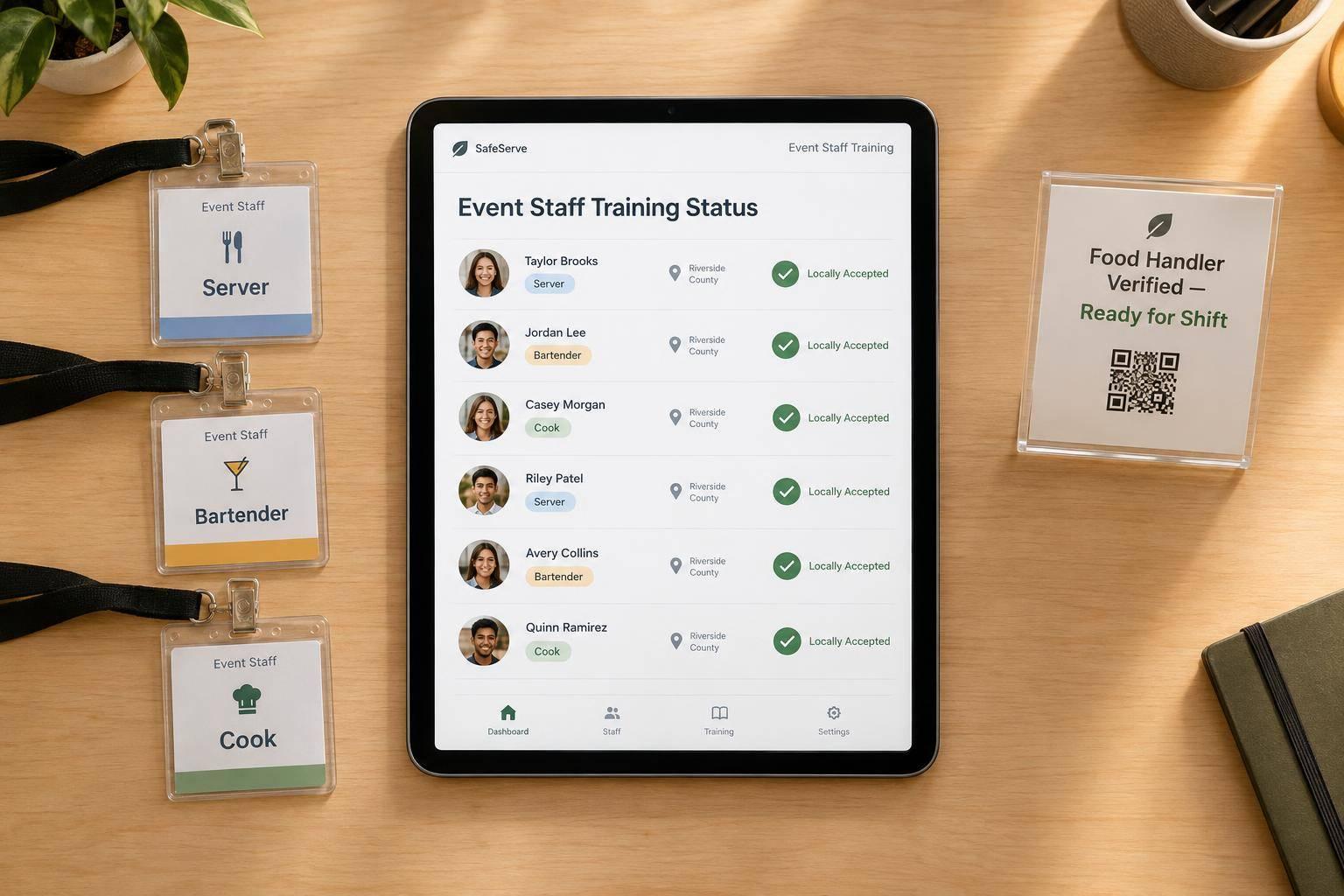
I verify food-handler training before assigning anyone to handle food. My planning target: finish locally accepted courses 7–14 days before the first shift, leaving time for retakes and certificate checks. Local legal deadlines still come first.
Here’s the process I use:
My rule is simple: <u>a scheduled shift isn’t proof of training</u>. If I can’t verify the required credential, I replace the worker or assign only duties local rules allow. A short pre-shift review covers menu allergens and illness reporting.
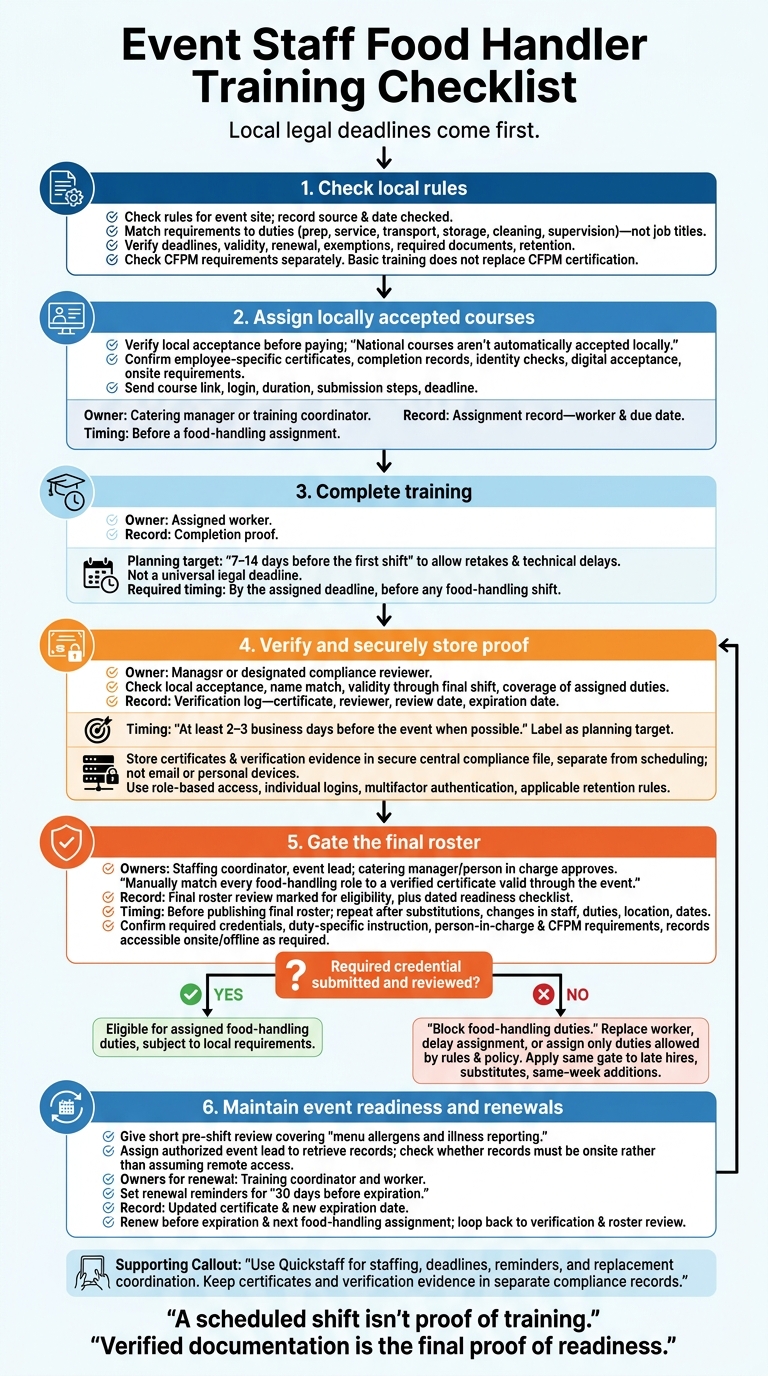
Event Staff Food Handler Training Checklist
Check the local health department rules for the event site, then match them to each food-handling role. Verify training deadlines, certificate validity, renewal intervals, exemptions, required documents, and how long records must be kept. Record the rule source and the date you checked it.
Assign training by duty, not job title. Include food preparation, service, transport, storage, equipment cleaning, and supervision. Flag workers who handle exposed time/temperature control for safety (TCS) foods.
Examples include cooked rice, dairy products, and cut melons.
Handle Certified Food Protection Manager (CFPM) certification separately. Basic food-handler training does not replace it. Check whether a CFPM must stay on site.
Before paying for access, verify that the course is accepted at the event site. Check that it provides employee-specific certificates, completion records, and any identity checks required by local rules. Also confirm whether digital records are accepted and whether documents must be available on site.
Review the course’s coverage of hygiene, illness reporting, cross-contamination, allergen cross-contact, temperature control, cleaning, and sanitizing. Budget for course fees, retakes, and paid training time. Check applicable wage-and-hour requirements before deciding who pays and whether training time must be compensated.
After choosing the course, assign it by role and set a completion deadline before event staffing is finalized. This ensures compliance within your scalable event scheduling system.
Assign accepted basic training to food-handling roles covered by local rules, and manager certification to supervisors who need it. Send workers the course link, login details, expected duration, submission steps, and deadline.
Set the deadline 7–14 days before the first shift to allow time for retakes or technical delays. Before accepting a returning worker’s certificate, verify local acceptance, a matching name, validity through the final shift, and coverage of their current duties.
Use these assignments to set training deadlines before event staff scheduling challenges and to support the training status checks in the next step.
Work backward from the food-service call time to set deadlines for certificate verification and roster approval. Leave room for login problems, retakes, and certificate retrieval. These buffers don’t replace local legal deadlines.
Keep a training register with clear statuses and a named owner for each step. Each status should show staffing coordinators whether a worker can be scheduled for food handling.
| Workflow stage | Responsible person | Required record | Deadline |
|---|---|---|---|
| Assignment | Catering manager or training coordinator | Assignment record: worker, due date | Before a food-handling assignment |
| Completion | Assigned worker | Completion proof | By the assigned deadline, before any food-handling shift |
| Verification | Manager or designated compliance reviewer | Verification log: certificate, reviewer, review date, expiration date | At least 2–3 business days before the event when possible |
| Scheduling review | Staffing coordinator and event lead | Final roster review: marked for food-handling eligibility | Before publishing the final roster; repeat after substitutions |
| Renewal | Training coordinator and worker | Renewal record: updated certificate, new expiration date | Before expiration and the next food-handling assignment |
Follow the same tracking process for late hires, substitutes, and same-week additions. Put the process in writing and name one decision-maker. Check local rules, set a short deadline, and block food-handling duties until the certificate is submitted and reviewed.
If the review isn’t complete by the cutoff, move the employee to a non-food role, replace the worker, or assign only duties allowed by local rules and the employer’s food-safety policy. A promise to finish training later isn’t enough to schedule food handling.
Use Quickstaff to organize event roles, deadlines, reminders, and staffing updates. Keep compliance records separate from scheduling.
Before publishing the roster, manually match every food-handling role to a verified certificate valid through the event. This roster check is the final gate before the event.
After verification, place every certificate in a central record file. Use that file to confirm which staff can work the event using event staff scheduling software.
Create one profile for each employee. Include the exact certificate name, internal staff ID, assigned role, course title, provider, completion date, credential number, expiration date, verification link or file, reviewer, verification date, jurisdiction, and event ID.
Store records in a secure document system - not email or personal devices. Use role-based access, individual logins, and multifactor authentication where available. Keep filenames consistent, retain prior certificates after renewals, and follow the applicable retention schedule.
Filename example:
LastName_FirstName_CredentialType_ExpirationDate.pdf
Check the roster against the verified record file using availability tracking apps before publishing it. Save a dated readiness checklist in the event file. Include the event ID, location, event date, reviewer, roster version, exceptions, and resolutions.
Confirm that:
Update the checklist whenever staff, duties, location, or dates change. Assign an authorized event lead to retrieve records. Check whether the local health department requires records onsite. Don’t assume remote access is enough.
Check expiration dates before confirming future assignments, and set renewal reminders for 30 days before expiration.
If proof is missing, get acceptable verification from the issuer. Otherwise, assign a legally permitted non-food role, arrange a replacement, or delay the assignment. Record the decision-maker, date, and supporting evidence. A scheduled shift is not proof of certification.
Make training checks part of every event plan. Confirm local requirements, assign accepted courses by role, set completion deadlines, verify proof, and store records securely. Review the final roster before work starts. National courses aren’t automatically accepted locally. Each step needs a clear owner.
Assign one owner to each task. The training coordinator verifies certificates and maintains the register. The staffing coordinator checks training status before assigning shifts and handles late hires. The catering manager or person in charge approves the final roster.
Have these owners use one shared compliance file. Name a backup, and document who can remove or reassign staff whose training hasn’t been verified.
Use Quickstaff to coordinate event staff scheduling, deadlines, reminders, and replacement staff through the waitlist. Keep certificates and verification evidence in compliance records. Verified documentation is the final proof of readiness.
Not automatically. A food handler certificate from one state may not meet another state’s requirements. State and local rules can also vary by the staff member’s role and the venue.
For each event, check with the state or local authority to confirm that it accepts the specific training provider or exam, including online or out-of-state training. This is especially important for regulated roles, such as food protection and alcohol service.
Before assigning a worker to a regulated role, check their legal name, credential type, issuer, ID number, completion and expiration dates, jurisdiction, and role limits. Verify any ID number in the issuer’s online database. A photo or screenshot isn’t enough.
Check with local authorities that the provider or exam is accepted in the event’s jurisdiction. Record the reviewer’s name, review date, source, and result.
Check that the local or state health authority for the event location officially recognizes the food handler certification program, including its language-specific course. Requirements vary by jurisdiction, so don’t assume every online credential is accepted.
Once the worker completes the approved training, use Quickstaff to update their profile, track their certification, and monitor its expiration date to stay compliant.