Event Staff Onboarding Software: 7 Uses
August 24, 2026

If your event team still uses spreadsheets, texts, and paper forms, onboarding will cost you time and shifts. I’d sum it up like this: event staff onboarding software helps me keep worker profiles, forms, training, job notes, reminders, and shift replies in one place so staff show up informed and cleared to work.
Here’s the short version of what this kind of software does:
For U.S. event companies, it also helps keep tax forms, I-9s, IDs, pay rates, and state work rules in better order. That matters when labor costs are tight and one no-show can throw off the whole event.
| Use | What it helps with | Main result |
|---|---|---|
| Digital profiles | Staff records and availability tracking | Faster crew selection |
| Forms and compliance | Documents, waivers, certifications | Fewer missing items |
| Job briefings | Event notes in one spot | Fewer mix-ups |
| Training checks | Role readiness before scheduling | Fewer bad assignments |
| Reminders and updates | Shift alerts and changes | Fewer no-shows |
| Shift confirmation | Accept/decline replies | Faster fill rates |
| Mobile workflows | Phone access and synced tasks | Less admin work |
When evaluating your options, use a checklist for choosing shift assignment software to ensure the tool handles compliance and mobile access effectively.
I see the main point as simple: when onboarding is clear, staff know where to go, what to wear, what to do, and whether they’re cleared for the shift. That saves time, cuts confusion, and helps events run with fewer last-minute problems.
Temporary event staffing is hard to predict. Once you add paper forms, scattered text messages, and manual follow-up, small issues can get expensive fast. Missed call times, expired certifications, and unclear instructions are all common when onboarding has no clear system.
The main problem is fragmented information. When staff have questions, or when plans change, there’s no single place to check. That leads to confusion before the event even begins.
No-shows often follow. Without a clear confirmation process, workers might miss a schedule update or say they never got their shift details. Either way, the outcome is the same: a last-minute scramble to cover a shift during a busy event.
Thin margins make structure a must. Event businesses often operate with very little room for error, and one labor miscalculation can cut straight into profit. A structured onboarding process cuts out guesswork and helps keep day-to-day work under control. The first step is collecting staff details with digital profiles.
Digital profiles make staff data easy to search from day one.
Each profile can hold a staff member’s name, contact details, location, roles, work history, and certifications. That gives managers a simple way to filter by role and availability and put a crew together faster. The same profile also works as the main place for shift invites and replies. Managers send shift invites in the system, and staff accept or decline in real time.
You can also attach dress codes, manuals, and safety instructions to the profile or event record. That way, staff get the rules and safety information they need before the event starts.
Quickstaff keeps profiles, scheduling, reminders, and event details in one mobile-friendly place.
Once profiles are set up, the next move is collecting forms and compliance documents.
Onboarding software makes form collection much faster by putting every required document into one workflow. Instead of hunting down paperwork across texts, emails, and clipboards, managers collect everything in one place. That cuts out one of the biggest slowdowns when getting new event staff ready before a shift.
Role-based templates also keep things simple. Each worker only sees the forms tied to their role, which helps cut down on partial submissions. A bartender might need a liquor certification and waiver. A server might need a food handler card. No extra clutter. Just the paperwork that fits the job.
E-signatures sit right inside the workflow. Staff get a link, open it on their phone or laptop, and sign there. The system then saves a timestamped copy to their profile. No printing. No scanning. Validation checks catch missing fields before someone submits, so forms are more likely to be done right on the first pass.
The dashboard gives managers a clear view of work status. They can see who is cleared, who still owes documents, and whose certifications are close to expiring. That makes the handoff into job briefs and training much smoother.
Once forms are done, teams can share job details and role-specific instructions in the same place.
Once forms are done, staff still need the basics before event day. They need the right details in one spot: venue address, call time, parking info, dress code, point of contact, and the tasks tied to their role.
When those updates are spread across texts, emails, and chat threads, things slip. People end up with the wrong version, or worse, they miss call time.
Event onboarding software keeps notes, floor plans, and run sheets in a single mobile view. That gives managers one place to update instructions before a shift starts.
It also makes it much easier to send role-based briefings. A captain doesn’t need the same notes as a setup crew member, so managers can send updates only to the staff assigned to that role.
With the briefing in place, teams can tie training and orientation into the same workflow.
After job details live in one place, training should connect straight to shift eligibility. When a scheduler assigns a role, the system checks the staff member's profile for required modules, certifications, and acknowledgments. If something is missing, the assignment is blocked until that item is done.
This works especially well for roles with clear rules. Bartenders can be required to finish responsible alcohol service training before they work a bar station. Banquet servers may need orientation on tray handling and service sequencing before they work a plated event. For U.S. event businesses, link required certifications and acknowledgments to role eligibility so staff aren't scheduled before they're cleared.
With Quickstaff, managers can attach orientation notes, run sheets, and safety policies to invitations. They can also send training links and checklists with reminders.
Once readiness is tied to scheduling, automation fixes scheduling issues like missed training and keeps staff on track.
Once training is assigned, automated reminders help keep staff on track before event day. Sending reminders 24 to 48 hours before an event can cut down on no-shows.
If event details change, send the update only to assigned staff. That way, everyone sees the latest call time, location, and instructions without extra noise.
These notifications can include the event name, date, role, and key instructions, so staff can spot the right update fast. Managers also get a clear view of who has responded.
Once reminders and updates go out, the next step is confirming shifts in one place.
Once reminders go out, the next bottleneck is collecting replies. Without a clear system, coordinators can get stuck in a loop of calls and texts just to figure out who’s actually showing up. The next move is simple: turn those reminders into fast yes-or-no responses.
Staff get a shift invite with the event date, time, location, and role notes, then accept or decline in one click. Confirmed shifts update right away, so coordinators can see which shifts are covered without chasing people down.
A centralized dashboard gives teams one place to check confirmed staff, open shifts, and availability conflicts across events and venues. There’s also a waitlist, so backup staff are ready if someone drops out. And when staff block out dates and times they can’t work, coordinators avoid sending invites that were never going to get a yes in the first place.
That kind of visibility cuts down on the back-and-forth to fill shifts and keep onboarding on track. It also lowers the admin load that comes with trying to keep scheduling and onboarding synced.
Once shifts are locked in, mobile access helps trim that last bit of back-and-forth. Mobile-first onboarding tools let new staff check job details, dress codes, and role notes right from their phones. That means fewer follow-up calls and fewer email chains for coordinators to sort through.
On the admin side, integrated workflows keep staff data in sync across forms, invites, and reminders. This creates a scalable event scheduling system that reduces manual oversight. So managers don't need to type the same details into several systems over and over. Staff can mark dates when they aren't available, and managers can send single-tap invites that update the schedule on their own.
The same setup also helps with repeat events. Event duplication makes prep faster: managers can copy a past event, change the date and a few details, and keep the staffing needs and notes in place.
Put simply, integrated workflows save scheduling time by cutting duplicate data entry. That matters most when the same onboarding steps happen again and again across multiple events.
The gap stands out even more in a manual-versus-software comparison.
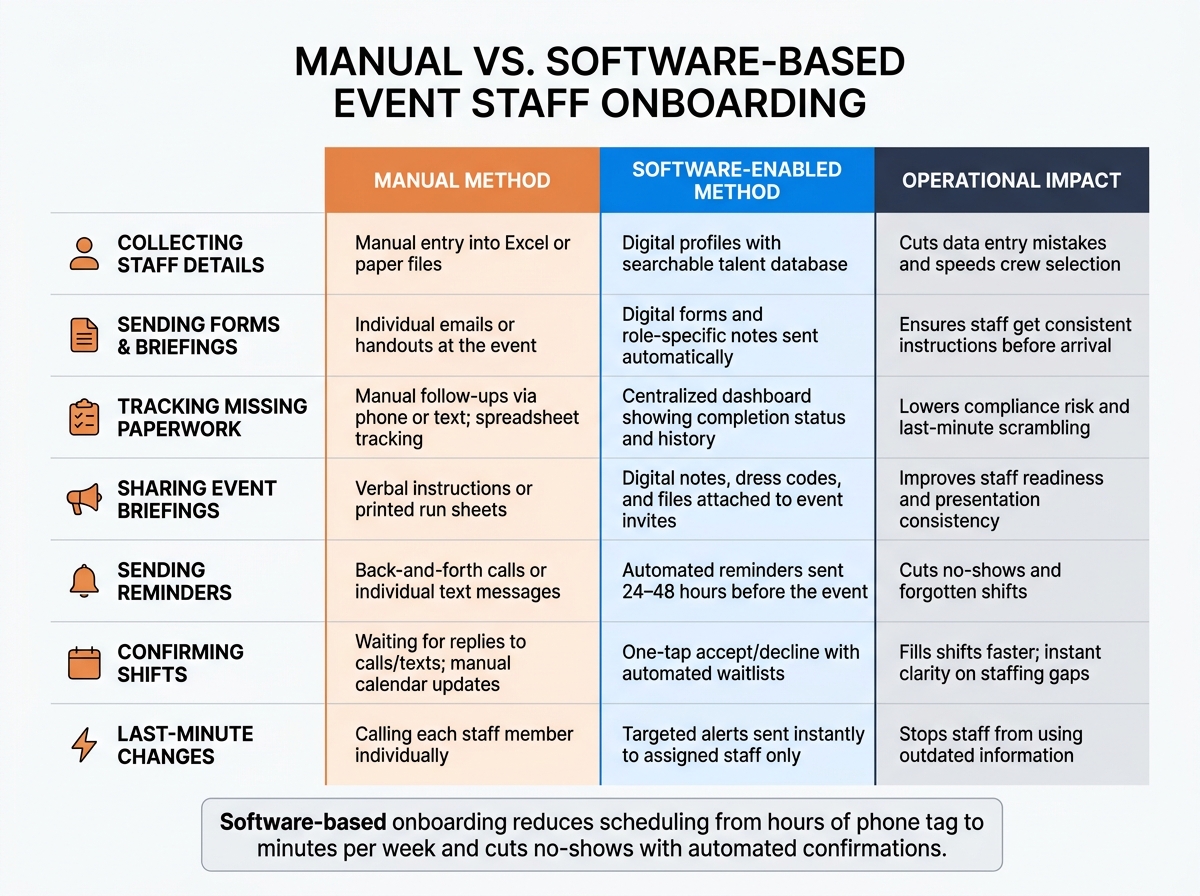
Manual vs. Software-Based Event Staff Onboarding: Side-by-Side Comparison
Here’s what those workflow gains look like when you put manual onboarding next to software-based onboarding. The table below sums up the main day-to-day gains from the seven use cases covered above.
| Process Step | Manual Method | Software-Enabled Method | Operational Impact |
|---|---|---|---|
| Collecting Staff Details | Manual entry into Excel or paper files | Digital profiles | Cuts data entry mistakes and creates a searchable talent database |
| Sending Forms & Briefings | Individual emails or handouts at the event | Digital forms and notes | Helps make sure staff get the same instructions before arrival |
| Tracking Missing Paperwork | Manual follow-ups via phone or text; tracking in spreadsheets | Centralized dashboard showing completion status and history | Lowers compliance risk and last-minute scrambling |
| Sharing Event Briefings | Verbal instructions or printed run sheets | Digital notes, dress codes, and files attached to event invites | Improves staff readiness and supports a consistent presentation |
| Sending Reminders | Back-and-forth calls or individual text messages | Automated reminders sent 1–2 days before the event | Cuts no-shows and forgotten shifts |
| Confirming Shifts | Waiting for replies to calls/texts; manual calendar updates | One-tap accept/decline for staff, with automated waitlists when needed | Fills shifts faster and gives instant clarity on staffing gaps |
| Last-Minute Changes | Calling each staff member individually to update details | Targeted alerts to assigned staff | Sends updates right away and helps stop staff from using old information |
For U.S. event teams, the next move is shaping these workflows around local compliance rules and scheduling needs.
After comparing workflows, the next step is getting setup right so onboarding works for day-to-day U.S. event staffing.
For U.S. event teams, it helps to keep tax forms, I-9s, IDs, roles, certifications, and event history in one secure staff record. When that information lives in one place, managers spend less time hunting through emails, PDFs, and spreadsheets.
Then move to pay. Set role-based pay rates in U.S. dollars for bartenders, servers, and kitchen assistants so timesheets and payroll exports line up with the agreed rate. If your team works across more than one state, set those state-level rules from the start, including break requirements and temp worker rules. That saves a lot of cleanup later.
Once pay and compliance are in place, build templates for repeat event types like weddings, corporate dinners, festivals, or venue shifts. Add preset dress codes, arrival instructions, role notes, and attachments such as floor plans or safety run sheets. That way, each new booking only needs the date and call time changed.
Mobile access matters too. Staff should be able to finish profiles, read event notes, and confirm shifts from their phones without jumping through hoops. It also helps to sync accepted shifts with Google Calendar, iCal, or Outlook so people can see their schedule where they already check it.
Getting onboarding right isn't just admin work. It shapes how each event runs from the start. When the process is organized, teams show up with more clarity, and managers spend less time putting out fires at the last minute.
The payoff is pretty clear: scheduling drops from hours of phone tag to just minutes per week, and no-shows fall when staff confirm shifts and get the right details ahead of time. That gives managers more time for recruiting, training, and event prep.
It also makes the job better for staff. Clear call times, dress codes, directions, and shift details help people arrive ready to work instead of guessing what they need to do.
Digital profiles, automated forms, clear briefings, reminders, shift confirmation, and mobile workflows keep staffing on track. At each step, onboarding software cuts down the back-and-forth from first contact to final shift. When staff arrive informed and confirmed, events run more smoothly, and crews are more likely to come back with confidence.
Event staff onboarding time depends on how your team handles the process. But one thing is pretty clear: digital tools can make it much faster.
With manual workflows, onboarding often takes about 45 minutes. By contrast, mobile onboarding software can cut that to under 10 minutes. It does that by giving new hires access to job details, training, and checklists ahead of time.
That means less waiting around on shift day and more time spent getting people ready to work.
Before a shift, event staff should send in documents that show they’re qualified for the job, such as food handler permits or other required certifications. Managers may also gather event-specific details, like uniform sizes, so the team is ready before the shift starts.
Quickstaff keeps this work in one place. Staff can store their skills and certifications in their profiles, which makes it easier for managers to track required credentials and verify them before assignments are locked in.
Onboarding software cuts no-shows by putting shift communication in one place and automating it. That means staff are less likely to miss key updates buried in texts, emails, or scattered apps.
It can: