Checklist Templates for Event Staff Onboarding
January 5, 2026

Onboarding event staff can feel overwhelming, but using structured checklists simplifies the process and ensures nothing gets missed. Here’s why it matters:
This guide breaks down onboarding into actionable steps:
Using tools like Quickstaff can streamline scheduling and communication, helping your team hit the ground running.

4-Phase Event Staff Onboarding Process with Key Statistics
Pre-onboarding takes place before a new hire's first day. This phase is all about cutting through administrative red tape so your new team member can focus on settling into their role instead of drowning in paperwork. Ideally, you should kick off this process 1–2 weeks before their start date to make sure everything is ready.
The purpose is straightforward: gather necessary documents, verify credentials, and establish clear expectations. A solid pre-onboarding process not only avoids first-day chaos but also shows your team is prepared and professional. Here's what you need to cover.
Collecting the right paperwork upfront is a must. Start with essential legal documents like the I-9 (Employment Eligibility Verification), W-4 (Federal Income Tax Withholding), and any state-specific tax forms. Make sure you also gather signed employment agreements specifying job titles, pay, responsibilities, and any required clauses. Don’t forget Social Security numbers, copies of government-issued IDs or passports, and direct deposit forms with banking details.
For roles tied to specific events, verify certifications as needed - such as food safety certifications for servers or licenses for security staff. This step helps avoid compliance issues on event day. Additionally, request emergency contact information and note any key health details, such as allergies.
"With a checklist, your onboarding will be consistent and complete for each employee, and you can stop the guessing game of what you've covered with each team member." - Quickstaff
To minimize delays, send these documents digitally as soon as the job offer is accepted. Tools like Quickstaff make it easy for staff to complete forms on their mobile devices.
Once documents are collected and verified, move on to background checks and reference validations.
Initiate background checks right after the offer is accepted. For event staff, this often includes reviewing criminal records and confirming professional references to validate experience and qualifications. For specialized roles - like technical crews, medical staff, or security personnel - double-check that all certifications and licenses are current. Expired credentials can lead to liability problems during live events.
Reference checks can also give you valuable insight into a candidate’s work style. A quick call to a former supervisor can reveal whether the person is dependable, punctual, and able to handle high-pressure situations.
Once the paperwork is in motion, shift your focus to scheduling and communication. Send a welcome email 1–2 weeks before the start date with all the essentials: arrival time, dress code, parking instructions, and a first-day agenda. This early communication helps ease any first-day jitters and ensures your new hire is ready to hit the ground running.
Use scheduling software to give staff real-time access to their shifts, tasks, and event details. Quickstaff simplifies this process by centralizing all the information and allowing staff to access it from any device.
"The easiest part of onboarding can be creating and communicating schedules, assigning tasks, and providing event specifics to your team!" - Quickstaff
Include a tentative first-week schedule in the email, covering training sessions, one-on-one meetings, and any team-building activities.
For an extra personal touch, assign a "welcome buddy" - a current team member who can reach out before the first day to answer questions and offer peer support. This small gesture can help new hires feel more connected before they even step through the door.
The first day on the job can set the tone for an employee’s entire experience, making it a key moment to get right. Research shows that a structured onboarding process can increase retention by 82% and improve productivity by over 70%. Yet, surprisingly, only 12% of employees rate their onboarding experience positively.
Kick things off with a warm, personal welcome. Greet your new hire, introduce them to their direct manager, team members, and supervisors, and pair them with an experienced buddy for immediate support. A short welcome meeting can help ease first-day jitters and show that you value them as individuals, not just as employees.
Follow up with a tour of the workplace. Point out essential areas, highlight critical safety protocols, and ensure they know where to find key equipment. Confirm that their tech is ready to go - this includes radios, tablets, and login credentials for scheduling software. Tools like Quickstaff can provide mobile access to schedules and tasks, keeping new team members informed from the start.
Take care of administrative essentials early on. Go over the employee handbook, policies, and any required paperwork. Use this time to clearly outline their role, responsibilities, and immediate goals for their first shift. It’s also a good opportunity to briefly share the organization’s mission and values to help them feel connected to the bigger picture.
"A poor onboarding experience can leave new hires feeling unsupported, disengaged, and at risk of leaving before they have had the chance to succeed".
Wrap up the day with a check-in. Address any questions or concerns they might have and gather quick feedback to ensure they feel supported. This thoughtful approach not only sets the stage for role-specific training in the days ahead but also helps build a strong foundation for long-term success.
The first week of training is where theory meets practice, and getting it right is crucial. Poor training during this period can lead to early turnover. A structured checklist helps ensure your event staff are ready to hit the ground running with confidence.
Start by introducing your team to the daily-use systems they’ll rely on, such as Quickstaff, ticketing platforms, POS systems, and time-tracking tools. Let them set up test events to get a feel for the system from both an admin and user perspective. Don’t forget to review communication protocols - whether it’s Slack, company email, or radio channels - so everyone knows how to reach the right people for specific issues.
Mix classroom-style instruction with hands-on practice to improve retention and build confidence. Cover critical topics like health and safety protocols, emergency procedures, security policies, and your company’s code of conduct. Schedule one-on-one meetings to clarify their job duties, daily tasks, and performance expectations for the first month. A FAQ document can also be a lifesaver, addressing common questions upfront and cutting down on repetitive inquiries. These steps lay the groundwork for more detailed role-specific and emergency training later in the week.
End the week with a check-in meeting to review training progress, address challenges, and gauge the new hire’s comfort level. Collect feedback, perhaps through a quick survey, to identify any gaps in your process and refine the onboarding experience.
Role-specific training ensures every team member understands their responsibilities. For event setup staff, this might include equipment handling, venue layout, and load-in/load-out procedures. Guest services staff should focus on customer interaction, conflict resolution, and understanding the services your events provide. Administrative staff need training on ticketing systems, registration processes, and data entry standards.
Set aside time for new hires to go over their job description in detail with their manager. Walk through their daily activities, performance metrics, and how their role fits into the bigger picture of event operations. For roles requiring technical skills, provide hands-on practice in a low-pressure environment before assigning live tasks.
Incorporating real tasks during the first week - not just theoretical lessons - helps new hires retain information and boosts their confidence as they work toward full productivity. Once they’ve mastered their role-specific tasks, it’s time to focus on safety skills.
Safety is non-negotiable. Start with a physical orientation to familiarize staff with emergency exits, fire extinguishers, first aid stations, and assembly points. This helps them visualize escape routes and understand the layout of the venue.
Include mandatory compliance training during the first week, addressing OSHA safety standards, workplace violence prevention, and any industry-specific regulations. Review your company’s policies on safety protocols, anti-harassment, and the code of conduct. A master checklist can ensure no critical steps are overlooked.
Tailor emergency training to the unique challenges of your events. For outdoor events, cover weather-related emergencies and evacuation plans. If alcohol is served, review protocols for handling intoxicated guests. For larger events, explain crowd management and medical emergency procedures. Case studies or lessons from past events can provide valuable insights into handling unexpected situations.
"With a checklist, your onboarding will be consistent and complete for each employee, and you can stop the guessing game of what you've covered with each team member." - Quickstaff
After formal training, nothing reinforces new skills like real-world exposure. Shadowing experienced team members is one of the best ways to prepare new hires. Assign mentors within the same role to guide them through tasks and processes in real time. Be sure to brief mentors on their responsibilities and schedule at least two shadowing shifts during the first week. This allows new staff to observe a variety of tasks and scenarios before taking the reins themselves.
Practice scenarios are another great way to build confidence. Have new hires participate in mock setups, practice using equipment, and role-play guest interactions. For inventory management, consider using QR codes on equipment that link to digital manuals or records. Simulating high-pressure situations, like emergencies or service conflicts, can also prepare staff for the unexpected.
Wrap up the week with a feedback session to review their shadowing experiences, address any challenges, and assess their readiness for upcoming tasks. This final step ensures they feel supported and prepared as they transition into their roles.
The first month is a pivotal time for new hires, as they transition from learning the basics to actively contributing. A well-structured 30-day integration checklist helps track their progress, uncover any challenges, and provide the support they need to settle into their roles. Considering the high rate of early turnover, this period is crucial for setting the foundation for long-term success.
At the end of the first month, conduct a one-on-one review to evaluate their performance, skill development, and overall job satisfaction. This is the time to assess how well they handle key responsibilities, whether it's setting up equipment, managing guest services, or completing administrative tasks. Ask them to demonstrate essential skills to ensure they’re ready for the demands of their role. During this meeting, finalize any quarterly goals or outline objectives for the next 60 days. This review acts as a bridge between initial training and their ongoing role development.
To gather valuable insights, implement a feedback loop by distributing a short onboarding survey at the 30-day mark. Use this opportunity to learn about the new hire’s experience with the training process and work environment. Ask specific questions like what they found confusing, what they found helpful, and where they feel additional support is needed. With only 12% of employees strongly agreeing that their organization excels at onboarding, this feedback can help refine the process for future hires. For more candid responses, consider having someone outside their immediate team, such as a hiring manager, conduct the check-in.
Another key step is ensuring the new hire feels connected to the team. Beyond performance feedback, confirm that they’ve participated in team-building activities, attended social events, and met with other departments to understand how their role contributes to the organization’s larger goals. These social connections are essential for long-term retention. Wrap up the month by transitioning the employee to advanced, role-specific training, setting the stage for continued growth in the following months.
"The programs that learning and development pros provide, from onboarding to mentoring to specific upskilling, transcend skill-building; they help employees align their learning with their growth at a company."
– Alex Halem, Head of Learning, Mars Global Services at Mars, Incorporated

Expanding on earlier checklist templates, Quickstaff simplifies every stage of onboarding by integrating your checklist directly into event staff scheduling software. This approach eliminates guesswork and reduces manual tracking. Acting as an employee scheduling assistant, Quickstaff automates schedule creation and communication, saving time for both managers and new hires. It connects pre-onboarding tasks with day-one processes in a smooth, efficient way.
To get started, include some key steps in your onboarding checklist. Begin with "Create Quickstaff Profile" as part of the pre-onboarding process. This ensures that login credentials and account access are set up before the employee’s first day, leaving a polished first impression. On day one, incorporate a "Quickstaff App Walkthrough" into the orientation. This helps new hires learn how to view schedules, accept shifts, and check event locations. Considering that 81% of new hires feel overwhelmed by information during onboarding, having a centralized platform for shift details can ease the transition.
During the first week, use Quickstaff’s task assignment feature to give new hires clear, manageable responsibilities for their initial events. Assign shadowing shifts through the app so they can see their training schedules at a glance. Encourage them to use the app for event-related questions, ensuring they always have access to up-to-date information.
"Event scheduling software will provide your employees with their schedules, assigned tasks, complete information about the event, and consistent and streamlined communication." – Quickstaff
Over the first 30 days, monitor attendance and performance using the platform to schedule timely check-ins. This step is especially important, as only 29% of new employees feel they were adequately prepared and supported in their new role.
A well-structured, customizable table can make onboarding much smoother, especially when managing multiple new hires or large event teams. This table provides a clear overview of each employee's progress, ensuring no step is missed. At its core, the table should include essential columns like Task Description, Assigned Owner (e.g., HR, Manager, or Buddy), Due Date, Status, and Notes. These categories help track progress and keep everyone aligned.
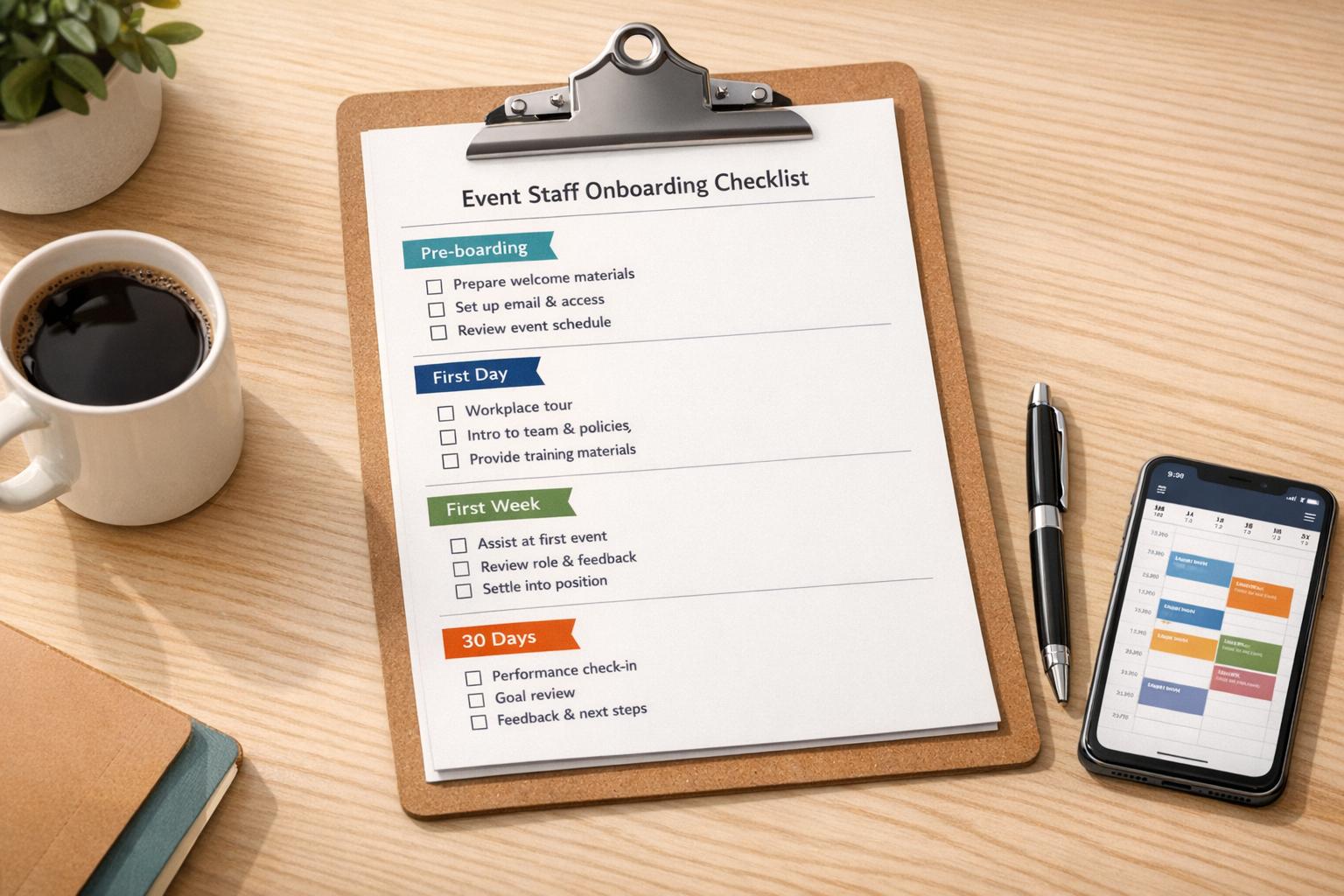
To streamline the process, organize tasks by onboarding phases: Pre-boarding, First Day, First Week, and 30-Day milestones. This phased approach ensures everyone knows what’s next. For the Status column, use dropdown menus or checkboxes with options like "Not Started", "In Progress", and "Completed." These visual cues make it easy for managers to spot delays or bottlenecks at a glance. Pairing this table with mobile scheduling tools allows for real-time updates, keeping everyone on the same page.
For even better tracking, add columns for Employee ID, Department, and Start Date. This extra layer of detail helps manage diverse roles and ensures the table adapts to varied team needs. The Notes section is perfect for capturing additional information, keeping all key details in one place.
Assigning specific owners to each task - whether it’s HR handling paperwork, IT setting up system access, or a peer mentor guiding role training - ensures accountability. When everyone knows their responsibilities, tasks are less likely to slip through the cracks. A well-maintained checklist like this not only keeps the onboarding process organized but also sets a strong foundation for employee success and retention right from day one.
A solid onboarding framework is more than just a formality - it's the backbone of a dependable and well-prepared event team. With up to 20% of employee turnover happening within the first 45 days, it's clear that an overwhelming or disorganized onboarding process can have serious consequences.
Done right, onboarding doesn't just reduce turnover - it can increase retention by 82% and improve productivity by 70%. For event businesses operating under tight deadlines and high-pressure conditions, this translates to having a team that's ready to perform from day one. Onboarding checklists bring much-needed organization and clarity, turning overwhelmed new hires into confident contributors.
Tools like the Quickstaff Onboarding Integration Template make this process even easier. By centralizing schedules, tasks, and event details in a mobile-friendly platform, Quickstaff helps managers automate updates and streamline communication. With a free 14-day trial and no credit card required, it’s a low-risk way to see how technology can simplify your onboarding process.
In an industry where precision and teamwork are non-negotiable, investing in detailed onboarding checklists and the right tools ensures your team is prepared, stays longer, and consistently delivers outstanding results.
To get your event staff ready for success, start with a thorough onboarding checklist. This should cover essentials like gathering personal and tax information, confirming their availability for upcoming events, and setting up profiles in your scheduling software. A well-structured checklist helps ensure nothing important slips through the cracks.
Make sure to collect necessary documents, such as I-9 forms and emergency contact details. Assign each staff member to their specific roles, shifts, and events using your scheduling platform. Follow this up with a welcome email packed with key details: event information, dress codes, important contact numbers, and any training materials they’ll need to hit the ground running.
Lastly, focus on clear communication and give them a quick orientation. Provide a short guide outlining their responsibilities, the venue layout, and safety protocols. Walk them through any tools or apps they’ll be using. These steps not only build confidence but also set the stage for a smooth and successful event day.
Quickstaff simplifies the process of onboarding event staff by replacing old-school, manual methods with an efficient digital system. With its customizable onboarding checklists, you can assign tasks like confirming availability, completing safety training, and reviewing event procedures directly to your team members. Plus, since the platform is mobile-friendly, staff can easily mark tasks as done in real time, giving managers instant visibility into progress and ensuring no steps are overlooked.
What’s more, Quickstaff seamlessly combines onboarding with event scheduling and communication. When planning an event, you can attach relevant checklists, share shift details, and even send automated reminders - all from a single platform. This not only cuts down on paperwork but also speeds up the entire onboarding process. The result? A smooth, consistent experience for new hires that leaves them feeling confident and ready to hit the ground running.
A well-structured onboarding process is essential for temporary event staff, offering consistency and reliability in an environment where things move quickly, and turnover is high. By using detailed checklists that cover essentials like venue policies, safety guidelines, and specific job responsibilities, event managers can minimize errors and ensure every team member is ready to provide a smooth experience for guests.
Beyond consistency, effective onboarding builds confidence and keeps staff engaged. Temporary workers often have little time to adapt, so clear instructions and expectations can make all the difference. When staff feel prepared, they perform better, which not only contributes to the event’s success but also eases stress for everyone involved.
Lastly, a structured approach ensures compliance with both legal and operational requirements. Onboarding checklists serve as proof that critical steps - like safety briefings and completing necessary paperwork - have been taken. This protects the organization while reinforcing its professional image.