Best Lighting Training for Event Crews
August 25, 2026

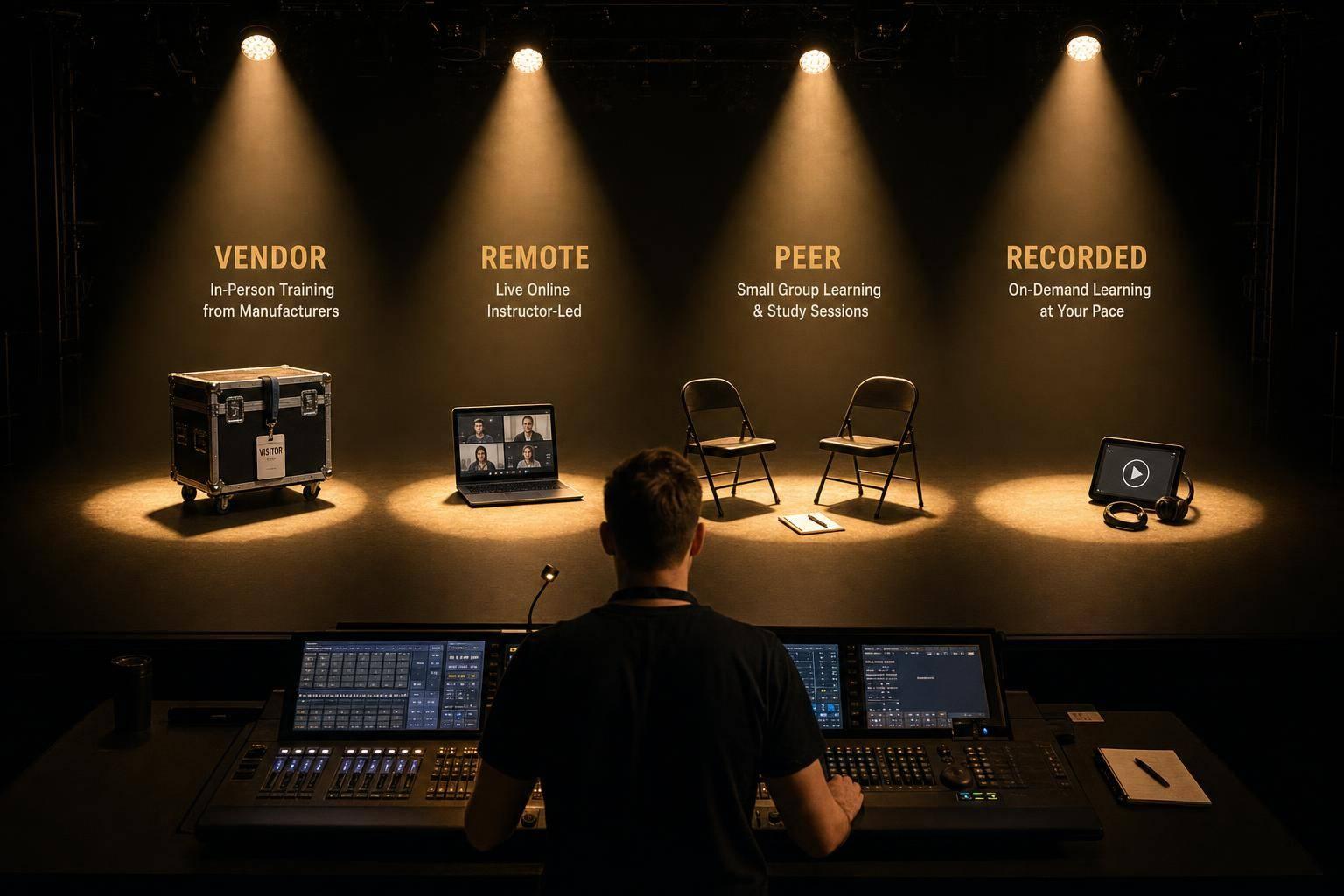
If I had to sum it up in one line: there is no single best lighting training format - the right pick depends on cost, schedule, hands-on needs, and crew size.
Here’s the short answer:
The article makes one point clear: live formats give more depth, while self-paced formats are easier to roll out to more people. It also shows where the money goes. For example, ETC in-person training runs about $149 to $235 per person, per day, while recorded training libraries can cost $5,000 to $20,000 up front. On the other hand, some remote options are free, and short recorded lessons can get 20% higher completion rates than longer ones.
If I were choosing fast, I’d use this rule:
The best setup for most teams is a mix, not a single format. A common approach is:
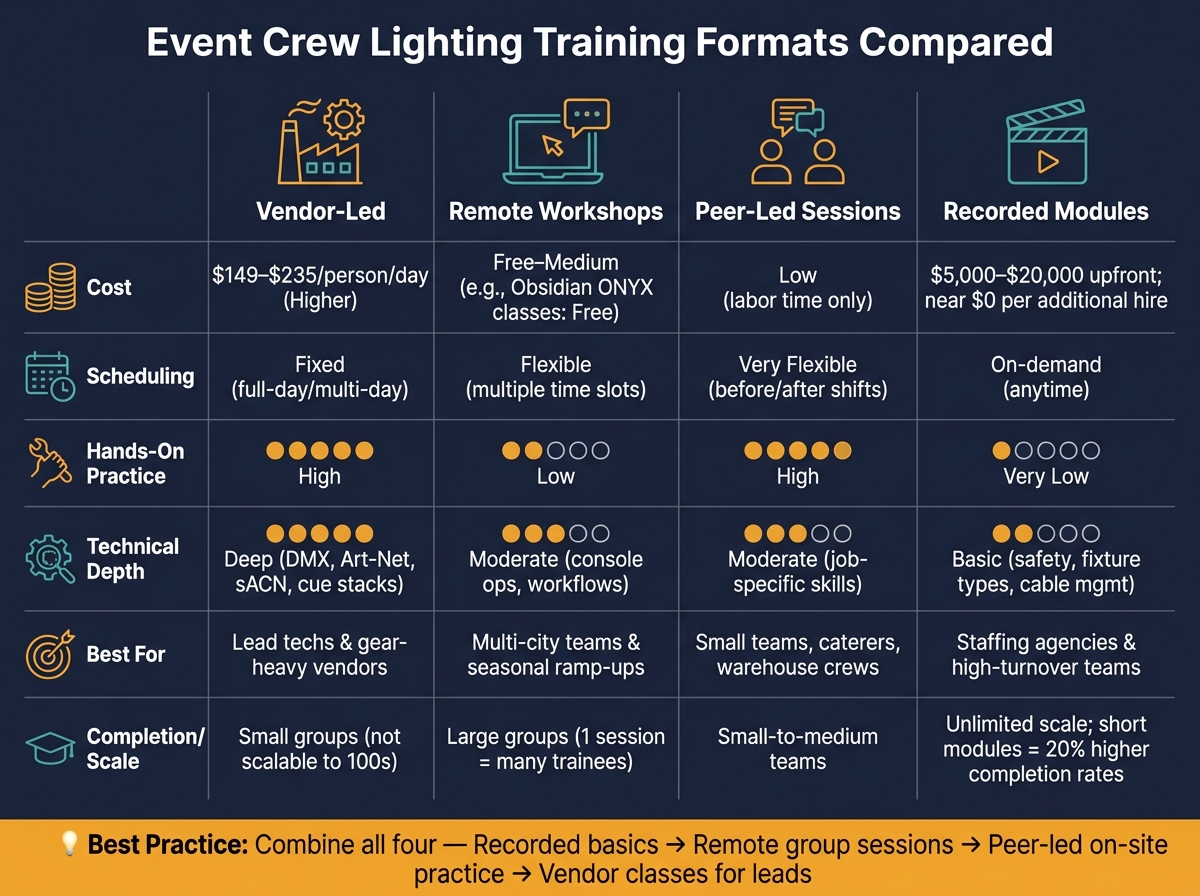
Event Crew Lighting Training Formats: Cost, Depth & Scale Compared
| Format | Cost | Schedule | Hands-On Practice | Best For |
|---|---|---|---|---|
| Vendor-Led | Higher | Fixed | High | Lead techs, gear-heavy vendors |
| Remote Workshops | Low to medium | More flexible | Low | Multi-city teams, seasonal ramp-ups |
| Peer-Led Sessions | Low direct cost | Flexible | High | Small teams, warehouse crews, caterers |
| Recorded Modules | Higher up front, low per person later | Very flexible | Low | Staffing agencies, high-turnover teams |
So if you run catering crews, AV teams, or event staffing, the choice comes down to a simple tradeoff: depth vs. scale, and live practice vs. convenience. The rest of the article breaks down those tradeoffs in plain terms.
Vendor-led classes come from the manufacturers and distributors behind the gear your crew already uses. Product engineers and senior techs usually build and teach these programs, so they tend to go deeper than peer-led sessions or recorded lessons. This setup makes the most sense for crews that are standardizing on the same lighting systems.
These courses get into the nuts and bolts: patching fixtures, building cue stacks, setting DMX addresses, routing Art-Net and sACN, and managing 120V load so you don't trip breakers. ETC's training, for example, is split into levels like Essentials, Enhanced Skills, and Intermediate, which means a new hire doesn't have to sit through the same class as a seasoned tech. Obsidian Control Systems also runs beginner, intermediate, and advanced ONYX tracks at rotating U.S. locations, including Los Angeles and Miami.
That kind of step-by-step structure is tough to match with informal training. It gives crews a clear path instead of a mix of random tips and one-off demos.
Vendor-led classes usually run as full-day or multi-day sessions. That's a hard fit for part-time and on-call crews. In most cases, it makes more sense to send team leads or A/V captains rather than the whole roster.
Vendor-led training helps standardize knowledge at the top of the organization. For multi-city operations, that matters. Everyone starts from the same playbook instead of doing things five slightly different ways.
The catch is scale. It doesn't work well for hundreds of seasonal workers. A better move is to train a small group first, then turn that material into internal playbooks and short crew sessions.
U.S. in-person ETC courses range from $149 to $235 per person, per day. Once you add travel, lodging, and lost labor hours, the price can climb in a hurry. That's why this format is usually best saved for lead techs and other roles that directly shape lighting results.
For crews that need the same kind of instruction without travel, remote workshops offer an easier option, though they come with less hands-on practice.
Remote workshops give teams a structured way to learn lighting without getting on a plane or driving across town. Platforms like ETC's LearningStage, Obsidian Control Systems' free weekly ONYX online classes, and ShowCraft Academy's live online courses all offer lighting instruction in a remote format.
These workshops can cover the nuts and bolts: fixture types, power distribution, DMX addressing, basic console operation, and common event setups like weddings, corporate meetings, and galas.
A lot of the value comes from screen sharing. An instructor can show the console live and walk the crew through patching, groups, palettes, cue building, and troubleshooting using real show files or virtual visualizers. That makes remote training a good fit for software-based tasks and repeatable workflows.
The gap is pretty clear, though. Remote sessions can't fully teach hands-on rig work like hanging fixtures, managing cable runs, or fixing hardware issues on a live setup. The best move is to pair remote lessons with on-site shadowing so crews can practice those physical skills in the field.
This is where remote workshops shine. Sessions can run in different time slots, and recordings can help staff who miss the live version catch up later.
For crews working nights and weekends, that kind of access can make or break participation. You can set up a training event in your scheduling tool, invite the right people, track RSVPs, and send reminders. Quickstaff can support that workflow.
If you're trying to get multiple teams on the same page, remote workshops are a strong option. One instructor using one curriculum means everyone gets the same direction on fixture labeling, cable management, safety checks, and the preferred looks for common event types.
That said, one session alone usually isn't enough. It's smart to follow each workshop with a setup checklist or patch template that crews bring on-site. It also helps to assign a lead tech at each location to reinforce the same process after the session ends, so teams don't slowly drift into different habits.
Remote workshops cost less because there's no travel or lodging to pay for. Some options are even free or low-cost. Obsidian's weekly ONYX classes are free, and the IATSE Training Trust offers free online lighting courses at varying skill levels.
One session can train a lot of people at once, which makes this format a strong fit for growing crews. It works well for:
For crews that already have the basics down, peer-led sessions are often the next lower-cost option.
When outside classes feel too formal or cost too much, peer-led sessions keep training close to the actual job. An experienced tech trains the crew on your gear, in your venues, using your standard event workflows. That makes the training local, fast, and tied to the work people do every day.
This setup is strong for job-ready skills, but not as strong on theory. A lead tech can show the crew how to handle safe power distribution on a 20-amp circuit, daisy-chain LED pars, set basic DMX addresses, and build the standard looks your company uses for its usual show types. For teams that need steady, basic operation, that often does the job.
The weak spot shows up once the material gets more advanced. Peer-led sessions only go as far as the lead tech’s knowledge. So topics like Art-Net/sACN, fixture personality management, or advanced cue stacks may be skipped. And without a set curriculum, one trainer might explain color temperature, beam angle, or patching one way, while another teaches it differently.
Caterers and staffing agencies often use this format for fast, low-cost onboarding. Vendors use it to keep one warehouse standard in place. For companies handling higher-end production, peer-led sessions usually work better when paired with vendor training or remote courses. This format works best as a baseline or a refresher, not as a full replacement for advanced instruction.
That hands-on focus is the big upside. Still, it only works if people actually show up.
This format gives you a lot of freedom. Sessions can happen during prep, before a call, or after teardown. You’re not tied to someone else’s calendar.
Still, flexibility can turn messy. During peak wedding season or the holiday party rush, training often gets bumped because events come first. A simple fix is to keep sessions short - about 30 to 60 minutes - and schedule them like shifts so on-call staff attend. Using a scheduling tool such as Quickstaff to schedule sessions, track RSVPs, and send reminders can help stop training from slipping through the cracks.
Peer-led training works well when you have one warehouse and a small group of leads. Once the crew gets bigger, consistency gets harder. One lead may prefer one DMX addressing scheme, while another uses a different one. That can throw people off, especially when crew members move between teams.
The fix is pretty simple: document a baseline procedure. That can include:
Add a simple competency checklist, and it gets much easier to keep standards aligned as the team grows.
Peer-led sessions usually have the lowest direct cost. There’s no tuition, travel, or lodging. The main expense is labor time. But if methods vary too much, the hidden costs can pile up fast: mispatched fixtures, longer load-ins, overtime, and client issues.
For caterers, vendors, and staffing agencies working with tight seasonal budgets, peer-led sessions during slower months are often the most workable way to keep skills current. They fit best when the goal is fast onboarding on real company gear.
When teams need the same message every time, recorded modules can help cover that gap.
Unlike live training, recorded modules stay available even when schedules change. That matters when crews are spread across cities, working weekends, or jumping between events. Everyone gets the same training, just on their own time.
Recorded modules are a good fit for core lighting topics: fixture types, basic DMX addressing, power safety, cable management, and crew safety. A solid program breaks those topics into short lessons and builds step by step, moving from the basics into more advanced work like console operation and cue playback.
That format also gives crew members room to review parts they didn’t catch the first time. If someone needs another pass on patching or power distribution, they can just replay that section.
Where recorded training falls short is the physical side of the job. Focusing a fixture from a ladder, programming a specific console under pressure, or dealing with a dimmer failure in the middle of a show can’t be learned from video alone. Recorded modules work best as pre-work, not as a full replacement for supervised hands-on time.
One of the biggest upsides is timing. Crew members can finish modules after a shift, between gigs, or during slow periods. When lessons are short - around 5 to 10 minutes - they fit much more easily into breaks, commutes, and downtime without getting in the way of event work.
Of course, convenience only helps if the training itself stays standardized.
This matters even more when teams rotate between venues or cities. For multi-location crews, recorded modules keep terminology, content, and safety guidance aligned. Once the library is built, you can train hundreds of seasonal hires with very little extra cost per person.
The catch is completion. Self-paced programs are often less likely to get finished than live workshops. That’s why many teams tie completion to the work itself. If staff need to finish a lighting safety basics module before they can take assignments involving truss or stage lighting, training stops being optional and becomes part of the role.
Tools like Quickstaff can help by keeping event assignments and staff communication in one place. That makes it easier for managers to check who is training-ready before putting them on lighting-heavy jobs.
Recorded modules usually cost more at the start and less per trainee over time. Building a basic lighting training library - covering safety, fixture handling, and standard setup procedures - can cost anywhere from $5,000 to $20,000, depending on production quality and scope, plus annual platform fees. But after that, adding a new seasonal hire costs almost nothing extra. For businesses with high turnover or large seasonal crews, that math can work in their favor.
There’s also a simple way to improve follow-through: keep modules short. Breaking training into 5- to 10-minute lessons focused on one skill can lift completion rates. Short modules show 20% higher completion rates than longer sessions.
For caterers and staffing agencies, that could mean splitting lighting training into small units such as:
Add a short quiz or scenario question after each module, and people tend to retain more than they do with passive video-only training.
No single format works best in every case. Each option gives you one thing and asks you to give up another. So the right pick comes down to your crew size, budget, and how technical your events get.
The table below breaks down where each format shines and where it can come up short:
| Training Format | Pros | Cons | Best Fit For |
|---|---|---|---|
| Vendor-Led | Deep, gear-specific instruction from product specialists | Costly and schedule-bound; limited to one brand or product line | Vendors training lead techs on standard gear |
| Remote Workshops | Low-cost, flexible, and easy to record | No hands-on practice; engagement drops in lecture-only sessions | Staffing agencies with crews across multiple cities; caterers prepping leads before busy wedding months |
| Peer-Led Sessions | Low-cost and job-specific; builds shared habits on-site | Weak habits can spread; knowledge leaves with senior staff | Caterers and vendors with experienced leads who can coach others on real equipment |
| Recorded Modules | On-demand, consistent, and scalable | Lower completion rates without accountability; lacks live-event context | Staffing agencies onboarding large seasonal crews; teams needing fast, standardized safety coverage |
The tradeoff is pretty clear. Live training tends to give you more depth, while self-paced options make it easier to train more people across more locations.
Next: which format fits caterers, vendors, and staffing agencies in practice.
Once you’ve compared the formats, the next step is simple: match each one to the crew that will get the most out of it. The right fit depends on crew type and how complex the job is.
Caterers usually need onboarding that’s fast and doesn’t interrupt service. Recorded modules work well here because new hires can learn basic lighting on their own time before their first shift. Then, right before service, a short peer-led walk-through can fill in venue-specific details, like where the house light panel is, when lights should dim during speeches, and how to prevent glare on buffets and cake tables. It’s a practical mix that keeps training moving without pulling people off the floor.
Event vendors who run more advanced systems tend to do best with a layered setup. Vendor-led classes give lead techs deeper technical training, including system design, troubleshooting, and safety compliance. After that, remote workshops help extend the same knowledge to crews in multiple cities without adding travel costs. They’re also easier to schedule around busy event seasons.
Staffing agencies need one thing above all: consistency. That’s why standardization should come first. Recorded modules set a baseline before anyone takes a lighting-related assignment. From there, periodic remote workshops can tackle repeat problems, like workers who aren’t familiar with common AV terms, before peak seasons begin.
The summary below shows the clearest fit for each crew type:
| Training Format | Best Crew Type | Onboarding Speed | Consistency | Scheduling Flexibility |
|---|---|---|---|---|
| Vendor-Led | Specialized event vendors | Slow | High | Low |
| Remote Workshops | Event vendors, multi-city agencies | Moderate | High | Moderate |
| Peer-Led Sessions | Caterers with experienced leads | Moderate | Variable | Moderate |
| Recorded Modules | Staffing agencies, high-turnover caterers | Fast | High | High |
For staffing teams, this fit matters during assignment, not just training. If an agency manages a large seasonal roster, pairing recorded modules with a scheduling platform like Quickstaff helps connect training to day-to-day staffing decisions. Managers can assign only workers who completed the required module. They can also attach notes or PDF guides to event invites so workers show up with the right context.
For crews that work events on a regular basis, the best format is the one that makes training easy to repeat and easy to use when it’s time to assign the job.
Choose training formats based on skill level and what people need to practice. Use classroom sessions or short video modules for safety rules and core concepts. Then shift to hands-on labs so people can practice safe setup and troubleshooting in a controlled setting.
To build workflow habits and communication under show pressure, add structured shadowing or live-event assignments. That’s where people learn how the job feels when the clock is ticking and small mistakes can snowball.
It also helps to match training to the risk tied to each role. If time is tight, keep the program modular so teams can cover the most urgent topics first without slowing everything down.
Track skills with a matrix, and run gap checks after new tech rollouts. That way, you can see who’s ready, where the weak spots are, and what needs more practice before the next event.
New seasonal hires should begin with OSHA 10 and basic AV workflow training. For general event staff, stagehands, and apprentices, OSHA 10 is the first step for hazard awareness and job-site safety.
They should also learn the core parts of day-to-day AV work, such as:
Update lighting training any time new equipment comes in or new hazards show up. Operators should also go through performance evaluations and retraining at least once every three years.
Keep training up to date for rigging, electrical work, and lift operations so crew members stay qualified to handle the procedures and equipment they use.