Seasonal Workforce Planning for Event Venues
August 17, 2026

If I wait until peak season to staff up, I usually pay more, work more overtime, and deal with more event-day gaps. The fix is simple: I plan labor demand early, forecast roles by event type, line up core, seasonal, and backup workers, and set backup rules before busy dates hit.
Here’s the short version:
A few numbers make the case. 89% of event professionals say staffing shortages have affected their events, and 68% of organizers struggle to find enough qualified workers during peak periods. That’s why I want a clear system before the rush starts, not during it.
What matters most is this: I don’t staff weddings, conferences, concerts, and holiday parties the same way. A plated dinner may need far more servers than a buffet. A concert needs more security than a banquet. And certified roles like bar service, A/V, and security need their own coverage plan.
So the goal isn’t to guess better. It’s to build a staffing process I can run every season with less scrambling, fewer no-shows, and tighter labor control.
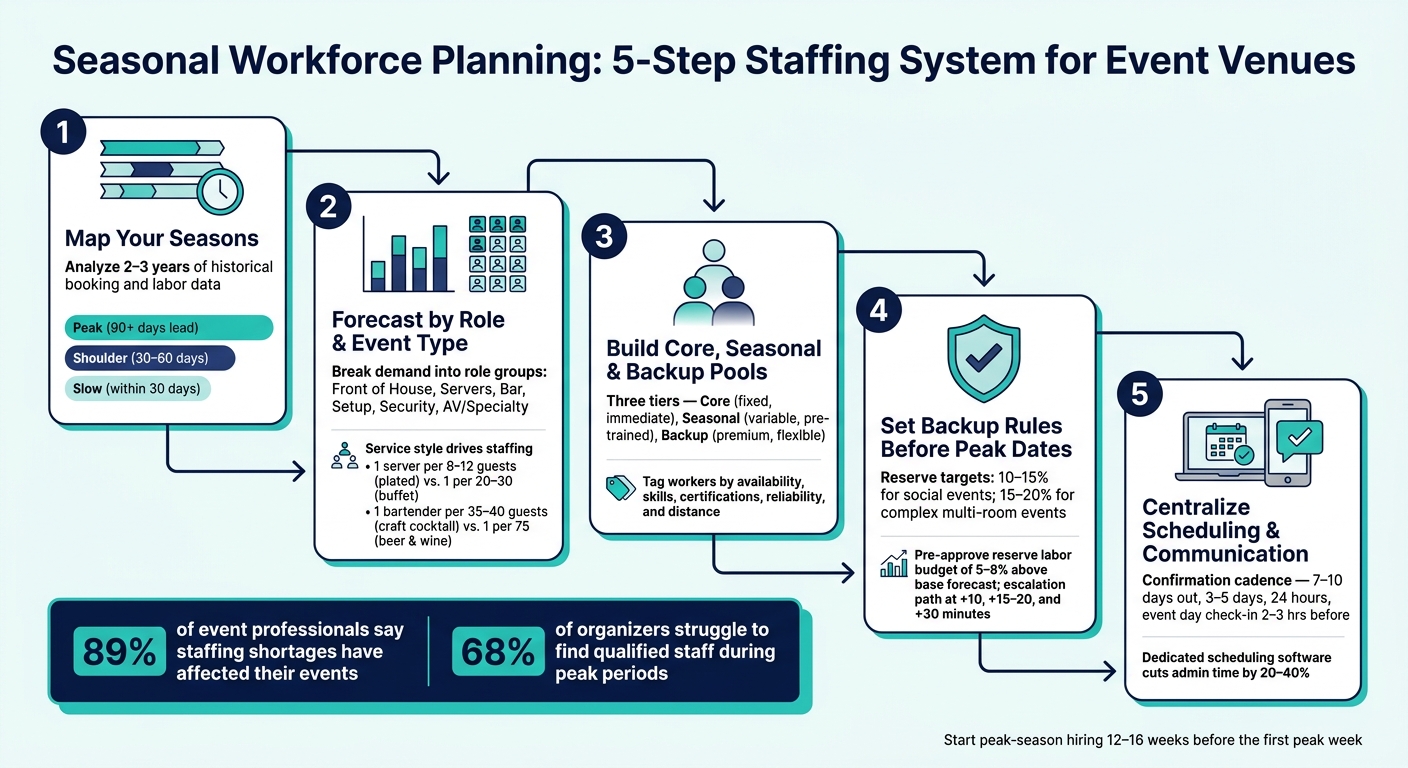
Seasonal Workforce Planning: 5-Step Staffing System for Event Venues
Start with 2–3 years of historical data: event counts, guest totals, event types, and labor hours by role. That time range helps smooth out oddball swings, like a one-time large contract or bad-weather disruption, and makes repeat patterns easier to see.
Then layer in the U.S. calendar. Wedding season runs roughly May through October across the country, with June, September, and October staying the busiest months. December holiday parties create a short but intense rush. Graduation weekends tend to cluster in late May through early June, and corporate and group event demand often climbs in January–February, April–May, and September–October.
National trends only tell part of the story. Local signals matter too. Festivals, marathons, commencements, and school breaks can create short demand spikes that turn a quiet week into a staffing crunch. Put those signals next to your booking history and sort the year into three simple bands:
| Season Type | Staffing Intensity | Typical Lead Time | Coverage Risk |
|---|---|---|---|
| Peak | High - full roster plus backups | 90+ days | High - overlapping events and limited replacement options |
| Shoulder | Moderate - mix of core and seasonal staff | 30–60 days | Medium - staff may have school or primary job conflicts |
| Slow | Low - core staff only | Within 30 days | Low - focus shifts to recruiting and onboarding for the next peak |
Your hiring calendar should start before the rush hits. Begin peak-season hiring 12–16 weeks before the first peak week. For December holiday parties, that means recruiting and backup planning should already be moving by September, not November.
A simple way to do this is to work backward from your highest-risk peak windows using three checkpoints:
This calendar helps you decide who to contact first, which roles need attention, and which dates need backup coverage. Once the year is mapped, you can turn each busy period into role-level demand using an event staffing needs analyzer.
Once you’ve mapped the season, the next step is turning each busy stretch into role-level demand. Headcount alone won’t get you there. Two events can have the same number of guests and need very different staffing. What changes the picture? Event type, service style, and day-of complexity.
So instead of forecasting one total labor number, break demand out by role group: front of house, food service, bar, setup/teardown, guest services, security, and specialty support. That gives you a much cleaner staffing plan. Using event staff scheduling software can help automate these role-based assignments.
| Role Group | Wedding | Conference | Concert | Banquet | Festival |
|---|---|---|---|---|---|
| Front-of-House & Coordination | Medium–High | High | Medium | Medium | High |
| Servers & Food Service | High (plated); Medium (buffet) | Low–Medium | Low | Medium–High | Medium |
| Bartenders & Bar Support | Medium–High (open bar) | Low–Medium | Medium–High | Medium | High |
| Setup & Teardown Crews | Medium–High (room flips) | Medium | Medium–High (staging) | Medium | High (multi-day) |
| Guest Services & Registration | Low–Medium | High | Medium | Low–Medium | High |
| Security & Safety | Medium | Medium | Very High | Medium | Very High |
| Specialty Support (AV, Tech) | Medium | High | High | Medium | High |
Guest count gives you the baseline, but service style sets the upper range. A plated, multi-course dinner usually needs about 1 server per 8–12 guests. Run that same event as a buffet, and staffing can drop to about 1 server per 20–30 guests, plus an attendant for each station or buffet line. Same attendance, very different labor plan.
The bar works the same way. A basic beer-and-wine bar may need about 1 bartender per 75 guests. A craft cocktail setup can push that to about 1 bartender per 35–40 guests. If you add VIP service or a clustered bar layout, plan for dedicated bartenders, a VIP host, and 1–2 extra security staff per bar cluster. Those differences should show up in your seasonal staffing model and in your backup pool.
Some roles can shift across event phases without much trouble. Servers may help with tables and linens before guests arrive. Guest services staff can help manage buffet lines or direct people during a room flip. Bartenders can pitch in with bar setup, inventory counts, and glassware bussing during slower periods. That kind of cross-training gives you more room to move without adding fixed headcount.
But there’s a line you shouldn’t cross. Security, AV engineers, licensed medical staff, and rigging specialists should never be pulled into general labor coverage. In many U.S. jurisdictions, alcohol service also requires trained and permitted staff, so you can’t just move an untrained server behind the bar when things get busy.
Treat those jobs as a protected pool with their own coverage. Build cross-training around the flexible roles instead. And here’s the tell: if the same person keeps filling two overlapping jobs, that’s not flexibility anymore. It usually means your forecast is short one dedicated worker during part of the event. When that pattern keeps showing up, add backup coverage in the next staffing pool.
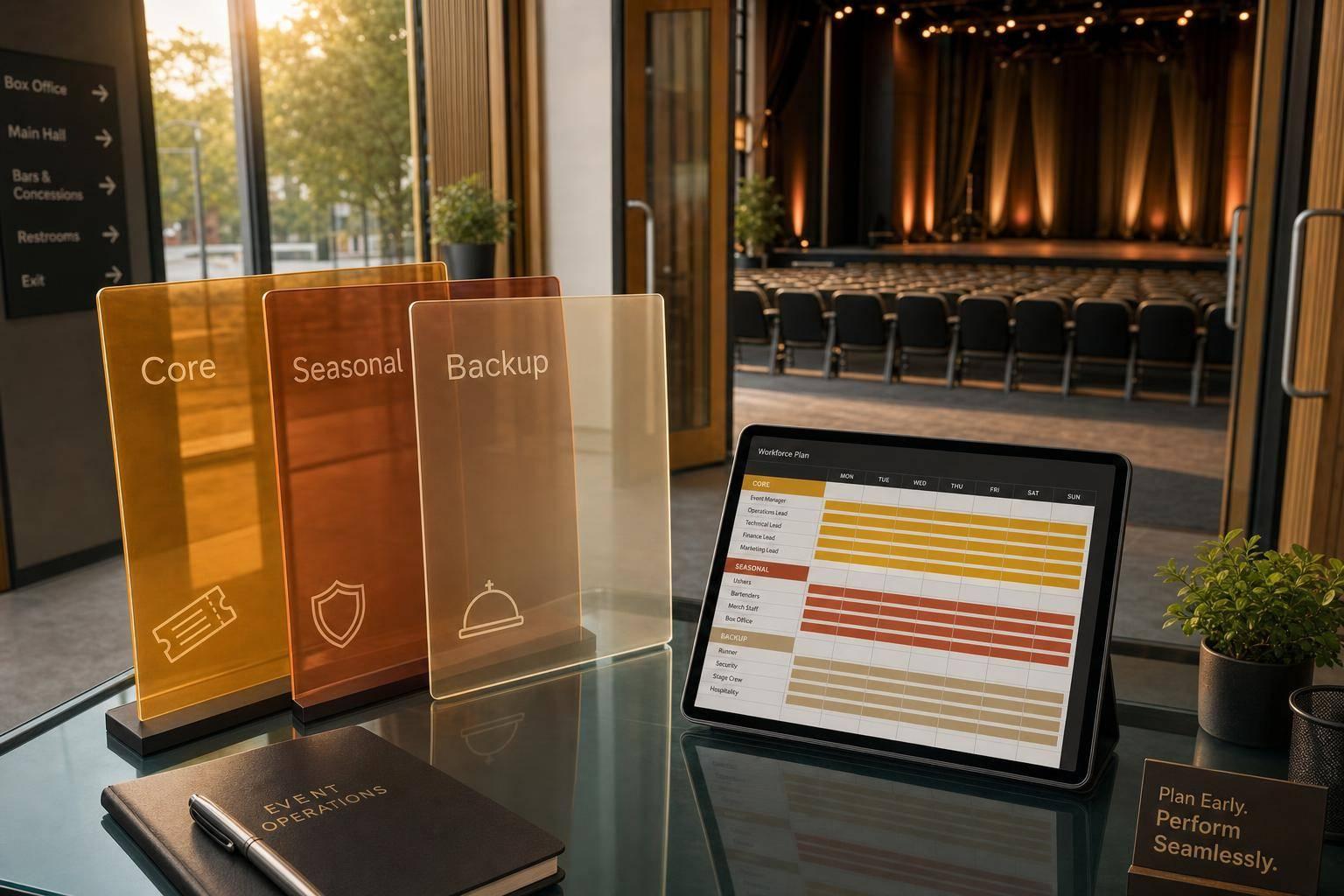
A labor forecast only helps if it turns into a staff pool you can put to work on time. Once you've mapped role demand, split workers into three groups: core, seasonal, and backup. Core staff handle critical roles year-round. Seasonal regulars cover expected busy periods. Backup staff step in for callouts and sudden spikes. Each group matches a different forecast window and staffing job. That setup turns projected demand into a team you can actually schedule.
Use the table below to separate the people you count on all year from the ones you bring in only during peak periods.
| Staff Layer | Cost | Readiness | Flexibility | Ideal Use Case |
|---|---|---|---|---|
| Core Staff | High (fixed) | Immediate | Low | Leadership, complex service, venue-specific standards |
| Seasonal Regulars | Moderate (variable) | High (pre-trained) | Moderate | Predictable peaks - summer weddings, December holiday parties |
| Backup Staff | Variable, often premium | Moderate (needs briefing) | High | Last-minute no-shows, weather changes, unexpected large bookings |
When you control your seasonal and backup pools, peak labor costs are easier to predict. For every worker across all three groups, track availability, skill tags, active certifications, reliability history, and distance to the venue. Those filters help you match the right person to the right event - fast, and with less guesswork.
Once the pool is set, start by filling it with people who've already worked with you before.
Before you post even one job ad, look at last season's roster. Workers who already know your venue layout, service standards, and event flow need much less ramp-up than brand-new hires. Reactivating them also cuts scheduling time because they already know how your operation runs.
A smart way to do this is to review your seasonal talent list 60–90 days before your expected busy period starts. Sort workers by events completed, manager ratings, and no-show history. Then send targeted re-engagement messages with upcoming dates and typical shift lengths. Put the fastest responders near the top of the list. A quick reply tells you something useful: this person is likely dependable.
Quickstaff keeps worker histories, availability, and preferred roles in one place, so top workers can be reactivated faster and re-invited before new hiring starts.
After that, sort workers by how much pressure they can handle on a given event.
Tiering staff with measurable data - not instinct - helps place your strongest people where they matter most.
A simple three-tier setup works well:
For peak events, fill most roles with Tier 1 and Tier 2 workers. Use Tier 3 for non-critical positions only. Then keep updating tiers as workers log more events or improve attendance. Quickstaff's availability tracking and response monitoring make it easier to spot who has committed to a shift and who still needs follow-up, so gaps show up early.
Once your tiered staff pools are set, lock in how backup coverage will work. No-shows, late call-outs, thin specialty coverage, double-booked workers, and compliance issues aren't random surprises. They're common staffing problems. And that means you can decide the response before peak season starts.
Use your staffing tiers to spell out who gets the first call, who handles floating coverage, and who stays protected for mission-critical roles.
The table below ties each common risk to its warning sign and the action that follows:
| Risk Type | Early Warning Sign | Backup Response |
|---|---|---|
| No-shows | Unconfirmed shift invitations or missed reminders | Activate the waitlist; escalate to a supervisor if the role is critical |
| Late call-outs | Cancellation within 24 hours of call time | Contact your on-call reserve pool; offer premium pay or a minimum-hours guarantee |
| Underfilled specialty roles | Dashboard shows the event is not fully staffed for a certified role | Send targeted messages to only qualified staff |
| Overlapping bookings | Same staff member assigned to concurrent events | Reassign to the priority event and fill the secondary shift from your backup pool |
| Compliance gaps | Expired certification or missing credential before the event date | Swap in a pre-identified backup with current credentials and flag the original staff record |
Set reserve targets before the season begins. For social events like weddings and galas, especially Saturday bookings, aim for 10% to 15% reserve coverage on guest-facing roles. For more complex events with multiple rooms or VIP service, move that up to 15% to 20% and give priority to senior staff who can step into lead roles. Also pre-approve a reserve labor budget, usually 5% to 8% above your base forecast, so managers don't freeze when backup help is needed. Put those reserve targets in the same planning calendar that handles confirmations and holds.
For day-of escalation, be clear about who acts and when. If a staff member is 10 minutes late with no contact, the shift supervisor should verify the no-show and alert the event manager. By 15 to 20 minutes, the event manager should activate on-call reserves or reassign cross-trained staff from lower-impact areas. If you're still short at 30 minutes, the venue operations manager or GM should approve overtime, adjust the service model, or communicate with the client. Log the no-show, activation time, and service change in the scheduling system, then update the worker's reliability score.
A clear confirmation cadence cuts down guesswork before event day. It also makes backup coverage far more dependable when things get tight.
Start 7 to 10 days out by sending full shift details: date, call time, location, dress code, role, and pay rate. Give workers 24 to 48 hours to confirm. If someone doesn't respond, flag that shift as at-risk and pre-alert a reserve for the slot.
Then tighten the process as the event gets closer:
If someone hasn't acknowledged by a set cutoff, such as 8:00 p.m. the night before, treat that shift as a risk and alert backup staff. At call time, any no-show at the +10-minute mark should trigger the escalation path right away.
Automated reminders and response tracking help surface at-risk shifts before they turn into service gaps. Quickstaff automates this confirmation and reminder flow, tracks responses in one dashboard, and flags at-risk shifts so managers can act on facts instead of guesswork.
Seasonal workers who show up unsure of the basics can slow everything down at the worst possible time. A simple onboarding packet helps prevent that.
Send each seasonal worker a one-page packet with dress code, arrival instructions, venue map, on-site contact, and role notes. Attach it directly to the shift invitation so they can pull it up on their phone while heading to the event.
You should also verify that anyone assigned to roles that need certification, such as alcohol service (TIPS or ServSafe Alcohol), food handling, or licensed security, has current and unexpired credentials before the event. Build that check into the confirmation workflow so it doesn't become a last-minute scramble.
For long shifts, especially in states with meal and rest break rules like California, include break timing in the shift briefing. That gives supervisors a clear plan to follow instead of making it up in the middle of service.
Build these rules into the same scheduling system that sends shifts, reminders, and backup alerts.
Once roles, tiers, and backup coverage are set, the next step is simple: turn the forecast into live shifts.
The best way to do that is to keep everything in one workflow. Start with the forecast, turn it into shifts, confirm coverage, and then manage event day from the same system. That flow keeps the plan tight and cuts down on the usual scramble.
Create events in your scheduling system as soon as dates are locked in. Add the core details right away:
From there, define the roles, generate shifts people can be assigned to, and send them out for availability checks. Once responses come in, use that same system to assign Tier 1, Tier 2, and backup staff to each event. Open shifts can then be filled based on skills and reliability, without bouncing between tools.
Keeping forecasting and scheduling in separate systems is where things start to fall apart.
Role counts get missed. Shift details change in one place but not the other. Then managers have to rebuild the staffing plan by hand. It's the kind of double work that eats up time and leads to mistakes.
A better setup keeps the forecast, shift, and worker record tied to the same event. That way, the forecast doesn't just sit in a spreadsheet. It becomes the event's staffing record, with roles and shifts linked to the same plan.
Software helps close that gap. Dedicated scheduling software can cut staffing admin time by 20% to 40% and reduce last-minute miscommunication.
This is where centralized scheduling earns its keep.
When availability, shifts, and messages all live in one place, managers can spot problems early. That includes unconfirmed shifts, open backup slots, and coverage gaps tied to Section 4's confirmation cadence. Waitlists can handle overflow without extra back-and-forth. Targeted messages go only to the people who need them, so a parking update doesn't hit the whole team. And staff can check call times, directions, and role notes from their phones while they're on the way to the venue.
Quickstaff is built for this kind of event-based scheduling, with availability tracking, automated waitlists, reminders, messaging, and mobile access in one place. The result is fewer gaps and faster coverage on peak dates.
Taken together, these steps turn seasonal forecasting into steady event coverage. Seasonal staffing works best when you treat it like a system: map demand early, forecast roles by event type, build layered staff pools, set backup rules, and run it all through one scheduling workflow.
The payoff is simple: fewer gaps and less scrambling. You get fewer last-minute holes, faster seasonal hiring, and steadier coverage on peak dates.
That kind of consistency matters because staffing shortages are still a serious issue across the industry. 89% of event professionals say staffing shortages have affected their events, and 68% of event organizers struggle to find enough qualified staff during peak seasons. A documented, repeatable system is often the difference between venues that handle that pressure and venues that get overwhelmed by it.
The goal isn't a perfect staffing plan - it's a consistent one. Track your own numbers from season to season, including:
Each peak season gives you better data to refine role templates, adjust tier assignments, and tighten backup rules for the next cycle. A mobile-friendly scheduling workflow like Quickstaff keeps event creation, staff availability, waitlists, reminders, and communication in one place. That means less time spent on logistics and more time for recruiting, training, and guest experience. The real payoff is fewer coverage gaps and more time to build the team behind the event.
Start with clean data from similar events. Look at guest counts, service style, and day-to-day needs on the floor. Then review 12 to 24 months of past event data to set a baseline for labor hours and role demand.
Standard ratios are a good starting point, but they shouldn't be the whole plan. Break the event into each phase:
That step matters because staffing pressure usually shifts during the event. A team that looks fine on paper can still fall short during arrival or cleanup.
It also helps to model three versions of the plan: best-case, expected, and worst-case. That gives you a clearer view of what the roster needs to handle if guest flow changes, timing slips, or labor demand spikes.
Before you lock anything in, use Quickstaff to track availability and spot gaps. It's a simple way to catch coverage issues early instead of scrambling at the last minute.
No specific roles are off-limits for cross-training.
The main idea is simpler than that: cross-training tends to work best when the skills fit together in a natural way. For example, servers can often pick up basic bartending tasks, and kitchen staff can help with food presentation.
Where things get harder is when the roles don't match well. A bartender taking on technical AV work is a good example. It’s not impossible, but it’s usually less practical.
After peak season, review past performance so your next plan is sharper. Compare each event’s actual results against your original plan, and look closely at metrics like staff utilization, shift fill rates, and total labor costs.
It also helps to look back over the last 12 to 24 months. That gives you a clearer view of seasonal trends, attendance patterns, and service gaps. You should also verify payroll against schedules and ask your team about recurring pain points.
Sometimes the numbers tell one story, and your staff tells another. You need both. If shift coverage looked fine on paper but people were stretched thin, that’s a planning issue worth fixing before the next busy stretch.