Why Event Staff Miss Details During Onboarding
August 15, 2026

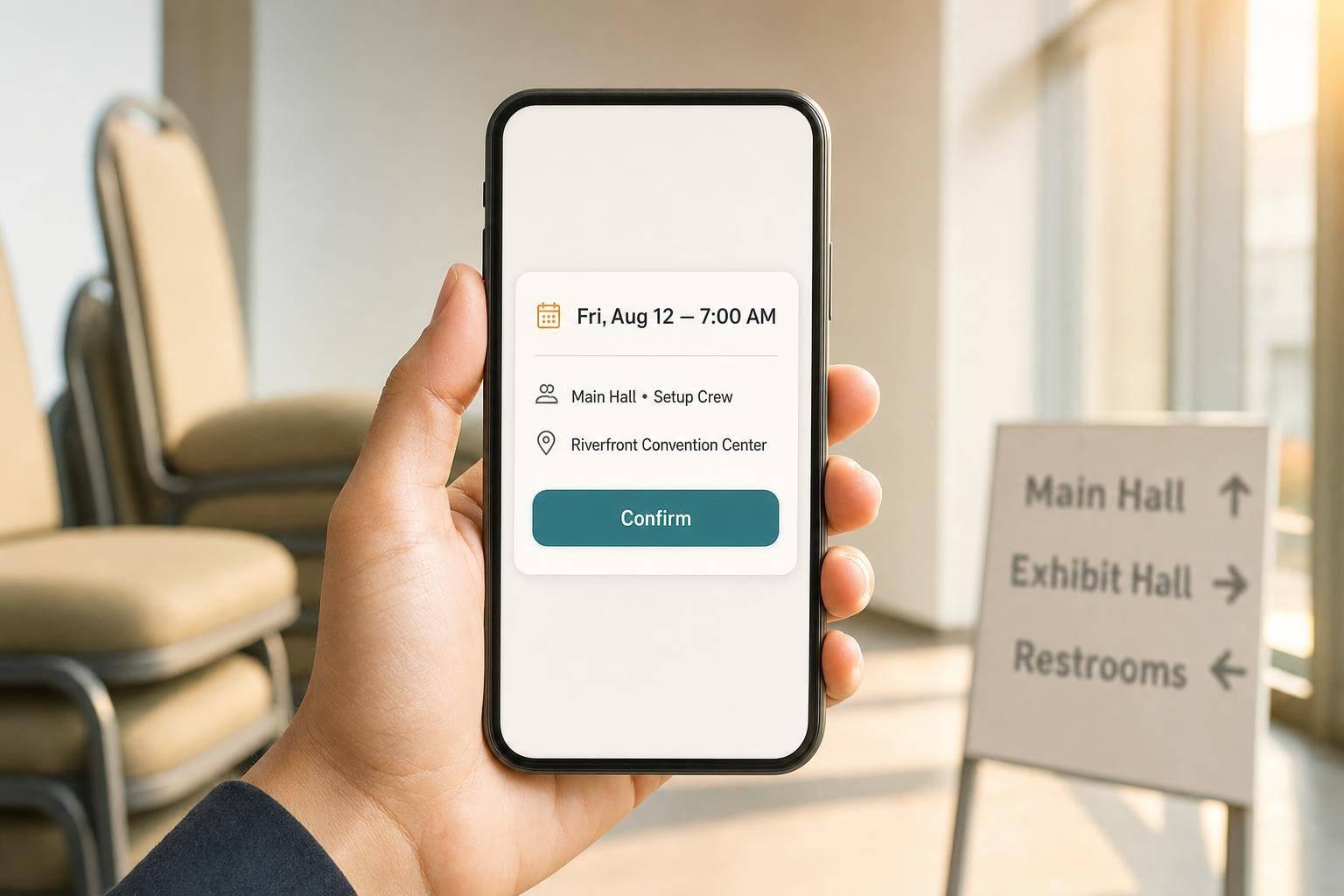
Event staff usually miss details for one reason: the message is split up, late, or too long to read on a phone.
If I had to sum up the fix in one line, it would be this: put every shift’s date, time, location, role, and contact person in one short mobile message, then ask for a clear confirmation and send reminders. When that does not happen, teams deal with missed shifts, late arrivals, and staff who show up unsure of what to do.
Here’s the short version:
A few numbers make the problem plain:
The main point: if you want staff to show up, arrive on time, and start strong, your onboarding has to be short, direct, and all in one place.
That is what this article gets into.
Most missed shifts don’t start with bad intent. They start with messy onboarding.
Usually, the details did exist somewhere. The problem was that they were split across too many places and weren’t easy to use in the moment. That’s where things start to go sideways.
When call times, addresses, and updates are spread across texts, emails, and spreadsheets, people end up with conflicting info. One message says the event starts at 4:00 PM. Another says the call time is 3:00 PM. The spreadsheet still shows the old version. At that point, the staff member has to guess which one is right.
And guessing is where mistakes happen.
When shift details are scattered across texts, emails, and phone calls, workers can miss a time change, overlook a cancellation, or show up at the wrong entrance. It’s not hard to see why. If someone is checking messages on their phone between jobs, they’re not going to dig through a dozen threads to piece it all together.
A single message should include the basics:
If even one of those pieces is missing, staff may wait for a follow-up that never comes.
A posted shift is not the same as a confirmed shift.
You need a direct acknowledgment. That could be a reply of "YES," a tap-to-accept, or something similar. What matters is simple: there’s a record showing that the worker saw and accepted the exact date, time, and location.
That small step matters more than many teams think. Research on reminder sequences shows that stacked SMS or email reminders sent 72 hours before, 24 hours before, and on the day of the shift can reduce no-show rates from 15–25% down to below 5% in some service contexts.
For U.S.-based event teams, the message should be plain and specific:
"Saturday, August 22 at 3:00 PM, call time 2:00 PM - reply YES to confirm."
That kind of wording leaves very little room for mix-ups. Staff can check the assignment in seconds and know whether they’re looking at the right shift.
Without a confirmation loop and reminder sequence, workers may miss the first post or confuse it with an earlier draft. That problem gets worse on mobile, where people skim fast and long threads get buried.
Email chains are a poor fit for frontline event workers. Most aren’t sitting at a desk working through inbox threads. They’re checking their phones between jobs, on the move, and often in a hurry.
That’s why short mobile messages work better. Lead with the details that matter most: date, time, location, and role. Put the key info up front so staff can read it fast and act on it fast.
Quickstaff supports this with mobile-friendly scheduling, automated reminders, availability tracking apps, and centralized coverage. That setup gives staff one place to check their confirmed assignment. It also gives managers a clear view of who has replied and who hasn’t.
Just as important, the same format keeps location details from getting buried, which helps cut down on late arrivals.
A confirmed shift doesn't always lead to an on-time arrival. Staff can accept a booking and still show up late if the onboarding message skips the details they need to map out the trip.
That’s the gap: acceptance is one thing, getting to the right place at the right time is another. And this issue doesn’t disappear once someone says yes to the shift.
A venue name alone doesn’t cut it. Big event spaces often have multiple entrances, separate load-in areas, and parking that’s hard to spot from the street.
Every onboarding message should include:
Put the address, staff entrance, parking, and arrival time in one message. If those details are split across different texts or emails, people miss things.
Even solid directions fall apart when they change and no one says anything.
Site changes happen. A load-in door gets moved. A call time shifts from 2:00 PM to 1:30 PM. A parking lot closes, so staff need to park somewhere else. When those updates are buried in scattered email threads, people miss them and have almost no time to adjust.
The fix is a consistent update workflow. When a detail changes, send the update right away to all confirmed staff through a centralized event staff app so everyone is working from the same information.
How the message is written matters just as much as the details inside it. If parking instructions are buried in a long onboarding email, a staff member checking their phone on the way in may never spot them.
Lead with the logistics first: arrival time, address, entrance, and check-in instructions. Then add role notes after that. Keep the message short and focused on arrival. Once those details are clear, the next step is spelling out what staff are expected to do.
Once staff arrive, they still need clear direction on what to do. This is where many teams slip up. The shift starts, people are on time, uniforms are on, and yet performance still falls short because the role was never spelled out in plain terms.
A title like "event staff" or "server" sounds clear at first glance, but it doesn't tell someone much that helps on the floor. It doesn't explain which station they cover, what they're responsible for, or who steps in when something goes wrong.
Each role label should come with a few basic details:
That kind of detail shows staff what success looks like for their assignment, not just for the event as a whole.
If there's no written checklist, people lean on memory or on habits from past jobs. And that's where things start to drift. One worker may set up everything correctly. Another may miss a step simply because no one wrote it down. The result is uneven service and more on-site fixing.
A practical briefing note doesn't need to be long. It should cover setup tasks, top tasks, dress code, break rules, safety notes, and who handles breaks, changes, and issues. Sending those notes 24–48 hours before the shift and making them easy to access gives staff time to read them before the event starts.
When staff don't know who to ask, they usually do one of two things: guess or stop moving. Neither helps.
Each worker should get the name of one supervisor, plus a short note on what that person handles: break approvals, zone reassignments, guest incidents, and supply issues. Put the supervisor's name, role, and issue path in one mobile briefing.
When staff know their role, have a checklist, and can reach one named contact fast, they make fewer mistakes. That's why the onboarding message needs to spell out the role, the checklist, and the contact person.
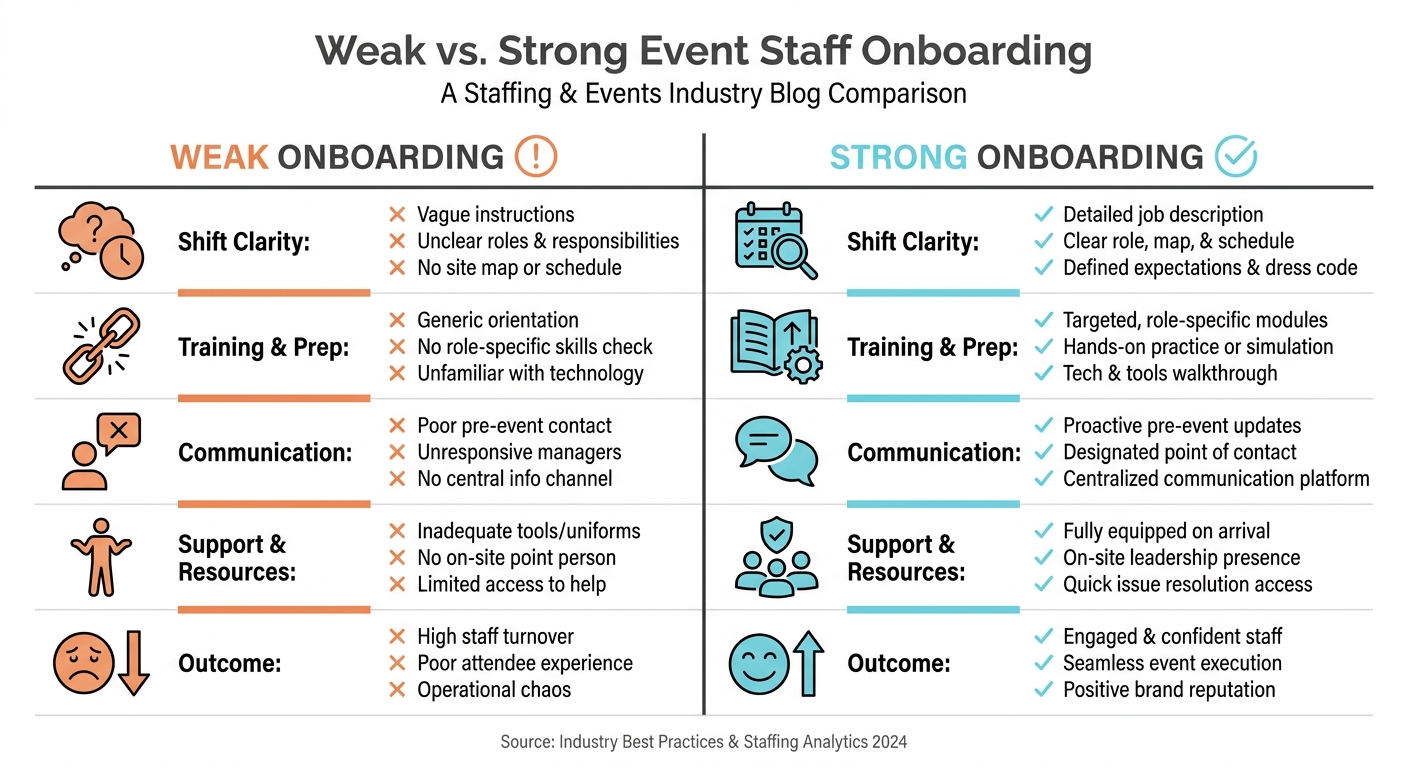
Weak vs. Strong Event Staff Onboarding: Side-by-Side Breakdown
Missed shifts, late arrivals, and role confusion usually happen when messages are scattered, vague, or sent too late.
These issues get easier to fix when every event uses the same message flow.
Each message has a job to do. Confirmation helps cut no-shows. Logistics reminders help people arrive on time. Role briefs help staff know what they’re walking into before they hit the floor.
The gap becomes pretty obvious when you look at the two side by side.
| Dimension | Weak Onboarding | Strong Onboarding |
|---|---|---|
| Shift clarity | "Can you work Saturday night at the hotel?" | "Event: Johnson Wedding, Date: Saturday, September 12, 2026, Time: 4:30 PM–11:00 PM, Location: Grandview Hotel, Banquet Hall" |
| Logistics detail | "See you there!" | Full address, parking instructions, arrival window, staff entrance location |
| Role specificity | Generic label: "Server" | "Banquet Server – tray-pass appetizers, maintain water service, report to Floor Captain" |
| Reminder cadence | Single assignment text, no follow-up | Confirmation request + 48-hour reminder + same-day reminder |
| Question routing | No contact listed | "If delayed or lost, text Onsite Coordinator at (555) 123-4567 immediately" |
This is where the benefits of using event staff scheduling software become clear. Quickstaff connects assignments, reminders, and role briefs to one event record, so the same process is easier to repeat without gaps.
The onboarding message is the first thing staff see, so it sets the tone. When every event follows the same clear sequence, people show up on time, go to the right place, and start work knowing what’s expected.
Every shift message should be easy to scan and include the basics:
If it applies, add the call time, parking details, entry point, and the on-site contact too.
Quickstaff keeps all of this in clear, mobile-friendly notifications, so staff can check the details fast without digging through long messages.
Send automated reminders 1–2 days before the event so staff have what they need and show up on time.
Include the call time, venue address, parking details, on-site contact, and shift tasks. If something changes at the last minute - like a new location or a staff reassignment - send an instant alert. Quickstaff can automate these messages and deliver them straight to staff mobile devices.
Send role details in the new assignment message before the shift so staff know what they’re walking into and can confirm with the right expectations.
In Quickstaff, the New Assignment email should include the basics:
If the role details change later, send an update notice that includes only what changed.