Event Staffing Challenges and Solutions
July 5, 2026

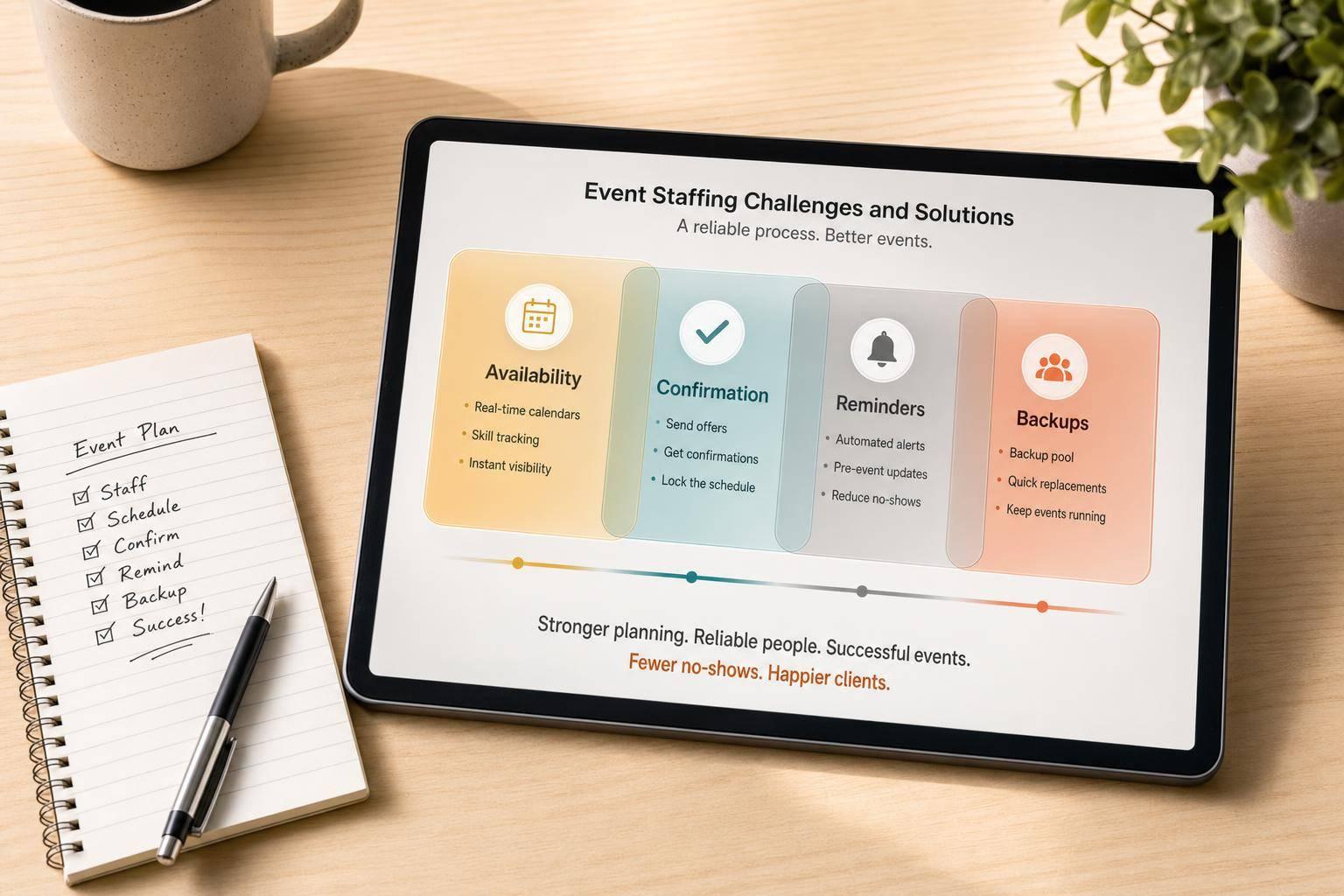
Event staffing usually breaks for three simple reasons: you can't see who is free, booked staff don't always show up, and key details are spread across too many places.
If I had to sum up the fix in one line, it's this: use one clear staffing process for availability, confirmations, reminders, backups, and event details. That matters even more when no-show rates can hit 20% to 30% and reminder systems in service businesses have been linked to 50% to 60% lower no-show rates.
Before I get into the full article, here’s the short version:
Here’s the core idea: when staffing runs on one repeatable workflow, growth puts less strain on your team. That means fewer gaps, less chasing, and fewer event-day surprises.
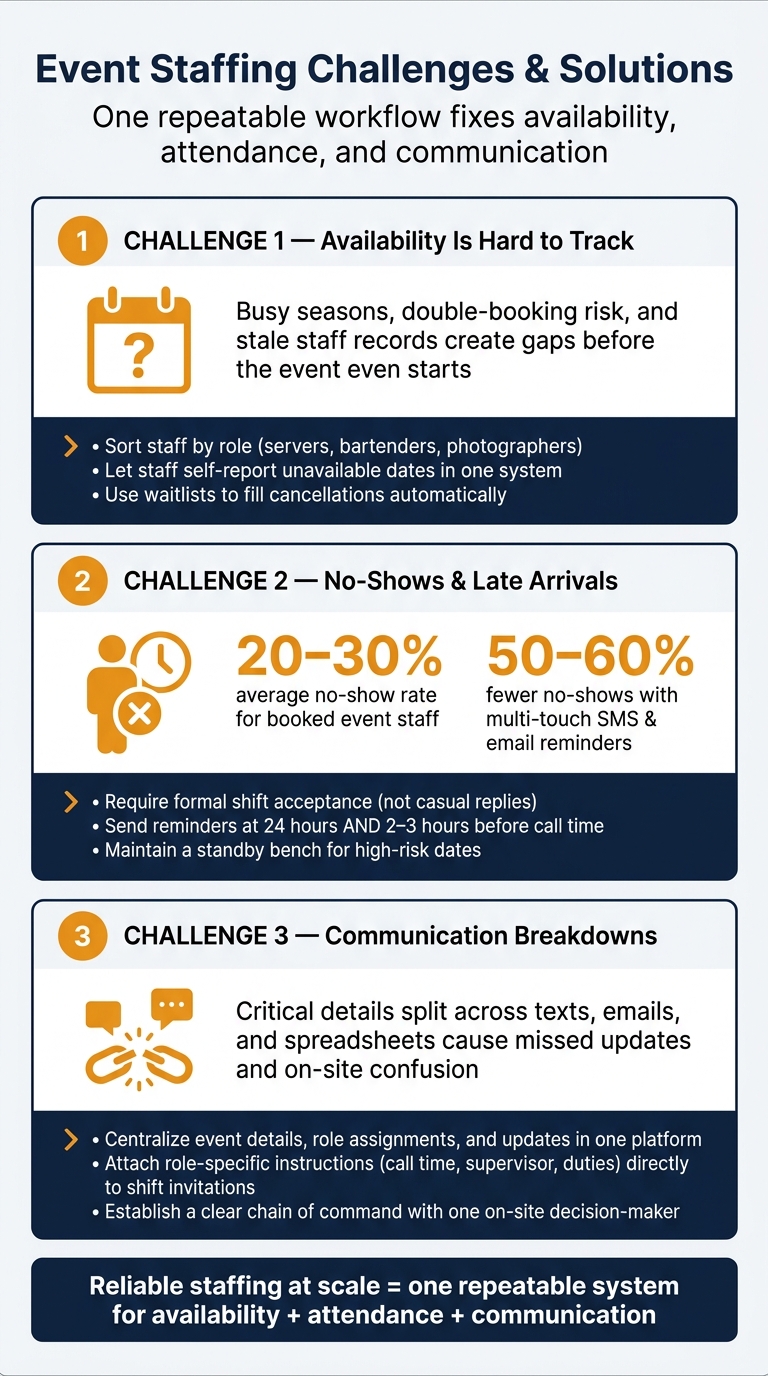
Event Staffing: Key Problems, Stats & Solutions at a Glance
As bookings climb, staffing stops being just a hiring issue. The bigger headache is knowing who is actually available. As Edin Pandur of Liveforce puts it:
"The problem is rarely a shortage of workers. It is a shortage of visibility."
That gets harder as you grow. It becomes tough to see who is free, who is qualified, and who is still active in your staff pool.
Busy periods like summer weddings, holiday events, and festival weekends squeeze demand into the same group of workers. Many part-time staff members also work for other companies, so double-booking is always lurking in the background.
The main issue, though, is often the manual process. Chasing people for updates takes time. It also leads to guesswork, where assumed availability turns into staffing gaps on event day. If you reach out two weeks before an event, your most dependable workers may already be booked somewhere else.
Stale staff records add another layer of trouble. It's easy to assume last year's team is still around and ready to work, but that can backfire fast. The longer you go without a current view of your staff pool, the tougher it gets to plug holes when demand jumps.
The fix usually comes down to two moves: build a deeper bench and manage it from one place.
A vetted bench means sorting your staff pool by role, such as servers, bartenders, and photographers, so you're only contacting people who can handle a given shift. Instead of scrambling to check availability one person at a time, use a system that lets staff block off dates they can't work. When all of that sits in one place, conflicts are much easier to catch before scheduling starts.
Waitlists help even more. If you invite more staff than you need and keep a queue, you can fill open shifts much faster when someone declines or cancels. Quickstaff supports this setup with role-based scheduling, availability tracking, and automated waitlists that help keep your roster filled without the back-and-forth.
Jennifer Manley, a Staffing Coordinator, said it in plain terms:
"My time spent scheduling has shrunk majorly, leaving me more time to focus on recruiting, onboarding new event staff, and training."
When you spend less time chasing confirmations, you get more time to build a dependable staff pool for peak season. Once availability is centralized, the next problem shows up on event day: late arrivals, no-shows, and last-minute changes.
Once you know who's available, the next problem is simple: Will booked staff actually show up? One no-show can throw off overlapping events and set off a chain reaction of last-minute changes. And this isn't rare. Multiple event staffing sources report average no-show rates of 20–30% of staff booked for events.
When a key staff member doesn't show, the impact hits fast. Load-in slows down, service starts to slip, and the client notices.
On top of that, emergency replacements and overtime can eat into margin fast, especially on peak weekends.
There's also the manager problem. Your on-site manager should be focused on the event, the client, and the floor. Instead, they're stuck calling no-shows, moving people between sections, and rushing through a handoff with a last-second replacement. That's usually when small service issues start turning into complaints.
Most event-day surprises come from the same three issues: loose confirmations, scattered event details, and no backup plan. Fix those, and a lot of the chaos starts to fade.
Shift acceptance needs to be clear. It can't be assumed. A mass message isn't a confirmation system. Staff should formally accept the shift, and managers should be able to see in real time who said yes and who still hasn't replied.
Reminders help too. Sending them 24 hours before a shift and again 2–3 hours before call time can cut down on the classic "I forgot" excuse. In appointment-based service industries, multi-touch reminder sequences through SMS and email have been tied to 50–60% drops in no-show rates.
Event details also need one home. When call time, location, parking instructions, dress code, and role details all sit in one place, staff show up better prepared. When that info is buried across email threads and group texts, people miss updates. It's that simple.
"Staff 'no shows' due to 'missed' messages and unanswered emails is not just frustrating, it also hurts your business!" - Quickstaff
Quickstaff puts event details, shift confirmations, and automated reminders in one mobile-friendly platform. That makes it easier for staff to find the latest info, and it gives managers a clear view of coverage status without chasing people down.
A simple playbook helps:
Once attendance is more stable, the next weak spot is communication.
Once attendance is under control, communication becomes the next big risk. And as event volume grows, things can fall apart fast. Staff show up at the wrong entrance, miss dress code changes, or report to the wrong lead because key details are spread across texts, emails, and spreadsheets.
The problem is simple: critical details live in too many places. Venue addresses, parking instructions, and role assignments get split across emails, texts, and spreadsheets. Then a start time changes or a role gets reassigned, and suddenly there’s no single place to update everyone or any solid way to make sure the message lands.
"Large-scale event staffing rarely fails because there aren't enough workers. It fails when communication, supervision, and contingency planning can't keep up with the demands of the operation." - Allied OneSource
Things also slow down when there’s no clear chain of command. Decisions get stuck. Updates move too slowly. Staff need one person coordinating, one on-site decision-maker, and one clear escalation path.
A central messaging system keeps event details, role assignments, and updates in one place for event communication. That matters because when staff can find what they need fast, missed updates go down and confusion starts to clear.
Role-based instructions tied straight to each shift assignment work especially well. Instead of blasting a general briefing to everyone, each staff member gets only what applies to their role - their call time, supervisor, duties, and reporting line.
Quickstaff helps by putting event communication, scheduling, and reminders into one mobile-friendly platform. Managers can attach event-specific notes - dress code, parking, and reporting lines - directly to shift invitations, so staff see the right details before they arrive.
With communication standardized, the next move is turning that process into a repeatable staffing system.
Once availability, attendance, and communication are under control, the next step is simple: make those fixes repeatable.
The main win isn't fixing each staffing issue one by one. It's building one staffing process that stops the same problems from popping up again. Use one workflow for every event, and the whole thing gets easier to run as you grow.
Start by using an event staffing needs analyzer to determine your requirements based on past setups, then change only what’s different. Quickstaff includes event creation and duplication, which helps support that repeatable workflow.
For new staff, send the same shift packet every time. That packet should include:
Adding those details straight to shift invitations keeps the right info in one place, instead of scattered across texts, emails, and last-minute calls.
After each event, add short post-event notes. This makes it easier to spot dependable staff and catch repeat issues before they turn into bigger problems. Those notes should shape who gets scheduled first for the next event. In other words, each event helps set up the next one.
Reliable staffing at scale comes down to one repeatable system that handles availability, attendance, and communication together. Keep a bench of confirmed alternates ready for high-risk dates. When those pieces are in place, taking on more events doesn’t have to mean more stress.
A repeatable workflow turns staffing from a scramble into a system.
Plan a 10%–20% staffing buffer to handle no-shows, last-minute cancellations, and surprise demand.
It also helps to keep an active, up-to-date list of cross-trained freelancers and part-time workers who can jump in when needed. Quickstaff can support this by tracking availability and helping you pull together event-specific backup coverage fast.
Most event staff no-shows come down to two things: poor communication and unclear scheduling.
When teams rely on spreadsheets, email threads, and scattered text messages, things slip through the cracks. Staff can miss updates, misunderstand their assignments, or never get the key event details in the first place.
Last-minute planning makes the problem worse. If people get too little notice, they're far more likely to drop off or not show up at all.
Quickstaff helps cut down on these issues by keeping event management in one place and sending automated reminders.
Use automated reminders to keep staff up to date on upcoming shifts and key event details, like directions and job-specific instructions.
That cuts down on missed messages and no-shows. A central tool like Quickstaff also makes reminders much easier to manage, so staff stay prepared without manual follow-ups or scattered emails.