Union Shift Assignment Checklist for Seniority
August 22, 2026

If you assign union shifts the same way every time, you cut grievance risk. In most cases, the order is simple: check the contract, confirm who is qualified, rank that group by seniority, apply tie-break rules, and save proof of each step.
I’d boil the process down to this:
A few contract points can change the outcome fast. Probation limits often last 60 to 180 days. Schedule posting rules may require notice 1 to 4 weeks ahead. And a tie between employees is not for a manager to guess at - the CBA decides it.
If I were building a repeatable process, I’d treat this as a contract-based checklist, not a judgment call.
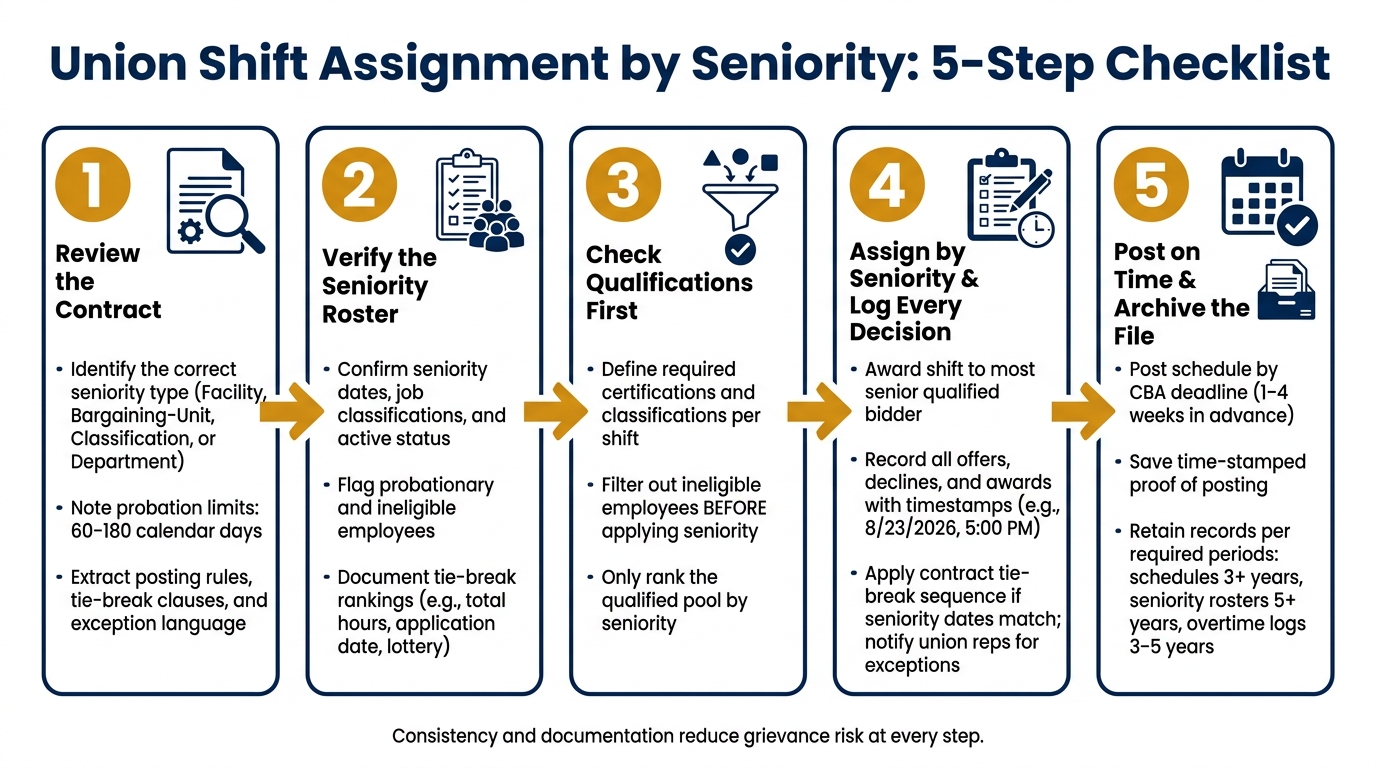
Union Shift Assignment by Seniority: 5-Step Checklist
Before you assign a single shift, review the CBA sections that control seniority, eligibility, overtime, schedule posting, and tie-breaks. That step matters because the same contract can use different rules for different staffing decisions.
CBAs don't always treat seniority as one simple thing. In many cases, the contract uses different seniority types depending on the issue at hand. Four of the most common are below:
| Seniority Type | How It's Measured | Common Scheduling Impact |
|---|---|---|
| Facility/Company | Total length of employment with the employer | Shift bids ranked by overall hire date, regardless of job changes |
| Bargaining-Unit | Time in union-covered positions only | Out-of-scope or management time excluded from the count |
| Classification | Time in a specific job title or role | A recent transfer may rank below a newer hire who stayed in that classification |
| Department/Location | Time within a specific worksite or unit | Staff from other departments can't claim shifts here, even with more total service |
The key point: the same CBA can apply one type of seniority to bidding and another to overtime or transfers.
After you identify the right seniority type, check whether probation or a break in service limits bidding rights.
Probationary employees can trip people up fast. Many CBAs say seniority starts on the hire date, but the employee can't use that seniority for bidding or overtime eligibility until probation ends. That window is often 60 to 180 calendar days. In practice, that means you should mark probationary employees as ineligible to bid.
Breaks in service matter too. Resignations, some terminations, and long unpaid leaves may reset seniority. On the other hand, approved FMLA or workers' compensation leave usually keeps seniority in place.
Then review the management rights clause and any emergency exception language. Pull out the exact clause, the trigger for using it, and any notice the contract requires. Do that work now, not in the middle of a staffing scramble, so your team applies the same standard every time.
Once you've found the key clauses, turn them into plain scheduling rules your team can use without reopening the contract every time. Think of it as moving from legal language to a shop-floor playbook.
Each clause should become one direct rule:
Write each one as a single action sentence. For example:
post open shifts by [date]; accept bids through [date]; award to the most senior qualified bidder; publish the final schedule at least [X] days before start.
Have HR or labor relations check that rule list before your team uses it. Then use the list to update the roster and confirm eligibility before assignment.
Once your contract rules are in plain scheduling language, the next job is simple: make sure your employee data is clean enough to use.
If your roster has old seniority dates, missing eligibility notes, or the wrong job titles, you're asking for trouble. In practice, that's not much better than skipping the contract review in the first place.
Before each schedule, verify these fields for every bargaining-unit employee:
| Field | What to Check |
|---|---|
| Full name and employee ID | Matches HR/payroll system exactly |
| Job classification | Current title, not a previous role |
| Seniority date | Confirmed against HR records and prior posted lists |
| Active status | Active, on leave, or terminated |
| Probation status | Eligible to bid or restricted |
| Bargaining-unit status | In-unit, out-of-unit, or temporarily excluded |
| Eligibility notes | Restricted duties, medical limitations, suspended license |
| Tie-break ranking | Documented rank among employees sharing the same seniority date |
Tie-break rules need their own field on the roster. That's a small detail that can save a big headache later.
Common contract methods include:
Whatever your CBA says, write it down clearly. For example: "Tie-break rank: 2 of 3, per total hours as of 08/01/2026." Also note the contract clause you used.
Then cross-check the roster against HR/payroll records and prior seniority lists. Save a dated pre-schedule roster report, share it with HR and any union representatives who need it, and fix any mismatch before shifts are posted.
Once the roster is clean, you can match each shift to the people who are allowed to work it.
Seniority sets the order. It does not decide who is qualified.
Start by defining each shift's required classification, certifications, and site rules. Then rank only the qualified group by seniority.
For each event or shift, identify the required classification, any must-have certifications, and any site-specific conditions. Here's what that looks like across common event roles:
| Shift/Role Type | Required Qualifications | Applicable Seniority Rule |
|---|---|---|
| Lead Server – Wedding | Lead server classification; 1+ year banquet experience; no active performance restrictions | Seniority among qualified lead servers in the bargaining unit |
| Bartender – Evening Event | Bartender classification; valid alcohol service certification; local permit where required | Seniority among qualified bartenders; overtime rotation tracked separately |
| Driver – Equipment Transport | Driver classification; CDL license; clean driving record per policy | Seniority among qualified drivers; tie-break by total hours if same seniority date |
| Setup Crew – Trade Show | Setup crew classification; ability to lift 50 lbs.; basic equipment training | Seniority among qualified setup crew; exclusions noted for medical restrictions |
| Certified Equipment Operator | Equipment operator classification; current certification for specific machinery; safety training completion | Seniority among certified operators on that machine, as defined in the contract |
Filter the roster first. Remove inactive employees, probationary employees who can't bid, and anyone missing a required certification. After that, sort the remaining group by seniority date and apply your recorded tie-break rules.
That order matters. If you sort the full roster first and check qualifications later, mistakes slip in fast.
Use Quickstaff to keep rosters, availability, waitlists, assignment notes, and declines in one place. That makes the assignment audit trail easier to follow.
With the roster current, assign shifts in seniority order and document each award.
Use the current roster and the contract rules to award each shift in seniority order. Then document every step. That paper trail matters. If anyone questions the assignment later, you need to show exactly what happened and why.
Start with the verified roster from the prior step. That is your source list for bidding.
Post the open shift with all the details employees need to respond:
Use U.S. date and time format the whole way through, such as 8/23/2026, 5:00 PM. Keep a copy of the posting with a visible timestamp.
Use the bid window required by the contract, and stick to the same deadline each time.
Once the bid window closes, gather all responses and sort the qualified bidders by seniority. Award the shift to the most senior qualified employee, then record why that employee got the shift.
If a senior qualified employee declines, record that decline right away with the date, time, and response status. If the first bidder passes, offer the shift to the next most senior qualified employee. That chain of offers and refusals is what proves the assignment followed seniority order.
Overtime adds one more step. Follow the contract’s overtime log and posting rules, and record each offer, acceptance, and refusal against the employee’s overtime balance. Tie that overtime log to the same assignment record so the full award trail stays in one place.
If bids tie or an exception applies, move to the contract’s tie-break and exception rules before you lock in the schedule.
Keep one assignment file with the full award trail:
| Proof Item | What It Should Show |
|---|---|
| Seniority list used | Effective date of the roster version |
| Qualification check | Which requirements were verified and how |
| Original posting | Shift details, posting date/time, closing deadline |
| Bid submissions | Each response with a timestamp |
| Award note | Why the winning employee was selected |
| Decline records | Who declined, when, and how equalization was applied |
| Final schedule version | Assignment confirmed, with any later changes and reasons noted |
Quickstaff can help keep availability records, assignment notes, and communication history in one place. That can support a cleaner audit trail, as long as the union contract rules are followed exactly.
If a tie or contract exception comes up, apply the next rule set before finalizing the schedule.
Use this step only if the roster and qualification check still end in a tie.
If two or more employees are tied under the contract’s seniority rules, the contract - not the scheduler - decides who gets the shift. Follow the tie-break order exactly as the CBA says, and stop as soon as one rule separates the tied employees.
Don’t jump ahead. Use the listed tie-break factors in order.
| Tie-break method | When it applies | What to record in the assignment file |
|---|---|---|
| Total continuous service (hire date) | When the CBA uses company seniority | Hire dates compared, the earlier date, and the CBA clause cited |
| Classification/department seniority | When the agreement distinguishes company-wide and classification seniority | Each employee's classification date, the classification involved, and the supporting clause |
| Employee ID or badge number | When the CBA allows employee ID as the next tie-break | The IDs used, the rule wording, and the final ranking |
| Hours paid in a lookback period | When seniority is defined by paid hours | Total hours, the lookback window, and the payroll source |
| Hire/application timestamp | When the agreement uses the application or hire timestamp to break a tie | The exact timestamp, which employee prevailed, and the rule used |
| Lottery | When the CBA permits a random draw and earlier methods do not resolve the tie | Names included, draw date, method used, and witnesses present |
As soon as you apply a tie-break, write it down. Include the employees compared, the exact contract clause, and the result. That paper trail matters. If someone asks, “Why did this person get the shift?” you should be able to answer in seconds, not dig through emails later.
Use exceptions only when the contract allows them. Then record the reason, the supporting clause, the employees affected, and the approver. Add this to the existing shift record in plain, neutral language:
Notify a union steward before the schedule posts when you bypass a more-senior employee, reassign work outside the bargaining unit, or make an assignment that could trigger a grievance. A short written note with the contract reference can help surface concerns early, before they turn into a formal grievance.
Once seniority awards, tie-breaks, and exceptions are locked in, post the final schedule by the CBA deadline. Then save proof that shows when it was posted and where it appeared. That can be a time-stamped PDF, a screenshot, or a system log.
For each schedule cycle, keep the records below for the period required by the CBA and any law that applies:
| Document | Keep For |
|---|---|
| Final posted schedule | At least 3 years |
| Schedule change log | 3–5 years |
| Seniority roster used | At least 5 years |
| Bid submissions / preference forms | 2–3 years (routine); 3–5 years (contested) |
| Overtime log | 3–5 years |
| Exception approvals | 5 years |
| Notice records (emails, texts, system logs) | At least 2–3 years |
Quickstaff can keep the posting log, notices, and assignment file together for that same cycle.
After the file is complete, run through the checklist below to confirm the cycle is closed.
A process you can repeat is what makes seniority assignments easier to defend over time. Here are the main steps, in order:
Consistency and documentation protect both the employer and the bargaining unit. A checklist like this turns a contract-driven process into a routine a supervisor can follow without guesswork, and one HR or labor relations can audit without digging through missing records.
Treat them as separate processes. Check the CBA section for each one and use the exact seniority standard it requires, whether that’s departmental seniority or company-wide seniority.
For compliance and transparency, regular bid scheduling and overtime scheduling should each follow their own rules. If it fits your setup, Quickstaff can help track roles and priorities based on the contract’s required seniority or skill criteria.
Record probation periods and leave restrictions right in your scheduling system to stop invalid assignments before they happen. Keep leave dates and workload limits up to date so the roster shows who’s unavailable or not eligible for certain shifts.
Review employee profiles on a regular basis so status changes, like end-of-probation dates or leave extensions, stay current and feed into your shift assignment rules correctly.
Keep a central audit trail for the full decision process. That means the original schedule, shift assignments, later changes, each employee’s role, confirmed availability, and any seniority or tie-break reasons should all live in one place.
You’ll also want communication records for swaps, confirmations, disputes, accommodation requests, formal resolutions, and payroll details such as clock-in and clock-out times, break logs, and pay rate calculations.
Why does this matter? If a question comes up later, you don’t want to piece the story together from texts, emails, and handwritten notes. You want a clear record that shows what happened, when it happened, and why.
Quickstaff can help keep these records, event logs, and attendance data in one central place.