Illinois Timekeeping Rules for Event Staff
September 22, 2026

If you run event staff in Illinois, the rule is simple: pay from actual time worked, not the schedule.
I’d sum up the whole article like this: keep daily and weekly hour records, track real clock-in and clock-out times, log actual meal breaks, record setup, teardown, and travel between job sites, review edits before payroll, and keep wage records for at least 3 years. If a worker goes over 40 hours in a workweek, overtime must be shown and paid based on that fixed 7-day workweek.
Here’s the short version:
A few risk points stand out fast. If I record only the event window, I can miss pre-event and post-event work. If I auto-deduct breaks, I can end up not paying for time people worked. And if I change punches to match the roster, I can weaken the record trail.
The article’s main point is direct: compare planned shifts to actual work, fix differences with notes and approval, then keep the records long enough to back up payroll.
| Topic | What I should do |
|---|---|
| Schedule vs. payroll | Use the schedule only as a reference and scheduling tools to manage availability |
| Hours worked | Track actual in/out times each day |
| Workweek | Total hours in a fixed 7-day week |
| Overtime | Pay over 40 hours in that workweek |
| Meal breaks | Record actual break times, not assumed breaks |
| Edits | Keep the original entry and approval note |
| Record retention | Keep wage and payroll records for at least 3 years |
If I follow that basic flow - <u>record, compare, correct, approve, retain</u> - I cut a lot of common Illinois timekeeping problems for event staff.
Once a schedule turns into time actually worked, the record has to show what happened, not what was planned. In Illinois, employers must keep accurate wage records for at least three years for each employee, including temporary event staff. For each temporary worker, those records should include the employee’s name and address, job title, pay rate, pay basis, hours worked each day and week, wages paid, deductions, and compensation notices.
The Fair Labor Standards Act adds a few more pieces: the workweek start day and time, straight-time and overtime earnings, and the pay-period dates. Put simply, every temporary worker at every event should have a record trail that links the person to the shift, the shift to the hours worked, and the hours to the paycheck.
The heart of the record is the daily and weekly hour data that feeds payroll. For more industry insights, visit The Event Staff Blog. For event staff, the key time entries are:
Example: June 18, 2026 - Lakeside Wedding - in 2:07 p.m., out 11:26 p.m., unpaid meal period 6:11–6:41 p.m., 8 hours 49 minutes paid.
Weekly totals should be checked and confirmed before payroll closes. They should not be pulled straight from the scheduled shift length. A workweek is a fixed seven-day, 168-hour period, and overtime is figured inside that window, not over a two-week pay period. If an employee works more than 40 hours in the defined workweek, the record should show the overtime hours, the overtime rate, and the overtime pay that followed.
Hours by themselves don’t tell the whole story. The record should also show what work was done. That means recording each shift assignment and each work segment within a shift, including setup, event service, breakdown, and any paid work at another assigned location. One worker might act as a banquet server at one event and a setup crew member at another, sometimes with different pay rates. When you document the assignment for each shift, payroll has a clear basis for the rate used.
The same rule applies to work done away from the venue, such as setup, breakdown, and travel between assigned locations during the workday. If work was performed and the employer knew or should have known about it, that time should be recorded.
Once the recordkeeping setup is in place—often managed through event staff scheduling software—the next problem is day-to-day execution. Missed punches, bad break deductions, and unchecked edits can turn a clean schedule into a messy payroll record fast. This tends to happen when crews work outside the planned time window or at places the roster doesn't fully track.
One of the most common mistakes is treating the scheduled event window as the full shift. But scheduled time and worked time are not always the same.
If a catering crew member loads equipment at 3:30 p.m. for a 6:00 p.m. event, the record should show 3:30 p.m. as the start time, not the guest-facing start. The same rule applies to teardown, post-event reporting, and travel between required work locations during the workday.
The fix is pretty simple: compare the scheduled shift window with the actual clock-in and clock-out times, then flag every difference. If a supervisor asked a bartender to stay 45 minutes past the scheduled end for cleanup, that extra time needs a written reason and an approval. It should not be silently edited back to match the original schedule.
Illinois' One Day Rest in Seven Act requires a meal period of at least 20 minutes for any shift of 7.5 continuous hours or more, and that break must begin no later than five hours after the start of the work period. Shifts of 12 hours or more require an additional 20-minute meal period. An auto-deducted or pre-entered break does not prove the break happened. It only assumes it did.
At busy events, breaks often get pushed aside. If a break is missed, starts late, runs short, or gets interrupted, record the actual time worked and pay it. The record should show the actual break start and end times. It should also flag any break that was missed, started late, lasted under 20 minutes, or was interrupted.
A time record showing the same 30-minute lunch for every worker at a packed wedding reception is a red flag. That's the kind of pattern that deserves a closer look.
Off-site work is easy to lose track of. A bartender might clock in at the ballroom but spend an hour before that loading supplies at a warehouse. If the timekeeping process starts only when staff arrive at the event venue, that hour vanishes from the record. Supervisors should cross-check time entries against staffing rosters, loading schedules, and any supervisor-directed work at secondary locations.
Manual edits create another weak spot. Every correction should keep the original entry, the revised time, the reason for the change, the date, and the approver. If someone deletes or overwrites an entry just to make it line up with the published schedule, and there's no documentation, the audit trail falls apart.
These checks should happen before payroll closes, while shift details are still easy to confirm.
| Recordkeeping failure | Compliance exposure | Preventive control |
|---|---|---|
| Recording only the scheduled event window | Unpaid setup, loading, check-in, teardown, or reporting time | Compare scheduled windows with actual punches and require documented variance corrections |
| Auto-deducting a planned meal break | Deduction for a break that was missed, shortened, or worked through | Record actual break start and end times; flag exceptions before payroll |
| Omitting work at a loading area or secondary venue | Understated daily and weekly hours | Reconcile entries against rosters, supervisor reports, and location logs |
| Editing punches without a reason or approval | Weak audit trail | Retain original entry, correction reason, timestamp, and approver |
| Failing to reconcile the full workweek | Missed overtime, duplicate entries, or payroll errors | Run a daily-to-weekly reconciliation across all events, venues, and supervisors before payroll closes |
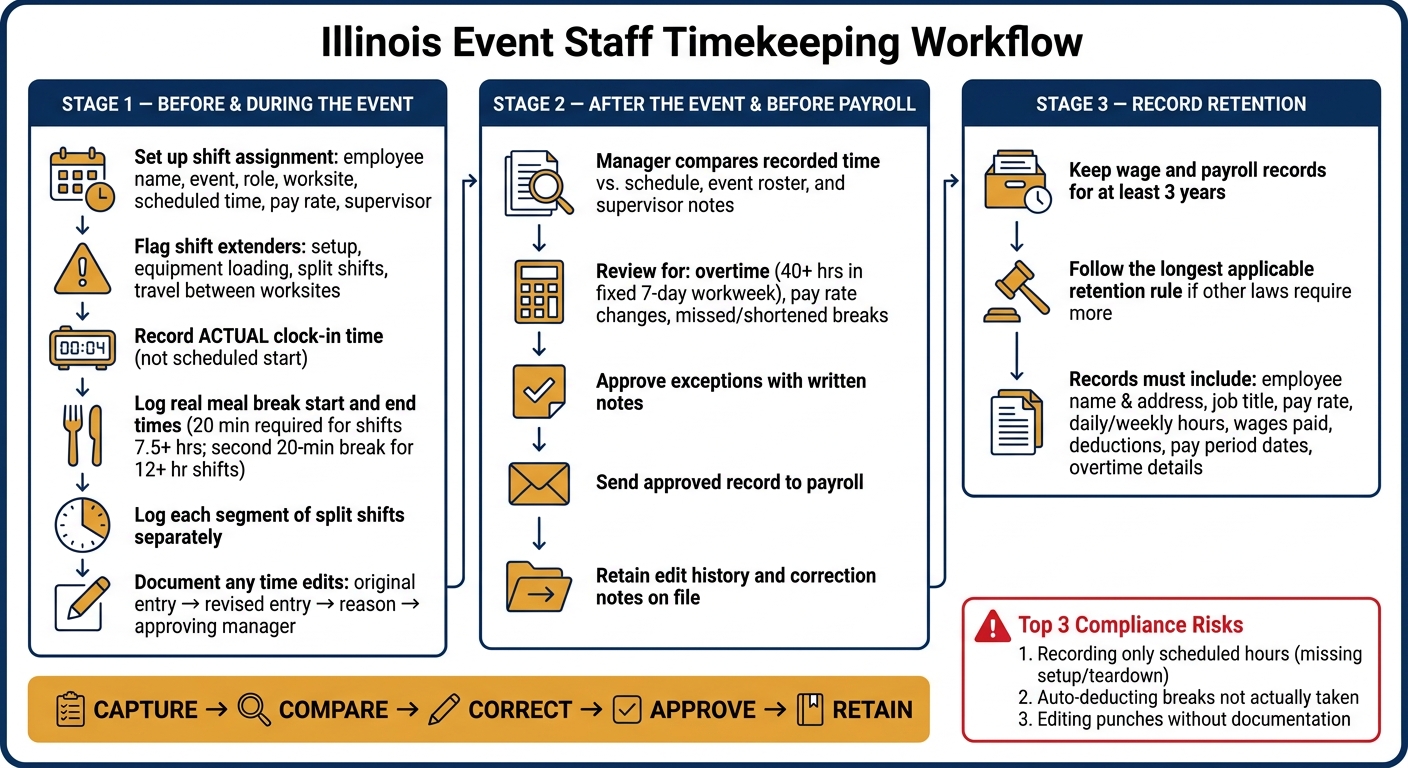
Illinois Event Staff Timekeeping Workflow: Record, Compare, Correct, Approve, Retain
A steady workflow helps close the gap between what was planned and what people actually worked. For event teams in Illinois, that matters. A simple three-stage process makes it easier to track time the right way and keep payroll on track.
Start with the schedule, but keep planned coverage separate from actual hours worked. Before the event, set up the shift assignment with the employee name, event, role, worksite, scheduled time, pay rate, and supervisor. Think of this as the planning layer, not the payroll record.
It also helps to mark anything that might stretch the shift window. That includes required setup, equipment loading, split shifts, or travel between two required work locations. Setup time, split shifts, and required travel between worksites should be recorded as actual time worked.
Once the employee starts working, record the actual clock-in time, not the scheduled start time. For meal breaks, log the real start and end time for each break. If someone works a split shift, enter each work segment on its own.
If a time entry needs to be fixed, use a documented edit process. Keep:
Don’t overwrite punches without a written reason. That may seem like a small step, but it can save a lot of trouble later.
After the event, move to reconciliation. A manager should compare the recorded time against the schedule, event roster, and any supervisor notes. The point here is to spot differences, not to treat every difference like a mistake. The schedule should be used to review exceptions, not to stand in for actual hours.
Review the record for hours worked, overtime, pay changes, and missed or shortened breaks. After those exceptions are checked and sorted out, approve the record. Then send the approved record to payroll and keep the supporting entries, edit history, and correction notes on file.
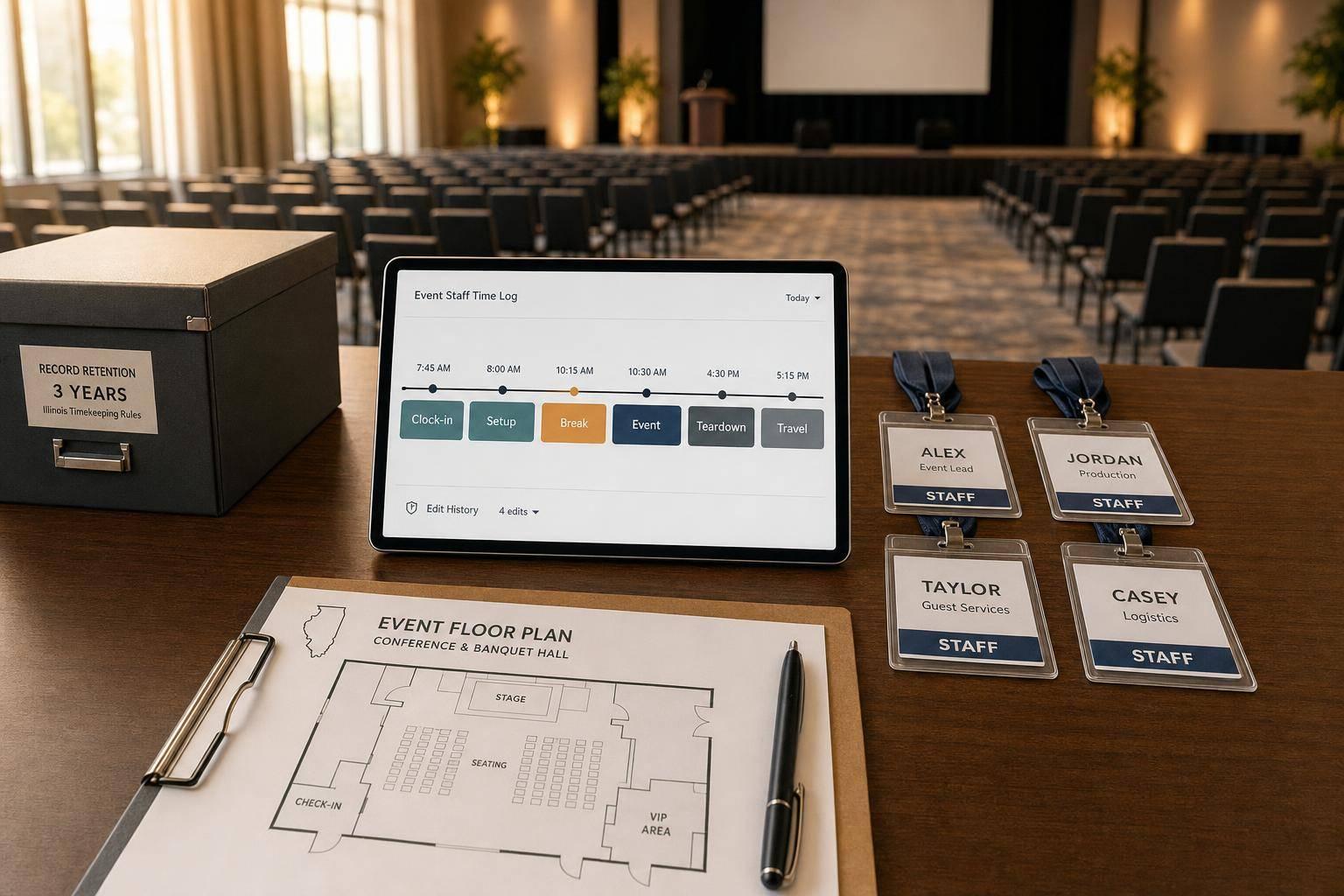
Illinois administrative rules support keeping wage and leave records for at least three years. Since other laws may require a longer period, use the longest retention period that applies.
If your team uses Quickstaff for scheduling, treat it as the planning layer that supports review. Quickstaff serves as the scheduling layer in this workflow. It can help managers handle event assignments, availability, reminders, waitlists, and event communication. That gives the team a clean starting point when it’s time to reconcile records.
But Quickstaff does not take over the employer’s duty to capture and verify actual hours worked. Shift assignments are planning data. Payroll still depends on actual time, meal breaks, corrections, and approval. If Quickstaff is used with a separate timekeeping or payroll system, decide which system is the main record for actual time, then reconcile both systems before payroll closes.
That way, event schedules, actual punches, and payroll records stay in sync.
The key is simple: pay based on the shift that actually happened, not the one that was planned on paper.
That gap matters more than it may seem. An event staff schedule is just a plan. Payroll records need to show what took place in the field, down to each person’s hours, breaks, and any approved edits.
| Planning Data | Payroll Record |
|---|---|
| Scheduled event start and end times | Actual clock-in and clock-out times |
| Assigned staff list | Employee-specific hours actually worked |
| Expected meal break | Whether and when the meal break was taken |
| Original shift estimate | Approved corrections with reason |
Then keep those records long enough to back up payroll and any later review. Illinois materials call for at least three years of wage and payroll records; if another rule requires more time, follow the longer rule.
Before payroll closes, line up the event timeline with punches, breaks, and any corrections. If something needs to be changed, don’t erase the first entry. Keep the original, add the update, and include a note that shows who approved it and why.
That’s the standard in plain English: capture, compare, correct, approve, retain.
Under federal law and Illinois rules, paid time covers all hours an employee is suffered or permitted to work.
For event staff, that doesn’t just mean the hours when guests are in the room. It also includes time spent on setup, teardown, mandatory training, pre-event briefings, waiting on-site between event segments, and travel between venues during a single shift.
Break time matters too. Short rest breaks of up to 20 minutes are paid. Meal breaks of 30 minutes or more are unpaid only when the worker is fully relieved of all duties.
If a worker misses a meal break, treat that meal period as not properly taken. The time record should show that clearly and accurately.
For any correction, review the record by hand. Then update it using event logs or other documented communication. Add a reason code, note who made the change and when, and have the worker review or certify the corrected timecard before payroll export.
A time edit trail should log every change made to a worker’s time record and tie it to the specific shift.
That means it should show:
It should also keep the original clock-in/clock-out entries, break changes, and shift edits.
If an approved or locked timesheet is reopened, the system should require a documented correction request and re-approval.