Religious Accommodation Checklist for Schedules
August 16, 2026


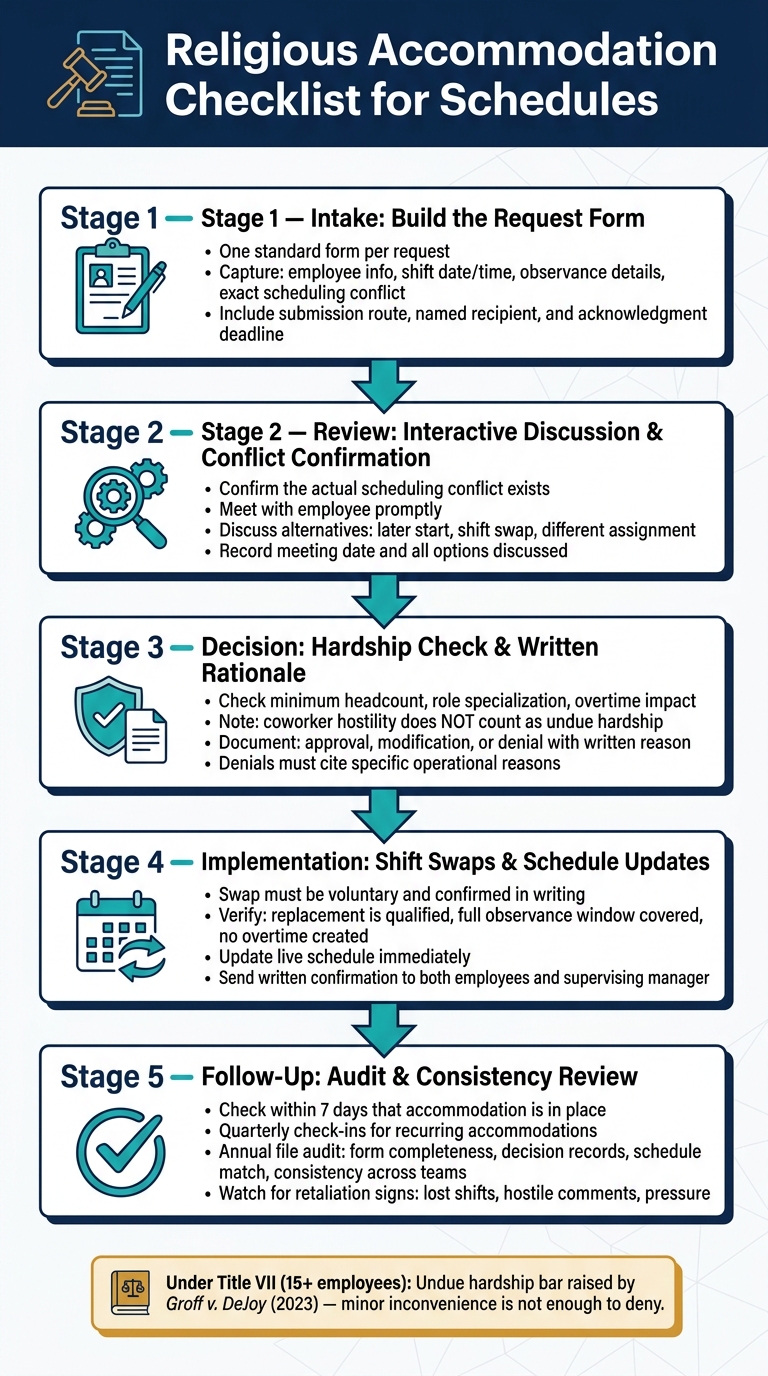
If you handle schedule-based religious accommodation requests, I’d keep the process simple: use one form, review each request the same way, document every step, test shift-swap options, and check later that the schedule still matches the decision.
Under Title VII, covered employers must allow religious accommodation unless they can show undue hardship. And after Groff v. DeJoy (2023), that bar is higher than a small inconvenience. In plain terms, I’d want a file that shows what the conflict was, what options were reviewed, what coverage issue existed, and why the final call was made.
Here’s the whole article in one short list:
A few points stand out:
I see this article as a guide for making each request easier to review, easier to track, and less likely to turn into a legal or staffing problem.
Religious Accommodation Request Process: Step-by-Step Checklist
Use one standard request form to gather the facts needed to review each religious accommodation request. Each field should help managers connect the request to a real shift, role, or coverage gap.
Start with the basics: employee name, employee ID if needed, job title, primary manager or scheduler, and the best way to reach the employee. Then collect the schedule details tied to the request, including the shift date (MM/DD/YYYY), start and end time (12-hour clock, a.m./p.m.), event or client name, and the venue name and city/state.
Add a field for the exact schedule requirement that conflicts with the observance. For example, an employee might write Friday sunset to 9:00 p.m. or Sunday service from 9:00–11:30 a.m. That kind of detail makes it easier for managers to see whether a partial shift, later start, or full reassignment could work.
If your team uses Quickstaff, include an internal event ID or shift code. That makes it easier to match the request to the right record and check staffing needs, role assignments, availability, and waitlists.
List the observance, the dates or recurring pattern, and the exact scheduling change requested. The main field here should spell out the request in plain scheduling terms: no Friday evening assignments, shift start no earlier than 8:00 p.m. on certain holidays, or a 30-minute break between 7:00 and 7:30 p.m.
Include space for other options the employee is open to, such as:
This keeps the request tied to clear scheduling options. The aim is simple: turn the request into a decision managers can review and document.
Put the submission method, recipient, and response deadline right on the form. Name a specific recipient and contact address. Also tell employees not to send requests through informal channels like text messages.
Set a written acknowledgment deadline and a follow-up deadline. During busy weekend event seasons, you may need a shorter window. The form should also say that the manager may set up an interactive discussion to talk through options, so employees know that step may come next.
Once the request is submitted, move it into review, coverage, and hardship analysis.
Review each completed request as soon as it comes in. Confirm that there is an actual conflict, talk through the options with the employee, and record the decision. After that, move into the form review and the interactive discussion.
Start with the form itself. Make sure it identifies the conflicted shift, the observance, and the exact change the employee is asking for. If anything is missing, send it back for completion before the discussion.
Then meet with the employee promptly. Pin down the timing and frequency of the observance. For example, if the form says "Sunday mornings", find out whether that means 8:30 a.m. to 12:30 p.m. or a smaller window. Ask whether the employee would consider other options, such as:
Keep the conversation factual and focused on scheduling and coverage. Record the meeting date, each option discussed, and whether the employee accepted or declined it.
After the discussion, decide whether approving the request - or one of the alternatives - would create an undue hardship when you look at your operation as a whole. For event-based businesses, check minimum headcount by role for the affected events, whether the employee fills a specialized or lead role that is hard to cover, and whether coverage would require major overtime or leave other events short-staffed.
Coworker or customer hostility toward the employee's religion does not count as undue hardship. A minor scheduling hassle does not count either. If a direct schedule change creates too much strain, see whether a voluntary shift swap fixes the conflict with less impact. If your team uses Quickstaff, use availability tracking and waitlists to see who may be able to step in before you make the call. If a direct change won't work, move the request into swap and schedule-change review.
Write one decision note that covers the outcome, effective date, scope, conditions, and review date. If you modify or deny the request, also record the original request, the options tried, the operational reasons, and the date you gave the employee the decision. Store accommodation notes in the employee profile and link them to event assignments so approved restrictions carry forward.
After you approve a swap, move fast. Update the roster, notify the right people, and keep the record clean.
Once a swap is approved, confirm that it is voluntary, covers the full observance period, and is entered into the schedule before the event.
The swap must be voluntary. The covering employee needs to agree without supervisor pressure or retaliation. Both employees should confirm the arrangement in writing, whether that’s by email or in a scheduling platform log. Don’t assign a swap; facilitate one.
Before approving, check that the replacement employee is qualified, the swap covers the full observance window, the replacement worker can handle the exact role needed, and the change doesn’t create overtime or leave a required role uncovered. If any of those checks fail, revise the swap or use another accommodation.
If employees can’t find substitutes, step in and help locate volunteers. Document each step, such as posting the open shift, checking availability lists, or reaching out to on-call staff, before deciding that a swap isn’t feasible.
After the swap passes review, the next step is to lock it into the live schedule and confirm it in writing.
Once approved, update the schedule right away and mirror the change in the roster. Then send both employees written confirmation with the event, date, time, location, and role. Notify the supervising manager of the approved swap.
If your team uses Quickstaff, update the assignment, confirm availability, and send notifications in one step. That keeps everyone working from the same version of the schedule and creates a clear record of the change for later review.
Once an accommodation is approved, the job isn't done. In many workplaces, mistakes show up later, especially around recurring events, holiday weekends, and new schedule cycles.
After the accommodation goes live, make sure it stays in place.
Within 7 days, check the change in every system and confirm with the employee that it’s working as planned. For recurring accommodations, such as early Friday departures for Sabbath observance or time off for annual holy days, set at least quarterly check-ins. It also helps to add one more touchpoint before major holiday seasons or new event contracts. Ask a few direct questions: Does the arrangement still work? Has anything changed? Has the employee faced any pushback from coworkers?
Retaliation is a common risk. Pay attention to shift removals, hostile comments, or pressure to trade away the accommodation. If you spot those patterns, deal with them early and document both what you saw and what action you took.
After that first check-in, shift to periodic audits.
At least once a year, or after each major busy season, review a sample of religious accommodation files. Check that each request form is complete, each decision file lines up with the final schedule change and approval date, and the approved accommodation matches the published schedule.
For event-based teams, do spot checks more often during high-demand periods like weekend weddings or holiday parties. If your team uses Quickstaff, use centralized event history to confirm that approved time blocks remained in place. Look for patterns. Repeated denials with no documented hardship, or one location approving far fewer accommodations than others, are both red flags worth digging into.
| Audit checkpoint | What to verify |
|---|---|
| Request form | Complete employee details, observance described, dates or recurrence noted |
| Decision record | Approval, modification, or denial with written rationale |
| Schedule match | Published shifts match what was agreed in writing |
| Consistency | Similar requests handled with the same criteria across teams and seasons |
| Retaliation signs | No adverse actions (discipline, shift changes, task assignments) tied to the accommodation |
If you find discrepancies, document the cause and fix the schedule record right away.
Religious accommodation in scheduling tends to go more smoothly when you use one repeatable checklist. That matters because every request goes through the same path: intake, review, decision, swap handling, and audit. Under Title VII, employers must reasonably accommodate employees' sincerely held religious beliefs unless doing so creates undue hardship on the business.
Using event staff scheduling software makes it easier to carry approved accommodations into the live roster without things slipping through the cracks. For caterers, wedding vendors, and staffing agencies, Quickstaff can keep event details, staff assignments, availability, and approved accommodations in one place.
The aim is a fair, repeatable process for each request, whether it involves Sabbath observance, a religious holiday, or another scheduling conflict.
Undue hardship means an accommodation that would cause major difficulty or expense, based on your business’s size, resources, nature, and structure.
For scheduling requests, look at whether the change would create a serious strain on day-to-day work, such as key staffing gaps, safety problems, or violations of labor rules. Review each request on its own. Before deciding it won’t work, consider other options like shift swaps or volunteer coverage.
Yes. Recurring religious requests often mean you’ll need to adjust schedules on an ongoing basis to meet an employee’s needs.
Because availability can shift from week to week - or even day to day - it helps to use a dynamic, centralized system like Quickstaff. That gives you one place to track recurring needs, record requests and responses, and cut down on scheduling conflicts or wage disputes.
A denial letter should explain the decision in a clear, professional way. State the exact reasons for the denial, especially if the request would cause undue hardship for business operations or conflict with core job duties.
The message should match company policy. Also, keep a record of both the request and the formal response in your central digital files. That gives you an audit trail and helps protect the company if discrimination claims come up later.