Checklist for Vetting Temporary Event Staff
July 12, 2026


A bad event hire can lead to no-shows, safety problems, guest complaints, and legal trouble. I’d use a simple vetting process that checks four things before anyone works a shift: role fit, legal and ID checks, job skills, and event-day readiness.
Here’s the short version:
A checklist like this helps me book people who are more likely to show up, follow rules, and do the job well. It also leaves a clear record if there’s ever a dispute about hiring, screening, pay status, or what happened on event day.
| Step | What I check | Why it matters |
|---|---|---|
| 1. Pre-screen | Duties, shift, attire, physical needs, permits | Cuts out bad fits early |
| 2. Compliance | ID, work history, references, training, insurance | Lowers legal and safety risk |
| 3. Performance | Job test, soft skills, attendance, reply speed | Helps predict event-day results |
| 4. Final ready check | Briefing, sign-in, backups, file storage | Keeps the shift covered and documented |
If I follow the same flow every time, staffing gets less chaotic and a lot easier to control.
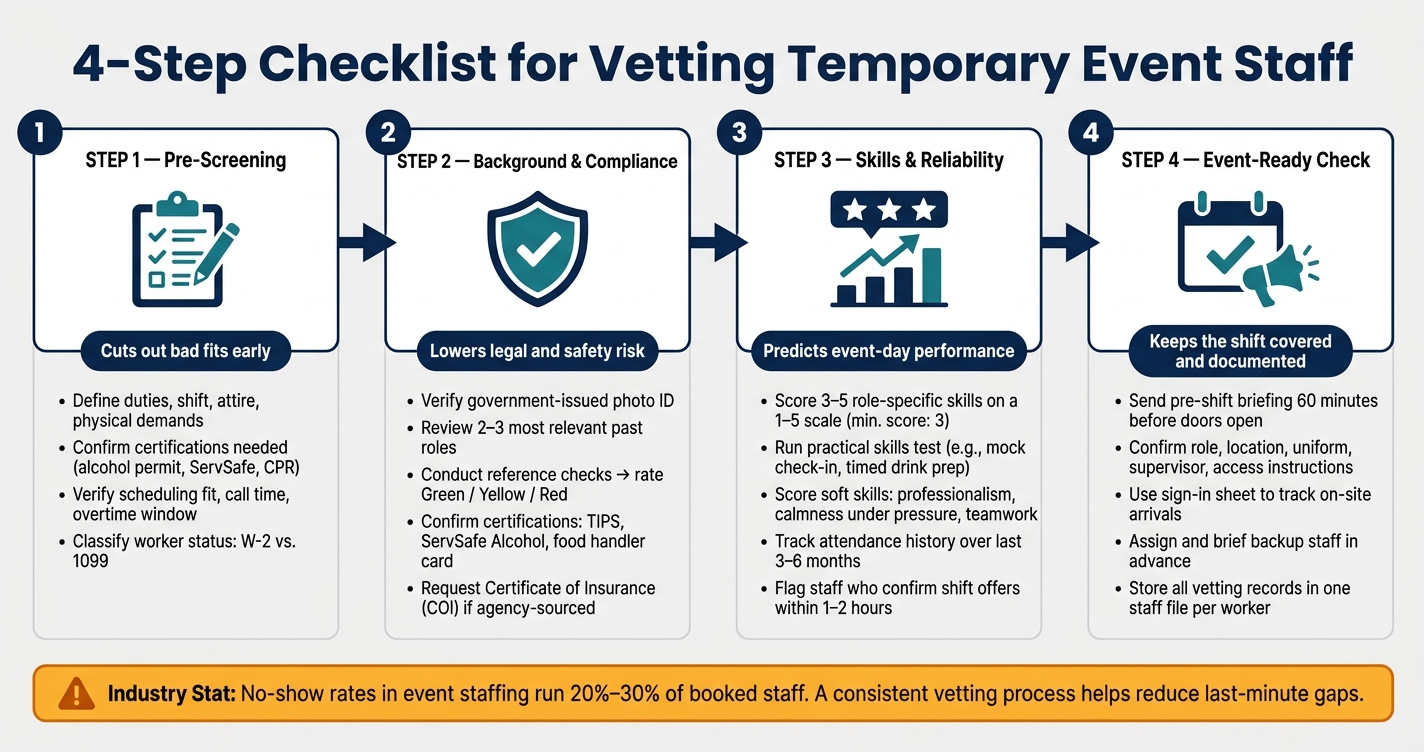
4-Step Checklist for Vetting Temporary Event Staff
Use pre-screening to cut out obvious mismatches before you spend time on deeper vetting. Start there, then move to background checks, skill reviews, or compliance steps.
Write the role requirements before you contact candidates. Be clear about duties, guest count, service style, needed certifications, and physical demands, such as lifting up to 50 lbs., standing and walking for up to 8 hours, or working outdoors in heat or cold.
Spell out required certifications right away. That may include a valid state alcohol server permit for bartenders, a ServSafe Food Handler card for catering staff, or CPR/first aid when the job calls for it. If a needed credential is missing, treat that as a disqualifier.
Once the role is nailed down, move to the legal fit.
For W-2 hires, confirm work authorization and I-9 readiness before booking. Ask every candidate the same questions, and do it before you lock in the shift.
Before booking event staff, classify the role the right way. If you control the schedule, tools, uniforms, and supervision, the work will usually fall under W-2 status. If the worker runs a business, chooses how the work gets done, can send a substitute, and takes on financial risk, 1099 may fit. Get this wrong and you could face back taxes, penalties, and wage claims.
Also confirm the exact shift, call time, overtime window, and transportation plan. If the event ends late at night, ask plainly whether that timing works for the candidate.
Be specific about attire too, including shoes, pants, and shirt. Put dress code and conduct expectations in the shift invite so staff acknowledge them before booking. If you're using Quickstaff, you can attach those requirements right to shift invitations, which gives you a clear record that expectations were shared.
After pre-screening, check identity, work history, and any required credentials before you hand out a shift.
Start with a government-issued photo ID such as a driver's license, state ID, or passport. Make sure the legal name and date of birth line up, and confirm the photo matches the person standing in front of you. Then log the ID type, issuing state, and expiration date in a simple vetting spreadsheet.
Next, look at the two or three most relevant past roles. Check the dates, job titles, and main duties. You don't need to dig into every job they've ever had. Focus on the roles that matter most for the position you're filling.
Reference calls should be short and consistent. Ask about punctuality, how the person handles pressure, and whether the employer would hire them again. From there, turn the feedback into a simple risk rating:
Flag Red-flag profiles in your staff records so schedulers don't place them on critical shifts. That small step can save you a major headache on event day.
Required credentials depend on the job. For bartenders and servers, confirm state-specific alcohol service training such as TIPS or ServSafe Alcohol. Record the issuing body, state, and expiration date. For catering and food-handling staff, check for a current food handler card or similar certification. ServSafe Food Handler, for example, requires a passing score of 75% or better to earn a certificate. Track expiration dates and set reminders 30 to 60 days ahead so staff can renew before they go back on the schedule.
Insurance checks also depend on how the worker was hired. If you're using a staffing agency, ask for a Certificate of Insurance (COI) that shows workers' compensation and general liability coverage. If you're hiring people directly, check with your broker to make sure your own policy covers temporary and seasonal staff. Store each COI with the event file so it's easy to find later.
Use this checklist to match each role with the right checks:
| Job Type | Required Checks | Additional Recommended Checks |
|---|---|---|
| Front-of-house (servers, bartenders, hosts) | Identity verification; alcohol service certification where applicable; criminal background check focused on violent offenses and theft | Strong references on guest service and professionalism; venue safety briefing |
| Back-of-house (kitchen, setup, dishwashers) | Identity verification; food handler card or food safety training; venue safety documentation | Basic criminal check; equipment safety training |
| Cash-handling (cashiers, ticketing, merch) | Identity verification; criminal background check focused on theft/fraud; cash-handling policy briefing | Enhanced reference check on honesty and reliability; periodic re-checks for recurring staff |
Record the ID, role, check type, provider, date, and status in a secure log. Keep sensitive reports in a separate secure file. In Quickstaff, you can add compliance notes and certification tags straight to staff profiles, which makes it easier for schedulers to filter by credential status before assigning someone to a role that requires it.
Once background checks and credentials are done, the next step is simple: can this person handle the job when the event gets busy? Use the same role requirements from pre-screening so you're only rating skills that matter on-site.
Credentials show that someone is qualified. A skills and reliability checklist shows how they perform during peak service.
Pick three to five must-have skills for each role and score each one on a 1-to-5 scale, with 3 as the minimum event-ready score.
What matters most is this: each score needs a clear, on-the-job meaning. For tray carrying, a 3 means the staff member can carry a standard loaded tray through a crowded room with only minor corrections. A 5 means they move heavy trays smoothly in tight spaces and can guide others. When supervisors use the same behavior-based standards, scoring stays consistent across events and managers.
| Role | Key Skills to Rate (1–5) |
|---|---|
| Banquet server | Tray carrying stability, table setting standards, guest interaction, following banquet captain instructions |
| Bartender | Drink preparation speed and accuracy, ID checking, bar cleanliness, cash/credit handling |
| Registration staff | Data entry accuracy, check-in software navigation, guest greeting, line management |
| Setup/tear-down crew | Safe lifting technique, ability to follow floor plans, care with venue property, time management |
A short practical test helps confirm the score. For bartenders, ask them to make a set of standard drinks within a time limit, then check recipe accuracy, portions, and presentation. For registration staff, run a mock check-in inside your actual event software and measure both speed and accuracy.
Technical scores tell you who can do the work. Soft skills tell you who can do it well in front of guests. Focus on professionalism, calmness under pressure, teamwork, communication, and how fast someone follows directions. Hospitality research ties these skills to better guest satisfaction and service outcomes.
Score soft skills based on what you can see, not instinct. "Arrived 15 minutes early and ready to work" is a usable rating. "Seems professional" isn't. Watch how staff respond when things get messy: a rush at the bar, a backed-up check-in line, or food and drink service hitting all at once. Do they stay organized and polite, or do they get flustered and start making mistakes? That's your calmness-under-pressure score in plain sight.
Attendance history fills in the rest. Industry data shows that no-show rates in event staffing run between 20% and 30% of booked staff. Track each person's on-time arrival rate, last-minute cancellations, and no-shows over the last three to six months to build a reliability score based on data, not hunches. Response speed also matters. Staff who reply to shift offers within 1–2 hours with a clear confirmation tend to honor commitments and understand expectations better than people who answer vaguely days later.
Record all of this in the staff profile. Quickstaff centralizes staff notes, availability, and event history so schedulers can filter by credential status, reliability, and past performance before assigning shifts.
Once a worker is cleared and scored, the next step is event-day prep. First, confirm that the worker is fully cleared. Then check the basics: role, shift window, check-in time, location, access instructions, uniform, and supervisor.
A structured pre-shift briefing - ideally 60 minutes before doors open - helps keep the team on the same page before things get busy. Start with emergency procedures. Then walk through the event schedule, chain of command, communication rules, and conduct expectations. Use a sign-in sheet to confirm who is on-site and track arrival times. That makes it easier to spot gaps before service starts.
Backup coverage should match the event’s size and risk level. Backups need to know their role ahead of time, confirm that they’re available, and, when possible, be cross-trained so they can step into bar support, guest registration, or setup work.
After that, log the outcome so the next booking starts with a complete worker profile.
Each worker should have one file that carries across events. That file should include:
Keeping this in one place saves time. You don’t have to start from zero every time you book the same worker.
Event day should be treated as both the last screening step and the first source of data for future staffing. Keep employment and screening records for at least one year; many advisors recommend up to six. Sensitive documents - such as background check authorizations, identity records, and adverse action notices - should be stored separately from general event notes, with access limited to HR or authorized scheduling managers.
Post-event reviews can make future bookings much easier. Score workers on attendance, punctuality, task accuracy, professionalism, communication, and guest interaction. If someone performs well again and again, they’re a strong pick for higher-priority shifts. If someone keeps showing up late or has conduct issues that weren’t resolved, flag that before the next booking, not after. Store records separately, then use post-event scores to update future booking priority.
Quickstaff can store shift details, reminders, and post-event notes in one place.
When you use the same checklist every time, vetting becomes a routine instead of a scramble. Hiring temporary event staff doesn't have to feel overwhelming. Stick to the same flow each time: define the role, verify compliance, confirm references and credentials, score skills and reliability, and wrap up with event-readiness checks.
A standard checklist cuts out guesswork. It also gives you a clear paper trail if questions come up around background checks, worker classification, or an on-site incident.
Don't look at qualifications alone. Screen for punctuality, response speed, and schedule fit too. That's often what helps cut down on no-shows. It also helps to confirm shift details and backup coverage early, before a last-minute gap turns into a day-of problem.
After the event, the checklist should get sharper, not longer. Review what worked, note what didn't, and update the checklist when the same issue keeps showing up. Small tweaks can save time and lower risk over time, which makes future bookings faster and more dependable.
Quickstaff can centralize shift details, staff availability, reminders, and post-event notes so vetting stays consistent across events.
Focus on the economic reality of the relationship, not the label you put on it. Calling someone an independent contractor doesn’t make it so.
Classification depends on the full picture. That includes:
The IRS looks at this from a few angles too: behavioral control, financial control, and the overall relationship.
Your paperwork needs to match the facts. Use Form I-9 for employees and Form W-9 for independent contractors. If the line still feels blurry, file Form SS-8 with the IRS.
For high-risk event roles, the screening process needs to go deeper. The stakes are higher, so the checks should be stricter to help protect people on site and support compliance.
Focus on a few core areas:
This kind of vetting helps confirm that candidates can handle sensitive situations, stay calm under stress, and meet the standards the role demands.
Update staff vetting records on a regular basis to support compliance and event safety. Certifications and licenses, like food handling permits or security credentials, need to stay current. If those documents expire, they can create liability problems during an event.
You should also keep payroll, tax, and personnel records for at least two years to meet labor law requirements. Quickstaff can help by keeping everything centralized and up to date.