Emergency Resource Allocation: Common Challenges and Fixes
June 16, 2026

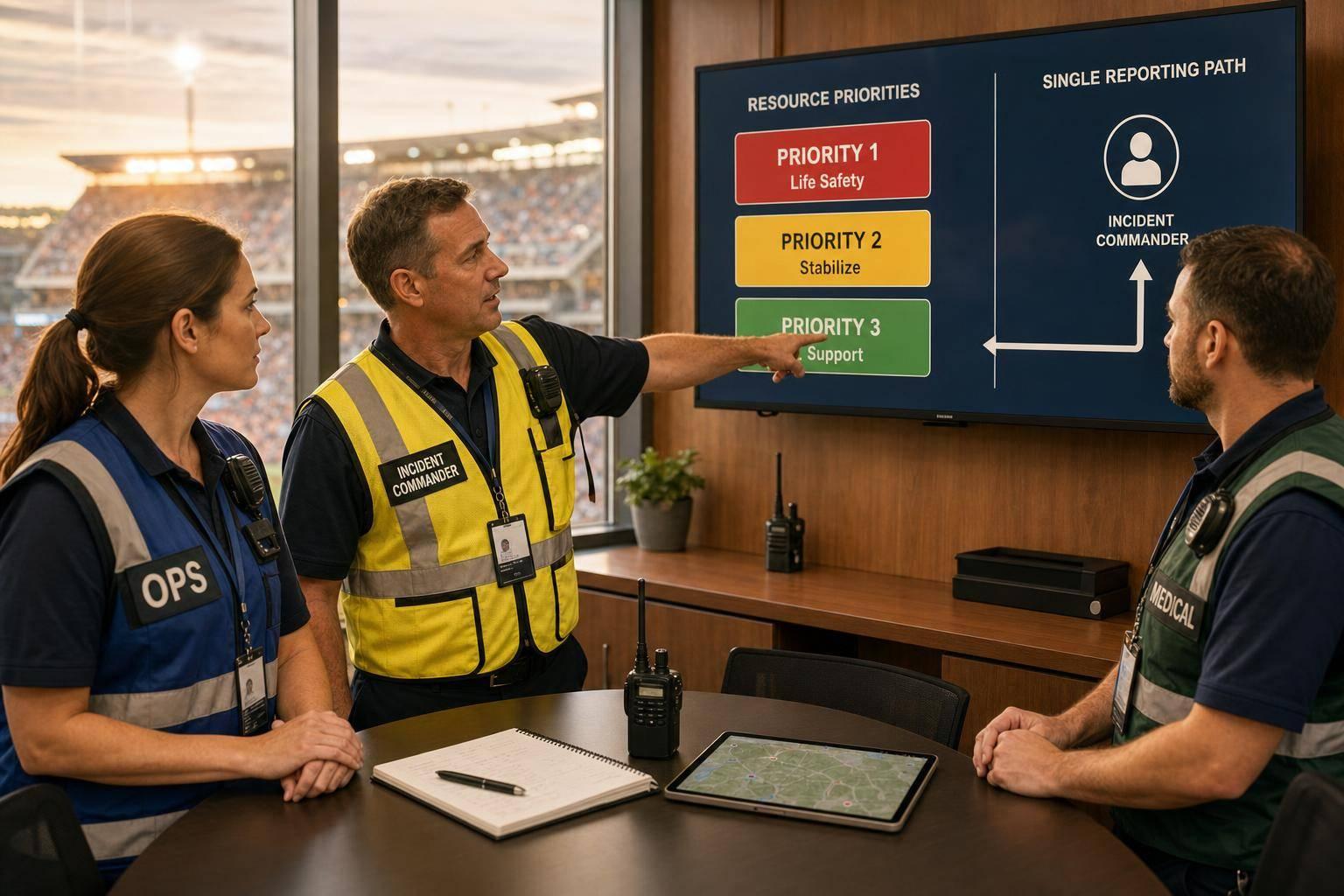
Most event emergency failures come down to three things: not enough backup people, poor status visibility, and unclear authority.
If I had to cut this article down to the main lesson, it would be this: I need to set priorities before event day, use one path for updates, and name who can move staff, gear, and vehicles without delay. That matters because 72% of event organizers have a written emergency plan, but only 31% have practiced it with the full team, and 89% of event pros deal with staffing issues during live events.
Here’s the short version:
A few numbers make the point clear:
Bottom line: if I wait until the emergency starts to sort out staffing, communication, and authority, I’m already behind. This piece shows the common failure points and the simple fixes that help me move people and resources with less confusion.
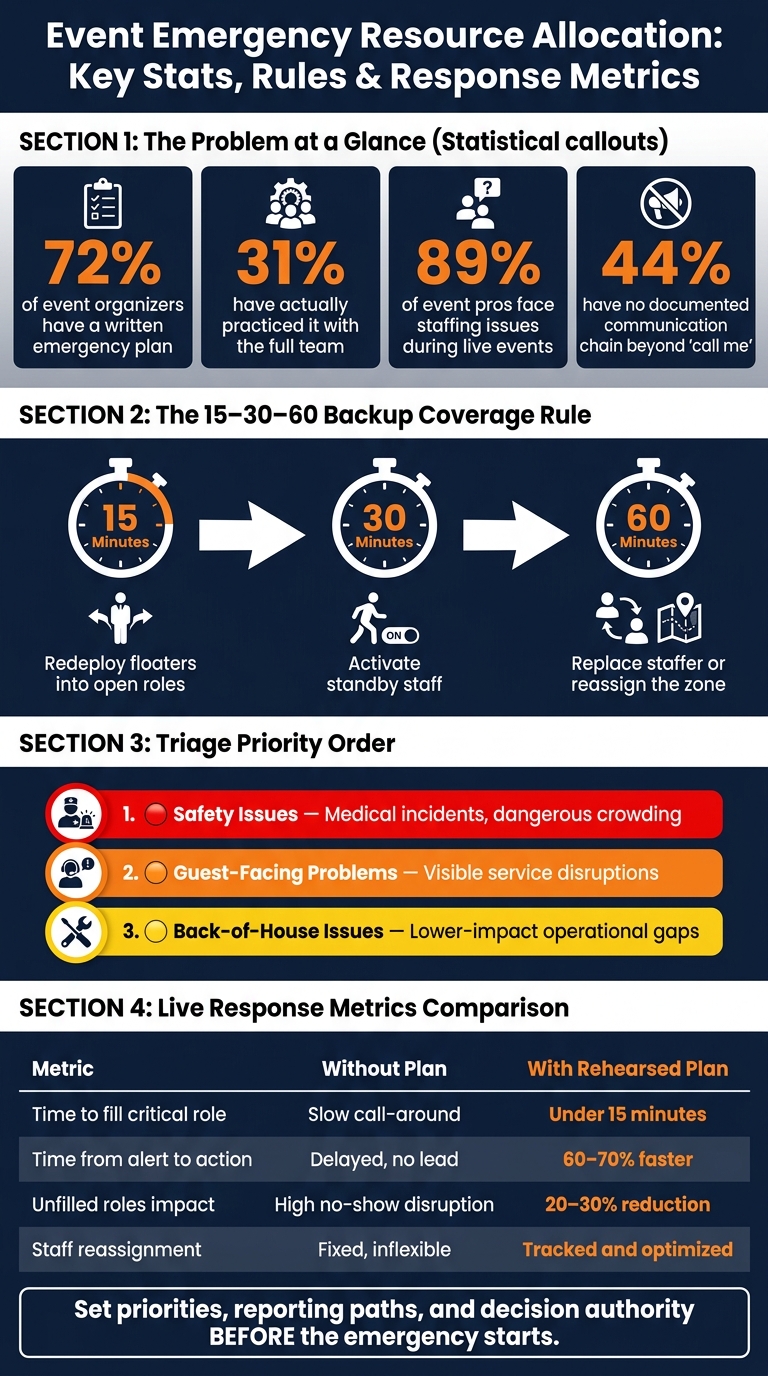
Event Emergency Resource Allocation: Key Stats, Rules & Response Metrics
Resource shortages almost never show up one by one. At a live event, a staff no-show, a tech issue, and a sudden crowd surge can all land at the same time. 89% of event professionals report experiencing staffing-related challenges during live events, and teams often stumble because they plug the wrong hole first or miscalculate staffing needs. That’s why a clear triage order matters more than trying to solve everything at once.
When several requests come in at once, the gut reaction is to jump on whatever feels most urgent. A better move is to run a simple three-part check: What happens if this waits? How visible is the impact to guests? And how fast can help arrive?
Safety issues - like medical incidents or dangerous crowding - come first. Guest-facing problems come next. Lower-impact back-of-house issues can wait until the highest-risk problems are under control.
The best fix starts before event day. Cross-train staff so one person can cover more than one role. That gives you room to move when gaps open up. It also helps to assign one briefed standby staffer per event who can step in within 30 minutes.
Use the 15–30–60 rule:
Quickstaff can help managers track availability, open shifts, and waitlists in real time.
Once staffing is sorted, the next weak spot is visibility.
Once staffing gaps are covered, communication is usually the next thing to crack.
When updates are scattered across texts, chat apps, email, and radio, key details slip through the cracks. And if managers can't see who's on break, who's at their post, or which area is short on coverage, they can't shift people, supplies, or alerts where they're needed fast enough. After the reporting path is set, the next job is simple: make sure the right update gets to the right people.
Use one reporting path, one owner, and one format. Every incident should be reported the same way, every time.
A simple setup starts with a central control room or command post. The first person who spots a problem sends the report through a dedicated emergency radio channel or message. That report then goes to the incident lead, who can loop in the right team lead.
Pre-written message templates for common situations - weather delays, evacuations, and technical issues - cut out guesswork when time is tight. Staff just fill in the missing details and send a clear update on the spot.
"If you need to flip through your ERP in a crisis, you're already behind. The confidence an event lead needs comes from familiarity." - René Tamayo, Tour Manager, Event 360
Keep assignments, availability, and live alerts in one system so managers can reassign staff in seconds.
Quickstaff keeps scheduling, availability tracking apps, messaging, and reminders in one mobile-friendly place. That means managers can change coverage without bouncing between apps or chasing people down for updates. And that kind of visibility is what lets teams move fast.
Send alerts by role, too. Security leads should get security alerts. Concessions staff should get concessions updates. No extra noise. No delay. Just the right message to the right group.
With clear visibility in place, the next challenge is deciding who has the authority to move staff.
Once reporting is clear, coordination can still break down if nobody knows who’s in charge. That’s when small issues turn into bigger ones. Venue, catering, transportation, and temporary staff all need to know who can move people, supplies, and vehicles. If that line of authority is fuzzy, gaps open up fast.
Set decision authority before the event begins. Your chain of command should name an Incident Commander or Crisis Director as the final decision-maker, along with operations and security leads and their deputies.
This isn’t a small problem. 44% of event managers have no documented communication chain beyond a vague "call me" instruction. When authority is clear, teams can reassign resources, pause operations, or restart service without getting stuck between mixed approvals.
One simple fix is a one-page Quick Response Card for staff and vendors. It should list key decision-makers and both primary and secondary evacuation routes.
Once authority is settled, the next weak spot is the handoff.
Shift changes are where things often slip. The same goes for moments when a lead gets pulled away to deal with another problem. That’s when tasks get missed, repeated, or left in limbo.
Each handoff should cover:
That kind of short, structured handoff keeps ownership clear and helps teams keep moving without overlap or gaps.
It matters more than most teams think. A documented and rehearsed emergency response plan can cut response time by 60% to 70%. To make the handoff process stick, run a 10-minute drill the day before the event with all teams - including catering and temporary staff - to confirm communication with event staff and decision-makers.
Once staffing, communication, and decision rights are set, these live fixes help allocation keep moving when things get tense.
When a crisis hits, people need a reference they can scan in seconds.
| Challenge | Direct Fix |
|---|---|
| Staff shortage / no-show | Trigger backup coverage immediately from the standby pool |
| Low visibility | Use one live check-in and status channel |
| Role confusion | Assign one zone lead to approve immediate reassignments |
| Crowd congestion | Use one-way flow systems and elevated crowd spotters |
| Technical failure | Protect critical equipment with backup power and spare devices |
A fix only matters if you can see whether it worked in the moment. After the first change is made, track if the new allocation cut the delay or closed the gap.
The most useful metrics are time to fill a critical role, time from alert to action, the number of unfilled roles, and staff reassignment count. Put together, they show where the first plan held up and where the team had to adjust on the fly.
| Metric | Initial Allocation Approach | Live Adjustment Impact |
|---|---|---|
| Time to fill critical role | Static roster; relies on "call-around" | Reduced to under 15 minutes using floaters and the 15–30–60 rule |
| Time from alert to action | "Call me" protocol; no designated lead | 60% to 70% faster response with rehearsed protocols |
| Unfilled roles | Staffed for average flow | 20% to 30% reduction in no-show impact via onsite leads and digital communication tools |
| Staff reassignment count | Fixed positions; no flexibility | Shows how stable the original staffing plan was |
Emergency allocation works best when shortages, communication, and coordination run through one repeatable process. The teams that recover fastest aren't more talented. They've already set priorities, reporting paths, and decision authority before the emergency starts.
Use a risk matrix to rank incidents by likelihood and impact. That gives you a simple way to see which problems need attention first and which ones can wait a bit.
Put the biggest focus on issues that affect guest safety, security, or core event operations like registration and AV support. Those come before secondary roles such as coat check.
A simple Green/Yellow/Red system makes this easy to scan:
Quickstaff can help by showing staffing gaps in real time, so you can move cross-trained staff or floaters where they’re needed most.
Authority needs to be set before the event starts, with a role map that shows who’s in charge and where issues go if they need to move up the chain. You also need to name the decision-makers ahead of time.
During a crisis, the Crisis Manager makes the final call. The Staff Coordinator keeps the team informed and organized. Zone Supervisors handle decisions within their assigned areas.
Centralized scheduling software like Quickstaff is one of the best ways to track staff availability in real time. Staff can update their own schedules and block off dates when they can’t work, so managers only see qualified people who are available.
With mobile dashboards and role-based filters, managers can spot staffing gaps fast, send targeted invites, and track responses as they come in. That cuts down on double bookings and helps keep schedules accurate.





