Ultimate Guide to Event Staff Communication
March 20, 2026

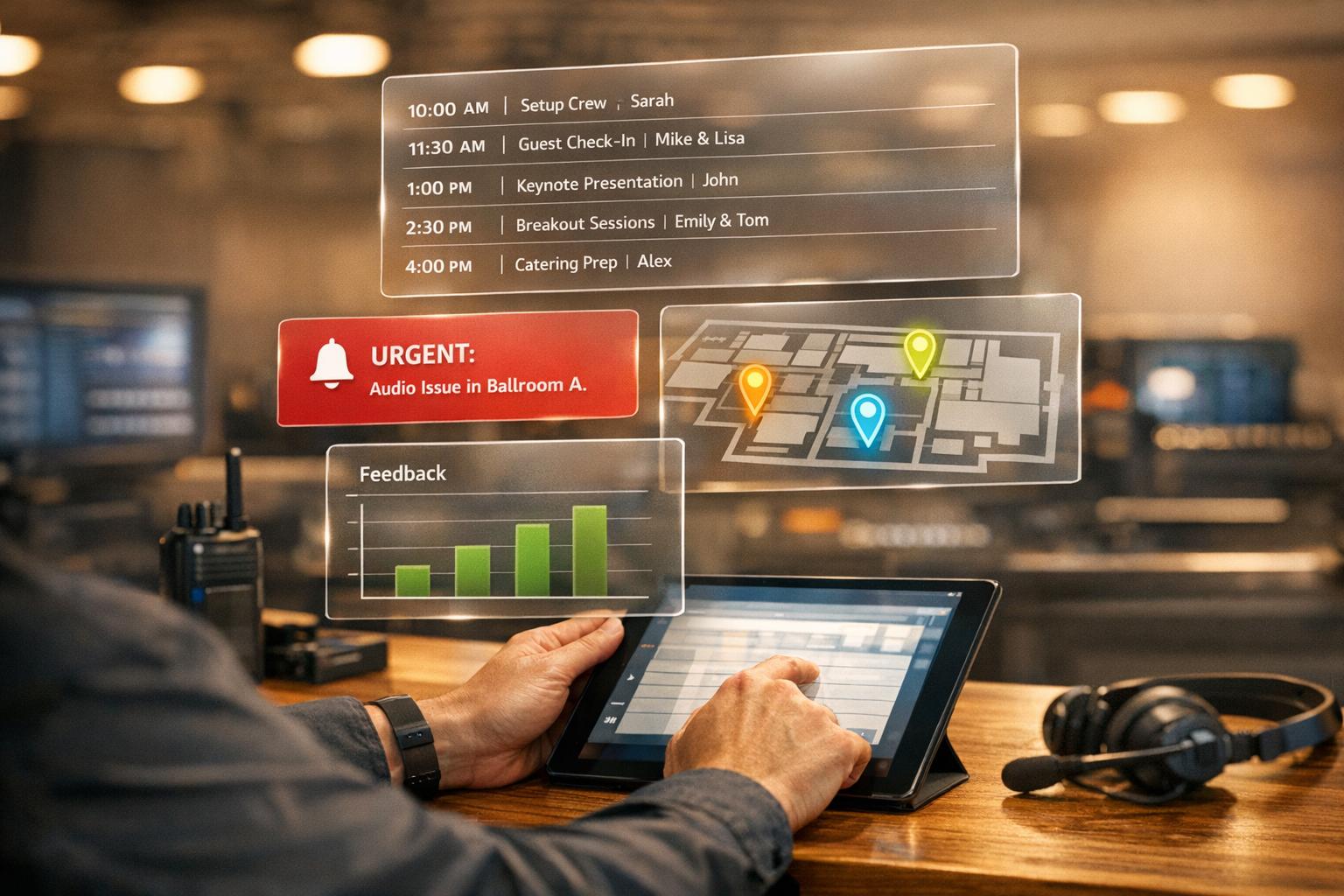
Great events depend on great communication. Without it, even the best plans can fall apart. Strong communication boosts productivity by 20–25%, while poor communication leads to burnout for 43% of employees. For event staff, this means avoiding mistakes like missed VIP updates or delayed catering.
Here’s the key: Create a clear communication plan, use centralized tools like Quickstaff, and ensure your team is aligned before, during, and after the event. From assigning roles to handling emergencies, this guide covers it all.
Key takeaways:
Good communication ensures your team stays coordinated, guests are satisfied, and events run smoothly.
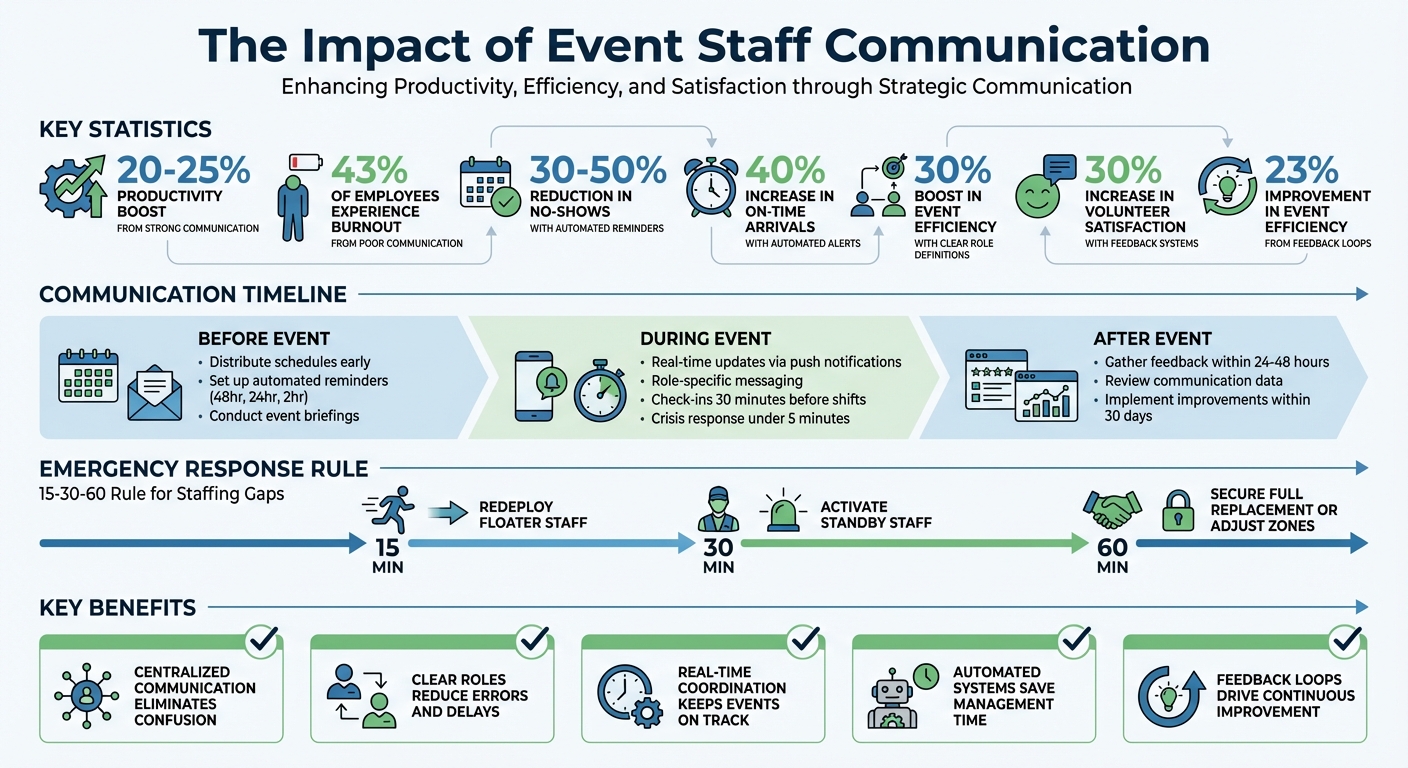
Event Staff Communication Impact Statistics and Key Benefits
Good communication is the backbone of any successful event. Without dependable ways to stay connected, even small misunderstandings can spiral into bigger problems. Imagine this: if door staff aren't informed about a last-minute change in VIP arrival protocols, the guest's first impression could be tarnished before the event even begins.
As Wright Group Event Services explains:
"Superior communication can prevent your team from making errors that can cause unnecessary delays and unexpected issues that can damage the event's reputation".
This kind of clarity allows for smooth, real-time coordination that ensures everything stays on track.
Quick updates are key to keeping the event flow uninterrupted and enjoyable for guests. For example, when door staff can immediately notify the hospitality team about a VIP's arrival, it creates opportunities for personalized service that make guests feel special. At the same time, discreet communication tools help keep operational challenges behind the scenes, so attendees remain unaware of any potential hiccups.
Clear communication also eliminates confusion about roles, helping every team member focus on their specific responsibilities. It’s especially important for maintaining venue safety - staff can work together to manage capacity limits and meet fire marshal requirements without a hitch.
Zach Napolitano, Director of Product Marketing at Splash, highlights this importance:
"If you're a great event planner, you put every measure in place to make sure the right people know about any unplanned surprises as soon as possible".
When everyone on the team knows their role and has access to effective communication tools, disruptions are kept to a minimum. This ensures that even minor delays won't overshadow the event's success.
A well-thought-out staff communication plan focuses on managing critical moments rather than just coasting through routine hours. As one event staffing CEO put it:
"I don't build staffing plans for the easy hours. I build them for the 15 minutes where check-in backs up, the client's asking questions, and everyone's looking at us to fix it." - CEO, Event Staff
The key is to identify potential bottlenecks - like when doors open, meal services transition, or VIPs arrive - and structure your communication strategy to ensure these moments flow smoothly.
To handle high-pressure situations effectively, start by setting clear communication goals. What’s the priority? Faster response times during emergencies? Better coordination? Higher staff engagement? Using the SMART framework (Specific, Measurable, Achievable, Relevant, and Timely) helps you define and track success. For example, instead of vaguely aiming to "improve communication", a SMART goal might be: "Reduce response time to staffing gaps from 45 minutes to 15 minutes."
Next, assign clear responsibilities for each communication channel. As Live Group explains:
"By defining roles (e.g. 'Sarah will update the website, John will liaise with the press, Aisha will brief our internal sales team'), you ensure accountability." - Live Group
This clarity ensures tasks don’t fall through the cracks and minimizes confusion. Also, establish an escalation ladder so everyone knows who makes decisions during emergencies like AV malfunctions or weather disruptions.
Tailor your messaging based on stakeholder needs. Internal staff may need details like schedules, zone assignments, and break rotations, while speakers might require AV setup instructions or rehearsal times. Assigning specific people to manage each group ensures communication stays focused and effective. Additionally, holding a kickoff briefing before the event aligns everyone on key messages and protocols. These role assignments and preparations contribute to smoother communication through centralized tools.

Scattered communication via texts, emails, phone calls, or even sticky notes can lead to critical details slipping through the cracks. A centralized platform consolidates scheduling, messaging, and event information into one accessible location. As StaffConnect notes:
"A centralized communication channel with event staff can streamline the communication process to ensure all team members are aligned and can exchange and receive critical information." - StaffConnect
Tools like Quickstaff integrate real-time schedule updates, event staff availability tracking, automated reminders, and unlimited messaging. When urgent updates are shared, the entire team is instantly informed, reducing the risk of "tribal knowledge", where vital information is held by only one person. With digital visibility, staff can quickly access zone assignments, rosters, and timelines without unnecessary back-and-forth.
The efficiency gains are undeniable. Staff save time by avoiding endless searches for missing colleagues or repeated questions. Centralized tools also shine during last-minute changes, like a server calling out or a VIP table being relocated. Updates are communicated in real time, enabling quick action. For instance, the 15-30-60 rule becomes easier to execute: redeploy floaters within 15 minutes, activate standby staff within 30 minutes, and secure a full replacement or adjust zones within 60 minutes. With a centralized platform, these time-critical processes become seamless, ensuring your pre-event communications are as efficient as possible.
Getting schedules out early can help avoid last-minute confusion. The aim is to shift away from scattered communication methods - like spreadsheets, sticky notes, or random text messages - and move toward a centralized system. This way, staff can quickly access their schedules and any essential details and event day supplies they need to know. This change lays the groundwork for smoother pre-event planning.
Quickstaff makes scheduling simpler by letting you create events and assign shifts based on real-time staff availability. The platform automatically flags double-bookings or unavailable slots and even suggests alternatives from your waitlist, saving you from having to manually sort out conflicts.
"One of the biggest frustrations of staff scheduling is staff unavailability. You spend your time creating the perfect schedule and contact your team members, only to discover they aren't available." - Quickstaff
Once you've finalized the schedule, you can share it using mobile-friendly links. Staff can then accept shifts directly from their phones and sync them with their calendars. This streamlined system significantly cuts down no-shows - by as much as 30–50%, according to event management best practices. Instant notifications and one-click confirmations make it easier for team members to stay on top of their commitments. For example, during a wedding catering event for 200 guests, Quickstaff allowed for smooth shift management and easy staff swaps using its waitlist feature, ensuring there were no coverage gaps.
Centralized scheduling becomes even more effective when paired with automated updates. After assigning shifts, keep everyone informed with automated reminders and detailed event briefings.
Instead of chasing after people with manual follow-ups, set up SMS or email alerts to go out at key times - 48 hours, 24 hours, and 2 hours before a shift. These reminders can increase on-time arrivals by up to 40%. Be sure to include all the critical details, like arrival times (e.g., 03/20/2026 at 5:00 PM), dress codes, parking instructions, and emergency contacts.
You can also attach event briefings as PDFs or in-app notes when creating the schedule. These should include visuals, like flowcharts for role assignments (e.g., "Greeters at entrance 5 PM sharp"), and timelines to make everything crystal clear. To ensure staff review these materials, require in-app confirmations or responses. For those who don’t respond, follow up with targeted notifications. This system of checks and confirmations eliminates guesswork, ensuring that everyone is prepared, while freeing managers from the hassle of constant calls and messages.
When the event kicks off, your focus shifts from planning to managing real-time coordination. This is where earlier preparations and tools like Quickstaff come into play, ensuring smooth communication without disrupting the guest experience or overwhelming your team.
Digital tools help keep everyone connected without interfering with the event itself. Quickstaff, for instance, allows you to send real-time updates to on-duty staff, keeping them informed about schedule adjustments, VIP arrivals, or capacity concerns.
Check-ins play a dual role - they confirm who’s on-site and flag potential issues. If someone hasn’t checked in 30 minutes before their shift, automated reminders alert you, giving you enough time to find a replacement. Once staff have checked in, you can streamline communication by targeting messages only to those actively working, reducing unnecessary noise for off-duty team members.
"If you're a great event planner, you put every measure in place to make sure the right people know about any unplanned surprises as soon as possible." - Zach Napolitano, Director of Product Marketing, Splash
Push notifications are especially useful for urgent updates, such as last-minute room changes or safety alerts, ensuring critical information reaches staff instantly. Real-time dashboards further enhance your ability to monitor check-in statuses and team responsiveness, enabling quick adjustments as the event unfolds. To make communication even more efficient, consider organizing role-specific channels.
Sending every update to all staff creates unnecessary clutter and risks burying important details. Instead, segment your communication by roles - set up dedicated channels for groups like door staff, catering teams, security, and emergency response teams. This ensures each team receives updates relevant to their specific responsibilities.
Pre-configure these role-specific channels in Quickstaff before the event begins to avoid last-minute scrambling. For example, door staff might need constant updates on guest flow and registration, while catering teams may require details about meal schedules and dietary needs. During high-pressure moments, this segmentation prevents information overload. A security alert, for instance, will go directly to the appropriate team without being lost among operational updates. You can even automate certain alerts - like notifying sales when a VIP checks in - so no critical opportunities are missed.
Even with the best-laid plans, unexpected challenges like bad weather, tech malfunctions, staff shortages, or safety incidents can arise. What separates a chaotic situation from a well-managed one is having clear communication protocols in place. As ClearEvent explains:
"Every event carries some uncertainty. From sudden storms to tech glitches or safety concerns, a solid crisis communication plan ensures you act fast, protect attendees, and safeguard your reputation".
The first step is to establish a crisis response team before the event begins. Assign specific roles, such as an Event Manager to make key decisions, a Communications Lead to handle updates, and Security or Safety Officers to liaise with emergency services. Be sure to assign backups for each role, as crises require immediate action. Regularly test your emergency communication system to ensure critical updates can reach the entire team in under five minutes. This preparation is essential for a quick and effective response.
Once your team is in place, focus on delivering updates through multiple channels. Use SMS, push notifications, and follow-up emails to ensure timely communication with all staff. Tools like Quickstaff enable targeted messaging, so you can notify specific teams - like security, catering, or door staff - without overwhelming others with irrelevant details.
To save time during high-stress moments, prepare pre-written message templates for common issues such as weather delays, technical glitches, or medical emergencies. These templates allow you to respond swiftly without scrambling to craft the perfect message. For staffing emergencies, prioritize essential roles like catering, bar staff, and AV. Cross-trained "floater" staff can step in to cover critical gaps when needed.
Finally, post-incident evaluations are vital. Within 30 days of any crisis or drill, hold a debrief to review response times and identify communication weaknesses. Use this feedback to update your crisis playbook, ensuring each experience strengthens your preparedness for future events.
A post-event review turns every event into a chance to learn and refine. Collect feedback promptly - ideally within 24 to 48 hours - to ensure fresh and accurate insights.
Select feedback methods that suit your team size and dynamics. For larger teams, digital surveys work well, while smaller groups might benefit from quick post-event huddles. Keep surveys concise - no more than 10 questions - and ensure they’re mobile-friendly for convenience. Focus on specific areas like access to resources and communication flow.
At Leafr, co-founder Gus Bartholomew introduced 5-minute video chats with staff immediately after events. These informal discussions revealed that volunteers often lacked clarity about their roles. In response, the company created detailed task cards, boosting event efficiency by about 30%. Similarly, Give River co-founder Meghan Calhoun used tools like "Feedback Friday" and informal "Riverside Chat" sessions. These efforts led to a 30% increase in volunteer satisfaction and a 23% improvement in event efficiency.
Ensure staff feel safe sharing honest feedback by framing these sessions as opportunities to learn rather than performance critiques. Start by highlighting successes before addressing challenges. This approach builds confidence and encourages open communication.
In addition to qualitative feedback, quantitative data provides a clearer picture of how well your event processes worked.
After gathering direct feedback, dig into quantitative metrics for deeper insights. Quickstaff’s reporting tools help analyze no-show and absentee rates, allowing you to assess whether automated reminders and pre-event briefings were effective. Look for patterns in task completion and performance. If specific roles consistently face challenges, it might signal the need for better role-specific briefings or adjustments to real-time updates. Group feedback into themes - such as logistics, leadership, and communication - to identify areas needing attention.
The key to meaningful improvement is closing the feedback loop. As StaffConnect highlights:
"If staff feel like their feedback goes nowhere, they'll stop sharing it".
Assign actionable improvements to specific team members and set clear deadlines for implementation. Before your next event, share the changes made based on staff input. This not only shows that their voices matter but also keeps the team motivated and engaged in the process of continuous improvement. Stronger processes lead to smoother coordination in future events.
Bringing together planning, execution, and review, effective communication is the glue that holds a flawless event together. Without it, even the most meticulously planned events can spiral into confusion, with mismatched expectations, duplicated efforts, and last-minute surprises derailing the entire operation.
The strategies outlined in this guide - like assigning clear roles, conducting real-time check-ins, and gathering post-event feedback - help establish a framework for smooth and dependable event management. As Barbara Kozanecka from 6Connex aptly states:
"Communication is the lifeblood of any event, linking every moving part to ensure that everything runs smoothly from one end to another".
When your team knows their responsibilities, who to turn to for help, and where to access essential information, they can focus on delivering standout experiences instead of wasting time resolving basic misunderstandings.
Quickstaff's centralized platform tackles common scheduling problems and communication challenges by consolidating schedules, updates, and messaging in one place. This ensures your team stays on the same page, from pre-event planning to post-event evaluations. Features like automated reminders, targeted role-specific messages, and streamlined reporting help minimize no-shows and fine-tune processes. This cohesive system sets the stage for ongoing team growth and efficiency.
Continuous two-way feedback is key to keeping communication strong. The insights your staff provide after each event can shape better protocols, clearer instructions, and more effective teamwork. By acting on their feedback, you show your team that their input matters, fostering a motivated and engaged workforce.
Start small - experiment with centralized scheduling, use automated reminders, or hold a quick post-event debrief. These focused communication upgrades can shift your event operations from being reactive to achieving seamless, proactive coordination.
An effective event staff communication plan focuses on a few key areas to keep everything running smoothly:
Quickstaff helps tackle no-shows and late arrivals by using tools like automated reminders and shift confirmations to keep staff informed and on track. With its ability to send quick updates and instant notifications, the platform makes it easier to find replacements for last-minute cancellations. Regular check-ins and straightforward communication features also boost reliability, reducing disruptions and ensuring more consistent attendance.
The quickest way to notify the correct team during an emergency is by using scheduling and communication tools such as Quickstaff. These tools make it easier to pinpoint who’s available, send out automated reminders, and confirm replacements seamlessly. Clear and immediate communication, paired with detailed instructions, is essential in these situations. Having a well-prepared emergency protocol and a backup list of staff ensures responses are not only swift but also well-organized.


