How Automated Reminders Improve Event Staffing
February 3, 2026

Automated reminders simplify event staffing by reducing no-shows, saving time on follow-ups, and improving communication. Here's how they help:
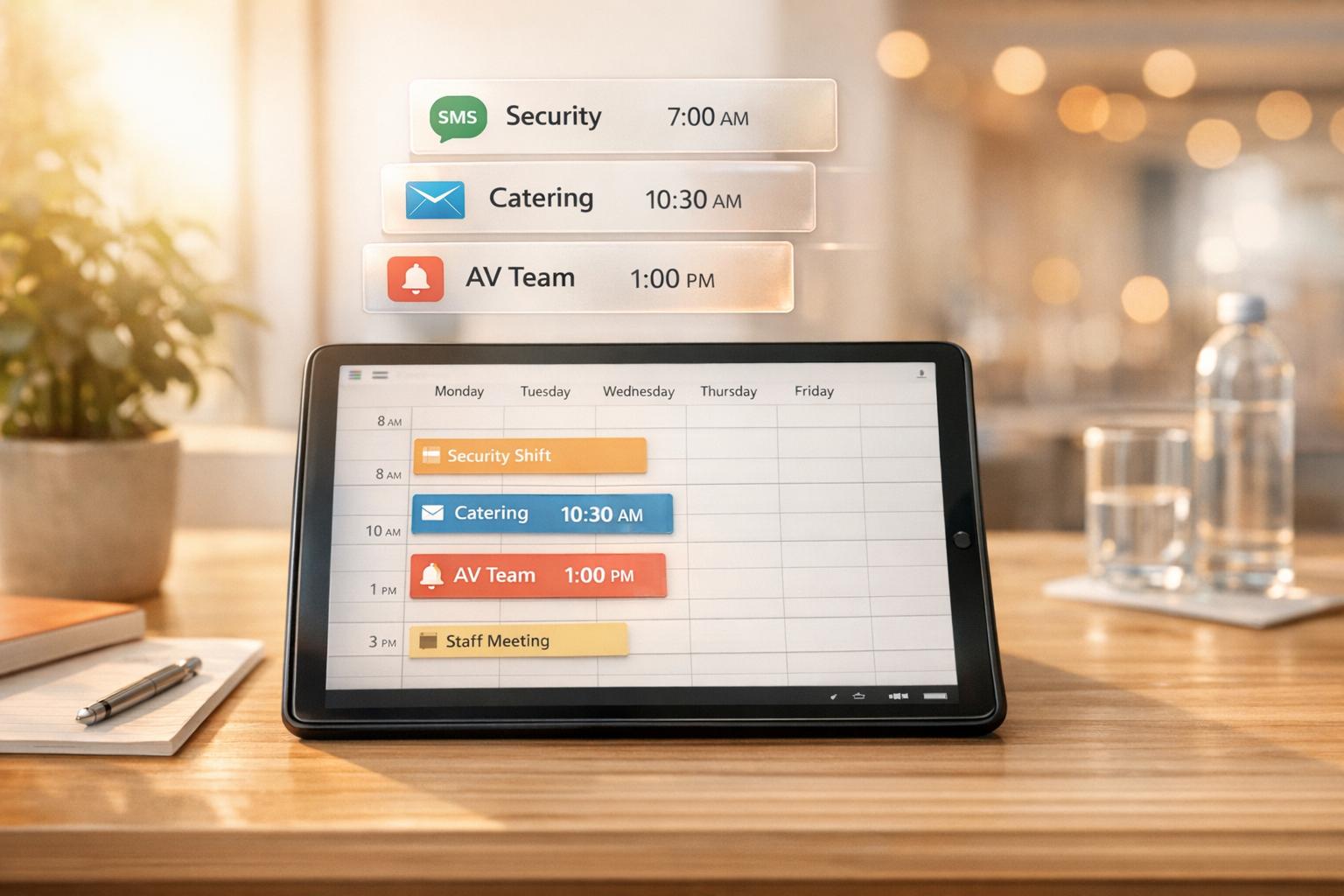
It’s easy for staff to forget their shifts, but automated reminders help keep events fresh in their minds. SMS reminders are particularly effective, reducing missed shifts to under 5%, with an impressive 98% open rate for messages.
Sending reminders 48 hours before a shift gives enough time for schedule adjustments, while a follow-up 2-hour notice ensures staff are fully aware of their upcoming responsibilities. Many systems even allow staff to respond with simple codes - like "C" to confirm or "R" to reschedule - which instantly updates the master calendar.
This streamlined approach minimizes last-minute cancellations and keeps communication smooth.
Automated reminders don’t just reduce no-shows - they also save a ton of time. Manually calling or messaging staff can be a huge drain on resources, but using budget-friendly staff scheduling tools can help automate these tasks.
"I used to be on the phone all the time to schedule staff. Now, within a few minutes, I can schedule all the staffing I need for my events." – Steven Townsend, Event Manager
The shift to automation is a game-changer for administrators. Staffing Coordinator Jennifer Manley highlights this impact: "My time spent scheduling has shrunk majorly, leaving me more time to focus on recruiting, on-boarding and training". Plus, real-time updates eliminate the need to manually track responses, making the entire process more efficient.
Automation doesn’t just save time - it also improves clarity. When communication happens across multiple channels, important details can easily get lost. Automated reminders simplify this by delivering consistent, accurate information about event details like date, time, location, and staff roles.
Additionally, calendar synchronization ensures schedules are up-to-date across all devices, reducing the risk of double-booking or miscommunication. This consistency helps events run more smoothly and keeps everyone on the same page.

Quickstaff's centralized calendar makes event scheduling a breeze by showcasing all upcoming events and staffing levels in one place. With the "Check Availability" feature, you can quickly identify team members who are free, avoiding scheduling conflicts. Staff can mark their unavailable dates, and these restrictions are automatically reflected in your scheduling view. Once you assign staff and they confirm their shifts, Quickstaff takes over by sending automated reminders, directions, and event notes.
"Prior to Quickstaff, I was using Excel spreadsheets to track my employees and their shift availability. My life changed the day I started using Quickstaff!" - Jaime S, VP, Lisa's Catering
After assigning shifts, you can customize the types and timing of reminders to keep your team informed and prepared.
Quickstaff simplifies communication by emailing shift invitations that staff can accept or decline instantly. To reduce no-shows, set pre-event reminders to go out 24–48 hours before the event. You can also send role-specific updates to ensure messages reach the right groups. Syncing events with major calendar apps adds another layer of reminders, helping everyone stay on track. Including details like dress codes, directions, and special instructions in the event notes ensures this information is automatically included in the reminders your team receives.
For last-minute updates, mobile notifications keep everyone in the loop without missing a beat.
When schedules change, Quickstaff instantly notifies affected team members. You can send updates to the entire team or target specific roles, minimizing unnecessary messages and reducing communication fatigue. The mobile-friendly platform allows staff to view schedules, event notes, and directions directly from their phones. Since Quickstaff operates entirely online, managers can coordinate staffing from anywhere. Encourage your team to sync their Quickstaff account with their mobile calendars so they receive alerts for any changes to event times or details. This mobile functionality ensures real-time updates and keeps your scheduling process efficient and stress-free.
Effective communication starts with tailoring reminders to suit the needs of different staff roles. For instance, waiters, bartenders, and cooks should only receive updates relevant to their responsibilities. Using Quickstaff, you can invite staff to events based on their roles - bartenders won’t get unnecessary notifications about kitchen prep times, for example.
It’s also important to consider how each staff member prefers to receive information. Some staff check their phones regularly and are more responsive to push notifications, while others might rely on email for detailed updates. Matching the delivery method to individual habits has shown to cut down missed shifts and late arrivals by up to 85%.
Timing is everything. A detailed reminder sent 24 hours before an event, followed by a quick alert on the day of, can make a big difference. This approach has helped organizations reduce overtime costs tied to last-minute coverage issues by an average of 23%. If a staff member doesn’t acknowledge a reminder, you can set up an automatic follow-up or receive an alert as the manager to take action.
As your team evolves, remember to regularly review and fine-tune these settings or use an event staffing needs analyzer to keep your strategy effective.
To know if your reminders are hitting the mark, monitor how staff respond to them. Look at acknowledgment rates to identify gaps. If certain groups consistently ignore email reminders, consider switching them to SMS or push notifications, which tend to grab attention faster. Using multiple channels can boost acknowledgment rates by 30–40% compared to sticking with just one.
You can also tie reminder data to attendance records to see how they impact no-shows, late arrivals, and unfilled shifts. Well-timed reminders have been shown to reduce no-shows by 25–35% and late arrivals by 15–20%. After events, ask staff for feedback on the clarity and usefulness of the reminders to refine both the timing and the content.
But don’t go overboard. Sending too many notifications can lead to fatigue, dragging engagement rates down to 40–50%. A balanced approach, where reminders are meaningful and well-timed, can maintain engagement rates above 80%. If you’re sending five reminders for a short two-hour shift, it’s probably time to cut back.
Reminders work even better when paired with Quickstaff’s availability tracking. When staff mark dates they can’t work, they’re excluded from receiving irrelevant notifications. This keeps communication focused on those who are actually available.
When setting up an event, enable the "Ask relevant staff if they are available for this call time?" option. Quickstaff will automatically send a group request to staff in the selected role via text and email. Their responses (Yes/No) are instantly updated in the Availability tab, giving you a clear view of who’s ready to work. Once someone confirms their availability, you can easily book them for the shift with a single click.
This system is especially helpful for last-minute cancellations. If a staff member backs out, the waitlist feature and automated reminders can quickly notify backup staff who’ve already indicated they’re available. This integration can reduce the manager's involvement in shift-swapping by up to 85%.
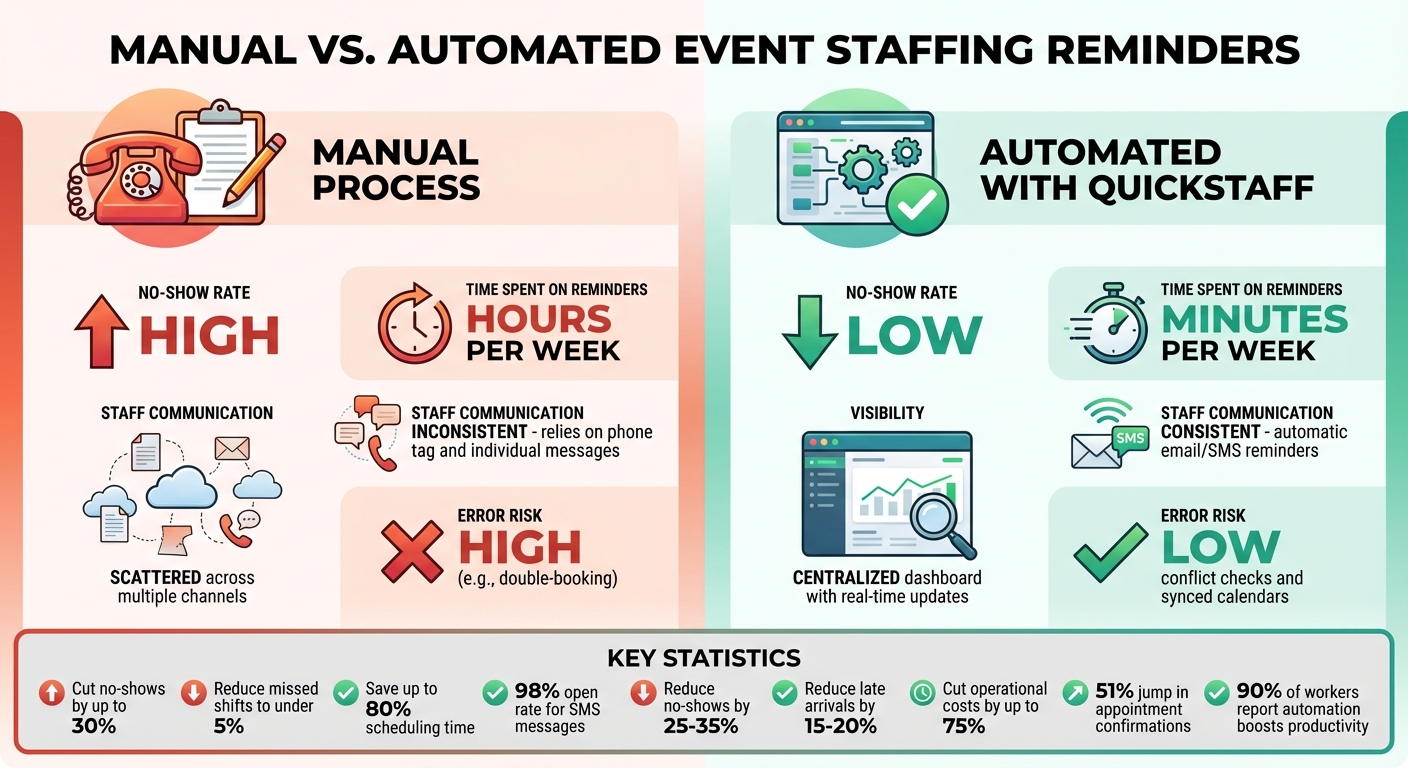
Manual vs Automated Event Staffing: Key Performance Metrics Comparison
To understand how automated reminders are working, it’s important to focus on key performance metrics. Start with no-show rates - they’re a direct reflection of how effective your reminders are. Automated systems provide accountability and make it easier to spot patterns over time.
Another critical metric is staff response times. Quickstaff simplifies this by offering a central dashboard that shows, in real time, who has confirmed or declined event invitations. This eliminates the need for manual follow-ups.
You’ll also want to keep an eye on staffing levels across events. Quickstaff’s dashboard lets you see which events are fully staffed and which might need more attention. With over 20,000 events scheduled since 2013, Quickstaff has proven its ability to handle high-volume tracking.
"The time that we have been able to save by using this staff scheduling software has allowed us to tackle the other issues that we face thereby improving our overall events!"
- Kelly, The Abbot KC
Availability tracking is another area to analyze. Automated systems ensure that reminders are sent only when staff are actually available. By allowing team members to block out their unavailable times, Quickstaff reduces scheduling conflicts and errors. This not only streamlines staffing but also helps minimize wasted resources. You can even assess financial benefits by calculating savings from fewer unfilled slots and less wasted time.
These metrics are essential for comparing the efficiency of manual versus automated scheduling.
When you compare manual scheduling to automation, the difference is clear. Manual scheduling often means hours spent on calls, texts, and emails, while automation reduces this to just a few minutes.
| Metric | Manual Process | Automated with Quickstaff |
|---|---|---|
| No-show Rate | High | Low |
| Time Spent on Reminders | Hours per week | Minutes per week |
| Staff Communication | Inconsistent; relies on phone tag and individual messages | Consistent; automatic email/SMS reminders |
| Visibility | Scattered across multiple channels | Centralized dashboard with real-time updates |
| Error Risk | High (e.g., double-booking) | Low; conflict checks and synced calendars |
Switching to automated reminders not only saves time but also makes managing your team much easier. Instead of chasing down confirmations, you can focus on more strategic tasks like communicating with event staff, recruiting, onboarding, and training. Plus, the centralized system gives staff one reliable place for all event details - no more digging through emails or texts.
Automated reminders have proven to be a game-changer for managing the complexities of event staffing. By tackling scheduling chaos and communication gaps, they allow you to organize your team in minutes while the system takes care of confirmations, updates, and last-minute adjustments. With around 90% of workers stating that automation boosts their productivity, and organizations reporting up to a 51% jump in appointment confirmations, the impact is undeniable.
Beyond improving efficiency, automated reminders help eliminate costly errors like double bookings and no-shows, while also slashing operational costs by as much as 75%. Staff benefit from timely updates delivered through their preferred communication channels, ensuring they’re always informed and ready to go.
Quickstaff simplifies this entire process with its intuitive, automated workflow. Just create your event, assign staff by role, and let the platform handle the rest - tracking invitations and responses in real time. With over 20,000 events scheduled since 2013, Quickstaff has become a trusted tool for event professionals.
"My time spent scheduling has shrunk majorly, leaving me more time to focus on recruiting, on-boarding and training."
- Jennifer Manley, Staffing Coordinator
Ready to save time and streamline your staffing? Try Quickstaff with a 14-day free trial - no credit card required - and see how automated reminders can revolutionize your event planning process.
Automated reminders play a key role in cutting down on no-shows by delivering timely, personalized notifications via SMS, email, or push alerts. These reminders help ensure staff are aware of their schedules, making it easier for them to plan ahead and arrive ready to work.
Clear and consistent communication through these reminders encourages accountability, lowers the risk of missed shifts, and boosts overall reliability and efficiency in event staffing.
Automated reminders can be customized to match the unique needs of various event staff roles by adjusting factors like content, timing, and delivery method. For example, front-of-house staff - such as servers or bartenders - might receive reminders with essential details like their shift times, dress code, and location. These could be delivered via SMS or email shortly before their shifts to keep things simple and timely.
On the other hand, managers or event coordinators might benefit from receiving updates or task checklists earlier in the day, giving them ample time to prepare and organize.
You can also implement triggers for role-specific notifications. These could include updates about schedule changes, availability confirmations, or even emergency alerts. By personalizing reminders this way, communication becomes clearer, no-shows are minimized, and every team member stays informed and ready to go. This approach helps streamline event staffing and reduces unnecessary stress.
Quickstaff leverages automated reminders to make sure staff get timely updates through their preferred method - whether that’s email or SMS. This approach helps cut down on no-shows and keeps everyone in the loop about their schedules.
By simplifying communication, Quickstaff allows event organizers to stay in sync with their team, leading to smoother operations and more reliable attendance management.