5 Tips for Managing AV Teams at Events
June 11, 2026

Managing AV teams at live events requires clarity, coordination, and preparation to avoid technical hiccups like audio feedback or glitchy visuals. Here's how to ensure smooth execution:
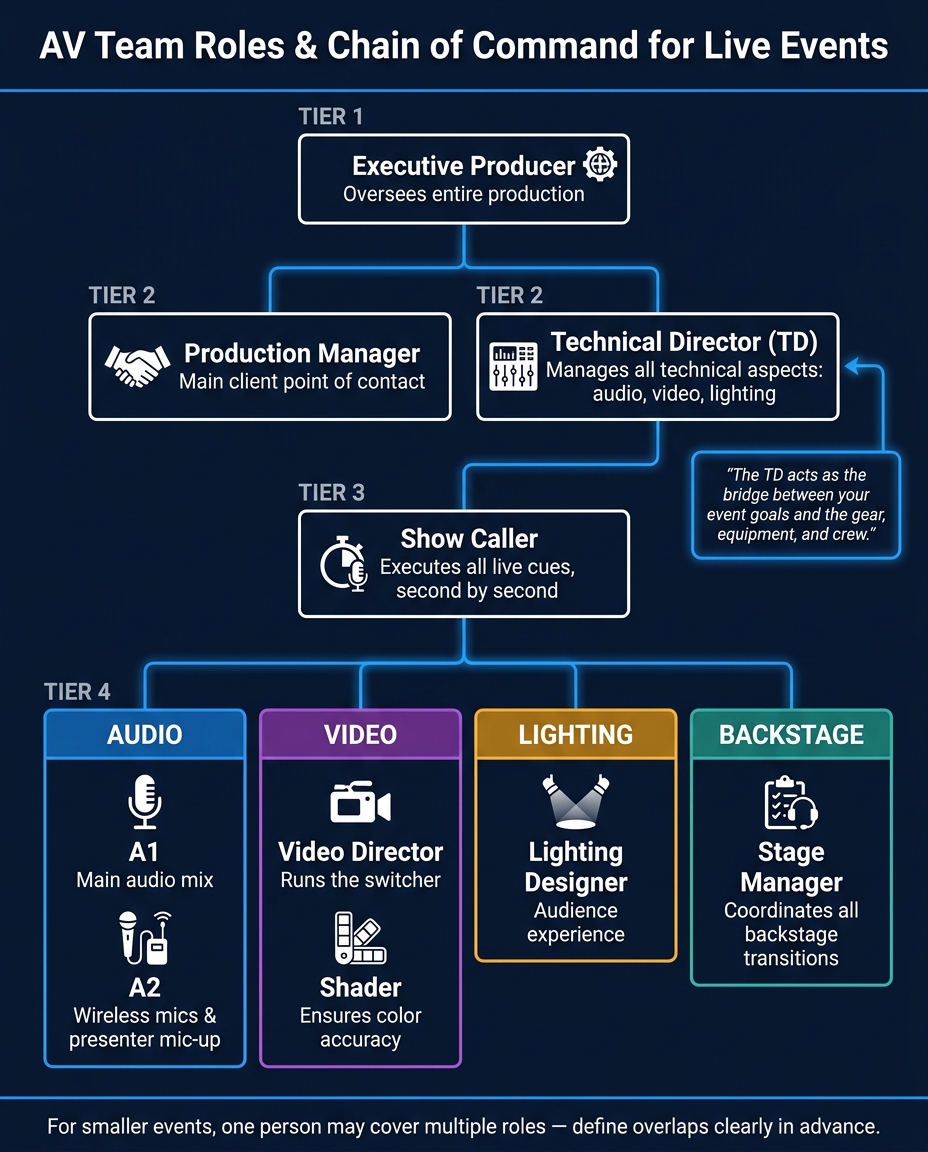
AV Team Roles & Chain of Command for Live Events
Before the event kicks off, every AV team member needs to know exactly what their role is. When roles are unclear, tasks can get overlooked - something no one can afford during a live event. A clear hierarchy ensures everything runs smoothly once the show is underway.
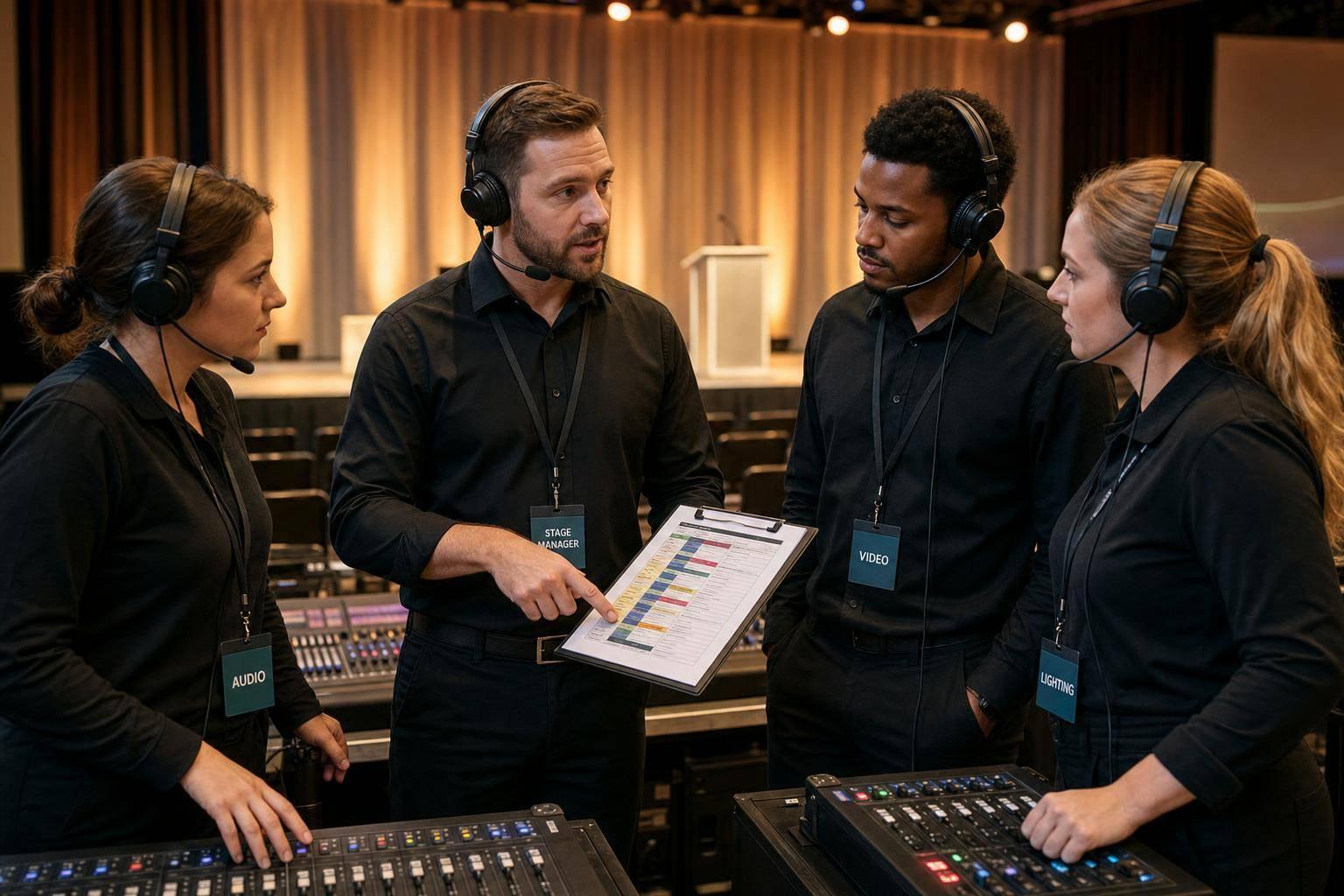
Successful AV teams have a well-organized structure. At the top, the Executive Producer oversees the entire production. The Production Manager acts as the main point of contact for the client, while the Technical Director (TD) manages all technical aspects, including audio, video, and lighting. Then there’s the Show Caller, who is responsible for executing cues live, down to the second.
"The TD is often the person that has the most responsibility for all things technical. They act as the bridge between your event goals and the actual gear, equipment and people on the crew." - Brandt Krueger, Senior Production Manager
Within each technical area, specific roles should also be assigned. For instance, the A1 manages the main audio, while the A2 handles wireless microphones. A Video Director runs the switcher, and a Shader ensures color accuracy. Behind the curtain, the Stage Manager coordinates all backstage transitions, freeing up the Show Caller to focus entirely on live cues.
For smaller events, it’s common for one person to take on multiple roles - like a TD covering several responsibilities. However, these overlaps should be clearly defined ahead of time. To avoid last-minute confusion, designate a single person with final decision-making authority. Gabe Solomon from MertzCrew highlights the importance of this approach:
"Segmenting your team allows each employee or AV freelancer to focus on what they do best... it's one of the best ways we know to avoid replication of effort and ensure that everyone is doing their best work."
One practical way to ensure this structure is followed is by preparing a one-page role sheet before the event. This document should outline every position, who’s assigned to it, and their responsibilities. Share it with the entire crew during load-in. For added efficiency, consider using tools like Quickstaff to keep the role sheet accessible to everyone throughout the event.
Once you've assigned roles, the next big hurdle is keeping communication clear and centralized. Relying on scattered personal texts, emails, or verbal instructions can lead to confusion, missed cues, and last-minute scrambling.
The best AV teams use a hybrid communication method: two-way radios for urgent, real-time communication and a mobile messaging app (like Slack or WhatsApp) for detailed coordination. Radios are ideal for live, push-to-talk updates since they don't depend on WiFi or cell networks. Messaging apps, however, allow for sharing floor plans, cue sheets, and photos while providing a searchable message history - something radios can't handle. This combination ensures fast communication during critical moments while maintaining a system for organized, ongoing collaboration.
"Effective communication is the key to planning and producing any event because it's what allows all the moving parts of the event to work together." - Gabe Solomon, MertzCrew
Before the event, set clear communication guidelines, including specific availability times (e.g., 8:00 AM–6:00 PM) and expected response times. Keep your digital channels focused by limiting non-essential chatter. When important instructions get buried under casual messages, mistakes are bound to happen. Assign a single point of contact for each AV sub-team to avoid conflicting messages reaching crew members.
For even more streamlined crew management, consider using a tool like Quickstaff. It consolidates your team roster, schedules, and messaging into one mobile-friendly platform, ensuring everyone has access to the right information when they need it.
The run-of-show acts as the ultimate guide for your event team, covering everything from the initial crew call to the final load-out. Paired with this is the cue sheet, which breaks down every technical action - second by second - so nothing is left to chance.
As LSAV Powerhouse explains:
"Your cue sheet is the event's playbook. It should include every lighting change, video playback, microphone switch, and sound effect - down to the second."
This level of detail ensures that every department knows exactly what to do, when to do it, and how to do it.
To make things even smoother, consider color-coding cues by department. For example, use one color for audio, another for video, and a third for lighting. This makes it easy for technicians to spot their next task at a glance.
Don't forget to plan for rest. Schedule one-hour meal breaks to keep the crew energized and avoid the hefty costs of overtime. Labor can account for 40%–50% of an AV budget, and overtime rates can quickly add up - like 1.5x pay for hours 11–12 and double pay starting hour 13. If a full break isn’t possible, providing a hot catered meal at the tech table can help keep costs in check.
Before the event, conduct a full technical rehearsal to walk through the entire cue structure with your team. This step will help identify potential problems, like overlapping audio cues or a presenter drifting off-mic during a video transition. As LSAV Powerhouse puts it, "smooth transitions result from thorough preparation." The Technical Director (TD) should lead this rehearsal, as they’ll be calling cues live and must have a complete understanding of the show’s flow.
To keep everyone on the same page, use tools like Quickstaff to share and update your run-of-show and cue sheets in real time. This ensures your AV team stays coordinated and ready to execute flawlessly.
Once you've established structured roles and clear communication, the next step is to align tasks with team members' expertise, venue zones, and contingency plans.
Start by matching tasks to specific skills rather than just job titles. For instance, an audio engineer experienced with a Yamaha CL series console might not be familiar with a DiGiCo SD series. Keeping a detailed record of each crew member's certifications and platform-specific expertise ensures you can assign roles accurately. This approach avoids misalignment and ensures specialized skills are used effectively.
Skill-based assignments are essential. Once roles are matched to skills, organizing by venue zones can help manage large events more efficiently. Divide your venue into distinct areas, such as Front of House (FOH), backstage, and other specialized zones like Video Village for complex productions. For example:
As Brandt Krueger, Senior Production Manager, explains:
"The A2 usually not only manages things like wireless frequencies and production communications; they're often responsible for 'mic-ing' up presenters before they go on stage."
Clearly defining zone responsibilities ensures everyone knows their role and reduces confusion during the event.
Plan for redundancy in critical roles. In addition to zone assignments, establish backup coverage for key positions. Assign 2–3 pre-qualified backups for every critical role. Daniel Muersing, Founder of Eventstaff, highlights the importance of preparation:
"The difference between amateur and professional staffing isn't headcount - it's anticipation. Using an event staffing needs analyzer can help you anticipate these requirements accurately."
A helpful method is the 15–30–60 rule: redeploy a floater within 15 minutes, activate standby staff in 30 minutes, and fully replace a team member within 60 minutes. To further minimize risks, stagger shift overlaps during transitions to avoid coverage gaps. Cross-training can also add flexibility - for example, a projectionist might step in as a shader once the projectors are set.
No matter how talented your AV crew is, without effective communication and structured check-ins, things can fall apart quickly. That's why pre-event briefings, live check-ins, and post-event debriefs are essential to keep everything running smoothly from start to finish.
Preparation starts well before the event. Send out your briefing document at least 48 hours prior - never on the morning of the event. Make it accessible as a searchable PDF or email, and follow up 24 hours later to confirm everyone has reviewed it. As Abastio explains:
"Briefing your event staff is not a formality you squeeze into the morning of the event. It is a structured communication process that starts days before the first vendor arrives."
Keep the briefing concise - two pages max - with an additional one-page addendum for AV vendors. This addendum should include key details like load-in schedules, power outlet locations, sound check timings, and cue sheets. Then, 30 minutes before the event begins, hold a quick 10-minute on-site meeting. This meeting should review the timeline, roles, communication protocols, and address any last-minute questions. It’s not the time to introduce new information but to ensure everyone is aligned.
During the event, handle live issues efficiently by using an escalation rule: if a technician can't resolve a problem within 60 seconds, they should immediately escalate it to the lead coordinator. To streamline this, set up a single command station - be it a specific radio channel, phone line, or physical location - so urgent matters are directed to the right person without confusion or delay.
Once the event wraps up, conduct a debrief within 48 hours. Focus on identifying areas like missed cues, signal interruptions, handoff issues, or mismatched resolutions. Studies show that most AV failures stem from human error or communication breakdowns - not faulty equipment. A structured debrief helps turn these mistakes into actionable steps for improvement, ensuring your team grows stronger with every event. It’s this kind of attention to detail that separates teams who consistently deliver from those who struggle with repeated errors.
Running an AV team effectively isn’t just about solving problems as they arise - it’s about setting up a system that minimizes issues before they even happen. By assigning clear roles, centralizing communication, creating a detailed run of show, delegating tasks based on skills and zones, and holding structured pre- and post-event briefings, you give your team the tools they need to deliver their best work.
Brandt Krueger, Event Technology Correspondent at Smart Meetings, puts it perfectly:
"By understanding the purpose of each role and creating a collaborative partnership, you're setting the stage for an event where the tech serves the experience."
This level of seamless execution is built on clear accountability, consistent communication, and a commitment to learning and improving after every event.
To take it a step further, proactive logistics management is critical. A common challenge for AV teams is keeping track of crew availability, certifications, and ensuring the right person is assigned to the right role. This is where tools like Quickstaff come into play. By replacing group texts and spreadsheets with a centralized platform, Quickstaff lets you schedule by role, track real-time availability, and send automated reminders - all from a mobile-friendly interface. For event vendors juggling multiple AV teams across various events, this kind of structure isn’t optional - it’s essential.
When combined with clear roles, streamlined communication, detailed cue planning, and thoughtful delegation, these practices form the backbone of a flawless event. Together, they create a system that makes even the most complex productions appear effortless.
During the show, a Show Director or Show Caller takes charge of managing the event's flow, giving precise instructions through a headset. They work closely with the Stage Manager, who handles backstage operations and keeps the team coordinated. With clear communication and well-defined roles, everything runs seamlessly.
An AV run of show is a precise, minute-by-minute schedule designed to coordinate all technical and performance elements of an event. It highlights key roles, such as the Show Director, Technical Director, and Stage Manager, ensuring everyone is clear on their tasks. This schedule typically includes details like presentation timings, transitions, lighting, sound cues, and special effects. It acts as a thorough roadmap to keep every technical aspect running seamlessly throughout the event.
To ensure backup coverage for essential roles, start by identifying 2-3 qualified and available crew members who can step in for each critical position. Implement a tiered system to assign shifts when the primary team member can't fulfill their duties. Use tools like push notifications or SMS alerts to maintain clear and immediate communication, enabling quick responses. Planning ahead like this helps reduce disruptions and keeps operations running smoothly during events.