Ultimate Guide to Role-Based Communication for Events
May 24, 2026


Role-based communication ensures every event team gets the right information at the right time. Instead of sending mass updates, this method tailors messages to specific roles like catering, AV, or security. The result? Fewer miscommunications, clearer accountability, and smoother operations.
By combining tools like radios for instant updates and apps for detailed coordination, you can improve efficiency across all event phases - planning, setup, live event, and teardown. Regular reviews and structured workflows are essential to keep communication effective over time.
This approach not only reduces stress but also helps teams deliver better events with fewer errors.
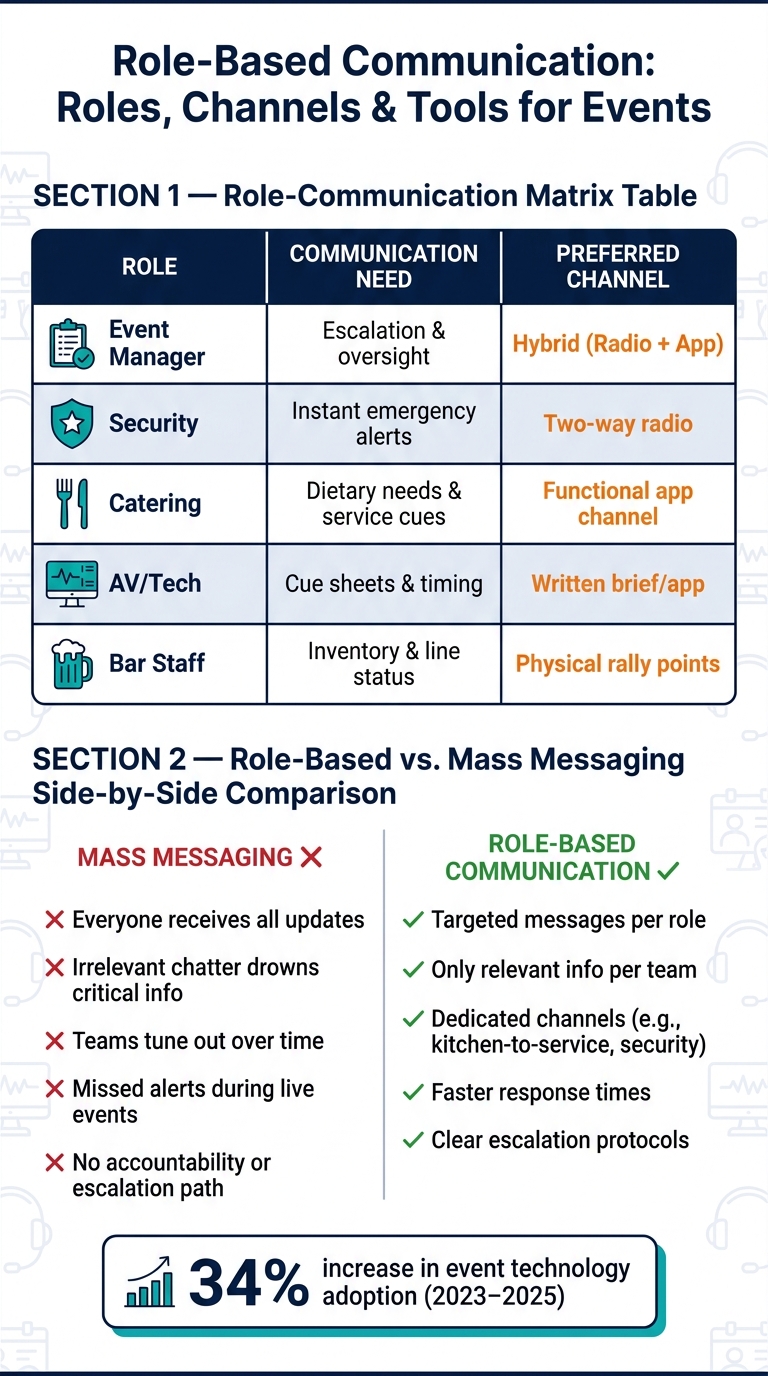
Role-Based Communication vs. Mass Messaging for Events
Every event relies on a network of roles, each with its own set of communication needs. Getting these needs right is the foundation of an effective communication system.
At the top of the hierarchy are event managers, the central command figures. They oversee every team, maintain a high-level view of operations, and act as the main escalation point for issues. Just below them are service captains or leads, who handle specific areas like the front-of-house or bar operations. Their focus is on guiding their teams through each phase of the event and ensuring smooth transitions between departments.
Frontline roles have more specialized communication needs. For example:
Here’s how these roles align with their communication needs and preferred tools:
| Role | Communication Need | Preferred Channel |
|---|---|---|
| Event Manager | Escalation & oversight | Hybrid (Radio + App) |
| Security | Instant emergency alerts | Two-way radio |
| Catering | Dietary needs & service cues | Functional app channel |
| AV/Tech | Cue sheets & timing | Written brief/app |
| Bar Staff | Inventory & line status | Physical rally points |
This tailored approach ensures every team gets only the information they need, reducing confusion and keeping operations smooth. With these roles defined, it’s important to understand why targeted communication outshines mass messaging.
Mass messaging might seem like a quick solution, but it often creates more problems than it solves. When a bartender hears radio chatter meant for the AV team or parking staff, crucial updates can get lost in the noise. Over time, people start tuning out, and critical information gets missed.
Role-based communication takes the opposite approach. Instead of broadcasting everything to everyone, messages are routed directly to those who need them. For instance:
This targeted method boosts efficiency by ensuring messages are relevant and timely. As Breakroom aptly states: "The chaos of live service destroys communication systems that depend on everyone staying calm and remembering protocols." Role-specific channels, on the other hand, are designed to withstand the pressure of live events.
To make role-specific communication effective, it’s essential to follow some key principles: clarity, relevance, and least-privilege access.
One practical way to implement these principles is by using a two-part briefing system. Start with a concise core briefing that outlines shared logistics, then provide each team with a one-page addendum that highlights role-specific details. This keeps communication focused and actionable, ensuring everyone has exactly what they need to succeed.
Events typically unfold across four main phases: planning, setup, live event, and teardown. Each phase comes with its own set of communication requirements. For instance, the details needed to coordinate catering setup are quite different from the real-time communication required during meal service.
| Event Phase | Communication Focus | Key Roles Involved |
|---|---|---|
| Planning/Pre-Event | Briefing, role assignment, timeline review | All staff, event lead |
| Setup | Logistics, equipment placement, layout | Logistics, decor, tech crew |
| Live Event | Service coordination, emergencies, special requests | Kitchen, servers, security, leads |
| Teardown | Inventory, cleaning, equipment return | All staff, venue manager |
Before the event kicks off, gather your entire team for a 30–45 minute briefing. Use this time to walk through the event sequence - from cocktail hour to the cake cutting - so every team member understands their part in the larger plan.
Once the event phases are outlined, the next step is to align roles with specific communication needs.
A communication matrix simplifies the flow of information by mapping out who sends and receives specific messages. This tool eliminates confusion about who should communicate with whom and about what.
To create one, list roles on one axis and message types - such as service updates, emergency alerts, inventory requests, and timeline changes - on the other. Then, specify each role's messaging permissions (send, receive, exclude). The matrix not only clarifies responsibilities but also defines an escalation process, ensuring minor issues are managed by front-line staff while critical problems go directly to event leads.
After defining roles and message flows, the next task is selecting the right communication tools. Your choice should depend on factors like urgency, message complexity, and the environment in which the team operates.
"Radio communication is the nervous system of a well-run event. It connects your teams in real time, enables rapid response to incidents, and keeps the whole operation coordinated." - Tickts Guide
Two-way radios are ideal for urgent, real-time updates, especially in noisy settings or places with spotty cell service. For more detailed information - like floor plans, photos, or searchable updates - mobile apps are a better fit. The most effective systems combine both tools, using radios for immediate alerts to all units and apps for detailed documentation and context.
One channel you should safeguard is the All-Hands channel. Use it exclusively for emergencies and critical updates. If routine messages start flooding this channel, team members may tune out - a risk that could lead to missed alerts during high-stakes moments.
Combining scheduling systems with role-based communication can significantly improve efficiency. When staff are assigned to specific roles within a scheduling platform, they automatically receive only the updates and details relevant to their position. This eliminates the hassle of sifting through irrelevant information.
For instance, platforms like Quickstaff make this process seamless. By scheduling staff based on their roles, you can align your communication setup so that servers get updates about service timelines, while the kitchen team receives prep instructions. Between 2023 and 2025, event technology adoption jumped by 34%, largely due to tools like these that cut down on manual coordination.
Once this integration is in place, the next step is creating structured communication workflows tailored to each phase of an event.
Using role-based scheduling tools, you can create efficient workflows for pre-event briefings, live updates, and post-event follow-ups.
The secret to a smooth workflow is consistency. When team members know exactly where to find updates and when to expect them, everything runs more efficiently.
Once your workflows are in place, the next step is controlling who can communicate within the system. Limiting messaging access by role helps reduce unnecessary chatter and ensures clarity.
Design your communication channels so that front-line staff communicate only within their designated role-specific channels, while supervisors and event leads have broader access across multiple channels. Reserve all-staff announcements for coordinators or designated leads. For sensitive or private discussions, set up restricted channels to keep the information secure. This structure not only keeps communication organized but also ensures that critical messages don’t get lost in the noise.
Once you’ve established a framework, the next step is ensuring it works smoothly over time. This means regularly measuring its effectiveness and making adjustments to keep everything running efficiently.
It’s important to assess how well your communication system performs after each event. By reviewing message logs, you can identify where communication bottlenecks occurred or where alerts were missed. These issues might not be obvious during the event itself but often stand out during a post-event analysis.
Pay close attention to two key metrics: response times and adherence to escalation protocols. If front-line staff are slow to respond to role-specific updates, it could signal that your communication channels need reworking. On the other hand, if incidents are escalated correctly - making sure the right people are informed promptly - it’s a good indication that your system holds up under pressure. These observations provide a roadmap for refining your communication framework.
Role-based communication isn’t something you can set up once and forget about. Teams and workflows evolve, and roles or permissions that made sense months ago might no longer fit. That’s why regular reviews - like quarterly audits of channel access and role assignments - are essential. These checks help prevent situations where someone retains access to channels they no longer need.
Make it a point to verify all role assignments and permissions at least 48 hours before an event. This gives coordinators enough time to fix any issues before they disrupt operations. After the event, take note of any last-minute role changes or unexpected traffic between channels. Use these insights to fine-tune your setup for future events.
Routine audits are great for day-to-day operations, but emergencies require a different strategy.
Even with a solid framework, emergencies demand quick, flexible communication that works alongside your usual workflows. Create a dedicated all-hands channel - often called "Event Control" - exclusively for urgent, site-wide updates. Keeping this channel free of routine messages ensures critical alerts get the attention they need.
For emergencies, two-way radios are invaluable. Start messages with the word "emergency" to grab immediate attention. Mobile apps can supplement this by sharing photos or detailed information, while radios ensure instant broadcasts.
| Situation | Primary Tool |
|---|---|
| Urgent, site-wide alert | Two-way radio |
| Detailed context or photos | Mobile messaging app |
| Sensitive personnel issues | Mobile phone (private call) |
| Post-incident documentation | Mobile messaging app |
Even if an emergency is resolved quickly, document the incident thoroughly. Include details like table numbers, complaints, and resolutions. These records are critical for post-event reviews and can help you improve escalation protocols for future scenarios.
Role-based communication isn't just for massive productions - it’s a practical cornerstone for any event team aiming to keep things running smoothly. When communication is clear and targeted, small hiccups are far less likely to spiral into major disruptions. As Megan Hayward, Founder & CEO of TempGuru, aptly states:
"Effective real-time communication prevents small problems from becoming disasters."
This guide highlights that tailored messaging isn’t just helpful - it’s a must-have for efficient event management.
The main takeaway? Implement role-specific updates, document your procedures, and regularly review your communication channels to ensure long-term success. A mix of tools - like radios for immediate updates and digital platforms for detailed coordination - can strike the perfect balance between speed and accountability.
Tools like Quickstaff showcase how scheduling and role-based communication can work hand-in-hand. By combining features such as unlimited messaging, role-specific staff scheduling, and a mobile-friendly design, Quickstaff helps teams seamlessly bridge the gap between assigning roles and executing them effectively.
To share updates effectively, align your communication with the specific responsibilities of each role. This ensures that the right people get the right information without unnecessary noise. Here's how it can work:
Keep messages brief, clearly labeled, and tailored to each role's needs. Following role-specific protocols helps prevent information overload and ensures everyone stays focused on what matters.
Radios shine when it comes to instant, urgent communication, providing quick push-to-talk capabilities and dependable performance without relying on cellular networks. This makes them perfect for delivering critical updates during large-scale events.
On the other hand, apps are better suited for detailed, documented communication, offering features like text messaging, media sharing, and searchable histories, which are invaluable for coordination and record-keeping.
Combining both tools can be the most effective approach: use radios for immediate, real-time alerts, and apps for structured, trackable discussions. Together, they help ensure event operations run smoothly.
Before the event, take time to carefully review roles, responsibilities, and access rights for every team member and vendor. Double-check that everyone has the proper permissions to carry out their tasks and access the areas or systems they need. Clear role definitions are key - this helps prevent confusion, overlaps, or missed responsibilities.
It's also important to go over venue restrictions, emergency protocols, and the communication plan. This ensures any potential issues are addressed well in advance, leaving no surprises on the event day.


