How to Manage Role Changes During Events
May 17, 2026


When unexpected issues arise during events - like staff no-shows, equipment failures, or schedule disruptions - managing role changes quickly is essential. This process, called dynamic role changes, involves reallocating staff to fill urgent gaps without disrupting the event experience. Here’s how to handle it effectively:
The key is to plan ahead, respond quickly, and communicate effectively to keep events running smoothly.
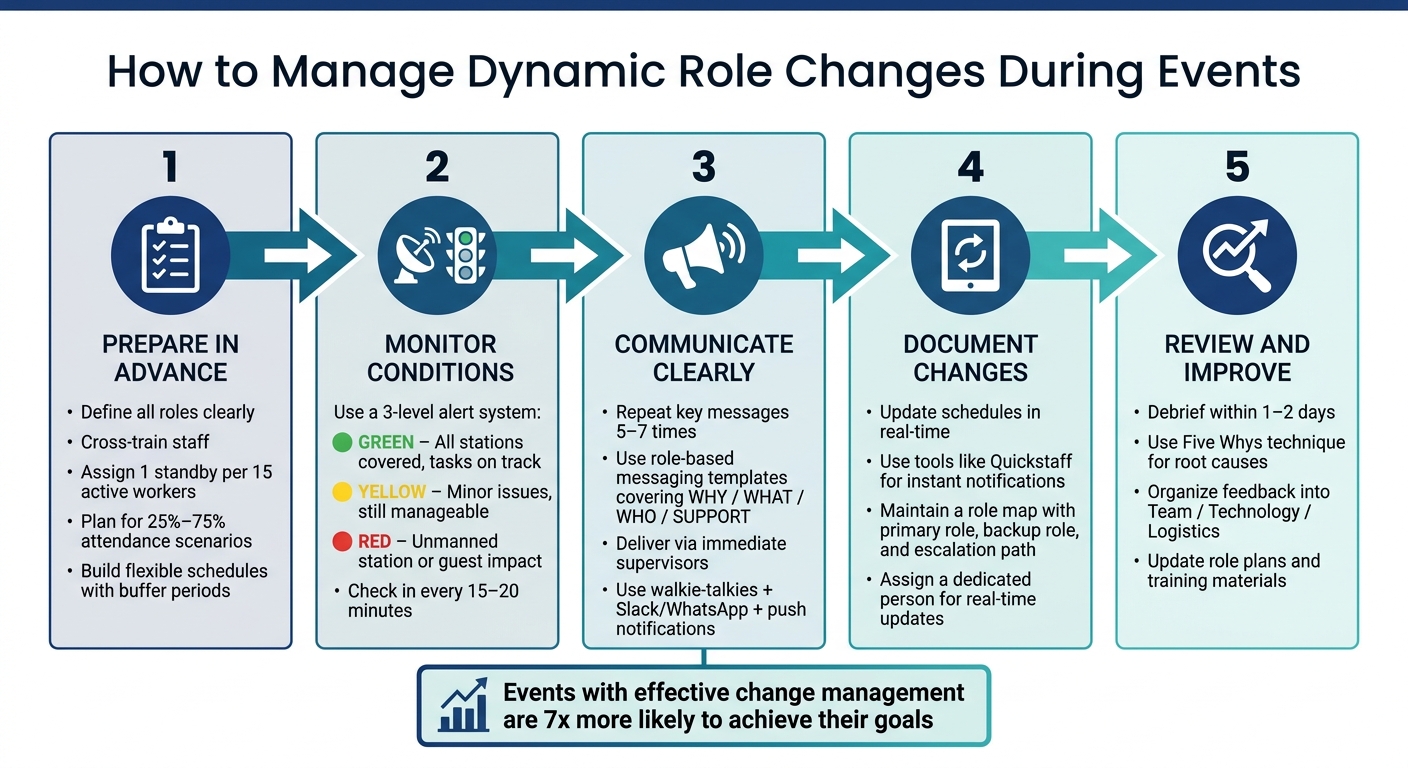
Dynamic Role Changes: 5-Step Event Management Process
Getting ready for role changes well in advance helps your team stay composed and effective when unexpected situations arise.
Start by outlining every role needed for your event, from Logistics Coordinator and Registration Manager to floaters and setup crew. Clear role definitions eliminate confusion, reduce overlap, and ensure all tasks are covered. When responsibilities are well-defined, it's easier to identify potential gaps and address them before they become issues.
Cross-training is equally important. Pinpoint team members who can step into backup roles and pair them with experienced staff for hands-on learning. As EventStaff wisely notes: "Clarity replaces training when time is short."
For on-site coverage, aim to maintain one standby staff member for every 15 active workers. This ratio provides a safety net without overstaffing.
Rigid schedules can break under pressure. Instead, build flexibility into your timeline by including buffer periods between key segments. Assign at least one or two floaters - team members without fixed roles who can step in wherever they're needed most.
To prepare for varying attendance, estimate staffing for both low- (25%) and high-turnout (75%) scenarios, then use the median as your baseline staffing level.
Kim Glenn, Managing Director of Innovative Learning Solutions at EDSI, emphasizes the importance of being ready to act quickly:
"The goal is not just to have extra funds on hand in case something happens, it's to protect the decision speed…when something shifts, the important thing is that we can respond immediately and with confidence."
Finally, document these contingency plans so every team member knows their role and backup assignments.
Turning preparation into action starts with documenting role assignments. Create a straightforward role map - a one-page document listing each staff member's primary role, their backup role, and their reporting structure in case of issues. Share this map during a pre-event briefing, ideally in a quick huddle 24 hours before the event begins.
Include a clear escalation path in your role map. This step-by-step guide should outline who to contact and what actions to take if a role change is required. For instance, if a bartender doesn’t show up, who decides to reassign a server? Who informs the rest of the team? Answering these questions in advance ensures decisions are made calmly and quickly. Tools like Quickstaff can centralize role assignments and staff communication, keeping everyone informed with the latest updates.
Once your event kicks off, things can get intense quickly. Even the most detailed planning can’t account for every curveball, so the key to success lies in identifying problems early and addressing them effectively. That’s what separates a seamless event from one that feels chaotic.
Keep a close eye on event conditions using a three-level system: Green (everything’s running smoothly), Yellow (potential issues), and Red (critical problems).
As Joseph Nduhiu, an ICT Consultant, emphasizes:
"The ability to quickly and accurately detect service outages and degradation is priceless: how quickly can your teams recover and return to normal?"
Assign a specific person to monitor these signals during the event. Their sole responsibility should be spotting yellow and red flags and alerting decision-makers. Regular check-ins - every 15 to 20 minutes - with team leads can help identify problems before they spiral out of control. This proactive approach ensures you’re ready to act when necessary.
Not every issue requires shuffling roles. For instance, a yellow signal might only need a quick reminder or a small adjustment. But a red signal - like an unattended station or a visible service bottleneck - demands immediate action.
When making changes, focus on maintaining a smooth guest experience and keeping operations efficient. Start by deploying pre-assigned floaters, individuals prepared to step in where needed. If that doesn’t resolve the issue, turn to cross-trained staff who can adapt to different roles on the fly.
Clear communication is critical when reassigning roles. Begin by explaining why the change is necessary and what it means for the person being reassigned. Research suggests that key messages often need to be repeated 5 to 7 times to ensure full understanding, so don’t rely on a single announcement - follow up to confirm the message has been received.
Michelle Haggerty, Chief Operating Officer at Prosci, captures this perfectly:
"No one says they learned about a change too early. But many people say they've learned about a change too late."
Whenever possible, have immediate supervisors deliver these instructions directly. People tend to respond better to direction from someone they report to, rather than from a general announcement. A calm, confident tone from leadership can set the mood for the rest of the team.
Once a role change is made, update your schedules and tools immediately to keep everyone informed. Assign someone other than the event manager to handle this task. That way, the manager can stay focused on overseeing the event without getting bogged down in administrative updates.
Using tools like Quickstaff can make this process much easier. Quickstaff allows you to update role assignments in real time and send notifications directly to staff members’ phones. This ensures the person stepping into a new role knows exactly what’s expected of them. Plus, maintaining an up-to-date digital schedule provides a reliable record for your post-event debrief.
When making real-time decisions, clear and immediate communication is non-negotiable. It’s the glue that holds dynamic role transitions together, ensuring that all the preparation and on-the-spot adjustments work seamlessly. Once a role shift is decided, how you communicate it can make or break the transition - either smoothing the process or creating unnecessary confusion.
Before the event kicks off, establish a single command center - a central hub that acts as the one reliable source for all live updates. This ensures that team leads receive consistent, real-time information from a unified source, avoiding the chaos of mixed messages or conflicting instructions.
For on-site coordination, walkie-talkies are invaluable. Pair them with a dedicated messaging platform like WhatsApp or Slack for written updates. When urgent role changes arise, mobile push notifications and other scheduling tools can ensure critical details reach staff who may not be actively monitoring chat threads.
As Michelle Haggerty, Chief Operating Officer at Prosci, advises:
"Communicate frequently using multiple channels to ensure timely updates."
Pre-prepared messaging templates are a lifesaver when the pressure is on. They help you stay consistent and efficient, even in high-stress moments.
A strong template covers three essentials:
By drafting these templates ahead of time - tailored to common scenarios like a no-show at a key station - you’ll save time and prevent incomplete or unclear communication. Instead of scrambling to write messages from scratch, you’ll simply fill in the blanks.
| Message Component | What to Include |
|---|---|
| Why | Brief reason for the change (e.g., "We have a gap at the bar station") |
| What | Specific new tasks and responsibilities |
| Who | New reporting line or point of contact |
| Support | Who to contact if they have questions |
These templates create a foundation for clear, confident communication, which helps maintain team cohesion and morale.
Templates alone aren’t enough - how you deliver the message matters just as much. Sudden role changes can feel unsettling, even for experienced staff. The way you present the change can either ease their concerns or amplify their stress. Start by showing empathy: acknowledge the unexpected shift, then follow up with clear and actionable instructions.
Addressing the "What’s in it for me?" (WIIFM) question upfront can make a big difference. When staff understand how the change impacts their specific duties and what support they’ll have, they’re more likely to stay engaged and cooperative.
Maintain a calm and confident tone to instill trust and keep everyone on board. Margaret Smith, Principal Change Advisor, emphasizes this approach:
"In managing change, I help sponsors instill trust through openness and vulnerability, show compassion by empathizing with impacted employees."
Finally, include a quick feedback loop for clarifications. This step not only catches misunderstandings early but also reassures staff that their concerns are being heard, which helps sustain morale throughout the event.
The work doesn’t stop when the event ends. Post-event reviews are key to refining your approach for future events, ensuring lessons learned are seamlessly integrated into your planning process.
Schedule your debrief within 1–2 days of the event to capture fresh insights while they’re still top of mind. Bring together everyone involved in role management to analyze performance and identify areas for improvement.
Focus the discussion with a straightforward question: Did the roles function as planned? Compare your expectations with actual outcomes to highlight both successes and areas that need attention.
"The debrief process is not just about identifying what went wrong – it's also about celebrating wins and understanding what worked well." – RingCentral
For more complex issues, consider using the Five Whys technique. By repeatedly asking "why", you can dig down to the root cause instead of stopping at surface-level symptoms.
Turn feedback into practical updates. If team members struggled with their reassigned duties, revise the role descriptions to make them clearer and more detailed. If technical tools caused confusion, update guides to include troubleshooting tips and step-by-step instructions.
Lauren Slattery from RingCentral emphasizes the value of reflection:
"Reflecting on finished projects –– with an open mind –– can help you pinpoint improvements and double down on what worked well." – Lauren Slattery, RingCentral
Organize debrief suggestions into three categories: Team, Technology, and Logistics. This structure makes it easier to take actionable steps that improve efficiency for future events.
Use insights from the debrief to adjust and optimize your tools and processes for the next event. For example, if you identified issues with availability tracking, refine how you collect and filter this data ahead of time. Quickstaff’s role-based scheduling features allow you to assign primary and backup roles right from the start, minimizing last-minute changes.
Additionally, update Quickstaff’s configurations and messaging templates based on the feedback you’ve gathered. With its unlimited messaging capabilities and mobile-friendly design, Quickstaff ensures your team stays informed, especially when updates are concise and well-organized.
To keep the cycle of improvement going, schedule the next debrief during the early planning stages of your upcoming event. This ensures the right people are available and reinforces the importance of continuous improvement as part of your overall strategy.
Adjusting to role changes during events isn’t a one-size-fits-all process. Success lies in early preparation, clear communication, and honest reviews. Teams that excel rely on strategies like cross-training staff, building contingency plans, and centralizing schedules. These proactive steps distinguish teams that handle changes seamlessly from those that struggle.
Statistics show that events with effective change management are 7 times more likely to achieve their goals compared to those with weaker strategies. Moreover, adopting better practices can triple your chances of success. The key to closing this gap lies in structured planning, ongoing monitoring, and thoughtful post-event analysis. Tools like Quickstaff simplify this process by offering a centralized platform for scheduling and assignments. Quickstaff ensures instant updates and mobile-friendly communication, keeping every team member on the same page, which is crucial for smooth execution.
While unexpected shifts are inevitable, the goal is to handle them so efficiently that guests never notice. With careful planning and real-time updates, your team can deliver a flawless experience every time.
The event manager plays a central role in handling role changes during an event. Their responsibilities include planning and executing the event while managing tasks like adjusting roles and dealing with unexpected changes. Acting as the primary point of contact, they ensure everything runs smoothly and effectively address any challenges or transitions that come up.
The quickest way to reassign roles without causing confusion is through clear and immediate communication. Use direct messages, in-person meetings, or workplace communication tools to notify staff about changes. Maintain a centralized, up-to-date schedule so team members can easily check their responsibilities. Platforms like Quickstaff make this even easier by allowing swift updates and real-time notifications, ensuring everyone stays on the same page.
Quickstaff makes handling last-minute role changes a breeze with its real-time communication tools and centralized scheduling system. Managers can easily check staff availability using the event calendar and make updates on the spot. Plus, instant notifications keep staff informed about any changes, allowing for seamless transitions during events. These features work together to streamline dynamic role adjustments and keep everything running smoothly.


