How AI Predicts Staff Availability for Events
May 13, 2026


AI is transforming event staffing by streamlining scheduling, reducing costs, and improving accuracy. Traditional methods often take 12–18 hours, but AI tools can cut this down to just 1–2 hours while ensuring compliance with labor laws and minimizing errors. By analyzing historical data, real-time inputs, and external factors like weather and local events, AI predicts staffing needs with up to 95% accuracy. Managers can also use an event staffing needs analyzer to determine baseline requirements. It also ranks staff based on skills, reliability, and preferences to create efficient schedules.
Key benefits include:
Platforms like Quickstaff centralize data, track availability, and automate updates, making AI-driven scheduling faster and more effective. While AI handles data and predictions, human oversight ensures personalized decisions for complex situations.
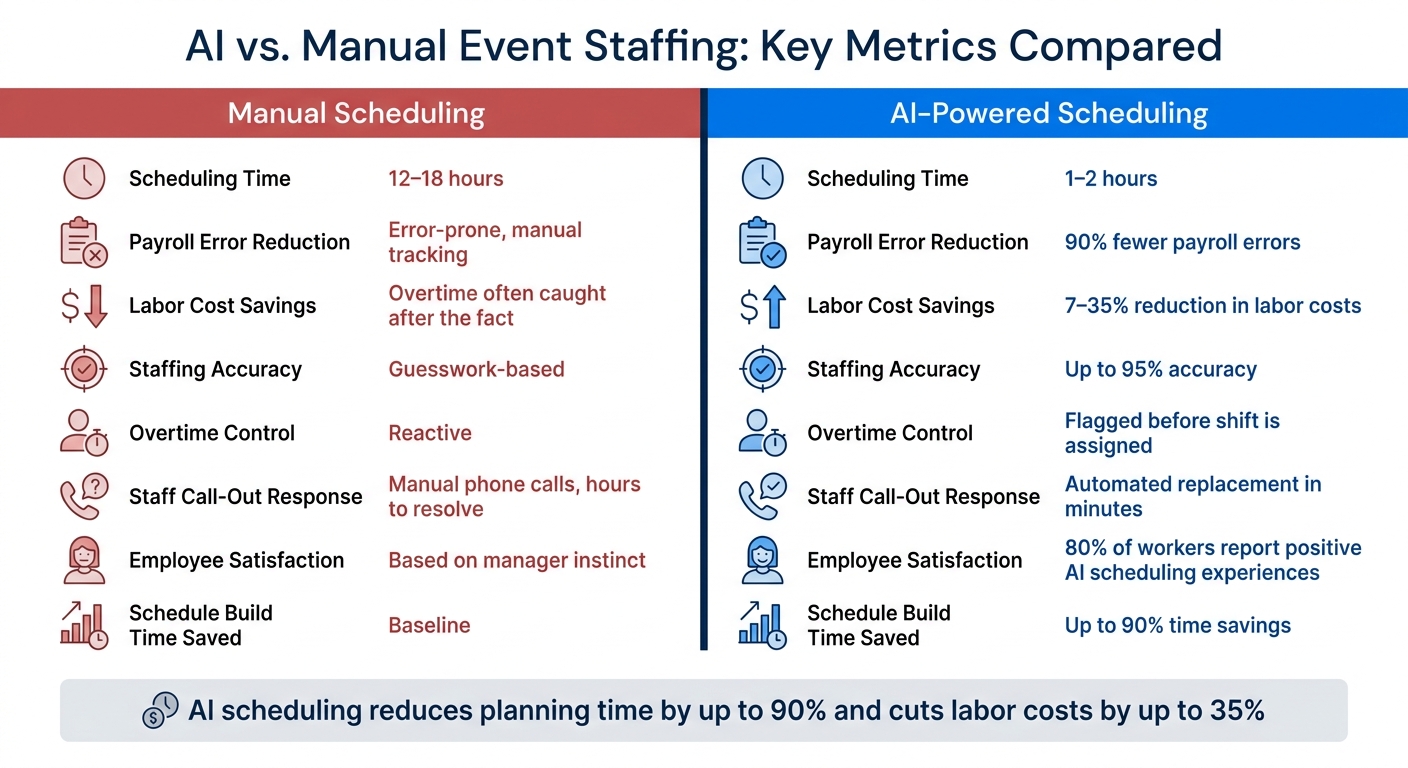
AI vs. Manual Event Staffing: Key Metrics Compared
AI thrives on data. The more relevant and comprehensive the data, the better its predictions. When it comes to event staffing, the data AI models use typically falls into a few key categories.
Internal historical data is the backbone of these predictions. This includes information like past sales figures, foot traffic trends, and labor costs - broken down by roles and locations. AI also examines employee behavior, such as attendance records and shift swap patterns. From this, it generates a reliability score, which measures how dependable an employee has been in the past.
External data plays an equally important role. For instance, staffing needs for a Saturday wedding might change if there’s a major local event happening at the same time. AI takes into account local event calendars, weather forecasts, and regional holidays to adjust predictions and help avoid being caught off guard by unexpected demand. Max Mickelson of XTIX highlights this capability:
"Predictive analytics is a game-changer. Instead of guessing what might happen, AI can analyze past event data to forecast attendance, identify potential bottlenecks, and even predict which sessions will be most popular."
AI also considers verified skills, certifications, and performance ratings to ensure the right person is matched to the right role. Combining these diverse data points enables models to forecast staffing needs with an impressive 95% accuracy rate.
By integrating these various data streams, platforms like Quickstaff ensure the information is not only accessible but also actionable.
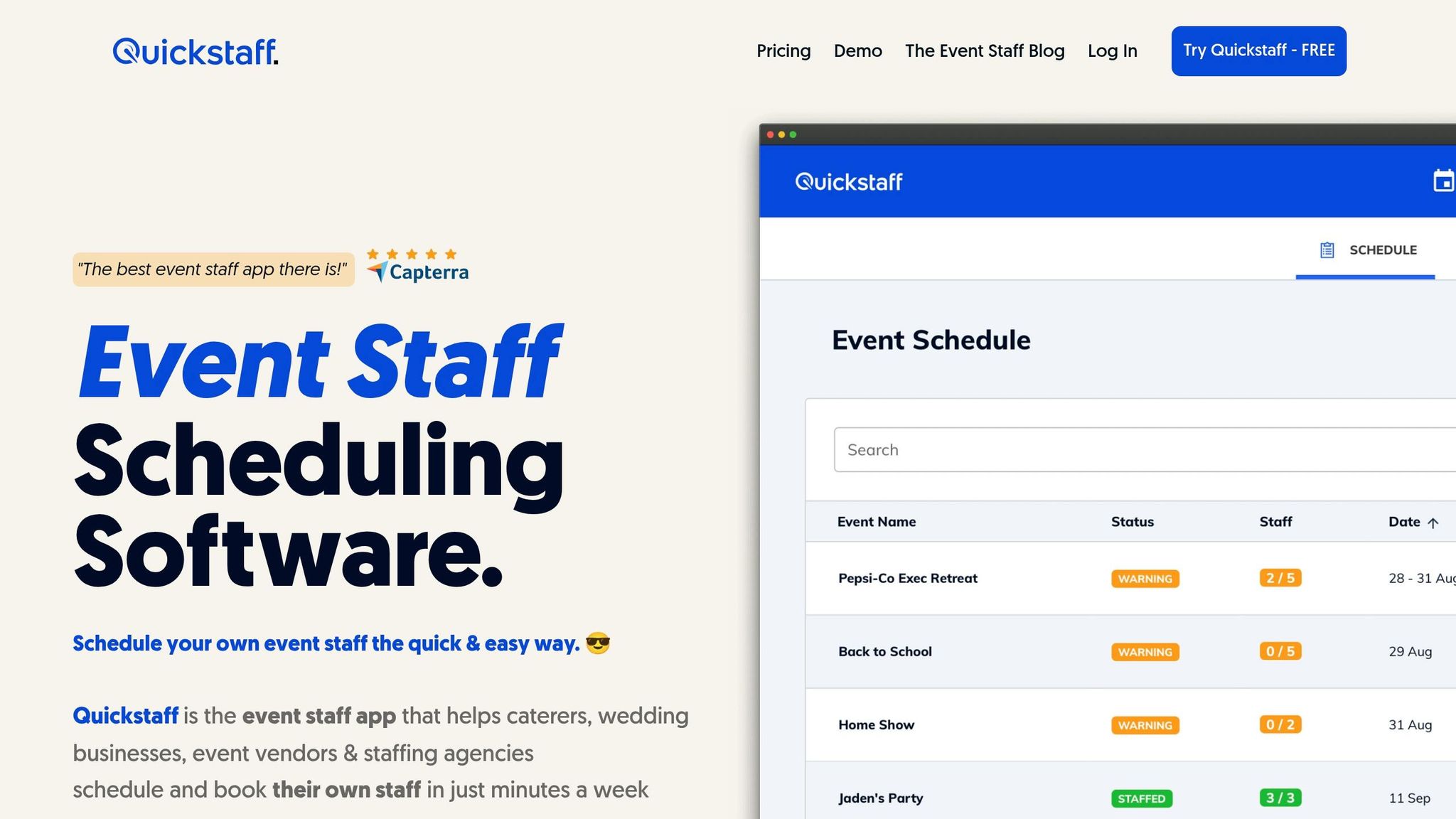
Effective data management is essential, and Quickstaff excels in this area. Quickstaff simplifies event staff scheduling by centralizing event details, staff roles, and availability tracking, creating a structured record of past events and staffing patterns. This organized data is exactly what AI models need to identify trends and make accurate forecasts.
Quickstaff also features mobile-friendly availability tracking, allowing staff to update their status in real time. This ensures records remain current, not outdated. With live updates combined with historical insights, AI can significantly reduce the risk of last-minute understaffing.
Understanding how AI handles staffing predictions sheds light on why it outperforms traditional scheduling methods. A combination of techniques transforms raw data into precise, actionable forecasts.
Machine learning regressors analyze historical data, such as past assignments, skill sets, and performance metrics, to generate a suitability score for each employee. This score indicates how well an individual aligns with a specific shift, with higher scores signaling better matches. Meanwhile, demand forecasting engines dive into historical sales figures, foot traffic patterns, and external factors like weather to predict labor needs, often down to 15-minute intervals.
Once the labor demand is forecasted, AI employs constraint-based optimization to ensure compliance with labor laws and regulations, such as mandatory breaks and predictive scheduling ordinances in states like New York and California. A heuristic algorithm then takes over, prioritizing employees with the highest suitability scores while adhering to hard constraints like rest periods and maximum weekly hours.
For even more precision, AI incorporates derived features - custom variables like is_preferred_day_off_clash or prefers_shift_type - to balance employee preferences with operational requirements. This approach ensures schedules are not just efficient but also considerate of employee satisfaction.
"The value of AI scheduling isn't just in building schedules faster. It's in building smarter schedules that account for variables no spreadsheet can process simultaneously." - Nowsta
These algorithms don't just predict staffing needs; they also enable rapid adjustments, ensuring operations can handle unexpected changes as they arise.
Even the best schedules encounter surprises - a sudden call-out or an unexpected surge in demand can throw plans off course. This is where real-time adaptive scheduling steps in to save the day.
If an employee calls out, AI instantly scans the roster to find the best replacement, factoring in proximity, qualifications, and potential overtime costs. What might take hours manually is resolved in minutes with AI.
During live events, AI keeps an eye on real-time data like attendance spikes, queue lengths, or incident reports. If coverage needs increase, the system flags the issue before it escalates. AI also enforces compliance with labor laws by ensuring breaks and rest periods are upheld, such as maintaining an 8-hour rest buffer between shifts to prevent burnout while staying within legal guidelines.
The table below highlights the difference in efficiency between manual and AI-driven responses to last-minute disruptions:
| Response Scenario | Manual Process | AI-Powered Process |
|---|---|---|
| Staff call-out | Manual phone calls; reactive | Automated replacement suggestion; proactive |
| Compliance check | Manual tracking; error-prone | Automated enforcement of labor laws |
| Time to resolve | Traditional: 12–18 hours | 1–2 hours |
| Overtime control | Often caught after the fact | Flagged before shift is assigned |
AI's ability to adapt on the fly ensures smoother operations, even when the unexpected happens.
Using AI's data-crunching capabilities, predictions are transformed into actionable schedules. The system takes demand signals - like historical foot traffic, transaction volumes, and real-time attendance - and translates them into staffing needs, sometimes down to 15-minute increments. From there, AI creates multiple schedule options tailored to different goals, such as minimizing costs, ensuring fast coverage, or boosting employee satisfaction. Managers can then choose the best-fit schedule, triggering immediate mobile notifications. This process not only improves accuracy but also reduces last-minute chaos, making planning more reliable and efficient.
This approach paves the way for flexible staffing solutions suited to a variety of events.
The AI scheduling process adapts seamlessly to different event types, as demonstrated by its use in conferences and weddings.
For multi-day conferences, AI takes into account time zones for international speakers and matches room capacities with predicted session attendance. For instance, if a keynote is expected to attract three times the audience of a smaller workshop, the system adjusts staff allocation accordingly.
"Predictive analytics is a game-changer. Instead of guessing what might happen, AI can analyze past event data to forecast attendance, identify potential bottlenecks, and even predict which sessions will be most popular." - XTIX Blog
Weddings, on the other hand, present a different challenge: timing. Vendors like florists, caterers, and photographers often work on a tight, sequential schedule. AI helps coordinate these timelines, flagging potential conflicts before they arise. This reduces the risk of delays and the stress of last-minute changes.
For event organizers managing temporary staff, the success of integrating AI predictions into finalized schedules often hinges on the platform’s ability to handle availability data. Quickstaff steps in here, offering real-time availability tracking and automated waitlists. If a staff member cancels, the system instantly notifies the next qualified candidate, eliminating the need for manual follow-ups.
This level of automation proves invaluable in high-pressure situations. Businesses using AI-driven scheduling report a 20–35% drop in unplanned overtime costs, thanks to the system’s ability to identify and address coverage gaps before shifts begin. Quickstaff’s role-based scheduling further ensures that every position is filled by the right person, whether it’s for a wedding reception or a corporate conference.
Imagine cutting scheduling time from 12–18 hours down to just 1–2 hours. That’s exactly what AI tools can do for event organizers, freeing up entire workdays. Instead of drowning in spreadsheets, organizers can focus on logistics, building client relationships, or simply reducing the stress that comes with pre-event planning.
Cost savings is another major perk. AI can pinpoint inefficiencies that might go unnoticed, like overstaffing during conference registration or unnecessary overtime for teardown crews. Companies using AI workforce platforms have reported a 17% drop in staffing costs and a 90% cut in payroll errors. What’s more, employees often appreciate AI-generated schedules because they’re tailored to their actual skills and preferences, not just a manager’s instincts. In fact, 80% of workers report positive experiences with AI at work, often using the extra time to focus on tasks that add more value.
To tap into these benefits, it’s essential to approach AI scheduling with a clear plan.
AI scheduling only works as well as the data it’s fed, so step one is cleaning up your records. Ensure that every team member’s skills, certifications, and availability are up to date. Platforms like Quickstaff can make this easier by centralizing staff data and automating updates.
Next, consider rolling out AI scheduling in phases. Start with a two-week review of your current roles and labor rules, then move into integration and staff training. By weeks 7–8, test the system on a single high-profile event. This trial run will help you measure key metrics like labor costs, schedule accuracy, and staff satisfaction before committing fully.
One important tip: encourage staff to accurately mark their unavailable times. If the AI assumes every open slot is fair game, it might create schedules that look efficient on paper but cause real-world frustrations.
Finally, don’t skip the human touch. Low-confidence matches or edge cases should still go to planners for review. While AI excels at crunching numbers and spotting patterns, humans are better equipped to handle relationship dynamics and unique situations.
By following these steps, you can avoid common pitfalls and get the most out of AI scheduling tools.
AI scheduling in event staffing offers clear advantages, but it’s not without its challenges. Here’s a fair breakdown:
| Advantages | Limitations |
|---|---|
| Cuts scheduling time by up to 85% | Needs clean, accurate data to perform well |
| Reduces labor costs and overtime | Requires careful handling of sensitive employee data |
| Minimizes human error and double-bookings | Can feel impersonal in service-focused roles |
| Creates fairer schedules based on skills and preferences | Initial setup and staff training take time |
| Adapts to real-time updates and changes 24/7 | Needs ongoing oversight to ensure compliance with privacy laws |
While the challenges are real, they’re manageable with the right approach. Keeping data accurate, maintaining open communication with staff, and involving humans in complex decisions can help you strike the perfect balance between efficiency and personalization. AI scheduling isn’t just about saving time - it’s about working smarter while keeping the human element intact.
AI has reshaped event staffing, turning it from a game of guesswork into a precise, data-informed process. By analyzing historical data, real-time inputs, and individual staff preferences all at once, AI can generate highly accurate, minute-by-minute forecasts - something spreadsheets or manual planning simply can't match.
Event organizers now spend 40–80% less time building schedules, while staff benefit from shifts that align better with their skills and preferences. This not only cuts down on administrative tasks but also allows managers to focus on the bigger picture, like team dynamics and client relationships. AI takes care of crunching the numbers, leaving the human touch to ensure events run smoothly.
For those looking to harness these benefits, Quickstaff is an excellent option. Its tools for tracking availability, managing events in one place, and offering mobile-friendly access provide the groundwork for AI-enhanced scheduling. Platforms like Quickstaff make it easy to turn data insights into smarter, more efficient staffing decisions.
AI relies on a mix of historical data, real-time inputs, staff preferences, skill sets, and availability details to function effectively. It also considers contextual elements like the type of event and its location to make precise predictions.
AI leverages predictive analytics and real-time data to tackle unexpected staffing challenges, such as last-minute absences or sudden demand surges. By examining past booking trends, current reservations, and live event updates, it suggests quick staffing adjustments to avoid shortages. This approach not only ensures operational flexibility but also helps maintain high service standards while minimizing the need for manual oversight. As a result, events can stay on track, even when surprises arise.
To get the most out of AI scheduling with Quickstaff, start by entering accurate details about your staff. This includes their availability, preferences, and qualifications. If there are any specific constraints or special requirements, make sure to include those too - this helps the AI create schedules that meet your needs.
Take the time to adjust settings like shift types, labor laws, and overtime limits so they match your workplace policies. Also, don’t forget to keep staff information up to date. Regular updates ensure the AI continues to improve its scheduling accuracy, keeping everything running smoothly.