Inclusive Hiring Practices for Event Businesses
July 15, 2026


If you need to fill event shifts without last-minute chaos, build a hiring process that is clear, consistent, and open to more qualified people. The article’s main point is simple: define the role first, write plain job posts, use more than word-of-mouth recruiting, ask every applicant the same job-based questions, and track where people drop out. Done well, this can help lower turnover by about 22% and reduce no-shows.
Here’s the full idea in a quick list:
One stat stands out: removing gender-coded wording can increase applications by 29%. That means small edits can change who applies.
In short: if I want a stronger event staffing process, I should make hiring easier to understand, easier to access, and easier to measure.
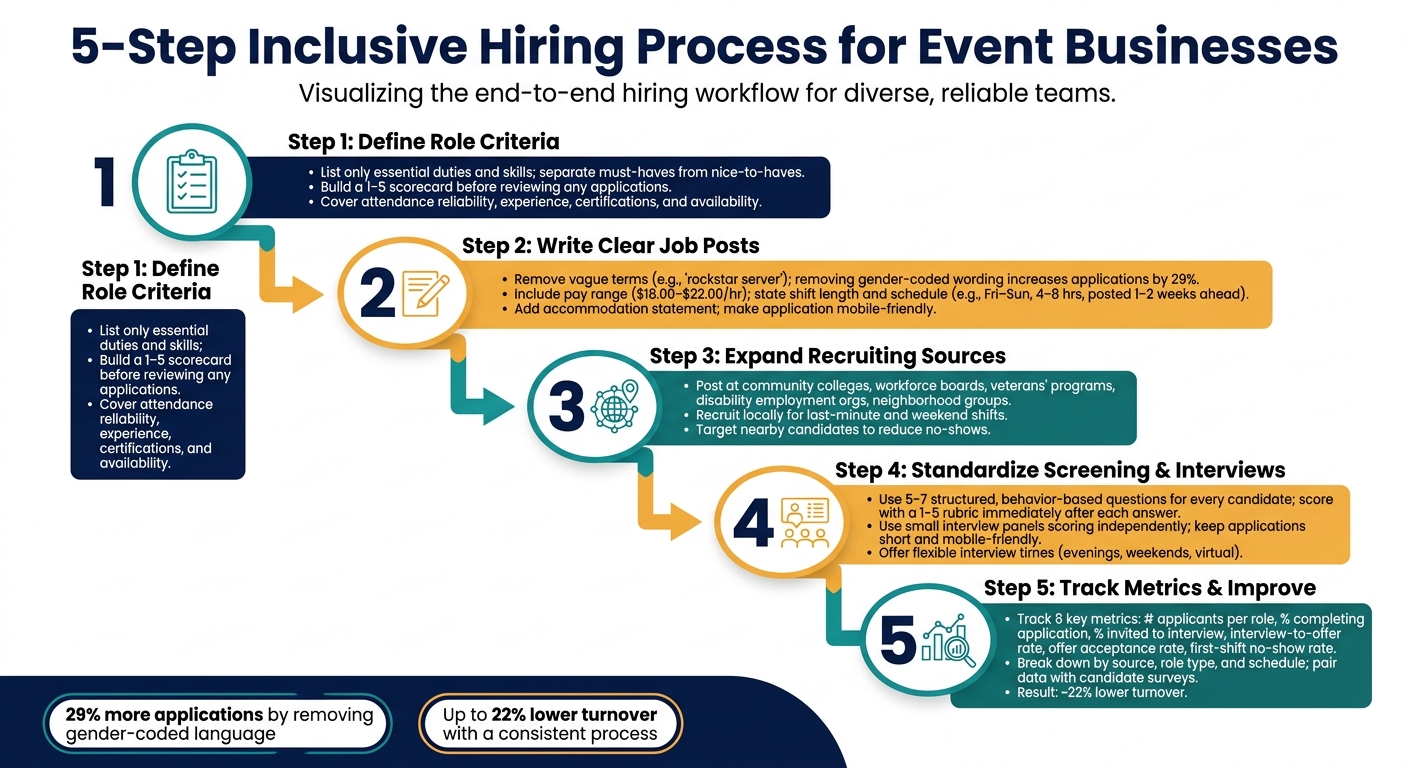
5-Step Inclusive Hiring Process for Event Businesses
Before you post a job, get clear on the role’s main duties, needed skills, and any limits that come with the work. Event businesses that do this early tend to make more consistent, job-related hiring choices.
For a banquet server, stick to the core work: carrying trays, greeting guests, standing for 6–8 hours, and traveling to nearby venues. Then separate out the true must-haves. That might include lifting 25 pounds, showing up on time, and having a valid food handler card. Banquet experience or fluency in another language may help, but those things shouldn’t screen out people who can still do the job well.
Each requirement should connect to an essential job function. Skip blanket years-of-experience rules when skills from retail, hospitality, or caregiving already line up with the work. That opens the door to more qualified people without lowering the bar. Under EEOC and ADA guidance, physical and scheduling requirements should map to essential job functions, and employers should consider reasonable accommodations where possible, such as team lifting or seated registration roles.
Once the role is defined, build a simple scorecard before you review a single application. For event roles, a useful scorecard often covers four areas:
Rate each area on a 1–5 scale, and spell out what each score means in plain terms. That way, two coordinators looking at the same candidate are more likely to give the same score.
This matters because gut feel can drift. A shared rubric keeps reviews lined up and makes hiring decisions easier to defend. Quickstaff can centralize role profiles, certification requirements, and availability so coordinators score candidates using the same information.
Once your criteria are set, turn them into a job post that includes only what candidates need to know.
Once your hiring criteria are set, the job post is where those rules either open doors or shut them. A clear, specific post helps qualified people decide, fast, whether the job fits. That matters a lot for part-time, seasonal, and temporary event roles. The first step is simple: swap vague wording for clear job duties.
Phrases like "rockstar server" or "ninja bartender" can shrink your applicant pool. Guidance from Massachusetts says that removing gender-coded terms can increase applications by 29%. For event businesses that need to fill shifts fast, that’s a big deal.
Use wording tied to work people can picture. Instead of "high-energy team player", write: sets up tables and chairs, checks in guests, and reports to the event lead during 6-hour evening shifts. If English communication matters for the role, say "fluent in English, spoken and written" instead of "native English speaker."
It also helps to keep degree and experience requirements tight. Mark them as preferred unless they are actually required. You can make this even clearer by splitting the post into:
That small change can keep good people from ruling themselves out too soon. Someone with guest-facing experience in retail or food service may be just as ready for event work as a person with formal hospitality experience.
Candidates need straight answers before they apply. Include a pay range - for example, $18.00–$22.00 per hour based on experience and event type. Say whether pay is hourly or per shift, and note whether tips are included. If you pay more for peak dates like New Year's Eve or holiday weekends, spell that out too.
Scheduling details matter just as much. State the usual shift length, whether weekends or holidays are part of the job, and how far ahead schedules are posted. For example: Most shifts are Friday through Sunday, 4 to 8 hours, with schedules posted 1 to 2 weeks in advance. That kind of detail helps because many event workers are balancing school, family duties, or a second job. They need to know up front if the role works for their life.
End the post with a short accommodation statement that invites applicants to ask for support during the hiring process. Make the application mobile-friendly, and allow phone or email accommodation requests.
Once the post is clear, share it beyond your usual channels.
Once the job post is clear, put it where qualified people already spend time. Don’t stop at the same job boards you always use. Event businesses often need people for setup, service, bartending, and registration, and some of the best candidates may come from places many hiring teams skip. SHRM notes that few HR leaders work with untapped talent pools such as veterans, people with disabilities, and justice-impacted individuals. For event staffing, that gap can work in your favor.
Community colleges are a good place to start. Many have hospitality, culinary arts, and event management programs. Reach out to the career services office or the program director, and share a short role summary along with details like recurring weekend shifts. That makes it easier for students and recent grads to see if the role fits.
You can also connect with:
These groups often know people who already want service work and are open to flexible schedules.
Disability employment organizations and vocational programs can also help with sourcing, matching candidates to roles, and onboarding support. That can be a strong fit for recurring events and back-of-house roles, where clear tasks and steady supervision can make ramp-up smoother.
Veterans’ groups and military transition programs are another strong source. Veterans often bring leadership, logistics coordination, situational awareness, and calm under pressure. Those skills fit event logistics, setup coordination, security, and guest-facing support roles well. When you contact these groups, keep the message simple: explain the job, the day-to-day work, and the skills needed to do it well.
When shifts come up at the last minute, local recruiting matters even more. For banquet, catering, and setup roles, especially weekend-only or short-notice shifts, distance can make or break attendance. Nearby candidates are often easier to book and less likely to cancel.
Simple local outreach can include neighborhood Facebook groups, community center bulletin boards, local chambers of commerce, and nearby restaurants or retail stores where people may want extra hours.
After each shift, track who arrived on time, did solid work, and communicated well. Then move those people to the top of the list for future openings. Quickstaff can track availability, manage waitlists, and send shift offers from one mobile-friendly system.
Once you have a solid candidate pool, screening and interviews matter just as much as sourcing. If the process changes from one interviewer to the next, two people with the same skill level can end up with very different experiences - and very different results. Use the same questions, the same scoring, and the same follow-up for every candidate. That keeps hiring fair and helps you move faster when you need to staff several event roles at once. Once the pool is set, use one consistent screen to narrow it down.
Structured interviews ask every candidate the same questions and use the same scoring system. That makes answers easier to compare and cuts down on gut-feel decisions.
Start with 5–7 job needs, like reliability, guest service, teamwork, and arriving on time for shifts. Then write one or two behavior-based questions for each area. For example, you might ask how a candidate handled overlapping tasks during a busy event. Match each question with a simple 1–5 rubric that shows what a strong, acceptable, or weak answer looks like. Score each answer as soon as the candidate gives it.
For key roles, a small interview panel can help. Have each interviewer score the candidate on their own before any group discussion. That can cut down on one person steering the room, social pressure, and snap judgments based on first impressions.
Even a fair process can fall apart if candidates drop out before the interview. Keep the application short and mobile-friendly. In most cases, you only need contact details, availability, and relevant experience.
Offer flexible interview times, such as evenings, weekends, or short virtual screening calls. That makes it easier for people with other jobs, caregiving duties, or transportation limits to take part. At each step, send a clear message: confirm that the application was received, share the interview time and what to prepare, and say when they should expect to hear back. Standardize each follow-up so nobody gets extra details or attention by luck.
Track which interview scores line up with reliable event staff, then use that data to fine-tune the process. Those results can help shape better hiring calls the next time around.
Once your hiring process is standardized, the next step is simple: check if it’s working. A set process doesn’t just help with fairness. It also makes it much easier to track results and spot weak points. After each season, review a small group of hiring metrics to see what went well and where candidates dropped out.
At a minimum, track:
Break those numbers down by candidate source, role type, and schedule type. That helps you see where underrepresented candidates may be falling out of the process. Drop-off often happens at the resume screening and first interview stages, so those points deserve extra attention.
When you review sources, don’t focus only on volume. Quality matters more. Track which sources bring in staff who show up, complete early shifts, and stay active. A platform like Quickstaff can make that easier by keeping availability tracking, event assignments, confirmation tools, and communication in one place. You get a clear record of accepted shifts, attendance, and gaps.
After each cycle, look for patterns that point to hidden barriers. If candidates from one source apply often but rarely make it past screening, your criteria, required documents, or application format may not fit their background. If no-show rates are higher among candidates who work multiple jobs, rigid interview scheduling may be part of the problem.
Pair the numbers with short candidate surveys about clarity and fairness. Data tells you what happened. Direct feedback helps explain why it happened. Put together, they give you a much clearer view than metrics alone.
Treat hiring as a repeat cycle: review metrics, spot bottlenecks, collect feedback, and adjust. After each hiring round, summarize your key metrics, identify one or two bottlenecks, and make two or three concrete changes for next time. Document those changes so every manager follows the same process.
Small fixes, repeated over time, can cut staffing gaps and help you build a more reliable roster.
Start by sorting tasks by what each event actually needs. Anything tied directly to smooth entry, sales, or compliance - like ticket scanning, cash handling, alcohol service training, or food handling permits - should be marked as essential.
Keep other qualifications in the preferred category so you have more room to hire. In job descriptions, make a clear split between required experience or credentials and preferred skills.
Start by tracking metrics that show both hiring reach and workforce reliability:
These numbers give you a clear read on scheduling, engagement, role appeal, pay structure, and whether your model can hold up as you grow. Quickstaff can centralize this data, so it’s easier to fine-tune recruiting channels, make onboarding clearer, and support a steady, diverse team.
Build a dependable pool of pre-vetted professionals, then run scheduling through a structured, digital-first system. On top of that, add a 10% to 20% buffer to each staffing plan so you have cover when last-minute gaps pop up.
Use Quickstaff to keep scheduling in one place, track real-time availability, and send automated reminders. It also helps to share clear expectations, shift playbooks, and event details at least one week in advance so people know what they’re walking into.





