7 Skills Logistics Staff Need on Event Day
August 15, 2026

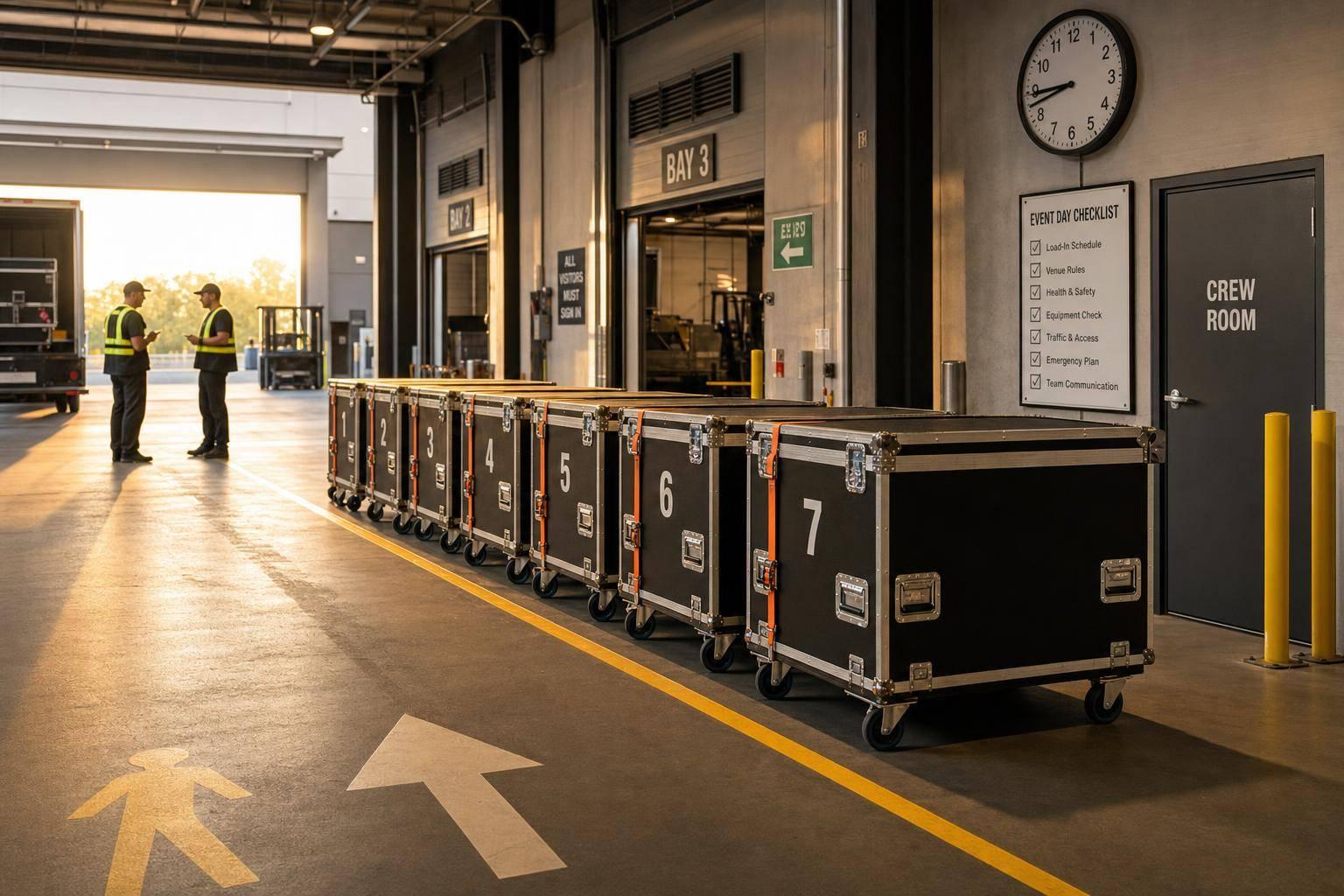
Event-day logistics can break down in minutes if timing, routes, safety, and communication are off. In many large events, 40%–60% of attendees arrive within the first 15 minutes, so staff need to keep shuttles, curbside traffic, dock activity, and guest movement under control from the start.
If I had to sum up the article in one line, it would be this: logistics staff keep an event on track by managing time, reading routes, guiding guests, handling loads safely, following venue rules, staying in contact, and using live scheduling tools.
Here’s the full picture at a glance:
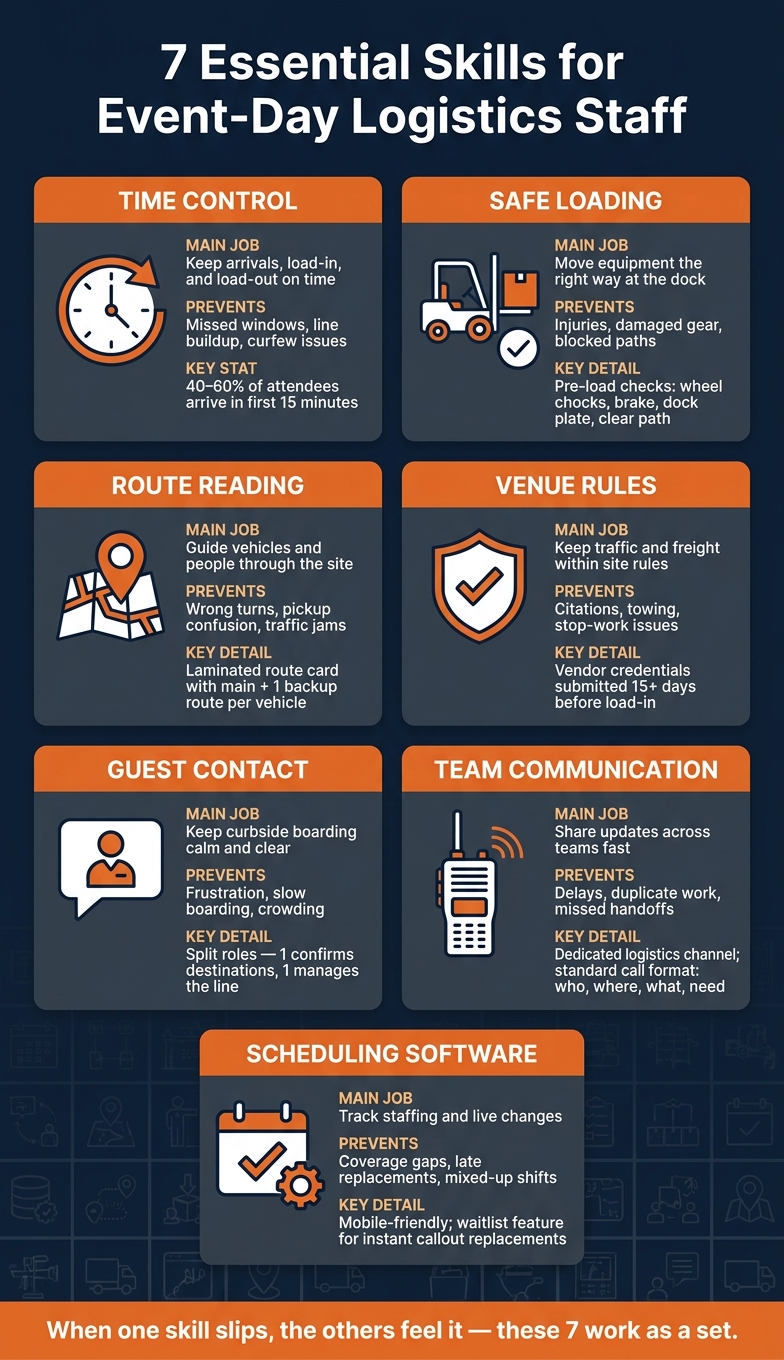
7 Essential Skills for Event-Day Logistics Staff
| Skill | Main Job on Event Day | What It Helps Prevent |
|---|---|---|
| Time control | Keep arrivals, load-in, and load-out on time | Missed windows, line buildup, curfew issues |
| Route reading | Guide vehicles and people through the site | Wrong turns, pickup confusion, traffic jams |
| Guest contact | Keep curbside boarding calm and clear | Frustration, slow boarding, crowding |
| Safe loading | Move equipment the right way at the dock | Injuries, damaged gear, blocked paths |
| Venue rules | Keep traffic and freight within site rules | Citations, towing, stop-work issues |
| Team communication | Share updates across teams fast | Delays, duplicate work, missed handoffs |
| Scheduling software benefits | Track staffing and live changes | Coverage gaps, late replacements, mixed-up shifts |
If you want event-day movement to stay smooth, these are the seven areas I’d focus on first.
Logistics and transport staff keep people, vehicles, and gear moving across the event site. On event day, that can mean running shuttles, handling VIP arrivals and departures, managing equipment load-in and load-out, directing curbside traffic, and keeping back-of-house routes clear.
Shuttle work often runs on looped routes between hotels, parking lots, and the venue. Staff check routes and timing, manage pickup and drop-off points, arrange accessible transportation, and adjust service when the schedule shifts. If one pickup runs late, the rest of the loop can get thrown off, so timing matters a lot.
VIP transfers need tighter control. Logistics staff work closely with event producers and security teams to set arrival and departure windows, mark VIP zones, and plan secure paths from the vehicle to backstage or premium areas. The goal is simple: smooth movement with as little disruption as possible.
On the equipment side, logistics staff manage loading dock schedules, assign bay time slots, and line up deliveries in the right order. Staging and rigging usually come in first. Catering and other noncritical deliveries follow once the core structure is in place. During tear-down, staff direct outbound traffic so crews can remove equipment without turning back-of-house areas into a traffic jam.
Curbside management is all about separation. Shuttle lanes, ride-share zones, and VIP drop-off areas need to stay apart so vehicles don't compete for the same space. Staff also help guide foot traffic and keep loading areas and access points open.
Back-of-house movement covers staff, vendors, and equipment moving through service corridors, storage spaces, prep areas, backstage, and production offices. Logistics staff map those routes and schedule large moves so they don't interfere with show cues, live broadcasts, or other timed production moments.
None of this works unless timing, routing, and access control stay in sync. That's what makes event-day logistics tick, and it sets up the skills this role depends on.
Those day-of tasks get hardest during three key moments: arrival, transition, and exit. That’s when pressure spikes. At many large corporate events, 40–60% of attendees arrive in the first 15 minutes after doors open. So teams don’t just plan for a smooth, even stream of people. They plan for a rush.
That’s what makes these windows so tough. Small mistakes don’t stay small for long. A pallet in the wrong spot can block a loading dock. A shuttle that shows up late during guest arrival can jam the check-in line and push the opening schedule off track.
The seven skills in this article don’t stand alone. They depend on each other. Time control shapes when people and gear move. Route reading helps teams avoid bottlenecks before they start. Calm guest contact stops frustration from boiling over when things aren’t going to plan. Safe loading and unloading protects both workers and equipment when the pace picks up. Venue-rule compliance keeps the operation legal and safe. Team communication keeps every group moving in sync.
Put simply, if one skill slips, the others can feel it too. Each one addresses a common point where event logistics can go wrong.
The best logistics staff don’t just move fast. They move in the right order, on the right route, with the right communication, while paying attention to what’s shifting around them. The seven skills below show how teams keep that flow steady when the pressure is on. The next seven sections break down each one.
Time control is more than showing up on time. It means actively managing people, vehicles, and equipment around hard event milestones like doors opening, keynote start time, session changeovers, and load-out curfew. Miss one window, and the rest of the day gets harder to hold together.
Split the event day into three phases: arrival peak, steady-state, and load-out. Each one needs its own shuttle spacing and staffing plan.
During arrival peaks - usually 60–90 minutes before doors open - run the highest shuttle frequency. Continuous loops work well here because buses can leave at short intervals and lines stay shorter. Once the rush settles, shift into steady-state service with consistent intervals. Track actual departure times against the plan so schedule drift shows up early, not after it becomes a mess. When timing is predictable, arrivals feel smoother and the whole event starts on the right foot.
Good timing does more than keep things moving. It also cuts dock conflicts and helps teams stay within the rules.
Staggering shuttle arrivals and vendor vehicle arrivals reduces curb congestion and helps keep emergency access lanes open. In the U.S., drivers and crew members may be subject to maximum shift lengths, required breaks, and overtime rules, so a controlled schedule helps keep staff within those limits. Venue permits and local rules often include load-in and load-out curfews, along with quiet hours. If load-out slips past the approved window, organizers can face fines or even a forced shutdown.
Mark hard stops on the run sheet. For example:
That kind of clarity matters on a busy event day. If nobody owns the clock, the clock wins.
Strong time control needs one dispatcher with clear authority to manage driver communications, move vehicles where needed, and adjust shuttle headways as conditions change. That person should work from a shared board that shows each vehicle and crew in real time.
Tools like Quickstaff publish call times, shift windows, and last-minute changes so staff stay aligned in real time. When everyone is working from the same timing plan, the next skill - route reading - gets a lot easier to carry out.
Knowing the venue layout before guests arrive keeps arrivals, departures, and deliveries on schedule. Staff who can read a venue map, spot pickup and drop-off zones, and follow both main and backup routes are much better prepared when conditions change. Once the team knows the timing, they also need to know the ground.
Good route reading cuts down on wrong turns, backtracking, and those small moments of hesitation that slow everything down. If drivers use a reserved access road, they can avoid public traffic and keep shuttle headways tight. A laminated route card in each vehicle should include travel times, main routes, and one backup route, so even a detour stays short.
This matters even more in timed movement plans, such as tiered arrivals. If VIPs arrive first, general admission second, and vendors last, each group only reaches the right entrance at the planned time when staff already know the map and the route logic behind it.
Accurate navigation keeps vehicles out of fire lanes, pedestrian-only areas, and ADA drop-off points. Just as important, it helps staff follow fire code rules, idling limits, and ADA requirements. In practice, clear instructions work far better than vague warnings.
For example, a useful shift-start reminder might be:
no shuttle traffic on restricted roads after the cutoff time, and Gate 2 stays clear for emergency use at all times.
That kind of direct instruction, pulled from the venue safety binder and local ordinances, gives staff something they can act on right away.
Route knowledge also shapes how staff help guests. When someone knows the layout, they can give directions with zone names and landmarks instead of vague pointing. For instance, "Shuttle Zone B is right next to the South Entrance, by the large blue banner" is much clearer than a hand wave across the lot.
Drivers who know their route can also give solid ETAs and explain return service with confidence. That helps calm guests during busy arrival and departure windows. One simple way to build that comfort is through role-play using the actual zone map, with short scripts for common situations like late arrivals or guests showing up at the wrong gate.
When roads close or zones fill up, route skill turns into a live adjustment tool. Teams that manage this well don't make it up on the spot. They work from pre-set contingency plans. For each key route, there should already be:
Then, if something changes, the transport coordinator updates the shared route board and sends the update in a standard format so every driver and zone captain gets the same message at the same time.
Clear backup routes, fallback pickup zones, and a fast update process keep navigation from becoming guesswork.
With routes already mapped, the curb becomes a communication job. At that point, staff tone and body language shape both the guest experience and shuttle timing.
Calm guest contact helps boarding stay on track during arrival surges. One staff member can confirm destinations while another manages the line and sends guests to the right queue.
That kind of split keeps things moving without the curb turning into chaos. Guests get where they need to go, and drivers spend less time sorting out confusion at the door.
A calm tone does more than make guests feel at ease. It also helps stop rushed, unsafe behavior around moving vehicles, luggage, and boarding steps.
Staff who speak in a steady way are better able to keep guests behind safety lines until the shuttle comes to a full stop. They can also help riders who need wheelchair lifts or extra time to board without making the process feel frantic. Follow ADA loading-zone rules for accessible spaces, level access aisles, and compliant slopes.
When a shuttle is delayed or the curb gets blocked, the message needs to be clear, fast, and consistent. One person should watch dispatch updates and pass changes to guests and the rest of the crew in plain language.
If a shuttle is delayed or rerouted, staff should share the update in simple terms, direct guests to the next pickup point, and keep priority boarding clear and fair for speakers and VIPs.
That same calm control carries over when the work shifts from guest boarding to dock activity.
Dock work brings heavier lifting, tighter spaces, and stricter timing. Once guests are in motion, attention moves to the dock, where speed still matters - but control matters just as much.
A clear loading plan helps keep shared docks moving. When roles, delivery order, and drop points are set ahead of time, turnarounds get shorter and confusion drops.
Before any loading or unloading begins, pre-load and pre-unload checks should confirm:
That kind of prep cuts delays and helps crews move with less stop-and-start.
Loading docks come with serious injury risk, and lifting is a major source of back injuries. Staff should lift with their legs, keep loads close to the body, pivot instead of twisting, and use team lifts for awkward items. PPE should match the task, including high-visibility vests, gloves, and steel-toe footwear. Only authorized, trained workers should operate forklifts or other powered industrial trucks.
Vehicles should be stopped and secured before anyone approaches. That means using wheel chocks or restraints, assigning spotters, keeping walkways clear, and making sure lighting is good. Any unprotected dock edge 4 ft or more above a lower level needs fall protection.
Freight should move behind barriers, not across guest routes. Barriers, floor markings, and visible staff presence help keep freight traffic out of guest paths and away from open dock edges.
One dock lead should approve each move, confirm the trailer is empty, and send urgent changes only to the crews affected. If weather, traffic, or a last-minute gear delivery changes the plan, updates should go only to the teams that need them.
That kind of message discipline keeps dock activity orderly and sets the tone for the rest of team communication.
Dock control keeps freight moving. But once vehicles leave the dock, venue rules and safety rules take over. If a team ignores them, an event can grind to a halt.
Fire lanes and restricted access roads often become bottlenecks at large events. If trucks stack up in those areas, venue security or fire marshals can stop the load-in on the spot. The fix is simple, but it takes planning: map restricted zones before event day, send trucks to approved holding areas, and release each vehicle only when a bay is open.
That kind of control does more than keep things on schedule. It also cuts the risk of rule violations that can stop the event instead of just slowing it down.
Venue-level violations usually show up around weight limits, blocked egress routes, and unauthorized access. A blocked fire lane or exit path can lead to citations, towing, stop-work orders, or even a partial shutdown.
Teams also need to plan for local rules that cover:
Those details shouldn't be an afterthought. They belong in the movement plan from day one.
ADA compliance is a compliance risk, not just a service issue. Designated accessible drop zones need to stay clear of freight vehicles, and guest routes to the entrance must meet accessibility rules.
There’s also the optics piece. If freight gets routed behind barriers and away from guest arrival areas, teams lower regulatory risk and avoid the kind of visible breakdown that guests notice right away.
Once the event begins, enforcement moves into real time. Rules can change fast after doors open. One late truck or a sudden surge near the shuttle drop zone can push vehicles into restricted areas in minutes.
That’s why teams should assign one venue contact and one security contact before the event starts. They also need a clear escalation path for violations or unauthorized access. Many venues require vendor credentials and insurance documents submitted at least 15 days before load-in, so confirm that list early. Otherwise, one rejected vendor can create a delay that never needed to happen.
Once rules and access points are clear, staff need fast, steady communication to enforce them.
Once rules, routes, and access points are in place, communication is what keeps the plan alive. It connects timing, routing, loading, and compliance in one flow. On event day, logistics teams stay in close contact with security, operations, drivers, venue staff, and front-of-house teams so people, vehicles, and equipment keep moving without turning small delays into bigger jams.
A late shuttle, a blocked dock, or a rerouted truck doesn't turn into a major issue by itself. It turns into one when the right team hears about it too late. For large events, two-way radios are the main tool because they still work when cell networks get overloaded. A short update like Shuttle 3 loaded, 10 minutes out gives dispatch what they need to adjust routes and keep traffic moving together.
It also helps to keep movement updates on a dedicated logistics and transport channel. That way, urgent shuttle timing, loading activity, and equipment-drop messages don't get buried under unrelated radio chatter. Simple setup, big payoff.
Bad communication can lead to blocked exits, unsafe loading, vehicle contact, and missed safety steps. That's why logistics, security, and medical teams need one clear escalation path. A standard call format keeps radio traffic sharp: who you are, where you are, what is happening, and what you need.
For example:
Logistics Lead to Security North Gate - delivery truck at east service entrance, needs escort, waiting on dock assignment.
That format cuts down on confusion and helps teams respond faster.
Staff working near shuttle stops, entrances, or service corridors often end up as the first people guests ask for help. A calm, short answer can stop a crowd from forming and keep foot traffic moving. Just as important, guest-facing updates should match what's being said over radios, PA systems, and signage. When those messages don't line up, confusion spreads fast and the guest experience takes a hit.
Event conditions can shift by the minute. Route changes, delays, dock conflicts, staffing gaps, and weather issues all need immediate updates. That's why every radio user should know their channel, call sign, and escalation route before event day starts. Pre-event briefings and radio checks across all zones help teams stay aligned.
When schedules start changing fast, a budget-friendly staff scheduling tools helps keep calls, assignments, and updates lined up.
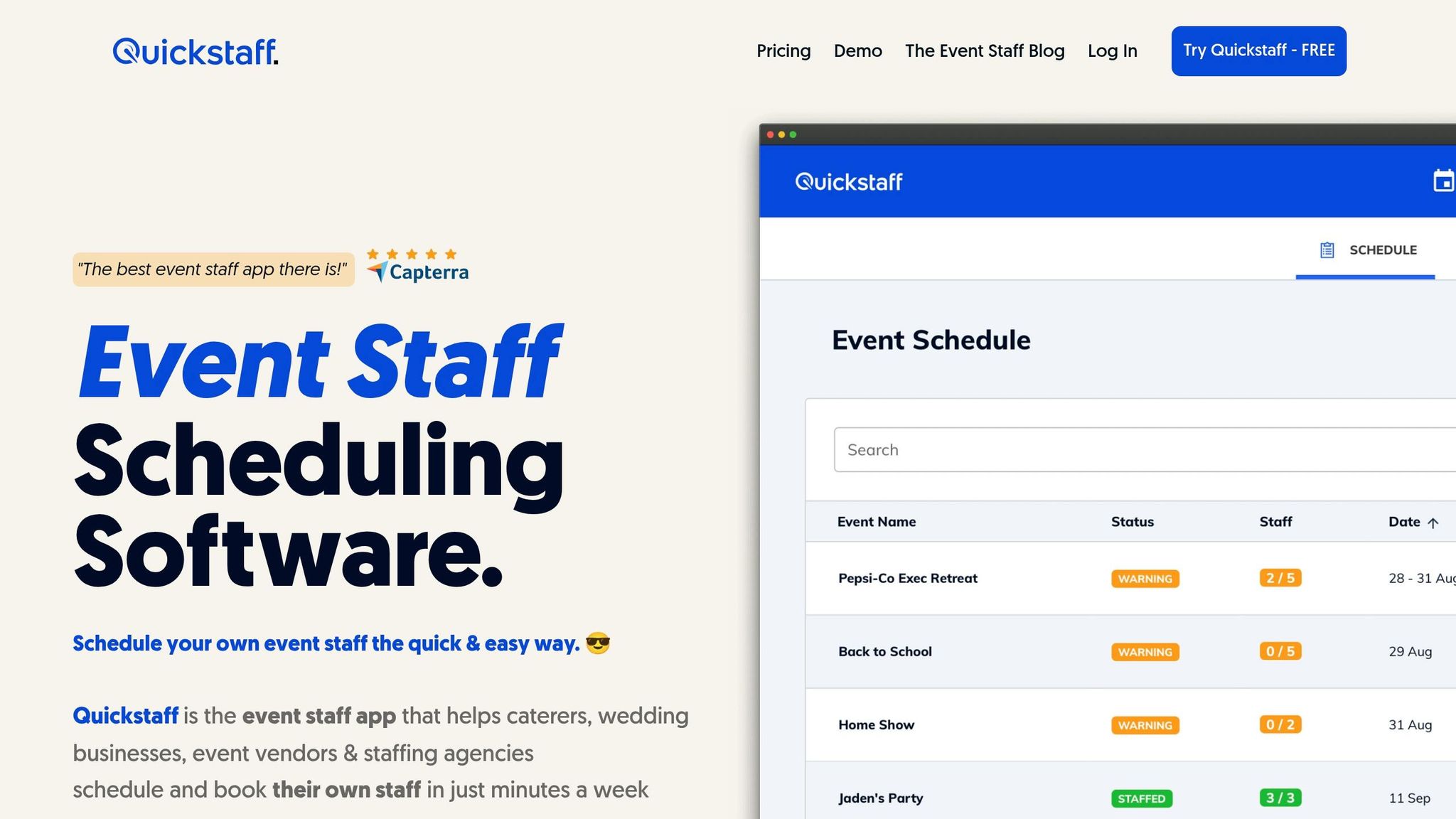
When shifts change after radios go quiet, scheduling software keeps the plan in view. Quickstaff puts shifts, roles, venues, and transport details into one live schedule, so the team isn't piecing things together from texts, paper sheets, and last-minute calls.
Event timing doesn't leave much room for drift. Quickstaff lets logistics leads build shifts that match the event's master timeline, with clear labels like Shuttle Driver – Hotel Loop so each person knows where to be and when. Automated reminders sent before call time can cut down on late arrivals.
If a vehicle delay throws things off, coordinators can check the schedule, see who is nearby and available, and reassign staff on the spot. That kind of quick swap helps keep the day moving instead of letting one delay ripple across the whole operation.
Quickstaff also helps teams place safety-critical roles - drivers, forklift operators, and dock loaders - with people who are qualified to do them. Leads can add compliance notes right into shift notes, including PPE rules or venue-specific cart speed limits.
Built-in break scheduling helps avoid informal rest periods that leave zones uncovered. And the schedule log gives teams staffing records they can use during compliance checks.
Better scheduling shows up fast in the guest experience, especially at shuttle stops, valet lanes, and entrance points. Coordinators can add extra drivers and attendants during known arrival waves, which helps keep lines from backing up.
Shift notes can also include tone expectations for handling delays, so staff show up prepared instead of making it up as they go. When a shuttle route changes, one central update to the schedule lets wayfinding staff and drivers get the same corrected details at the same time. That keeps day-of changes visible in one place.
Printed run sheets get old fast. A mobile-friendly platform like Quickstaff lets logistics leads update assignments, shift times, and location notes from anywhere on site.
If a shuttle driver calls out before guests arrive, the waitlist feature shows available replacements right away, without messy text chains flying around. Coordinators can also set up floater shifts for staff who can move between zones as problems come up. It's a simple buffer for the unpredictable parts of event day, and that shared view makes staff training and day-to-day use a lot easier.
Training works best when it lines up with the seven skills above, not generic classroom lessons. A short core orientation is a good start, but the day-to-day gains usually come from role-based drills for drivers, dock staff, runners, and guest-facing staff. The goal is simple: get people ready for rush periods, late changes, and loud, chaotic conditions.
Route-walk drills should happen on the exact path staff will use. Walk the route first, then ask staff to name landmarks, access points, turnoffs, and no-go zones on their own through a teach-back. That extra step matters. It shows whether they know the route or just nodded along.
Shuttle timing drills should mirror the full day, not just one calm stretch. Run full-timeline shuttle drills that cover arrivals, pickups, loading, peak arrivals, turnarounds, and departures. That way, staff get used to the pace changes instead of being thrown into them cold.
Radio training helps people stay clear under pressure. Practice short radio calls that include location, issue, and action. Then repeat those drills in noisy conditions, with missed messages and repeat-backs mixed in. If a message falls apart when things get loud, that's the time to fix it.
Once staff can communicate clearly, move into the physical work they'll actually do. Dock safety refreshers should connect to the site layout and cover lifting, carts, pinch points, walkways, PPE, wheel chocks, dock locks, and what to do when a route is blocked.
Guest-direction scripts help keep the curb calm. Role-play late arrivals, wrong entrances, shuttle waits, and accessible routing using calm, direct scripts. When staff already know what to say, tense moments tend to stay more under control.
After each drill, look for signs of progress:
Use those results to adjust schedules, call sheets, and role assignments. Then finish with a 10-minute debrief to catch weak spots before staff deal with live arrivals, dock moves, and route changes.
On event day, these tools keep the seven skills above - timing, routing, guest contact, loading, compliance, and communication - working when pressure hits. Two tools do most of the heavy lifting: scheduling software for planning and radios for speed. Each solves a different problem.
Quickstaff handles the planning side. It keeps shifts, roles, availability, and last-minute changes in one live schedule. Staff can check assignments on a phone and know exactly where to be and when.
When plans change in the moment, that’s where radios come in.
Use radios for route closures, blocked docks, guest issues, and other changes that need instant action. Set separate channels by function - shuttle, dock, and security - so urgent messages don’t get buried.
Use Quickstaff for the plan, and radios for live adjustments. If a route change becomes permanent, update it in Quickstaff so the rest of the day matches the new setup. If it’s only a short reroute, the radio is enough to keep people moving.
This split keeps planning and live response separate, which makes the whole operation easier to manage.
| Tool | Primary Use | Best For |
|---|---|---|
| Quickstaff | Shift assignments, availability, waitlists, reminders | Planning and roster visibility |
| Two-way radios | Live coordination across routes, docks, and zones | Immediate on-site decisions and safety alerts |
| Dispatch board | Visual overview of active vehicles and timelines | Command-post oversight |
A centralized schedule also helps teams spot staffing gaps, backup use, and timing slips for the next event.
When event-day logistics go sideways, the warning signs are usually pretty easy to spot. In most cases, the same trouble spots show up again and again: timing, routing, loading, compliance, and communication gaps.
Missed call times often trace back to no buffer time and schedules that were never confirmed.
Wrong pickup zones usually happen when directions are too vague or routes aren’t labeled.
Blocked fire lanes can lead to penalties or even a stop-work order.
And unclear radio handoffs? These often stem from common staff scheduling challenges that disrupt flow. That’s where things start to pile up fast: coverage gaps, duplicate work, and missed assignments.
Use the table below as a quick event-day check for the most common failure points.
| Mistake | Root Cause | Skill That Prevents It |
|---|---|---|
| Missed call times | No buffer time, unconfirmed schedules | Time control |
| Wrong pickup zones | Vague instructions, no zone maps | Route reading and wayfinding |
| Guest confusion at curbside | Incomplete directions, rushed communication | Calm guest contact |
| Unsecured or damaged loads | Skipped checks, improper stacking | Safe loading and handling |
| Blocked fire lanes | Assumed rules, no pre-event walk-through | Venue rules and safety compliance |
| Unclear radio handoffs | No confirmation, vague location calls | Team communication |
Logistics and transport staff do far more than drive or load. They keep people, vehicles, and equipment moving on time, safely, and in the right order. These seven skills work as a set. If one starts to slip, the whole operation can slow down. And in most cases, the hardest moment comes during the exit rush.
Departure rushes have a way of exposing weak logistics plans fast. If the departure setup isn’t solid, the guest experience can fall apart just as fast, and the event’s reputation can take a hit.
That’s why tight coordination matters so much. Tools like Quickstaff help teams keep schedules, availability, and updates in one place.
When logistics staff pair strong skills with clear coordination, events stay on schedule.
Team communication matters most during peak arrival times. When things get busy, confusion spreads fast. A simple fix is to split board updates from message handling and stick to short, standard incident categories.
Quickstaff supports this by keeping rosters, role-based contacts, and timestamped messages synced in real time. That gives staff one live record to work from instead of piecing things together from scattered notes.
Event teams need a clear, repeatable way to communicate. Scattered updates create confusion fast, especially when plans shift in the middle of an event.
An Incident Command System (ICS) gives teams that structure. It sets clear roles, locks in communication channels, and keeps each issue logged in writing so nothing gets lost in the shuffle.
Quickstaff can help support that process with tools like:
Regular drills matter too. They help staff stay calm and respond with confidence when things change on the fly.
Logistics staff stay in sync with a clear communication plan, such as ICS, with assigned radio channels that keep traffic organized instead of turning into a free-for-all. Printed channel sheets and role-based contact lists help too, especially when people are moving fast and don't have time to hunt for the right number.
Quickstaff helps manage rosters, shift assignments, and real-time mobile updates. Central logs, status boards, and written escalation steps keep teams aligned without leaning on scattered texts or unverified information.