Cleaning Training: Logs and Staff Sign-Offs
October 31, 2026

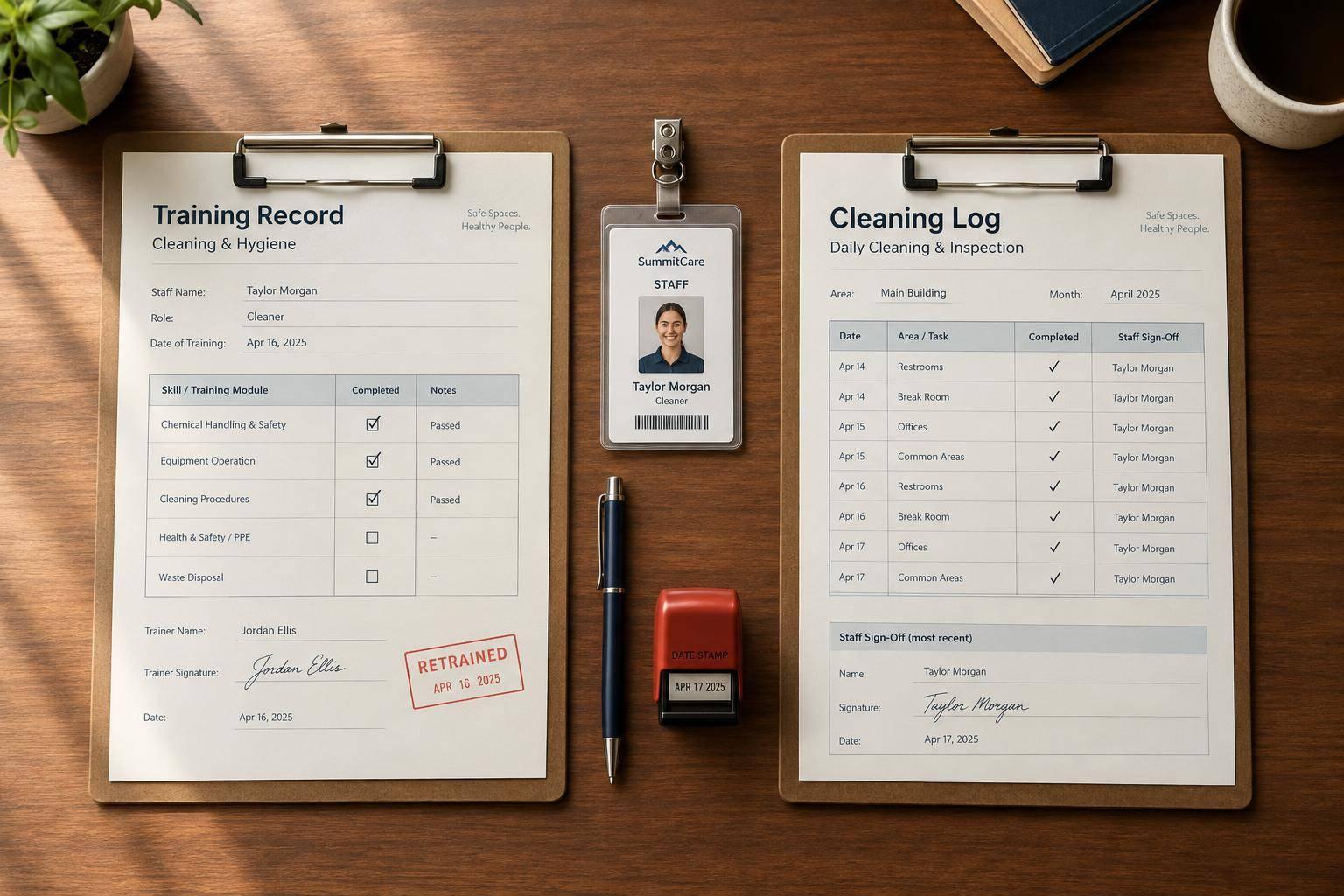
A training sign-off doesn’t prove today’s cleaning was done. I keep 2 separate records: one for staff training and one for completed cleaning.
Here’s what I check before each event:
<u>My rule: check skills, not just signatures.</u> I also confirm local requirements and follow a written retention policy - there’s no single retention period for every cleaning business.

Cleaning Training Records vs. Cleaning Logs
Use the training record to document what was taught, who taught it, and who verified it.
Organize the Cleaning and Sanitizing Training Record into four parts: session details, procedures taught, assessment and corrective action, and acknowledgments. Mark missing required fields as Incomplete. Use N/A for items that don’t apply.
Enter the employee’s full payroll name, preferred scheduling name if different, event role, and training location or operation. Record the training date in U.S. format. For long or shift-based sessions, include start and end times.
Example training date: November 1, 2026
Include the trainer’s full name, role, and relevant qualification to train.
Identify each procedure by its title and version or effective date. This lets reviewers check exactly which instructions were taught. For group sessions, store shared details once, then link each attendee to their own assessment result and acknowledgment.
Next, record each procedure taught and how the employee’s ability to perform it was checked.
Give each relevant procedure its own assessment line. As applicable, cover cleaning versus sanitizing, food-contact surfaces, handwashing, cross-contamination prevention, and chemical storage. For chemical tasks, record the product, dilution method, contact time, PPE, and label/SDS reference.
Assign one result per procedure: Demonstrated, Needs coaching, or Not yet competent. Leave space to describe the task observed.
Include fields for the specific mistake, corrective instruction, trainer, retraining date, and reassessment result. Keep the original assessment and record confirmation that the employee can perform the procedure on a separate date. Add dated sign-off fields for both the employee and trainer.
After recording the training session, check that the employee can perform each task. Document the sign-offs separately.
Review the procedure, demonstrate it, then watch the employee perform it. Check cleaning and sanitizing as separate tasks: cleaning removes soil, while sanitizing reduces microbes on a clean food-contact surface. Watch for soil removal, rinsing where required, sanitizer application, contact time, and air-drying.
Follow the chemical label, manufacturer instructions, and local requirements for dilution, equipment, PPE, and contact time.
Correct errors right away and have the employee repeat the task. Ask what they would do if the sanitizer concentration were wrong or the surface became contaminated again. Keep records of failed attempts, the coaching provided, and the reassessment result. Record the successful completion date. Until the employee shows the required skills, allow them to perform unsafe tasks only under supervision.
On the record created in Step 1, link both sign-offs to the procedure reviewed and the assessment result. The employee’s signature or identifiable initials confirm that they received instruction, had their questions answered, and understand task limits. The trainer’s sign-off confirms that they provided instruction and verified the recorded result. Neither signature alone proves skill. Keep both acknowledgment dates beside the completion status and any follow-up requirements.
For digital acknowledgments, record the person and date - not just an undated checkbox. Link each acknowledgment to the procedure reviewed. If retraining is required, document the new instruction and collect new acknowledgments.
Use a separate event-day cleaning checklist to record the date, completion time, area or equipment, cleaning status, sanitizing status where applicable, worker ID, and supervisor verification. A training sign-off does not replace a completed cleaning entry.
For missed or failed work, record the problem, corrective action, responsible person, and verification after correction. If the failure shows a skills gap, document retraining separately.
Once sign-offs are collected, store the records and review them before each event.
Assign a manager, sanitation lead, or designated person - plus a backup - to maintain records, limit edit access, and check for missing information. Review records before each event and on a set schedule, such as monthly or weekly during busy seasons. Document who reviewed them, the review date, findings, assigned actions, and completion dates.
Keep training records, cleaning logs, procedures, chemical and equipment instructions, and corrective-action records separate but linked. Use consistent IDs, dates, procedure titles, and trainer names so you can retrieve training dates, assessments, sign-offs, and review history.
Before relying on the system, test its search, retrieval, export, and backup recovery functions. Limit editing rights and preserve change history when the system supports it. Otherwise, use dated amendments that keep the original entry intact.
Set retention periods to meet applicable legal, contractual, insurance, customer, and company requirements. Document who handles retention, how records are disposed of, and when deletion must pause for an investigation, complaint, audit, or dispute.
Use these records to check readiness before assigning staff.
Compare the roster with current training records to confirm who is qualified for the shift’s cleaning duties. Flag missing records, overdue retraining, and training that doesn’t match the assigned equipment or chemicals.
Address gaps through reassignment, supervised instruction, or temporary task limits. Separately check how training records are stored, acknowledged, retained, and retrieved.
When reviews reveal problems, promptly document the cause and any retraining to address skills gaps before the next event. Check logs for blank fields, missed tasks, repeated corrections, or patterns by shift or location.
Determine whether the cause is a skills gap, unclear responsibility, missing supplies, or time pressure. Missing documentation is not proof that a task was completed.
Provide retraining when skills fall short, duties or equipment change, or failures point to a training need. Record the actual retraining date, reason, procedure, trainer, assessment result, and new sign-offs from the employee and trainer.
Keep earlier entries and add dated corrections; do not backdate entries. Check later logs to confirm improvement.
Check practical skills through observation or a short assessment. Record the results and collect dated acknowledgments from the employee and trainer. Log completed cleaning separately: a training sign-off does not prove a task was completed at that event.
Before each event, match assignments to current, task-specific training. Give supervisors access to both record types and keep an offline backup. Address missed tasks with documented corrections. For failed skill checks, verify and record retraining.
After readiness checks, review record retention - the final control point. Follow applicable retention requirements. No universal retention period applies to every cleaning operation. If no period is specified, follow a written retention policy.
Keep a centralized, timestamped record for each worker with their full name, staff ID, job title, training topic, completion date (MM/DD/YYYY), training duration, delivery method, and trainer’s name. Each staff ID must identify only one worker. Attach proof of completion, such as signed attestations, quiz scores, or hands-on assessment results.
For certifications, include both the issue and expiration dates. Store all records in one secure system to maintain a clear audit trail.
Treat an unsigned training record as incomplete evidence. Document the refusal, then repeat the briefing and create a separate, verifiable entry. Include the date and time, event, topics covered, trainer, and worker acknowledgment.
OSHA-style compliance calls for proof that the employee understood the briefing. Follow up, and keep the employee off tasks that require that training until they acknowledge it.
Make sure your system records a timestamped confirmation for every sign-off and links it to a staff ID assigned to one person - not just a name. This helps prevent errors and mistaken identities. Timestamped updates also create an auditable history showing what was on file when an event occurred.