How to Improve Event Staff Onboarding Feedback
May 6, 2026


Improving onboarding feedback for event staff is key to reducing turnover and increasing productivity. Here's how you can make feedback collection effective and actionable:
Start small by implementing one feedback method at your next event and build from there. Listening to your staff and acting on their input can transform your onboarding process and improve team performance.
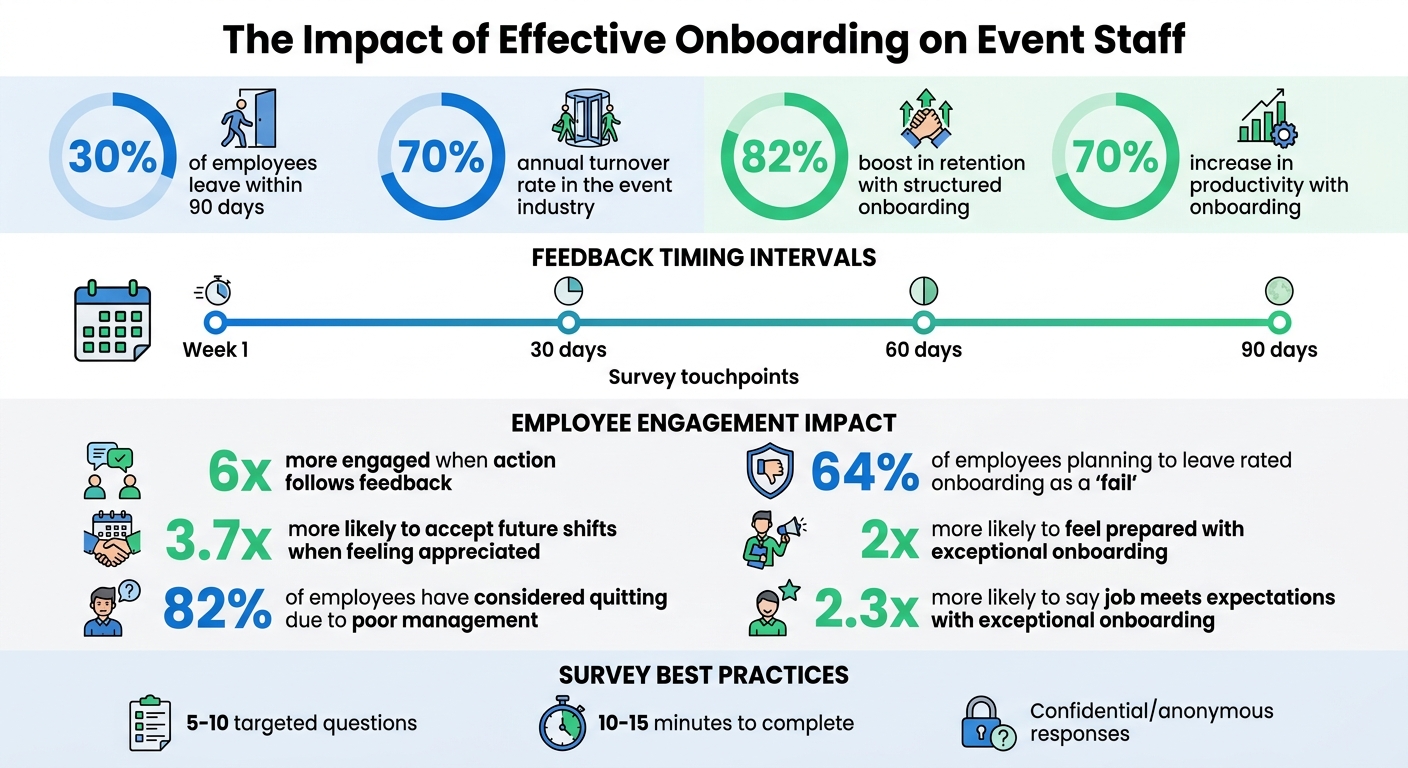
Event Staff Onboarding Statistics: Impact on Retention and Productivity
Surveys are an organized way to collect feedback from event staff, helping to improve the onboarding process through practical insights. Unlike casual conversations, well-crafted surveys can uncover trends - like multiple team members struggling with the same training issue or feeling uncertain about their roles.
Timing is key. Conduct surveys at strategic points - within the first week, and then at 30, 60, and 90 days. Keeping them short, with 5–10 targeted questions that take only 10–15 minutes to answer, ensures higher participation rates. This phased approach captures how staff sentiment changes over time and pinpoints when initial enthusiasm may start to wane. To get clear responses, focus each question on a single topic. For instance, avoid combining two ideas, like "Was your manager supportive and did you receive adequate training?" - this can confuse respondents and muddy the results.
Confidentiality is critical. When staff know their feedback is anonymous, they’re more likely to be honest about management and workplace concerns. Make sure to emphasize this at the beginning of every survey.
These strategies lay the groundwork for designing effective onboarding survey questions.
For a well-rounded view of the onboarding experience, combine quantitative and qualitative questions. Use tools like Likert scales (e.g., 1–5 or Strongly Disagree to Strongly Agree) and 1–10 ratings to collect measurable data. Examples include: "How clear are you about your job responsibilities?" or "Rate your satisfaction with the training materials provided".
Pair these with open-ended questions to uncover the reasons behind the numbers. For example: "What is one thing we could have done differently to improve your first week?" or "What additional resources would help you succeed in your role?" These types of questions often yield actionable insights.
Keep the language simple and easy to understand. New staff may not be familiar with terms like "pre-shift briefing protocols" or internal acronyms, so avoid jargon, especially in early surveys.
Structure your questions using the "4 C's" framework: Compliance (understanding policies), Clarification (role expectations), Culture (organizational fit), and Connection (team relationships). This ensures you’re addressing all key areas of the onboarding process.
| Question Type | Best Use Case | Example |
|---|---|---|
| Binary (Yes/No) | Verifying logistics | "Did you receive all necessary equipment before your first event?" |
| Likert Scale | Gauging satisfaction levels | "How satisfied are you with the training you received?" |
| 1–10 Rating | Measuring overall experience | "On a scale of 1–10, how likely are you to recommend working here?" |
| Open-Ended | Collecting specific feedback | "What would have made your first week more productive?" |
Choose survey platforms that integrate smoothly into your workflow. Busy event managers may find tools like Google Forms, SurveyMonkey, and Formbricks particularly useful. These platforms allow you to quickly create surveys, distribute them via email or text, and review feedback in real time.
Look for features that automatically schedule surveys based on hire dates, ensuring that every new hire receives the survey at the right time. Segmenting the results by department, role, or manager can help pinpoint specific areas for improvement.
Make sure your surveys are mobile-friendly. Event staff often rely on their smartphones between shifts, so surveys should display well on small screens. Some tools even let you use emojis or smiley faces instead of traditional number scales, making the process more engaging.
If you already use Quickstaff for scheduling, take advantage of the benefits of event staff scheduling software and its built-in communication tools to send survey links directly to your team. Combining these tools with Quickstaff ensures feedback is timely and actionable, setting the stage for more personalized follow-ups during one-on-one sessions.
Surveys might give you numbers, but one-on-one feedback sessions provide the stories behind them. These personal conversations dig into individual experiences, uncovering details that rating scales can miss. For example, a new hire might share that their equipment wasn’t ready on their first day or that their training left them feeling unprepared. Addressing these issues early can prevent frustration from escalating into turnover.
With event staff turnover exceeding 70% annually, these sessions are more than just a good idea - they’re essential. Each check-in serves a specific purpose: the 30-day session focuses on training and tools, the 60-day session looks at role fit and team dynamics, and the 90-day session evaluates long-term goals and overall fit within the company.
Before these conversations, review any onboarding surveys to pinpoint areas that need attention. During the session, document key takeaways, including the date, topics discussed, and any agreed-upon actions. This creates a record you can refer to later. And remember, 82% of employees have considered quitting due to poor management. These check-ins are your chance to show you’re invested in their success.
For event staff juggling irregular hours, supplement these formal sessions with on-the-spot coaching during events. Recognizing their efforts in real-time can make a big difference - workers who feel appreciated on the job are 3.7 times more likely to accept future assignments.
To make these sessions effective, use a structured approach like the SBI framework. Start by setting the tone: let the employee know this is a developmental conversation, not a performance review. Stress that their honest feedback will help improve the onboarding process for future hires. Creating a safe environment is key - if they fear backlash, they’re less likely to open up.
The SBI framework helps keep feedback clear and actionable. Break it down into three parts: describe the Situation (when and where something happened), the Behavior observed, and the Impact it had.
"During the wedding reception on Saturday, I noticed you proactively refilled water glasses before guests asked, which helped maintain excellent service flow during the dinner rush."
This method keeps the focus on actions, not personal traits.
Assigning a peer mentor can also enhance the onboarding experience. A mentor provides a go-to person for everyday questions and team norms, freeing up your one-on-one time for bigger-picture topics like career goals. This connection can make a big difference - 30% of employees leave within their first 90 days, and feeling part of the team can help prevent that.
Make sure to follow up within five business days to share any resulting changes. Using phrases like "You told us X, so we changed Y" shows employees that their feedback leads to real action. Insights from these sessions can also feed into broader initiatives, like focus groups or process improvements.
Ask open-ended questions to encourage detailed answers. Start by exploring first impressions:
"Were there any moments in your first week where you felt confused or unsupported?"
Then, dive into role clarity and productivity:
These questions can spotlight whether new hires have the tools and training they need to succeed.
To gauge team integration and support, ask:
Organizations with strong onboarding programs see retention rates improve by 82% and productivity increase by over 70%.
Wrap up with forward-looking questions to assess retention risk:
Since 70% of employees decide within the first month whether a job is right for them, these early conversations are crucial.
Finally, ask for suggestions to improve the onboarding process:
"What would you change about the onboarding experience for future hires?"
You can also include simple yes/no questions to address logistical concerns:
"Did you have system access on Day 1?"
If you’re using tools like Quickstaff to manage your event team, take advantage of its scheduling and communication features to set up these check-ins. Centralizing this process ensures these important conversations don’t get lost in the chaos of busy event seasons.
One-on-one sessions are great for understanding individual experiences, but focus groups take it a step further by uncovering shared patterns and insights across your event staff. Bringing together 6–8 team members can spark discussions that reveal trends you might miss in isolated interviews. This is especially important in event staffing, where annual turnover rates exceed 70%. Spotting these common threads early can help you address minor issues before they snowball into bigger challenges.
The secret lies in careful participant selection. For example, if you're exploring why some staff rarely accept shifts, invite a mix of highly active workers and those who frequently decline. If you're testing a new training method, include both seasoned veterans who know the existing process inside out and fresh hires who bring a new perspective. This variety encourages debate and helps uncover blind spots that a more uniform group might overlook.
Timing is everything. Schedule your focus groups about one to two months after onboarding surveys. By then, you'll have identified specific trends that need deeper exploration. To ensure open and honest dialogue, exclude direct managers and bring in a neutral facilitator who can create a safe space for participants to share their thoughts freely.
Here’s why follow-up matters: Employees who see action taken after feedback sessions are six times more engaged than those who don’t. Plus, workers who feel valued and recognized are 3.7 times more likely to accept future shifts.
To keep the discussion on track, start with a single, clear goal - whether it’s identifying roadblocks, testing new strategies, or celebrating successes. Let participants know the purpose of the session upfront so they come prepared and focused.
Keep the session short and sweet - an hour is ideal for maintaining energy and engagement. Stick to groups of six to eight people; smaller groups may limit discussion, while larger ones can make it harder for everyone to participate. Assign a notetaker or record the session to ensure you can fully engage with the group without worrying about missing key points.
Facilitators should aim to speak less than 20% of the time. Instead, focus on asking open-ended questions that start with "why", "what", or "how." If someone gives a surface-level answer, dig deeper. For instance, if a participant says, "The training videos were confusing", follow up with questions like, "What specifically was unclear?" or "How could the videos be improved?"
Don’t rush through pauses - sometimes a little silence after a tough question encourages more thoughtful responses. Also, keep an eye on dominant voices in the room. If someone is quieter, gently bring them into the conversation with prompts like, "Sophie, what’s your take on this?" to ensure everyone has a chance to contribute.
To keep discussions objective, use the SBI framework: describe the Situation, the Behavior you observed, and the Impact it had. This approach keeps the conversation focused and constructive.
Wrap up by summarizing the next steps. Clearly communicate how their feedback will lead to changes, using phrases like, "You told us X, so we’re implementing Y". Tools like Quickstaff can help you quickly share updates, ensuring participants see that their input is making a difference.
These group discussions create a strong foundation for turning feedback into real, actionable improvements.
Quickstaff simplifies feedback collection by centralizing everything into one platform, making it easier to gather insights during onboarding. Managing event staff across multiple venues and shifts can get chaotic, but Quickstaff keeps everything organized. With its communication tools, you can send surveys, track responses, and maintain records - all without juggling multiple platforms or losing important details in email threads. By combining surveys, one-on-one sessions, and focus groups, Quickstaff helps transform onboarding feedback into meaningful improvements.
One standout feature is its unlimited messaging capability, which allows you to send feedback forms to your entire team or narrow it down by specific roles. For instance, bartenders and servers can receive tailored questions relevant to their responsibilities. This targeted approach ensures you get responses that are both relevant and actionable.
"My time spent scheduling has shrunk majorly, leaving me more time to focus on recruiting, on-boarding and training." – Jennifer Manley, Staffing Coordinator
Another handy tool is the "Attached Notes & Files" feature. You can share PDF feedback forms, onboarding guides, or event-specific notes directly with your staff. Instead of juggling separate email attachments, Quickstaff embeds survey links alongside shift details. This setup encourages staff to complete feedback requests while reviewing their assignments.
Quickstaff offers a 14-day free trial - no credit card required - so you can test its automated feedback tools risk-free. Pricing starts at $49/month for the Boutique plan (up to 35 staff), $99/month for the Growing plan (up to 70 staff), and $249/month for the Large plan (up to 175 staff).
Next, we’ll look at how Quickstaff’s mobile interface and calendar integrations make communication with event staff smoother and more efficient.
Quickstaff’s mobile-friendly design makes it easy for staff to provide feedback while on-site or immediately after their shifts. Automated email notifications, which include event details and work invitations, create a natural opportunity to ask for feedback. Since staff are already checking these emails to confirm shifts, they’re more likely to complete a quick survey while their experience is still fresh.
The platform also syncs with popular calendar systems like Google Calendar, iCal, Outlook, Yahoo, and Hotmail. This integration lets you schedule follow-up feedback sessions or send reminders about survey deadlines. Plus, with its one-click confirmation feature, staff can respond to work invitations with a simple "Accept It" or "Decline It" button. This instant feedback loop helps you track availability and identify new hires who might need extra support during onboarding.
Once you’ve collected feedback, Quickstaff’s centralized records allow you to track trends and make informed decisions for continuous improvement.
Quickstaff’s worker database stores detailed records for each staff member, including their name, role, and event history. This comprehensive view lets you identify patterns - like whether staff who complete onboarding surveys are more likely to accept future shifts. By analyzing this data, you can pinpoint which changes are driving real results and refine your processes accordingly.
"The time that we have been able to save by using this staff scheduling software has allowed us to tackle the other issues that we face thereby improving our overall events!" – Kelly, The Abbot KC
Once you've gathered feedback through surveys, one-on-one discussions, and focus groups, the real challenge begins: turning those insights into meaningful changes.
Collecting feedback is just the first step. The real impact comes from analyzing and acting on it. Erin Geiger, Director of Content at Lumos, emphasizes this point:
"The real value comes from analyzing that data to identify trends, benchmark against industry standards, and ensure alignment with company goals".
When you use feedback to drive changes, it sends a powerful message to your team - that their opinions matter. This not only builds trust but also helps improve retention. However, these benefits only materialize when the feedback is actively applied to make adjustments.
Start by identifying trends in the feedback you’ve collected. For instance, if multiple bartenders mention confusion about tip distribution policies or servers report delays with system access, these are clear problem areas to address. Breaking feedback down by role can also uncover specific challenges. For example, technical staff might need better equipment training, while administrative staff could benefit from clearer communication. This segmentation helps you focus on the changes that will make the biggest difference in performance.
Not all feedback carries the same weight. It’s important to focus on addressing common concerns rather than isolated issues. Hannah Barnes from Planning Pod offers this advice:
"By carefully considering the source and context of any feedback, you can make informed decisions about which suggestions to prioritize and implement and which to take with a grain of salt".
Start with quick wins - small, immediate changes that can build momentum and credibility. For example, if onboarding surveys show that access to IT systems is a recurring issue, work with your tech team to simplify access procedures.
It’s also helpful to benchmark your metrics - like retention rates and time-to-productivity - against industry standards. This can highlight areas where your onboarding process may be falling short. Collaborate with the relevant teams to address these gaps directly.
Once you’ve identified key changes, test them on a small scale before rolling them out fully.
Pilot testing is a great way to fine-tune improvements without disrupting your entire operation. For major updates, try them with a small group first. This lets you measure their impact on training and job performance in a controlled environment.
Avoid overwhelming new hires by breaking changes into smaller, manageable steps. Overloading employees with information is a common issue - 81% of new hires report feeling overwhelmed during onboarding.
To ensure your adjustments are effective, schedule check-ins at 30, 60, and 90 days. These touchpoints give you real-time feedback on how well the changes are working. For example, if a new training module isn’t resonating, you can tweak it before the next group starts. This iterative process ensures your onboarding stays aligned with your team’s evolving needs.
Once you've implemented better feedback practices, the next step is to measure their impact. Without tracking results, you're left guessing. Holly Burkett Ph.D., SPHR, emphasizes this point:
"Onboarding is a continuous journey rather than a one-time task, metrics should emphasize ongoing improvement, driven by regular data reviews and continuous feedback".
To ensure your efforts are effective, use clear, actionable metrics to quantify the results.
Start by monitoring key indicators like retention intervals and time-to-productivity. These metrics help determine whether new staff are reaching independence more quickly. High early turnover rates highlight the importance of evaluating these areas. Specifically, time-to-productivity measures how long it takes for new event staff to perform independently without supervision. This metric directly reflects whether your training and support systems are working as intended.
Another valuable tool is the Employee Net Promoter Score (eNPS). This metric acts as an early warning system for engagement issues. By asking staff how likely they are to recommend your organization as a workplace, you gain insight into their overall satisfaction. Pair this with satisfaction scores collected through milestone surveys at key points - such as the first week, first month, and third month. Keep these surveys short (10–15 minutes) and include a mix of quantitative data (like rating scales) and qualitative feedback (open-ended questions). Together, these methods provide a comprehensive view of your onboarding improvements.
The data is clear: exceptional onboarding has a measurable impact. Among employees planning to leave their jobs soon, 64% rated their onboarding experience as a "fail". In contrast, employees who undergo exceptional onboarding are nearly twice as likely to feel fully prepared for their role and 2.3 times more likely to say the job meets or exceeds their expectations. To maintain progress, review your metrics quarterly to identify trends and make necessary adjustments.
Finally, close the feedback loop by sharing the changes you've made based on staff input. This not only demonstrates that their voices are heard but also fosters trust and strengthens team morale. These metrics aren't just numbers - they're the foundation for continuous improvement.
Effective onboarding feedback can make a big difference in reducing turnover and boosting performance. In the event industry, where turnover rates are notoriously high, having a structured approach to feedback is essential to get the most out of your recruitment and training efforts.
The methods highlighted in this guide - such as structured surveys, one-on-one check-ins, focus groups, and using technology for tracking - work together to create a solid feedback system. When used consistently and at key intervals (like the first week, 30 days, and 90 days), these strategies can lead to noticeable improvements in retention and productivity. The secret is tying feedback to clear, measurable goals and sticking to the plan.
Technology is a game-changer here. Tools like Quickstaff simplify communication, monitor staff progress, and give real-time insights into engagement. This makes feedback not just easier to collect but also actionable, turning it into a competitive edge for event businesses handling temporary staff.
But let’s not forget the human side. As Richard Branson wisely pointed out:
"Clients do not come first. Employees come first. If you take care of your employees, they will take care of the clients".
When event staff feel heard, valued, and supported through thoughtful feedback, they are 3.7 times more likely to accept future shifts.
You don’t have to overhaul everything at once. Start with just one feedback method from this guide at your next event. Track how it works, make adjustments, and build on your successes. By investing in meaningful feedback, you’ll see positive results not just for your staff but also for your clients and your business as a whole.
Gathering honest feedback from event staff starts with using onboarding surveys that include thoughtful, open-ended questions. These surveys should be designed to encourage genuine responses, helping staff feel heard and valued. It's also important to create an atmosphere where team members feel comfortable sharing their thoughts without hesitation. By conducting these surveys consistently - both during and after onboarding - you can pinpoint areas that need adjustment and ensure the process meets the team's expectations.
Creating an effective onboarding survey for event staff means focusing on their experiences, understanding of their role, and how welcomed they feel. Here are some key questions that can help gather meaningful feedback:
By asking these targeted questions, you can uncover valuable insights to improve and streamline the onboarding process for future staff.
Key metrics to evaluate improvements in onboarding are time-to-productivity, turnover or retention rates, and employee satisfaction and engagement. These metrics help determine how fast new hires become productive, whether they remain with the company, and how connected and motivated they feel in their positions.





