10 Event Staff Scheduling Hacks for Caterers
August 10, 2026

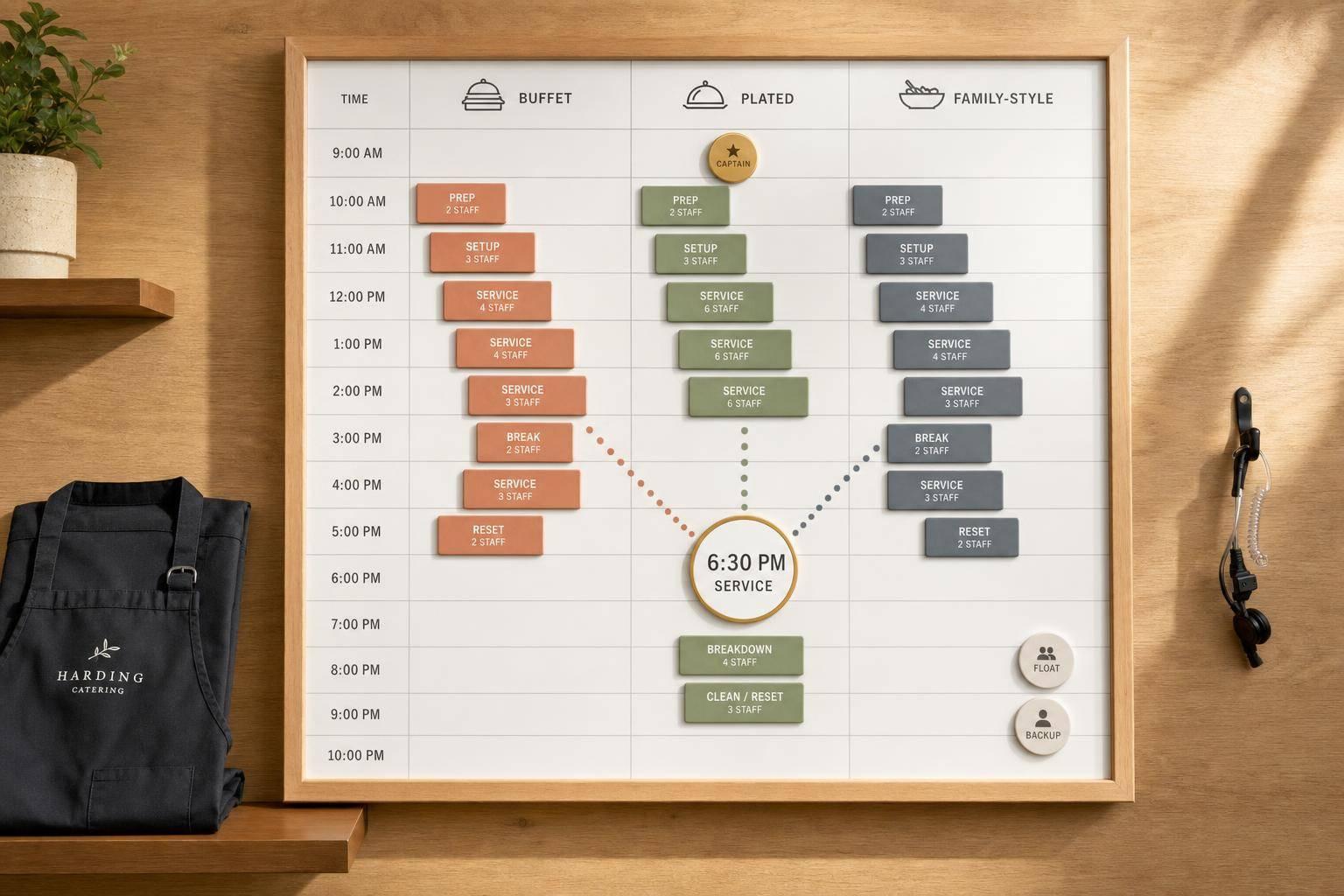
If I want catering shifts to stop falling apart, I need to build the schedule around service time, role timing, break coverage, venue limits, and backup staff.
This article boils staffing down to 10 clear fixes: work backward from guest service, stagger call times, assign one captain, add float staff, block breaks in advance, check venue rules before posting, size crews by guest count and service style, keep backups ready, store event details in one place, and use a shared calendar to move people fast.
In plain terms, here’s what matters most:
A few numbers stand out right away:
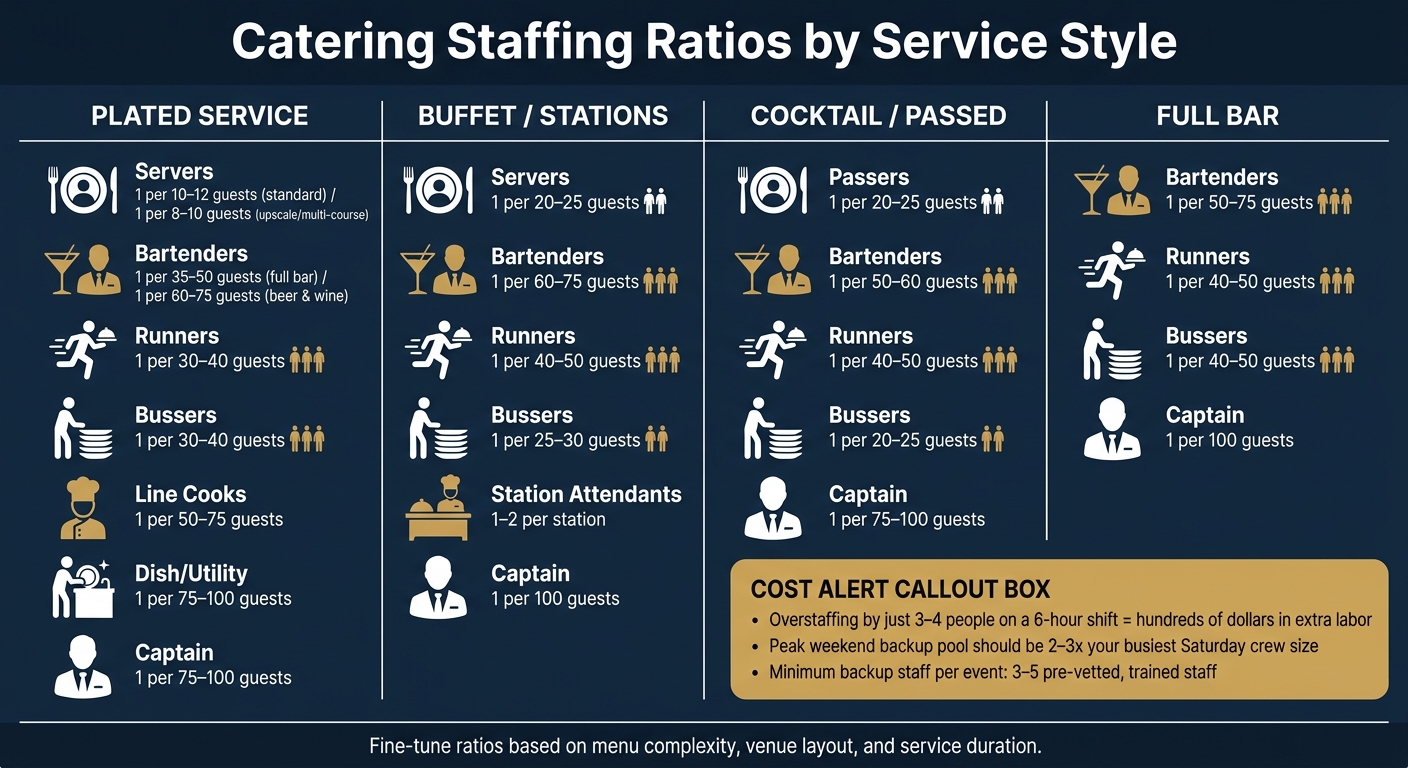
Catering Staffing Ratios by Service Style
| Hack | What I’m fixing | Main result |
|---|---|---|
| Schedule backward from service | Bad call times | Better event timing |
| Stagger call times | Idle labor early | Lower labor waste |
| Assign one captain | Split event control | Clear on-site ownership |
| Add float coverage | Overlap gaps | Better support at rush points |
| Plan breaks as coverage blocks | Holes during service | Steadier floor coverage |
| Check venue rules first | Shift rework | Fewer posting mistakes |
| Size crew by style and count | Over/understaffing | Tighter labor control |
| Keep backup staff ready | Callouts | Faster replacement |
| Centralize event details | Lost updates | Fewer communication misses |
| Use a shared calendar | Slow reassignments | Faster schedule changes |
Using a dedicated system makes event staff scheduling made quick and easy by automating these manual tasks.
Bottom line: if I want fewer callout problems, less overtime, and smoother service, I need a schedule that matches the event timeline from the start.
Most catering schedules are built the other way around: pick a start time, stack tasks on top, and hope the whole thing wraps before guests walk in. A better way is to start with the service time and work backward.
Here’s how that plays out in a live event timeline.
Start with service time first. Then set the earlier deadlines for setup, briefing, and arrival based on each role. Every checkpoint creates a call time. So you might have a captain at 4:30 p.m., servers at 5:00 p.m., and kitchen staff arriving between 3:30 p.m. and 4:00 p.m.
Once that timeline is locked in, check whether the shift length still fits labor and venue rules. Backward planning also helps spot shifts that could run past venue limits or labor-rule cutoffs. It brings break windows into view early, which matters when meal break rules are strict. And that matters for a simple reason: the timeline itself shows where the trouble spots are. You don’t need a separate compliance pass to find them.
If someone cancels, a backward-built schedule also makes it much easier to post an exact shift. For example: 5:30–9:30 p.m., plated dinner service, no setup. That kind of detail helps replacements say yes faster because they know exactly what they’re walking into.
This setup also makes scheduling software more useful. Quickstaff can turn those timelines into reusable event templates, staggered call times, and mobile reminders.
Set call times so each role shows up when its work begins. If you schedule everyone for the same start time, you burn labor early and then end up thin when the pressure hits.
Once the service time is locked, stagger arrivals by role. For a 6:00 p.m. plated dinner, a solid starting point looks like this:
For larger events, add 30–60 minutes to that template.
This kind of stagger cuts idle time and keeps people where they’re needed most. The key is to build overlap at the two handoffs that matter most: kitchen to plating, and setup to guest arrival. In that last stretch before doors open, aim for at least a 45–60 minute overlap between the captain and kitchen lead. That window shouldn’t be fixed, though. It should shift based on the event format.
Plated dinners usually need more kitchen coverage earlier in the day. Buffets and station events push more labor into setup and the first 60–90 minutes of service, so those crews should come in earlier. Cocktail-only events put most of the strain on bar and tray-passed staff during a tight 3–4 hour window, which often calls for a smaller crew with later start times.
Save these timing patterns as reusable templates. That way, when a similar event comes up, staffing gets a lot faster.
Use an event staffing needs analyzer to ensure crew size matches the guest count and service style.
Once call times are locked in, put one captain in charge of the event from load-in through breakdown. If that ownership gets split between multiple people, small issues tend to slip through the cracks.
The captain’s role is clear. They run the pre-shift meeting, stay aligned with the kitchen lead, watch service flow, and make on-the-spot decisions when the schedule shifts. Having the right scheduling tools helps manage these sudden changes. They should also be the single point of contact for the client, the venue manager, and the kitchen team. That kind of clarity matters most when the timeline gets tight, like when a ceremony starts late and dinner service gets compressed. In that moment, the captain can adjust fast by tightening early courses and moving open staff to the areas that need help most.
The captain is also responsible for following venue rules on site. Before the event, they should review the venue’s requirements, including:
Those rules should be covered in the pre-shift meeting. During service, the captain needs to watch the clock, keep racks out of fire exits, and make sure the team clears out within the allowed window. If the venue flags a problem, the captain handles it right away and documents it.
Break planning sits with the captain too. They stagger rest periods so coverage doesn’t dip during peak service, and they track who has taken a required break. Short breaks still count as paid time and belong in hours worked.
Put the captain’s name on the BEO and staff schedule before either one goes out.
Once each event has a captain, add float coverage for the overlap windows. If two events run at the same time, you need a few extra hands to handle the shared pressure points.
For larger events, use 1–2 float staff for every 10 crew members. Keep them unassigned so they can step in where gaps or bottlenecks show up. For two concurrent 150-guest plated dinners, add 2–3 float roles such as:
Label these roles Float Server or Float Bar Support. Use them during setup overlap, peak service, and early teardown. They should not belong to one event. Instead, they report to the operations manager so they remain open for shared coverage.
If the schedule shifts mid-service, those float roles should stay easy for the operations manager to spot. Keep float assignments visible in the scheduling software so managers can reassign people fast.
Float coverage also makes break coverage easier.
Use float staff to cover planned break waves. When breaks happen on the fly, holes open up fast. A server steps away right as speeches end, guests head straight for the bar, and that section is left hanging. That’s why every break should be treated as a scheduled coverage block, not a personal call made in the moment.
Map out each break before you post the schedule. Decide who steps away, when they go, and who covers that station. Stay away from breaks during guest arrival, entrée service, and the first 10–15 minutes after speeches. Those are high-pressure windows. It’s smarter to place breaks in quieter moments, like after plates hit the table or during dessert and coffee.
Break waves usually run best when coverage is assigned by zone. For a 200-guest plated dinner with 10 servers, it could look like this:
| Break Wave | Who | Time | Coverage |
|---|---|---|---|
| Wave 1 | Servers 1–4 | 7:15–7:30 p.m. | Floater + Captain |
| Wave 2 | Servers 5–8 | 7:30–7:45 p.m. | Servers 1–4 back on floor |
| Bar breaks | One bartender at a time | During meal service | Remaining bartender holds the bar |
Don’t send the whole bar team or an entire section out at the same time. That’s asking for trouble. Add a 5- to 10-minute handoff buffer so the incoming staffer is set before the outgoing one steps away. Even a short uncovered gap can turn into a mess.
Write down break blocks and log start and end times. That gives you a clean way to track compliance and catch repeat coverage gaps before they become a pattern. With breaks blocked out, the next move is matching shifts to venue rules before you post them.
Posting shifts before you check venue rules is a fast way to create extra work. The fix is simple: read the rules first, then post.
Pull the venue contract and BEO before you build a single shift. Look at access windows, required end times, and in-house labor limits before anything goes live. If a hotel requires all outside staff to be off the property by 11:00 p.m., your shifts should end by 10:30 p.m. If a convention center requires in-house bartenders once guest count passes a set threshold, remove those roles from your roster before posting, not after staff have already confirmed.
Venue rules control access. Labor rules control shift limits. Local labor rules may also affect break timing and trigger premium pay. So after you review the venue rules, check whether local labor rules change the break plan.
A simple pre-posting checklist helps keep this on track. Before shifts go live, confirm:
Use Quickstaff to store venue notes so every staffer sees the same limits before accepting a shift.
Once venue rules are locked in, size the crew by guest count and service style.
Once venue rules are clear, the next job is sizing the crew based on guest count and service style. Those two factors work together. A 150-guest plated wedding dinner does not need the same team as a 150-guest corporate buffet lunch, even though the number of guests is the same. The service format changes everything: staffing ratios, call times, role mix, and how much backup you need.
Use these ratios as a starting point:
| Service Style | Server Ratio |
|---|---|
| Plated (standard) | 1 per 10–12 guests |
| Plated (upscale/multi-course) | 1 per 8–10 guests |
| Family-style | 1 per 10–12 guests |
| Buffet / stations | 1 per 20–25 guests |
| Cocktail / passed hors d'oeuvres | 1 per 20–25 guests |
Bar staffing should be planned on its own. A good starting point is 1 bartender per 50–75 guests for beer and wine, and 1 per 35–50 guests for full cocktail bars.
After you’ve set server and bartender counts, fill in the rest of the crew by role. Back-of-house needs its own math. Plan for about 1 line cook per 50–75 guests for hot plated meals, plus at least 1 dish/utility person per 75–100 guests when china and glassware are turning over fast.
This is where small mistakes can get expensive. Overstaffing by 3–4 people on a 6-hour shift can add hundreds of dollars in labor. But cutting too close has a price too. Slow courses, long bar lines, and missed resets can damage reviews and referrals, especially for high-pressure events like weddings.
The goal is simple: keep staffing lean, but give each role a clear purpose. You want the right headcount without leaving holes in coverage.
Quickstaff can turn these ratios into event templates, so peak-date staffing starts with a preset crew.
Once the base crew is set, build a backup list for peak dates.
Peak dates - summer Saturdays, holiday weekends, and graduation weeks - are when callouts hit hardest. Float staff help with overlap. Backups step in when someone drops. This list is for people you can call in, and it does not replace on-site float coverage.
The move here is pretty simple: build a pre-vetted backup pool before peak season starts. Industry guidance says to keep 3–5 backup staff per event who are trained, not already scheduled, and ranked by how fast they usually respond. For peak season, your full backup pool should be about 2–3× your busiest Saturday headcount. So if your busiest weekend needs 15 people, your target pool is 30–45 staff.
Not everyone should make the list. Stick to people who have already worked at least 3–5 shifts with your team, show up reliably, and have current certifications, like food handler cards and alcohol service permits where required. It also helps to tag each person by role and service style experience, so you’re not digging through names when time is tight.
A backup list is only useful if it shows real-time availability, not a plan someone made two months ago and forgot about. Quickstaff lets staff mark which peak dates they’re open to work right from their phones. That means when a callout comes in, you’re seeing actual options, not wishful thinking. And its waitlist feature takes some of the scramble out of the process: when more staff accept an event invite than you need, Quickstaff moves the extra people to a waitlist. Quickstaff's waitlist automatically keeps overflow staff ready for last-minute openings.
Keep backup contacts, roles, and event notes in one shared system so open shifts can be reassigned fast.
When details are spread across email threads, text chains, and spreadsheets, things start to drag. A single shared event record keeps call times, access, and roles lined up when plans change.
Each event record should include the venue address, load-in instructions, parking, guest count, service style, captain, dress code, and timing rules. If the venue moves the load-in window up by 30 minutes, or the chef changes hot-hold timing, that update should live in ONE place, not get passed around by hand to every staff member.
Staff also need mobile access to call times, role assignments, and the captain's contact info. If the system isn't mobile-friendly, it slows the team down right when every minute counts.
Quickstaff keeps event details in one place and lets managers message only the staff assigned to that event. Once the event brief lives in one spot, the next step is handling reassignments fast on a shared calendar.
Once event details and backup coverage live in one place, the calendar turns into your fastest tool for moving people when plans shift. You can spot open shifts and overlap gaps fast. So when a callout comes in, you open the calendar, find the hole, and start filling it right away.
If someone cancels close to service time, that live view helps you reassign already-approved staff without throwing other events off track.
Here’s what that looks like in practice: if a Saturday has three 150-guest plated dinners and only one captain confirmed across all three, you can see that gap days ahead of time. A weekly review helps you flag risky dates before the schedule goes live. From there, you can pre-assign float staff to high-risk windows before they turn into day-of problems.
Quickstaff's shared calendar lets managers:
That same calendar view also makes next week's schedule easier to build.
Use this table as a quick headcount check by service style. Then fine-tune it based on menu complexity, venue layout, and how long service will run.
| Role | Plated | Buffet | Stations | Cocktail |
|---|---|---|---|---|
| Servers | 1 per 10–12 guests | 1 per 20–25 guests | 1 per 20–25 guests | 1 passer per 20–25 guests |
| Bartenders | 1 per 60–75 guests | 1 per 60–75 guests | 1 per 60–75 guests | 1 per 50–60 guests |
| Runners | 1 per 30–40 guests | 1 per 40–50 guests | 1 per 2–3 stations | 1 per 40–50 guests |
| Bussers | 1 per 30–40 guests | 1 per 25–30 guests | 1 per 25–30 guests | 1 per 20–25 guests |
| Station Attendants | - | - | 1–2 per station | - |
| Captain | 1 per 75–100 guests | 1 per 100 guests | 1 per 75–100 guests | 1 per 75–100 guests |
No matter which format you choose, you still need one captain. After you set the crew mix, match each role to the event timeline so everyone knows where they need to be and when.
Match each role to the event phase so you staff only the hours that role is needed. Start with your crew mix, then plug each job into the right phase.
The table below uses T-minus timing, which makes it work no matter when the event starts. T-0 is guest arrival. Anything before that is prep and setup. Anything after that is service and breakdown.
| Role | Prep (T-6 to T-3) | Setup (T-3 to T-0) | Service (T-0 to T+2) | Breakdown (T+2 to T+4) |
|---|---|---|---|---|
| Event Captain | Reviews BEO, confirms counts, checks floor plan | Leads setup, coordinates with venue | Controls service pace, adjusts pacing | Oversees load-out, signs off with venue |
| Banquet Servers | Minimal, unless folding napkins or polishing glassware on-site | First wave in at T-3; set tables, stage trays, stock water and bread | Full front-of-house coverage; tray-passing, plated service, or buffet service, bussing | Clear tables, pack rentals; keep 50–60% of FOH for breakdown and release the rest after dessert |
| Bartenders | Pull liquor, prep garnish at commissary | Build bar stations, set back bar, stock ice and mixers | Pour drinks, watch inventory, manage bar lines | Secure alcohol, break down bar |
| BOH / Cooks | Core cooking, blast chilling, portioning | Set hot line, plug in hot boxes, finish sauces | Fire courses, manage plating, maintain buffet integrity | Cool down, label leftovers per venue rules, clean BOH |
| Dish / Utility | Load dish machine, sanitation, trash handling | Set up dish area, stage racks, distribute bus tubs | Keep dish moving, reset glassware, support bussers | Final trash run, clean kitchen, break down racks |
| Float / Runner | Load vans, transport equipment | Move rentals and décor, support setup bottlenecks | Refill water, refill buffets, cover breaks, handle dietary special plates | Assist load-out; ensure nothing is left behind |
Use this as your shift map, then tweak it for guest count and venue rules.
A simple way to think about it:
For a 150-guest plated wedding, that usually means early BOH coverage, a first server wave during setup, a later server wave for service, and float coverage that stays in place through breakdown.
Before you post shifts, check this phase map against the BEO and the venue contract. A hard load-out deadline usually means you need a bigger breakdown crew. A tight load-in window? That usually calls for more hands during setup.
Strong catering schedules come down to a few core habits: plan around service time, build in overlap, assign one captain per event, account for venue rules, block out breaks, and keep backup staff ready.
From there, use the staffing and timeline tables together. Start with headcount based on the ratios, then match each role to the timeline so every prep, service, and breakdown block has a clear owner. That’s what makes the schedule repeatable from week to week.
It also helps to build templates by service style and guest count, then keep a fast system for callouts and reassignment. Quickstaff supports that workflow by keeping shifts, availability, waitlists, reminders, and event details in one place. When timing, coverage, and event details stay in sync, even peak weekends feel under control.
Start with the exact time food service begins. Then work backward through transition, setup, and breakdown. Build in buffer time for setup and unexpected delays, especially when phases overlap.
It also helps to stagger start times. Bring in setup crews first, then registration or support staff, and floor staff closer to the busiest service window. Quickstaff can help by organizing role-based shifts and tracking availability in real time.
For peak dates, plan for a 10% to 15% staffing buffer above your baseline. If you're working in a complex venue with multiple rooms or levels, push that buffer to at least 15%.
For events that run longer than six hours, add 20% to 30% more staff to handle breaks and rotations. It also helps to keep at least one standby backup on hand and use floaters - about 1 to 2 for every 10 staff members - to deal with no-shows and bottlenecks.
Typical staffing ratios look like this:
Plated service takes more staff. It’s more hands-on, so labor needs go up. Buffet service is usually more efficient because guests serve themselves, which cuts down on the number of servers you need.





