Event Escalation Matrix: Roles and Steps
August 30, 2026

When an event issue sits too long, guest experience drops fast. In hospitality, recovery handled within 30 minutes tends to lead to much better guest response than recovery that drags to 2 hours or more.
If I had to sum up the whole process in one line, it would be this: I put every common event problem into one simple path: what happened, who owns it, how long they have, and who gets the call next.
That means I need to lock in:
I also need to keep a few rules in place:
Here’s the short version of what the matrix covers:
| Area | What I define |
|---|---|
| Issue type | Staffing gaps, which can be managed with last-minute scheduling tools, guest complaints, safety, food delays, AV or power issues, vendor delays, and communicating with event staff |
| Trigger | A clear point that starts escalation, like 3 complaints in 10 minutes or a 15-minute meal delay |
| Owner | The role in charge of fixing the issue |
| Backup | The role that steps in if the first owner is unavailable |
| Next contact | The person or role called when the issue is not fixed in time |
| Time threshold | How fast work starts, when it should be fixed, and when it moves up |
I’m not building a long policy document here. I’m building a one-page guide that staff can scan during service and use on the spot.
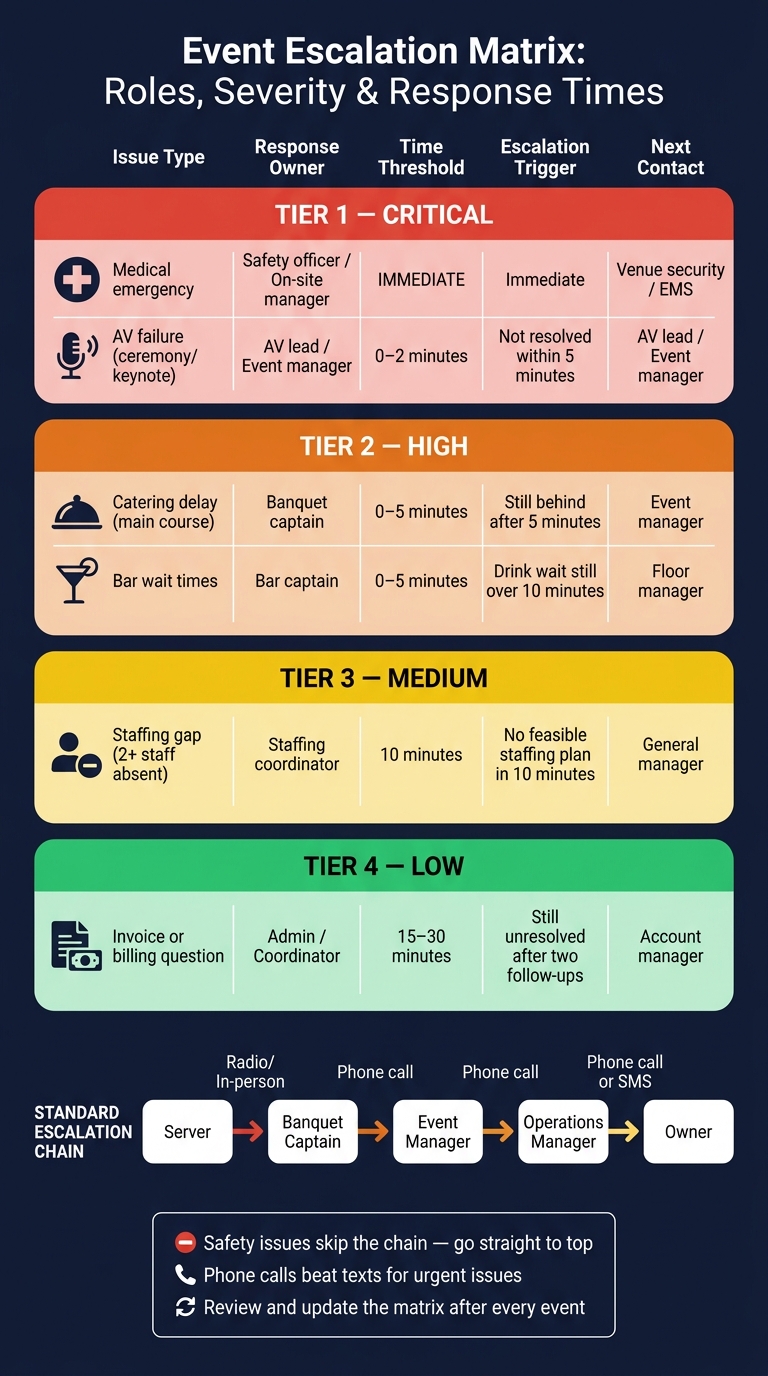
Event Escalation Matrix: Roles, Severity & Response Times
Start with the problems your team actually ends up escalating on site.
For most event teams, the main categories are staffing gaps, guest-service complaints, safety and security incidents, food and beverage service quality or timing issues, equipment or power failures, vendor and delivery delays, and team or client communication failures.
A good range is 6 to 10 categories. If you use fewer than six, very different problems can get lumped together. If you go past ten, people may hesitate or waste time sorting issues during a live event.
Once you have the categories, give each one a clear trigger. In plain English, that means a specific condition that tells staff: escalate this now.
Vague wording like “when the issue worsens” sounds fine on paper, but it falls apart in the moment. During service, nobody wants to stop and debate what “worsens” means. Time-based and count-based triggers are much easier to use.
Here are some practical examples written in simple if-then terms:
| Issue Category | Escalation Trigger |
|---|---|
| Staffing gaps | A confirmed server or bartender has not checked in by 30 minutes before call time |
| Guest-service complaints | 3 similar complaints in 10 minutes |
| Safety incidents | Any injury requiring more than basic first aid, or any aggressive guest behavior |
| Food and beverage service | Plated service is delayed more than 15 minutes past the scheduled start time |
| Equipment or power | Main space power is out for more than 2 minutes |
| Vendor and delivery delays | Critical rentals are not onsite 90 minutes before guest arrival |
| Communication failures | A supervisor is unreachable by call or text for more than 10 minutes during active service |
Each trigger should connect to one owner, one backup, and one deadline in the matrix.
Safety issues need different handling. They should skip the normal chain and go straight to the highest on-call decision-maker.
Once your triggers are in place, assign ownership by role, not by person. That way, anyone working in that role during an event knows what lands on their plate, whether they’re a full-time manager or filling in for one shift.
Use the issue categories and triggers from Section 1 to decide who owns each type of response. The person who spots the problem reports it. The owner is the one who decides what happens next.
For each issue category in your matrix, assign one primary owner role. This is the role accountable for fixing the issue, not just noticing it first.
Here’s a simple way to map common issue types to primary and backup roles:
| Issue Type | Primary Owner Role | Backup Owner Role |
|---|---|---|
| Staffing gap / no-show | Staffing coordinator | Event lead |
| Guest service complaint | Server captain | Event lead |
| Food quality / kitchen delay | Catering manager | Event lead |
| Equipment or power failure | Operations manager | Owner |
| Safety incident | Owner / general manager | Operations manager |
| Vendor or delivery delay | Event lead | Operations manager |
Each issue type in your matrix should point to exactly one primary owner role. That avoids confusion when something goes sideways and people start looking around the room for someone else to act.
Every primary owner needs a backup. If the main person is off-site, tied up, or between shifts, a second role should be ready to step in.
Pick backup roles based on three things:
For example, if the staffing coordinator owns no-shows, the event lead is often the right backup. They’re there in person, they can move people around, and they know the event schedule. If the operations manager owns equipment failures, the owner may be the backup for high-severity issues after hours.
Use event staff scheduling software to assign both primary and backup roles before the event.
Once ownership is clear, the next step is to define who gets contacted next and how the handoff works when an issue isn’t resolved.
For each issue type and owner role, define who gets contacted next if the issue isn't resolved. If that answer isn't built into the matrix, frontline staff can lose time deciding whether to call a supervisor, the operations lead, or the owner.
After that, set the timing. In plain terms: how long does each role have before the issue moves up?
Keep the chain short - 3 to 5 roles max. Every extra step adds delay. For wedding staff scheduling, a practical chain might look like this:
Server → Banquet Captain → Event Manager → Operations Manager → Owner
Use the same role names that appear in the matrix. If you run split shifts, list the active contact by shift block.
Each role in the chain should answer four basic questions:
For example:
Event Manager - on-site 3:00 p.m.–11:00 p.m.; call or text; approves schedule changes, vendor arrival adjustments, and comp decisions up to $250; budget changes above $250 go to the Operations Manager.
Anything above that limit moves to the next level.
For critical issues, pass along the key facts right away: location, issue type, severity, impact, actions already taken, and the decision needed now. That gives the next contact enough context to act without starting from zero.
Pick the channel with as much care as the contact. Use the fastest reliable method for the urgency and the venue. In a loud or packed space, a phone call or radio call usually works better than a text because it confirms the message was received right away.
Match each handoff to the level of urgency:
| Escalation Tier | Recommended Channel | Backup Channel |
|---|---|---|
| Frontline staff → Captain | Radio or in-person if the captain is on-site | Text if radio is unavailable |
| Captain → Event Manager | Phone call | Text with required response |
| Event Manager → Operations Manager | Phone call | App notification |
| Operations Manager → Owner | Phone call or SMS | App notification |
For lower-urgency updates, a text or app notification is fine. But if the issue involves safety, a staffing gap, or a decision above someone's authority limit, default to a phone call. Voice communication confirms the message was received and understood in real time.
Once the channel is set, assign a deadline for each handoff.
Give each handoff path a clear deadline. If your team doesn't know the time window, escalation gets messy fast when things heat up.
For every issue, set three separate deadlines:
That split matters. Otherwise, teams often wait until the deadline has already passed before doing anything.
Base each deadline on service impact, not what's easiest for the team. A four-band setup gives people a practical way to decide how fast they need to move
Set the deadline before the issue starts hurting guest experience or service. That's the whole point.
Use this table during service, and keep a printed copy in the operations area. The first role notices the issue. The response owner handles it. If the deadline passes, the next contact takes over. Make sure every role name matches the names in your handoff chain
| Issue Type | Severity | First On-Scene Role | Response Owner | Time Threshold | Next Contact | Escalation Trigger |
|---|---|---|---|---|---|---|
| Medical emergency | Critical | Any staff member | Safety officer / on-site manager | Immediate | Venue security / EMS | Immediate |
| AV failure (ceremony/keynote) | Critical | AV tech | - | 0–2 minutes | AV lead / Event manager | Not resolved within 5 minutes |
| Catering delay (main course) | High | Banquet captain | - | 0–5 minutes | Event manager | Still behind after 5 minutes |
| Bar wait times | High | Bartender | Bar captain | 0–5 minutes | Floor manager | Drink wait time still over 10 minutes |
| Staffing gap (2+ staff absent) | Medium | Staffing coordinator | - | 10 minutes | General manager | No feasible staffing plan in 10 minutes |
| Invoice or billing question | Low | Admin / coordinator | - | 15–30 minutes | Account manager | Still unresolved after two follow-ups |
Use U.S. time formatting every time: "5 minutes", "2 hours", "4:30 p.m." Skip vague terms like "ASAP" or "shortly."
If a threshold depends on a tool action, say that plainly. For example: if no replacement accepts within 15 minutes of sending the Quickstaff invite, escalate to the event manager. That removes guesswork about when the clock starts.
Once issue types, owners, contacts, and deadlines are set, put the matrix where staff will actually use it. A matrix only works when people can find it, know how to use it, and trust it in the moment. The goal is simple: make it part of day-to-day event operations so staff can act fast.
After roles, contacts, and thresholds are set, make the matrix easy to find, train on, and update. Keep it in event packets, at key stations, and as a digital link in shift notes or the event file. Keep one master copy in the operations drive or event system, with read-only access for staff and edit access for managers.
Use one standard format so every event follows the same setup. Keep the wording plain so temporary staff can scan it and move. Add a short legend that matches the same severity levels used in the matrix. Lock the structure, headings, and terms so only contacts and timing need to change.
Before service starts, walk through the main escalation paths so staff know exactly when to act. Run short, role-based drills around common problems, like a guest injury, a catering delay, or an AV failure. During the drill, ask each main role, such as floor leads, catering leads, AV, security, and front-of-house, to name its owner and next contact. That small step makes gaps show up fast.
After the event, check whether the matrix worked the way it was written. Look at what actually escalated, how fast the team responded, and whether handoffs followed the set chain. Compare live response times and handoffs against the matrix, and flag any bypassed roles or direct escalations for minor issues. If that keeps happening, the matrix may not have been visible enough, clear enough, or trusted by the team. Pull hard numbers where possible, including time to first response, time to resolution, and any chain bypasses.
Update the matrix any time roles change, event staff schedules shift, or repeat breakdowns show a gap in ownership. Give one person, often the operations manager, control of edits and approvals. Label each revision clearly so everyone knows which copy is current. Then update every version, including printed packets, digital files, and mobile links, and archive the old copy for reference.
A good matrix puts the key details in one place: issue type, role, next contact, and deadline. When roles are plain and deadlines are clear, staff can move fast when the pressure is on. Keep it to one page so people can recall the process during a live event.
Use role titles like "Event Manager" or "Banquet Captain" instead of individual names. That way, the matrix still works during shift changes and staff turnover. Store it in each event profile so assigned staff can open it next to their catering staff scheduling checklist and call times. It also needs to be easy to scan on both paper and mobile.
Time thresholds should match the severity of the issue. Critical issues need action right away, while lower-severity issues can allow a short window before escalation.
Treat the matrix as a living document. Clearly version each update so teams know which copy is current and older versions can be retired. Review and update the matrix after every event.
Analyze your event’s risks and day-to-day needs, then match each incident type to a clear response protocol. Use standard categories like medical incidents, security threats, facility issues, and life-safety events so staff can spot and report problems fast.
It also helps to group those categories by severity, such as minor, moderate, or major. That makes it clear who can step in at each stage and when an issue needs to move up the chain. Shape the categories around your event’s size and complexity so communication stays focused and relevant.
Assign updates to one lead. In an emergency, that’s usually the Incident Commander. For day-to-day issues, it’s often the Event Manager or Guest Services Supervisor.
If coordination leans heavily on logistics, put a logistics or project lead in charge of updates as the single source of truth. Quickstaff can help keep those updates synced in real time.
Run escalation drills every quarter so the team stays ready and feels sure of what to do. You can tweak the timing to match your organization’s workflow, but always share test dates ahead of time so no one gets caught off guard.
It also helps to weave practice into day-to-day training. Use role-playing, crisis simulations, and short pre-shift refreshers to walk through escalation steps and clarify who handles what.