Scalable Emergency Plans for Large Events
June 26, 2026

A large event plan should scale with the crowd, the venue, and the risk. A plan that works for 500 people can fail at 50,000, especially when weather, medical demand, radio traffic, and crowd movement change fast.
Here’s the short version:
A few numbers show why this matters:
If I had to boil the article down to one point, it’s this: don’t write a static emergency plan. Build one plan, tie it to clear thresholds, manage event staff scheduling by event size, and make sure everyone knows who decides, who acts, and how messages go out.
That’s the difference between a plan that sits in a folder and one people can use under pressure.
Most large-event failures don’t start on event day. They’re usually baked in months earlier, when teams recycle plans that no longer fit the crowd, venue, or staffing setup. And when things go wrong, the weak spots tend to show up in three places: plan design, coordination, and communication.
A generic Emergency Action Plan is one of the most common mistakes in large-event management. On paper, it looks useful because it can apply to almost anything. In practice, that’s the problem. If a plan fits every event, it doesn’t fit any one event well.
The missing details are often the ones that matter most in a crisis: evacuation routes, shelter areas, pinch points, and trigger points. Those specifics guide people when stress is high and time is short.
Role confusion makes a bad situation worse. If a plan lists only a job title instead of a named person and a named backup, decisions can stall the moment that main contact is unavailable. The same issue shows up with exits. If exits aren’t tied to zones and backup leads, staff won’t know where to direct people.
Venue blind spots can be just as risky. A reused plan may leave out refuge areas for attendees with limited mobility, rough terrain, or EMS access routes. Even simple layout choices matter. Egress areas should be twice as large as entry points to help prevent bottlenecks during an evacuation.
Without a unified command structure, a multi-agency response can fall apart fast. Police, fire, and EMS each bring their own protocols, terms, and priorities. If ICS isn’t in place, those groups can end up working in silos. That leads to duplicated effort in one area and dangerous gaps in another.
Vendors need to be part of the same command chain too. They can’t operate off to the side and hope someone loops them in later. One survey found that 44% of event managers had no designated communication chain beyond "call me". That’s not a command structure. It’s a single point of failure.
Plans built around one communication channel tend to crack when traffic surges. Large events need at least two ways to communicate, such as radios and phones, and they also need a separate medical channel that stays clear of general event traffic.
Recent large-event incidents keep showing the same pattern. When communication breaks down, show stops are delayed, medical response slows, and crowd harm gets worse. The wording of messages matters too. A vague alarm without specific, pre-scripted instructions can cause people to freeze or head back toward the entrance they used. That’s exactly how bottlenecks form and how an emergency can spiral into a catastrophe.
That’s why scalable plans need clear roles, defined triggers, and backup communication channels in place before event day. The fix isn’t guesswork under pressure. It’s a framework built around roles, activation levels, and redundant messaging.
Large Event Emergency Planning: Scalable Staffing & Response Framework by Crowd Size
Build one core plan, then scale it with clear triggers, roles, and staffing. Those pieces should shape your command structure, activation levels, and how much staff you need on the ground.
Start by mapping your risks. Look at the venue layout, crowd demographics, event type, and conditions such as heat index or the chance of storms. Then score each hazard by likelihood × impact. Any high-risk item should lead to mandatory rehearsals.
Once those risks are clear, build your command structure around the Incident Command System (ICS). ICS is a modular framework that can expand or shrink based on how complex the incident is. It has five functional areas: Command, Operations, Planning, Logistics, and Finance/Administration.
For smaller events, some roles can be combined. For larger events, each of the five functions should have its own lead. That matters because ICS gives police, fire, EMS, and event staff one shared command structure. When multiple agencies are involved, they should work under Unified Command - a single leadership team that coordinates the response while each agency keeps its own authority.
Your core Emergency Action Plan (EAP) should include site maps showing venue boundaries, medical stations, evacuation routes, helicopter landing zones, and entry and exit points. The plan itself stays the same. What changes is the activation level based on conditions at the event.
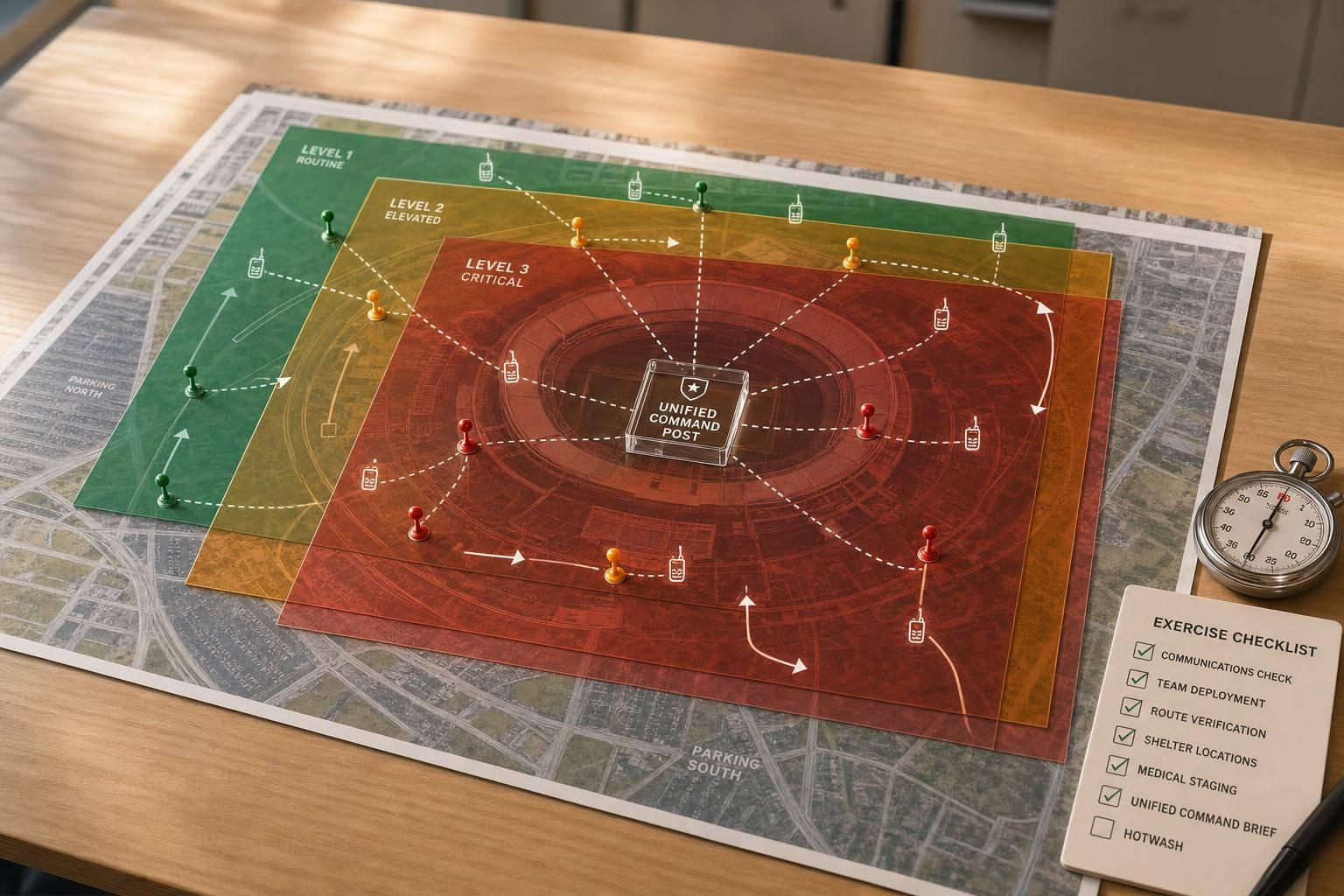
Use three activation levels: Green, Amber, and Red. Green means normal operations. Amber means watch conditions, with equipment staged and key staff notified. Red starts full response procedures. Use the risk score to decide when you move from monitoring to active response.
The triggers need to be specific. For weather, start monitoring 72 hours before the event, and suspend outdoor activities if lightning is detected within 10 miles. For crowd density, restrict entry at 4–5 people per square meter and stop all entry, while using pressure relief procedures, above 5–7 people per square meter.
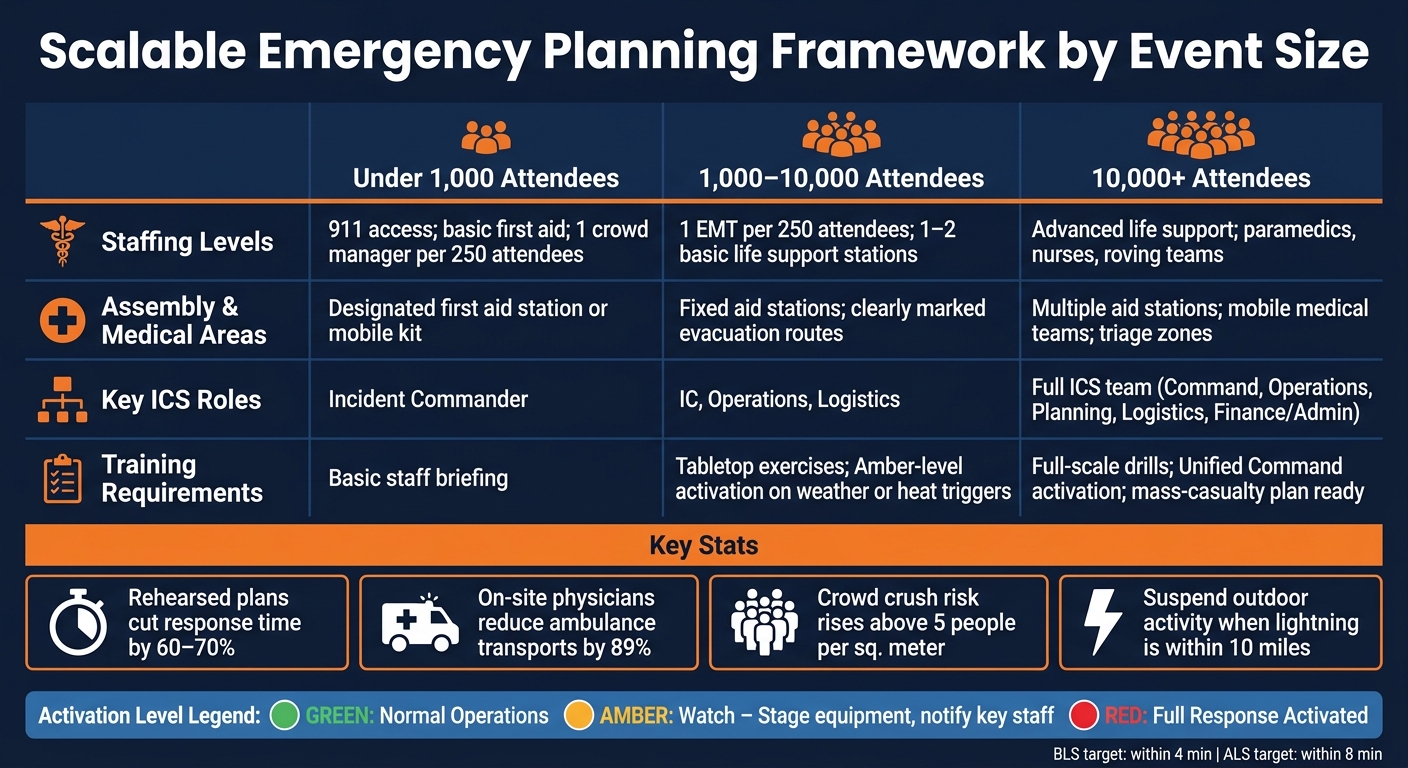
The same plan can scale based on crowd size:
| Event Size | Staffing Levels | Assembly & Medical Areas | Key ICS Roles | Training Requirements |
|---|---|---|---|---|
| Under 1,000 | 911 access; basic first aid; 1 crowd manager per 250 attendees | Designated first aid station or mobile kit | Incident Commander | Basic staff briefing |
| 1,000–10,000 | 1 EMT per 250 attendees; 1–2 basic life support stations | Fixed aid stations; clearly marked evacuation routes | IC, Operations, Logistics | Tabletop exercises; Amber-level activation on weather or heat triggers |
| 10,000+ | Advanced life support; paramedics, nurses, roving teams | Multiple aid stations; mobile medical teams; triage zones | Full ICS team | Full-scale drills; Unified Command activation; mass-casualty plan ready |
One staffing detail stands out: on-site physicians can reduce ambulance transports by 89%. Planning targets should also aim for basic life support within 4 minutes and advanced life support within 8.
Once you’ve set activation levels, the next step is simple: put names next to roles.
After the plan is written, assign one primary person and one backup for every role. Each assignment should include:
That last point matters more than many organizers expect. People need to know, in writing, who can pause the event or order an evacuation. If that authority is fuzzy, teams lose time waiting for permission when every second counts.
Run a tabletop drill at least 30 days before the event. Walk each team lead through a specific scenario, such as a lightning strike or a security threat, so each person knows their lane before the pressure hits. Then do a venue walk-through with all temporary staff and vendors. Cover emergency exits, AED locations, and medical station positions.
A documented and rehearsed emergency response plan can cut response time by 60% to 70%.
Once roles are assigned, build a communication setup that still works if one channel goes down.
Use two layers:
All teams, including temporary vendors and contractors, should use plain English instead of department-specific codes. That keeps messages clear when stress is high. Dedicated radio channels also help cut cross-talk. For example, use Channel 1 for emergencies, Channel 2 for operations, and Channel 3 for security.
| Channel | Speed | Reach | Reliability |
|---|---|---|---|
| PA System | Instant | High | High (if on backup power) |
| Radios | Instant | Staff only | High (dedicated channels) |
| SMS/App Alerts | Fast | High | Medium (network congestion) |
| Signage | Constant | High (passive) | High |
| Face-to-Face | Slow | Localized | High |
Layered messaging does more than help staff talk to each other. It also helps direct crowd movement and lower panic. Think of it like having more than one brake system in a car - you hope you won’t need the backup, but you’ll be glad it’s there.
Set message approval rules before event day. Decide who can approve a public announcement, who handles media statements, and how the escalation chain moves from a first responder on the ground to the Incident Commander. When messaging is made up on the fly, panic spreads fast.
Role clarity falls apart fast if staffing details live in five spreadsheets, two group chats, and someone’s inbox.
Large events often depend on temporary staff and several vendors. That means role assignments, contact details, and shift coverage can scatter fast. Keeping staffing data in one place helps team leads check who is on site, who is filling a gap, and who still needs to be reached.
For caterers, staffing agencies, and event vendors managing temporary workforces, Quickstaff centralizes staffing, availability, waitlists, and mobile reminders, so leads know who is on site, who is missing, and who still needs briefing. That record also makes post-event review faster and more accurate.
Use the event-day staffing record and decision log to catch problems while the details are still clear. Start with the 24-hour rule: within one day after the event ends, finish a written incident report. Gather staff statements while memories are still fresh, note any live changes made during the event, and photograph equipment failures or crowd bottlenecks.
Then, within one week, bring all team leads together for a formal After-Action Review (AAR). The goal is simple: figure out what worked, what failed, and what the plan didn’t account for. Use the decision log to walk back through key calls made during the event - for example, why a show was paused. That kind of review helps tighten your trigger points for the next event.
After each event, track PPR, TTHR, and MUR to check staffing levels and hospital impact. If the numbers show your thresholds were off, require a plan update before the next event. Then use those findings to reset activation triggers, staffing levels, and communication channels.
Scale the plan by matching your team setup to the crowd size and the risk level.
For events with 50–500 attendees, a lean command setup usually does the job. As the event gets bigger and more complex, shift to a full section-based structure.
One rule matters here: keep the span of control tight. Each lead should manage 3–7 direct reports. If that starts to stretch, bring in zone leads to keep things organized and avoid bottlenecks.
Staffing needs to grow with the event too. A simple way to think about it:
That kind of scaling helps the plan stay workable instead of top-heavy on one end or understaffed on the other.
Status changes should follow pre-set triggers decided during interagency planning and handled through a Unified Command.
Common escalation triggers include threats to life safety, such as severe weather, crowd disturbances, fires, structural failures, disease outbreaks, or security threats. When those risks go beyond current staffing levels or site capacity, operations should move to a stronger incident command structure.
Stop-event or evacuation decisions should be made jointly by representatives from all involved agencies at the Incident Command Post.
Using a Unified Command lets venue leaders, police, fire, EMS, and medical partners keep their own roles while working from the same playbook before the event. They can agree on shared goals and tactics ahead of time, which helps cut delays and coordination problems.