Event Calendar Tools for Overlapping Schedules
April 25, 2026


Managing overlapping schedules doesn't have to be a nightmare. The right calendar tools can help you avoid double bookings, streamline coordination, and save hours of effort each week. Whether you're juggling team schedules, managing shared resources, or handling event logistics, modern tools offer real-time updates, conflict prevention, and automation to simplify your workflow.
Here’s what you’ll learn:
Key takeaways:
Overlapping schedules bring more than just inconvenience - they can lead to a cascade of problems. One of the most common issues is double bookings, where the same person or resource is assigned to multiple events simultaneously. This often happens when teams rely on unsynchronized calendars. Picture this: a conference room gets booked for two different meetings at the same time, or an employee is scheduled to work at two venues simultaneously. It's a recipe for chaos.
Then there are resource clashes, which occur when staff are scheduled during their approved time off or outside their available hours. This happens when fragmented systems fail to provide a clear picture of everyone's availability. To make matters worse, communication breakdowns can escalate these problems. Last-minute updates sent via text, WhatsApp, or email often don't make it to the official schedule. The result? People showing up at the wrong place or time because they missed the memo.
Even when schedules don’t overlap directly, conflicts can arise. For instance, failing to account for travel time or time zone differences can throw everything off, leading to constant rescheduling and delays. These missteps can have serious consequences, both financially and operationally.
The financial toll of scheduling errors can be substantial. Double bookings can leave time slots empty, translating into lost revenue that can’t be recovered. On top of that, fixing these conflicts often requires paying overtime, further driving up costs. Repeated mistakes can also tarnish a company’s reputation, making clients and partners question its reliability.
Operationally, these errors disrupt team dynamics. Managers often find themselves scrambling to resolve immediate scheduling clashes instead of focusing on long-term objectives. According to Harvard Business Review, managers already spend around 23 hours a week in meetings, so dealing with rescheduling only adds to their workload. Employees, too, feel the strain - unstable schedules lead to poor sleep, increased stress, and lower job satisfaction.
Manual scheduling methods often make these problems worse. One key issue is sync delays. While automated tools can experience occasional delays, manual systems are far more prone to errors. By the time a double booking is noticed, it might already be too late to fix.
Another challenge is the reliance on excessive manual checks. Manually reviewing multiple calendars for conflicts is time-consuming and prone to human error. Often, only a primary calendar is checked, while conflicts hidden in secondary or imported calendars go unnoticed. If permissions or connections expire, schedules can fall out of sync entirely, creating even more problems.
Considering that professionals spend between 15% and 50% of their workweek in meetings, the inefficiencies of manual scheduling represent a major drain on productivity. These challenges underscore the importance of modern calendar tools in preventing and resolving scheduling conflicts effectively.
Choosing the right calendar tool can make all the difference when managing overlapping schedules. Different tools cater to specific needs, helping you tackle scheduling challenges effectively. Here's a breakdown of some top categories to simplify your scheduling process.
Calendar sync tools bring together calendars from services like Google, Outlook, and Apple into a single, cohesive view. This helps avoid double bookings and ensures you can see your full availability at a glance. Tools such as Multical, MergeCal, and Calendox copy events between calendars and integrate seamlessly with features like "Find a Time" in Google or Outlook.
One key factor to consider is synchronization speed. For example, Apple calendars may take up to 15 minutes to update, while Google and Outlook sync almost instantly. Most of these tools also emphasize privacy, with features like "Zero Data Retention", meaning your calendar data is processed for syncing but not stored permanently.
Group scheduling platforms make it easier for teams to manage shared resources and coordinate schedules. Tools like Teamup and GroupCal offer advanced features like multiple permission levels (up to nine levels) to help teams view "Busy" times without exposing sensitive details. These tools are particularly useful for managing shared spaces or equipment.
"GroupCal allows all my clubmates to have access to all events. I have recommended it many times and am very happy with it."
– Cindy M, Secretary, Motorcycle Club
AI-powered tools simplify scheduling by automating the process of finding available times. Tools like Calendro, CalUnity, and Calendox use natural language inputs (e.g., "after 2 pm CT"), detect conflicts across multiple calendars, and even manage scheduling through email assistants.
"Managing multiple client calendars was a nightmare before Calendox. Now everything is perfectly synchronized."
– Simeon Lakuc, Public Relations Executive
For industries like catering, weddings, and event management, event staff scheduling tools address the unique challenges of managing team schedules. These platforms focus on role-based scheduling, availability tracking, and centralized event management.
These platforms provide a master calendar view while enabling separate calendars for individual groups or resources. Advanced synchronization features, such as webhook-based updates, ensure that changes appear across all connected calendars in under three seconds - far faster than traditional methods, which can take 5–15 minutes.
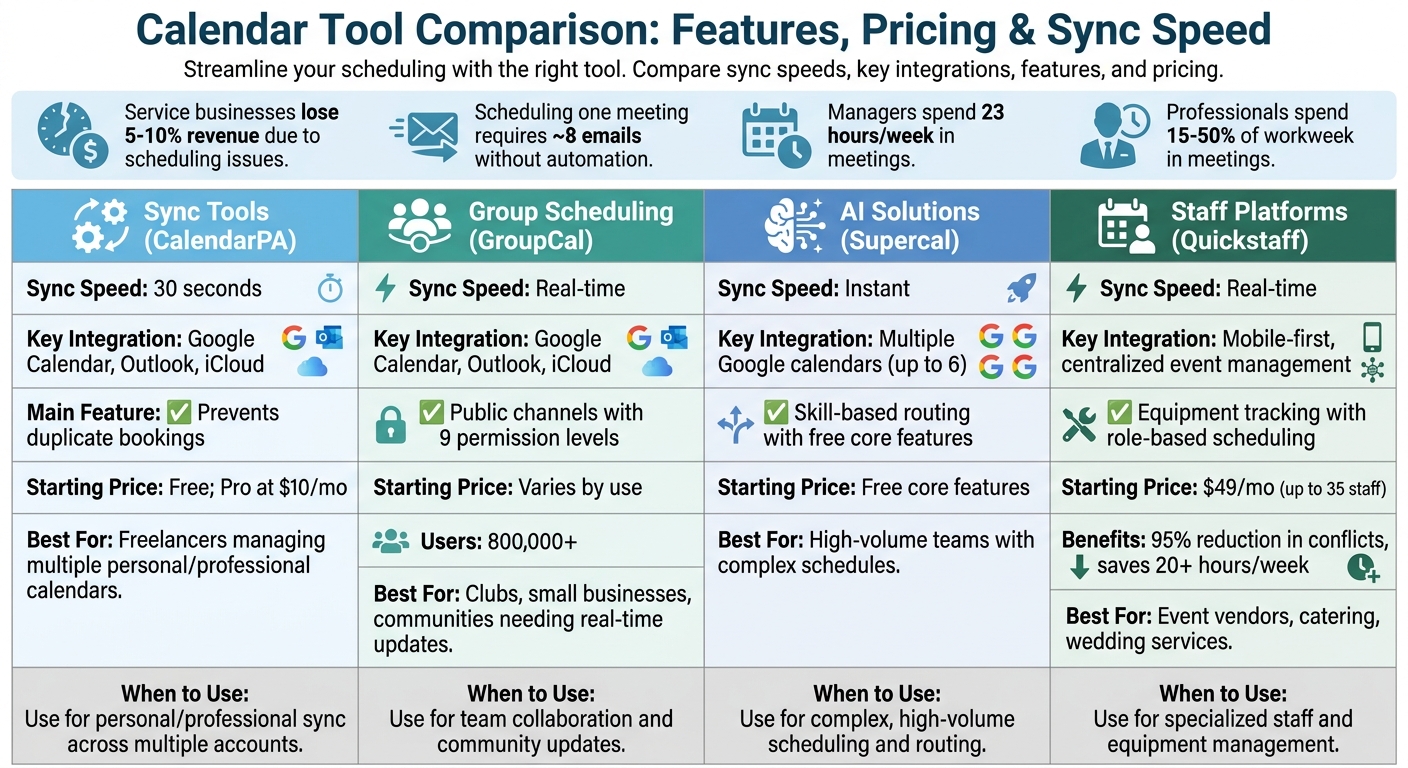
Calendar Tool Comparison: Features, Pricing, and Sync Speed
Calendar tools come with a variety of features tailored to different needs. For example, sync tools like CalendarPA offer a rapid 30-second sync rate and immediately flag conflicts upon confirmation. These tools integrate seamlessly with Google Calendar, Microsoft Outlook, and iCloud, providing a consolidated view of all your schedules.
Group scheduling platforms such as GroupCal, trusted by over 800,000 users, focus on real-time updates and shared links. These links enable dynamic "chat-like" updates for teams, making coordination effortless. With up to nine permission levels, users can control who sees or edits specific events while safeguarding sensitive information.
AI-powered solutions like SchedulingKit and Supercal take scheduling a step further. Instead of relying on simple round-robin logic, they consider workload, staff expertise, and client preferences to optimize assignments. Supercal, for instance, allows syncing across six Google calendars simultaneously and offers free core features along with unlimited booking links.
For businesses managing event staff, platforms like Quickstaff integrate personnel schedules with equipment and venue availability. Features like color-coded indicators and automated scheduling conflicts and automation solutions help avoid double-bookings. Quickstaff’s pricing starts at $49 per month for teams of up to 35, scaling to $249 per month for larger teams of 175. It also includes unlimited messaging and a mobile-friendly interface.
| Tool Type | Sync Speed | Key Integration | Feature | Starting Price |
|---|---|---|---|---|
| Sync Tools (CalendarPA) | 30 seconds | Google Calendar, Outlook, iCloud | Prevents duplicate bookings | Free; Pro at $10/mo |
| Group Scheduling (GroupCal) | Real-time | Google Calendar, Outlook, iCloud | Public channels with 9 permission levels | Varies by use |
| AI Solutions (Supercal) | Instant | Syncs with multiple Google calendars | Skill-based routing with free core features | Free core features |
| Staff Platforms (Quickstaff) | Real-time | Mobile-first, centralized event management | Equipment tracking with role-based scheduling | $49/mo |
This breakdown highlights the strengths of each tool, helping you identify the best option for your scheduling needs.
Choosing the right calendar tool depends on your specific scheduling challenges. If you’re managing multiple personal and professional calendars, sync tools are perfect for eliminating manual cross-checking and avoiding conflicts. These tools are particularly useful for freelancers or consultants juggling Google, Outlook, and iCloud accounts.
Group scheduling platforms shine in environments like clubs, small businesses, or communities where real-time updates are critical. They’re ideal for keeping everyone on the same page, even during last-minute changes. As venue owner Ornella Faranda shared:
"GroupCal allows all my clubmates to have access to all events... we can align instantly without the issue of overlapping bookings".
For high-volume teams or those with complex schedules, AI-based tools are the go-to option. They’re designed to automate meeting optimization, balance workloads, and protect focus time. These solutions are especially effective for managing irregular hours or seasonal peaks, such as during contract-heavy periods.
If your operations involve managing both people and physical resources, event staff scheduling platforms are the way to go. They excel in preventing logistical clashes by integrating personnel schedules with equipment and venue availability. According to EventInflow, these platforms can reduce scheduling conflicts by over 95% and save more than 20 hours per week on coordination. Whether you’re running a catering business, wedding service, or staffing agency, tools like Quickstaff provide the centralized system you need to keep everything running smoothly.
Marking events as "Busy" on your calendar and adding 10–15 minute buffer periods between appointments can make a big difference. These buffers help absorb any overruns and prevent a domino effect of delays. Plus, marking time as "Busy" ensures scheduling tools recognize it as unavailable, reducing the risk of overlapping appointments.
Did you know that service businesses lose an estimated 5–10% of potential revenue due to issues like overbookings or inefficient gaps in their schedules?. Standardizing event durations and buffer times across the board can eliminate manual errors and keep schedules consistent for everyone on the team.
Set clear booking boundaries to keep things predictable. For example, allowing a minimum notice of 2–24 hours for new appointments prevents last-minute disruptions. At the same time, a 60–90 day maximum booking window helps avoid conflicts with future schedule changes. These small adjustments create a balance between flexibility and control.
Once you’ve established these time blocks and buffers, automating these processes becomes the logical next step.
Two-way real-time sync is your best defense against double-bookings. The most reliable systems sync updates within 1–2 minutes, ensuring that any blocked time in your personal calendar is immediately reflected in your professional booking system - and vice versa. This eliminates the need for manual cross-checking and pairs seamlessly with advanced scheduling tools to reduce errors.
For holidays and vacations, automation can take care of recurring blocks. Overrides allow you to block specific dates without disrupting your regular schedule. If you’re managing shared resources like rooms or equipment, automation can also help enforce capacity limits, keeping everything running smoothly even when individual staff members appear available.
You can also implement service-specific rules to tailor your schedule. For instance, you might reserve mornings for detailed planning sessions and afternoons for quick client check-ins. This reduces the mental strain of constantly deciding whether a time slot is appropriate for a particular task.
Automation is powerful, but a centralized communication hub can take things to the next level. When information is scattered across spreadsheets, private calendars, or endless email chains, scheduling conflicts are almost inevitable. A single hub ensures everyone has access to the same, up-to-date schedule.
Daniel Claudet, Manager at Hope Channel Southeast Asia, highlighted the benefits of consolidation:
"We all know with one click what projects we are working on, what is happening next, who is involved, deadlines and so much other important information".
Without automated scheduling tools, scheduling a single one-on-one meeting often requires about eight emails. A communication hub eliminates this back-and-forth by keeping everything - files, images, links, and time-stamped notes - directly within event entries.
Tools like Quickstaff provide centralized hubs that keep event staff on the same page. With mobile accessibility, even remote or field crews can stay updated in real time. Look for a platform that supports two-way calendar sync and offers multi-level permission controls. This ensures sensitive data stays secure while giving team members the flexibility to manage their schedules effectively.
With the right calendar tools and strategies, a well-organized scheduling system is entirely achievable. These tools can help prevent double bookings, minimize time spent coordinating, and provide a clear, real-time view of operations.
Centralizing schedules, staff availability, and equipment tracking can save hours of effort. As Jaime S., VP at Lisa's Catering, shared:
"Prior to Quickstaff, I was using Excel spreadsheets to track my employees and their shift availability. My life changed the day I started using Quickstaff!"
Quickstaff simplifies scheduling by offering real-time conflict prevention and automated communication. It ensures you can see staff availability before making bookings. Jennifer Manley, a Staffing Coordinator, highlighted:
"The calendar makes it really easy for me to see what my week looks like. The sorting function helps me isolate events to more easily see events."
By implementing time blocks with built-in buffers, automating recurring tasks, enabling two-way sync, and centralizing communication, you can lay the groundwork for a seamless scheduling process. Quickstaff even offers a 14-day free trial with no credit card required.
Take the first steps toward turning scheduling chaos into an efficient, centralized system.
When choosing the best tool, it all comes down to your event needs. For handling event staff, Quickstaff is an excellent choice. It simplifies scheduling, booking, and communication, making it especially useful for catering businesses, weddings, and staffing agencies. If your focus is on managing resources, avoiding double-bookings, or juggling complex schedules, look for platforms that offer visual calendars and conflict-checking tools. For situations with overlapping staff schedules, Quickstaff stands out as a reliable option.
To avoid double bookings, rely on scheduling tools that check availability in real time across all linked calendars. These tools sync instantly, blocking overlapping shifts before any conflicts arise. By connecting multiple calendars, the system automatically identifies and prevents scheduling clashes, ensuring that booked times are updated across all platforms. This makes managing overlapping schedules easier and eliminates double bookings with less hassle.
The sync speed you choose should match the number of calendars you manage and how frequently you schedule events. For many professionals, having a real-time or near-instantaneous two-way sync is key. This helps prevent double bookings and ensures your availability is accurate across all your calendars. Pick a sync speed that keeps everything updated without delays.





