Emergency Response Planning for Events
August 3, 2026


If an event plan fails, it usually fails on five basic points: leader, communication, venue rules, outside contacts, and practice. I’d set those five items before event day, keep the plan to one page for leads, and test it before doors open.
Here’s the short version:
One stat stands out: mass-gathering research shows about 0.5 to 2 medical calls per 1,000 spectators. So I wouldn’t treat emergency planning as a “just in case” document. It’s a working tool for issues that come up at many events.
A good event emergency plan is not a long binder. It’s a short, clear guide that staff can read fast under stress. The main job is simple: tell people who decides, who calls, where guests go, and what staff say when something goes wrong.
That means I’d focus on:
For small events, that may be one lead, one backup, and a short exit review. For mid-size events, I’d add zone leads, radio channels, and a contact sheet for venue security and medical teams. For large or multi-day events, I’d use a fuller command setup, agency coordination, written handoffs, and pre-opening tests across all teams.
Bottom line: the best plan is the one your staff can find, scan, and use in under a minute.
Set the command chain before guests arrive. Start with clear authority: name one commander, choose backups, and spell out decision rights. Every team member should know who is in charge and what that person can do.
The Event Commander is the single person who can make emergency calls. That includes ordering an evacuation, pausing service, or working directly with venue security and first responders. For most events, this is the lead planner or the event manager who stays on site for the full event.
You also need a backup. If the Commander steps away or gets pulled into another issue, someone else has to take over right away. For a typical corporate banquet or wedding, the backup setup might look like this: Event Commander = lead planner; Backup 1 = catering event manager; Backup 2 = venue event coordinator. Put all three names, mobile numbers, and radio channels in the plan before event day.
Smaller events can get by with fewer named roles. Bigger events usually need extra backups and zone leads.
Your plan should remove doubt. Write out decision authority in plain English before the event begins.
After roles are set, put them in a table your team can scan at a glance. Think phone screen, lanyard card, or a printed sheet at the check-in table. If you use Quickstaff, add the table to the event notes so staff can see it with their shift details.
| Emergency Role | Primary Person | Backup Person | Core Responsibility |
|---|---|---|---|
| Event Commander | Lead Planner | Catering Event Manager | Orders evacuation, shelter-in-place, and service pause |
| Floor Lead | Head Server | Senior Bartender | Directs guest movement, opens exits, pauses floor service |
| Security Lead | Venue Security Supervisor | Designated Backup | Coordinates with police/EMS, manages crowd issues |
| Staffing Coordinator | Agency On-Site Rep | Assistant Manager | Tracks staff on-site, relays instructions to staff |
| Kitchen Lead | Executive Chef | Sous Chef | Manages back-of-house safety, stops cooking if needed |
| Incident Recorder | Assistant Planner | Office Coordinator | Logs times, decisions, and communications |
Use only the roles your event needs.
Once those roles are locked in, you can use them to set up staff communication and venue coordination.
Use the command chain from Step 1 to route every emergency update. Staff should get role-based instructions. Guests should get short PA announcements, with megaphones and signs ready if the PA system fails.
For medium and large events, two-way radios should be the main on-site communication tool. Keep one radio channel reserved for emergencies only. Cell phones still help, especially for longer conversations or offsite coordination, but they should not be your only line during a major event.
FEMA's Special Events Contingency Planning guidance warns planners not to rely on cellular telephones for critical event communications.
Build in redundancy with four layers:
Test cell coverage by carrier before event day. And don't treat runners like some vague last resort. Assign them in the command chain ahead of time. Your backup methods should fit the venue layout and the location of the command post.
Event staff scheduling software like Quickstaff can keep schedules, role assignments, emergency contacts, and procedure documents in one place before event day.
Next, confirm the layout staff will use on site. Ask the venue for its Emergency Action Plan (EAP) and floor plans, then walk the site in person. That last part matters. Exits move, signs change, and shelter points aren't always where you expect them to be.
Mark these items on a simple event-specific map:
Venue rules shape what staff can and can't do during an incident. Set a non-elevator route for guests who need help during fire alarms. If the venue has gas, power, or water shutoffs, spell out who controls them and how staff request a shutdown through the venue command chain.
Open flame rules need the same level of detail. That includes candles, catering equipment, and pyrotechnics. Staff should know who may put out flames, when service must stop, and how fuel sources get secured. Barricade control matters too. Which barriers can open for emergency egress? Who has the keys or tools?
Work these rules into staff scripts and radio procedures so no one is making it up in the moment. Add them to the event map staff will carry during the incident.
Write your scripts before event day, get venue management to approve them, and store them where staff can reach them fast - on a lanyard card, on a printed sheet at check-in, or inside Quickstaff.
| Scenario | Guest PA Script |
|---|---|
| Evacuation | "Attention, everyone. Please exit the building calmly through the nearest marked exit and follow the instructions of event staff. Do not use elevators." |
| Severe weather | "Attention, everyone. Due to severe weather, please move away from windows and doors and follow staff to the nearest interior shelter area. Remain calm and await further instructions." |
| Medical incident | "Please remain where you are and allow space for medical personnel to reach the affected guest. There is no need to move unless directed by staff." |
| Lost child (staff only) | "Staff, we have a missing child report. Check your area and contact command immediately if located; do not announce over the public address unless directed." |
The staff versions can include a bit more operational detail, but keep them short enough to read from a card under stress. Run through them during the pre-event walkthrough so the wording feels natural before event day.
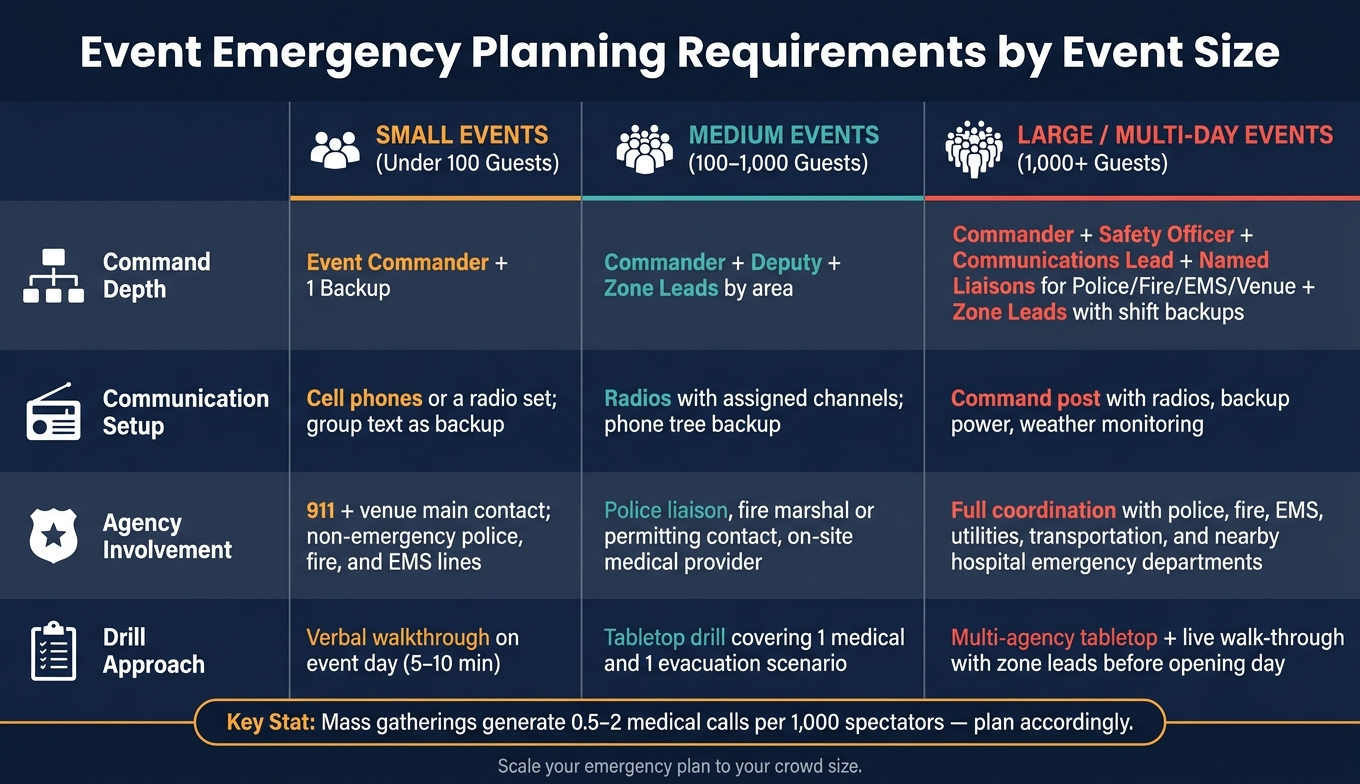
Event Emergency Planning Requirements by Event Size
Once roles and radios are set, build a contact sheet for outside agencies and venue contacts. Each on-site lead should have a one-page version. Keep it grouped into clear sections:
For each contact, list the name, role, backup number, and responsibility. Add a location if that helps dispatch get to the right place faster.
The point is simple: speed matters. As an event gets bigger, more people need direct agency contacts and clear escalation paths.
Stick to the command chain from Step 1. Call 911 first for any immediate danger. Send all other issues through the zone lead or event commander.
Post the contact sheet at the command post, give a copy to every zone lead, and save it in a mobile-friendly file so staff can pull it up on the go.
Match the contact list and coordination setup to crowd size and site complexity. A small event can get by with fewer handoffs. A larger event can’t. As attendance grows, you need more liaisons, clearer handoffs, and tighter coordination.
| Event Size | Command Depth | Communication Setup | Local Agency Involvement | Recommended Drill Approach |
|---|---|---|---|---|
| Small (under 100) | Event commander + 1 backup | Cell phones or a radio set; group text as backup | 911 + venue main contact; non-emergency police, fire, and EMS lines | Verbal walkthrough on event day (5–10 min) |
| Medium (100–1,000) | Commander, deputy, zone leads by area | Radios with assigned channels; phone tree backup | Add police liaison, fire marshal or permitting contact if tents or stages are involved, and on-site medical provider | Tabletop drill covering 1 medical and 1 evacuation scenario |
| Large / Multi-day (1,000+) | Commander, safety officer, communications lead, named liaisons for police, fire/EMS, and the venue, zone leads with shift backups | Command post with radios, backup power, weather monitoring | Full coordination with police, fire, EMS, utilities, transportation, and nearby hospital emergency departments | Multi-agency tabletop plus live walk-through with zone leads before opening day |
For medium events, run a pre-brief with venue security and any contracted medical provider. Confirm evacuation routes and decide how 911 calls will be handled on site. That avoids confusion when time is tight. Shift changes should also include written handoff notes so incoming staff know what already happened and which risks are still active.
For large or multi-day events, written handoff notes for zone leads are a must. The plan should also use the same role names public safety uses, so everyone is speaking the same language.
Once roles, communication, and venue details are set, it's time to test the plan in real conditions.
A plan is only useful if people can actually use it when things go sideways. The best way to find weak spots is to test it in three stages: a tabletop review, a venue walk-through, and a pre-opening communications test.
Run the tabletop 2–4 weeks before the event, after the first draft of the plan is done. Bring in the commander, backups, and zone leads. Give each person their event role, then walk through one or two likely scenarios. For example:
After each scenario, do a short debrief. Note what felt unclear, slow, or confusing. Then update the plan before the walk-through. This is where you catch gaps early, before you're standing on-site trying to sort them out.
The venue walk-through should happen at least a few days before the event or during load-in. Walk every exit. Confirm shelter areas. Check where the AEDs and fire extinguishers are. Then compare the actual setup with the written plan. Even one blocked hallway or a last-minute layout shift can wipe out a route you've already briefed to staff.
On event day, before doors open, run a pre-event communications test. Test every channel against the real venue layout. Send a message through radios, group texts, and any staff app you're using for scheduling and coordination. Log who confirmed receipt and how long it took. If radios aren't charged or certain areas have dead zones, fix that before the first guest arrives. Repeat drills when staffing, layout, weather risk, or guest count changes.
After the testing is done, boil the plan down into something staff can use fast.
Give each lead a one-page incident card for the event. On event day, staff need a short summary they can scan in seconds, not a long document buried in a folder.
That one-pager should include:
Keep it short enough that a floor lead can read it under stress and still act fast.
Use a readiness checklist before doors open:
| Task | Owner | Due Date | Status |
|---|---|---|---|
| Confirm event commander and backups | Safety Manager | 08/01/2026 | ☐ |
| Verify local police, fire, and EMS contacts | Operations Lead | 08/01/2026 | ☐ |
| Complete venue walk-through and update map | Event Commander | 08/02/2026 | ☐ |
| Test radios, text groups, and staff app alerts | Communications Lead | 08/03/2026 (9:00 AM) | ☐ |
| Brief all staff on emergency roles and scripts | Staffing Coordinator | 08/03/2026 (10:00 AM) | ☐ |
If you use Quickstaff for staff scheduling and communication, its messaging and reminder features can help send the one-pager and contact details to staff before event day.
Run a structured after-action review within a few days of the event. Pull in event leadership, venue security, and medical leads. Write down what worked, what didn't, and why. Use specific incidents and near-misses, not vague takeaways. Then assign each gap a corrective action, an owner, and a target date.
Update the written plan and the one-pager right away. Add version dates so staff can tell they're using the latest copy. For recurring events, keep a simple log of incident types over time. If outdoor summer events keep leading to heat-related calls, that's a clear sign that cooling or hydration protocols need work. Put those fixes into the next version of the plan.
In an emergency, the best plan is usually the one people can find, read, and use without stopping to think too hard. Keep the command chain set, test communication, follow venue rules, keep contacts current, scale the plan to event size, and rehearse before event day.
During an emergency, the Incident Commander makes the final calls and directs the response.
At smaller events, that person may be the event lead or operations manager. At larger events, you may also have section chiefs for logistics, planning, and finance.
This role needs to be named before the event starts. Staff should know exactly who is in charge and follow the set chain of command. The Safety Officer should also be able to report hazards straight to the Incident Commander.
Testing emergency alerts quarterly is a solid baseline. It helps confirm the system works, cuts down on errors, and keeps staff confident when it counts. From there, you can adjust the schedule based on your organization’s needs.
To avoid confusion and get better participation, announce test times ahead of time. After the event, review the plan with all involved agencies to spot coordination gaps and see how well the process worked.
For small events, the command setup can stay lean. One person might wear a few hats, and that’s often fine.
For events with 50 to 500 attendees, a single lead can often run operations under a lean staffing ICS model.
Once an event goes past 500 attendees or gets more complex, that setup usually stops being enough. At that point, you need a full sectioned ICS with dedicated leads for planning, logistics, finance, and coordination.
Staffing buffers matter more at small events too. If one person doesn’t show up, the hit is bigger because there are fewer people to cover the gap.