Emergency Response In Event Run Sheets
August 12, 2026

If staff can’t find the emergency steps in 10 seconds, the run sheet will fail when it matters.
I’d boil this guide down to one rule: put the emergency plan inside the run sheet people already use. That means 911 instructions, named leads, who takes over next, radio wording, muster points, and time targets like 1 minute, 3 minutes, and 5 minutes. The goal is simple: when a guest collapses, smoke appears, power cuts out, or a child goes missing, staff should know what to do without hunting through another file.
Here’s the full picture in plain English:
One fact sits behind all of this: OSHA’s emergency action plan rule, 29 CFR 1910.38, calls for clear duties, escape steps, and named people in charge. This article shows how I’d turn that policy into a short, usable field guide inside the run sheet.
| Area | What the run sheet should show |
|---|---|
| Contacts | Names, cells, call signs, channels, backup contacts |
| Command chain | Who reports to whom, in order |
| Timing | 1-, 2-, 3-, and 5-minute targets |
| Locations | Zone-based muster points and responder entrance |
| Radio use | Plain-language calls and channel rules |
| Event checks | Pre-doors, busy-period, and load-out safety tasks |
If I were setting up an event today, August 13, 2026, I’d treat the run sheet as the first document staff grab in a problem - not just the schedule.
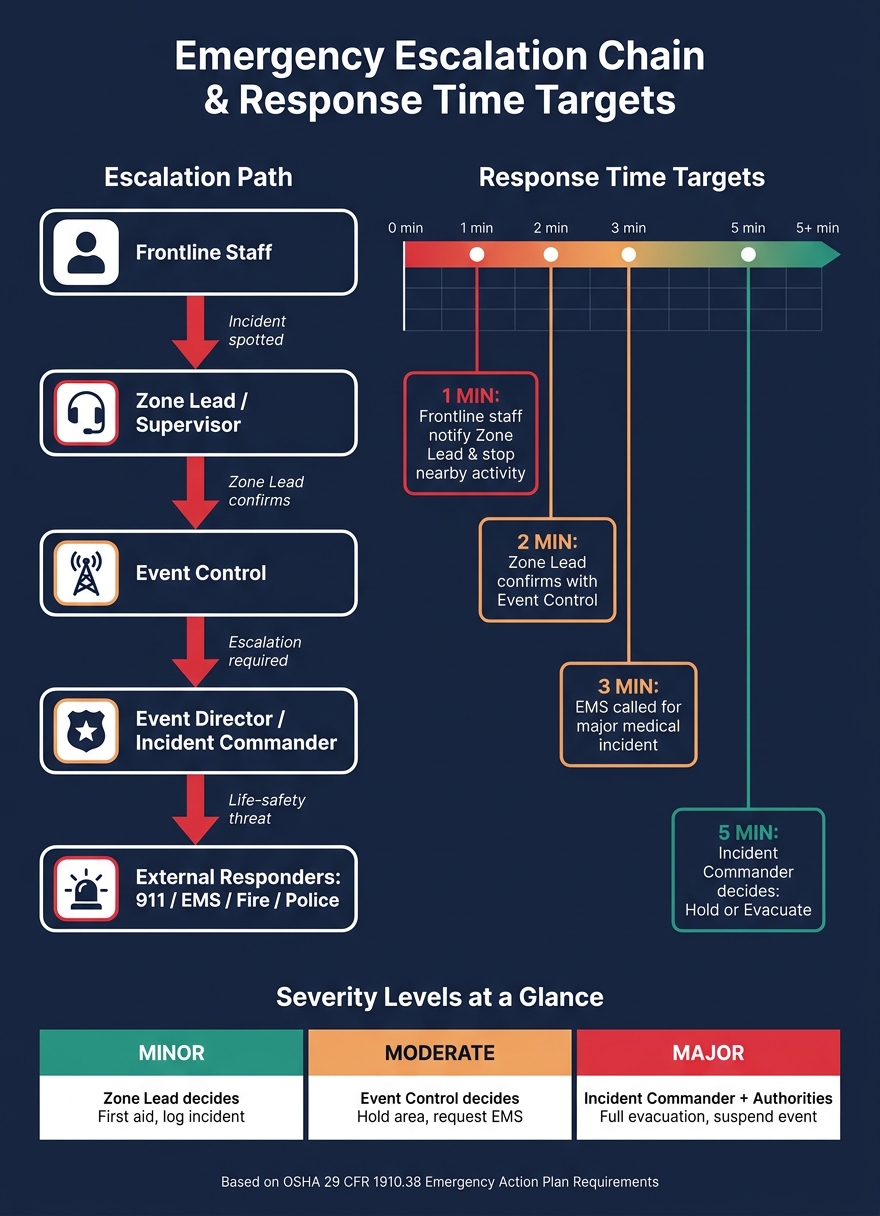
Emergency Response Run Sheet: Escalation Chain & Response Time Targets
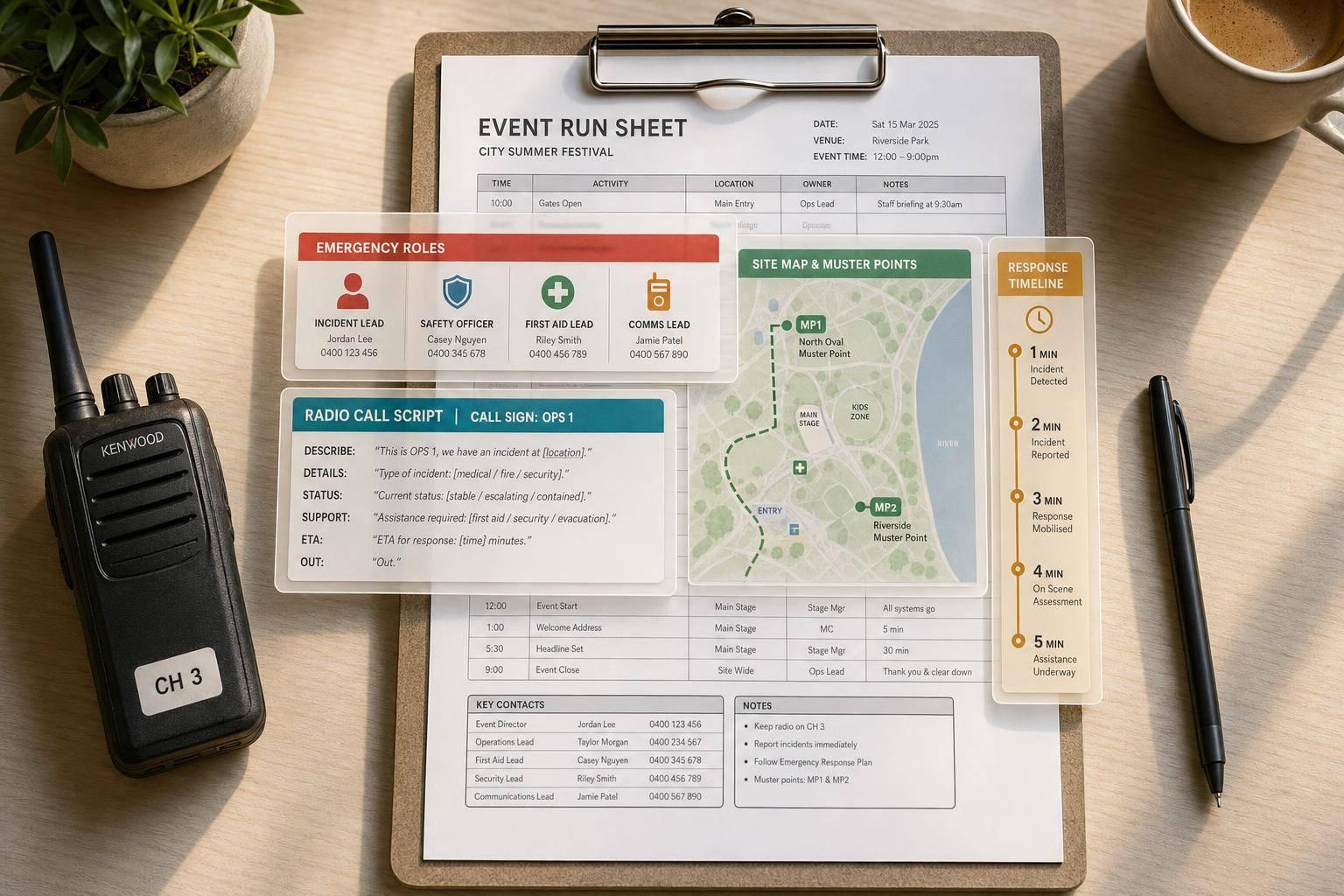
Put a clearly labeled emergency block at the very top of page one, or in the header. Think of it as the field-ready version of the EAP: just names, phone numbers, and access details. No extra clutter. In a tense moment, staff should see the same block in the same spot every time.
Include these six roles: Incident Commander or Event Director, Safety Officer, Medical or First Aid Lead, Security Lead, Venue Rep / Duty Manager, and Emergency Services (Police/Fire/EMS – 911). For each person, list their full name, cell, call sign, channel, and a backup contact.
Put the venue name, street address, and responder entrance on one line staff can read word-for-word.
| Role | Name | Cell | Call Sign | Channel | Backup |
|---|---|---|---|---|---|
| Incident Commander | Alex Johnson | (555) 111-2233 | Command 1 | Channel 2 | Sarah Lee (555) 111-3344 |
| Safety Officer | Chris Nguyen | (555) 222-4455 | Safety | Channel 2 | John Doe (555) 234-5678 |
| Medical Lead (Onsite EMT) | Taylor Brooks | (555) 333-5566 | Medic 1 | Channel 3 | Sarah Lee (555) 111-3344 |
| Security Lead | Pat Rivera | (555) 444-6677 | Security | Channel 3 | John Doe (555) 234-5678 |
| Venue Rep / Duty Manager | Jamie Carter | (555) 555-7788 | Venue 1 | Channel 1 | Sarah Lee (555) 111-3344 |
| Emergency Services | Police/Fire/EMS – 911 | 911 | - | - | - |
Right after that contact block, assign each critical task to one named person.
Department labels are too vague. In an incident, vague labels create dead space where everyone thinks someone else is handling it. The run sheet should name the person tied to each critical action.
That includes who stops food and beverage service, who calls 911 and reads the venue address to dispatch, who meets EMS at the entrance, and who accounts for all staff at the muster point. OSHA's emergency action plan guidance says plans should list the names, titles, and telephone numbers of people responsible for carrying out duties under the plan.
Treat the emergency block like a living document tied to the roster. Use Quickstaff to keep that block lined up with the live roster before doors open. If a substitution happened overnight, staff can spot it before the event starts, not in the middle of an incident.
Once the names and access details are locked in, the next step is to map how an incident moves up the chain.
Right after the contact block, add the escalation chain and response times inside the timeline itself. Then give each handoff a firm time limit.
Use this chain: frontline staff → Zone Lead or Supervisor → Event Control → Event Director or Incident Commander → external responders (911, EMS, venue security).
Write it as short, action-based steps in each timeline block so people can act fast instead of stopping to interpret instructions. For a medical incident during the main program, a run sheet entry might say: Guest collapses: frontline staff call the medical alert on the designated emergency channel and stay with the guest. Zone Lead responds within 30 seconds and notifies Event Control. Event Director decides within 2 minutes whether to continue, hold, or evacuate the affected area.
An ICS-style chain keeps handoffs clear. That matters when the room gets loud, radios overlap, and everyone feels the clock ticking.
Timing markers turn loose guidance into plain expectations. Put them next to each incident step in the timeline so staff can see urgency at a glance. No guessing. No mental math. Be sure to include these in your event day checklist.
Set those times based on the venue layout, radio coverage, and staffing plan.
For a staffed event with radios, sample targets look like this:
These are targets, not promises. Still, they give staff a clear way to sort out priorities when several things happen at once.
Two tables do most of the work here. One maps common incident types to the right responder and the target timing. The other shows who has decision authority at each severity level, so staff know exactly when an issue has moved past their lane and needs a handoff.
Incident Handling: Normal vs. Escalated
| Incident Type | Initial Responder | Escalation Trigger | Next Contact | Target Response Time |
|---|---|---|---|---|
| Minor medical (guest lightheaded) | Frontline staff | Guest does not improve within 5 minutes | Zone Lead → Event Control | Zone Lead notified within 1 min; EMS if no improvement within 5 min |
| Major medical (unresponsive guest) | Frontline staff | Guest does not respond to voice or touch | Zone Lead, Event Control, 911 | Zone Lead within 1 min; 911 called within 3 min |
| Behavioral or security issue (intoxicated or disruptive guest) | Frontline staff | Guest refuses to comply or becomes physically aggressive | Security Lead via Event Control | Security on scene within 5 min |
| Facility issue (localized power loss) | AV or venue staff | Emergency lighting is affected | Event Control, Incident Commander | Event Control notified within 1 min; decision within 3 min |
| Life-safety threat (fire alarm or visible smoke) | All zone staff | Alarm sounds or smoke is visible | Incident Commander, 911, venue security | Protective action decision within 5 min of confirmation |
Severity Matrix
| Severity Level | Typical Examples | Decision Authority | Required Action |
|---|---|---|---|
| Minor | Small cut, single intoxicated guest who complies, minor spill | Zone Lead or Supervisor | First aid or guest support, log the incident, inform Event Control only if escalation risk exists |
| Moderate | Multiple guests ill in one zone, repeated aggressive behavior, partial power loss, minor fire contained quickly | Event Control / Incident Commander | Hold or pause the affected area, request venue security or EMS if needed, initiate partial evacuation if needed |
| Major | Fire, severe weather requiring shelter or evacuation, mass medical incidents | Incident Commander in coordination with external authorities (Fire Department, Police, EMS) | Full or multi-zone evacuation, shelter-in-place orders, coordination with 911 responders, formal emergency communication, suspension of event operations |
Keep both tables on one page, then cross-reference them in each timeline block. In the briefing, walk through the rows that matter most for that event. Next, connect those steps to muster points, evacuation routes, and radio terms.
Once your escalation chain and response times are locked in, the next step is simple: where people go and what staff say. In an incident, nobody should have to dig through a separate safety binder to find that info.
Staff need two things right away:
Each zone in the run sheet needs a named primary assembly area and a backup. Skip internal codes. Plain, landmark-based names are much easier to spot under stress. Bus Loop by Oak Trees tells people where to go. Assembly Point A-7 usually doesn't.
Keep the details staff need in the same row they'll scan during an incident. For each muster point, include the rough walking distance from the nearest entrance and an estimated capacity. Also confirm each location with venue management and the fire marshal so it doesn't block fire lanes, ambulance access, or triage space.
Once the locations are clear, staff also need the exact language to activate them.
After staff know where to move people, spell out how they call it in. Use plain language instead of 10-codes, since codes differ across agencies. Write the exact phrase and the required response so there’s no guesswork.
Set a dedicated emergency channel apart from general operations, and make the rule plain in the run sheet: emergency traffic overrides everything else. When "Emergency, emergency" is called on any channel, all non-essential traffic stops. Event Control must acknowledge that traffic within 10 seconds. If there’s no reply, repeat it once, then switch to Channel 3 and call, "Emergency, emergency, Control from [location]."
Put both tables directly under the emergency block so staff can find them in seconds.
Zone Location and Communication Reference
| Zone Name | Primary Muster Point | Secondary Muster Point | Radio Channel | Zone Lead |
|---|---|---|---|---|
| Main Stage | North Parking Lot (MP-1), ~250 capacity, ~300 ft from Main Entrance | Overflow Grass Field (MP-3), ~400 capacity, ~500 ft from Main Entrance | Channel 2 – Security and Crowd Management | Jordan Lee – Floor Manager |
| VIP Lounge | East Field Muster Point, about 400 ft behind the vendor tents | North Parking Lot (MP-1), ~250 capacity, ~300 ft from Main Entrance | Channel 1 – General Operations | Sam Rivera – VIP Supervisor |
| Loading Dock | South Gate Parking Row A–C | Bus Loop by Oak Trees | Channel 1 – General Operations | Taylor Brooks – Dock Lead |
| Gate 1 / Entry | Bus Loop by Oak Trees | Overflow Grass Field (MP-3), ~400 capacity, ~500 ft from Main Entrance | Channel 2 – Security and Crowd Management | Morgan Chen – Entry Lead |
Radio Terms Reference
| Term or Phrase | Who Uses It | Meaning | Required Action |
|---|---|---|---|
| "Control from [Location]" | All staff | Initiating contact with Event Control | Wait for "Go ahead [Location]" before transmitting further |
| "Emergency, emergency" | Any staff witnessing a life-threatening situation | Immediate threat to life, serious medical issue, fire, or structural hazard | Cease non-essential radio traffic; give location, incident type, and number of people affected; follow Control's instructions |
| "Medical to [Zone/Muster Point]" | Zone leads, medics | Requesting medical resources at a specific location | Clear access routes; direct guests away from the path; stay on scene until relieved |
| "Stand by" | Event Control, zone leads | Hold transmission; priority message pending | Do not transmit until "Go ahead" or "All clear" is given |
| "All clear" | Event Control, Incident Commander | Identified hazard resolved or contained | Resume normal operations; stand down from emergency posture unless directed otherwise |
| "Evacuate Zone [Name] to [Muster Point]" | Event Control, zone leads | Ordered evacuation of a specific area | Implement zone evacuation plan; escort guests; confirm sweep if required |
A staff member should be able to spot their zone row in a few seconds. Use the same zone names across the full run sheet. That way, the calls, locations, briefings, and live staffing updates all match.
After contacts, escalation steps, muster points, and radio terms are set, the last job is to put them into the event day itself. Build the emergency block, then place each action on the event timeline so staff can see timing, owner, and outcome in one spot.
Use three checkpoints in the timeline: pre-doors, peak periods, and load-out.
The pre-doors walk should cover exits, emergency lighting, muster-point signs, extinguishers, AED access, and PA tests. Run it 60–90 minutes before doors open, and list it in the run sheet as a named task with one person responsible.
At 30 minutes pre-doors, the run sheet should show the all-staff briefing as a timed task with a named owner and an attendance check. Put emergency procedures first: evacuation routes, muster points, and a check that the assigned 911 caller is confirmed.
During the event, add lead check-ins at the busiest moments. That might be right before a keynote, midway through a packed dinner service, or 15 minutes before pyrotechnics. At each check-in, the floor manager, security lead, and medical lead confirm radio function, crowd density, and responder access paths. Before load-out, add a final sweep confirmation and a short debrief to log incidents or near misses. Also make sure breakdown work doesn't block exits while guests are still on-site.
Once those safety checkpoints are on the timeline, tie each one to a clear owner.
Each team's run-sheet line should say exactly what they do if an incident gets bigger:
Also assign one named person for public announcements and one named person to meet and escort external responders.
A live roster helps keep those assignments from drifting out of date.
Quickstaff lets you add emergency-specific roles - Muster Point Lead, Responder Liaison, and Radio Channel Monitor - straight into staff assignments. If availability changes, you can reassign those roles fast. Then you can push updated run sheets, emergency assignments, and briefing links to leads and crew before doors open, so no one is working from an old version with the wrong responsibilities.
An emergency-ready run sheet should clear one simple test: can staff see who to call, what to say, where to go, and how fast to act at a glance? If the answer is no, strip it back.
Keep the emergency block at the top. Include named contacts, a clear escalation chain, target response times, zone-based muster points, and agreed radio phrases and channels. That setup only works if the run sheet matches the live roster.
Keep the run sheet synced to the live roster. Quickstaff can link emergency roles to confirmed staff and send the current version to mobile before doors open. Once the roster is up to date, the next job is making the page easy to scan under stress.
Design for speed. Use short labels, compact tables, and a layout staff can scan in seconds. A simple test works well here: ask a new staff member to find the medical contact or the Zone C muster point in under 10 seconds. After the event, use that same format to spot what slowed people down.
After each event, note what was hard to find or what changed late, then update the next run sheet. Small edits can turn a compliance document into a working tool staff can use under pressure.
Keep the page brief and easy to scan. Split it into clear sections for emergency contacts, radio channels, and escalation paths so staff can find what they need fast.
Use tables for contact details and radio plans.
| Contact | Role | Phone | Notes |
|---|---|---|---|
| Emergency Services | Police / Fire / EMS | 911 | Use for urgent threats to life or property |
| Site Lead | On-site lead | [Insert number] | First internal point of contact |
| Security | Security team | [Insert number] | For access issues or safety concerns |
| Channel | Use | Who Uses It | Notes |
|---|---|---|---|
| Channel 1 | General operations | All staff | Default working channel |
| Channel 2 | Security | Security and leads | Keep traffic short |
| Channel 3 | Emergencies | Leads and response team | Use only during active incidents |
Keep scenario instructions short and action-focused:
If it fits your setup, Quickstaff can centralize team profiles and contact lists so you don't have to repeat the same details across the page.
Before the event begins, assign each emergency task to a specific person in your ICS structure.
Update run sheets in real time so everyone is working from the latest details. When shifts or assignments change, use Quickstaff to share those updates right away and keep old information from causing problems.
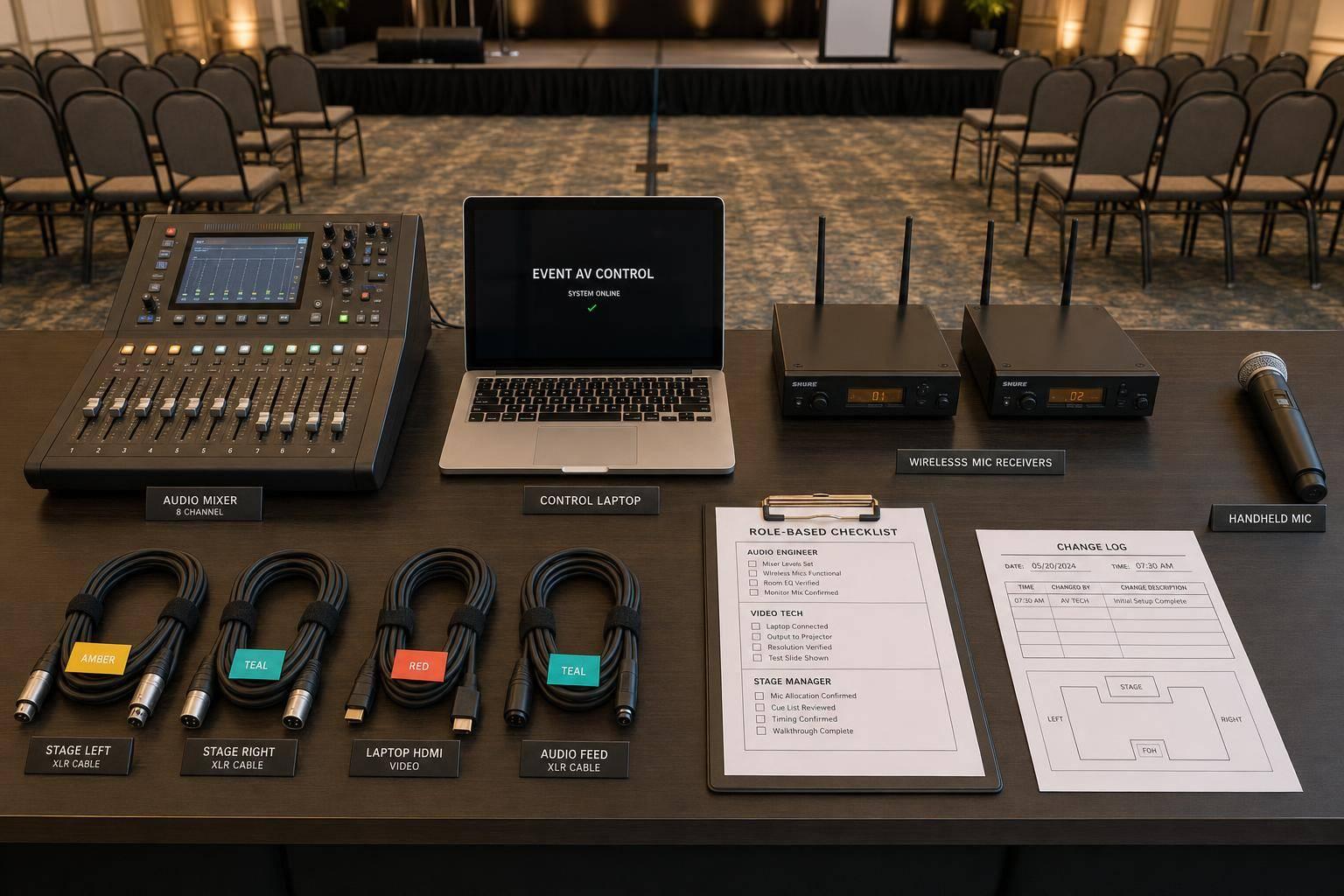
For contingency items like AV checklists, update them as soon as each event ends so lessons learned don’t slip through the cracks. And make sure briefing documents and schedules are locked in well before event day. That helps cut down on morning-of confusion.