Availability vs Seniority: Shift Rule Comparison
August 25, 2026


If you apply the rules in the wrong order, one shift can turn into a grievance and back-pay claim. My takeaway is simple: in many union event settings, I first check the CBA, then qualifications, then availability, and only then seniority. If the contract flips that order for a certain shift type, I follow that rule instead.
Here’s the short version:
A few points stand out from the article:
| Rule | What it answers | Common order | Main risk if missed |
|---|---|---|---|
| Availability | Who can be considered? | Often checked before seniority | Scheduling someone who did not mark availability, or leaving out someone who did |
| Seniority | Who gets first shot? | Applied after availability and qualifications in many CBAs | Skipping a senior qualified employee and owing back pay |
| Qualifications | Who is allowed to do the work? | Checked before final assignment | Giving work to someone without the needed license, training, or classification |
| Documentation | Can the employer prove the decision? | Needed at every step | Weak defense in a grievance or arbitration |
What I like about this comparison is that it cuts through a common mistake: people treat availability and seniority like competing ideas, when they usually work in sequence. The contract decides that sequence. And if I’m filling banquet, stadium, holiday, or on-call event shifts, that order can affect staffing, overtime, and labor cost in a direct way.
So before posting any shift, I’d keep one simple checklist in front of me:
That’s the core point of the article, and it’s the part managers need most.
Availability tells you who can be considered for a shift. It does not settle who gets picked first. Under many CBAs, workers submit availability through a formal process, not by text or phone call. One union event employer, for instance, opens an online availability calendar on the 10th of each month, workers submit by the 17th, and the schedule is posted on the 24th. That kind of fixed window makes staffing easier to track. Miss the deadline, though, and things can get messy fast.
This system works best in jobs where demand moves around from week to week. Availability rules matter most in variable-shift roles like banquet servers, on-call crews, and seasonal staff. These jobs don't run on a set weekly pattern, so the CBA usually lays out a clear method for deciding who belongs in the pool for each event date.
Most CBAs handle availability in one of three ways: as a hard limit, as a preference, or as a submission rule with a default if the worker misses the deadline.
That last setup is where trouble often starts. If the rule is buried in contract language and no one checks it closely, both managers and staff can end up working from different assumptions.
The biggest scheduling problems usually show up in three places: missed deadlines, too many restrictions on busy dates, and scheduling people outside what they declared available.
Peak dates are where the pressure hits hardest. If too many workers mark themselves unavailable for New Year's Eve, holiday weekends, or busy wedding Saturdays, managers may be left scrambling to fill shifts at the last minute. That often means overtime premiums for a much smaller group of workers. On the other side, if a manager builds the schedule from memory or scattered messages instead of the actual availability record, it's easy to assign someone on a day they marked unavailable. In a union setting, that can lead straight to a formal grievance.
| Rule Area | Typical Union Treatment | Manager Risk | Operational Impact |
|---|---|---|---|
| Submission deadlines | Fixed deadline, such as the 17th of the month; late submissions may be invalid | Disputes over whether a late submission counts; grievances if someone claims they submitted on time | Last-minute schedule gaps and confusion over who is available |
| Peak date availability | Staff may restrict availability; some CBAs set minimum availability requirements or a required number of shifts per month | Understaffed events if too many staff opt out; possible CBA violations if minimums aren't enforced | Forced overtime, higher labor costs, and service-quality issues |
| Scheduling outside declared availability | Hard-restriction CBAs prohibit it; preference CBAs allow it with documentation | Grievances, back pay claims, and allegations of favoritism | Last-minute call-offs, morale issues, and potential arbitration |
| Non-submission default | Some CBAs default missing submissions to unavailable, the last recorded availability, or full availability | Employee claims they weren't actually free; resentment if they are over-scheduled | Unreliable coverage and strained employee relations |
| Record-keeping | Written or electronic submissions are typically required; verbal confirmations usually don't count | No audit trail to defend scheduling decisions in grievances | Inability to resolve disputes quickly or accurately |
Quickstaff puts time-stamped availability records and reminders in one place. Once the available pool is locked in, seniority decides who gets the first offer.
In union event work, seniority is the contract-based ranking of qualified employees by continuous service. Some CBAs use a company-wide list. Others use department or classification lists. Seniority comes into play only after availability and qualifications are confirmed. That order is a big deal when shifts are bid, added, or reassigned after the schedule changes.
So if a senior banquet server doesn’t have the needed liquor-service certification, that person still can’t claim a bartending shift. Seniority helps decide among qualified people. It doesn’t override job requirements.
Once the eligible pool is set, seniority decides who gets first shot. That usually covers shift bidding, preferred assignments, extra shifts, and reassignments after cancellations or rescheduling.
For extra shifts added after the schedule is posted, those hours are often offered down the seniority list to qualified employees before management gives them to anyone else. The key is simple: use the roster that fits the work being assigned, whether that’s company-wide, by department, or by classification.
The mistake managers make all the time is giving the shift to whoever answers the phone first or is easiest to reach, instead of the most senior qualified employee. That can lead to a grievance and make-whole pay.
The other big trap is using an old roster. A stale list can give a false picture of who is senior. On paper, the assignment may look fine. Under the contract, it may be wrong. In most cases, the risk comes down to using the wrong list or following the wrong order.
Before posting or reassigning a shift, managers should double-check these common pressure points:
| Seniority practice | Union rule | Risk | Effect |
|---|---|---|---|
| Premium shift assignment | Offered to qualified employees in seniority order within the classification. | Senior qualified staff bypassed. | Employer may owe back pay or priority on future offers. |
| Extra shifts and overtime | Offered in descending seniority order to available, qualified employees. | Calling preferred or easily reachable staff first. | Perceived favoritism and possible call log review. |
| Shift bidding | Employees choose in seniority order; remaining shifts go to junior employees. | Wrong bid sequence or wrong seniority list applied. | Senior staff get less desirable shifts; schedule may need to be rebid. |
| Holiday assignments | Holiday work offered first to volunteers in seniority order; remaining shifts assigned in reverse seniority order. | Miscounting volunteers or using the wrong seniority order. | Unbalanced holiday coverage and grievances over holiday pay. |
| Classification-based list selection | Seniority maintained separately by classification; rights apply only within that classification unless the contract states otherwise. | Mixing server and bartender lists, or full-time and on-call lists. | The wrong employee may get the shift, forcing a correction. |
Tie-breakers matter too. When two employees share the same seniority date, some contracts break the tie alphabetically by last name.
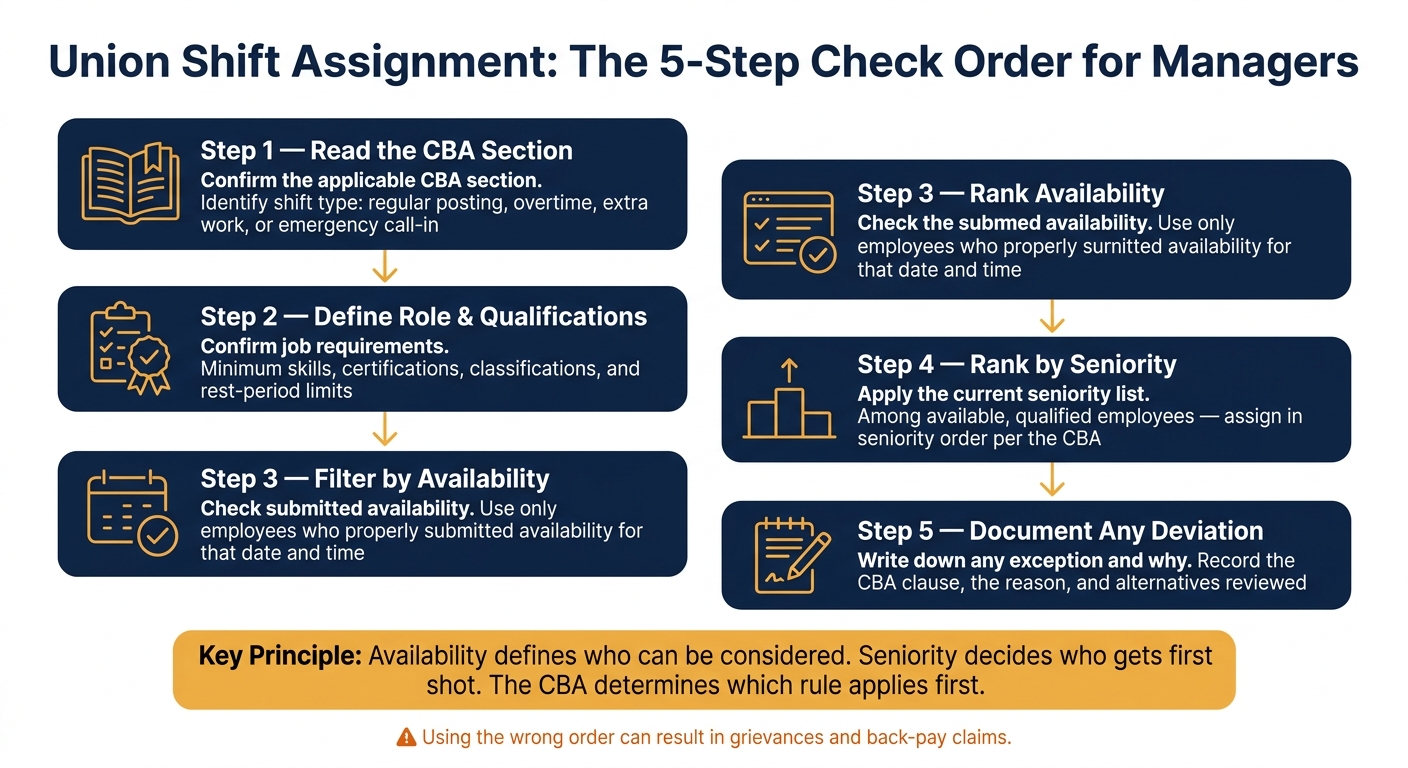
Union Shift Assignment: The 5-Step Check Order for Managers
Conflicts usually show up in a few familiar ways. A senior employee misses the availability window. Or a junior employee is the only person who can actually work a tough shift. That’s where the CBA matters most.
If the CBA treats availability as a condition for eligibility, seniority doesn’t come first. It comes after you’ve set the pool of people who are available.
Once you know who’s available and where each person falls on the seniority list, managers need a set process. Same steps, every time. That keeps decisions clear and cuts down on arguments later.
Before assigning any shift where availability and seniority might clash, managers should follow the same sequence each time:
A scheduling platform with built-in availability tracking, waitlists, and centralized event management - like Quickstaff - makes this process much easier to follow and document when you’re juggling multiple events at once.
Use that same check order whenever a shift could go either way under the CBA.
| Scenario | Availability-first result | Seniority-first result | What to verify in the CBA |
|---|---|---|---|
| Holiday banquet - senior employee didn't submit availability | Less senior employee who responded on time gets the shift | Senior employee claims priority based on rank alone | Whether availability submission is a condition of eligibility, or whether seniority overrides it regardless |
| Late-added Saturday event posted after normal scheduling | Manager assigns to the first qualified employee who submitted availability | CBA may still require a seniority-based offer if the event counts as overtime or extra work | Whether the shift is classified as extra work or overtime, which may trigger seniority-based offers |
| Back-to-back shifts where rest rules apply | Available employee is blocked by the mandatory rest period | Senior employee who is rested and available gets the shift | Contractual rest minimums between shifts and whether hours-worked conditions apply to extra-shift eligibility |
| Specialized event requiring alcohol service certification | Less senior certified employee is available and qualified | Senior employee lacks certification; junior employee is the only qualified option | Whether qualifications must be met before seniority applies, or whether certification is a hard prerequisite |
Save the availability record, posting timestamp, and assignment reason. Have those records ready before you post the shift.
After looking at availability-first and seniority-first rules side by side, use this final check before posting any union-covered shift. Availability defines who can be considered. Seniority decides who gets first shot within that group. And the CBA tells you which rule applies first for each type of shift.
Before you post, check these five items in order:
If the contract language is unclear, check with labor relations or the union before posting.
Quickstaff can help track availability, waitlists, and assignment records, so managers can document the required order.
If the CBA is unclear, treat it as incomplete guidance. First, confirm the jurisdiction clauses and check any side letters or MOUs. Then document any unclear wording that came up in talks with union stewards or venue labor relations staff.
If that still doesn't settle the assignment, look at documented past practice. Track who handled the disputed work across several events, and note whether both sides accepted that pattern. After you've mapped the task to the agreement, follow the CBA's dispute process.
Use the seniority list only when your union agreement’s shift-pick rules call for it. In most cases, that happens after availability is confirmed for a dropped or open shift.
If the agreement starts with availability or standby rules, follow those first. Then use seniority only as a tiebreaker.
If you work across multiple venues, check each local CBA. Covered roles can differ from one location to another.
Save complete assignment records tied to payroll and timekeeping, including:
Keep these records in one central place so you can track worker status, hours, and assignments if a dispute or audit comes up.
For record retention: