Ultimate Guide to AV Equipment Operation Training
June 13, 2026

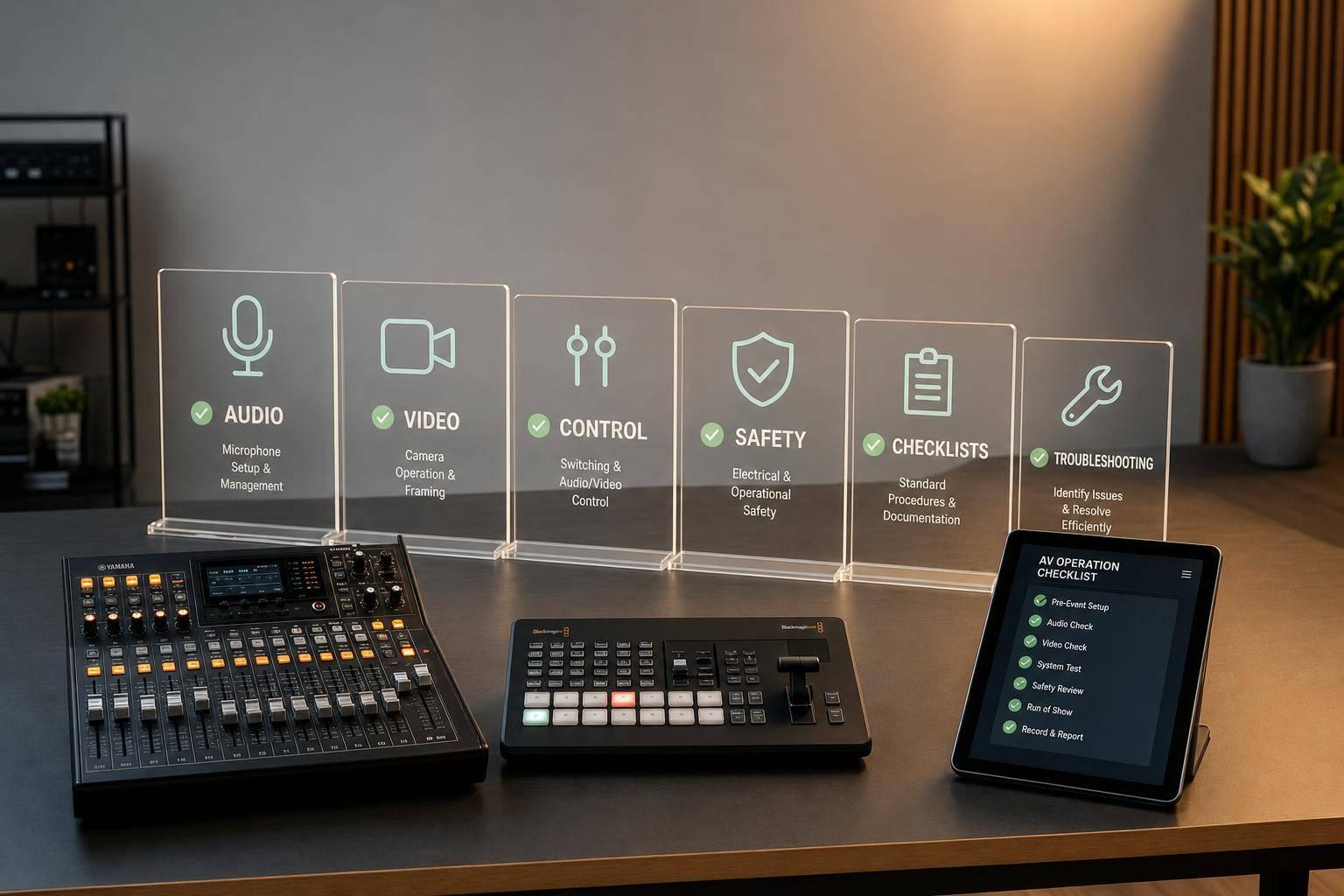
Most live AV problems come down to a short list: bad signal flow, wrong power-up order, weak checklists, poor comms, and no backup plan. If I were training an AV team, I’d focus on five things first: audio, video, control/network basics, safety, and repeatable show-day procedures.
Here’s the full article in plain English:
A few details stand out. The article says 1080p should be the floor for most corporate events, while 4K is common for higher-impact shows. It also notes that projectors in moderately lit ballrooms may need 10,000+ lumens. And for longer video runs, SDI beats HDMI.
What I like most is the article’s main point: good AV training is less about theory and more about repeatable habits under pressure. If a team can follow a checklist, communicate on comms, trace signal flow, and swap to backups fast, show-day risk drops.
If you run events, this guide gives you a clear training frame:
That’s the core idea the rest of the article builds on.
Every live event runs on three linked systems: audio, video, and control. If you understand how each one works on its own - and how they work together - you stop reacting blindly when something goes wrong. You start operating with intent.
The audio chain is pretty straightforward: sound starts at a microphone or instrument, passes through a DI box when needed, moves into the mixing console, and then goes out to powered speakers or amplifiers.
Mic choice matters more than people think. A dynamic mic works well for vocals and instruments. Wireless mics fit presenters who need to move. Lavaliers are a common pick for keynote speakers. Goosenecks make sense at podiums.
Gain staging is where a lot of new operators get tripped up. If input gain is too low, the signal gets noisy. If it's too high, it clips. The aim is simple: a clean, steady signal at each point in the chain.
Monitor mixes also shape how the stage feels. Floor wedges can work well, but they add more sound to the stage. In-ear monitors (IEMs) cut that down and give performers their own stereo mix.
Feedback is one of the fastest ways to wreck the flow of a live event, and in many cases, it's preventable. Don’t put main loudspeakers behind microphones. Weak PA systems and bad monitor mixes can also push a system toward feedback, so use separate monitor mixes and EQ to keep things under control. And when sizing a PA, match it to the room and the coverage needed - not some fixed watt-per-person formula.
Video follows the same basic path as audio: source, transport, control, output. Laptops, cameras, and media servers feed a video switcher. That switcher then sends the signal to displays such as LED walls or projectors. For short cable runs, use HDMI. For longer runs, SDI is the better fit.
Resolution also matters. 1080p is the minimum acceptable standard for most corporate events, while 4K is now common for high-impact presentations. Many current switchers include scalers, which helps when you're dealing with mixed-resolution inputs and need one clean output.
The right display depends on the room. LED walls perform well in spaces with high ambient light, and they can be built into almost any shape. Projectors fit better in controlled-light spaces like breakout rooms, but they need at least 10,000+ lumens to stay visible in a moderately lit ballroom. That’s not something to check at the last minute. Confirm aspect ratio and brightness during setup, while there’s still time to fix problems.
Control systems are what pull the whole show together. Touch panels and control software let operators handle audio, video, and lighting from one surface. Lighting runs on DMX, while networked audio and video often use Dante or NDI. Network switches move traffic between devices, so basic IP addressing and network setup aren’t just nice to know - they’re part of the job.
Good signal flow isn’t only about gear. It’s also about clean routing and clean habits. Label every cable, and stick to one labeling system across the show. If a cable crosses a walkway, even for a short time, use cable ramps and edge covers. One loose run can create a trip hazard, and one pulled cable in the middle of a show can throw the whole event off track.
Once these systems make sense, the next step is turning that knowledge into repeatable pre-event procedures.
Turn AV know-how into a training program your team can run again and again, perhaps using budget-friendly scheduling tools to manage trainee availability. It should get operators ready for the work they’ll do on actual shows: soundcheck, source switching, backup changeover, and safe shutdown. Once that structure is in place, you can turn it into procedures, checklists, and live-event steps people can follow under pressure.
Build AV training around three levels. Each one should include skills you can see, test, and sign off on. No one moves up until they’ve cleared the current level.
| Skill Area | Beginner | Intermediate | Advanced |
|---|---|---|---|
| Safety | Manual handling, ladder safety, PPE use | Site-wide risk assessment, harness rigging | Safety lead, emergency protocol management |
| Audio | Cable wrapping, basic mic placement | Signal flow troubleshooting, mixer setup | DSP configuration, wireless coordination |
| Video | Display mounting, basic cabling | Switcher operation, source management | Multi-screen mapping, signal distribution |
| Workflow | Pre-event checklist execution | Run-of-show communication | Lead operator, backup planning |
This kind of setup makes training much easier to manage. A beginner might need to show they can wrap cables the right way, place a mic, and finish a pre-event checklist without missing steps. At the intermediate level, the focus shifts to diagnosis and event flow. By the advanced stage, the tech should be able to lead, plan backups, and handle more complex systems without hand-holding.
Use those three levels to assign the right kind of training: classroom sessions, lab work, and shadowing. Most of the learning should happen with hands on gear. That’s where people stop just hearing about AV and start doing it.
A blended setup usually works best:
Short simulations and guided demo stations can also help trainees work through harder setups, like DSPs and microphone placement, without the stress of a live show.
| Format | Best For | Pros | Cons |
|---|---|---|---|
| Classroom/Theory | Onboarding, regulations, and foundational concepts | Scalable; ensures everyone hears the same safety rules | Memorization without practice |
| Hands-On Labs | Technical configuration and troubleshooting | High retention; safe environment to fail and experiment | Requires physical space and equipment inventory |
| Shadowing | Workflow, communication, and "soft" event skills | Real-world context, immediate feedback | Can be informal and inconsistent without a structured checklist |
| Live-Event Assignments | High-pressure performance and advanced operation | Builds true confidence | High stakes; mistakes can impact the client |
The balance matters. Too much classroom time and people can recite terms without being able to patch a signal or recover from a bad input. Too much shadowing without structure, and training turns into “watch whatever happens today.” Labs close that gap by giving techs room to make mistakes, fix them, and try again.
Safety has to come first, and it should tie straight to the live tasks it protects. Start with site safety walk-throughs so trainees can spot trip hazards, exposed cabling, and blocked fire exits. Cover manual handling and working-at-height rules before any technical operation starts.
Working at height is the single largest source of serious injury in event production. That’s why ladder rules, the three-points-of-contact rule, and the no-one-underneath protocol for rigging need to be drilled early. Training should also cover proper lifting technique for heavy flight cases and speakers, along with electrical grounding awareness.
Assessment needs to show more than recall. Written quizzes can check whether someone remembers the rules. Practical sign-offs show whether they can use them on the job. A senior tech should watch the trainee complete actual tasks, then sign off only when the work is done right.
Use a mix of checks to document progress:
Post-event sign-offs from senior techs make the next step clear. They show who’s ready for more responsibility and who needs more reps. Those sign-offs should then feed back into your checklists and troubleshooting steps, so each show teaches the next one something useful.
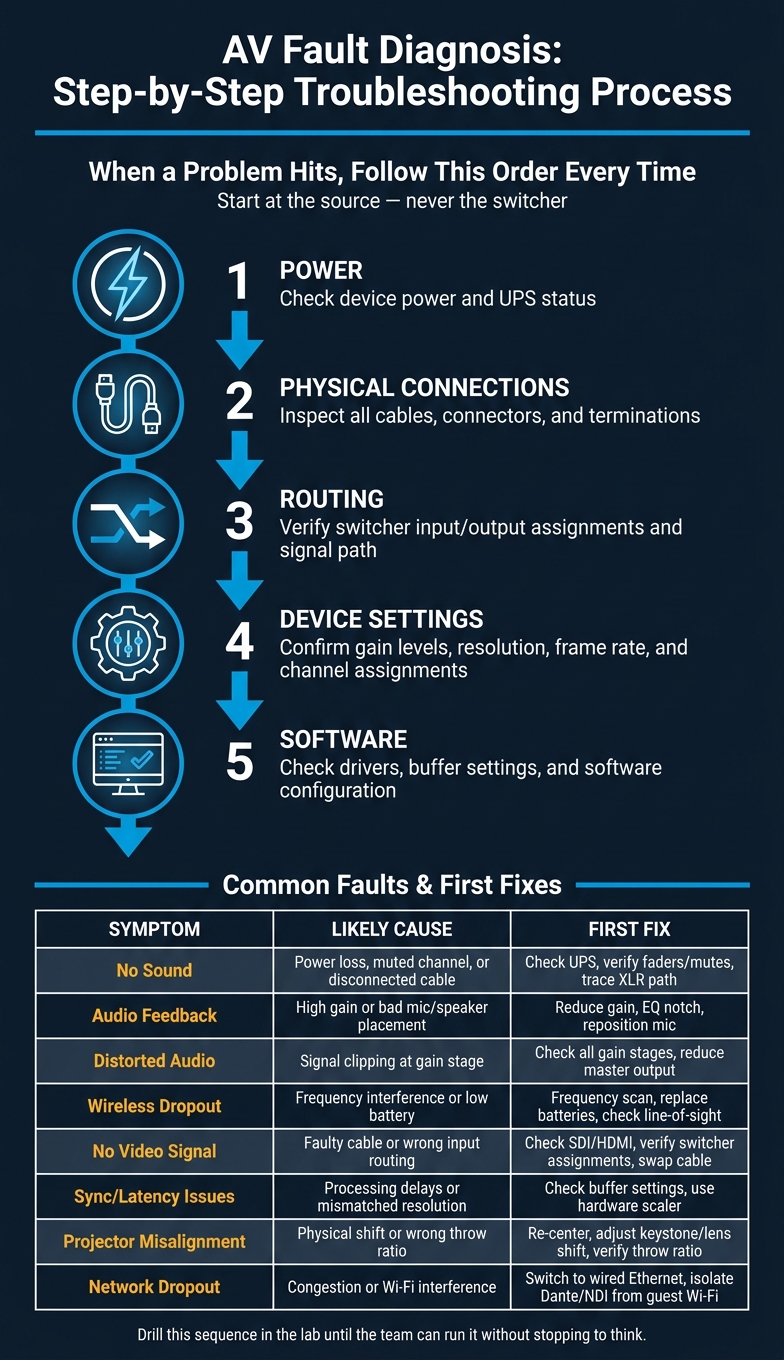
AV Fault Diagnosis: Step-by-Step Troubleshooting Process
Training only pays off on show day when the team can repeat the same process under pressure. The goal here is simple: turn lab practice into routines people can run almost on autopilot. Checklists, clean comms, and a set diagnostic flow are what separate a crew that fixes problems fast from one that starts guessing.
Pre-event checklists make sure every signal path, power source, and backup has been checked before doors open. On more complex shows, setup should wrap several hours ahead of time, or even the day before, so the team has room to test, spot issues, and make changes.
A solid checklist should cover power, audio, video, lighting, network, room readiness, communication, and backups. For power, confirm the venue can handle the load, check UPS battery health at the front-of-house rack, and place cable ramps anywhere people will walk across a cable run. For audio, test line input, console operation, PA coverage, and every monitor mix. For video, trace each source through the switcher to every display, then check alignment, focus, and LED pixel integrity. It also helps to check the room itself: ambient light, echoes, blinds, and sightlines from the farthest seat all matter. Before the team moves on, confirm intercom or radio links between FOH, backstage, and stage management.
One rule is worth keeping firm: all gear, including spares, needs to be on-site before show day. Same-day delivery of a critical part is asking for trouble. Before the event starts, update operating systems and drivers, clean air vents so gear doesn't overheat, and remove storage clutter from playback devices.
During the show, the Production Binder should be the single source of truth. It contains the run-of-show, cue sheets, stage plot, channel list, and contact details for each technical lead. Operators follow it, cues are called from it, and problems get escalated through it. The Technical Director handles crew coordination and scheduling, cue calls, and live troubleshooting.
Communication between FOH, backstage, and stage management should run through a dedicated intercom system. Tight comms cut down missed cues and crossed wires. If something breaks, the escalation path should already be clear: who makes the call, who fixes the issue, and who keeps the show moving while that happens. Standard backup gear includes:
UPS units at the front-of-house rack help guard against power swings that could crash the system in the middle of the show, and signal distribution amplifiers let one source feed several destinations at the same time.
When a problem hits, follow the same order every time: power → physical connections → routing → device settings → software. Jumping around usually burns time. Start at the source, not the switcher.
The table below covers the faults trainees are most likely to run into, along with the usual causes and the first fixes to try:
| Symptom | Likely Cause | Fix Steps |
|---|---|---|
| No sound | Power loss, muted channel, or disconnected cable | Check device power and UPS; verify mixer faders and mutes; trace XLR/TRS signal path |
| Audio feedback | High gain or poor mic/speaker placement | Reduce gain; use EQ to notch out ringing frequencies; reposition the mic away from speakers |
| Distorted audio | Signal clipping at the gain stage | Check all gain stages; reduce the master output |
| Wireless dropout | Frequency interference or low battery | Run a frequency scan; check or replace batteries; verify line-of-sight between transmitter and antenna |
| No video signal | Faulty cable or wrong input routing | Check SDI/HDMI connections; verify switcher input/output assignments; swap the cable |
| Sync issues or latency | Processing delays or mismatched resolution | Check buffer settings; use a hardware scaler to normalize resolutions and frame rates |
| Projector misalignment | Physical shift or incorrect throw ratio | Re-center the projector; adjust keystone and lens shift; verify the throw ratio matches the screen size |
| Network dropout | Network congestion or Wi-Fi interference | Switch to a dedicated wired Ethernet network; isolate Dante/NDI traffic from guest Wi-Fi |
This sequence needs to become second nature. In the middle of a show, a calm, step-by-step response beats improvising every time. Drill it in the lab until the team can run it without stopping to think.
Once your procedures are set, staffing becomes the next big checkpoint. After the team finishes the core training levels, the job shifts to something simple but critical: making sure the right tech is at the right event. A skills matrix makes that easier. It maps each technician’s current skill level against role needs, so you can spot gaps and staff with less guesswork.
Here’s how the five core AV roles break down, along with how staffing changes based on event size:
| Role | Required Skills | Staffing by Event Size |
|---|---|---|
| Entry-Level Operator | Basic cabling and load-in/out | 1–2 for small events; 4+ for large events |
| Senior Operator | Advanced switching and troubleshooting | 1 for medium events; 2+ for large |
| Systems Tech | Control systems and networking | 1 for medium or large events |
| Audio Lead | FOH mixing, wireless frequency coordination, signal flow | 1 for any event with live audio |
| Video Lead | Multi-source switching, LED wall config, signal routing | 1 for any event with complex video |
Run a skills gap analysis once a year and again after any new technology rollout or production expansion. That gives you a clear read on where the team stands. To close gaps faster, pair junior techs with senior operators. In most cases, hands-on shadowing moves faster than classroom training alone.
The matrix shouldn’t just sit in a spreadsheet. It should shape both training plans and live staffing.
Quickstaff helps AV managers schedule technicians by role and availability, which makes it easier to line up training sessions, shadow shifts, and live event coverage with the right people. It also keeps availability, waitlists, reminders, and staffing in one workflow.
Reliable AV work comes back to a few repeatable habits: strong fundamentals, skill-based training, checklists, and a clear diagnostic process. When the right people are placed in the right roles, training shows up where it matters most - on show day. Add safety protocols and regular skills audits, and the program gets stronger event by event.
Keep an eye on the numbers that show whether training is doing its job:
Those metrics show whether the team is getting more prepared and whether event performance is moving in the right direction. Post-event NPS and participant satisfaction surveys add another layer, helping you see if the technical side of the event met attendee expectations.
"AV is what you do. Training helps you do it better." - AVIXA
AV operator training usually takes about five days in a structured onboarding process. That time is often used to cover the core parts of the job: technical systems, equipment setup, troubleshooting, client interaction, and more advanced skills.
If the training is spaced out or shaped around a team’s specific needs, it can stretch across extra shifts or even several weeks to make sure the operator is fully ready for the role.
A beginner should start by learning the basics of AV concepts and day-to-day workflows. Structured training, such as the CTS 1 course, can help build the core skills needed for AV work.
It also pays to learn basic setup, equipment testing, and safety checks early on. Those fundamentals give you a strong base for more advanced skills.
The main backup gear should include power conditioners, UPS backup systems for the FOH rack, and backup signal paths for critical components so one failure doesn't take the whole setup down.