Paper vs Digital Safety Records for Events
August 31, 2026

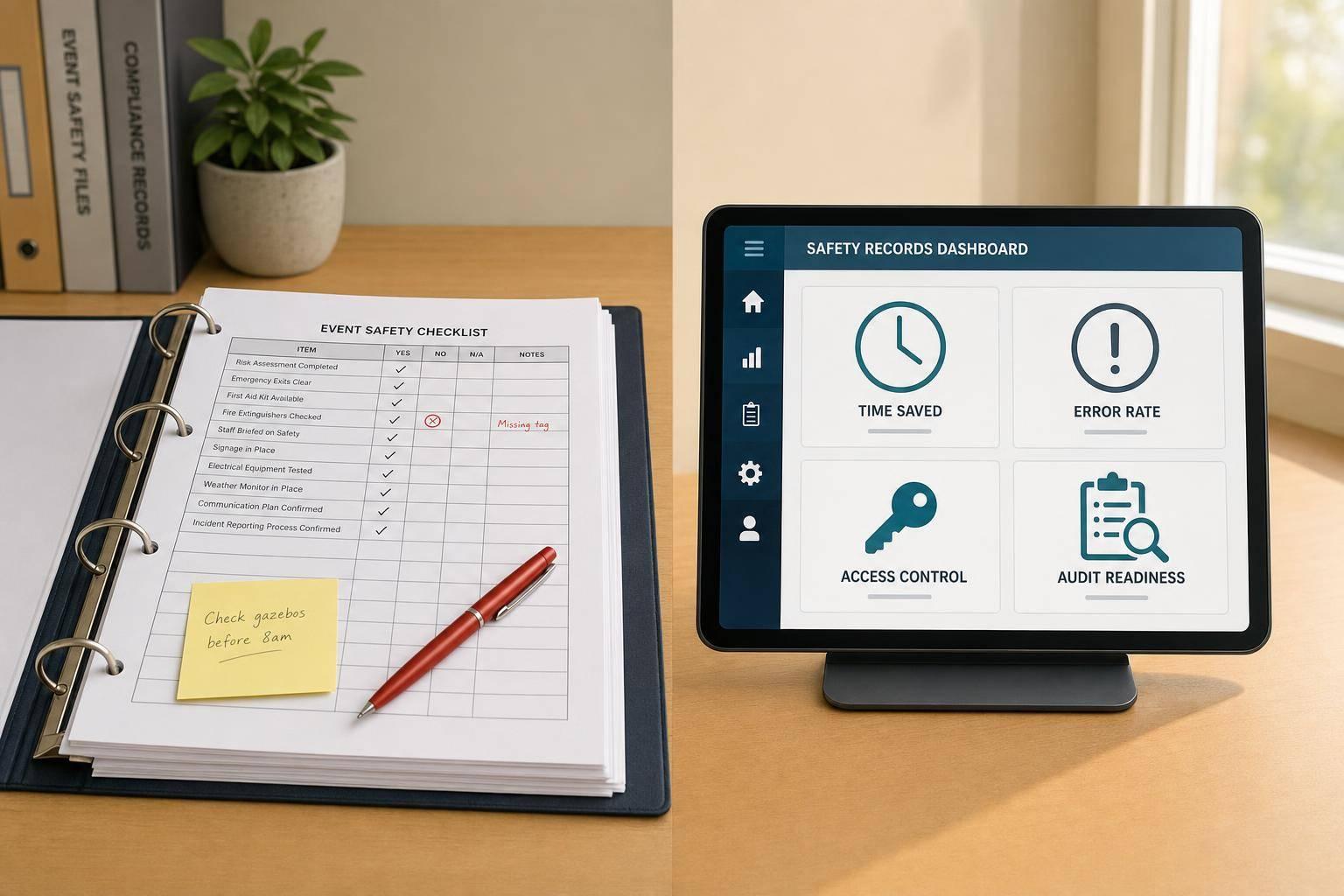
If I had to give the short answer: digital records usually beat paper for event businesses. Paper may cost less to start, but digital cuts admin time, lowers form errors, makes records easier to find, and helps a lot when an auditor, client, venue, or insurer asks for proof.
Here’s the article in plain English:
If I were running events across multiple venues, I’d care most about four things:
That’s where the split is the clearest.
Paper vs Digital Safety Records: Key Stats & Performance Comparison
| Factor | Paper | Digital |
|---|---|---|
| OSHA compliance | Yes, if records are complete and readable | Yes, if records are complete and readable |
| Startup cost | Lower | Higher |
| Day-to-day admin | More manual work | Less manual work |
| Form errors | Higher | Lower |
| Lost or damaged files | More common | Less common with backups |
| Updates to forms | Reprint and replace by hand | Update once for all users |
| On-site access | Limited to where files are kept | Phone, tablet, or laptop access |
| Audit prep | Slower | Faster |
| Best fit | Small, simple setups | Growing, multi-venue teams |
Bottom line: paper is cheaper to start, but digital is often cheaper to run. If you manage a lot of events, a lot of staff, or a lot of venues, that difference shows up fast.
Paper safety records can work for very small, stable operations. The problem is that the admin work piles up fast as you add more events, more venues, and more staff changes. The starting cost is low in a very literal sense: if you already have printers, clipboards, and filing cabinets, you can begin right away. But that cheap setup doesn’t stay cheap for long once records need to be updated, shared, and pulled back up across several venues.
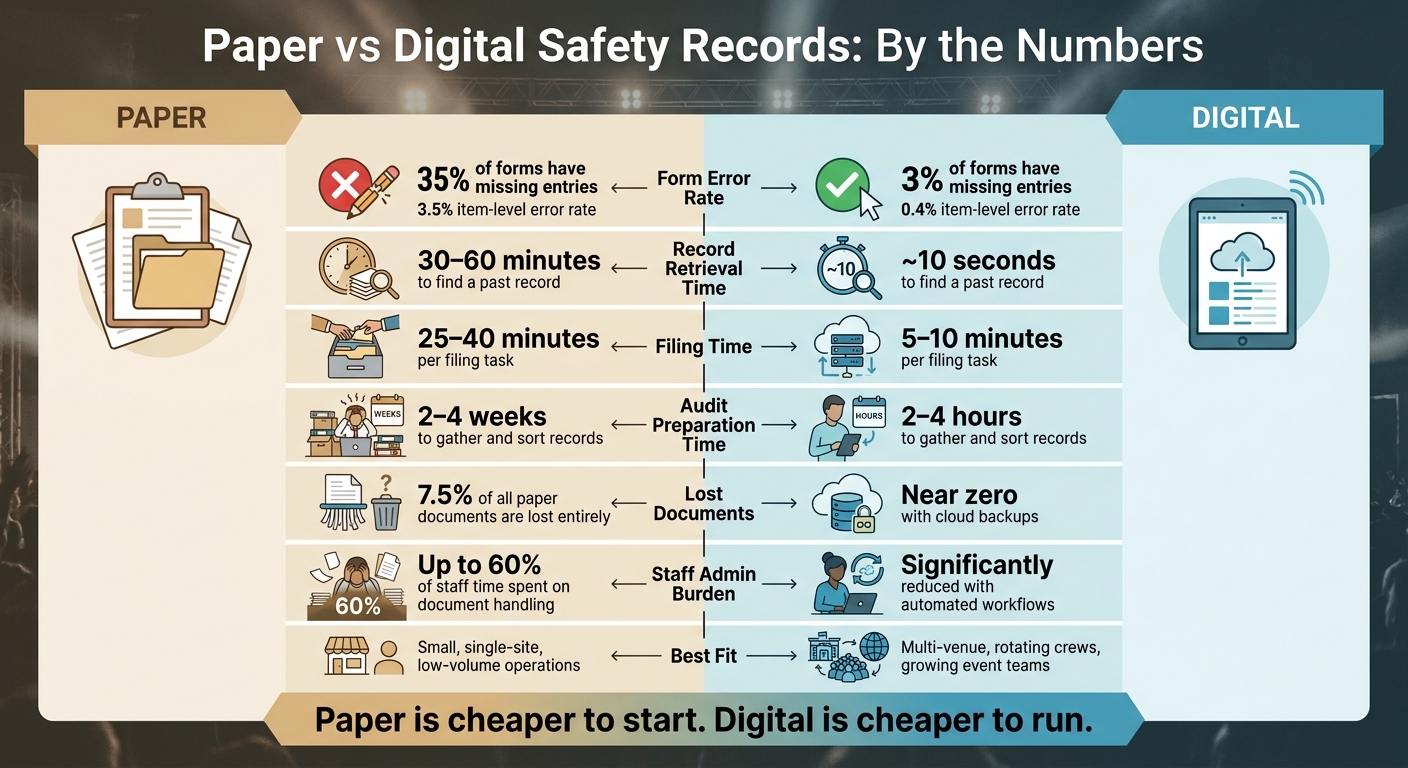
Every paper record comes with a chain of manual tasks: print it, hand it out, collect it, review it, and file it away. Paper document handling can take up about 60% of staff time. For safety logs, that’s a lot of hours spent moving paper instead of doing the work the forms are supposed to support.
Handwriting adds another layer of trouble. When staff are rushing through event setup, it’s easy to leave blanks, scribble something no one can read later, or misread what’s already on the page. One study that compared paper and electronic forms found that 35% of paper forms had errors of omission, compared with just 3% of electronic forms. At the item level, error rates were 3.5% for paper versus 0.4% for electronic. That gap can turn into a compliance issue fast, especially when a missing signature or unclear entry holds everything up.
Lost files are a steady risk too. An industry survey found that 7.5% of all paper documents are lost entirely. In an event business, that could be a checklist left behind at a venue, a binder ruined by a spill, or an incident report filed under the wrong event date. If an auditor or insurance provider asks for records from 18 months ago, “we can’t find it” won’t hold up.
When a safety procedure changes, paper turns a simple update into a chore. Someone has to print new copies, send them out, and collect the old ones. Until that happens at every venue, people may be working from different versions of the same checklist. That lag is one of the first cracks that shows up when paper systems start stretching too far.
Audit prep is slow for the same reason. Staff have to dig through binders, filing cabinets, and offsite storage, then sort everything by date and check that the records are complete. For event businesses with frequent venue changes and temporary staff, that process can drag even more when an inspection shows up without warning. In an unannounced inspection, slow record retrieval can lead to findings or fines.
That’s where digital records start to pull ahead of paper.
Paper records start to drag the moment filing and retrieval pile up. A digital system removes that choke point.
The time difference is hard to ignore. Paper filing takes 25–40 minutes. Digital filing takes 5–10 minutes. Pulling up a past incident can take 30–60 minutes with paper, but only about 10 seconds in a digital system - whether you're on-site, in setup, or moving between events.
Digital forms also make records more consistent. Required fields, dropdowns, and standard templates keep entries aligned across every event. Timestamps log exactly when something was entered, which makes backdating much harder. Paper forms have 15–20% error rates, while digital forms stay under 2% because required fields and clearer inputs cut missing data and illegible handwriting.
That matters most in the middle of a shift, when staff need the record right there, not sitting in a binder back at the office.
When a safety checklist changes after a venue inspection or a policy revision, a digital system can send that update to every authorized user right away. That means one crew isn't stuck using last month's version while another is working from the current one. Every team, at every site, sees the same form.
That kind of access fits how event teams actually work. Staff move between loading docks, prep kitchens, and front-of-house spaces. For multi-venue teams, temporary staff, and shift-based work, a practical digital system lets people:
Role-based permissions help make sure staff only see records that fit their role, while managers and auditors can pull complete histories when needed. Cloud storage also protects records if a device is lost or damaged during breakdown. And later on, that same setup makes audit prep much less of a scramble.
Audit prep is where the gap between paper and digital gets even more obvious.
With paper records, gathering training logs, incident histories, and corrective-action files across multiple events can take 2–4 weeks of manual sorting. In an organized digital system, the same job usually takes 2–4 hours because records can be filtered by date range and exported in a few clicks.
The records that make the biggest difference in a digital system include event staff training logs, incident and near-miss reports, corrective-action records, venue-specific safety checklists, equipment inspection logs, and policy acknowledgment forms. Taken together, they show that a policy wasn't just issued - it was used and followed.
Version history and timestamps also show who changed what and when. That's useful during compliance reviews or when an insurer asks for records.
The clearest differences show up when you put the two formats next to each other.
| Factor | Paper Records | Digital Records |
|---|---|---|
| Time use | Slower filing, sorting, and retrieval | Faster entry, search, and reporting |
| Error risk | Higher risk of illegible writing, skipped fields, and duplicate forms | Lower risk with required fields, templates, and timestamps |
| Missing files | Easier to misfile, lose, or damage | Easier to centralize, back up, and recover |
| Update speed | Requires reprinting and redistributing forms | Updates made once and applied immediately |
| Staff access | Limited to physical location or binder handoff | Available by phone, tablet, or laptop with permissions |
| Audit readiness | Manual review and collection takes longer | Reports and records easier to pull on demand |
On paper, the weak spots add up fast. A missing binder, a mislabeled folder, or a form tucked into the wrong stack can turn a small admin slip into a compliance problem.
The gap gets bigger as event count goes up and more people touch the process.
| Business size or pace | Paper records | Digital records |
|---|---|---|
| Small, single-site operations | Workable if forms are simple and record volume stays low | Still useful, but may feel less urgent at very small scale |
| Multi-event or multi-venue operations | Harder to control, update, and retrieve consistently | Scales better across crews, venues, and event dates |
| Larger staff pools | Manual tracking gets slower and more error-prone | Shared access and centralized records improve control |
| Higher documentation needs | More time spent filing and checking completeness | Easier to standardize, search, and export records |
This is where paper starts to drag. A catering company running 10–15 events per week can easily burn several hours of staff time weekly on paper filing alone - especially when forms come back late, incomplete, or from the wrong version of a checklist. That’s time the business doesn’t get back.
Paper tends to fit best when the operation is simple: low event volume, a small team, and steady routines. If you run a few events each month, use the same two or three venues, and keep files in good order, paper can still do the job.
Digital starts to make more sense once the business gets more moving parts. That usually means multiple venues, temporary or seasonal staff, concurrent events, or clients who want proof of safety compliance. At that stage, being able to search records by date or venue, send out updates at once, and pull a compliance report in hours instead of weeks can make a big difference in how cleanly the operation runs.
Once you compare time, mistakes, access, and audit prep, this mostly comes down to scale. Paper can still work for very small, steady operations. But that low upfront cost often hides a lot of admin work later.
One analysis suggests businesses lose about 1 in 20 documents, and staff can spend up to 50% of their time searching for information. For event teams, that’s a headache. Venue changes, rotating crews, scheduling tools, and inspection requests already pull people in a dozen directions. Add missing files or slow document retrieval, and the problem gets bigger fast.
This is where digital starts to pull ahead. Event records often need to move at the same pace as the team. With digital systems, updates go out right away, files stay searchable and timestamped, and staff can pull what they need from a phone or laptop at any venue. That makes inspection prep a lot less painful when a client, venue, or insurer asks for proof.
If your business handles a growing list of events, rotating crews, or more than one venue, digital records are the better long-term setup. That doesn’t mean paper is always the wrong call. It means paper gets harder to manage as things get more complex, and those hidden costs add up.
Paper is cheaper to start. Digital is cheaper to run.
Switch when you need faster day-to-day work, fewer human mistakes, or better audit-ready compliance. It matters even more if you still depend on scattered manual systems like spreadsheets, sticky notes, or paper files that can go missing or fall out of date.
If your business manages staff across multiple events, digital records put safety documents in one place and make real-time updates much easier. That helps cut admin slipups during compliance checks.
Start with records you may need to pull fast during day-to-day work or an audit:
These records matter most for safety, compliance, and audit prep.
Centralize records in one system with a clear audit trail. Keep the latest worker schedules, assignments, and emergency or safety documents linked to the live roster, so staff aren’t working from old files or stale instructions.
Keep complete employment records, along with injury and illness documentation, including OSHA 300 Log entries and safety training records when needed. Use timestamped, role-based training logs with signed attestation, and document communications and alerts with delivery status or acknowledgments.