Manual vs. Automated Scheduling for Large Events
March 13, 2026

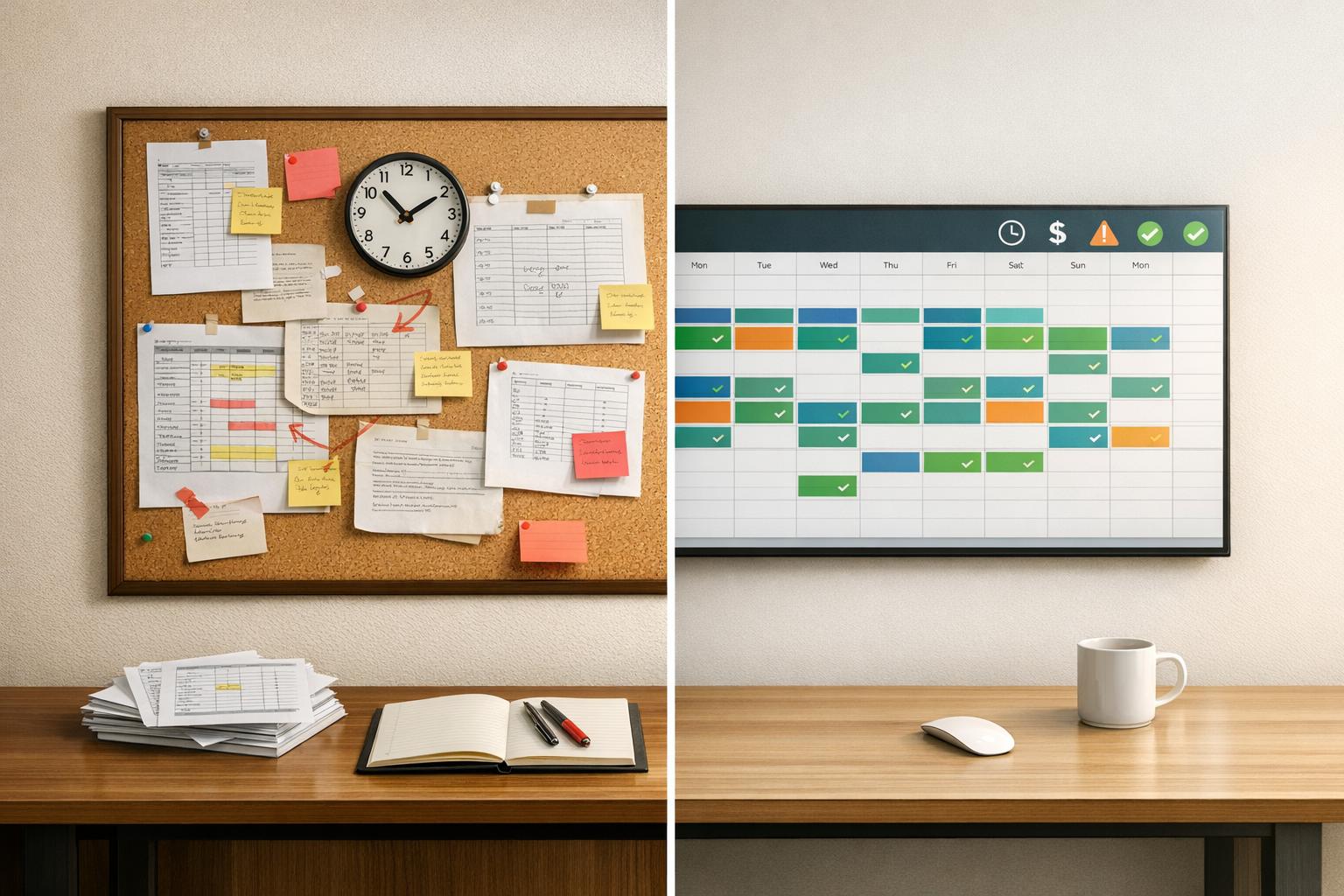
Coordinating staff for large events is challenging. Manual scheduling methods, like spreadsheets and phone calls, are time-consuming and error-prone. On the other hand, scalable event scheduling tools simplify the process by assigning shifts in seconds, reducing errors, and improving communication.
Key Takeaways:
Quick Comparison:
| Metric | Manual Scheduling | Automated Scheduling |
|---|---|---|
| Time per shift assignment | 5–10 minutes | Seconds |
| Shift fill rate (72 hrs) | 65% | 95% |
| Payroll processing cost | $15/hour | $2/hour |
| Admin time per week | 5–10 hours | <2 hours |
| Error rate | High (e.g., double-booking) | Near zero (AI-driven) |
Automated scheduling is the efficient choice for managing large-scale events, saving time and reducing costs while keeping operations organized and error-free.

Manual vs Automated Scheduling: Performance Metrics Comparison for Large Events
Manual scheduling relies on simple tools like spreadsheets, paper charts, whiteboards, and sign-in sheets to track staff. Communication is handled through phone calls, texts, and long email chains, which can be cumbersome.
The process begins with recruitment using printed or emailed forms. Managers gather availability using event staff availability tracking apps and manually match their skills - like first-aid certification or AV knowledge - to event requirements. With so many communication channels in play, critical details can easily slip through the cracks. On the day of the event, manual check-ins further complicate things, making it harder to quickly identify no-shows.
This approach requires a lot of time and effort. Assigning a single staff member to a shift can take anywhere from 5 to 10 minutes. For an event needing 100 workers, that’s over 8 hours of administrative work - before even considering last-minute changes. TCP Software aptly notes:
"Manual scheduling might have worked when your team was small or your operations were simple. But as your organization grows, the cracks start to show."
Mistakes are another big issue. Errors like double-booking, assigning staff to the wrong location (e.g., Portland, Maine instead of Portland, Oregon), or miscalculating overtime are common. These missteps lead to only about 65% of shifts being filled 72 hours before an event, and managers spend 35% of their time resolving conflicts. Shiftboard highlights the inefficiency:
"Traditional event staffing often relies on disjointed tools and manual efforts ranging from paper and pencil, whiteboards, and spreadsheets to sign-in sheets, email, and phone trees."
Scalability is yet another hurdle. While manual methods might suffice for small teams, they become unmanageable as the operation grows. Managers often need to bring in extra administrative help just to handle scheduling, and the lack of centralized tools makes it nearly impossible to track staffing levels in real time.
These obstacles make it clear that manual scheduling isn’t built to handle the demands of large-scale events.
Manual scheduling can be a tedious and error-prone process, especially for large events. Automated scheduling steps in to simplify this by using centralized software powered by AI. Instead of juggling spreadsheets and endless phone calls, these systems match staff to shifts in seconds, considering factors like skills, location, and availability. It’s a massive time-saver compared to the 5–10 minutes it usually takes to assign shifts manually. Plus, automated tools provide real-time updates and send alerts for last-minute cancellations.
One standout feature is the use of auto-alerts. When a cancellation happens, backup staff are notified immediately, resolving 95% of no-shows within just 30 minutes. Workers can also manage their schedules through a mobile app, where they can check shifts, accept assignments, or mark themselves as unavailable - all in one place.
To make things even smoother, role-based features allow managers to tailor assignments to specific event needs. For example, they can define roles like bartenders or servers, send out one-click invitations, and sync schedules with personal calendars for seamless updates.

Quickstaff takes these automated scheduling tools and packages them into a comprehensive, cloud-based platform ideal for managing large events. Since its launch in 2013, Quickstaff has been used in over 20,000 events, proving its reliability and efficiency. The platform streamlines the entire scheduling process - from creating events to assigning staff by role and automating communications.
One of the most common headaches in scheduling is dealing with staff unavailability. As Quickstaff puts it:
"One of the biggest frustrations of staff scheduling is staff unavailability. You spend your time creating the perfect schedule... only to discover they aren't available."
Quickstaff addresses this with real-time availability tracking. Staff can block out dates when they can’t work, so managers only send invitations to those who are actually free. Other helpful features include automated waitlists, unlimited messaging, event calendar views, and reminders - all accessible through a mobile-friendly interface. By centralizing everything, Quickstaff eliminates the chaos of scattered emails and texts, keeping every detail organized in one place.
Looking at manual versus automated scheduling, the difference is stark. Assigning a single shift manually takes 5 to 10 minutes, but an automated system handles it in mere seconds. The efficiency gains across various performance areas are undeniable, as highlighted in the table below.
Cost-wise, the gap is just as striking. Manual payroll processing costs roughly $15 per hour, while automated systems bring that down to just $2 per hour. Add to this a 40% drop in overall expenses and 200+ hours saved annually, and the financial advantages become clear.
| Metric | Manual Scheduling | Automated Scheduling |
|---|---|---|
| Time per shift assignment | 5–10 minutes | Seconds |
| Shift fill rate (72 hours before event) | 65% | 95% |
| Payroll processing cost | $15/hour | $2/hour |
| Admin time per week | 5–10 hours | <2 hours |
| No-show replacement time | Slow (manual calls) | 95% replaced within 30 minutes |
| Error rate | High (double-bookings, wrong locations) | Near zero (AI-driven) |
Automated scheduling doesn’t just save time - it transforms how work gets done. By completing assignments in seconds, it saves over 15 hours weekly and drastically reduces human errors. These systems use AI to analyze skills, locations, and availability, ensuring precision when choosing shift assignment software. Beyond the numbers, the boost in efficiency positively impacts staff morale and engagement.
Automation isn’t just about speed and cost - it’s also about improving communication and satisfaction. Traditional manual scheduling often leaves workers frustrated with disorganized communication via emails, texts, and phone calls, creating uncertainty and disconnection. Automated systems solve this by offering real-time mobile notifications and instant updates, keeping everyone informed and aligned.
When employees have more control over their schedules, satisfaction increases. Automated systems provide self-service options for managing shifts, availability, and time-off requests, giving workers transparency and predictability. This approach significantly reduces stress and burnout. For example, event staffing apps have been shown to reduce no-shows by 60% thanks to automated check-ins, reminders, and alerts. By fostering transparency and empowering staff, automated scheduling also helps lower turnover rates.
Automated scheduling has revolutionized the way large events are managed, cutting down on delays and inefficiencies caused by manual processes. With AI-powered tools, shifts can be assigned in seconds rather than the 5–10 minutes it typically takes manually. This efficiency can save over 15 hours each week and help fill around 30 additional shifts. Plus, automation can slash scheduling costs by 40% and reduce payroll processing expenses from approximately $15 per hour to just $2 per hour. By centralizing shift tracking, managers gain a clear view of shift statuses, simplifying oversight tasks and reducing stress.
Another major benefit is the prevention of errors. Manual scheduling often leads to costly mistakes, like assigning staff to incorrect locations (e.g., confusing Portland, ME, with Portland, OR) or unintentionally creating overtime situations. Automated systems, however, use built-in logic to identify and resolve these issues before they happen, significantly lowering error rates. These advantages make automation a game-changer for large-scale event planning.
Scalability is where automated scheduling truly shines. As operations grow, manual methods become less practical and more prone to mistakes. Automation is particularly effective for teams with over 10 workers, where manual scheduling often falters. For high-volume staffing agencies managing hundreds of contractors across various locations, automated tools are indispensable. They can handle large workloads seamlessly without requiring additional administrative support.
Businesses juggling multiple events simultaneously also benefit from features like automated filters to quickly locate staff with specific certifications or high-quality ratings (e.g., 4.8+). Geofenced check-ins streamline attendance tracking, while automated alerts instantly notify backup staff in case of cancellations. This system can replace 95% of no-shows within 30 minutes - a task that would otherwise take hours if done manually.
Quickstaff offers flexible pricing plans tailored to businesses of different sizes and needs:
| Plan | Monthly Price | Staff Limit | Best For |
|---|---|---|---|
| Boutique | $49 | Up to 35 staff | Small businesses or startups moving away from manual scheduling |
| Growing | $99 | Up to 70 staff | Mid-sized businesses expanding their events and workforce |
| Large | $249 | Up to 175 staff | High-volume staffing agencies managing large-scale operations |
Each plan includes unlimited events, guided onboarding, and access to essential features like automated waitlists, real-time notifications, and centralized tracking. These options make it easy for businesses to scale, whether they’re just starting out or managing multiple events, while also saving significant time and resources annually.
For large events, manual scheduling might appear cost-effective at first glance, but it comes with hidden expenses that can quickly eat into profits. These include administrative overhead, overtime from scheduling mistakes, compliance risks, and higher staff turnover. As Nowsta put it:
"Manual scheduling isn't just outdated. It's quietly draining your budget through overtime spirals, compliance risks, and preventable turnover".
Automated scheduling, on the other hand, simplifies operations by replacing scattered tools with a centralized platform. It handles routine tasks, reduces errors, and offers real-time visibility into operations. For event businesses juggling multiple locations or managing large staffing volumes, this approach is essential to remain competitive and adapt to evolving labor laws.
Most businesses experience positive results within just 3 to 6 months, including time savings of up to 80% and significant reductions in costs and errors. These improvements directly address the staffing challenges discussed earlier. Beyond efficiency, automation also shifts the focus from firefighting last-minute issues to planning events that deliver measurable results.
Quickstaff provides an accessible solution with pricing plans starting at $49/month for teams of up to 35 staff. These plans include unlimited events, automated waitlists, real-time notifications, and centralized tracking. Whether you're organizing staff for a 500-person wedding or managing teams across multiple venues, Quickstaff scales with your needs while keeping operations straightforward. With a clear return on investment, automated scheduling becomes a smart, strategic move for event managers.
The real question isn't whether you should automate - it's how soon you can make the change. Every month spent on manual scheduling means lost productivity and unnecessary labor costs.
When manual scheduling starts eating up too much time, leads to frequent mistakes, or becomes hard to manage as you scale, it’s time to think about automation. Common red flags include issues like double-bookings, higher costs due to miscommunication or overtime, and difficulties juggling larger or multiple events. Automation steps in to streamline the process, cut down on errors, and handle complex scheduling with ease, saving both time and headaches.
To get started with automated scheduling, you'll need some essential information. This includes details like staff availability, their roles, skills, and preferences. You'll also want to collect specifics about the event and the qualifications required for each role. Having this data on hand ensures the scheduling process runs smoothly and helps assign the right staff to the right tasks efficiently.
Automated scheduling often recoups its initial cost within just 3 to 6 months. How? By cutting down on labor expenses, trimming administrative tasks, and eliminating inefficiencies. Key savings come from faster schedule creation, better staffing optimization, and lower overtime costs. These streamlined processes quickly balance out the upfront investment, making it a smart choice for handling large-scale events.