7 Event Staff Scheduling Steps for Faster Booking
August 27, 2026


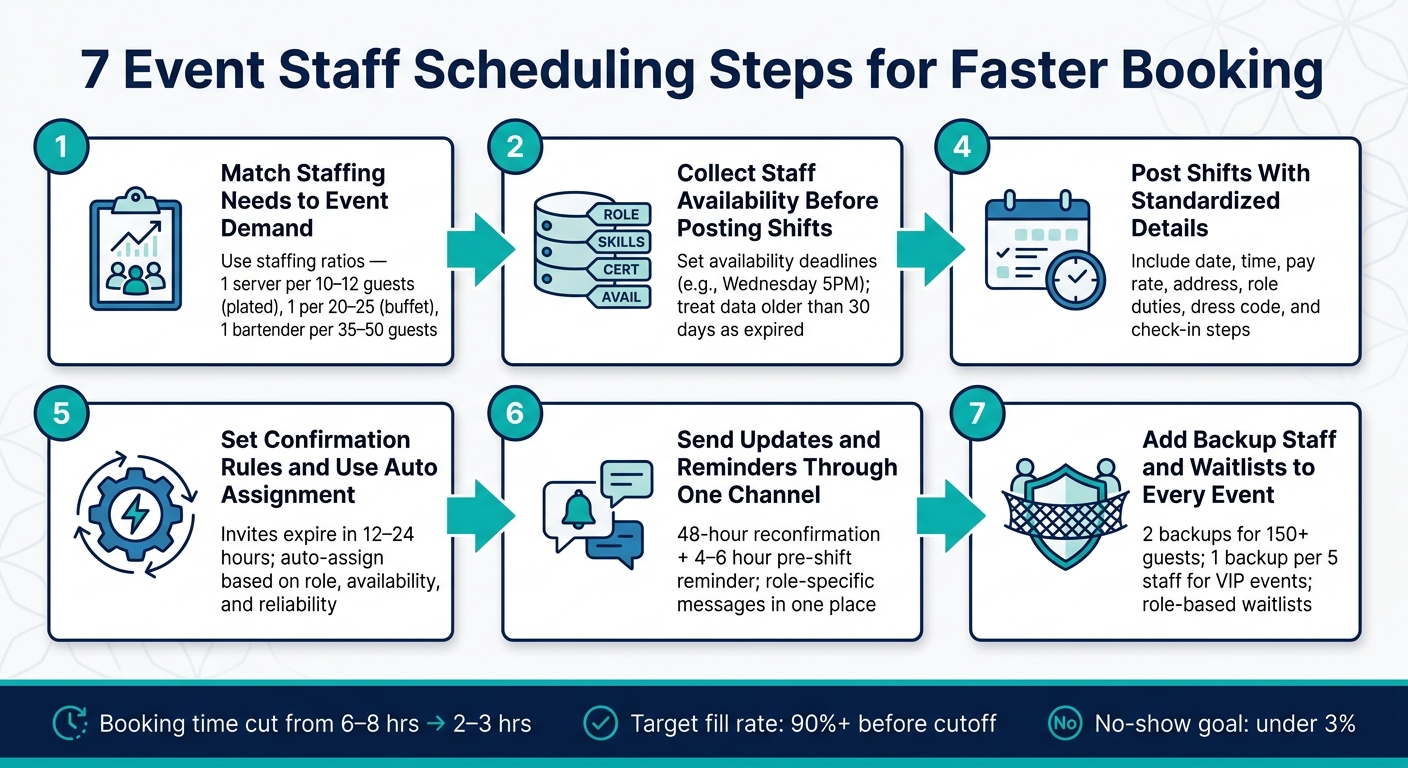
If booking event staff takes too long, the fix is simple: use one clear system from headcount to backup coverage.
I’d sum up the article like this: define staffing needs early, keep staff data current, collect availability before posting, write clear shifts, automate confirmations, keep messages in one place, and add backups to every event. That matters because slow booking can turn 6–8 hours of outreach into a drain on time, while a more organized process can cut that to 2–3 hours.
Here’s the full seven-step flow in plain English:
A few numbers stand out:
What I like about this piece is that it stays practical. It’s not about sending more messages. It’s about sending fewer, with better timing and clearer rules. That’s what helps teams book shifts faster and with less chaos.
7 Event Staff Scheduling Steps for Faster Booking
When booking drags on, problems stack up fast. A catering manager running 10 events a week can shrink scheduling time from 6–8 hours of outreach to 2–3 hours by using scheduling software for caterers to centralize postings and automate confirmations. That's a big chunk of time back. And it happens by fixing the steps that slow booking at the start.
Service can slip too. When shifts are locked in early, staff show up knowing their roles, and event captains have time to brief the team before service starts. That cuts down on role mix-ups and helps avoid gaps on the floor.
Labor costs take a hit as well. Slow booking often forces managers to overstaff just to play it safe, or pay higher last-minute rates to fill open spots. Faster booking helps teams lock in the right roster earlier, which keeps staffing tighter and spending more under control.
The biggest slowdowns usually come from four issues:
These are the blockers the seven steps below deal with. The first step is making sure staffing needs match event demand.
Before you post a single shift, pin down the basics: guest count, service style, venue layout, timeline, and service needs. Those details shape headcount and roles. Once that number is clear, booking gets a lot easier.
Service style has a big impact on staffing. Plated service usually needs more hands than buffet service. A solid starting point is:
After that, adjust for the setup in front of you. Multi-room venues, live stations, and VIP tables can all push staffing needs up.
Next, turn those ratios into a time-block staffing grid by role. For example: "4 servers, 2 bartenders, 1 captain, 2 setup crew from 3:00–6:00 p.m.; 6 servers, 3 bartenders, 1 captain from 6:00–10:00 p.m." That kind of detail cuts down on back-and-forth. People know what they're signing up for, and booking moves faster.
Past events can help you tighten the plan. If the same bottlenecks, overtime, or slow service keep showing up, adjust your ratios. Teams that build standard event profiles for common job types don't have to estimate from zero each time, which speeds up the full booking cycle. It's also smart to add a 10–15% buffer for last-minute changes.
With staffing needs mapped out, the next move is pairing those roles with the people who can fill them.
Once your headcount is locked in, put every role into a searchable staff database. Include contact info, skills, certifications, pay rates, location, availability, and past assignments. If you skip this step, finding the right person turns into a messy hunt through texts and spreadsheets. That slows booking down before the first shift even goes live.
A simple tag system works best. Use a short, standard set like Server, Lead Server, Bartender, Bar Lead, Event Captain, Setup Crew, Dishwasher, and Brand Ambassador. Then add tags for certifications, languages, seniority, and backup roles.
Here’s the point: when you search Bartender + alcohol certification + usually available Saturdays, you should get a short list of qualified people in seconds, not spend five minutes scrolling through your full roster.
Tag each new staff member right away with:
If a profile has no tags, it’s hard to find when you’re in a rush. That defeats the whole point of having a database.
Use Quickstaff to filter by role, track availability, and send targeted messages without blasting the full roster.
A tagged roster makes availability collection faster and more accurate.
Once roles are tagged in Step 2, the next filter is simple: who can actually work? Collect availability before you post shifts.
If you skip this step, you end up offering work to people who are already booked. That burns time and slows booking fast.
Instead of sending shifts to your entire roster and waiting to see who replies, start with staff who already said they’re free for those dates and times. That keeps outreach focused, and the responses you get are ones you can use right away.
Ask for a few specific details:
Store that availability with role tags so you can filter for qualified staff in seconds.
Availability goes stale fast, so set a clear routine. For example, make availability updates due by Wednesday at 5:00 p.m., then send the schedule by Friday. For critical bookings, treat availability older than 30 days as expired. Staff should also be able to mark their own block-out dates at any time, not just during a set collection window.
Once availability is current, post only the shifts that fit it.
Quickstaff lets staff update availability and block-out dates on mobile, so schedulers can work from current options instead of old data. With that in place, the next step is posting shifts with clear, standardized details.
Once you’ve filtered for availability, post shifts with enough detail for people to say yes right away. If the post is vague, staff will stop and ask questions. That slows booking.
For example, a post like "Need servers Friday downtown, 5–late, good pay, black dress code" leaves too much up in the air. Staff will want to know the date, exact address, end time, and pay before they commit.
Use the same format every time so staff can scan the post fast and reply without back-and-forth:
Role details should be in the post too. Bartenders need to know how the bar is set up and whether they’ll handle cash. Servers need to know the service style and guest count.
Quickstaff builds this structure into the shift creation flow. Coordinators enter event details once, and that info carries through to every staff notification automatically. Clear shift details also make confirmation rules easier in Step 5.
Once your shift details are locked in, the next big time-saver is using shift assignment software to automate who gets confirmed. If you don't set clear rules, managers end up doing too much by hand - tracking replies, checking who qualifies, and chasing follow-ups across different channels.
Confirmation rules move staff from invited to confirmed on their own. The most useful ones are:
Once those rules are in place, the system can start filling shifts for you.
Auto assignment goes one step further. Instead of choosing staff one shift at a time, you set the criteria once - role tags, availability, location, and past performance - and the system matches open shifts with qualified staff without sending one-off messages each time.
A simple setup works well: confirm shifts on a first qualified acceptance basis. The first person who meets the rules and accepts gets the shift. Anyone after that can move to a waitlist. Add qualification filters and reliability scores so you're not just rewarding the fastest reply, but the best fit too.
This becomes even more useful when a confirmed staff member cancels close to the event. Quickstaff can auto-create a waitlist when more staff accept than you need, so backup coverage is already there before you have to scramble.
Once staff are confirmed, keep every schedule change and reminder in one channel. If shift details get scattered across texts, emails, group chats, and phone calls, managers end up chasing replies in four different places. That burns time fast.
Use one channel for every schedule change and reminder. Staff know exactly where to check, and managers have one place to review responses and updates.
Automated reminders should handle most of the follow-up. A message sent 48 hours before the shift gives staff a prompt to reconfirm. Then a follow-up 4–6 hours before call time can cover the basics:
It also helps to tailor the message by role, so each staff member gets only the details they need. That way, you can send role-specific instructions without breaking the message thread into separate conversations.
Quickstaff supports this by letting managers message the confirmed team or filter by role from one dashboard, while keeping event details, dress codes, and attached PDFs inside the same shift record staff already accepted.
This also gives managers a clear record. When every message is tied to a specific event, it's easy to see who was notified, when they were notified, and whether they acknowledged it. If the venue or call time changes, update the event once and send it to the right staff. No conflicting texts. No stale email threads. Less confusion.
With communication in one place, the last booking gap is backup coverage.
A same-day cancellation can throw off the whole event. And when no-shows hit 20% to 30% of booked staff, backup coverage and waitlists can't be something you patch together later. They need to be part of the booking from the start.
Treat backup planning as a built-in rule, not a last-minute scramble.
Set backup coverage based on event size and risk:
Waitlists work best when they're tied to each role. A waitlisted server can't step in as a bar lead, so sort your list by position. Then rank backup staff based on past reliability, travel distance, and how fast they usually reply.
When someone cancels, use the same contact order every time. Reach out to the first backup, then move to the next if needed. That simple flow keeps replacements moving and cuts down on random group texts.
Quickstaff supports this setup directly. Managers can invite more staff than the number of open positions for an event, and extra staff move into a role-based waitlist. Backups also get the full event details right away, including call time, venue address, dress code, and role expectations. That means they can step in fast without extra messages or confusion.
Write these backup rules into your standard booking policy and make them the default for every event.
Once your booking workflow is set, the next step is to lock down the rules that make it repeatable. If every coordinator handles the same issue a little differently, delays pile up fast. That’s when missed shifts and coverage gaps start to creep in.
Shift status labels. Every shift should use one of these six labels: Open, Pending, Confirmed, Waitlisted, Cancelled, or Need Coverage. Define each one once, then stick with it across every event. When multiple coordinators work on the same schedule, shared labels cut confusion and help booking stay on track.
After status labels are set, response timing becomes the next pressure point.
Response deadlines. Set one response window by event type: 24–48 hours for advance bookings and a few hours for same-day openings. After that deadline passes, move the shift to the next qualified staff member automatically.
Then comes pay compliance.
Overtime checks. Review projected weekly hours before you confirm a shift so no hourly worker gets booked beyond FLSA limits.
After that, make swap and call-out handling consistent too.
Swap and call-out rules:
Standard policy: Offers expire after 4 hours unless otherwise noted. Unconfirmed shifts move to the next qualified staff member. All swaps require manager approval. Call-outs must be reported immediately through the designated channel.
Pick the confirmation rule based on three things: how complex the event is, how important the role is, and how much hands-on review your team can take on. The best fit also depends on what matters most in that moment - speed, quality control, or fair treatment.
First-come, first-served (FCFS) fills a shift the moment a qualified staff member accepts it. It works well for interchangeable roles like banquet servers and setup crew.
Skill-priority confirms the most qualified available staff first, using role tags, certifications, or performance history. This is a strong fit for high-stakes roles like lead bartenders, event captains, and AV techs.
Seniority-based assignment is a better match for stable teams or union settings where tenure-based treatment is required. It moves shifts down the seniority list, which makes it slower for last-minute bookings.
A lot of high-volume teams use a hybrid model: skill-priority for critical roles and FCFS for general support.
| Confirmation Approach | Booking Speed | Fairness | Admin Effort | Best for High-Volume Events | Best Use Cases |
|---|---|---|---|---|---|
| First-Come, First-Served | Very fast | Medium (favors fast responders) | Low | Excellent | Weekend catering, generic server shifts |
| Skill-Priority | Fast | High for clients; Medium for staff | Medium | Excellent for complex events | Galas, weddings, specialized roles |
| Seniority-Based | Slow | High for tenured staff | Medium to high | Limited for rapid scaling | Union teams, stable in-house crews |
| Hybrid (Skill + FCFS) | Fast | Medium–High | Medium | Excellent | Corporate events: captains by skill, servers by FCFS |
Once the confirmation rule is set, lock in backup coverage for the shifts it leaves open.
When confirmation rules leave holes, you need a backup plan that’s already in place before event day. That’s what keeps coverage steady when someone drops out at the last minute.
The three options that work best in practice are on-call floaters, role-specific backups, and pre-approved waitlists. Each one handles risk in a different way, so the right fit depends on your event size, how complex the setup is, and how much coordination your team can handle.
On-call floaters are cross-trained staff who are already scheduled and either on-site or close by. For general roles, they’re the most dependable backup option. They cost more, but they cut down on last-minute scrambling and help final confirmations move faster.
Role-specific backups are pre-booked alternates for jobs that can’t easily go uncovered, like lead bartenders, captains, and AV techs. They make the most sense for higher-risk events such as corporate galas, large weddings, and multi-room conferences, where one absence can throw off the whole plan.
Pre-approved waitlists are the lowest-cost route because staff are paid only if they’re activated. That makes them a good match for high-volume rosters where unused labor can’t sit on payroll. The catch is speed and follow-through: if you don’t reconfirm, call-up rates can fall to 60%–80%.
Quickstaff puts this into one place by centralizing availability, automating waitlist alerts, and updating the roster as soon as someone accepts.
Use the table to pick the backup model that matches event risk and staffing volume.
| Backup Model | Reliability | Labor Cost | Response Speed | Coordination Effort |
|---|---|---|---|---|
| On-Call Floaters | High | High | Immediate | Moderate upfront; low day of |
| Role-Specific Backups | High for specific roles | Medium | Fast if pre-briefed | Moderate during planning; low once set |
| Pre-Approved Waitlists | Medium to high | Low | Fast to variable | High without automation |
A simple way to think about it:
Write that model into your booking rules instead of deciding it case by case.
Once your booking rules and backup plans are set, the next job is simple: check if they’re actually helping you fill shifts faster.
Each metric points to a different part of the booking process. Some show whether your availability data is up to date. Others show whether shift details are clear, confirmations are moving fast, reminders are doing their job, or backup plans are kicking in too often.
Time to confirmation shows how fast a shift moves from posted to fully confirmed. For catered social events, aim for under 48 hours. For large corporate events, a good range is 48–72 hours. If this number keeps dragging, the problem often comes back to weak availability data or vague shift details.
Fill rate before deadline tracks how many positions are confirmed by the cutoff compared with how many you need overall. The goal is 90% or more before cutoff. If you keep landing below 70%, that usually points to a process issue, not bad luck.
Messages per booking tracks how many total messages it takes to lock in a confirmed shift. This is a good way to spot extra back-and-forth. When shift postings follow a set format and communication happens in one place, this number should start to drop.
No-show rate and day-of replacements should be tracked as two separate metrics. That matters because they tell you different things. A no-show points to a staff reliability issue. A day-of replacement can point to a late cancellation, weak backup planning, or both. Strong booking systems keep no-shows below 3% and keep last-minute replacements under control.
| Metric | Formula | Healthy Target |
|---|---|---|
| Time to confirmation | Confirmation timestamp − posting timestamp | <48 hours for catered social events; 48–72 hours for large corporate events |
| Fill rate before deadline | Confirmed shifts ÷ required shifts × 100 | >90% by cutoff |
| Messages per booking | Total messages ÷ confirmed shifts | As low as possible; track trend |
| No-show rate | No-shows ÷ confirmed staff × 100 | <3% |
| Day-of replacements | Events with at least one day-of replacement ÷ total events × 100 | <20% of events impacted |
Quickstaff keeps availability, confirmations, and attendance records in one place, which makes reporting much faster. That makes it easier to see where the booking flow starts to break down - and which step needs cleanup first.
Think of the seven steps as one booking system, not seven separate tasks. Each step removes a different cause of delay, from mismatched headcount to old availability data to communication spread across too many places. But that only works if the process is written down and handled the same way every time.
The point is to cut follow-up, not create more work. Write out your booking process and use it the same way across the team: set shift owners, list the required details, lock in deadlines, schedule reminders, and define backup triggers. Once that standard is in place, software can help keep everyone on track.
Quickstaff supports that setup with availability tracking, waitlists, reminders, and centralized communication. When teams standardize their workflow, they can book faster, with less follow-up and fewer gaps.
Pick the rule that fits your goals and keeps things clear for staff. Use first-come, first-served if speed matters most. If consistency matters more, give priority based on seniority or recent hours worked.
Automated waitlists can help too. They let you invite more qualified staff than you need, then assign the shift to the first person who accepts.
Every shift post should spell out the main event details so there’s less back-and-forth and staff can show up ready to work.
Include the event date, call time, shift start and end times, role, venue address, entry or parking instructions, dress code, pay rate, and any event notes or tasks that matter for the shift.
It depends on your event type, guest count, and menu complexity, because those set your baseline staffing needs. There isn’t one fixed number that works for every event, but a good rule is to book at least one extra staff member beyond your bare minimum.
Quickstaff can make this a lot easier. You can invite more staff than you need and keep a waitlist ready for last-minute cancellations.