Why Staff Gaps Follow Peak Event Dates
September 3, 2026

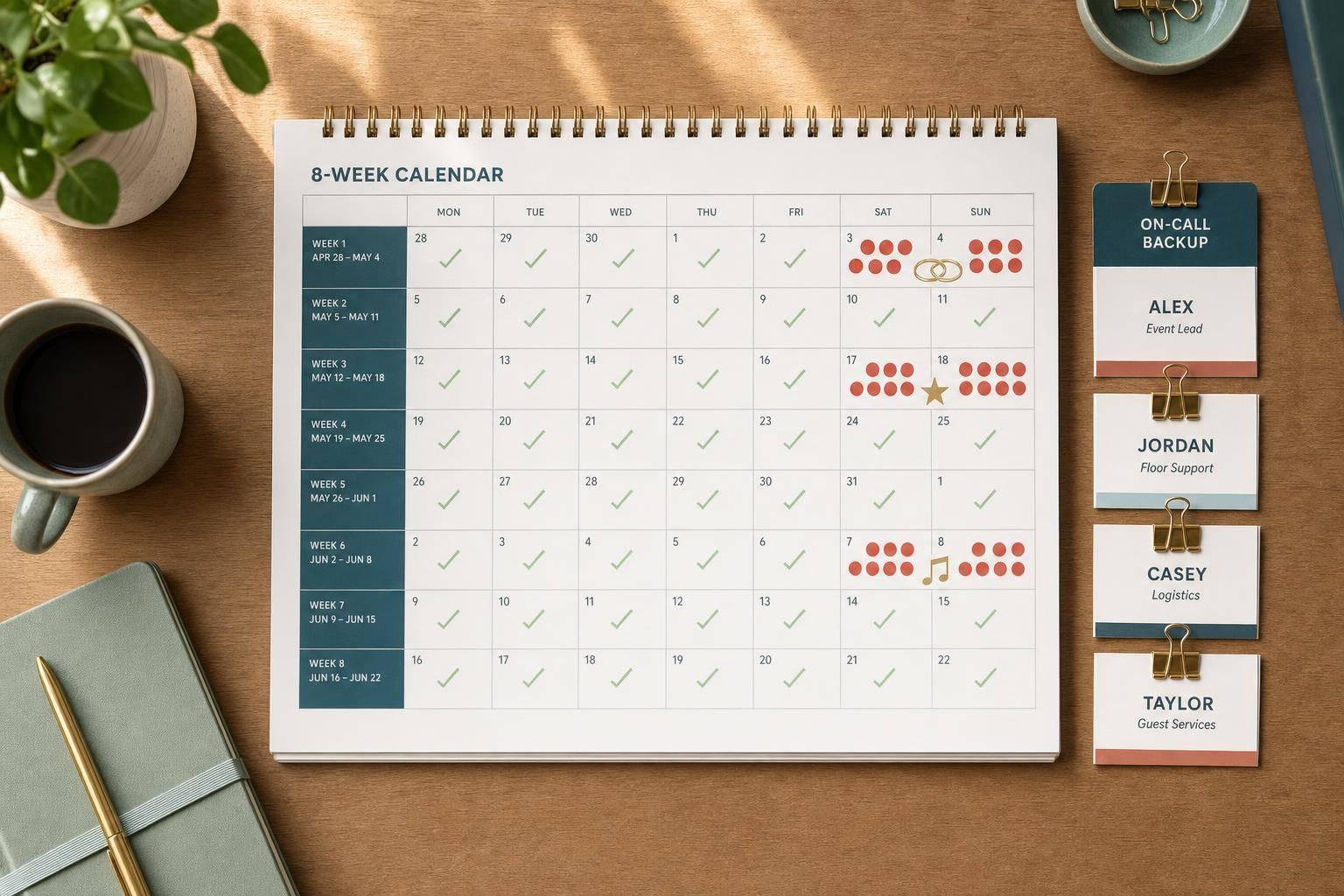
Staff gaps usually aren’t random - they hit on the same dates every year. In the U.S. events market, 76% of weddings happen from May through October, 34% landed in September and October in 2023, and nearly 95% fall on Friday, Saturday, or Sunday. Add holiday parties, New Year’s Eve, local festivals, and conventions, and you get the same problem: too many events chasing the same people on the same days.
If I had to sum it up in plain English, it’s this:
Here’s the short version of what matters most for you:
The main point: if you can spot a thin date 3–4 weeks out, you still have time to fix it. If you wait until the final week, your options shrink fast.
This article breaks down the pattern, the reasons behind it, and the steps I’d use to stay ahead of peak-date staffing pressure.
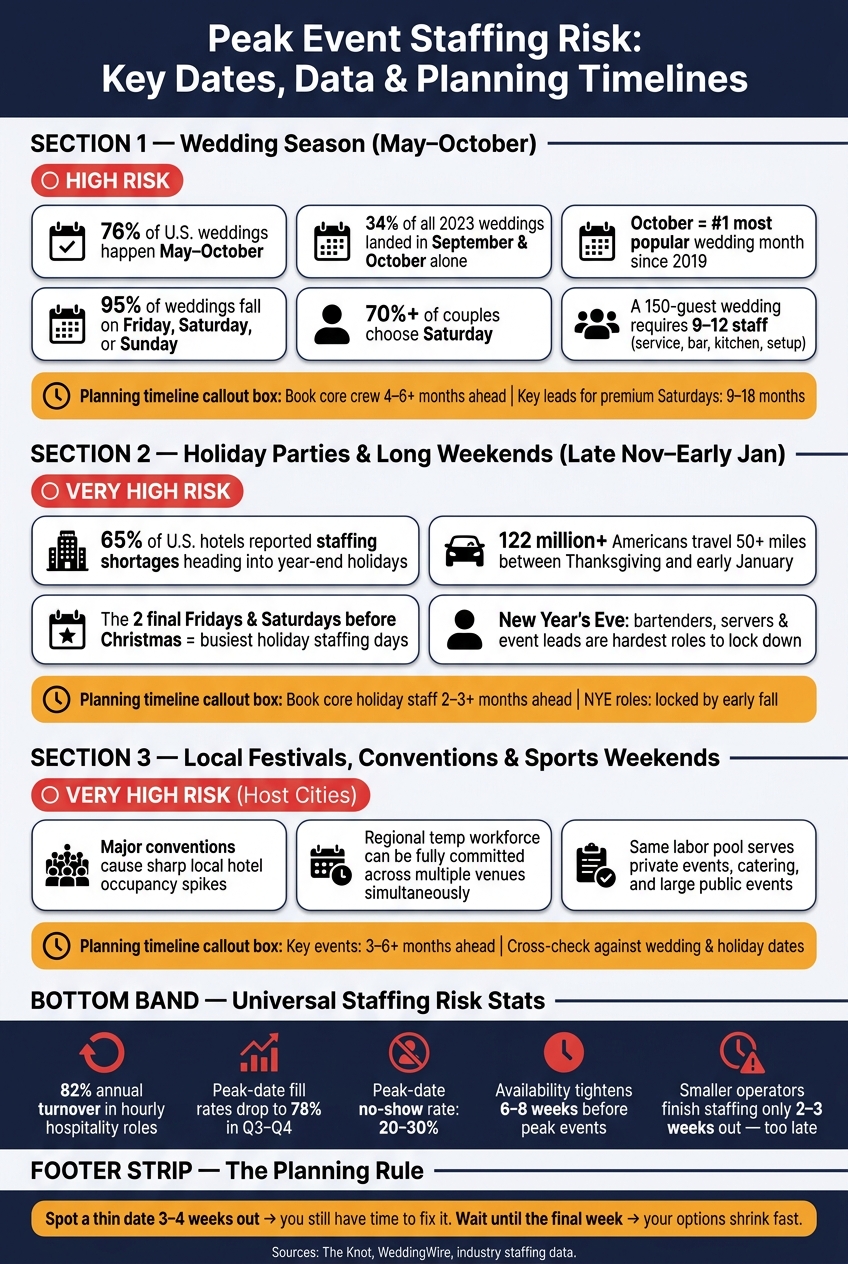
Peak Event Staffing Risk: Key Dates, Data & Planning Timelines
Event demand tends to bunch up into a few clear windows. And when it does, staffing gets tight fast. The pattern is pretty simple: when more events land on the same dates, every venue is chasing the same limited crew.
About 76% of U.S. weddings happen between May and October. So during those months, caterers, venues, and vendors are all trying to book the same servers, bartenders, chefs, captains, and setup crews. The squeeze gets even tighter in early fall. September and October alone accounted for 34% of all U.S. weddings in 2023, and October has been the single most popular wedding month since at least 2019.
The calendar makes this even tougher. Over 70% of couples choose Saturday, and nearly 95% of all U.S. weddings fall on a Friday, Saturday, or Sunday. So demand is not just seasonal. It piles into the same weekend slots. A 150-guest wedding typically requires 9–12 staff across service, bar, kitchen, and setup. If several venues in the same metro area are hosting similar weddings on the same Saturday, the local labor pool can dry up in a hurry. In these cases, managers often rely on last-minute scheduling tools to fill sudden gaps.
When that wave slows down, another one shows up.
As wedding season tapers off, corporate parties, private holiday dinners, and New Year's Eve events start stacking up from late November through early January. At the same time, vacation requests and holiday travel hit their peak, making event staff availability tracking essential. More than 122 million Americans were expected to travel at least 50 miles between Thanksgiving and early January.
That overlap puts event staffing in a bind. Industry data shows 65% of U.S. hotels still reported staffing shortages heading into the year-end holidays, and event teams feel that same strain. The two final Fridays and Saturdays before Christmas are widely flagged as the busiest days of the holiday stretch. Then there is New Year's Eve, which creates a staffing crunch of its own. Bartenders, servers, and event leads are among the hardest roles to lock down for that single date.
Citywide events add one more layer of pressure. Big local gatherings often pull from the exact same labor pool that private events and catering jobs rely on. When a metro area hosts a major convention, a multi-day festival, or a high-profile sports weekend, the regional temp workforce can get booked across the board at the same time.
Research on multi-day conventions shows sharp local hotel occupancy spikes. That matters because higher hotel demand often means tighter staffing for catering and private events happening on those same dates.
These overlaps are what make peak dates so hard to staff.
Use the table below as a planning baseline:
| Period | Staff Availability Risk | Recommended Lead Time |
|---|---|---|
| Wedding season (May–Oct) | High on June, Sept, Oct Saturdays | Core crew: 4–6+ months; premium Saturdays: 9–18 months for key leads |
| Holiday parties & long weekends (late Nov–early Jan) | Very high due to time-off requests and travel | Core holiday staff: 2–3+ months; NYE roles locked by early fall |
| Local festivals, conventions, sports weekends | Very high in host metros; temp pools committed across multiple venues | Key events: 3–6+ months; cross-check against wedding and holiday dates |
The patterns in the previous section show when shortages hit. This section gets into why they keep showing up, even when teams can see the busy dates coming from a mile away.
Peak dates line up with the same periods when staff most often want time off: summer weekends, Thanksgiving, Christmas, and New Year's Eve. That isn't bad luck. It's built into how the calendar works.
Once those dates fill up, three event staff scheduling challenges tend to make the problem worse.
Late schedules and repeated weekend shifts make workers more likely to turn down peak-date shifts or walk away from event work altogether. Hospitality already operates with a thin bench, and hourly roles see 82% annual turnover.
As the season goes on, experienced staff are more likely to ask for time off, call in sick, or stop taking new shifts. It makes sense. Back-to-back long shifts, late breakdowns, and early setups wear people out. And when availability starts to shrink, the risk doesn't stay limited to simple understaffing. It can spill into full event disruption.
That smaller pool is exactly why waiting to schedule tends to backfire.
In busy U.S. markets, peak-date availability often starts tightening 6–8 weeks before the event. Bigger venues usually secure key leads earlier, but many smaller operators still finish staffing only 2–3 weeks out. By then, the most dependable workers are often already taken.
What's left is a smaller pool with less experience. That usually means more overtime for core staff, more burnout, and weaker fill rates. During peak season in Q3–Q4, event-specific fill rates fall to 78%.
On a peak Saturday in October, one no-show can throw the whole event off balance. Peak weekends get hit harder because backup staff are often already booked. And the causes are familiar:
These pressure points are predictable. They show up in the same windows, on the same kinds of dates, year after year. That's what makes calendar-based risk tracking the next logical move.
Staff gaps are often easy to see before they hit you - if event dates, staff availability, and local demand all live in one calendar view. When you do that, busy-date patterns stop being a guessing game. You can see them. And once that pattern shows up in a calendar forecast, you can turn it into a day-by-day staffing forecast.
Start by laying out every scheduled event across a rolling 4- to 8-week window. For each date, track the event type, day of week, start and end time, expected guest count, venue complexity, service format, and load-in and breakdown times. You can also use an event staffing needs analyzer to calculate precise headcounts based on these variables. Then turn each event into role counts and compare those numbers against confirmed, tentative, and open shifts by date.
Here’s the idea: a 150-guest plated dinner needs a set number of servers, bartenders, and a captain. Put that next to who’s actually available before the staffing window closes. That’s when weak spots start to stand out.
Once the calendar is mapped, flag thin dates before the season gets packed.
A simple color system can turn a packed calendar into a risk map you can act on.
Pre-flag known peak wedding, holiday, and local-event windows, then review them every week. Amber dates need backup confirmation. Red dates need action right away: confirm primary staff first, activate waitlists, and decide whether you should accept new bookings before coverage is locked in.
This is where calendar visibility helps solve common scheduling problems that arise from last-minute planning.
| Aspect | Manual Late Scheduling | Calendar-Based Planning |
|---|---|---|
| Planning effort | High; managers rebuild lists manually for each event and chase confirmations by text or phone | Lower ongoing effort; assignments, updates, and reminders are streamlined and reusable |
| Visibility | Limited; no single view of all events and staff on a given date | High; events, roles, and assigned staff are visible on one calendar, often color-coded by status |
| Gap risk | Higher; gaps typically surface in the final week as no-shows or miscounted roles | Lower; shortages appear weeks out when more options are still available |
| Day-of-event impact | Higher disruption risk; last-minute scrambles with a depleted pool | Lower disruption risk; backup coverage is confirmed and communication is already in place |
A live calendar shows staffing gaps while there’s still time to fix them.
Red and amber dates need earlier outreach, backup coverage, and active confirmations.
For routine events, book staff 4–6 weeks ahead. For large weddings, aim for 2–3 months. And for Thanksgiving, Christmas, New Year's Eve, plus major local festivals and sports weekends, start 3–6 months in advance.
Start with captains, bartenders, and experienced kitchen staff. Those roles usually go first because these workers often pick up shifts from multiple employers. Once their calendars are packed, finding a solid replacement gets a lot harder.
The reason is simple: peak-date calendars fill up fast.
Not every part of an event needs the same staffing level. A wedding may need a full crew for cocktail hour and dinner service, then fewer people during setup and breakdown. A good way to plan is to build the schedule around the busiest 30 minutes first, then add lighter coverage around that window.
That approach helps you put labor where it matters most instead of spreading people too thin across the whole event.
Beyond your core team, keep a backup pool of pre-vetted workers ready to step in on short notice. Peak weekends can bring 20% to 30% no-shows. So if you need 15 staff members on your busiest Saturday, it makes sense to keep a pool of 30–45 vetted workers. Cross-trained team members help too. If a bartender or server drops, you have more room to move people where they're needed most.
| Approach | Strengths | Trade-offs | Best-fit use cases |
|---|---|---|---|
| Early hiring | Secures staff before calendars fill; improves reliability; cuts last-minute scrambling | Requires earlier forecasting and commitment | Weddings, holiday events, large seasonal bookings |
| Staggered shifts | Matches labor to busy hours; cuts idle time | Requires careful timing and handoffs | Events with strong spikes at arrival, meal service, or breakdown |
Build the schedule for the worst 30 minutes first, then protect the rest with backups.
Booking someone six weeks out doesn't mean much if you never check back in. What protects peak dates is a steady confirmation process: confirm at booking, send a reminder a few days before the event, do a final check-in within 24 hours, and run a same-day status check for key roles. Each touchpoint gives you a chance to catch cancellations before they turn into open shifts.
Live status checks make red dates easier to manage right up to event day. Instead of finding out about a no-show after guests walk in, managers can see which roles are confirmed, which are still unconfirmed, and where the top-priority gaps are. That makes it much easier to pull from a backup list or waitlist without the usual chaos.
A live confirmation view makes event staff scheduling easier and keeps peak dates from turning into last-minute scrambles.
Once a date turns red, the next job is simple to describe and hard to manage: get every role, backup, and reminder into one place. Quickstaff does that with a calendar-based workflow. It helps caterers, wedding businesses, event vendors, and staffing agencies move from planning to action without juggling separate tools.
Quickstaff gives managers one calendar for events, roles, and assignments. When you set up an event, you can add the date, location, event type, and the number of people needed for each role.
Staff can update their availability from mobile devices, so managers are looking at current info instead of guessing. That matters when busy dates start stacking up. If several weddings land on the same Saturday and confirmed coverage is short, the gap shows up weeks earlier, before the scheduling window closes.
Managers can also use reserved assignments to hold key team members, like lead bartenders or captains, for high-priority events. That helps stop double-booking across overlapping weekend shifts. In plain terms, you can spot trouble before it becomes a same-day scramble. Having an event day checklist ready ensures nothing is missed during the rush.
Quickstaff also lets managers add backups to a waitlist inside the event itself. The backup stays visible in the same system, which saves time when plans change. If a server drops out, managers can move in a waitlisted replacement and send event details right away.
Built-in messaging and reminders help keep confirmations moving all the way to event day. Managers can:
That makes a staged confirmation process - 7 days out, 72 hours out, and the morning of - much easier to run. And when peak dates get messy, that kind of speed can make all the difference.
Quickstaff offers plans for smaller teams and larger operations, so seasonal demand is easier to handle as workload grows.
Staff shortages tend to pile up around peak dates: wedding season, holiday parties, and local event rushes. Demand jumps at the same time worker availability shrinks. When scheduling gets pushed to the last minute, a problem you could see coming turns into a same-day scramble. That’s why calendar-based forecasting makes sense here.
Once you can spot a gap 3–4 weeks ahead, you still have room to act. Looking at the next 4–8 weeks by date, role, and event type helps teams flag high-risk weekends before the labor pool gets tighter. If a gap shows up 3–4 weeks out, you still have time to recruit sooner, activate a waitlist, or shift coverage where it’s needed.
These shortages aren’t one-off problems. They come back again and again as seasonal demand runs into a limited labor pool.
When peak dates are understaffed, service slows down, sales drop, and reviews take a hit.
That’s where Quickstaff comes in. It keeps availability, waitlists, and confirmations in one calendar, so peak dates are easier to manage.
Demand tends to jump during predictable seasonal peaks and local event rushes, especially during peak wedding months from May through October and on holiday or corporate-event weekends in November and December.
During those dates, managers usually need more role-specific coverage. At the same time, staff availability often shrinks around major holidays and fully booked Saturdays. That mix creates recurring gaps in the schedule.
Schedule staff for peak dates as early as you can. A good place to start is past event patterns. That gives you a baseline, and then you can adjust the plan as the event gets closer and people’s availability shifts.
Try not to book with less than two weeks’ notice. At that point, labor costs can climb 20–30%. Keep updating the schedule all the way through go-live, and use real-time availability to catch gaps before they turn into a scramble.
Forecast demand from past event data and compare it with your actual staff capacity before the date is even booked. That gives you a clear read on what’s coming instead of relying on guesswork.
Look for peak periods, then run a weekly gap check by role to compare required hours with the staff hours you have available. It’s a simple way to spot trouble early, whether you need more bartenders, servers, or setup crew.
Quickstaff can help by putting availability, role-based scheduling, and waitlists in one place. So you can spot when a date may be short-staffed fast - and act before it turns into a scramble.


