Key Data Points for Smarter Scheduling Decisions
March 17, 2026


Scheduling effectively requires data - not guesswork. Without it, you risk overstaffing, which increases costs, or understaffing, which leads to burnout and poor customer experiences. Here are the key takeaways from the article to help you make better staffing decisions:
Technology streamlines scheduling by centralizing data, tracking staff availability, and automating reminders. Tools like Quickstaff save time and reduce errors, ensuring smoother operations. Start by analyzing 12–18 months of historical data to identify trends and set measurable KPIs for efficiency and performance.
Bottom Line: Data-driven scheduling improves productivity, reduces costs, and creates better experiences for both staff and customers.
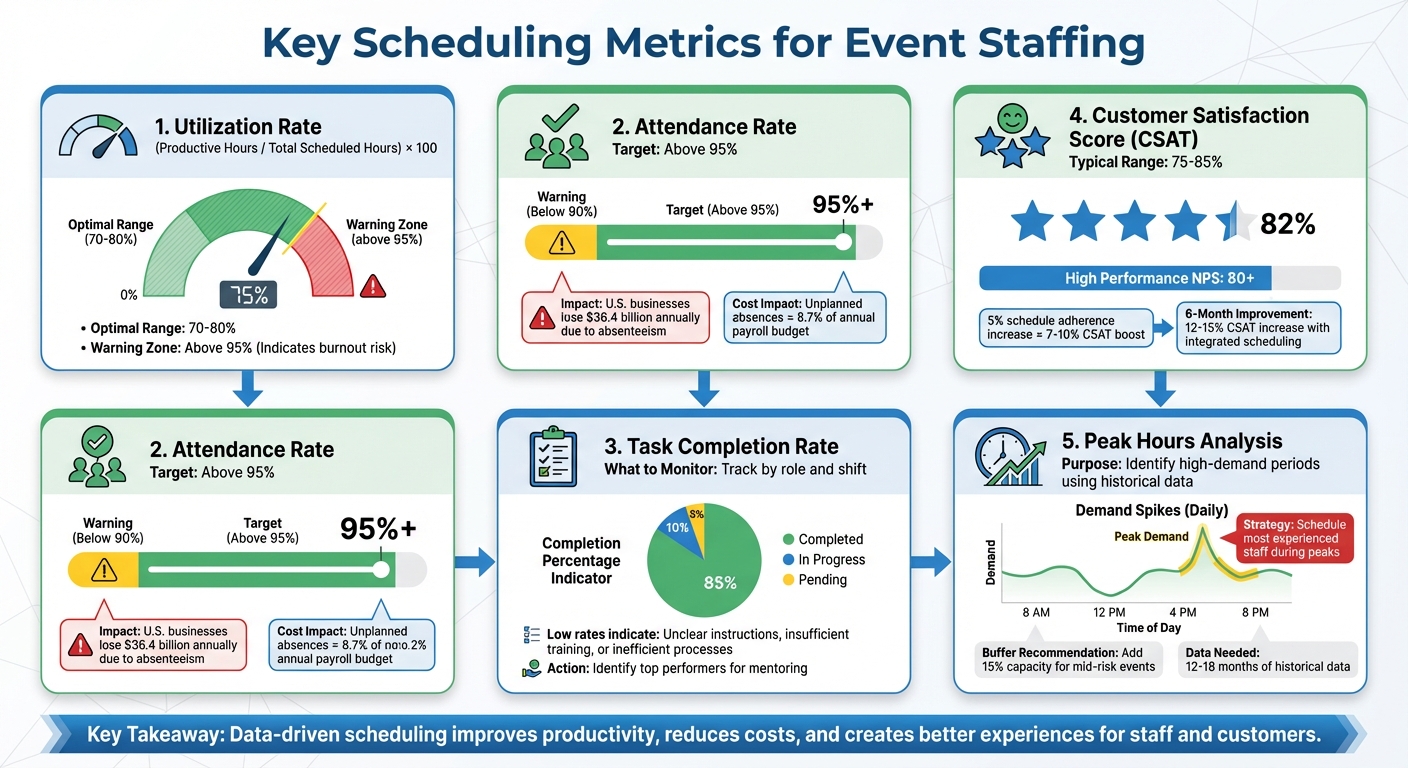
5 Key Scheduling Metrics for Event Staffing Success
Tracking the right metrics can transform scheduling from guesswork into a strategic advantage. By analyzing these metrics, you can pinpoint what’s working and uncover areas that need improvement.
The utilization rate measures how much of a staff member’s scheduled time is spent on productive tasks like guest service, setup, or coordination. It’s calculated using this formula: (Productive Hours / Total Scheduled Hours) x 100. For event staffing, a sweet spot is typically between 70% and 80%, balancing productivity while avoiding burnout.
If utilization consistently climbs to 95% or higher, it could be a sign of overworked staff, which increases the likelihood of errors. Brett Downes, Founder of Link Building Geek, emphasizes:
"Once the utilization rate hits 75%, that signals that we need another staff member to cope with the workload".
Review this metric during debriefs to spot bottlenecks. For instance, some roles might be stretched thin while others have downtime. Adjusting responsibilities can help even things out. Additionally, keep in mind that unplanned absences can eat up as much as 8.7% of a company’s annual payroll budget.
Next, let’s look at attendance rates to further evaluate team reliability.
The attendance rate compares the number of staff who actually show up to the number scheduled. A healthy rate should exceed 95%. If it dips closer to 90%, it’s a warning sign - persistent no-shows can disrupt operations and place extra stress on active team members.
Track attendance by event type, role, and season. For example, absences might spike during flu season or holidays. If certain roles or departments consistently have low attendance, it could point to burnout or disengagement. U.S. businesses, in fact, lose about $36.4 billion annually due to absenteeism. Anthony Presley, CEO of TimeForge, advises:
"The path forward isn't about reacting to absences but anticipating them, transforming data into a blueprint for growth".
To ensure accurate attendance tracking, consider using biometric systems to eliminate issues like buddy punching.
This metric tracks whether tasks are completed on time and meet required standards. Low task completion rates can signal problems like unclear instructions, lack of training, or inefficient processes. For example, if setup teams frequently run behind schedule or registration desks struggle with check-ins, it may be time to refine training or adjust staffing levels.
Monitor completion rates by role and shift. If underperformance is consistent, this could highlight areas where targeted training or role reassignment is needed. On the flip side, tracking this metric can also help identify top performers who could mentor others and reduce recurring issues. These adjustments ensure smoother operations and better performance across the board.
Finally, let’s explore how scheduling impacts guest experiences through customer satisfaction scores.
Customer satisfaction scores (CSAT) provide insight into how scheduling decisions affect guest experiences. A typical CSAT for events ranges between 75% and 85%, while organizations with high standards often achieve a Net Promoter Score (NPS) of 80 or higher. These scores reflect factors like wait times, staff availability, and service quality.
Gather feedback through post-event surveys, social media, or digital platforms. Break down responses by time and location to identify specific challenges. For instance, if satisfaction drops during shift changes, there may be coverage gaps. Organizations that integrate scheduling with satisfaction tracking often see CSAT improvements of 12–15% within six months. Even small gains in schedule adherence - like 5% - can boost satisfaction by 7–10%. High CSAT scores confirm that the right staff is in the right roles, while lower scores highlight issues like understaffing or lack of experience.
Peak hours analysis uses historical data to pinpoint times of high demand, such as event start times, meal services, or registration. Rather than staffing for average conditions, this approach helps you prepare for demand surges, reducing wait times and guest frustration.
Review past events to identify patterns, whether daily or seasonal. Once peak periods are clear, schedule your most experienced staff during these times and add a buffer - typically around 15% for mid-risk events - to handle unexpected spikes. This proactive approach ensures your team is ready to handle high-demand periods effectively.
Managing schedules manually becomes a headache as your event business grows. Modern scheduling platforms simplify this process by bringing together data collection, staff coordination, and communication into one easy-to-use dashboard. These tools help you quickly act on key metrics like utilization rates, attendance trends, and peak hours. They not only make operations more efficient but also open the door to advanced features that take scheduling to the next level.
A centralized platform cuts through the clutter of juggling multiple tools. For example, confirming staff availability can take just 2 minutes instead of hours. Quickstaff (https://quickstaffpro.com) has been a game-changer for caterers and event vendors, helping them schedule staff for over 20,000 events since 2013. It provides real-time insights into which events are fully staffed and which need immediate attention. With cloud-based access, you can review and adjust schedules from anywhere, avoiding the common pitfalls of outdated systems.
"My time spent scheduling has shrunk majorly, leaving me more time to focus on recruiting, on-boarding and training."
- Jennifer Manley, Staffing Coordinator
Real-time availability tracking ensures you don’t accidentally schedule someone who’s already booked. Staff can update their own availability in the system, cutting down on back-and-forth communication. And when unexpected cancellations happen - like a server calling out sick - automated waitlists step in to notify available staff and quickly fill the gap. This keeps your events fully staffed and running smoothly.
Beyond availability tracking, automated tools help keep communication timely and seamless. Notifications make it easy to get quick responses from staff without the need for endless follow-ups. Staff can accept shifts instantly, speeding up confirmations and reducing scheduling gaps. Platforms are mobile-friendly and sync with popular calendar apps, preventing double-bookings and ensuring everyone gets the details they need - like directions and role expectations.
Event Manager Steven Townsend highlights the impact:
"I used to be on the phone all the time to schedule staff. Now, within a few minutes, I can schedule all the staffing I need for my events."
This streamlined communication doesn’t just save time - it directly improves customer experiences. Well-organized events often achieve Net Promoter Scores as high as +50, while also cutting down on no-shows, which cost U.S. businesses $36.4 billion annually.
Once you've pinpointed the key metrics that matter most, the next step is weaving these insights into your daily operations. By leveraging historical data and modern scheduling tools, you can make smarter staffing decisions that directly impact efficiency and costs.
Switching from intuition-based scheduling to a data-driven approach doesn’t mean starting from scratch. Begin by gathering 12–18 months of historical data to identify seasonal trends and workload patterns. Focus on metrics like customer traffic or transaction volume rather than just operating hours. For example, a 47-store retail chain made this shift and saw labor costs drop from 18.2% to 15.8% in just six months. Even better, they cut average checkout wait times by 36%, from 6.4 minutes to 4.1 minutes.
Dive into your historical data to uncover when and where resources are most needed. Look at timestamps, transaction spikes, and other indicators to identify peak demand periods. Compare your scheduled staffing levels to actual labor usage to find inefficiencies, such as overstaffing or understaffing. Businesses relying on static schedules often overspend on labor by 8–15%, compared to those that adjust staffing based on demand.
Another valuable practice is conducting post-event reviews with your team. These debriefs can reveal which areas were under-resourced or overstaffed during key moments. Instead of having everyone start and finish their shifts at the same time, stagger shifts to ensure extra help is available during peak periods, such as when doors open or during intermissions.
Once you’ve analyzed your data and identified patterns, it’s time to set measurable goals to guide your staffing strategy.
Define 5–7 core KPIs that align with your operational goals. Examples include maintaining a 98% fill rate, keeping no-show rates under 5%, and achieving 70–80% staff utilization. One regional call center discovered they were losing $2.3 million annually due to mismatched staffing. By introducing clear KPIs, they reduced labor costs by 12% in just one quarter.
Tools like GPS check-ins can help boost attendance rates to 95% or higher, ensuring that your team is where they need to be when they need to be there. Keep in mind, 73% of staffing agencies lose clients because of missed KPIs like attendance rates and payroll errors.
With these KPIs in place, the next step is to streamline scheduling with the right tools.
As your business grows, manual scheduling becomes less practical. Tools like Quickstaff (https://quickstaffpro.com) can track real-time metrics, such as fill rates and attendance, allowing you to make immediate adjustments when needed. A centralized dashboard lets you monitor events and measure performance against your KPIs. Companies using staffing software often see a 60% reduction in operational risks and a 35% increase in profits. For instance, one retail chain cut the time managers spent on scheduling from 4.5 hours to just 1.2 hours per week per store.
Data-driven scheduling lays the groundwork for reducing uncertainty and managing risks effectively. With 94% of event organizers identifying data management as a top priority, it's evident that the industry has shifted away from relying solely on intuition.
"Data empowers event planners to move from reactive to proactive, from general to personalized, and from guesswork to precision." - GlobalMeet Blog Team
By monitoring metrics like utilization, attendance, and peak hours, you can align staffing levels with actual demands. This approach not only avoids wasteful overstaffing, which strains budgets, but also prevents the chaos caused by understaffing. Regularly reviewing data ensures you're prepared to address staffing challenges before they escalate.
These insights pave the way for using technology to refine scalable event scheduling processes. Tools like Quickstaff (https://quickstaffpro.com) simplify this task by offering real-time analytics, automated reminders, and features such as the Event Staffing Efficiency Analyzer to identify staffing imbalances. With its mobile-friendly platform, Quickstaff centralizes event tracking, enabling real-time adjustments and seamless communication - allowing you to focus on executing outstanding events.
Let data steer your next scheduling decision. The insights you gather today can lead to smoother, more profitable events tomorrow.
If your utilization rate is consistently above 95%, it might be time to take a closer look at staffing efficiency. High utilization could signal potential overstaffing, which can lead to wasted resources. Consider adjusting staff allocation to align more closely with actual demand. Fine-tuning your scheduling process can go a long way in maintaining balance and boosting overall efficiency.
If you don’t have historical data to rely on, focus on real-time demand signals and external event data to predict peak hours. Keep an eye on local events, holidays, and attendance patterns to identify potential demand spikes. You can also monitor live customer flow and sales during initial operations to make on-the-fly adjustments to staffing. By blending these insights, you can create a more flexible schedule and ensure you have enough staff during unexpected or evolving peak times.
Tracking key scheduling metrics can make a big difference in how efficiently your team operates. Some important ones to keep an eye on include:
By keeping tabs on these metrics, you can fine-tune your scheduling, address staffing challenges, and ensure everything runs as planned.





