How Staff Train for VR Event Support
September 22, 2026

If VR staff can’t run the same steps every time, the line slows down, guests get confused, and safety problems show up fast.
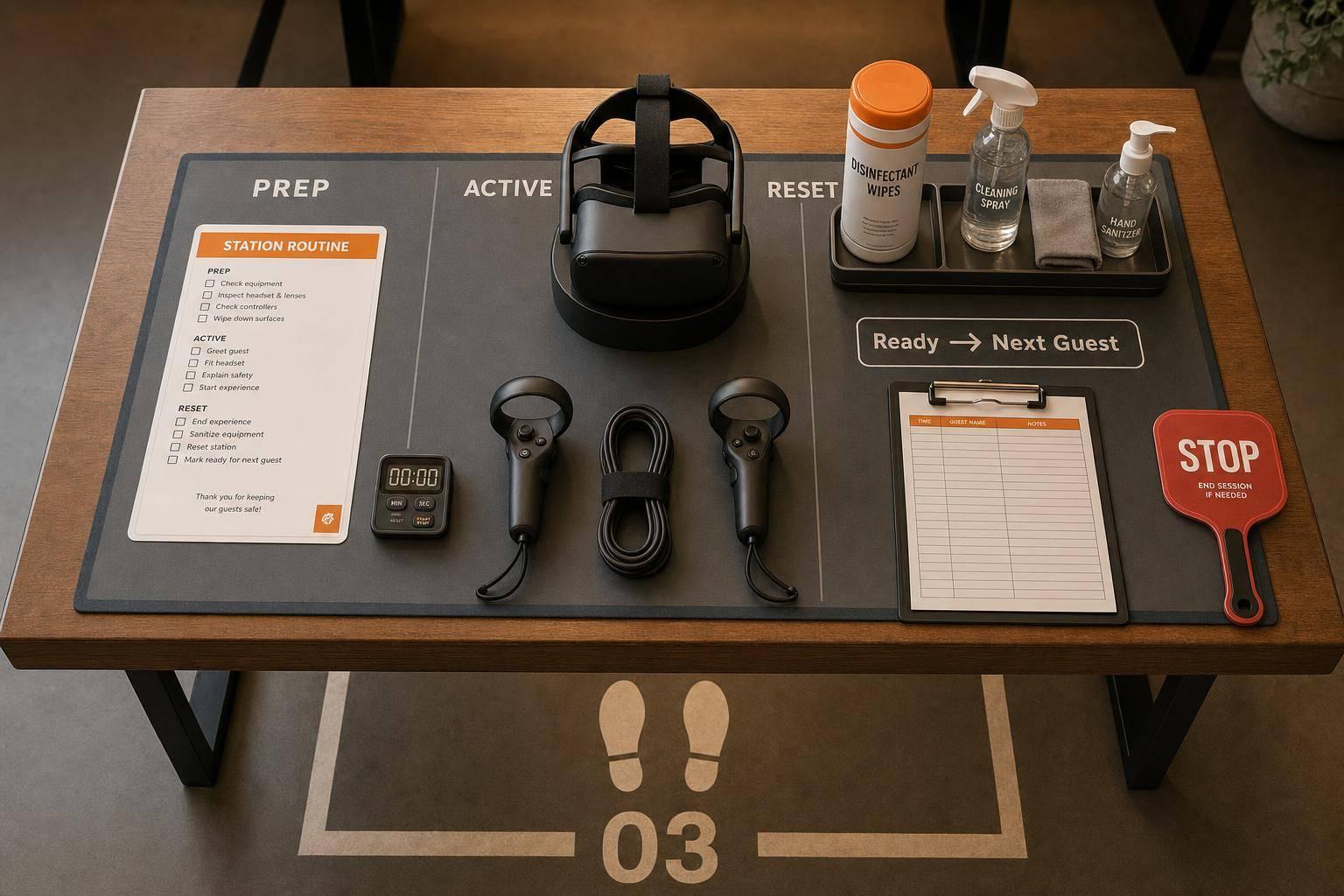
I’d sum the training up like this: staff need to learn clear roles, one station routine, a short guest script, stop rules, cleaning and reset steps, and shift handoff notes. The article also points to short drills - 5 to 10 minutes for setup and shutdown, plus a 20-minute role-play for line pressure, guest issues, and tech problems.
Here’s the full picture in plain English:
A few facts stand out. The article suggests about 10 minutes for new-user sessions, uses the U.S. date format 09/23/2026, and treats guest illness or failure to respond as issues that must be passed to a lead under site policy.
The main idea is simple: I’d train for consistency, safe guest handling, and fast station turnover so each guest gets the same steady experience from start to finish.
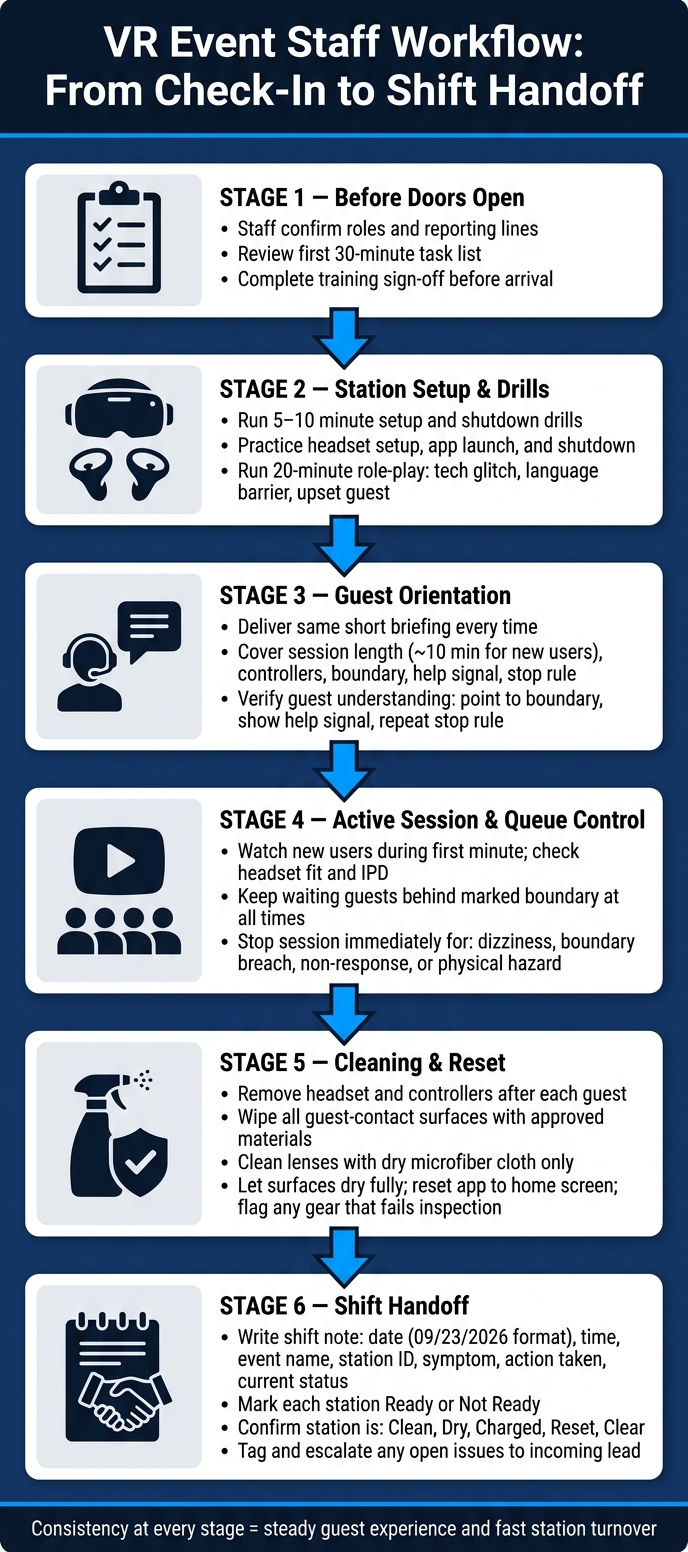
VR Event Staff Workflow: From Check-In to Shift Handoff
Have staff finish training sign-off before they arrive. That keeps the on-site briefing tight and focused on hands-on practice, not paperwork.
Each person should be able to use the one-page operational brief without hesitation. They should also know their first 30-minute tasks and exactly who they report to.
Use the workflow to make every guest handoff easy to spot. Walk staff through the full path: check-in, headset issue, play session, headset return, and station reset.
The goal is simple. Before doors open, everyone should know where one handoff ends and the next one starts. That includes check-in, headset issue, play time, and reset.
Before the event starts, run short 5- to 10-minute drills on headset setup, app launch, and shutdown tasks.
Then run a 20-minute role-play drill that covers:
Keep the drill centered on technical failure and fast reset. In a live VR station, that's where speed matters most.
Assign one Event Captain to take over technical issues that supervisors can't fix on their own. Use Quickstaff to assign roles, send reminders, and keep event details in one place, so each staff member shows up knowing their job.
Once roles are set, move straight into training on guest guidance and safety.
With roles assigned, training should shift to guest guidance and safety. This is the point where staff turn setup into a calm, steady handoff for each guest.
Train staff to give the same short briefing every time, even when things get busy. Cover the session length, how to hold and use the controllers, the play boundary, the signal for help, and the stop rule. Tell guests to stay inside the marked area, keep both controllers in hand, and stop right away if they feel dizzy, nauseated, disoriented, or uncomfortable. For new users, short sessions of about 10 minutes are a good place to start.
Before the session starts, ask the guest to point to the boundary, show the signal for help, and repeat the stop rule. That quick check matters. If they can’t do it, slow down and go through the briefing again. If the guest can’t see, hear, or follow the instructions, pause and refit the headset or restate the briefing more slowly.
Staff should also point out the floor boundary and explain that the headset’s boundary system warns users when they get close to the edge. The floor markings show the usable area.
After the briefing, check the fit and watch the first minute closely.
Fit the headset first. Adjust the strap so it feels secure without being painfully tight, set lens spacing (IPD) if the device allows it, and make sure the image looks sharp. Blurry vision can increase discomfort and motion-sickness risk, so this step should never get rushed.
Don’t leave a first-time user alone during those opening moments. Watch for hesitation, shaky footing, or trouble responding to prompts. If a guest seems unsure or has balance concerns, offer a seated option if the experience allows it. For children or older adults, slow the briefing and stay closer. Follow the device’s current age guidance and your venue’s policy. Start only when the guest can stand or sit comfortably and respond clearly.
Keep waiting guests behind the marked boundary at all times. No one should enter until the previous guest has removed the headset, stepped out of the play area, and the station has been fully reset and cleared. Use a clear call-forward: "Wait behind the blue line until I call you in." Give honest wait times, and update them if the line changes.
Use one rule set for the line issues staff will see most often:
| Observed situation | Immediate staff action | Escalation required? |
|---|---|---|
| Guest asks for the expected wait | Give the current estimate and update it if the line changes | No, unless the queue is becoming unsafe |
| Guest steps over the waiting line | Ask the guest to return behind the marked boundary and explain why | No, unless the guest refuses or creates a hazard |
| New guest enters before reset is complete | Stop entry, move the guest back, and finish the reset | No, unless equipment or crowd control is compromised |
| Participant reaches the play boundary | Give the trained stop cue and guide the participant back only when safe | Escalate if the guest cannot reorient or repeatedly crosses the boundary |
| Guest reports dizziness, nausea, or headache | End the session, remove the headset, seat the guest, and notify the lead | Yes, according to the venue's incident policy |
| Child or spectator enters the play area | Pause the session if needed; move the person outside the boundary | Escalate if the area cannot be kept clear |
| Guest does not respond to instructions | Pause or end the session and remove the headset carefully | Yes, especially if the guest may be distressed or injured |
Train staff to treat dizziness, boundary warnings, and physical hazards as stop conditions.
Fast turnover starts with the same cleanup and reset routine after every guest.
As soon as a guest leaves, start cleanup and reset right away. Staff should follow the same sequence every time, no matter how busy the event gets. That kind of consistency helps keep things moving and cuts down on missed steps.
After each guest, remove the headset and controllers. Then check the straps, lenses, cables, and facial interfaces for debris or wear. Wipe all guest-contact surfaces using approved materials only. Lenses are the one exception - use a dry microfiber cloth and nothing else.
Once you've wiped everything down, let the surfaces dry all the way before the next guest puts on the headset. Reset the app to the home screen. If anything doesn’t pass the basic check, flag it before the next guest steps in. For troubleshooting, stick to approved actions only, like restarting the app, checking cable connections, and sending anything else to the lead.
Shift notes help the next team step in and keep things moving. Write them so the incoming staff member can take over without stopping to ask, “What happened here?” Once the station is reset, the last job is a clean handoff to the next team.
Each shift note should give the next staff member enough to start right away. Use the same format every time. Include the date in U.S. format, such as 09/23/2026, the approximate time, the event name, the station ID, and the name of the staff member writing the note.
Then stick to what was observed: the symptom, the guest impact, the steps taken, and the current status. Keep it tight. The goal is simple: give the next shift what they need to act now, not a long story.
| Field | What to record |
|---|---|
| Date and time | 09/23/2026, approximately 4:20 PM |
| Event and station | Event name and station ID (e.g., Smith Wedding / VR-01) |
| Guest impact | Delay, shortened session, reassignment, or no guest impact; omit personal details |
| Symptom | Exact behavior, such as "right controller disconnected twice" |
| Action taken | Battery replaced, app restarted, or station taken out of service |
| Status | Returned to service, temporarily unavailable, or removed from service - follow-up required |
| Battery/cleaning status | Charge level or charging status, cleaning done, and drying status |
| Supplies needed | Wipes, face covers, batteries, or microfiber cloths to restock |
| Follow-up | Named role or person and expected next action |
Here’s what that looks like in practice:
Station VR-02 showed left-controller disconnect; battery reseated once and pairing procedure completed; issue returned after test; station tagged out and manager notified at 4:40 PM.
That note gives the next team a clear starting point. No guessing. No backtracking.
Before anyone leaves, every station should be marked ready or not ready. After the note is written, check that the station matches the note.
Before leaving, confirm that the station is:
If a station has an open issue, tag it, note it, and tell the incoming lead directly. Use Quickstaff for reminders, assignments, and handoff visibility. Keep technical incidents in the operational log.
Strong VR event support comes down to repeatable habits at every stage. That includes a clear station workflow before doors open, a short and steady guest orientation at each session, defined queue and safety boundaries, proper cleaning and inspection between users, troubleshooting that stays within approved limits, and written notes at every shift change. When each step is handled the same way across shifts, the station keeps moving.
Keep VR staff training tied to the shift itself. Plan a 10–15 minute pre-shift briefing right before doors open, and spend about 3–4 minutes on safety.
If the schedule is packed, add a 3-minute reset before doors instead. Keep it short and practical with role-based drills and escalation walkthroughs, so the team is ready for the first 30–60 minutes of the event.
Staff should alert a frontline lead or zonal manager right away, support the guest, and check whether the guest improves within about 5 minutes. If needed, pause or hold the affected area.
If the guest does not improve within 5 minutes, or becomes unresponsive, escalate at once to event control and call 911 for major medical emergencies, following the on-site emergency plan and incident/run-sheet instructions.
A VR shift handoff note should be the clear source of truth for continuity and safety. It needs to spell out the basics up front: the date, shift start time, staff member name, assigned role, and supervisor.
From there, it should cover the details people need to do the job without guesswork. That includes current role assignments, shift timing, break plans, dress code, emergency reporting steps, PPE rules, escalation paths for technical issues, guest interaction expectations, task lists, and any relevant digital links.
Think of it like the baton pass in a relay race. If the handoff is messy, the whole shift can wobble. If it’s clean, the next person can step in and keep things moving.