Event Staff Etiquette Checklist for Pre-Shift Training
August 13, 2026

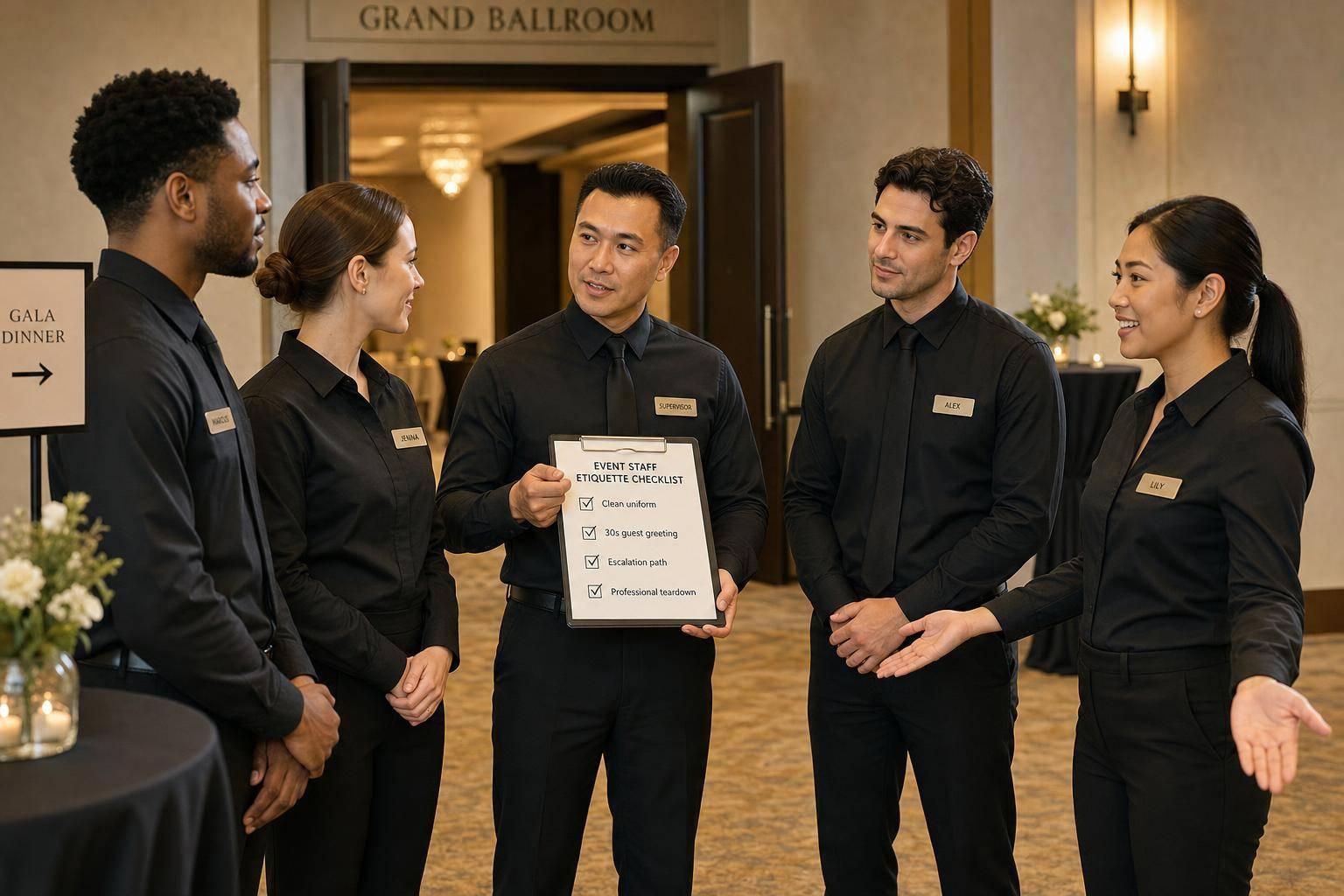
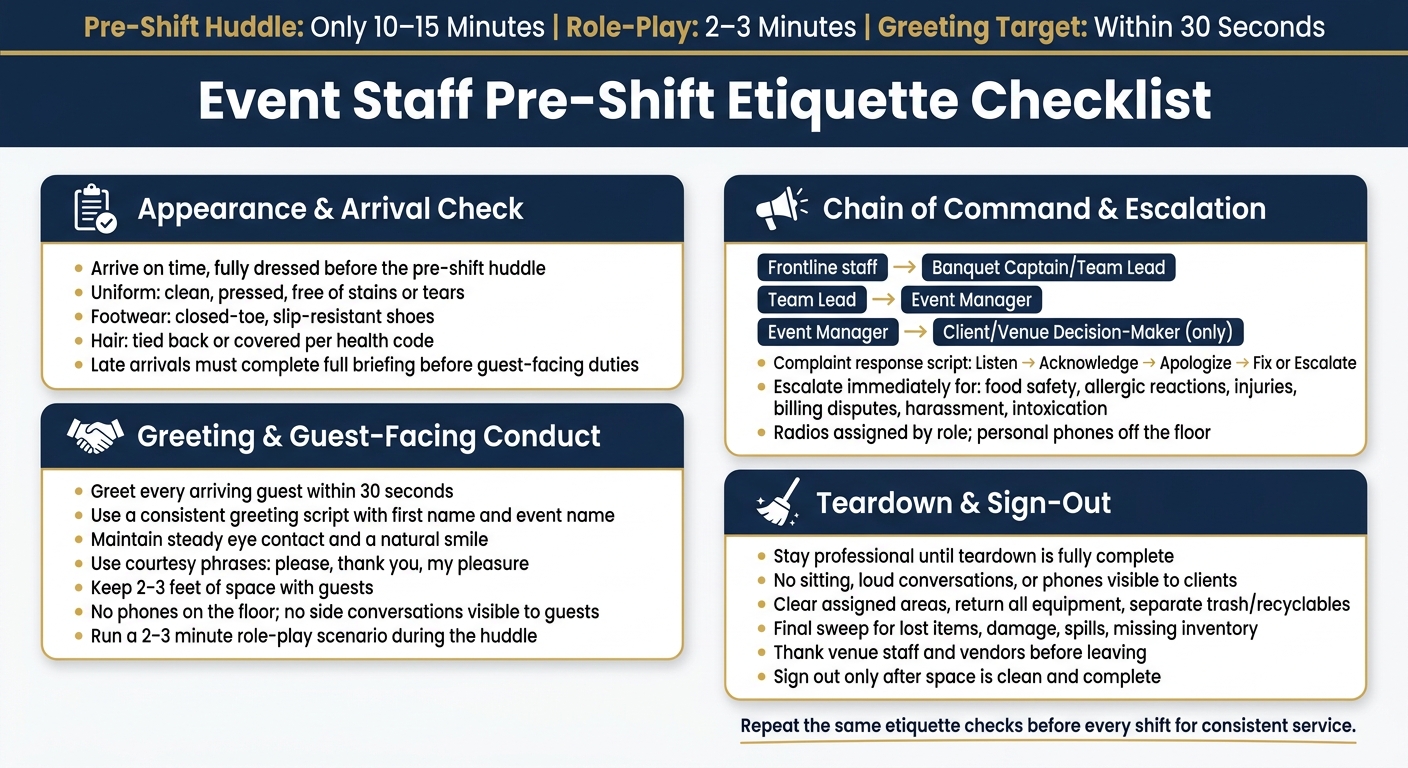
A 10–15 minute pre-shift huddle can stop many guest-facing mistakes before they happen. I’d use it to check four things: appearance, greeting, team communication, and teardown behavior.
Here’s the short version:
I also notice the article keeps the training simple: don’t change the core standards from event to event. Change only the event details, like names, timing, layout, and client notes.
A few facts stand out. The huddle takes only 10–15 minutes, role-play can be done in 2–3 minutes, staff should keep 2–3 feet of space with guests, and greeting speed is measured with one clear target: 30 seconds.
My takeaway: if I want steadier service, I’d repeat the same etiquette checks before every shift instead of leaving behavior to chance.
Event Staff Pre-Shift Etiquette Checklist
Before service starts, check each staff member against these basics.
| What to Check | Standard |
|---|---|
| Uniform (shirt, coat, apron) | Clean, pressed, and free of stains or tears |
| Footwear | Closed-toe, non-slip, or slip-resistant shoes |
| Hair and headwear | Hair tied back or covered per health code |
This check should happen before anyone steps into service. A clean uniform, proper shoes, and hair secured the right way set the tone fast.
If someone shows up without the required footwear or hair restraints, send them home to change before service begins.
Staff should arrive fully dressed and ready for the pre-shift briefing. They should not begin any guest-facing work until that step is done.
Late arrivals need to complete the full safety and operations briefing before taking on guest-facing duties. No shortcuts here. If someone misses the huddle, give them the notes and collect their initials before they start.
After arrival and presentation are checked, move to greeting standards and guest-facing conduct. The next step is making sure guest interactions stay steady from one team member to the next.
Once appearance and arrival are set, turn the team toward guest-facing behavior. A warm, direct greeting shapes the whole event, but it only works when the standard is clear.
Use a short, consistent greeting: "Good evening, welcome to [Event Name]. My name is [First Name], and I'll be taking care of you tonight."
Coach staff to:
A script gives less experienced staff something solid to lean on. It also helps the team greet people the same way each time, which improves first impressions and cuts down on missed interactions.
Set one simple benchmark before every shift: greet every arriving guest within 30 seconds. It’s easy to track, and staff know exactly what to aim for.
Use last names and titles at corporate or formal events when it fits. Use first names at casual events or when guests invite it. If you’re not sure, sir or ma'am is a respectful choice.
Don’t interrupt active conversations unless the issue is urgent.
Next, make sure tone and body language back up the greeting.
Tone and body language matter just as much as the words.
Use calm, steady speech and professional wording. Skip sarcasm, filler words, and overly casual phrases. For example, swap No problem for Of course and you guys for everyone.
Stand upright, keep hands visible, and leave 2–3 feet of space. Don’t lean, check your phone, or carry on side conversations where guests can see them. If staff need to stay visible without hovering, have them move through key service areas, like the entrance, bar, or buffet, in slow, purposeful circuits instead of standing in one spot.
Use one short practice round to lock in the standard. Pick one scenario and run it in 2–3 minutes during the huddle.
A solid option is guest arrival at check-in. One staff member plays a busy guest. Another plays the check-in attendant. The scenario should cover:
Run it once in a natural way. Then run it again using the checklist standards: eye contact, open posture, no interruptions, and a calm tone. Call out the difference so the team can see what good service looks like in real time.
From here, move into communication rules and escalation paths as part of your scalable event scheduling strategy.
Once greeting standards are set, the next step is simple: every staff member needs to know exactly who they report to and how issues move up the line.
Before service starts, frontline staff should report to the banquet captain or team lead. Team leads should pass operational issues to the event manager. And unless the event manager has handed that duty to someone else, only the event manager should contact the client or venue decision-maker.
Don’t leave this vague. Say it out loud during the huddle, then confirm it. Have each role repeat where they go for urgent issues. If you need to step away from the floor, name who’s in charge before you go. That small step can stop a lot of confusion later.
Communication needs the same kind of clarity. Assign radios by role. Use one channel for kitchen-to-service coordination and another for urgent service alerts. Non-urgent questions are better handled face-to-face. Personal phones should stay off the floor except in emergencies.
When a guest brings up a problem, the response should be calm and direct: listen without interrupting, acknowledge the issue, apologize, and either fix it or escalate it. No defending. No blaming. No arguing.
A simple script works well here:
Thank you for letting me know. I’m sorry for the inconvenience. I’m going to get a supervisor right away.
For billing or food concerns, move the conversation somewhere private and out of earshot. That helps protect the guest’s dignity and keeps the issue from turning into a scene.
Some problems should never stay with line staff. Escalate right away if the issue involves:
Staff should also know what they can solve on the spot versus what needs a manager right away. A missing utensil or a refill? Handle it. A safety issue or billing dispute? Bring in a supervisor at once.
Post these rules in the team’s event notes so everyone follows the same escalation path.
Use Quickstaff to post assignments, escalation notes, and event changes in one place, so every staff member shows up with the same instructions. Once escalation rules are clear, confirm teardown and sign-out expectations before the shift starts.
Once guest issues are closed out, move straight into teardown and sign-out using event staff availability tracking apps.
After guests leave, the job isn't over yet. Staff should stay professional until teardown is done and the space is signed out. That means no visible sitting around, no loud personal conversations, no phone use where guests can see it unless it's for work, and no joking or complaining within earshot of clients or attendees.
Teardown should stay orderly and coordinated. It helps to assign one person to watch guest-facing behavior during breakdown so the rest of the team can stay focused. Clear assigned areas, return all equipment, separate trash and recyclables, and do a final sweep for lost items, damage, spills, or missing inventory before sign-out.
If you're working near venue staff or other vendors, coordinate movement and ask before relocating anything that belongs to the venue. It's a small step, but it prevents mix-ups. Before leaving, thank venue staff and vendors.
Use the same closing standard at every event. Repeat it every time: stay professional through teardown, return all equipment, and sign out only after the space is clean and complete.
Managers should bring them up to speed right away, so they know their role and the current site conditions before they begin.
Use your scheduling platform or main communication tool to send a private, short briefing that covers the event run-of-show, safety protocols, and any updates tied to that shift. Then check assignments and shift status in real time to make sure they got the handoff notes or any needed documentation.
Encourage staff to skip stock lines like "Can I help you?" and lead with plain, human curiosity instead.
Teach them to look for simple buying signals: eye contact, a guest slowing down, or someone pausing at a display. Then have them step in within 15 to 20 seconds with open-ended questions tied to the event, such as what brought the guest there or what they hope to get out of it.
Escalate guests to a supervisor or the Event Commander right away if they’re causing a disruption, making threats, or if the situation could lead to a serious outcome like an ejection.
For non-medical guest help or lost items, use the designated guest service channels.
If staff can’t fix a technical issue within 60 seconds, pass it to the lead coordinator.