Ultimate Guide to Event Customer Service Skills
July 13, 2026

Good event service helps you get more bookings, more referrals, and better reviews. In live events, there is no pause button. Your team needs to communicate clearly, stay calm, fix problems fast, and follow through before, during, and after the event.
If I had to sum up the full guide in a few points, it would be this:
In short: if you want steady event service, you need three things working together: people skills, clear standards, and solid coordination.
The rest of the article breaks down how I’d put those pieces into practice at every stage of an event.
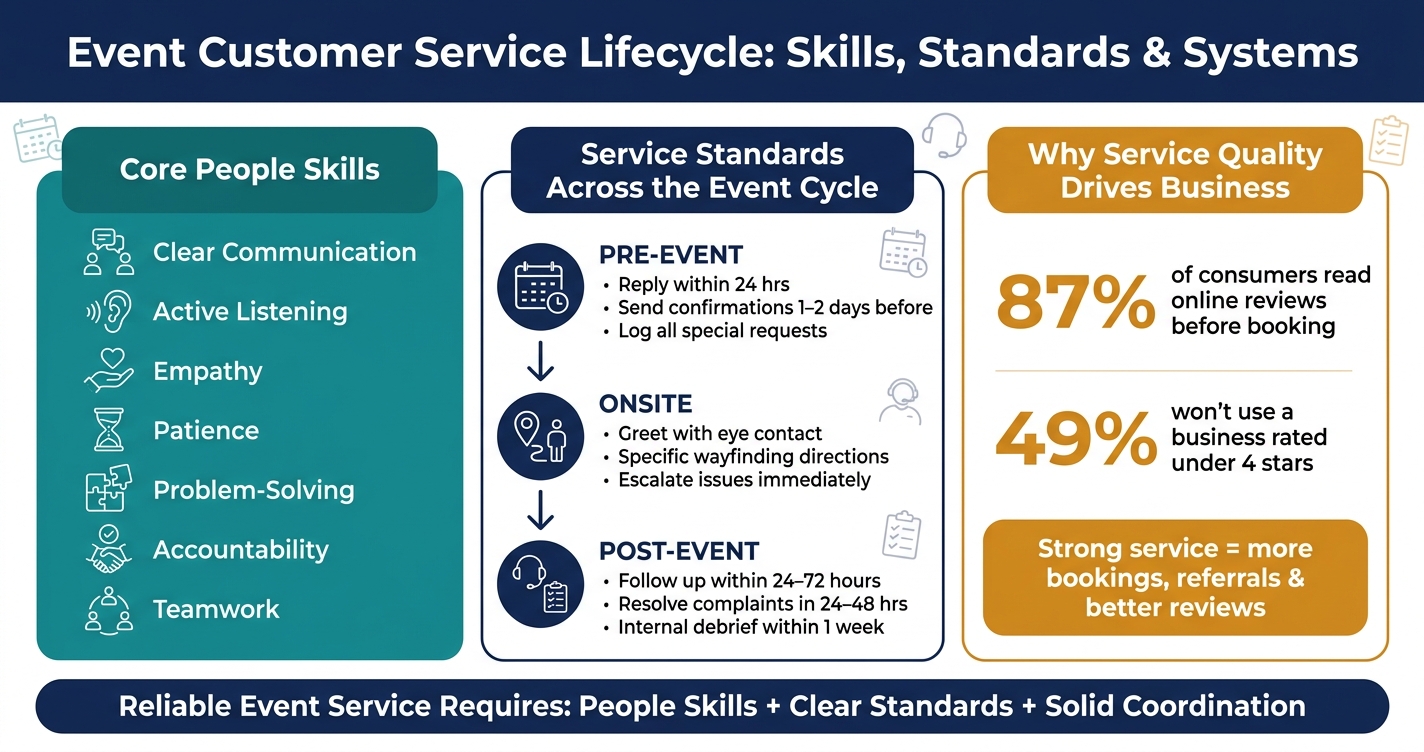
Event Customer Service Lifecycle: Skills, Standards & Systems
These skills matter at check-in, on the floor, and when something goes sideways. At each touchpoint, they keep service moving smoothly.
At registration and wayfinding, clear directions stop repeat questions and slowdowns. Instead of saying registration is over there, staff should give short, specific guidance: Registration is on Level 2. Take the escalator behind you, then turn left at the sign that says Event Check-In. One step at a time works best. It cuts confusion before it starts.
Mixed messages can do just as much damage. If one staff member calls a space Ballroom A and another calls it Main Hall, guests lose confidence fast. Everyone needs to use the same room names, the same timelines, and the same answers. That starts with a solid pre-shift briefing and event staff scheduling software the full team can pull up.
What staff hear matters just as much as what they say. Pause other tasks, face the guest, and paraphrase the concern before offering a fix. For example, a staff member might confirm that the guest is worried the group will not be seated together because they arrived late. That small step helps the guest feel heard and can lower frustration before anything is solved. If tension starts to build, a steady pace and open body language can keep things calm and stop the issue from getting worse.
Empathy at an event is more than saying you understand. It means showing it through action, and doing it fast. If a guest's dietary meal is missing, the best response is simple: acknowledge the issue, apologize, and contact the catering captain right away with a clear update time. Guests tend to remember that mix of acknowledgment, ownership, and a specific next step.
Long lines and delays push everyone's patience. Staff who move through the queue, share honest wait-time estimates, and offer small helpful gestures - like pointing out a nearby water station - can protect goodwill far better than an apology later. And when a guest turns rude or combative, professionalism means not taking the bait. The goal is to separate the behavior from the person. A calm response that follows policy can set a respectful boundary without adding fuel to the fire.
Room changes, AV failures, and staffing gaps are not rare on event days. They're part of the job. A simple five-step response loop helps teams stay steady:
Pre-planned contingencies make a big difference here. Backup indoor layouts for weather, secondary AV setups, and cross-trained staff help teams respond with control instead of scrambling in the moment.
Accountability is where teams often stumble. When a seating error happens, blaming someone else or going silent only makes it worse. Own the mistake directly, explain what happened, and give a specific timeline for the fix. That rebuilds trust faster than an excuse. Guests judge organizations not only by whether problems happen, but by how openly and reliably those problems are handled. Logging incidents and resolutions after each event also helps teams spot patterns and make the next event run better.
The skills above only work when each stage of the event has clear service standards. Staff need to know what good service looks like before the event, during it, and after it. That’s how communication, empathy, and accountability show up in day-to-day work instead of staying nice ideas on paper.
The pre-event phase is where trust starts. Or falls apart before anyone even arrives. Every touchpoint matters, from registration confirmations to schedule reminders to accessibility requests.
Reply to emails within 24 business hours, return voicemails the same business day, and respond to texts within a few hours. Those targets give people a clear and predictable service standard.
Send an immediate confirmation, then a final reminder 1–2 days before the event. Include the date and time in U.S. format, the venue address, parking details, a short schedule preview, and a support contact. If someone requests dietary support, an ASL interpreter, wheelchair access, or large-print materials, log it in one central system and confirm it back in writing. Be specific about what will be provided and where the attendee should go onsite.
Website details, confirmation messages, and onsite information need to match exactly. If one message says Room A and another says Ballroom East, confusion starts fast.
Once those expectations are set, the onsite experience needs to live up to them.
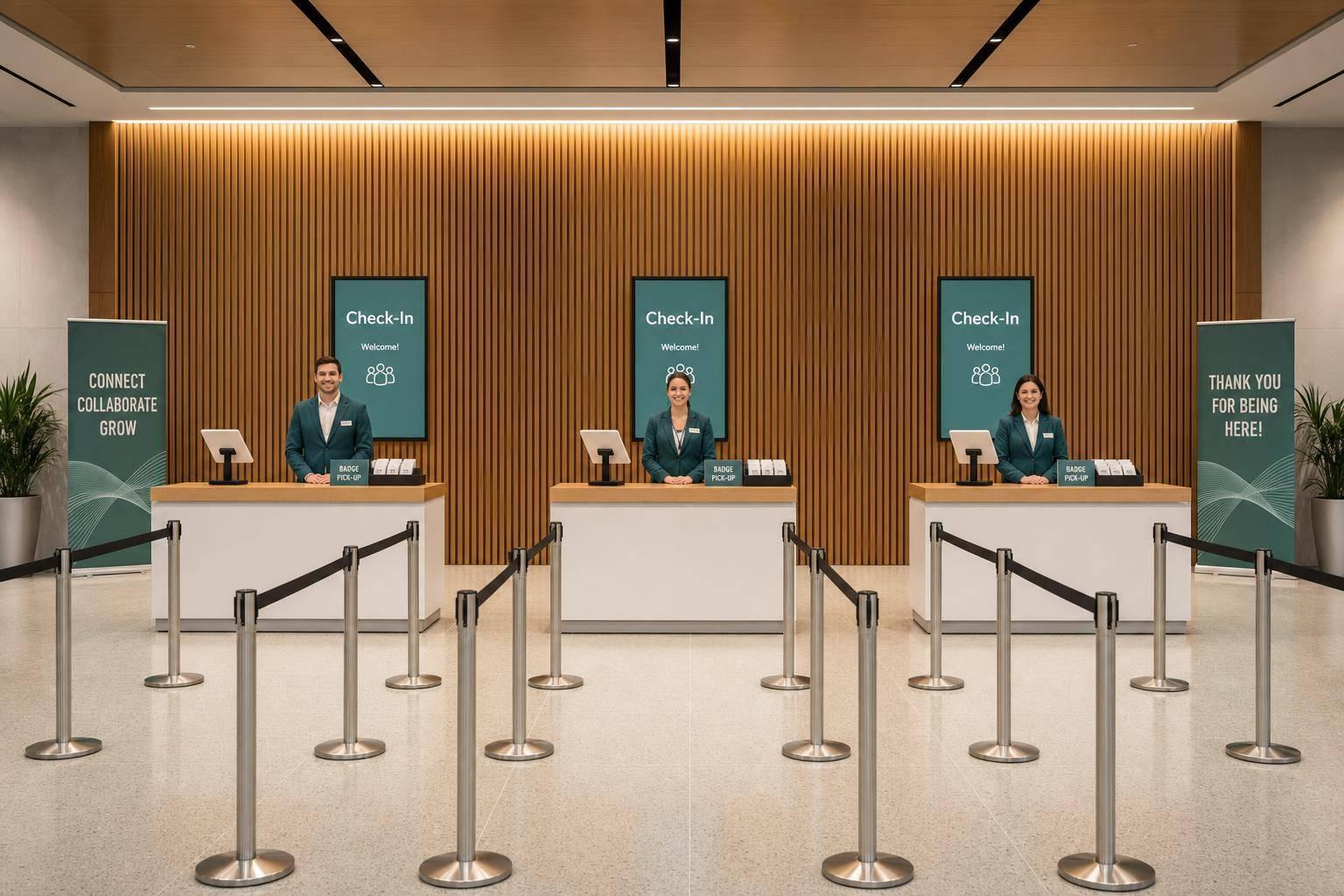
Check-in is often the first in-person moment that shapes the guest experience. If lines drag, satisfaction can drop fast.
Staff should greet each guest with eye contact and a verbal welcome, then verify registration through a process that’s easy to follow. That can include alphabetized lines, separate VIP lanes, and a separate lane for on-site registration. Teams should also plan for peak arrival windows ahead of time, with backup check-in lanes and a line host ready to share wait-time updates.
Use signage and staff guidance together. High-contrast signs help, but people still need human direction. Assign staff whose main job is wayfinding. Their directions should be specific, not vague. “Down the hall, second left, next to Registration Help” works a lot better than “It’s over there.”
For guests with accessibility needs, staff should know how to help without sounding patronizing. They also need to know exactly where accessible routes, elevators, and restrooms are located.
If an issue turns sensitive, move the conversation out of public view. Listen first. Then respond. If frontline staff can’t fix it, escalate it right away.
After the event, follow-up shows whether the service standard actually held.
Send thank-you messages within 24–72 hours. Tailor them by audience, whether that’s attendees, sponsors, or vendors, and give one clear next step: a survey link, access to recordings, or early-bird registration for the next event.
Feedback surveys should be short, mobile-friendly, and accessible. Use both rating scales and open-ended questions. Ask about check-in, staff helpfulness, signage clarity, and accessibility.
Acknowledge complaints within 24–48 hours and resolve them within a few business days. Document every interaction. When complaints go quiet and unresolved, repeat attendance usually goes with them.
Hold the internal debrief within one week. Review scores, complaint types, wait times, and incident logs, then look for patterns. If check-in ratings stay low or wayfinding complaints keep showing up, that’s not random noise. It’s a sign to fix something. Write those fixes into updated SOPs and scalable staffing plans before the next event. Don’t leave them as talking points that disappear after the meeting.
The table below maps each phase to its main tasks, common problems, staff behaviors to expect, and the metrics worth watching:
| Phase | Key Tasks | Common Challenges | Expected Staff Behaviors | Metrics to Track |
|---|---|---|---|---|
| Pre-Event | Inquiry handling, registration support, confirmations, cancellations, special request logging, accessibility planning | Inconsistent information across channels, slow response times, missed accommodation requests | Prompt replies, clear written communication, thorough note-taking, proactive expectation-setting | Avg. response time by channel, unanswered messages after 24 hours, pre-event satisfaction ratings |
| Onsite | Check-in, crowd and line management, wayfinding, VIP handling, dietary/accessibility support, complaint resolution | Arrival surges, bottlenecks, unclear signage, emotional guests | Calm demeanor, proactive guidance, clear verbal directions, respectful handling of sensitive needs, efficient escalation | Avg. check-in wait time, service incident count, onsite satisfaction score, first-contact resolution rate |
| Post-Event | Thank-you messages, feedback surveys, complaint follow-through, internal debriefs, SOP updates | Low survey response rates, delayed complaint handling, failure to implement changes | Timely follow-up, accountability for mistakes, rigorous documentation, honest debrief participation | Survey completion rate, avg. complaint resolution time, likelihood to recommend, repeat registration rate |
Once staff know the service standards, the next job is turning communication, ownership, and composure into habits they can repeat under pressure.
Good service comes from repeatable behavior practiced over and over. For small and mid-sized event businesses juggling full-time employees and temporary hires, the training system needs to be simple enough to run before every event.
The best training skips broad customer service theory and sticks to what staff will face on the job: a guest whose name isn't on the list, a line piling up at check-in, a VIP arriving late, or a dietary request that wasn't flagged. A 60-minute workshop works well:
For temporary staff, a 30-minute on-site briefing works better than a generic orientation email. It puts people in the setting where they'll work, with the tools they'll use, which makes the training stick.
Pre-shift briefings should follow the same format every time: a quick event snapshot, three service priorities for that day, known risks and how to handle them, and one clear escalation contact. Keep it to 10–15 minutes. When the order stays the same, staff know where to focus without wasting mental energy figuring out what's important.
Training also works better when supervisors reinforce the same behaviors during the event itself. Practice matters, but in-the-moment correction is where habits start to lock in.
Live observation shows whether staff are using the accountability and problem-solving skills they practiced. Supervisors should watch staff during events with a short checklist covering greeting speed, direction clarity, issue handling, and escalation. The point is to note specific examples, not vague impressions.
Coaching lands better in low-traffic moments, one fix at a time, and always in private. Correcting someone in front of a guest or coworker usually shuts learning down fast.
After each event, use a short debrief to turn lessons from the day into coaching points for the next one. Three questions keep the conversation focused:
Each answer should lead to a clear action item with an owner and a deadline. Bringing at least one temporary staff member into the debrief adds a useful view on what felt clear in training and what felt confusing.
Leaders who coach the same way event after event build habits that last longer than a single shift.
The table below links skills, goals, and proficiency markers:
| Skill | Training Goal | Sign of Proficiency |
|---|---|---|
| Clear communication | Staff give accurate, concise directions and confirm understanding | Staff can repeat expectations back and follow checklists of essential event day items without errors |
| Issue ownership | Staff state what they can do and stay with the guest until resolved | Staff avoid blame and escalate quickly when they can't fix something themselves |
| Professional composure | Staff maintain a calm tone and neutral body language under pressure | Staff use solution-focused language even with frustrated guests |
| Accountability | Staff take ownership of tasks and understand their impact on the team | Staff arrive on time, follow through, and flag problems before they escalate |
| Consistency | Full-time and temporary staff deliver the same service level | Guests receive the same experience regardless of which staff member they encounter |
Track a few simple measures to see whether training is changing performance. Complaint acknowledgment time, check-in wait times, and complaint resolution time across events can show whether staff performance is improving. A shared spreadsheet maintained by event leads is enough to get started. That gives you a simple trend line showing what got better and where staff still need help.
Training sets the bar. Operations are what make that bar possible to hit on event day.
You can train a team well, but if schedules are vague, coverage is patchy, or key details are scattered across texts and email threads, service starts to slip. For event teams, clear coordination is what turns good prep into steady execution.
A good schedule does more than show when someone starts and stops. It tells each staff member where to be, what job they’re doing, who covers their break, and who to contact if something goes wrong.
At a corporate conference, for example, a check-in assignment should say something like Ballroom A Registration: 1:30 PM–4:00 PM, backup coverage: floater instead of a vague note like “check-in shift.” That small bit of detail can save a lot of confusion.
Each staff member also needs an event brief. This should include:
Keeping all of that in one system makes it much easier to manage, especially when plans change.
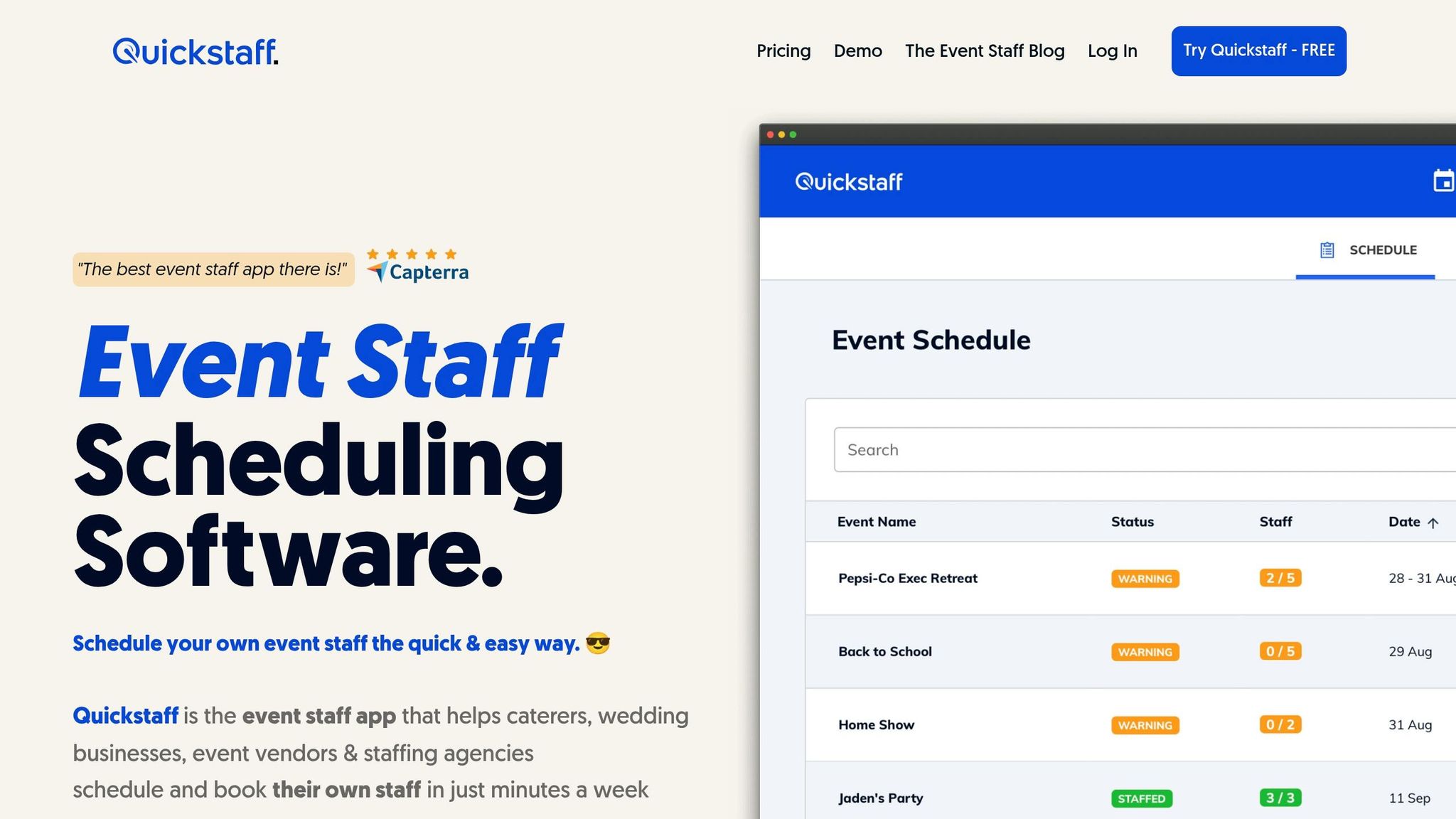
Quickstaff brings event details, roles, and staff updates into one place. Event organizers can build events with structured details, assign staff to exact roles and shifts, and track who is confirmed and available before event day.
For teams that depend on temporary staff, that kind of structure helps avoid common problems like:
Quickstaff’s waitlist feature is especially useful when you’re planning coverage. If a confirmed staff member drops out, a pre-loaded waitlist makes it much easier to bring in a replacement fast instead of digging through contacts at the last minute.
Automated reminders help keep confirmations up to date. And because the platform works well on phones, temporary staff can check assignments, call times, and event notes without printed schedules or long email chains. That usually means less confusion and more attention on guests.
Reliable event service comes from skilled staff, clear standards, and systems that keep roles, coverage, and updates aligned.
Measure event customer service with both numbers and direct feedback. Look at results like First-Contact Resolution and guest satisfaction scores, then use the SBI framework (Situation, Behavior, Impact) to record specific interactions in a clear, objective way.
It also helps to collect input from a few angles, including guest surveys, peer evaluations, and self-assessments. Quickstaff makes this easier by keeping performance history and communication logs in one place, so you can spot patterns and support steady, high-quality service.
First, listen actively to the guest. Give them your full attention instead of just waiting for your turn to speak. That simple shift can prevent mix-ups before they turn into bigger problems.
Then stay calm, acknowledge the issue, and speak in a steady tone. A calm voice can help lower tension and keep the situation from spiraling.
Small event teams can make service more consistent by standardizing day-to-day processes and giving each person training that fits their role. It also helps to use the SMART framework to set clear performance benchmarks, so every role has goals that are specific, measurable, achievable, relevant, and time-bound.
Tools like Quickstaff can keep scheduling, team communication, and training materials in one place, which cuts down on confusion. Cross-training gives team members a better feel for each other's work and makes it easier to handle staff shortages. Regular debriefs help teams spot service gaps, talk through what happened, and improve communication before the next event.