How to Train AV Teams for Live Streaming Events
June 25, 2026

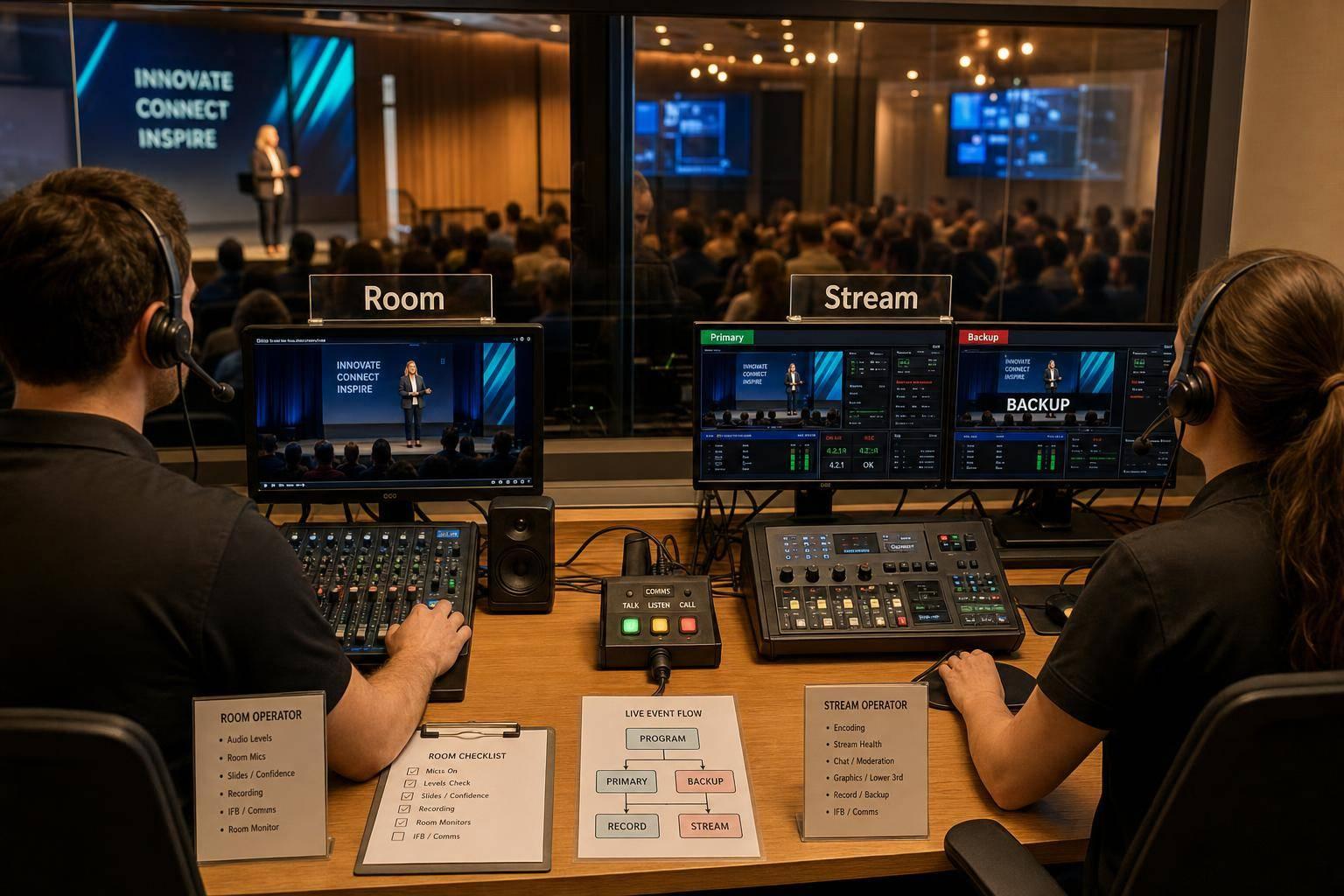
Live streaming fails when teams treat it like a normal in-room AV job. If viewers hit buffering, almost 50% leave within 90 seconds, so I’d train the crew around one goal: run the in-room show and the stream as two linked productions with clear roles, fixed checks, tested backups, and post-show review.
Here’s the short version:
The main idea: you do not train for a perfect show. You train for the same setup, the same handoffs, and a fast response when gear, audio, or internet goes wrong.
A few points matter most:
If I were building this into one team routine, I’d keep it simple: write the process down, rehearse the weak spots, log every issue, and train the same way every time.
Once the workflow is mapped, train each role on the handoffs that keep the show moving. Every major task should have one owner, one backup, and one final decision-maker. That clears up confusion fast.
A live streaming crew works best when each person knows their job and knows exactly what information needs to move to the next person.
"The show caller calls cues. The TD switches. The A1 manages audio execution. Playback owns media. Stage management handles talent movement. When responsibility gets fuzzy, people either duplicate effort or assume someone else has it covered." - AV LAND
Camera operators also need to know the shot list so they can frame speakers and key moments the right way.
Here’s a simple role map for ownership and handoff needs:
| Role | Primary Responsibility | Key Handoff Needed |
|---|---|---|
| Show Caller | Cue timing and show flow | Finalized run-of-show with exact timecodes |
| Technical Director | Video switching, camera cuts, graphics timing | Camera shot list and graphics sequence |
| Audio Engineer (A1) | Mic gain, audio routing, mix-minus for remote guests | Mic plot, talent entrance cues, mute/unmute status |
| Streaming Operator | Encoder configuration, bitrate, platform health | Stream keys, backup ingest URLs, incident reports |
| Graphics/Playback Operator | Lower-thirds, playback assets, sponsor slates | Approved branding files, playback order |
| Stage Manager | Talent movement and green room instructions | Presenter handoff timing, "on-stage" cues |
One training point is easy to miss, but it matters a lot: the A1 needs to send the encoder a dedicated stream mix, not the room PA feed. If that step gets skipped, the stream picks up reverb and room noise. And that can make an otherwise clean show sound rough.
After roles are set, drill the pre-show check until it feels automatic. A simple T-minus timeline helps the crew lock in the pace of the day:
Also set up two separate comms channels: one for operators and one for talent. That small split can save a lot of chatter at the worst possible moment.
Teams working multiple events in the same weekend run into a common issue: information gets scattered. When schedules, notes, and updates live in different places, people show up unsure of their role or unsure which run-of-show is current.
Quickstaff helps fix that. It keeps staff assignments, availability, event notes, and reminders in one mobile place. For multi-event weekends, that means less confusion and fewer last-minute text chains.
"If a task matters to the audience experience, it should exist in writing." - Supports.Live Editorial Team
That idea fits scheduling just as much as cue sheets. When role assignments and event details live in one organized system, crew members spend less time chasing confirmation and more time focused on the show.
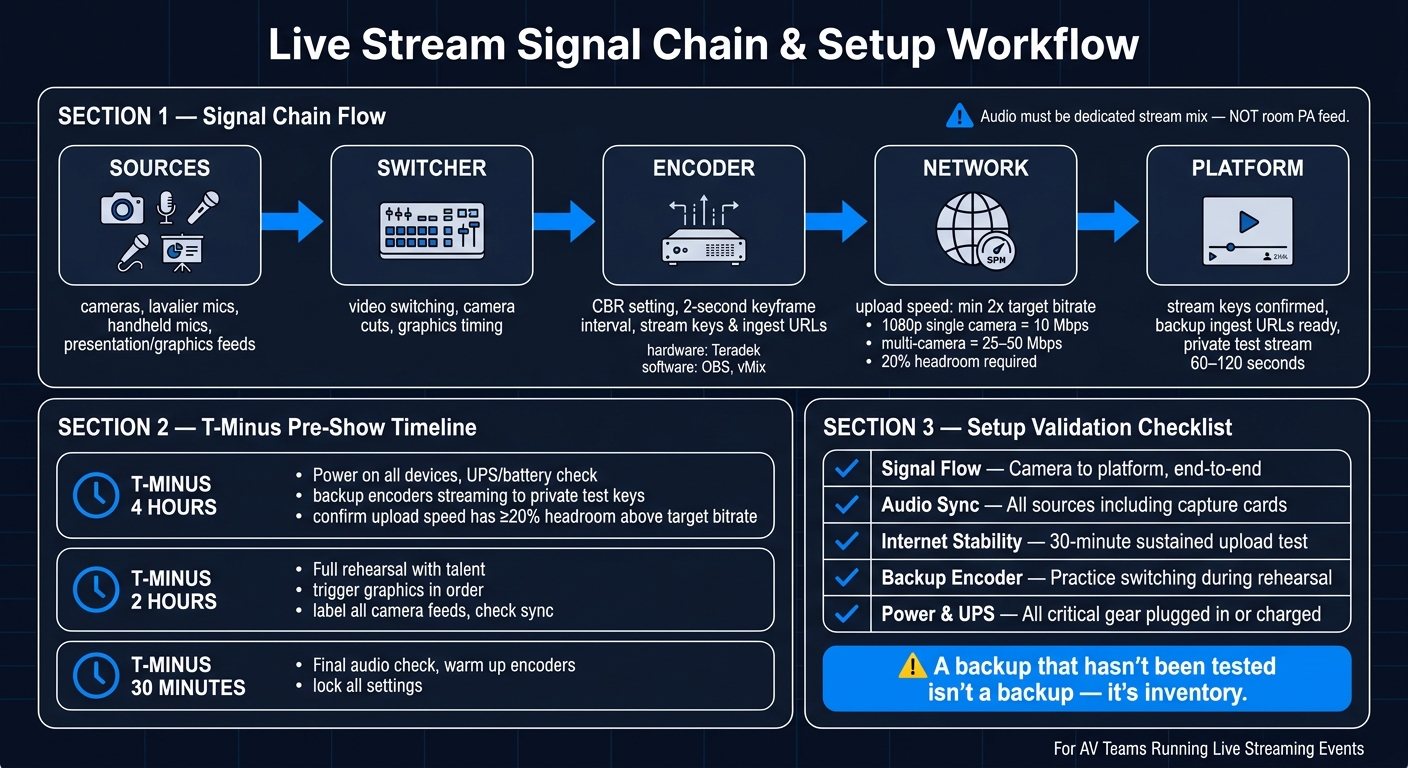
Live Streaming Event: AV Team Workflow & Signal Chain
Once you have established a scalable event scheduling system to manage your crew, After role training, move into the exact gear and software each operator will use.
A live stream signal chain moves from sources to switcher to encoder to network to platform. Every crew member should be able to trace that path and spot where it breaks.
Sources include video cameras, lavalier and handheld microphones, and presentation or graphics feeds. Stream audio should come from the console mix bus, not the room PA feed.
Train staff to use CBR, set a 2-second keyframe interval, and check stream keys and ingest URLs before rehearsal.
"Audio problems destroy streams faster than video issues. Clear audio should be a top priority in any event live streaming workflow." - Nathan Kurszewski, Clarity Experiences
Once the signal path is clear, train operators on the tools they'll need to handle when the pressure is on.
Train on the exact cameras, mixer, switcher, encoder, and stream monitor used on site. Repetition with the actual gear builds the kind of muscle memory that helps when things get hectic.
Cover both hardware and software encoders, including Teradek, OBS, and vMix, plus a dedicated stream monitor with headphones for nonstop audio checks. For software encoders, technicians should practice building scenes with display capture and window capture, stacking sources in the right order, and setting hotkeys for smooth transitions. They also need to load every scene, overlay, and browser source ahead of time to make sure the CPU and GPU have enough headroom before event day.
Use hardware encoders for high-stakes events because they keep streaming separate from other applications. Software encoding can work when the production setup matches the event, but the team still needs to know how to route the OBS Virtual Camera output into platforms like Zoom or Microsoft Teams for hybrid formats.
End every setup with a live test from source to platform. A checklist helps the team verify the full chain before going live.
"The goal is not to simulate perfection. The goal is to expose weak points while there is still time to fix them." - Supports.Live Editorial Team
Use a private test stream of 60–120 seconds to check the full signal path. Test upload stability for 30 minutes and confirm at least 2x the target bitrate. For a single 1080p camera stream, that means at least 10 Mbps of dedicated upload. Multi-camera productions need 25–50 Mbps.
| Validation Item | What to Check | Why It Matters |
|---|---|---|
| Signal flow | Camera to platform, end-to-end | Catches routing breaks before go-live |
| Audio sync | All sources, including capture cards | Drift can start before the stream begins |
| Internet stability | 30-minute sustained upload test | Short tests miss intermittent drops |
| Backup encoder | Practice switching to it during rehearsal | Confirms redundancy before it's needed |
| Power and UPS | All critical gear plugged in or charged | Prevents mid-show failures from power loss |
One point should be drilled into every technician: a backup that hasn't been tested isn't a backup.
"If the team has not practiced switching to it, it is inventory, not a backup." - NextStream Editorial
Once the signal chain is stable, the next step is simple: get the team ready to run the show under pressure. Start with cue language. Then rehearse at full show pace.
One rule should stay fixed: only the show caller calls cues. Everyone else - camera, audio, and playback - works off that timing.
Cue language needs to stay short and consistent from one event to the next. Countdown calls, camera changes, presenter mic handoffs, and playback triggers should mean the exact same thing to every operator, every time. Put the language in writing, then train the team to use it the same way on every show.
Cues alone aren't enough. The crew also needs a clear path for escalation. Pick one person - often the Producer or a named incident lead - to make the final call when something goes wrong. That person decides whether the show keeps moving, restarts, or shifts to backup. Keep technical escalation on a private staff channel so urgent notes don't get buried in general chatter.
Run the event the way it will happen on show day. Use the same gear, the same accounts, and the same network path. Big post-rehearsal changes are risky because they introduce new failure points that no one has tested.
Spend most of the rehearsal on the spots most likely to break: the opening, transitions between major speakers, and any live switch between in-room and remote contributors. Run cues at actual show speed so the team feels the pressure before it matters.
At least one team member should watch the stream from a separate device on a separate network - not the venue Wi-Fi - to confirm what the remote audience is seeing. That's the view that counts.
If time is tight, focus on the parts that matter most:
When something breaks live, people can lock up fast. A repeatable sequence helps the team stay calm and move in the right order.
| Issue | Primary Check | Recovery Action |
|---|---|---|
| No Audio | Mic source and gain levels | Switch to backup mic or alternate console feed |
| Video Freeze | Encoder overload | Restart software encoder or switch to hardware backup |
| Network Lag | Sustained speed test for packet loss | Fail over to bonded cellular or secondary ISP |
| Sync Errors | Sample rate consistency | Adjust audio delay settings in the encoder |
| Encoder Failure | Power and input signal | Switch to redundant ingest path or backup machine |
Keep a one-page incident runbook close by. Include pre-written audience messages for common problems, such as "Audio Issues - Please Stand By" or "Stream Restarting." That way, the team isn't trying to write copy while also diagnosing a live failure.
After the show, use what happened to shape the next round of training.
Map ownership so you can spot training gaps and missed handoffs.
| Phase | Key Responsibilities | Owner |
|---|---|---|
| Pre-Event | Goal setting, signal path testing, technical rehearsal, role assignment | AV Lead / Producer |
| Live | Signal monitoring, audio/video switching, incident management | Stream Ops / Tech Crew |
| Post-Event | Post-mortem review, analytics reporting, recording cleanup, checklist updates | Producer / Organizer |
This ownership map shouldn't only cover live duties. Use it to assign follow-up actions too, so the same loose ends don't show up again at the next event.
Run a 10–15 minute post-mortem right after each event. That short window matters. The details are still fresh, and people usually remember where things slowed down.
Look for the slowest diagnosis points and the warning signs the team missed. Then review the same failure points the team trained for: audio, video, network, and cueing.
Treat the post-mortem as training input, not just an event recap. After each post-mortem, turn every issue into one checklist update before the next event. Skip vague steps like "test audio" and use clear instructions instead: "confirm USB interface selection, record 30-second test, and verify left/right channel balance".
Also track the numbers that show how the system held up under pressure: bitrate stability, dropped frames, CPU/GPU load, sync drift, and backup-path use. Those metrics help you see whether the team is becoming more repeatable or simply more familiar with the setup.
It depends on how involved your event is. A simple stream, like a solo coaching session, might only need one person to run the show. But a bigger or more demanding broadcast often needs three to six people to cover jobs like director, technical director, audio engineer, and camera operator.
No matter how many people are on the crew, set clear roles from the start. Also, make sure one person has the final say when decisions need to be made.
Use a hardware encoder for high-stakes events like conferences, galas, or town halls, where a technical failure would be embarrassing. It’s usually more dependable because it doesn’t fight with your computer for resources, handles heat better, and is less likely to crash.
For smaller workshops or internal meetings, software can be a better fit if you want more flexibility. But for critical events, the safer move is simple: run a dedicated hardware encoder as your main setup and keep a software backup ready.
A live stream backup plan should cover five layers: source, encoder, ingest, distribution, and operations.
That means thinking past a single point of failure. If one piece drops, something else should be ready to take over. In practice, that usually includes redundant hardware like:
The plan should also include an incident runbook. Keep it direct and easy to use under pressure. It needs failover thresholds, escalation paths, and clear role assignments for monitoring and communication.
Then test every backup path in a formal technical rehearsal. Don’t just assume it works because it’s plugged in. Make sure backup graphics, recordings, and audience messaging are documented and easy to access when the stream is live and the clock is ticking.