How Real-Time Staff Updates Improve Event Scheduling
December 19, 2025

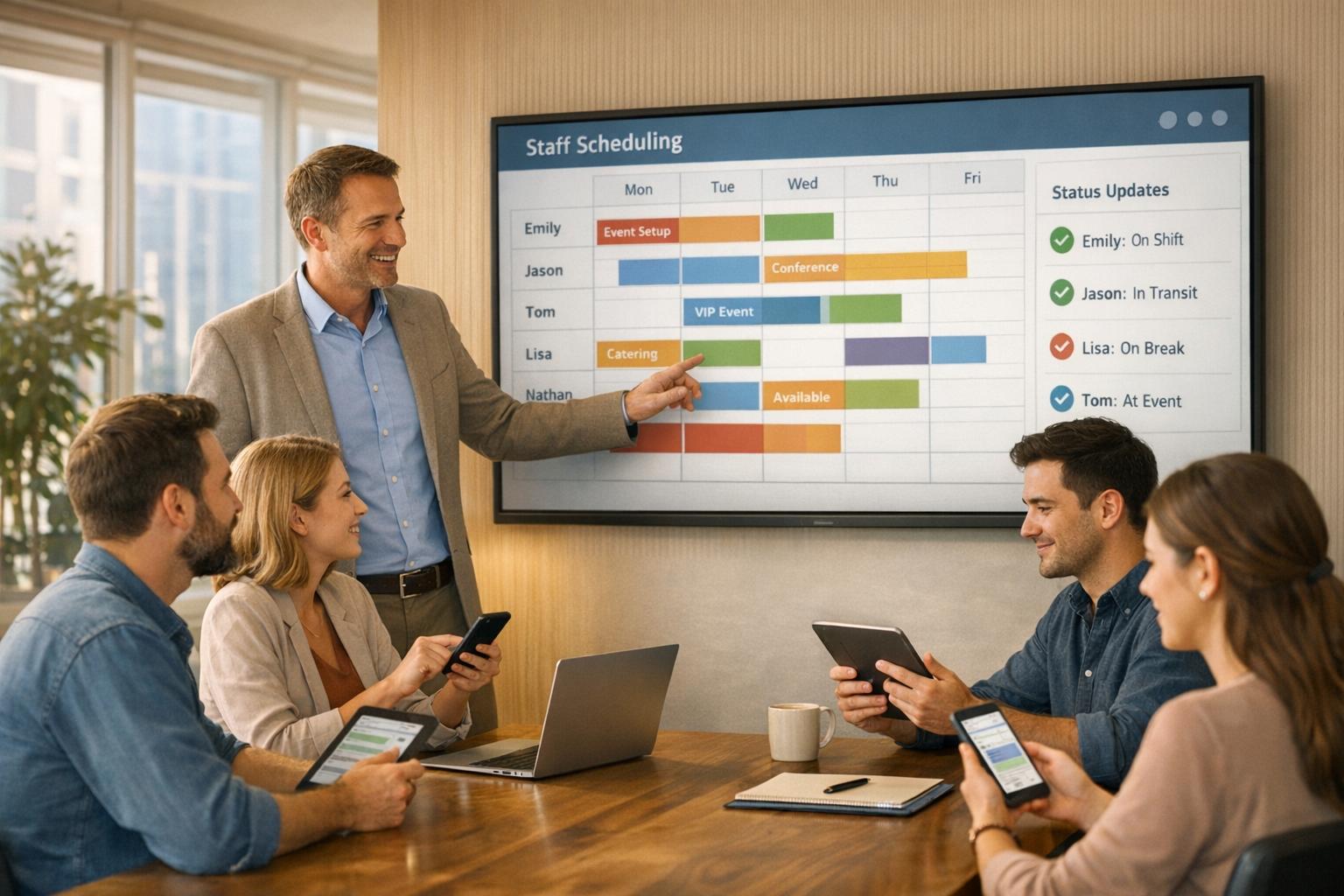
Real-time staff updates make managing event schedules faster, simpler, and more efficient. By replacing manual processes like spreadsheets and phone calls, these systems allow managers to instantly access staff availability, send invitations, and track responses - all in one place. The result? Fewer scheduling conflicts, faster communication, and better-prepared teams.
Quickstaff, a platform used for over 20,000 events since 2013, has helped event managers schedule thousands of shifts annually with ease. It streamlines operations, minimizes disruptions, and keeps teams aligned, ensuring smooth event execution.
The difference between a seamless event and last-minute chaos often boils down to how quickly and effectively information is shared between managers and their teams. When availability updates happen instantly - not hours later - everyone stays on the same page. This eliminates confusion caused by outdated scheduling methods. These real-time updates not only simplify communication but also help tackle common scheduling hurdles head-on.
Real-time updates serve as a central hub for all scheduling information, keeping everything in one place. Instead of juggling multiple channels like emails, texts, and calls, managers can quickly send messages to the entire team or specific groups. For example, they can remind servers about dress codes or share venue changes with bartenders. Even staff working at distant venues can receive instant notifications through mobile apps, ensuring no one is left out of the loop. This streamlined approach eliminates the need for time-consuming individual follow-ups.
Additionally, when employees mark their unavailable dates in the system, those dates are automatically removed from the scheduling pool. This prevents wasted time and avoids assigning shifts to unavailable staff. Clear communication also helps reduce scheduling overlaps and conflicts, making the whole process more efficient.
Real-time systems can detect and flag scheduling conflicts, like double-bookings or overlapping shifts, as soon as they occur. For instance, if a manager tries to assign someone who’s already scheduled elsewhere, the system immediately alerts them to the issue. This kind of instant feedback prevents the chaos that happens when someone shows up for two events at the same time. In fact, one case study showed that using specialized management software cut last-minute scheduling problems by more than 50%.
These systems can also sync work schedules with personal calendars like Google or Outlook, helping staff avoid accepting shifts that clash with their personal plans. And when an employee calls out sick or doesn’t show up, real-time tools can automatically notify available team members to fill the gap, minimizing disruptions.
Empowering staff to take control of their schedules changes the game. When employees can set their availability, request time off, or swap shifts through a transparent system, it builds trust and reduces stress. They feel respected and valued, which helps ease the anxiety that often comes with unexpected schedule changes or miscommunications.
Centralized scheduling ensures shifts are assigned fairly, based on accurate and up-to-date availability. This fairness fosters trust among team members and boosts morale. When communication is clear and scheduling conflicts are rare, staff satisfaction naturally improves. Happier employees are more likely to stay, reducing turnover and keeping experienced team members on board.
For an industry expected to grow from $890 billion in 2020 to $2 trillion by 2028, retaining skilled staff is essential. Flexible scheduling and clear communication not only improve morale but also contribute to better event execution and long-term business success.
Real-time availability tracking doesn't just improve communication - it brings measurable advantages that can directly enhance operational efficiency and positively impact your bottom line. These benefits go hand in hand with the communication improvements discussed earlier.
Manual scheduling can be a massive time drain. Real-time tracking eliminates the need for countless phone calls, text messages, and spreadsheet updates. Instead of chasing down staff availability, managers can instantly see who’s free before sending out invitations, allowing them to schedule events in a matter of minutes.
The time savings are undeniable. Jennifer Manley, a Staffing Coordinator, explained:
"My time spent scheduling has reduced significantly, leaving me more time to focus on recruiting, on-boarding and training".
Beyond that, automated systems handle tasks that once required manual effort. For example, when too many staff accept a shift, automated waitlists take care of cancellations. Staff can also block off their unavailable dates themselves, instantly updating the manager's view and preventing unnecessary invitations. For managers sending out thousands of staff invitations annually - sometimes over 15,000 - this automation streamlines the entire process, making event scheduling more efficient and reliable.
Real-time tracking does more than save time - it reduces errors. Manual scheduling often leads to double-bookings, missed conflicts, or miscommunications. With real-time systems, errors are flagged immediately. For instance, if a manager tries to assign someone already scheduled elsewhere, the system alerts them before the mistake happens.
Studies show that using specialized management software can cut last-minute event issues by over 50%. This improvement stems from having accurate, up-to-date data readily available instead of relying on outdated spreadsheets or memory. Real-time tracking also helps avoid over-hiring, which is especially important in industries like catering and events, where profit margins can be tight. Knowing exactly who’s available and what roles they can fill allows managers to staff events precisely without padding numbers "just in case." Additionally, managers can quickly respond to client inquiries about future staffing capacity by referencing the availability tool.
The right staffing can make or break an event. When you have the right number of staff with the right skills in the right places, everything runs more smoothly - attendees experience shorter wait times, faster service, and better overall operations. Real-time tracking ensures this level of precision.
It also allows for on-the-fly adjustments. If an event’s needs shift - like a speaker canceling, a sudden crowd surge, or one area finishing early - managers can reallocate staff in real time to maintain balance. This flexibility prevents situations where one station is overwhelmed while others have idle staff.
Since 2013, Quickstaff has supported the scheduling of over 20,000 events, helping caterers and event vendors achieve the staffing accuracy needed for success. As Kelly from The Abbot KC put it:
"The time that we have been able to save by using this staff scheduling software has allowed us to tackle the other issues that we face thereby improving our overall events!".

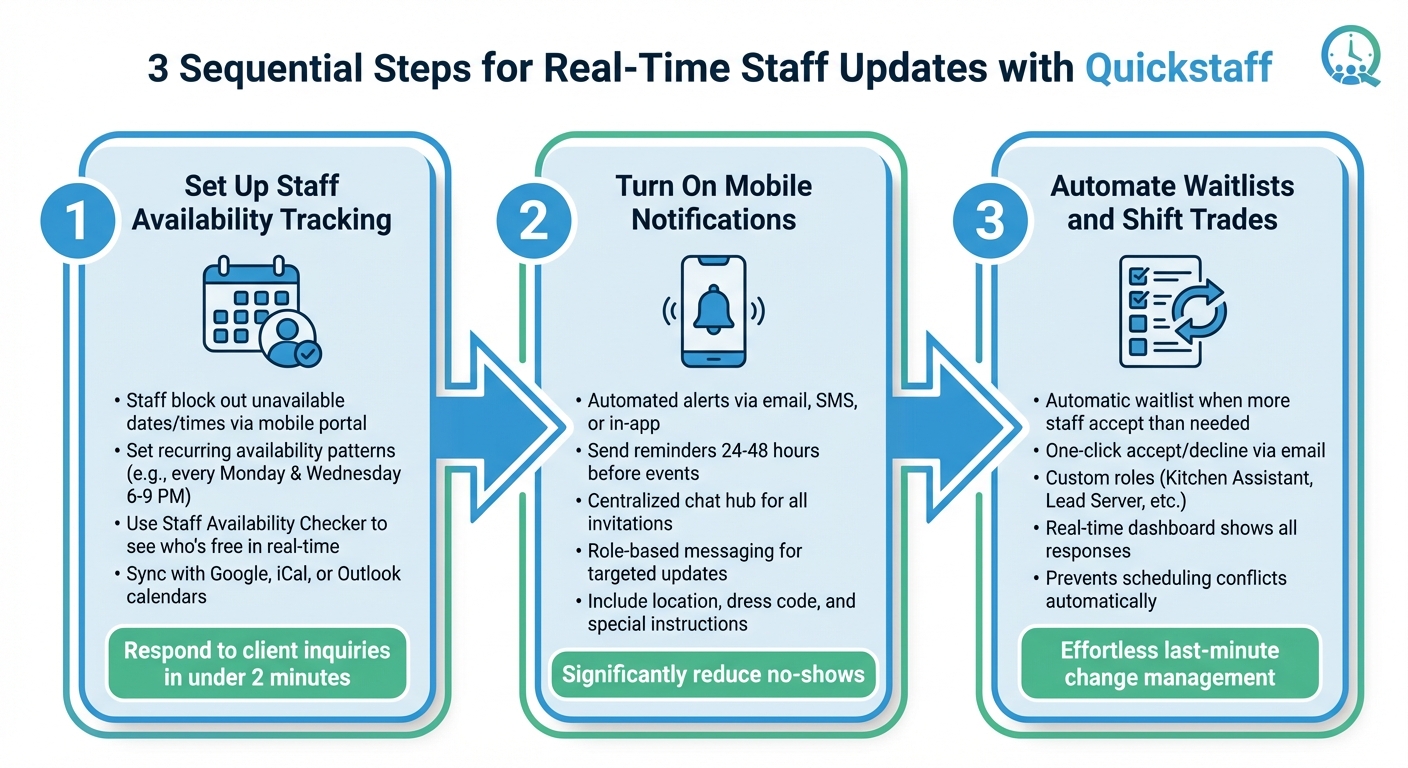
How to Implement Real-Time Staff Updates in 3 Steps
Quickstaff is designed to make scheduling a breeze by offering real-time updates. Here’s a step-by-step guide to activating the features that enable seamless scheduling.
The foundation of real-time updates lies in letting staff manage their own schedules. With Quickstaff, team members can easily block out dates and times they’re unavailable using a mobile-friendly portal. When they set these blockouts, the system automatically removes them from the available staff pool, saving you the hassle of inviting someone who can’t work.
For staff with consistent schedules, Quickstaff also supports recurring availability patterns, such as every Monday and Wednesday from 6:00 PM to 9:00 PM. This creates a weekly baseline that updates itself, making scheduling even more efficient. Before confirming any event, you can use the Staff Availability Checker to see who’s free in real time. This tool allows you to respond to client inquiries confidently and quickly - often in under two minutes.
Jaime S., VP at Lisa’s Catering, shared how Quickstaff changed their workflow:
"Prior to Quickstaff, I was using Excel spreadsheets to track my employees and their shift availability. My life changed the day I started using Quickstaff!".
To further streamline scheduling, you can sync Quickstaff with personal calendars like Google, iCal, or Outlook. This integration helps avoid double-booking conflicts, and with availability clearly tracked, your team will always receive timely updates on any changes.
Keeping everyone in the loop is key, and Quickstaff makes it easy with automated notifications. The system sends alerts as soon as you create an event and invite staff. Notifications can be delivered via email, SMS, or in-app alerts, depending on your preferences.
You can also enable reminders to go out 24 to 48 hours before an event’s start time. This simple feature helps significantly reduce no-shows by keeping the event fresh in your team’s minds. Plus, the mobile app includes a centralized chat hub where all event invitations and updates are stored, so staff don’t have to rely solely on email.
For last-minute adjustments, Quickstaff allows role-based messaging, ensuring only the affected team members are notified. Be sure to include details like location, dress code, and any special instructions in the event notes - these will automatically be included in the notifications sent to staff.
Managing last-minute changes is effortless with Quickstaff’s automatic waitlist feature, which kicks in when more staff accept an invitation than needed. Instead of manually juggling overflow, the system builds a backup pool that can be tapped if someone cancels.
Quickstaff uses an "ask" model rather than assigning shifts directly. Staff receive an automated email where they can accept or decline with a single click:
"The system then generates an automatic email, through which they can simply accept or decline. It's that easy!".
Additionally, you can set up custom roles like "Kitchen Assistant" or "Lead Server" to ensure invitations go only to qualified personnel. Combined with staff blockouts, this feature helps prevent scheduling conflicts before they arise. All responses - acceptances, declines, and waitlist updates - are displayed in real time on your dashboard, giving you instant insight into staffing levels for every event.
Once you've rolled out real-time updates, the next step is to measure their impact. This helps you gauge your return on investment and pinpoint areas for further improvement. The best part? Many benefits become apparent quickly and can be measured effectively.
Manual scheduling can eat up hours every week, but real-time updates shrink this process to just minutes. With better visibility, you can staff events more accurately, avoiding the need to over-hire just to cover uncertainties. Traditional scheduling often leads to padding the roster "just in case", which directly affects profit margins. To measure improvements, compare the number of staff invited to the number actually needed for each event. You can also track how much time your team saves by monitoring the reduction in follow-up communications.
Jennifer Manley, a Staffing Coordinator, shared how this change transformed her workflow:
"My time spent scheduling has shrunk majorly, leaving me more time to focus on recruiting, on-boarding and training."
These efficiencies in time and cost don’t just improve operations - they also enhance staff engagement.
When scheduling becomes more transparent and predictable, employee satisfaction naturally increases. Start by tracking your no-show rates - instances where staff miss shifts due to lack of awareness. Automated reminders sent 24 to 48 hours before events can significantly reduce these occurrences. Metrics like mobile acceptance rates and the adoption of self-service tools, such as availability blockouts and calendar syncing, often correlate with happier staff and lower turnover.
Beyond internal benefits, real-time updates also play a key role in ensuring successful events. You can monitor last-minute staffing gaps and measure how quickly they’re filled using waitlists and real-time notifications. These tools allow you to reallocate staff immediately when someone calls in sick or when unexpected crowd surges require extra help. Tracking double-booking incidents is equally important - automated conflict detection should eliminate these entirely compared to managing schedules manually.
Feedback from attendees can provide additional insights. Metrics like service speed and wait times at check-in or food stations can highlight the positive effects of well-coordinated staffing.
Kelly from The Abbot KC explained how these tools have transformed their operations:
"The time that we have been able to save by using this staff scheduling software has allowed us to tackle the other issues that we face thereby improving our overall events!"
For perspective, event managers using real-time scheduling tools often send out over 15,000 staff invitations annually, making automated tracking indispensable for staying organized. Since 2013, Quickstaff has supported the scheduling of more than 20,000 events, proving how scalable these systems can be once implemented.
Real-time staff updates take the chaos out of event scheduling, turning it into a smooth, efficient process. With instant access to availability, one-click responses, and automated notifications, you can skip the endless phone calls and clunky spreadsheets. The result? Fewer scheduling conflicts, properly staffed events, and a team that feels confident and prepared.
But the benefits go beyond just saving time. Accurate staffing helps protect your profit margins by avoiding over-hiring, while well-organized events ensure everyone is in the right place, ready to deliver their best.
Quickstaff makes this shift effortless with its user-friendly, real-time tools. Starting at just $49 per month for teams of up to 35 staff members, Quickstaff is designed to help caterers, wedding planners, and event vendors ditch fragmented communication in favor of centralized, automated scheduling.
Real-time staff updates give managers immediate insight into their team’s availability, making it easier to assign shifts thoughtfully. When schedules are automatically synced across all calendars, it eliminates the risk of double-booking and reduces the chances of last-minute surprises.
These updates also allow managers to quickly adjust schedules, reassign shifts, and cover any gaps, all while keeping the team in the loop. This not only simplifies the scheduling process but also helps events run smoothly without added stress or miscommunication.
Quickstaff takes the hassle out of event scheduling by offering a cloud-based platform that centralizes all your planning needs. Managers can effortlessly create events, assign roles, and monitor staff availability in real-time. Whether you're using a desktop, tablet, or phone, Quickstaff keeps you connected, eliminating the need for clunky spreadsheets or endless email chains.
The platform lets staff mark their unavailable dates, reducing the risk of double-bookings or last-minute staffing issues. It also automates outreach and confirmations, saving you hours of manual work. With instant notifications, team members stay informed about updates, cutting down on no-shows and boosting reliability. By simplifying communication and scheduling, Quickstaff frees up your team to focus on what matters most - delivering outstanding events.
Real-time tracking ensures employees stay informed about their assignments, making it easy to handle last-minute changes like shift updates or venue adjustments. This approach eliminates unnecessary guesswork, minimizes confusion, and gives staff more confidence in their schedules. When schedules are updated promptly and availability is respected, employees feel less stressed, which naturally enhances job satisfaction.
On top of that, real-time updates make tasks like shift swaps, time-off requests, and notifications much simpler. Instead of juggling long email chains or phone calls, a single, clear system does the job. This kind of streamlined communication not only reduces frustration but also helps employees feel appreciated. Tools like Quickstaff’s mobile-friendly platform make it even easier for staff to update their availability, receive alerts, and manage shifts, giving them more control over their work and encouraging long-term retention.