Cross-Functional Staff Allocation: 7 Key Tips
January 9, 2026


Cross-functional staff allocation helps event teams handle multiple roles efficiently, ensuring smooth operations even during unexpected challenges. By combining roles like servers assisting with cleanup or bartenders helping with setup, you can reduce costs and improve flexibility. Here’s a quick summary of the key tips:
Using tools like Quickstaff simplifies scheduling, communication, and tracking, making it easier to manage cross-functional teams. These strategies not only improve efficiency but also help maintain service quality during any event.
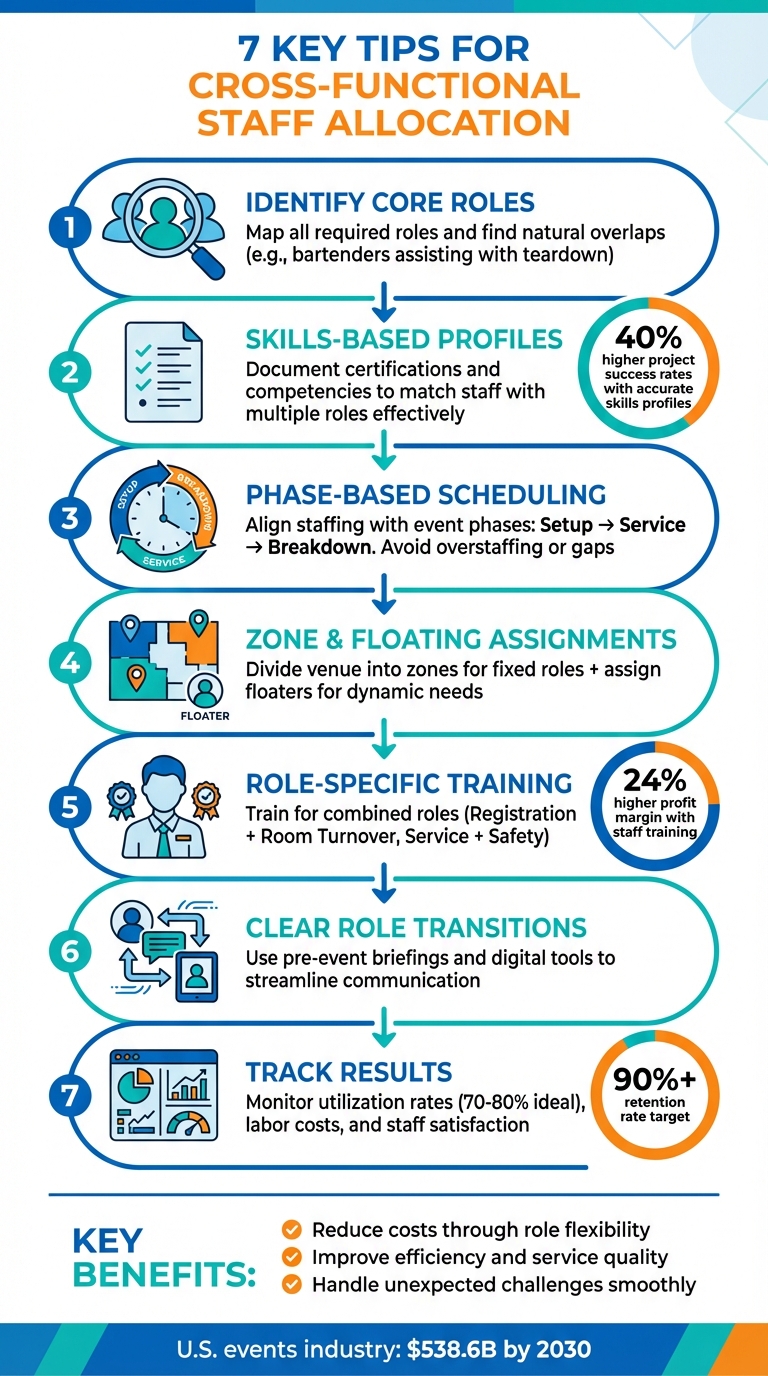
7 Key Tips for Cross-Functional Staff Allocation in Event Management
Begin by outlining all the roles your event will need - everything from the setup crew and servers to bartenders and cleanup staff. Then, look for positions that naturally align in terms of timing, location, or required skills. For instance, bartenders who finish their drink service duties before teardown could help pack up glassware and bar equipment in the same area. Once you’ve identified these overlaps, evaluate them based on key compatibility factors.
When assessing whether roles can be combined, focus on three main factors: certifications and training (like alcohol service credentials for bartenders or the ability to handle heavy lifting), timing overlaps, and how close the roles are within the venue’s layout.
Make onboarding easier by documenting each team member's qualifications and physical abilities. Use your scheduling system to categorize staff by role, assigning labels such as "server", "kitchen assistant", or "setup crew." This makes it simple to spot who’s qualified to take on multiple responsibilities.
Before locking in any cross-functional assignments, confirm staff availability through digital tools. This step reduces the risk of no-shows and ensures that team members who are trained for multiple roles can smoothly transition between tasks when needed.
Once you've identified roles that can overlap, the next step is to refine staff allocation by developing detailed skills profiles. These profiles should highlight certifications and core competencies for each team member. Start by documenting formal qualifications like alcohol service certifications, food handler permits, or hospitality management diplomas. Then, add key competencies that are relevant to multiple roles.
Using tools like Quickstaff's scheduling platform can make this process much smoother. For example, you can tag employees with attributes like "bilingual", "heavy lifting", or "VIP handling." This allows you to filter and match staff to cross-functional positions quickly and effectively. Digital tools also help minimize errors, which is critical given that only 8% of organizations currently have reliable data on their workforce's skills. Without this data, many events face last-minute staffing challenges.
Keep profiles up to date by automatically logging new training or event-specific experiences. This real-time tracking is a game-changer when you need to reassign someone mid-event. You'll know exactly who has the right mix of technical expertise and soft skills to step into a new role seamlessly.
To ensure consistency, establish a clear proficiency scale - say, 1 to 5 - so managers can evaluate staff uniformly across various events and venues. For instance, if you're deciding whether to shift a bartender to setup duties, knowing they score a "4" in physical stamina and a "5" in time management makes the decision much easier. Accurate skills profiles can boost project success rates by 40%, proving their value in effective staffing.
Once you’ve established multi-role staff profiles, the next step is crafting a schedule that aligns skills with the natural flow of the event.
Every event moves through distinct phases: setup, service, and breakdown. Each phase has unique staffing demands, so your scheduling should reflect these shifts. For example, during setup, you’ll need a dedicated "Setup Crew" to prepare the venue. As guests arrive, front-of-house staff take center stage, while the breakdown phase might call for reassigning servers to help with cleanup. This approach ensures you’re not overstaffed during lulls but fully equipped to handle peak activity. As ClearEvent puts it:
"When staff know where to be and when, your focus shifts from firefighting to delivering memorable event experiences".
To fine-tune your staffing, rely on past event data to anticipate needs. Did registration see a rush in the first 30 minutes at a previous event? Assign extra staff to that area during the opening window. Slight overlaps in shifts can also help, allowing outgoing staff to brief incoming team members for seamless transitions.
Tools like Quickstaff make this process even easier by letting you assign tasks based on roles and send targeted updates as needed. This ensures your cross-trained team can pivot quickly when unexpected demands arise.
A centralized dashboard can also be a game-changer for real-time adjustments. Let’s say you notice long lines forming at the bar during cocktail hour. With cross-trained staff and a clear overview of your team’s deployment, you can reassign people from quieter areas to ease the bottleneck. This kind of flexibility turns your team into a dynamic, responsive workforce, ready to adapt as the event evolves. Phase-specific scheduling, paired with role-based planning, creates a smooth, efficient operation that keeps everything running seamlessly.
Once your schedule aligns with the event phases, it’s time to focus on the physical layout of your venue. Dividing the space into zones not only clarifies responsibilities but also adds flexibility. Include detailed location information and specific instructions in your event notes to ensure your staff knows where to go and what to expect before they even arrive.
Now, think about how to balance fixed and flexible assignments to meet the demands of your event. Fixed zones are great for consistent coverage - like assigning servers to the dining area, bartenders to the bar, and greeters to the entrance. This setup ensures that every key area is staffed appropriately, keeping service smooth and efficient.
But what happens when fixed roles aren’t enough? That’s where floating staff come into play. These team members are ready to adapt as the event’s needs shift. Choose floaters from your most experienced staff - those with versatile skills, confidence, and excellent communication abilities.
Take a page from UNC Health’s playbook: in November 2024, their ShiftMed Flex solution gave float nurses real-time control over their shifts, doubling commitments within 90 days. The same idea works for events - giving floating staff clear visibility and autonomy leads to better outcomes.
Tools like Quickstaff make managing these roles easier. You can create custom positions like "Zone Lead" or "Floating Assistant" and send targeted messages to specific staff. For example, if the cocktail area gets unexpectedly busy, you can quickly notify floaters to step in without overwhelming the entire team with unnecessary alerts. This level of precision keeps operations seamless and ensures you’re ready to adapt to any changes.
Once you've mastered scheduling and cross-functional assignments, the next step is training your team for specific role combinations. This targeted approach can significantly boost productivity, reduce downtime, and keep everything running smoothly. Some role pairings are particularly effective at cutting costs and maximizing efficiency. Here are a few worth considering:
Registration + Room Turnover is a great place to start. After the initial rush at the check-in desk, cross-trained staff can step in to reset chairs, clear tables, and prepare spaces for the next session. This approach not only keeps staff busy during quieter periods but also eliminates the need for a separate setup crew at smaller events. It’s an efficient way to make the most of your team’s time.
Another pairing to consider is Floor Rover + Light AV Support. Training your floor rovers to handle simple tasks like mic checks, timers, or slide clickers turns them into versatile helpers who can troubleshoot minor technical issues. This reduces the need for a dedicated AV team and ensures quick fixes during events.
For guest-facing roles, look at combining Check-In + Sales/Ticketing. As Bar Crawl USA explains:
"Finding a person who can both use the Eventbrite Organizer app to check-in guests but also be personable, engaging, and professional is the true challenge - especially when you consider that this is the first person 1,000 crawlers will see at our events".
Training staff to handle both entry and ticketing not only speeds up the check-in process but also sets a positive tone for attendees. Another valuable combination is Service Staff + Safety Awareness. Teaching your team to recognize potential issues - like intoxicated guests or crowd bottlenecks - enables them to intervene early, preventing problems from escalating and enhancing overall safety.
The benefits of investing in staff training are clear: companies that do so report a 24% higher profit margin, and 59% of employees say training improves their performance. To prepare your team, use scenario-based drills - simulate issues like check-in failures or AV mishaps - and provide venue tours to build familiarity. Role-playing common guest interactions can also help staff feel confident in high-pressure situations.
Platforms like Quickstaff make it easy to create custom roles such as "Registration + Room Turnover" or "Rover + AV", ensuring you assign the right people and track their performance. With proper training, you’ll reduce costs, enhance coverage, and keep your event operations running without a hitch.
Having clear protocols for role transitions is essential to avoid confusion, missed tasks, and communication breakdowns.
Start with a pre-event briefing to outline expectations, and schedule quick 10-minute check-ins during the event to confirm any role adjustments. This keeps everyone aligned and minimizes misunderstandings.
Establish a clear chain of command so staff know exactly whom to contact during role shifts. A simple "Who to Call" directory can be a lifesaver. Include names, current roles, and preferred communication channels, whether that’s through radios or app-based messaging. For urgent situations, brief huddles with relevant team leads can help resolve issues quickly.
Centralized digital tools can also simplify communication. For example, platforms like Quickstaff let you send role-specific updates - targeting only those involved in tasks like "Registration" or "Room Turnover" - so you’re not flooding everyone’s inbox. These tools can also store schedules, maps, and protocols in one place, ensuring everyone has access to the same information. Features like automated reminders and event notes make it easy to document handoff procedures, while mobile check-ins allow staff to confirm their new duties and collect any materials they need when transitioning to a different role.
To make transitions even smoother, adopt a structured "detect → decide → communicate" approach. Staff should identify when a change is needed, decide on the best course of action with their supervisor, and then communicate the transition through official channels. For high-stress roles, consider scheduling brief "cooling off" periods before staff return to their regular duties. These short breaks can help them reset mentally and maintain focus.
To ensure your cross-functional staffing strategy is working, keep an eye on key metrics. Start with the utilization rate - this measures the percentage of a team member's shift spent on productive tasks versus downtime. Calculate it by dividing productive hours by total scheduled hours, then multiply by 100. A healthy utilization rate falls between 70% and 80%. If it’s consistently hitting 100%, you’re likely pushing your team too hard, risking burnout. On the flip side, rates far below 70% might indicate overstaffing or inefficient task assignments.
Another metric to watch is the labor cost rate - the total labor cost divided by total event revenue. This can help you evaluate how role transitions, like moving someone from setup to guest services, impact both efficiency and overall event quality. Additionally, track task completion rates. If certain tasks are routinely left unfinished, it might signal the need for better training, lighter workloads, or a rethinking of role combinations. Together, these metrics offer a clear picture of how well your staffing plan supports smooth event operations.
"Effective staffing managers measure performance, tracking what works, what hinders, and where to improve." – StaffConnect
Don’t overlook the human side of staffing. Measure staff satisfaction and retention rates to gauge how multi-role assignments are affecting your team. High satisfaction and retention are good indicators that your strategy is energizing, not exhausting, your staff. A strong retention rate for event staffing is typically 90% or higher, and research shows happy employees can be 13% more productive. Use tools like post-event surveys or quick one-on-one chats to gather feedback on how clear role instructions were and whether transitions felt manageable.
For actionable insights, platforms like Quickstaff make tracking easier. Centralized reporting and mobile check-ins help you spot trends, such as patterns in attendance or no-shows. Keep in mind, no-shows can eat up as much as 8.7% of your annual payroll budget. Quickstaff can also reveal which roles are consistently understaffed during peak times, giving you the data you need to fine-tune your allocation strategy for future events.
Cross-functional staff allocation goes beyond simply filling shifts - it's about strategically positioning your team to handle unexpected situations with ease. By identifying essential roles, crafting skills-based profiles, and scheduling around event phases and peak activity times, you're setting up a system designed to meet real-time demands. Incorporating zone-based assignments and floating staff provides the flexibility to adapt quickly to unforeseen challenges, while focused training helps your team transition seamlessly between roles, ensuring smooth operations.
Data highlights that 70% of employees feel better collaboration boosts their productivity. With the U.S. events industry forecasted to hit $538.6 billion by 2030, adopting efficient staffing practices has never been more crucial. Clear communication protocols and well-defined role transitions minimize confusion during high-pressure moments, keeping both your team and event attendees happy.
Tracking performance is key to improvement. By analyzing utilization rates, labor costs, and staff satisfaction, you can uncover trends and fine-tune your strategies for future events. Understanding how multi-role assignments impact team morale isn’t just smart management - it’s a solid business move.
To streamline these efforts, modern scheduling tools are essential. Platforms like Quickstaff simplify skill tracking, manage availability, and offer real-time visibility into staff assignments. With mobile-friendly communication features and automated reminders, you can focus on delivering memorable events while the software handles the scheduling complexities. Whether you're coordinating a team of 35 or 175, the right technology transforms cross-functional allocation from a logistical headache into a competitive edge.
Try implementing one or two strategies from this guide at your next event. Monitor the results, gather team feedback, and refine your approach. The aim is to build a staffing system that's both adaptable and reliable, giving you the confidence to tackle whatever challenges come your way.
Cross-functional staff allocation plays a key role in making event operations run more smoothly. It helps avoid scheduling conflicts, reduces the chances of double bookings, and boosts communication among team members. With this approach, staff can take on different roles as needed, leading to more efficient workflows and smarter use of resources.
When you fine-tune staff assignments, you can save time and potentially reduce labor costs by up to 20%. Plus, this method ensures your events are well-organized, creating a better experience for both your team and your attendees.
Assigning event staff based on their skills ensures tasks are matched with the right people, leading to smoother operations and better event outcomes. Instead of simply relying on names, organizing staff by their abilities and roles allows you to quickly find qualified team members, cut down on scheduling time, and avoid last-minute staffing headaches.
This approach also helps uncover hidden talents, pinpoint skill gaps, and plan for targeted training. With this insight, you can create adaptable, cross-functional teams ready to tackle unexpected challenges - all while keeping labor costs in check. Using skills-based profiles streamlines workforce management, enhances communication, and helps ensure events run on time and within budget.
When it comes to managing events, zone-based and floating staff assignments can make all the difference in keeping things running smoothly. These strategies help ensure that the right people are always in the right place, exactly when they’re needed.
Zone-based assignments focus on assigning staff to specific areas of the event. This guarantees consistent coverage and keeps operations in those zones organized and efficient. With this setup, confusion is minimized, and every zone gets the attention it needs.
On the flip side, floating assignments bring flexibility into the mix. Floating staff aren’t tied to one specific area - they’re free to move around and step in wherever they’re needed most. Whether it’s resolving unexpected issues or helping out in high-traffic zones, these team members are there to handle the unpredictable.
By using a mix of both approaches, event managers can make the best use of their resources, adapt quickly to changes, and keep everything running like clockwork. It’s a win-win for both the staff and the organizers, reducing stress and ensuring a seamless experience for everyone involved.


