Ultimate Guide to Workforce Growth for Event Businesses
June 1, 2026


Scaling your event business workforce is challenging but essential for long-term success. Here’s what you need to know:
By focusing on systems, forecasting, and data-driven decisions, you can scale your workforce without sacrificing quality or efficiency.
In the event industry, workforce growth is all about handling more events - or more complex ones - without letting service quality slip or administrative costs spiral out of control.
Finding the right balance between full-time employees and seasonal or part-time staff can feel like walking a tightrope. Flexibility is great, but it only works if you’ve got solid systems in place. Otherwise, scaling up can quickly become chaotic.
Unlike industries with fixed environments, events are ever-changing. Each one comes with its own unique roles, locations, and compliance hurdles.
Surprisingly, the toughest challenge isn’t always finding workers. It’s often about managing the unpredictable - like fluctuating demand, overlapping schedules, and keeping tabs on staff availability in real-time.
"The difficulty is not headcount. It is the overlap between events that share the same staff pool." - Edin Pandur, Liveforce
The tools many agencies rely on - spreadsheets for schedules, texts for availability, emails for compliance - can create more headaches than they solve. Errors pile up. Staff get double-booked. Certifications expire unnoticed. And when someone doesn’t show up on event day? Cue the last-minute scramble, which often comes with a hefty price tag.
Manual processes tend to hit a breaking point once an agency manages around 100 active workers or handles multiple clients at the same time. At that scale, the workload can overwhelm even the most diligent teams, making smooth operations nearly impossible.
If you want your workforce to grow sustainably, you need to move from managing events one at a time to running a centralized system. This means integrating scheduling, communication, compliance, and payroll into one streamlined operation.
Here are three principles to help make that shift:
The most successful event businesses don’t just react to demand - they prepare for it. By building systems that ensure the right people are in the right place at the right time, they create the foundation for long-term workforce growth. These principles are the building blocks for scaling without sacrificing efficiency or quality.
A capacity plan is more than just a headcount spreadsheet - it’s a proactive approach to aligning your expected event volume with the specific roles, skills, and people you’ll need. This planning ensures you’re ready well before the demand hits.
Start by reviewing historical trends. Look at your booking data from the past two to three years to identify when your busiest times occur. For most event businesses, demand tends to cluster around predictable periods like spring weddings, summer festivals, or the holiday corporate event rush in November and December.
"Agencies that forecast well do not have more staff. They have more time to find and confirm the right staff." - Edin Pandur, Liveforce
Once you’ve identified these patterns, base your staffing plan on peak demand, not average load. For example, calculate staffing needs for peak 30-minute intervals, such as registration surges or meal service transitions, rather than using a general guest count. Here’s a simple formula: divide your expected peak volume by the average productivity per staff member. If 150 guests are expected at check-in and one person can handle 15 guests per hour, you’ll need 10 people at that station.
To account for no-shows and unexpected spikes, always include a 10% to 20% contingency buffer in your staffing plan. This approach not only ensures you meet headcount needs but also helps you pinpoint the specific roles required, paving the way for clear role definitions.
Vague job titles can lead to confusion as your team expands. For instance, a "server" at a small plated dinner will have a very different set of responsibilities than one working a large buffet. To avoid misalignment, define roles based on their specific functions, not just their titles.
Organize your workforce into two categories:
"The difference between amateur and professional staffing isn't headcount - it's anticipation." - Daniel Muersing, Founder, Eventstaff
Standardize role definitions in your scheduling system. For example, use labels like "Bartender – San Diego" or "Registration Lead – Chicago" to avoid recreating job specs for each new event. Additionally, maintain a centralized record of each staff member’s qualifications, reliability, and cross-training capabilities. Knowing that a server can also bartend gives you flexibility when last-minute changes arise.
To further streamline planning, refer to the table below for recommended staffing ratios based on different service styles:
| Service Style | Recommended Ratio | Note |
|---|---|---|
| Plated Dinner | 1 server per 15–20 guests | Tighten to 1:12 for high-end or multi-course service |
| Buffet Service | 1 server per 25–30 guests | Staff handle clearing and replenishment |
| Full Open Bar | 1 bartender per 50–75 guests | Minimum 2 bartenders for 75+ guests |
| Setup Crew | 1 person per 25–30 guests | Separate from service crew to prevent fatigue |
| Registration | 1 staff per 50–100 guests | Adjust based on peak arrival windows |
With demand forecasts and clearly defined roles, you can create a detailed staffing roadmap to shift from reactive hiring to a planned process. A 12- to 24-month roadmap ensures you’re prepared for future needs.
For recurring seasonal peaks, start planning early. For example, if you manage Christmas corporate events, begin reaching out to reliable staff in September instead of waiting until November. For large events with 150 or more guests, aim to confirm staff at least two weeks in advance. For major festivals or activations, you might need to secure quality talent 8 to 12 weeks ahead.
To maintain flexibility, keep a staff pool that’s 2 to 3 times your peak requirement. If your busiest weekend needs 20 people, you should have 40 to 60 trained and reliable workers on your roster. This depth ensures you’re never caught off guard. During normal periods, conduct weekly pipeline reviews looking 4 to 6 weeks ahead, and extend that window to 8 to 12 weeks during your busiest times.
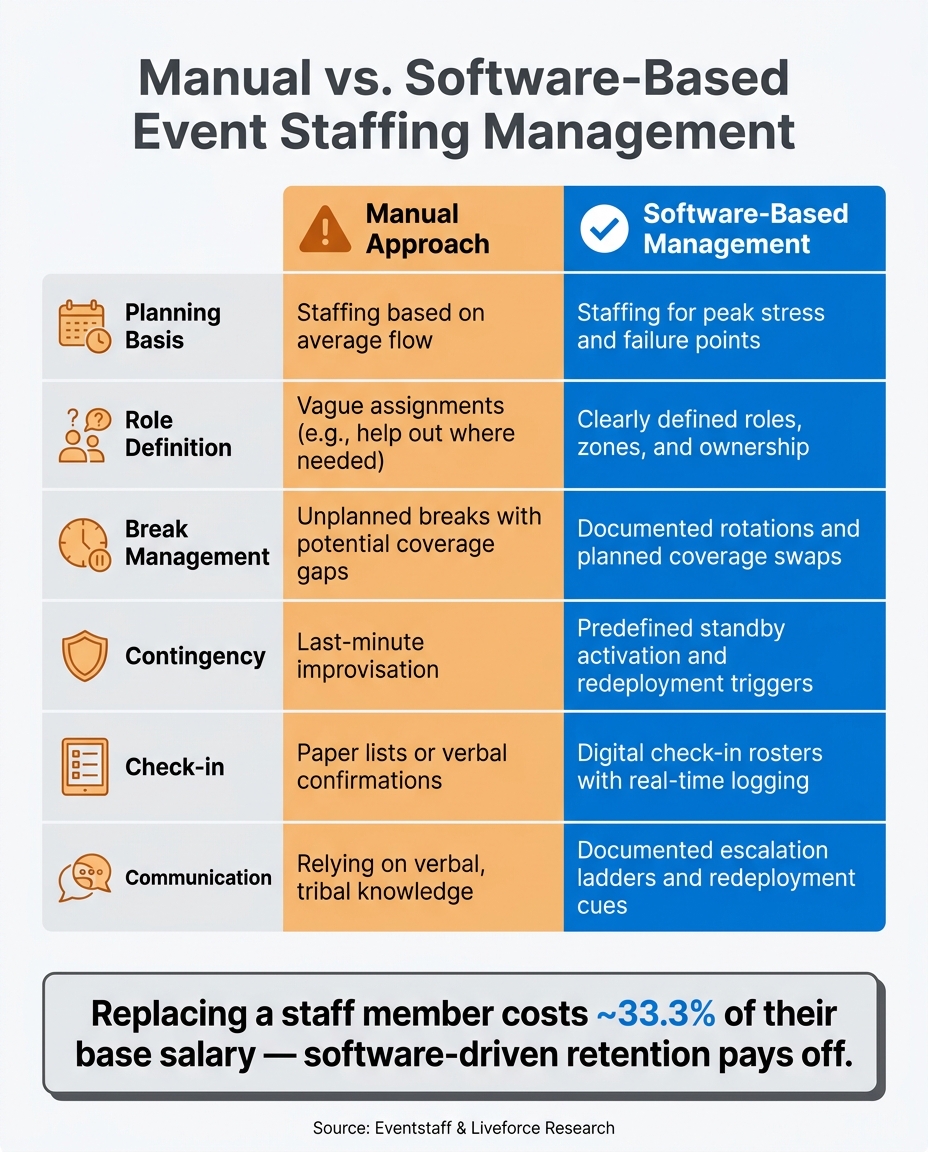
Manual vs. Software-Based Event Staffing: Key Differences
As your team expands, relying on memory or informal notes simply won’t cut it. Every staffing process - whether it’s confirming attendance or managing no-shows - needs to be clearly documented and easy to replicate.
A practical way to achieve this is by implementing a three-phase checklist. Here’s how it works:
Additionally, having standardized procedures for break rotations and escalation protocols ensures that critical areas remain covered, even during high-demand moments.
"An event staffing plan is a documented operational strategy - not a roster." - Eventstaff
These streamlined workflows create a strong foundation for integrating technology into staffing management.
While manual scheduling might work for small teams, it quickly becomes unmanageable as your workforce grows. Problems like missed confirmations, double-booked shifts, and unclear availability become all too common.
That’s where scheduling software, such as Quickstaff, comes into play. These platforms allow you to:
Staff can use the mobile interface to confirm shifts, access event details, and communicate in real time, which drastically reduces coordination headaches.
Here’s a side-by-side comparison of manual management versus software-based solutions:
| Feature | Manual Approach | Software-Based Management |
|---|---|---|
| Planning Basis | Staffing based on average flow | Staffing for peak stress and failure points |
| Role Definition | Vague assignments (e.g., "help out where needed") | Clearly defined roles, zones, and ownership |
| Break Management | Unplanned breaks with potential coverage gaps | Documented rotations and planned coverage swaps |
| Contingency | Last-minute improvisation | Predefined standby activation and redeployment triggers |
| Check-in | Paper lists or verbal confirmations | Digital check-in rosters with real-time logging |
| Communication | Relying on verbal, tribal knowledge | Documented escalation ladders and redeployment cues |
Data source:
By adopting software-driven scheduling, you not only simplify day-to-day operations but also set the stage for smoother onboarding and training.
Once your staffing processes and scheduling tools are in place, the next step is a structured onboarding program. This is key to building a dependable workforce. Considering that replacing an employee can cost up to 33.3% of their base salary, retaining well-trained staff is both cost-effective and operationally smart.
Effective onboarding introduces new hires to their roles, assigned zones, supervisors, and protocols for handling unexpected situations. This preparation should happen well in advance of their first event. The goal isn’t just to fill shifts - it’s to cultivate a team of skilled, reliable personnel who understand your operations inside and out. This level of preparation is critical for maintaining a strong and sustainable workforce.
Once you've nailed down your scheduling and onboarding processes, the next step is to let data drive your workforce strategy. It’s all about using the numbers to make smarter, more informed staffing decisions.
Tracking the right metrics is essential if you want to move beyond guesswork when it comes to staffing. These four categories of workforce metrics can give you a well-rounded view of your team’s performance:
| Metric Type | Key Data Points | Purpose |
|---|---|---|
| Reliability | Confirmation rate, no-show rate, response speed | Highlights your most dependable staff for priority scheduling |
| Efficiency | Fill rate, gap exposure, labor cost % | Helps identify over- or understaffing issues early |
| Retention | Shift acceptance rate, repeat booking rate, 90-day turnover | Detects early signs of disengagement or workforce turnover |
| Operational | Peak arrival flow, compliance status, handover buffer time | Ensures smooth operations during high-pressure moments and client needs are met |
Pay close attention to the shift acceptance rate - a drop here might indicate early signs of disengagement. Another critical metric is gap exposure, which measures the difference between the required headcount and confirmed staff. By keeping an eye on this, you can address potential risks well before the event, rather than scrambling at the last minute.
Here’s a practical tip: maintain a staffing pool that’s 2 to 3 times larger than your peak Saturday requirement. This ensures you can cover shifts without last-minute chaos.
By focusing on these metrics, you can plan ahead and avoid surprises.
Forecasting isn’t about being perfect - it’s about minimizing surprises. A simple but effective method is a rolling weekly pipeline review. Spend 30 minutes each week reviewing confirmed and likely events alongside your available and compliant staff for the next 4–6 weeks. For busy seasons like summer festivals or the holidays, extend your planning window to 8–12 weeks.
"The problem is rarely a shortage of workers. It is a shortage of visibility." - Edin Pandur, Liveforce
To streamline planning, create reusable position templates for common event types. For example, a 200-person wedding might have pre-set roles and ratios, such as 1 server per 15–20 guests or 1 bartender per 50–75 guests for an open bar. Adjust these templates as needed for specific events, and you’ll save time while ensuring consistency.
Planning should also focus on peak stress points - like when doors open or during meal transitions - rather than average attendance. Historical data can help you stagger staff call times so the right people are in place at the right moments. This keeps labor costs under control while maintaining excellent coverage.
Forecasting is just the beginning. To truly refine your staffing strategy, dig into post-event data. After every event, compare your planned headcount to what actually happened, review incident notes, and gather performance feedback. Over time, this log becomes a goldmine of insights, helping you spot trends like which roles are consistently understaffed or which team members have recurring issues with late confirmations.
"The best event operations are not the ones where nothing goes wrong. They are the ones where something goes wrong and nobody notices because the systems absorbed it." - XShift AI
Cross-checking clock-in and clock-out data against your shift schedules ensures payroll accuracy and helps fine-tune your labor cost projections for future events. Tools like Quickstaff make it easier to centralize this data, linking post-event insights directly to your next scheduling cycle. This way, every event becomes an opportunity to improve your workforce strategy.
Managing risks becomes increasingly important as your team grows. Challenges like no-shows, legal issues, and inconsistent service quality can escalate without proper oversight. Using data effectively can help you address these issues and maintain a reliable workforce.
With an annual turnover rate of 63%, staffing gaps are almost inevitable. Having a solid plan in place can make all the difference.
One effective approach is the 15–30–60 Backup Rule. This strategy ensures quick responses to gaps:
This tiered approach keeps operations running smoothly, reducing the stress on your event lead.
"I don't build staffing plans for the easy hours. I build them for the 15 minutes where check-in backs up, the client's asking questions, and everyone's looking at us to fix it." - Daniel Muersing, Founder, Eventstaff
Assigning an onsite manager to handle check-ins, uniforms, and replacements allows the event lead to focus on client needs rather than scrambling to fill gaps.
Expanding into multiple states brings legal challenges that are just as important as operational ones. For example, many event businesses rely on 1099 contractors. However, if these contractors are performing core event functions, they may fail the ABC test. This has already led companies like GigSmart and Qwick to reclassify their workers as employees in April 2026.
"You are saying you are in the business of delivering events and you are hiring contractors that are your core business, but you are also paying people on your team as employees who are doing that same job." - Tracy Judge, Founder and CEO, Soundings Connect
The financial risks are real. For a company using 50 workers across five states for 12 events annually, a two-year audit could result in over $200,000 in penalties. State penalties vary widely:
| State | Misclassification Penalty (First Offense) | Legal Standard |
|---|---|---|
| California | $5,000 – $15,000 | ABC Test (AB5) |
| New York | Up to $5,000 | ABC Test |
| Massachusetts | Up to $25,000 | Strict ABC Test |
| Illinois | $1,500 per violation | Employee Classification Act |
Beyond worker classification, laws like predictive scheduling in cities such as New York, Chicago, and Seattle require advance notice for schedules and premium pay for last-minute changes. Assign someone on your team to stay updated on these local regulations. Staying compliant not only avoids financial penalties but also builds a more stable and scalable workforce.
Adding more staff doesn’t automatically improve service. Without structure, larger teams may cluster in low-pressure areas, leaving high-demand zones underserved.
To address this, divide your team into two categories:
Including 1–2 backup staff per event provides flexibility to handle unexpected bottlenecks. Keep training for surge hires brief - under two hours - focusing on essentials like POS systems, basic service steps, staying calm under pressure, and following policies.
"Your employees may be temporary, but their enthusiasm and dedication can make or break your business during peak periods." - Marc Goldberg, SCORE Mentor
Using tools like Quickstaff to centralize shift details and communication ensures everyone, whether core or temporary, has the same information before the event begins. This approach helps maintain consistent service quality, even as your team scales up.
To build a thriving event workforce, it's time to stop treating staffing as a last-minute scramble. Instead, think of it as an ongoing system. The businesses that succeed are the ones that identify staffing gaps weeks in advance - not just days before the event.
The principles outlined here are simple to put into action. Start by forecasting demand 4–6 weeks ahead, dedicating just 30 minutes a week to reviewing your staffing pipeline. Plan staffing levels based on your busiest 30-minute intervals, not average guest counts. Separate your core team - the experienced leads who make critical decisions - from surge staff, who handle high-volume, repetitive tasks. And always maintain a 15%–20% headcount buffer to handle no-shows and unexpected spikes.
Two numbers stand out: replacing a staff member costs about 33.3% of their base salary, and hospitality staff who have a positive onboarding experience are 69% more likely to stay for three or more years. These figures highlight the importance of structured onboarding and identifying key team members early to protect your bottom line.
On the operational front, tools like Quickstaff can make a big difference. They provide a mobile-friendly dashboard that consolidates key information - confirmed bookings, staff availability, and open gaps. As Liveforce points out:
"The agencies most likely to struggle with last-minute gaps are not the ones with the smallest rosters. They are the ones without a centralised view of upcoming demand."
Growing your workforce isn’t about constantly hiring more people. It’s about creating systems, data-driven habits, and contingency plans that allow your team to deliver consistently - whether you’re managing one event a month or twenty.
To ensure smooth operations and maintain service quality, hire full-time staff to handle consistent, recurring tasks. For peak periods - like event openings, transitions, or other busy moments - rely on surge staff to meet temporary demand.
When planning, focus on staffing for peak demand, not average levels. Additionally, build in a 10–20% buffer to account for no-shows or unexpected last-minute changes. This approach helps prevent both understaffing and overstaffing, ensuring your team is prepared for any situation.
To keep staffing gaps at bay, stay on top of your event pipeline for the next 4–8 weeks. Make sure to track confirmed bookings, staff availability, and any outstanding gaps. A tool like Quickstaff can be a game-changer here - it helps you keep an eye on no-show rates, availability, and those inevitable last-minute changes.
Pay close attention to peak traffic periods and aim to maintain a contingency buffer of 10–20%. This extra cushion can help you handle unexpected absences or sudden spikes in demand without scrambling.
To ensure compliance when working with 1099 contractors across various states, it's crucial to assess their classification based on the laws in three key areas: where the work is performed, where the worker lives, and where your business operates. If there's a conflict between these standards, always apply the one that offers the strictest protections.
Using tools like Quickstaff can simplify this process by centralizing scheduling and keeping records of worker roles. And when you're uncertain, it's often safer to classify workers as W-2 employees. This approach helps reduce the risk of audits and potential penalties for misclassification.





