Emerging Tech Skills Every Event Staff Needs
January 11, 2026

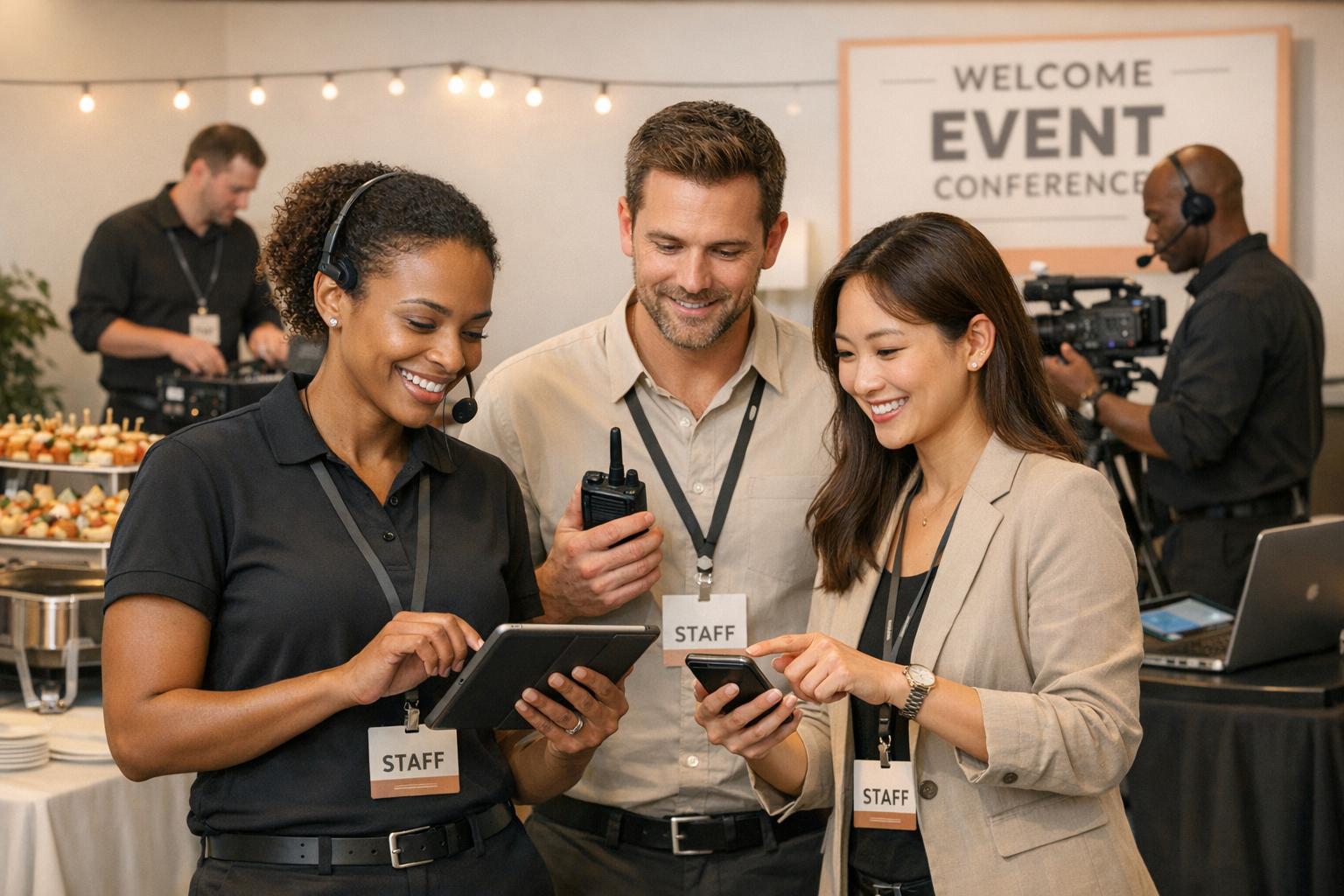
The events industry has transformed with digital tools now driving everything from guest check-ins to logistics. Event staff must develop specific tech skills to stay relevant. Here's what you need to know:
Training is key, with simulated scenarios, digital playbooks, and pre-event tech walkthroughs helping bridge the skills gap. Investing in these areas can improve efficiency, reduce errors, and boost profits by up to 24%.
Front-of-house teams rely heavily on guest-facing technology designed to make processes faster and more intuitive. Digital check-in systems equipped with QR scanners have replaced slower manual methods, allowing attendees to check in within seconds. RFID-enabled badges and wristbands now handle contactless entry and cashless payments, while mobile event apps act as comprehensive hubs, offering schedules, indoor navigation, and real-time updates.
AI-powered chatbots are increasingly taking over routine inquiries, giving staff more time to focus on complex guest interactions. It's worth noting that the chatbot market is projected to grow by about 23% in the next seven years, underlining their expanding role in guest services. Facial recognition technology is also making its way into the mix, enabling automated check-ins and even analyzing micro-expressions to gauge real-time attendee satisfaction.
This growing reliance on technology highlights the need for staff who can seamlessly blend technical know-how with excellent interpersonal skills.
Front-of-house staff don’t need to be IT experts, but they do need to handle basic tech hiccups, like app login issues or scanner malfunctions, with ease. The real challenge lies in balancing technical competence with warm, professional guest service. According to Bar Crawl USA, finding staff who can manage both is a key hurdle.
Interestingly, while 91% of event organizers acknowledge the importance of event technology in their roles, only 48% consider themselves tech-savvy. This gap underscores the need for practical, hands-on training to ensure staff are prepared to meet both technical and guest service demands.
Bridging the gap between tech and service skills requires a thoughtful approach to training. Effective training can significantly boost profit margins - by as much as 24%. Simulated scenarios, like resolving login issues under time pressure, can help staff hone both their technical and problem-solving abilities. Pairing new hires with experienced team members allows them to develop "event logic", an intuitive sense for managing tech-related challenges on the fly.
Providing digital playbooks and login credentials at least a week before the event gives staff a chance to familiarize themselves with the tools. On-site drills, such as processing mock cashless payments or guiding a "VIP" through the digital guest list, are practical ways to build confidence and reduce errors when it matters most.
Front-of-house staff should always have a troubleshooting kit on hand, stocked with essentials like backup cables, spare batteries, and adapters. They also need to operate POS systems for cashless transactions and know how to reset apps or reconnect to Wi-Fi quickly when issues arise.
Success in this role is measured by speed and accuracy. With over 90% of event planners now integrating AI into their workflows, front-of-house staff must stay adaptable to new platforms while maintaining the personal touch that defines outstanding guest service. Mastering these tools ensures smooth operations and elevates the overall event experience.
Catering teams are increasingly relying on technology to streamline their operations. Mobile POS systems with tap-to-pay capabilities allow staff to process cashless transactions and monitor sales in real time. Tools like RFID badges and QR code scanners are used to manage VIP lounge access and track guest dietary preferences, ensuring a personalized experience throughout the event.
Wearable communication devices, such as headsets and smart wristbands, have become essential for seamless coordination between kitchen staff and floor teams. These tools are especially useful for timing courses or addressing last-minute requests. Additionally, sustainability apps are gaining traction, helping teams track waste, manage recycling stations, and coordinate food donations - key responsibilities in today’s banquet operations. Mastering these tools requires a mix of technical know-how and service expertise, honed further through on-the-job experience.
Catering staff need to quickly grasp both the technical and service aspects of their roles. Familiarity with digital platforms and the ability to troubleshoot basic issues are crucial. While their primary focus remains on delivering exceptional service, they must also handle tech-related challenges effectively. For instance, only 48% of event organizers consider themselves tech-savvy, and this skills gap often extends to on-site catering leads.
Although catering staff don’t need to be tech experts, they should be prepared to manage issues like POS glitches or lost logins during events. Training sessions often include simulated scenarios to test their troubleshooting skills under pressure.
Training catering staff pays off significantly, with a 24% boost in profit margins reported by businesses that invest in it. The focus should be on developing "event logic", or the ability to solve real-time problems using technology without constant oversight. VR training platforms are increasingly being used to simulate high-pressure situations, such as managing difficult guests or handling emergency evacuations.
Providing digital playbooks before events and conducting on-site drills - like simulating a VIP order via headset communication - can build confidence and reduce errors during service.
Catering staff rely on several tech tools to ensure smooth service. These include handheld radios or messaging apps like Slack for instant communication, digital inventory systems for tracking supplies, and contactless payment systems at service stations. Staff with experience in bars or hotels often adapt more quickly to these fast-paced, tech-enabled environments.
Platforms like Quickstaff (https://quickstaffpro.com) help managers coordinate their teams by centralizing event schedules, tracking staff availability, and sending automated reminders. This ensures that everyone is familiar with the tools they’ll use before arriving on-site. With 59% of employees reporting that training improves their performance, investing in both technology and staff development leads to smoother operations and better guest experiences. Just as front-of-house teams use tech to engage guests, catering professionals leverage these tools to deliver efficient and high-quality service.
On-site coordinators are the heartbeat of any event, relying on a variety of digital tools to keep everything running smoothly. Mobile organizer apps are their go-to for managing check-ins, tracking sales, and even processing cashless payments directly through their smartphones during events. These tools allow them to stay on top of things in real time.
Venue planning tools are another essential. These help coordinators measure rooms on the spot and create floor plans that match the guest count and equipment requirements. To streamline guest flow and gather engagement data, many rely on RFID badges and QR code systems. And in noisy environments, wearable communication devices like headsets and smart wristbands make it easier to coordinate with security, catering, and tech teams. Unlike general staff, coordinators also need to grasp how digital ticketing integrates with CRM systems and budget management software.
Floor leads take on a more demanding technical role compared to other event staff. They’re the go-to troubleshooters when things go wrong. While 91% of event organizers agree that technology is essential to their work, only 48% feel confident in their tech skills, revealing a significant skills gap in leadership positions.
Coordinators need what experts call "systemic" tech skills. This means they’re not just operating tools - they’re analyzing data, solving problems, and connecting various systems.
"Our research shows, however, that organizers don't necessarily have the time nor skills to tackle this head on - paving the way for a new 'event technologist' role in our industry: an event professional whose job is to focus exclusively on all things event tech." - George Sirius, CEO, Eventsforce
This role is critical because coordinators handle the core operations of an event. Their ability to master tech tools directly affects the event’s flow, guest satisfaction, and ability to avoid crises. Increasingly, they’re expected to embrace the "event technologist" role, taking charge of data management, analytics, and reporting to make smarter decisions. This shift underscores the need for targeted training to sharpen these advanced skills.
Bridging the gap between technical expertise and real-time problem-solving requires focused training. Investing in this area pays off - companies see a 24% higher profit margin when they prioritize staff development. Training should focus on building "event logic", which is the ability to instinctively prioritize tasks and resolve issues without waiting for instructions.
Hands-on training, like role-playing technical emergencies (think Wi-Fi outages or app crashes), helps coordinators build confidence in high-pressure scenarios. Digital playbooks that outline every event milestone can cut down on the need for constant check-ins on event day. Virtual reality (VR) training platforms are another great tool, offering simulations of high-stress situations, such as managing difficult guests or emergency evacuations, without real-world consequences.
Pre-event tech walkthroughs are also essential. These give floor leads time to familiarize themselves with the venue’s specific technology setup and address any last-minute connectivity issues.
Coordinators have a growing arsenal of tech tools to enhance their efficiency. AI-powered platforms help monitor performance and reallocate staff in real time. RFID tools and facial recognition streamline staff tracking and floor management. While messaging apps are useful for pre-event planning, handheld radios remain a staple for quick communication during live events.
Platforms like Quickstaff (https://quickstaffpro.com) simplify team management by centralizing schedules, tracking staff availability, and sending automated reminders. This eliminates the need to juggle multiple systems. With 68% of event professionals saying that being tech-savvy is crucial for success, mastering these tools gives coordinators a clear edge.
The rise of hybrid events adds another layer of complexity. Floor leads now need to manage both in-person and virtual experiences, requiring them to be proficient with streaming platforms and contactless logistics. This dual responsibility makes tech expertise more important than ever for event coordinators.
Production and AV technicians rely on highly specialized gear to bring events to life. Audio technicians typically split into two roles: A1 technicians handle the main audio consoles, designing and managing sound systems for elements like walk-in music and stingers, while A2 technicians focus on wireless frequencies and oversee production communication systems. For visual displays, tools like video switchers, LED walls, and high-lumen projectors are essential. Specialists such as Projectionists and LED Engineers use software for color-matching and alignment to ensure seamless visuals across panoramic or stacked screens.
Lighting Designers use lighting consoles to create the perfect mood and effects, guided by detailed rigging plots. For advanced video playback and motion graphics, technicians turn to media servers like D3, Millumin, HiRez, or E2. To keep the team in sync during live sessions, headsets and smart wristbands are key. With the rise of hybrid events, technicians must also be prepared to manage live streaming, requiring sharp troubleshooting skills to provide a smooth experience for remote audiences.
Mastering these tools is just the start - delivering a flawless live event demands exceptional technical expertise.
The technical skills needed for production roles vary widely based on the event's scale and complexity. Smaller events might combine audio, video, and lighting into one role, but larger productions demand a highly specialized team for each area. Video departments often grow the fastest - while a simple event may only need one person to manage PowerPoint, a complex production with multiple cameras and LED walls could require a "Video Village" of 10-15 experts, including Shaders, Projectionists, and LED Engineers.
"A great AV team is like the crew of a naval warship... each person has a role; they're all in sync and working behind the scenes to pull off something epic." - Brandt Krueger, Senior Production Manager, Smart Meetings
The Technical Director (TD) plays a crucial role, bridging the gap between the event's goals and the technical setup. This position demands a deep understanding of audio, lighting, and video systems. For large-scale events, the budget for the technical crew can surpass the cost of the equipment itself. Specialization in these roles not only elevates production quality but aligns with the growing emphasis on tech-driven event management.
Staying ahead in this field means keeping up with advancements like AI-driven platforms, AR/VR, and 5G connectivity. Many professionals stay informed through peer discussions (78%), industry blogs and news (50%), and trade shows or conferences (48%). Despite this, 75% of event professionals admit they struggle to keep pace with new tools and trends.
Hands-on preparation is essential before an event. Simulated scenarios, such as fixing microphone issues or handling Wi-Fi outages, help technicians build the confidence to address problems quickly during live events. For senior roles like Technical Directors, cross-training in audio, lighting, and video enhances collaboration among specialized teams. Many organizations (83%) outsource AV services to access expert skills while avoiding the costs of full-time staff and ongoing training. Effective training in these advanced technologies is critical to ensuring both technical excellence and overall event success.
The role of production technicians is expanding beyond traditional AV systems. AI integration is becoming a practical tool, with 43% of organizers eager to use AI for real-time data analysis and personalized experiences. Mixed reality skills are also in demand, as 50% of event planners look to AR and VR platforms for upcoming events. Additionally, contactless technologies like RFID badges, QR check-ins, and wearable devices are now standard for efficient, real-time coordination.
Although only 24% of organizations currently have a dedicated event technologist, 82% expect this role to gain importance by 2029. These specialists focus on managing the event tech stack, data integration, and other advanced systems - areas where 47% of traditional planners feel underqualified. For technicians in talent-facing roles, such as A2 or Stage Manager, interpersonal skills are just as critical as technical know-how. These roles often involve tasks like outfitting keynote speakers with microphones and managing the green room.
These evolving responsibilities highlight how production teams are essential to delivering seamless, tech-driven events.
Event supervisors and staffing managers rely on a range of tools to keep operations running smoothly. AI-powered staffing platforms are now a go-to for automating schedules and monitoring staff performance in real time. These tools help managers allocate resources efficiently and adapt to changing needs. For attendance tracking, solutions like Jibble use facial recognition to log arrival and departure times accurately, cutting out manual errors.
Mobile apps are critical for handling on-site logistics. For example, the Eventbrite Organizer app allows supervisors to manage guest check-ins quickly, monitor real-time sales, and process cashless payments with tap-to-pay functionality. When it comes to venue planning, tools like MagicPlan make it easy to measure spaces and create digital floor plans on the spot, ensuring the venue meets the event's requirements. Communication tools also play a key role, especially in noisy environments. Beyond basic messaging apps, teams often use handheld radios or wearable tech like smart headsets and wristbands to stay connected. On the budgeting and CRM front, platforms like Cvent, ClearEvent, and EventPro streamline expense tracking and attendee data management, helping supervisors refine strategies for future events.
Supervisors need to go beyond basic app usage and develop a deeper understanding of how various systems work together. While general staff might only need to know how to scan tickets or operate a check-in app, supervisors are expected to have "system-level" expertise. This means understanding how Event Management Systems (EMS) integrate registration, floor planning, and analytics into a cohesive workflow. They also need a grasp of technical infrastructure, such as ensuring adequate bandwidth for multiple devices and troubleshooting issues like wireless microphone interference.
"Behind every smooth event is an event manager who understands that audio quality, visual clarity, and reliable internet connectivity form the technical trinity of modern events." – EVM Institute
As events become increasingly digital, supervisors must also embrace strategic data analysis. When managed effectively, digital systems can process attendees in seconds, a significant improvement over manual methods. Companies that provide training for their staff often see a 24% boost in profit margins, largely because supervisors are better equipped to maximize these tools. Supervisors also take on responsibilities like tracking lead generation, analyzing exhibitor booth performance, and calculating post-event ROI - tasks that go beyond the scope of front-line staff.
Keeping up with new technologies requires ongoing training. Virtual reality platforms like Tale Spin and Warp VR are gaining traction as tools for simulating high-pressure scenarios, allowing supervisors to practice crisis management in a controlled environment. These immersive experiences help managers develop a sharp "event logic", enabling them to anticipate and address technical challenges.
Bar Crawl USA, a company that manages multiple events across different cities, provides its event leads with detailed playbooks a week before events. They also train staff to use the Eventbrite Organizer app for managing high-volume check-ins - sometimes up to 1,000 attendees. This preparation, combined with a 10% profit-sharing model, has led to high staff retention, with some managers staying for over nine years.
Supervisors should also be equipped with a physical toolkit for basic AV troubleshooting. Shadowing programs, where new supervisors learn from experienced team leads, can further speed up skill development and reduce confusion during events.
Staffing managers are increasingly turning to predictive scheduling tools that analyze past event data, staff availability, and seasonal trends. These tools help forecast staffing needs and match roles based on skills and reliability. This approach is paying off - 90% of companies that prioritize skills over credentials report fewer hiring mistakes, and 94% say skills-based hires perform better than those chosen solely for their degrees.
Real-time monitoring tools are another must-have. Mobile apps enable supervisors to track metrics like check-in speeds, sales data, and no-show rates. Advanced technologies like IoT and biometrics - including GPS-based geofencing, RFID badges, and biometric scanners - help ensure accurate attendance tracking, identity verification, and even monitoring staff fatigue levels to maintain safety. This is crucial, as disengaged employees can cost companies up to $20 million for every 10,000 workers.
Platforms like Quickstaff (https://quickstaffpro.com) simplify these processes by centralizing event creation, staff scheduling, availability tracking, and messaging in one mobile-friendly interface. Features like automated SMS reminders and calendar integrations reduce late arrivals, while centralized tracking eliminates the need for juggling multiple systems. These tools ensure consistency and efficiency, especially for managers overseeing multiple events at once.
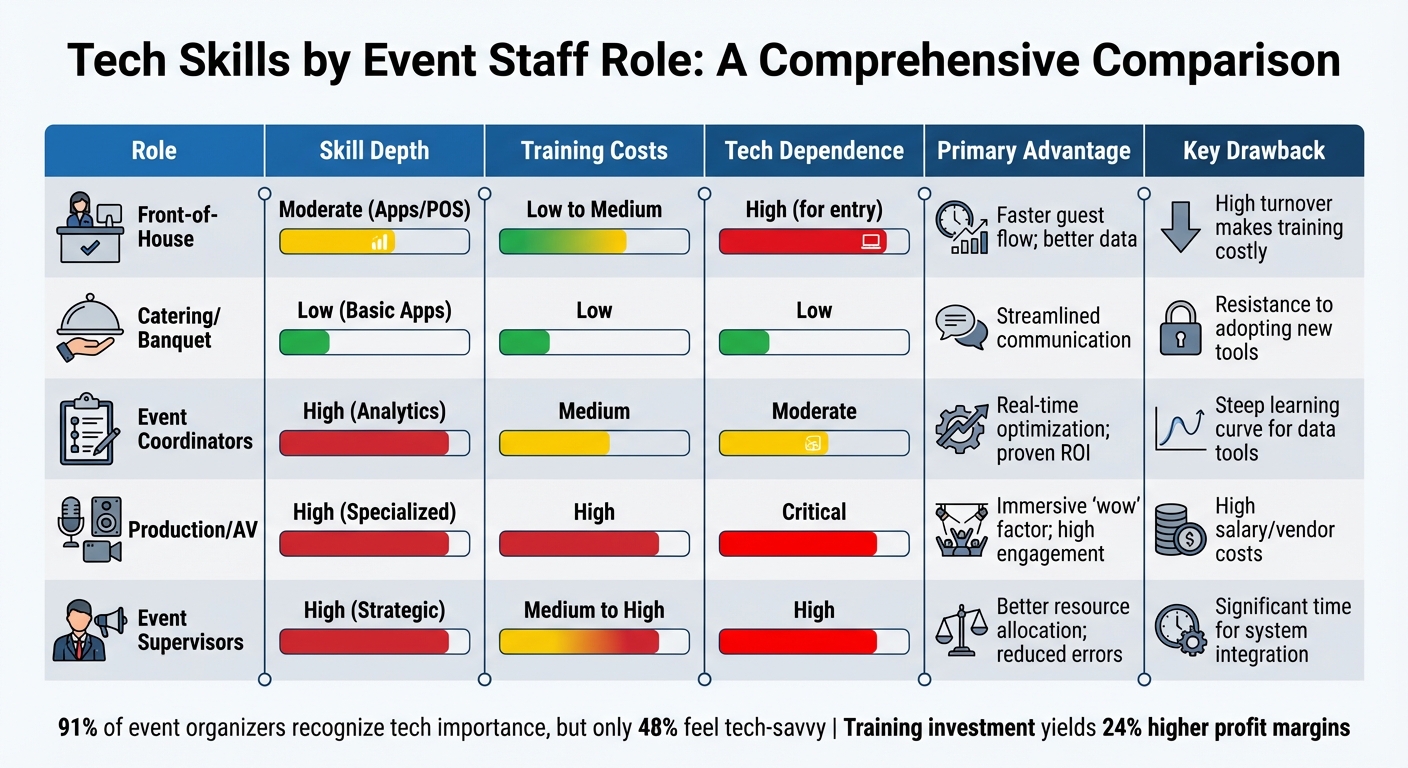
Tech Skills Requirements by Event Staff Role: Training Costs, Skill Depth, and Key Benefits
When it comes to technology in event management, there's a constant balancing act between capability and cost. For front-of-house staff, moderate tech skills are a must - think check-in apps and point-of-sale systems. These tools streamline guest flow and provide real-time data, but the high turnover in these roles often means training investments don't pay off in the long run. Each role in the event ecosystem comes with its own tech demands and challenges, highlighting this trade-off.
Take production and AV technicians, for example. These professionals need advanced technical expertise to handle signal flow, bandwidth, and live-streaming. Their work delivers the immersive "wow factor" that can make or break an event, making them indispensable to its success.
Event supervisors and managers face their own hurdles. They rely on advanced data analytics and management skills for real-time optimization and tracking ROI. However, nearly half (47%) of event planners admit to struggling with tech-related decision-making, and 65% report long integration times for new systems.
The importance of training can't be overstated here. While 91% of event professionals recognize the critical role of technology in their work, only 48% feel confident in their tech skills. This gap in proficiency has real consequences: 46% of employees say they'll leave their jobs if upskilling opportunities aren't available. Investing in training not only improves staff retention but also strengthens profit margins.
Here’s a breakdown of the pros and cons across different roles:
| Role | Skill Depth | Training Costs | Tech Dependence | Primary Advantage | Key Drawback |
|---|---|---|---|---|---|
| Front-of-House | Moderate (Apps/POS) | Low to Medium | High (for entry) | Faster guest flow; better data | High turnover makes training costly |
| Catering/Banquet | Low (Basic Apps) | Low | Low | Streamlined communication | Resistance to adopting new tools |
| Event Coordinators | High (Analytics) | Medium | Moderate | Real-time optimization; proven ROI | Steep learning curve for data tools |
| Production/AV | High (Specialized) | High | Critical | Immersive "wow" factor; high engagement | High salary/vendor costs |
| Event Supervisors | High (Strategic) | Medium to High | High | Better resource allocation; reduced errors | Significant time for system integration |
Each role brings its own strengths and challenges, but one thing is clear: prioritizing the right training and tech investments can lead to smoother operations and better outcomes across the board.
The essential tech skills for event staff differ depending on their roles, but a few stand out across the board: digital literacy, effective use of AI tools, and real-time communication. For front-of-house staff, proficiency with check-in apps and contactless payment systems is crucial. Catering teams benefit from tools that streamline scheduling and communication. Event coordinators and supervisors need to harness data analytics to improve operations and prove ROI, while production and AV technicians should focus on staying current with specialized equipment and live-streaming technologies. These evolving demands highlight the importance of continuous training to stay ahead in the field.
Interestingly, while 91% of event organizers recognize the importance of event technology, only 48% feel confident in their tech abilities. Companies that prioritize targeted training often see profit margins increase by as much as 24%. Upskilling isn’t just about keeping up - it’s a smart investment that boosts both efficiency and the bottom line.
To build tech-savvy teams, start with universal tools like check-in software, communication apps, and scheduling platforms. Then, layer in role-specific training through practical methods like simulations and shadowing. This approach ensures staff can handle tech challenges on-site without needing constant managerial intervention.
Platforms like Quickstaff simplify operations by centralizing staff scheduling, tracking availability, and consolidating event communications into one mobile-friendly system. Features like automated reminders and digital playbooks help keep everyone on the same page, minimizing last-minute chaos.
As new technologies continue to reshape the events industry, teams that embrace targeted training and adopt a cohesive tech stack are better equipped to deliver seamless events, satisfy clients, and retain top talent. With 68% of professionals agreeing that tech-savviness is key to career success, adapting to these changes is no longer optional - it’s a necessity.
Front-of-house (FOH) staff need to be equipped with a variety of tech skills to keep operations running smoothly and ensure guests have a positive experience. One key area is digital ticketing and registration systems, which make check-ins faster and more efficient by using QR codes and real-time dashboards.
Being familiar with mobile scheduling tools like Quickstaff is another important skill. These tools help FOH staff manage their shifts, check availability, and stay informed through notifications on their smartphones.
Another must-have is experience with point-of-sale (POS) systems, which are essential for handling payments, issuing refunds, and resolving minor technical problems. On top of that, real-time communication tools are crucial for staying in sync with other teams, such as the kitchen or management. For certain events, having a basic understanding of social media platforms can also come in handy for sharing live updates or addressing guest questions.
By mastering these tools - digital ticketing, scheduling apps, POS systems, and communication platforms - FOH staff are well-prepared to deliver smooth, tech-driven events.
Catering teams can enhance their operations by incorporating technology into both event planning and execution. Tools like event management software simplify tasks such as tracking budgets, managing guest registrations, and organizing virtual or hybrid tastings. These tools not only reduce mistakes but also save valuable time. On top of that, customer relationship management (CRM) systems make it easy to access details like client preferences, dietary restrictions, and past orders, helping create a more tailored and memorable experience.
When it comes to staffing, Quickstaff is a game-changer. It streamlines scheduling with features like real-time availability tracking, shift assignments, and automated reminders. This allows managers to quickly adjust schedules, prevent double-bookings, and share updates - whether it’s a last-minute menu change or new venue details. With its centralized event management and labor reporting tools, Quickstaff keeps catering teams organized and efficient, so they can focus on delivering top-notch service.
The best way to train event coordinators combines hands-on experience with focused digital learning. On-the-job training plays a crucial role here. By shadowing seasoned staff during live events, coordinators get the chance to operate tools like ticketing systems, virtual event platforms, and staff scheduling apps. This real-world exposure helps cement their skills, especially when paired with immediate feedback.
Another effective approach is using short, focused learning modules. These are perfect for covering specific tasks, such as using QR codes for check-ins or managing data dashboards. Since these modules are concise, they fit seamlessly into busy schedules. Beyond that, regular feedback and performance reviews are essential. They help coordinators pinpoint areas for improvement and monitor their growth over time.
Platforms like Quickstaff can take training to the next level. This tool allows coordinators to practice event setups, assign roles, and manage staff availability in a simulated environment. Plus, its analytics provide valuable insights into their progress. By blending hands-on practice, digital learning, and constructive feedback, coordinators can stay sharp and adapt to the latest tech tools in the industry.


